Every year, thousands of candidates rush online trying to print their JAMB slip, only to face errors, delays, or blank pages. It often happens just days before the exam, when anxiety is already high.
The problem is simple but serious. Without your JAMB exam slip, you cannot know your exam date, time, or CBT center. That alone can cost you your chance to sit for the exam.
Many students ask the same question: How do I complete JAMB exam slip printing 2026 without stress or errors?
This guide walks you through the exact steps, the best time to print JAMB slip, and practical solutions if things go wrong.
What Is JAMB Exam Slip and Why Is It Important?
The JAMB exam slip is one of the most important documents for any UTME candidate. It confirms that your registration was successful and provides key exam details.
What the Slip Contains
- Your exam date
- Your exam time
- Your CBT center location
- Your registration number and personal details
Why You Need It
- It is required for entry into the exam hall
- It helps officials verify your identity
- It guides you to your exact exam venue
In simple terms, without successful JAMB exam slip printing, you cannot sit for the exam.
When Will JAMB Slip Printing Start?
JAMB usually releases slips 5 to 7 days before the UTME exam begins. This timeline may vary slightly each year, but it remains close to the exam date.
How You Will Be Notified
- Email notification
- SMS alert
- Updates on the official JAMB portal
Important tip: Do not rely on rumors. Always check official announcements to avoid missing your printing window.
Step-by-Step Guide to JAMB Exam Slip Printing 2026
Printing your slip is straightforward if you follow the correct steps.
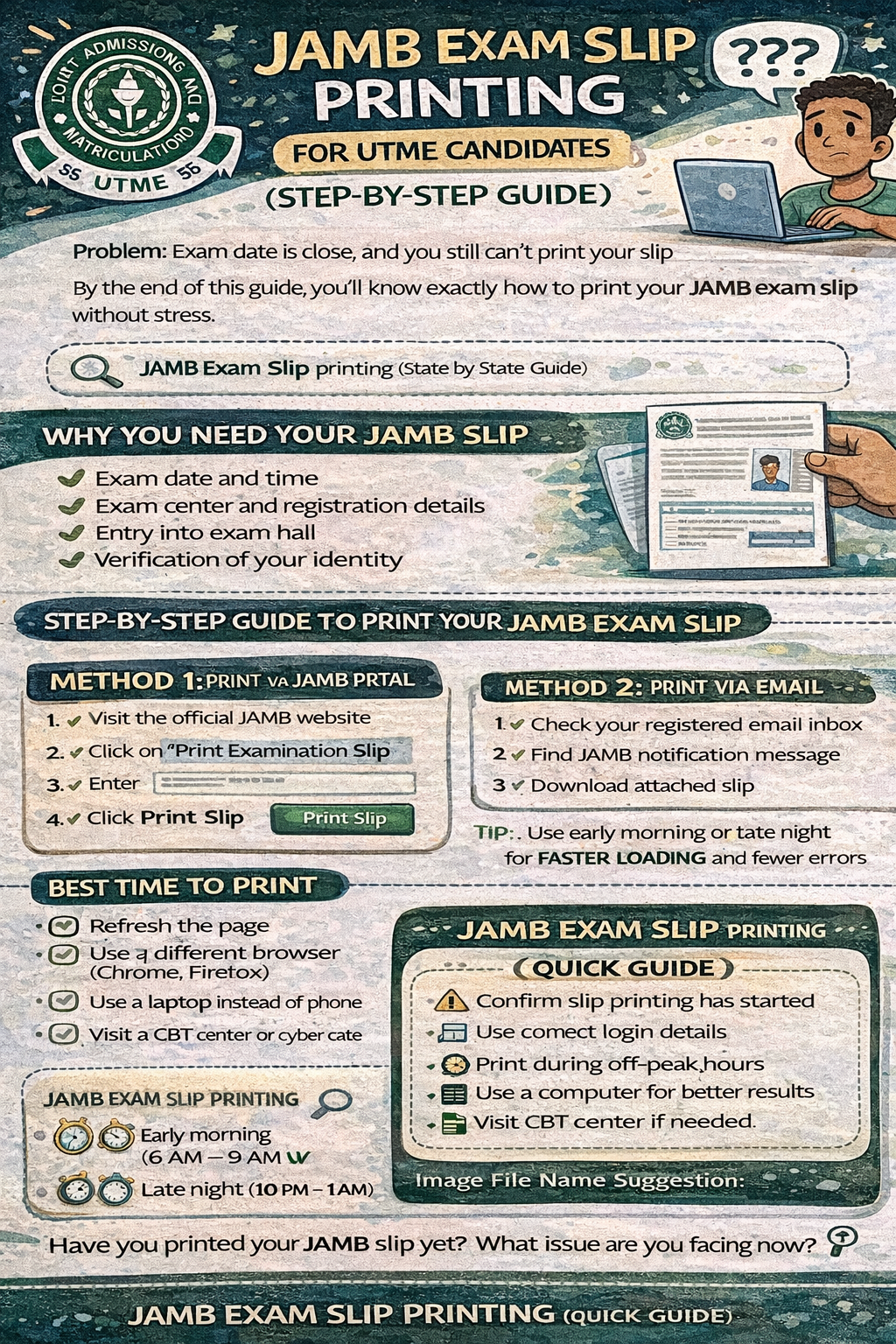
Method 1: Print via JAMB Portal
- Visit the official JAMB portal
- Locate and click “Print Examination Slip”
- Enter:
- Your registration number or
- Your registered email address
- Click Print Slip
- Download the file
- Print it immediately
Method 2: Print via Email
Sometimes JAMB sends your slip directly to your email.
- Open the email used during registration
- Look for a message from JAMB
- Download the attached slip
- Print it
This method is often faster and avoids portal congestion.
Best Time to Print JAMB Slip Without Errors
Timing plays a major role in successful JAMB reprint slip 2026.
Recommended Time
- Early morning: 6 AM to 9 AM
- Late night: 10 PM to 1 AM
Why This Works
- Fewer users on the portal
- Faster page loading
- Lower chance of server errors
Many Nigerian students who struggle during the day succeed simply by switching to these hours.
Common Problems During JAMB Exam Slip Printing
Even when you follow instructions, issues can still arise.
1. JAMB Portal Not Loading
This is one of the most common complaints.
Causes:
- Heavy traffic from millions of candidates
- Poor internet connection
2. Slip Not Showing
You may log in successfully but see nothing.
Possible reasons:
- Slip printing has not started yet
- Incorrect login details
3. Download or Print Failure
Sometimes the slip appears but won’t download.
Common causes:
- Browser problems
- Disabled pop-ups
4. Server Overload
During peak hours, the JAMB server becomes slow or unresponsive.
This usually happens when candidates wait until the last minute.
Quick Fixes for JAMB Slip Printing Issues
Before you panic, try these simple fixes:
- Refresh the page and try again
- Switch browsers (Chrome or Firefox works best)
- Use a laptop instead of a phone
- Clear your browser cache
- Try again during off-peak hours
These small adjustments often solve the problem within minutes.
What to Do If You Can’t Print Your JAMB Slip
If the problem continues, do not waste time. Use alternative options.
Visit a CBT Center
- Accredited centers handle JAMB exam slip printing daily
- They have stable internet and proper systems
- Staff are trained to resolve issues quickly
Search for JAMB CBT centers near me or visit the nearest one.
Use a Cyber Café
Cyber cafés remain one of the easiest options in Nigeria.
- Affordable service
- Fast printing
- Experienced operators
Contact JAMB Support
If all else fails:
- Provide your registration number
- Use your correct email address
- Follow official support channels
Requirements for JAMB Slip Printing
Before you begin, ensure you have:
- Your JAMB registration number
- Your registered email address
- A device with internet access
- A printer or access to one
Having these ready saves time and prevents frustration.
Common Mistakes Students Make
Many printing issues come from avoidable mistakes.
Avoid These Errors
- Waiting until the last day
- Entering wrong login details
- Ignoring official announcements
- Using only mobile phones
Early preparation makes the entire process smoother.
Real-Life Example: Successful Slip Printing
A student in Ibadan once struggled for hours trying to print his slip.
The portal kept failing due to heavy traffic. Instead of giving up, he changed his approach:
- Tried again early in the morning
- Visited a nearby cyber café
- Used a faster internet connection
Within minutes, he printed his slip successfully.
This simple adjustment made all the difference.
JAMB Exam Slip Printing (Quick Guide)
- Check if slip printing has started
- Use correct login details
- Print during off-peak hours
- Use a computer for better results
- Visit CBT center if needed
- Avoid last-minute printing
Frequently Asked Questions (FAQs)
How do I print my JAMB exam slip?
Visit the JAMB portal, enter your details, and print your slip.
When will JAMB slip printing start?
Usually a few days before the exam.
Can I print my JAMB slip with my phone?
Yes, but a computer gives better results.
Why is my JAMB slip not showing?
It may not be released yet or your details are incorrect.
What is the best time to print JAMB slip?
Early morning or late night.
How to reprint JAMB slip 2026?
Log in to the JAMB portal using your registration number or email and follow the printing steps again.
What details are on JAMB exam slip?
It includes your exam date, time, center, and personal details.
Can I enter the exam hall without JAMB slip?
No. The slip is required for entry.
How do I fix JAMB portal not loading?
Use a better internet connection, switch browsers, or try again later.
What should I do if my exam center is far?
Plan your route early and consider arriving a day before if necessary.
Can cyber cafés help with JAMB slip printing?
Yes, many are experienced and reliable.
Is it safe to print my slip multiple times?
Yes. You can reprint your slip as many times as needed.
Conclusion: Print Early and Avoid Stress
JAMB exam slip printing is simple when handled early and correctly. Most issues come from delay, poor timing, or minor technical errors.
Once you understand the process and follow the right steps, the task becomes straightforward.
Act early. Double-check your details. Use the right tools.
That alone can save you from last-minute panic.
Call to Action
- Visit the JAMB portal now
- Print your exam slip immediately
- Share this guide with friends preparing for UTME
Now Over To You
Have you printed your JAMB slip yet?
What challenge are you facing right now?
Which course are you planning to study in university? Let us know in the comments.