Every year, thousands of Nigerian students lose admission opportunities because their O’Level results were not uploaded properly on the JAMB portal. Some candidates complete UTME registration successfully but later discover that their WAEC or NECO results are missing from JAMB CAPS.
For first-time UTME candidates, the process can feel confusing. Many students are unsure whether they should upload their results during registration, after registration, or after admission begins. Others mistakenly believe uploading results at a cybercafe is enough without verifying the upload on CAPS.
The truth is simple. Your admission process may remain incomplete if your O’Level result is not uploaded correctly.
This detailed guide explains everything you need to know about how to upload O’Level results on JAMB portal successfully. Whether you want to upload WAEC, NECO, or NABTEB results, this article will help you avoid costly mistakes and improve your admission chances.
By the end of this guide, you will understand:
- how to upload WAEC result on JAMB portal,
- how to upload NECO result on JAMB CAPS,
- how to confirm successful upload,
- common O’Level upload problems and solutions,
- and what happens if you fail to upload your results properly.
What Is JAMB O’Level Upload?
JAMB O’Level upload simply means submitting your WAEC, NECO, or NABTEB result details to the Joint Admissions and Matriculation Board portal for admission processing.
This process allows universities, polytechnics, and colleges of education to verify your academic qualifications before offering admission.
Why JAMB Requires O’Level Uploads
JAMB requires candidates to upload O’Level results because schools need proof that students meet admission requirements.
For example, a student applying for Medicine may need:
- at least five credits,
- including English,
- Mathematics,
- Biology,
- Chemistry,
- and Physics.
Without uploaded results, institutions cannot verify eligibility properly.
Relationship Between O’Level Upload and JAMB CAPS
Your uploaded result becomes visible during CAPS admission processing.
This is why students are always advised to monitor:
- JAMB CAPS,
- admission status,
- and uploaded subject combinations regularly.
If your result is missing on CAPS, admission processing may stop completely.
Why Uploading O’Level Results Is Important
Many students underestimate the importance of JAMB O’Level upload until admission problems begin.
Uploading your result correctly can determine whether you receive admission or not.
Admission Eligibility
Schools use uploaded O’Level results to confirm that candidates meet departmental requirements.
Without correct uploads, some institutions may not consider your application.
Verification Purposes
Institutions verify uploaded results to reduce fraud and ensure authenticity.
School Screening Requirements
Many universities now insist on complete O’Level uploads before Post-UTME screening consideration.
CAPS Admission Processing
CAPS cannot process some admissions successfully if O’Level results are missing or incomplete.
Several Nigerian universities now reject incomplete CAPS profiles automatically.
Which Results Can Be Uploaded on JAMB Portal?
JAMB accepts several approved O’Level examinations.
WAEC
The West African Senior School Certificate Examination remains the most commonly uploaded result in Nigeria.
NECO
Many candidates also upload NECO results for admission processing.
NABTEB
NABTEB results are accepted by several institutions, especially technical and vocational schools.
Single Sitting vs Two Sittings Explained
Students often ask whether combining results is allowed.
Single Sitting
Single sitting means all required subjects were passed in one examination session.
Many competitive courses prefer this option.
Two Sittings
Two sittings involve combining results from different examination sessions.
For example:
- WAEC + NECO
- or two separate WAEC sittings.
Many Nigerian universities accept two sittings, although some highly competitive departments may prefer one sitting.
Requirements for JAMB O’Level Upload
Before visiting a CBT centre, candidates should prepare necessary documents carefully.
JAMB Registration Number
Your registration number identifies your profile on the portal.
O’Level Result Copy
Bring clear copies of your:
- WAEC result,
- NECO result,
- or NABTEB result.
Active JAMB Profile
Your JAMB profile must already exist before upload.
Accredited CBT Centre Access
Only approved centres should handle uploads.
Importance of Accurate Grades and Names
Many admission problems happen because students fail to verify uploaded details carefully.
Always confirm:
- spelling of names,
- subject combinations,
- examination year,
- and grades.
Incorrect uploads may delay admission processing significantly.
Where to Upload O’Level Results for JAMB
One major mistake candidates make is using random cybercafes.
Also read: How Many Hours Should UTME First-Time Candidates Study Daily?
Accredited CBT Centres
JAMB-approved CBT centres remain the safest option for uploads.
These centres understand:
- CAPS requirements,
- upload procedures,
- and portal verification processes.
JAMB-Approved Registration Centres
Approved registration centres can also assist with uploads.
Why Cybercafes Are Risky
Some cybercafes:
- upload incorrect details,
- fail to complete uploads,
- or use unofficial procedures.
This creates admission complications later.
Always use approved centres only.
How to Upload O’Level Results on JAMB Portal
Many first-time candidates worry unnecessarily about the upload process.
Fortunately, the process is straightforward once you understand the steps
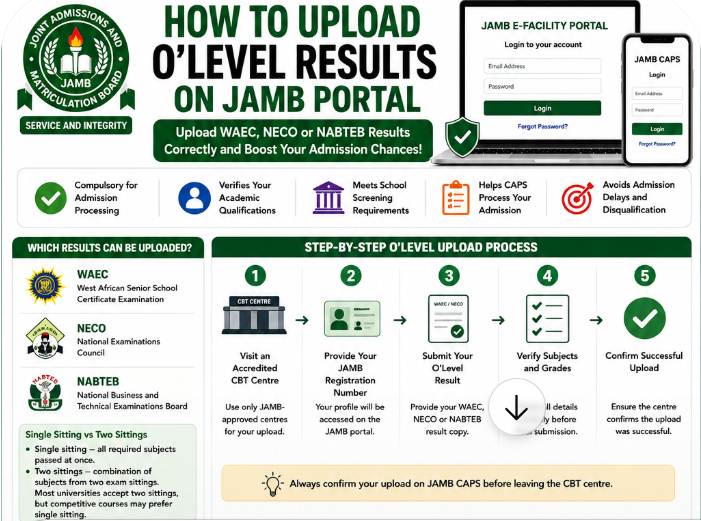
Step-by-Step O’Level Upload Process
Step 1: Visit an Accredited CBT Centre
Locate a JAMB-approved CBT centre near you.
Step 2: Provide Your JAMB Registration Number
The operator will access your profile using your registration details.
Step 3: Submit WAEC or NECO Result
Provide your result copy for upload.
Step 4: Verify Subject Grades
Check every subject carefully before submission.
Step 5: Confirm Successful Upload
Do not leave immediately without confirmation.
Always ask the operator to verify upload completion.
Mobile and Desktop Portal Explanation
Although students can access CAPS on phones, actual uploads are usually handled professionally at accredited centres using proper systems.
How to Upload WAEC Result on JAMB Portal
WAEC uploads follow similar procedures.
Submit WAEC Details Properly
Some centres may request:
- examination year,
- examination number,
- or scratch card details if necessary.
Verify Examination Year Carefully
Wrong examination years create major admission issues.
Confirm Subject Grades
Always cross-check grades before final upload.
Common WAEC Upload Mistakes
Students often:
- upload incomplete subjects,
- enter wrong grades,
- or use incorrect examination years.
Careful verification prevents these mistakes.
How to Upload NECO Result on JAMB CAPS
NECO uploads are also straightforward.
Submit NECO Result Copy
Provide clear and complete NECO details.
Verify Candidate Information
Check:
- names,
- subjects,
- grades,
- and examination year.
Confirm Successful Upload
Request confirmation before leaving the CBT centre.
NECO Awaiting Result Process
Many students initially register with awaiting results.
Once NECO results are released, candidates should upload them immediately to avoid admission delays.
Single Sitting vs Two Sittings Explained Further
Many candidates worry whether combining results affects admission chances.
Universities That Accept Two Sittings
Several Nigerian institutions accept two sittings for many courses.
However, competitive programs like:
- Medicine,
- Pharmacy,
- Nursing,
- and Law
may sometimes favor stronger single-sitting performances.
Students should confirm specific school requirements carefully.
How to Confirm Successful O’Level Upload on JAMB CAPS
Uploading results alone is not enough.
Candidates should confirm that the upload reflects correctly on CAPS.
Step 1: Login to JAMB Portal
Access your JAMB dashboard.
Step 2: Open CAPS Dashboard
Locate the CAPS section.
Step 3: Check Uploaded Result Section
View uploaded subjects and grades.
Step 4: Verify Details Carefully
Ensure every subject appears correctly.
Signs of Incomplete Upload
Warning signs may include:
- blank subject sections,
- missing grades,
- or incomplete examination details.
If anything looks wrong, return to the CBT centre immediately.
What Happens If You Don’t Upload O’Level Results?
Many students delay uploads carelessly.
Unfortunately, this can create serious admission problems.
Admission Delays
Schools may postpone processing incomplete profiles.
CAPS Processing Issues
CAPS may not process admission correctly without uploaded results.
Admission Disqualification Risks
Some institutions may reject candidates entirely if uploads remain incomplete.
Real Example Nigerian Students Often Face
A student may score above 280 in UTME but still miss admission because WAEC results were never uploaded correctly.
This happens more often than many candidates realize.
Common JAMB O’Level Upload Problems and Solutions
Several technical issues may occur during upload periods.
Upload Not Reflecting
Sometimes uploads do not appear immediately on CAPS.
Solution
Return to the CBT centre for confirmation.
Wrong Grades Uploaded
Incorrect grades can affect eligibility.
Solution
Request correction immediately.
Incomplete Subjects
Missing subjects create admission complications.
Solution
Verify all subjects carefully before final submission.
Portal Delays
Heavy traffic sometimes affects CAPS updates.
Solution
Monitor CAPS regularly and remain patient.
Can You Upload O’Level Results Twice on JAMB Portal?
Yes, corrections are possible in some situations.
Re-Upload Possibilities
Students may re-upload corrected details if mistakes occur.
Important Precautions
Avoid unnecessary duplicate uploads because repeated changes can create confusion.
Always confirm details carefully before submission.
How Much Is JAMB O’Level Upload?
Charges vary slightly depending on location and CBT centre.
CBT Centre Service Charges
Most accredited centres charge modest service fees.
Why Students Should Avoid Exploitation
Some centres overcharge students unnecessarily.
Always request official receipts after payment.
Common Mistakes Students Make During O’Level Upload
Many upload problems come from avoidable mistakes.
Uploading Wrong Grades
Always cross-check grades carefully.
Using Wrong Examination Year
Incorrect years may invalidate uploads.
Ignoring CAPS Confirmation
Students should never assume uploads are successful automatically.
Uploading Incomplete Results
Every required subject should appear properly.
Best CBT App for JAMB Preparation
Preparing for UTME becomes easier with regular CBT practice.
One helpful platform many Nigerian students use is:
JambSmartPrep CBT App
Benefits of JambSmartPrep CBT App
- CBT simulation practice
- Mock examinations
- Speed improvement
- Weak subject identification
- Performance tracking
Regular practice helps candidates become more comfortable with CBT environments before examinations.
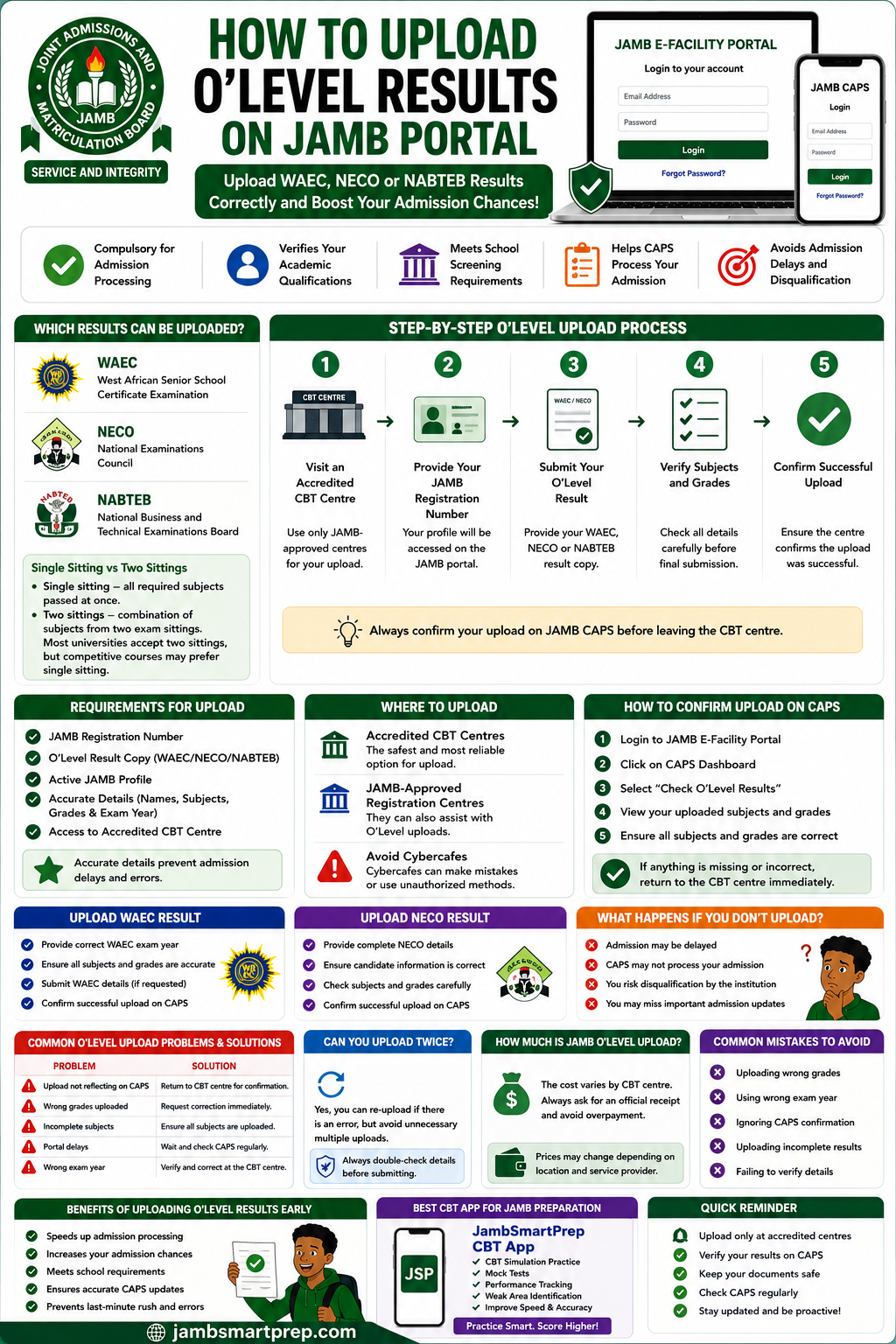
📘 Custom Infographic Section: Quick Guide to Uploading O’Level Results on JAMB Portal
O’Level Upload Steps
✅ Visit accredited CBT centre
✅ Provide JAMB registration number
✅ Submit WAEC or NECO result
✅ Verify subjects and grades
✅ Confirm successful upload
WAEC Upload Guide
✅ Check examination year
✅ Confirm subject grades
✅ Verify candidate details
NECO Upload Guide
✅ Submit complete NECO result
✅ Confirm uploaded subjects
✅ Monitor CAPS afterward
CAPS Confirmation Process
✅ Login to JAMB portal
✅ Open CAPS dashboard
✅ Check uploaded results section
Common Upload Errors
❌ Wrong grades
❌ Missing subjects
❌ Incorrect examination year
❌ Incomplete uploads
Frequently Asked Questions About JAMB O’Level Upload
What is JAMB O’Level upload?
It is the process of uploading WAEC, NECO, or NABTEB results to JAMB for admission processing.
How do I upload WAEC result on JAMB portal?
Visit an accredited CBT centre with your WAEC result and JAMB registration number.
How do I upload NECO result on CAPS?
Provide your NECO result details at an approved CBT centre for upload.
Can I upload result twice?
Yes, corrections may allow re-upload in some situations.
How do I confirm successful upload?
Login to CAPS and verify your uploaded subjects and grades.
What happens if I don’t upload my result?
Admission processing may become delayed or incomplete.
Can cybercafes upload O’Level results?
It is safer to use accredited CBT centres only.
Which CBT centres are approved?
JAMB-approved CBT centres handle official uploads.
How much does upload cost?
Charges vary slightly depending on the CBT centre.
How long does upload take?
The process is usually completed quickly if systems are stable.
Can I upload awaiting result on JAMB portal?
Yes. Many candidates initially register with awaiting results.
Does CAPS show uploaded results immediately?
Sometimes updates take time because of portal traffic.
Can universities reject incomplete uploads?
Yes. Missing uploads may affect admission consideration.
Is O’Level upload compulsory?
Yes. Uploading results is extremely important for admission processing.
Can I upload NABTEB results?
Yes. NABTEB results are accepted by many institutions.
What browser works best for CAPS?
Google Chrome usually performs well for CAPS access.
Can I upload result with my phone?
CAPS can be viewed on phones, but uploads are better handled at accredited CBT centres.
What should I do if upload is not reflecting?
Return to the CBT centre for confirmation.
How often should I check CAPS?
Candidates should monitor CAPS regularly during admission periods.
Can wrong uploads affect admission chances?
Yes. Incorrect uploads may create serious admission problems.
Conclusion
Understanding how to upload O’Level results on JAMB portal properly is extremely important for every Nigerian UTME candidate.
A simple upload mistake can delay or even affect admission processing completely. This is why students should always:
- use accredited CBT centres,
- verify uploaded grades carefully,
- and monitor CAPS regularly.
Whether you are uploading WAEC, NECO, or NABTEB results, proper confirmation is essential.
Do not assume your upload is successful until it reflects correctly on CAPS.
Have you confirmed your O’Level upload on CAPS yet? Share this guide with another UTME candidate and bookmark this page for future admission updates.