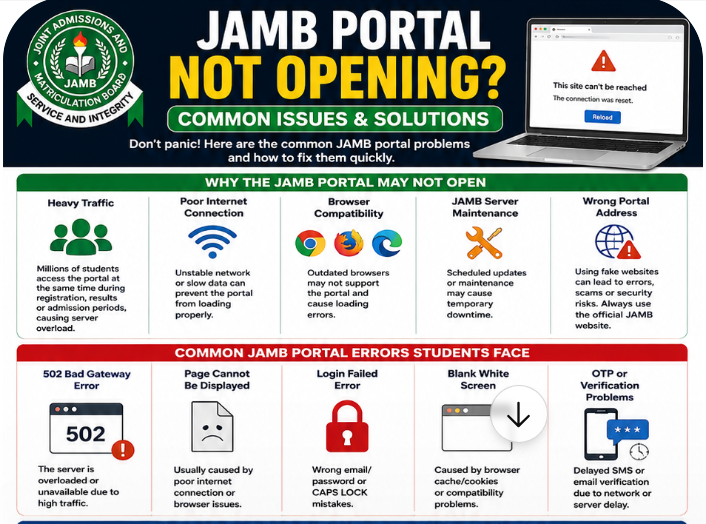
Few things frustrate Nigerian students more than trying to access the JAMB portal during registration, admission processing, or result checking only to discover that the website is not responding.
Many candidates panic immediately when the JAMB website stops working, especially during important periods like UTME registration, admission acceptance, or CAPS updates. Since millions of students access the portal at the same time, temporary issues are very common.
Sometimes the problem comes from the JAMB server itself. In other situations, the issue may be caused by poor internet connection, outdated browsers, incorrect login details, or fake portal links.
The good news is that most JAMB portal issues are temporary and can be fixed easily.
In this guide, you will learn why the JAMB portal may not open, the most common errors students face, and practical step-by-step solutions to fix JAMB portal problems quickly.
Whether you are trying to access CAPS, check admission status, print your slip, or update your profile, this article will help you troubleshoot the problem properly.
Why the JAMB Portal May Not Open
There are several reasons why the JAMB portal may stop working temporarily.
Understanding these causes can help students avoid unnecessary panic.
Heavy Traffic on the JAMB Website
One major reason the JAMB portal is not opening is heavy traffic.
Every year, millions of candidates attempt to access the portal simultaneously during:
- JAMB registration on the JAMB official registration website: https://efacility.jamb.gov.ng
- Result checking
- Admission processing
- CAPS acceptance
- Change of course procedures
When too many users visit the website at once, the server may become overloaded.
This often leads to:
- Slow loading
- Login failures
- Blank pages
- Temporary downtime
This is one of the most common JAMB portal server problems Nigerian students experience.
Also read: How to Upload O’Level Results on JAMB Portal
Poor Internet Connection
Internet quality also affects portal performance.
In many parts of Nigeria, unstable mobile networks can interrupt browsing sessions. Slow internet may prevent the JAMB portal from loading properly.
Some students assume the portal is down when the actual problem is weak network coverage.
If other websites are also loading slowly, your internet connection may be responsible.
Browser Compatibility Problems
Old browsers sometimes struggle to load modern websites properly.
Candidates using outdated versions of:
- Chrome
- Opera Mini
- Firefox
- Safari
may experience portal loading issues.
This can result in:
- White blank screens
- Login errors
- Missing buttons
- Incomplete pages
Keeping your browser updated improves compatibility.
JAMB Server Maintenance
Sometimes JAMB temporarily shuts down parts of its system for maintenance or upgrades.
During these periods, some services may become unavailable briefly.
Examples include:
- CAPS portal maintenance
- Result portal updates
- Registration system upgrades
When this happens, students may see messages indicating server downtime.
Wrong Portal Address
Many fake websites now imitate official government portals.
Students who enter incorrect links may encounter:
- Fake login pages
- Errors
- Suspicious redirects
Always verify that you are using the official JAMB website.
Also read: What to Carry on JAMB UTME Exam Day: Full Checklist for Candidates
This is important for both security and successful access.
Common JAMB Portal Errors Students Face
Students experience different kinds of portal problems depending on the situation.
Below are the most common JAMB login errors and portal issues.
“502 Bad Gateway” Error
This error usually appears when the server becomes overloaded.
It often happens during peak registration periods when too many candidates access the portal simultaneously.
The solution is usually patience and retrying later.
“Page Cannot Be Displayed”
This error may happen because of:
- Poor internet connection
- Browser issues
- Temporary network interruptions
Refreshing the page or changing networks often helps.
Login Failed Error
Many students experience JAMB portal login problems on https://efacility.jamb.gov.ng/ because of incorrect credentials.
Common causes include:
- Wrong email address
- Incorrect password
- Typing mistakes
- CAPS LOCK errors
Always double-check login details carefully.
Blank White Screen
Some students encounter a completely blank page after opening the portal.
This usually happens because of browser cache or compatibility issues.
Clearing cookies and cache often fixes this problem quickly.
OTP or Verification Problems
Another common issue is delayed verification codes.
Sometimes students complain that:
- OTP messages are not arriving
- Emails are delayed
- Verification links fail
This often happens during heavy traffic periods.
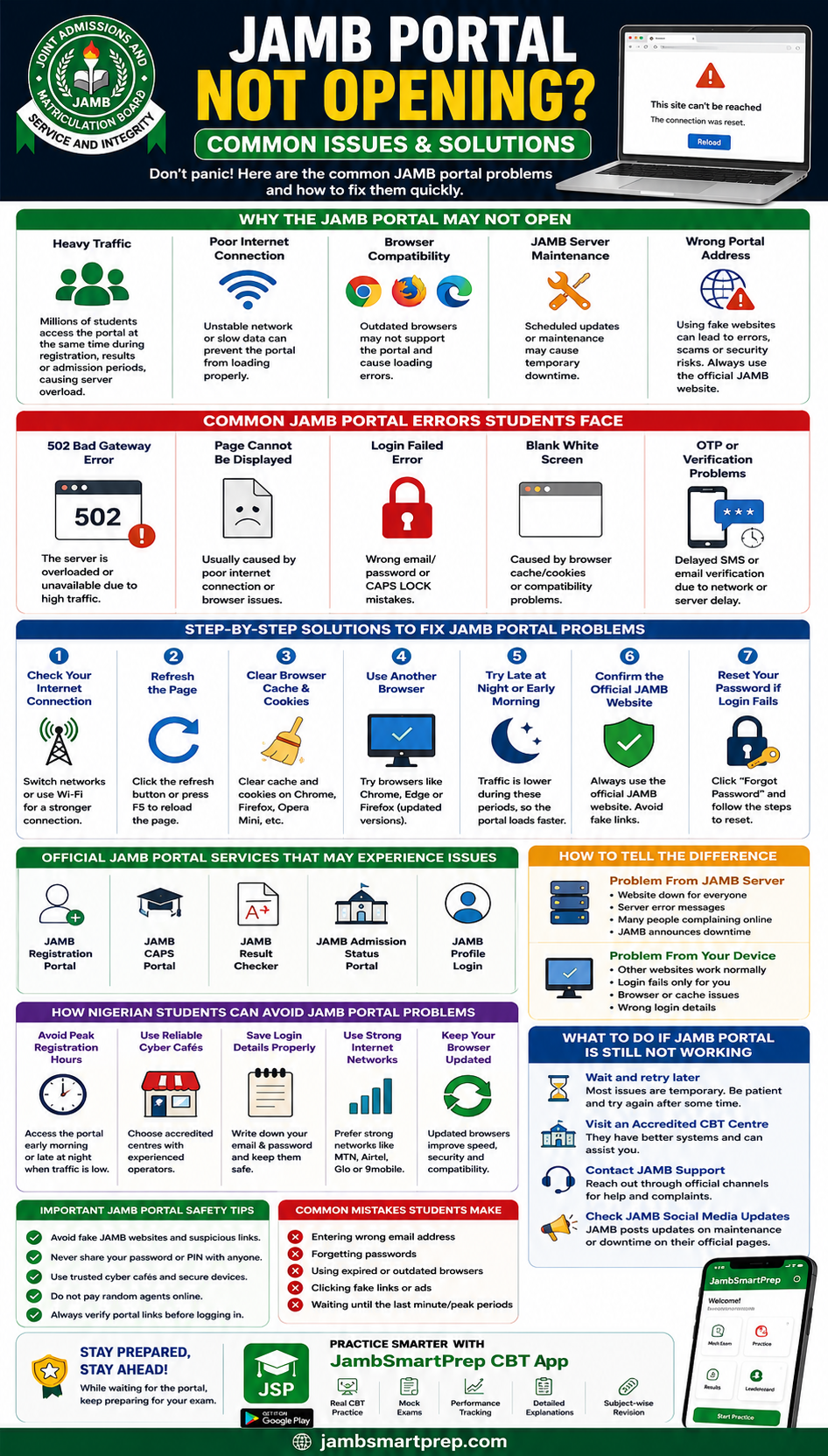
Step-by-Step Solutions to Fix JAMB Portal Problems
If the JAMB website is not working, follow these practical troubleshooting steps.
Check Your Internet Connection
Before blaming the portal, test your network first.
Try:
- Opening other websites
- Switching mobile networks
- Using stronger Wi-Fi
- Moving to a better signal location
Many portal problems disappear after changing networks.
Refresh the Page
Sometimes a simple page refresh solves temporary loading issues.
Use:
- Refresh button
- F5 key on computers
- Swipe refresh on mobile browsers
This is often enough during brief interruptions.
Clear Browser Cache and Cookies
Browsers store old data that may interfere with updated websites.
Clear cache and cookies from:
- Chrome
- Firefox
- Opera Mini
- Safari
Then reopen the portal.
This fixes many JAMB portal blank page issues.
Use Another Browser
If one browser fails, try another.
For example:
- Chrome
- Microsoft Edge
- Firefox
Updated browsers usually work best.
Try Accessing the Portal Late at Night or Early Morning
Portal traffic reduces significantly during off-peak hours.
Many experienced cyber café operators advise students to browse:
- Late at night
- Early morning
- Weekdays with lower traffic
This improves loading speed.
Confirm the Official JAMB Website
Students should avoid clicking random social media links.
Always confirm the correct JAMB portal address before entering login details. The JAMB’s portal official website is https://efacility.jamb.gov.ng/
This reduces exposure to fake JAMB portal scams.
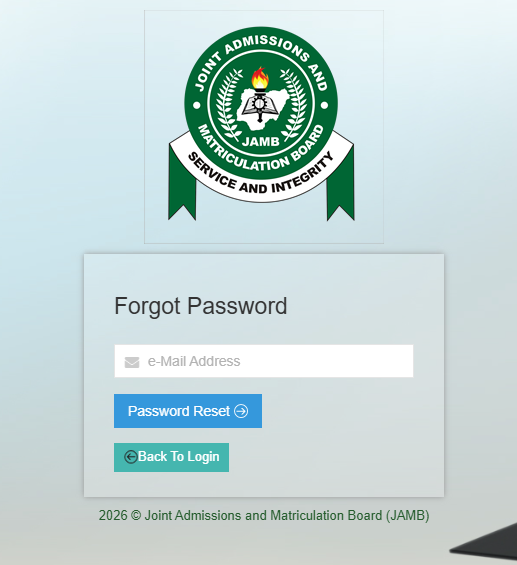
Reset Your Password If Login Fails
If your password is incorrect, visit the JAMB portal website via https://efacility.jamb.gov.ng/forgot
- Click “Forgot Password”
- Enter your registered email
- Follow the reset instructions
- Create a stronger password
Always save login details securely afterward.
Official JAMB Portal Services That May Experience Issues
Several JAMB services may experience downtime occasionally.
JAMB Registration Portal
Heavy traffic during registration often slows down the system thus, the efacility.jamb.gov.ng website will tend to slow to load up.
JAMB CAPS Portal
Many students complain about JAMB CAPS not opening during admission periods.
This usually happens when many institutions begin uploading admissions simultaneously.
JAMB Result Checker
The result checker sometimes becomes slow immediately after results are released.
JAMB Admission Status Portal
Admission processing periods can increase portal load significantly.
JAMB Profile Login
Students sometimes struggle to access profile dashboards because of verification or password issues.
How Nigerian Students Can Avoid JAMB Portal Problems
Preventing portal issues is often easier than fixing them.
Avoid Peak Registration Hours
Try not to browse during the busiest periods.
Midnight and early morning sessions often work better.
Use Reliable Cyber Cafés
Experienced operators understand portal troubleshooting better.
A good cyber café can save time and reduce mistakes.
Save Login Details Properly
Many students forget passwords or registration emails.
Keep login details in secure locations.
Use Strong Internet Networks
Reliable networks improve portal performance.
Examples include:
- MTN
- Airtel
- Glo
- 9mobile
Network quality may vary depending on location.
Keep Your Browser Updated
Updated browsers improve speed, compatibility, and security.
Difference Between JAMB Server Problems and User Errors
Sometimes students blame JAMB when the actual issue comes from their own devices.
Signs the Problem Is From JAMB
Indicators include:
- Everyone reporting issues online
- Server maintenance messages
- Nationwide complaints
- Social media updates about downtime
Signs the Problem Is From Your Device
Indicators include:
- Other websites working normally
- Login errors affecting only you
- Browser-specific problems
- Wrong credentials
Knowing the difference helps avoid confusion.
What to Do If JAMB Portal Is Still Not Working
Wait and Retry Later
Many portal problems are temporary.
Waiting a few hours may solve the issue automatically.
Visit an Accredited CBT Centre
Official CBT centres often have better systems and experience handling portal issues.
Contact JAMB Support
Students facing serious problems should contact official JAMB support channels.
Avoid relying on unofficial agents online.
Check JAMB Social Media Updates
JAMB sometimes announces maintenance updates or technical issues through official platforms.
Stay informed before panicking.
Best CBT Apps for JAMB Preparation and Updates
Why CBT Practice Helps Students
Modern examinations increasingly use computer-based systems.
Students who practice CBT regularly usually become more confident during exams.
Benefits include:
- Faster answering speed
- Better time management
- Familiarity with CBT navigation
- Reduced anxiety
Recommended CBT Platform
JambSmartPrep CBT App
JambSmartPrep CBT App is one of the most useful CBT preparation tools for Nigerian students.
Features include:
- JAMB CBT practice questions
- Mock exams
- Performance tracking
- Subject-by-subject revision
- Real JAMB exam simulation
Students can continue practicing even while waiting for portal issues to be resolved.
Important JAMB Portal Safety Tips
Avoid Fake JAMB Websites
Always verify portal links carefully.
Never Share Your Password Publicly
Protect your profile credentials.
Use Trusted Cyber Cafés
Avoid suspicious operators who may misuse student data.
Avoid Paying Random Agents Online
Many fraudsters target students during registration periods.
Verify Every Portal Link Carefully
Incorrect URLs may lead to phishing websites.
Common Mistakes Students Make When Using the JAMB Portal
Entering Wrong Email Address
Typing errors often prevent successful login.
Forgetting Passwords
Students frequently lose access because they fail to save credentials properly.
Using Expired Browsers
Old browsers may not support portal updates.
Clicking Fake Links
Random social media links may expose students to scams.
Waiting Until Deadline Periods
Late registration increases stress and server congestion.
Frequently Asked Questions About JAMB Portal Problems
Why Is the JAMB Portal Not Opening Today?
The portal may be experiencing heavy traffic, maintenance, or temporary server downtime.
How Can I Fix JAMB Login Errors?
Check your internet, confirm login details, clear browser cache, and retry later.
What Should I Do If OTP Is Not Sending?
Wait a few minutes, refresh the page, or retry during less busy hours.
Can I Use My Phone to Access JAMB Portal?
Yes. Smartphones can access the portal successfully if internet connection is stable.
Why Is JAMB CAPS Not Loading?
CAPS may become slow during heavy admission processing periods.
Is JAMB Portal Down During Registration?
Yes. Heavy traffic can temporarily slow down the portal.
How Long Does JAMB Server Downtime Last?
Downtime may last from a few minutes to several hours depending on the issue.
Can Browser Cache Affect JAMB Portal?
Yes. Old cache files sometimes prevent proper loading.
What Is the Official JAMB Website?
Students should always verify official JAMB links carefully before logging in.
Can VPN Affect JAMB Portal Access?
Yes. Some VPN services may interfere with portal loading or verification.
JAMB Portal Not Opening? Quick Fixes for Nigerian Students
Include:
- Common JAMB errors
- Fast troubleshooting steps
- Browser fixes
- Internet solutions
- Safe login practices
- Best CBT preparation platform:
- JambSmartPrep CBT App
Conclusion
JAMB portal issues can be frustrating, especially during important periods like registration, admission processing, or result checking. However, most problems are temporary and can be solved with simple troubleshooting steps.
Students should remain patient during heavy traffic periods and avoid panicking unnecessarily.
Always use official JAMB platforms, protect your login details, and avoid suspicious websites or fake agents online.
While waiting for portal issues to be resolved, candidates can continue preparing for exams using reliable CBT practice tools like the JambSmartPrep CBT App.
If you found this guide helpful, consider sharing it with other students facing JAMB portal challenges. You can also explore related JAMB preparation guides to improve your exam readiness and admission process understanding.
