NECO result is not showing? Welcome to Jambsmartprep.com, your no. 1 guide for Jamb, WAEC, NECO and admissions. In today’s post, we will be covering virtually everything you need to know about How to fix NECO Result Is Not Showing issue.
Yes, during the course of this online guide, you will Learn why your NECO result is missing, pending, withheld, or unavailable and discover practical steps to fix it. All you need to do to get what you want is to keenly follow all the instructions outlined in this post.
You entered your NECO examination details, submitted your token, clicked “Check My Result,” and expected your grades to appear.
But nothing happened.
Perhaps the page displayed an error message. Maybe the result page remained blank. In some cases, the portal loaded successfully, accepted the token, yet the expected result did not appear.
If you are facing this problem, you are not alone.
Every year, thousands of Nigerian candidates search online for:
- NECO result is not showing
- NECO result not showing after checking
- NECO result checker not showing result
- Why is my NECO result not showing?
- NECO result not displaying
- NECO result not available
- NECO result not found
A missing result does not automatically mean that your result is lost or that you failed your examination.
The issue could be related to:
- Incorrect examination details
- NECO token problems
- Browser or internet issues
- Temporary portal errors
- Result release delays
- Pending results
- Withheld results
- Incomplete subject records
The good news is that most NECO result problems can be identified with careful troubleshooting.
In this guide, you will learn:
✅ Why your NECO result is not showing
✅ How to fix NECO result portal problems
✅ What a pending or withheld result means
✅ What to do if your token works but the result does not appear
✅ When to contact NECO support
Before spending money on another token, it is important to identify the real cause of the problem.
According to the official NECO Results Portal, candidates are required to provide:
- Examination year
- Examination type
- Token
- Registration number
Entering any of these details incorrectly may prevent the system from displaying the expected result.
Official NECO Result Portal: https://results.neco.gov.ng
Quick Answer: Why Is Your NECO Result Not Showing?
If your NECO result is not showing, the most common reasons include:
- Wrong examination year selected
- Wrong examination type
- Incorrect registration number
- Invalid or wrongly entered token
- Result not yet released
- Result pending
- Result withheld
- Browser or internet issues
- Temporary portal problem
- Incomplete result processing
The best approach is to diagnose the issue step by step instead of immediately purchasing another token.
NECO Result Is Not Showing? Try These Fixes First
If your NECO result is not showing after checking, start with these simple troubleshooting steps.
Many students discover that the issue is caused by an incorrect detail rather than a serious problem.
1. Confirm Your Examination Year
This is one of the most common mistakes.
If you sat for NECO SSCE Internal but accidentally selected another year, the system may not locate your record.
For example:
- Candidate sat for examination in 2025
- Candidate selected 2024
Result:
NECO result not found
Always compare the selected year with your examination slip.
2. Select the Correct Examination Type
The official portal asks candidates to choose an examination category.
Examples include:
- SSCE Internal
- SSCE External
- BECE
- NCEE
Selecting the wrong examination type can lead to:
- NECO result not available
- NECO result checker not showing result
- Result cannot be found
Many candidates overlook this step.
3. Check Your Registration Number
Your registration number is very important.
Even one missing character can stop the portal from locating your result.
Check carefully:
✔ Numbers
✔ Letters
✔ Slashes
✔ Sequence
Compare it directly with:
- Photocard
- Examination slip
- Registration document
A wrong registration number is one of the leading causes of:
- NECO result not displaying
- NECO result cannot be checked
- Result not found
4. Check Your NECO Token
The result checker token is another major source of problems.
Ensure:
- Token is entered correctly
- No extra spaces
- No missing characters
- Token was purchased successfully
A token issue can lead to:
- NECO result checker token not working
- Invalid token error
- Result not showing
Do not buy another token immediately.
First, verify the original token.
5. Refresh the NECO Result Portal
Sometimes the problem is temporary.
Try:
- Closing the browser
- Reopening the portal
- Refreshing the page
Use only the official portal:
https://results.neco.gov.ng
Avoid unofficial result websites.
6. Try Another Browser
Browser problems can affect result checking.
Try:
- Chrome
- Firefox
- Edge
- Safari
An outdated browser may cause:
- NECO result not loading
- Blank result page
- Portal errors
7. Try Another Phone or Computer
If the result does not show on your phone:
- Try another device
- Use a laptop
- Use a desktop computer
This helps determine whether the issue is:
- Device-related
- Browser-related
- Portal-related
8. Check Your Internet Connection
A weak connection can interrupt the result retrieval process.
Switch:
- Mobile data → Wi-Fi
- Wi-Fi → Mobile data
Stable internet reduces:
- Page loading problems
- Incomplete requests
- Result display errors
NECO RESULT IS NOT SHOWING? 8 THINGS TO CHECK
📌 Check examination year
📌 Check examination type
📌 Check registration number
📌 Check token carefully
📌 Confirm result release status
📌 Check pending or withheld status
📌 Try another browser/device
📌 Contact NECO support if necessary
Why Is My NECO Result Not Showing?
If the simple fixes above do not solve the problem, the next step is understanding the actual cause.
Many candidates assume:
“My result is missing.”
In reality, several different situations can lead to the same experience.
Let us examine them.
1. Your NECO Result Has Not Been Released Yet
You cannot check a result that has not yet been uploaded or released.
Every examination follows stages:
- Examination
- Marking
- Processing
- Approval
- Release
- Upload to portal
If the result has not reached the final stage, candidates may see:
- Result not available
- No result found
- Result not displaying
Always check official NECO announcements before assuming there is a problem.
2. Wrong Examination Year
Selecting the wrong year remains one of the biggest causes of result errors.
The system searches only within the year selected.
Wrong year = Wrong search result.
3. Wrong Examination Type
A candidate who selects SSCE External instead of SSCE Internal may receive:
- No result found
- Result not available
- Result not displaying
Double-check before submitting.
4. Incorrect Registration Number
Typing errors are more common than many students think.
Examples:
Incorrect:
1234567890A
Correct:
1234567890B
A single character difference matters.
5. Wrong Token
Token issues can cause:
- Result checker not working
- Invalid token
- Blank page
Always compare your token carefully.
6. Token Already Used
Sometimes the portal may indicate that the token has already been used.
This may happen if:
- The token was used previously
- Another person used it
- There is a system issue
Keep your payment evidence.
7. NECO Portal Problem
The issue may not be your result.
Sometimes the portal experiences:
- Heavy traffic
- Slow loading
- Temporary outages
This is common when results are newly released because thousands of students check simultaneously.
8. Browser Problems
Old browsers may fail to display pages properly.
Try:
- Clearing cache
- Using incognito mode
- Updating browser
9. Your Result May Be Pending
Pending means:
The result is still under processing.
It does not automatically mean:
❌ Failure
❌ Cancellation
❌ Withheld result
Pending results require patience.
10. Your Result May Be Withheld
A withheld result is different from:
- Result not found
- Result pending
- Portal error
Candidates should wait for official information before drawing conclusions.
11. Your Result May Be Incomplete
Sometimes:
- Mathematics shows
- English shows
- Biology missing
This is known as an incomplete result.
Do not assume the entire result is lost.
NECO Result Not Showing After Entering Token
Many candidates complain:
“My token worked, but the result is not showing.”
This situation usually points to:
- Wrong examination year
- Wrong examination type
- Wrong registration number
- Result pending
- Portal issue
Before buying another token:
✔ Check year
✔ Check examination type
✔ Check registration number
✔ Check result release status
✔ Try another browser
Purchasing another token may not solve the actual problem.
NECO Result Not Showing but Token Is Working
This is an important distinction.
If the token is accepted but the result does not appear, then:
The token is likely not the problem.
Possible causes include:
- Result not released
- Pending result
- Withheld result
- Incomplete result
- Wrong examination details
The next step is to verify the result status rather than buying another token.
NECO Result Is Not Showing After Entering Token
If you entered your NECO result checker token correctly but your result is still not appearing, do not assume that the token has failed.
The official NECO Results Portal currently asks candidates to select the examination year and examination type, enter the token and registration number, and then click “Check my result.” The portal also provides an option to purchase a token and lists support@neco.gov.ng for support.
That means several things can go wrong before the system actually displays your result.
Check the Token Again
Start by checking the token character by character.
If you copied the token from a message, receipt or another source, make sure you copied the entire number.
Also check for:
- Missing digits
- Extra spaces
- Incorrect characters
- Incomplete token
- A token belonging to another transaction
Do not keep guessing different combinations. If the token came with a purchase confirmation, compare what you entered with the original transaction information.
Confirm the Examination Year
The result portal requires you to select an examination year before checking the result.
For example, if you are checking a result from one examination year but select another year, the system may not locate the expected record.
This can make it appear as though your NECO result is not showing, when the actual problem is the search information.
Confirm the Examination Type
The examination type also matters.
Check that you selected the examination category that corresponds with the result you are trying to retrieve.
If the examination year and examination type do not match your record, the portal may fail to display the result you expect.
Confirm Your Registration Number
Your registration number should be entered exactly as it appears on your examination documents.
Avoid relying on memory if you have your examination slip or other official record available.
A single incorrect character can prevent the system from finding your result.
Try the Result Portal Again
After checking all the information, return to the official NECO Results Portal and try again.
Do not rely on an old bookmark or a result-checking website that you found through a search engine.
The current official result portal is:
results.neco.gov.ng
The portal’s current instructions confirm that candidates should select the examination year and type, enter their token and registration number, and then check the result.
Try Another Browser or Device
If your details are correct but the NECO result is not displaying, test the process on another browser.
For example, if you normally use Chrome, try another updated browser.
You can also try another phone, laptop or desktop computer.
This simple test can help determine whether the problem is connected to your device or browser.
Check Whether Your Token Was Purchased Successfully
If you recently paid for the result checker token, confirm that the transaction was completed.
Keep your:
- Payment receipt
- Transaction reference
- Payment confirmation
- Token
- Date of purchase
NECO’s official 2024 Annual Report lists the result checker token as a service with a fee of ₦1,600 plus ₦50 stamp duty at that time. Because fees can change, candidates should check the current official purchase process instead of relying on an old price.
Most importantly, do not purchase another token simply because the first attempt failed.
First establish what went wrong.
NECO Result Not Showing but Token Is Working
This situation is different from a NECO result checker token not working.
If the portal accepts your token but your result does not appear, the problem may be connected to the result record or the information used to retrieve it.
Possible explanations include:
- The result has not been released
- The result is pending
- The result has been withheld
- The wrong examination information was selected
- Some subjects have not been displayed
- There is a temporary portal problem
This is why it is useful to separate a token problem from a result problem.
If the token is accepted, there is little reason to keep purchasing tokens before investigating the result status.
Check Your Examination Details
Go back through the information you supplied.
Check:
- Examination year
- Examination type
- Registration number
- Token
If all four are correct, move to the next possible cause.
Check Whether Results Have Been Released
A result cannot be retrieved from the portal before it is available for checking.
This is particularly important around result-release periods.
Candidates may hear from friends or see posts on social media claiming that results are available. That does not mean every examination record is necessarily accessible at the same time.
Use official NECO information when confirming the release of results.
Check for a Pending Result
A pending result is not the same thing as a failed result.
If the examination record is still being processed, the candidate may need to wait for further official updates.
Do not pay anyone who claims to have a private method for making a pending result appear.
Check for a Withheld Result
A withheld result is also different from an ordinary portal problem.
If NECO specifically indicates that a result has been withheld, follow the official instructions associated with that status.
Do not assume that repeatedly entering your token will solve it.
Check Whether Only Certain Subjects Are Missing
There is another situation that often worries candidates.
You may see some subjects but notice that one or more expected subjects are missing.
For example:
- English Language appears
- Mathematics appears
- Biology appears
- Chemistry is missing
Do not immediately assume that your entire NECO result is lost.
The missing subject may have a separate status or may require further processing.
If the subject remains unavailable after you have confirmed your details, contact NECO through an official support channel.
NECO Result Checker Is Not Showing My Result
The phrase “NECO result checker is not showing my result” can describe several different problems.
The quickest way to identify yours is to look at what happens when you use the portal.
| Problem | Possible Cause | What to Do |
|---|---|---|
| Result page does not load | Browser or network problem | Try another browser or connection |
| Token rejected | Token or entry problem | Check the token carefully |
| Result not found | Incorrect details or unavailable record | Check year, type and registration number |
| Result pending | Record may still require processing | Monitor official updates |
| Result withheld | Specific result status | Follow official NECO instructions |
| Some subjects missing | Incomplete or unresolved result | Check the status and contact NECO if necessary |
| Payment completed but token fails | Transaction or token issue | Keep payment evidence and seek official support |
This distinction is useful because “NECO result not showing” is not a single technical error.
The correct solution depends on what the portal is actually doing.
What Does It Mean When NECO Result Is Not Available?
The words “not available,” “not found,” “pending,” and “withheld” should not be treated as if they mean the same thing.
They can point to different situations.
Result Not Released
If the result has not been made available for checking, there may be nothing for the portal to display yet.
The solution is not to buy more tokens.
Instead, monitor official NECO announcements.
Result Pending
A pending result means the candidate should not automatically assume that the result has disappeared.
Keep your examination documents and monitor the situation.
If the status remains unresolved and you believe there is a problem, contact NECO.
Result Withheld
A withheld result requires a different approach.
Do not confuse a formal withheld status with a website that refuses to load.
If the portal specifically indicates that the result is withheld, look for official information about the next step.
Result Not Found
A NECO result not found message can have several possible explanations.
Start by checking:
- Examination year
- Examination type
- Registration number
- Token
Then consider whether the result is available for checking.
Portal Error
Sometimes the result itself is not the problem.
The website, browser, internet connection or device may be responsible.
Testing another browser or device is a simple way to narrow down the cause.
How to Check NECO Result Again When It Is Not Showing
If your first attempt failed, you can go through the checking process again carefully.
Step 1: Open the Official NECO Results Portal
Go to the official NECO Results Portal via results.neco.gov.ng
The official page identifies itself as the NECO Results Portal and provides the current result-checking fields.
Step 2: Select the Examination Year
Choose the year that corresponds with the examination you took.
Do not select a different year because you believe it may display the result.
Step 3: Select the Examination Type
Choose the correct examination type.
Take your time here, especially if you have taken more than one NECO examination.
Step 4: Enter Your Token
Enter your result checker token carefully.
Avoid altering any part of the token.
Step 5: Enter Your Registration Number
Enter your registration number exactly as it appears on your examination record.
Step 6: Click “Check My Result”
The current official portal uses the “Check my result” button for submitting the request.
Step 7: Wait for the Response
Give the portal time to process the request.
Avoid repeatedly clicking the button if the page is slow.
If the page appears stuck, wait briefly and then consider refreshing it or trying another browser.
NECO Result Not Showing on Phone
Many Nigerian students use smartphones to check examination results.
If your NECO result is not showing on your phone, the phone itself may be part of the problem.
Use an Updated Browser
An outdated browser can create compatibility problems.
Update your browser before trying again.
Clear Browser Cache
If the portal has previously loaded incorrectly, cached files may interfere with a fresh session.
Clear the browser cache and reopen the website.
Open the Portal in Private or Incognito Mode
An incognito or private window starts a separate browser session.
This can help determine whether stored cookies or cached information are affecting the page.
Switch Between Mobile Data and Wi-Fi
Try another connection.
For example:
Mobile data → Wi-Fi
or
Wi-Fi → Mobile data
If the page works on one connection but not the other, your original connection may have been the problem.
Try Another Phone
Ask a trusted person if you can use another device to test the same official portal.
If the result appears on another phone, your original device or browser may need attention.
Try a Computer
A laptop or desktop computer can provide another useful test.
If the result remains unavailable across different devices and browsers, investigate the examination details and result status instead of assuming the phone is responsible.
Do Not Buy Another Token Just Because Your Phone Fails
This point is worth repeating.
A phone, browser or network problem does not mean your token is bad.
Troubleshoot the technical problem first.
What to Do If Your NECO Result Is Still Pending
A NECO result pending situation can be particularly stressful when the candidate needs the result for admission.
For example, a student may be waiting for a result while preparing for:
- JAMB admission
- University screening
- Polytechnic admission
- College of Education admission
- Scholarship application
- Employment documentation
The important thing is to understand what the portal is actually reporting.
Confirm That You Entered the Correct Details
Before assuming that your result is genuinely pending, verify:
- Examination year
- Examination type
- Registration number
- Token
A wrong detail can produce a result that appears unavailable.
Check the Result Status Again Later
If NECO has not made the result available for retrieval, repeated attempts may not change anything.
Keep checking official information rather than relying on claims from WhatsApp groups or social media.
Do Not Assume Pending Means Failed
A pending status should not be interpreted as a grade.
It does not tell you that you failed the examination.
Wait for the official result or status.
Keep Your Examination Documents
Do not throw away your:
- Examination slip
- Photocard
- Registration information
- Payment records
- Result-checking details
These documents may become useful if you need to contact NECO.
Contact NECO if the Status Remains Unresolved
If you have checked the details carefully and the problem continues, use NECO’s official support channels.
The NECO support portal allows users to search for help and submit a ticket.
What to Do If NECO Result Is Withheld
A withheld result requires more care than an ordinary website problem.
What a Withheld NECO Result Means
If NECO identifies a result as withheld, that is a specific result status.
It should not be confused with:
- A blank webpage
- A browser error
- An incorrect registration number
- A rejected token
- A slow internet connection
Why Candidates Should Not Confuse Withheld and Missing Results
Imagine two candidates.
Candidate A: The result page refuses to load.
Candidate B: The portal displays a specific withheld-result status.
They have two different problems.
Candidate A should troubleshoot the website and checking details.
Candidate B should follow the official procedure applicable to the withheld result.
Check Official NECO Information
Do not depend on a private individual who claims to know how to release a withheld result.
Look for official NECO instructions.
Follow Any Required NECO Procedure
If NECO provides a procedure for a withheld result, follow that procedure carefully.
Keep copies of documents and evidence of any official communication.
Avoid Unofficial “Result Release” Agents
Be especially careful with people who claim they can:
- Release withheld results
- Change grades
- Remove a pending status
- Bypass the NECO portal
Never give an unknown person your banking password, OTP, ATM PIN or other sensitive credentials.
What If Only Some NECO Subjects Are Showing?
A NECO result incomplete problem can be just as worrying as a completely missing result.
Suppose you checked your result and most subjects appeared, but one subject is missing.
Do not immediately conclude that the subject has been deleted.
Check Whether the Missing Subject Is Listed
Look through the complete result carefully.
Make sure you did not simply overlook the subject.
Check Whether the Result Is Marked Pending
A missing subject may have a status attached to it.
Read the displayed information carefully.
Check Whether the Result Is Withheld
If a specific subject has a status indicating that it is withheld, treat that differently from an ordinary display error.
Do Not Assume a Missing Subject Means the Entire Result Is Lost
A missing subject does not necessarily mean that the whole result has disappeared.
If the other subjects are displaying normally, focus on the specific subject that is unavailable.
Contact NECO if the Missing Subject Remains Unresolved
If you have confirmed your details and the subject remains missing, contact NECO through an official support channel.
The official NECO support platform provides a way to submit a ticket when the available help does not resolve the problem.
NECO Result Not Showing After Payment
Another common complaint is:
“I paid for my NECO token, but my result is not showing.”
Payment alone does not guarantee that the result will immediately appear.
You still need to complete the result-checking process correctly.
Confirm the Payment Was Successful
Check your payment confirmation.
Save the transaction details.
Confirm the Token Was Generated
If the purchase process produced a token, keep it somewhere secure.
Do not share it publicly.
Check Your Payment Reference
Your transaction reference can become important if you need to resolve a payment problem.
Keep:
- Transaction reference
- Payment date
- Amount paid
- Payment confirmation
- Token information
Check the Token Carefully
A token copied incorrectly can cause a failed result-checking attempt.
Do Not Immediately Make Another Payment
This is one of the most important pieces of advice in the entire guide.
If money has already been deducted, investigate the original transaction first.
Buying another token may simply create a second expense without fixing the first problem.
Contact NECO if the Transaction Cannot Be Resolved
The current NECO Results Portal lists support@neco.gov.ng as its support email.
NECO also maintains an online support portal where users can search for help or submit a support ticket.
How to Know Whether NECO Portal or Your Result Is the Problem
When your NECO result is not showing, it can be difficult to know whether the problem is with the website, your examination details, your token, or the result itself.
A simple way to narrow it down is to look at exactly what happens when you try to check the result.
The following scenarios can help you identify the likely cause.
Scenario 1: The NECO Website Will Not Open
If the official result portal will not open at all, your result may not be the problem.
The first things to check are:
- Internet connection
- Browser
- Device
- Website availability
Try opening the official NECO Results Portal again using a different browser or device. The current portal is available at results.neco.gov.ng.
If the website works on another device, the original problem may be related to your browser, device or internet connection.
Scenario 2: The Website Opens but Your Token Is Rejected
If the website opens normally but your token is rejected, concentrate on the token and the information you entered.
Check:
- Token characters
- Examination year
- Examination type
- Registration number
Do not immediately conclude that your NECO result is missing.
A rejected token and a missing result are two different problems.
Scenario 3: Your Token Works but the Result Does Not Appear
This situation requires more investigation.
If your token is accepted but the expected result does not appear, consider:
- Whether the result has been released
- Whether you selected the correct examination year
- Whether you selected the correct examination type
- Whether your registration number is correct
- Whether the result is pending
- Whether the result has a specific withheld status
- Whether the portal is experiencing a temporary problem
In this situation, purchasing another token may not solve anything.
Scenario 4: Only Some Subjects Are Showing
If most of your subjects are displayed but one or more are missing, do not immediately assume that your entire NECO result has disappeared.
Look carefully at the displayed result and any status attached to the missing subject.
If the problem continues after checking your examination details, contact NECO through an official channel.
Scenario 5: Your Result Says Pending or Withheld
A displayed result status should be treated differently from a technical problem.
If the portal indicates that your result is pending, investigate the official status and monitor for further updates.
If the result is specifically withheld, follow the applicable NECO instructions.
Do not treat every NECO result not showing complaint as a withheld result.
NECO Result Checker vs NECO e-Verify
Another source of confusion is the difference between the ordinary NECO result checker and the NECO e-Verify system.
They are related to NECO results, but they serve different purposes.
What the NECO Result Checker Is Used For
The ordinary NECO Results Portal is designed for candidates who want to check their examination results.
The current portal instructs candidates to:
- Select the examination year
- Select the examination type
- Enter the token
- Enter the registration number
- Click “Check my result”
The same portal also provides a Purchase token option for candidates who do not already have one.
Therefore, if you are simply trying to see your NECO grades, the ordinary results portal is the appropriate starting point.
What NECO e-Verify Is Used For
NECO’s e-Verify platform is a result verification and confirmation system.
The official platform explains that individuals can use it to verify or confirm their results and generate a verification report for institutional purposes. Institutions can also use the system for result verification.
This makes e-Verify particularly relevant when a university, employer, government organisation or another institution needs to confirm the authenticity of a candidate’s result.
Can You Use e-Verify to Fix a Missing Result?
Not necessarily.
If you are simply unable to display your result through the ordinary NECO Results Portal, e-Verify should not automatically be treated as a replacement for the result checker.
First determine why the result is not showing on the ordinary portal.
The e-Verify service has its own account and verification process. The official platform explains that users can register, log in, purchase a verification token where required, validate payment and submit an application for verification.
In other words, NECO result checking and NECO result verification are separate processes.
When Should You Contact NECO?
You should consider contacting NECO when ordinary troubleshooting does not resolve the problem.
This is especially important if:
- Your examination year is correct
- Your examination type is correct
- Your registration number is correct
- Your token is valid or accepted
- Your internet connection is working
- You have tried another browser
- You have tried another device
- Your result is expected to be available
- The problem continues
You should also contact NECO if only one or more subjects are missing and the issue remains unresolved.
The current NECO Results Portal lists support@neco.gov.ng as its support email.
NECO also operates an online support platform where users can search for help and submit support tickets.
When contacting support, explain the problem clearly instead of sending a short message such as:
“My result is not showing.”
A more useful explanation would identify your examination year, examination type, the problem you encountered and the message displayed by the portal.
What Information Should You Give NECO Support?
Before contacting NECO, gather the information that can help them understand your case.
You may need:
- Full name
- Examination year
- Examination type
- Registration number
- Token purchase information
- Payment reference where applicable
- Date of payment
- Exact error message
- Screenshot of the problem
- Approximate date and time you tried checking the result
Keeping these details together can make your complaint easier to understand.
Keep Your Examination Documents
Do not discard your examination documents after writing the examination.
Keep copies of:
- Examination slip
- Registration details
- Photocard
- Payment receipts
- Token purchase information
- Previous correspondence with NECO
If you eventually need to prove that you registered for the examination or purchased a token, these records can be useful.
Take a Screenshot of the Error
If your NECO result is not displaying, take a screenshot of the message or page.
For example, a screenshot may show:
- Result not found
- Invalid token
- Pending result
- Withheld status
- Blank result page
- Portal error
This gives NECO support more information than a general statement that the result is missing.
Important Privacy Warning When Contacting NECO
Be careful when looking for help online.
A result problem can create an opportunity for scammers to target anxious candidates.
Never give a stranger your:
- ATM PIN
- Card PIN
- Bank password
- Internet banking password
- OTP
- Email password
- Mobile banking login
- BVN or other sensitive financial information
A person claiming to be able to “release” your NECO result should not be trusted simply because they know your examination details.
NECO result problems should be handled through official channels.
The official e-Verify platform, for example, publishes its own contact information and explains its verification process.
Do Not Pay Someone to “Release” a Pending or Withheld Result
This deserves special attention.
You may encounter people on WhatsApp, Facebook, Telegram or other platforms claiming that they can:
- Release a pending result
- Remove a withheld result
- Increase examination grades
- Change a result
- Bypass the NECO portal
- Recover a missing result instantly
Treat such claims with extreme caution.
A candidate who is worried about admission may be tempted to pay quickly. That is exactly why you should slow down and verify the person’s claim before sending money or personal information.
Use official NECO channels for examination-related complaints.
Common Mistakes to Avoid When Your NECO Result Is Not Showing
Troubleshooting is easier when you know what not to do.
Buying Another Token Immediately
This is one of the first mistakes some candidates make.
If the original token was valid, buying another one may not solve a problem caused by:
- Wrong examination year
- Wrong examination type
- Incorrect registration number
- Pending result
- Withheld result
- Portal problem
Find the cause first.
Using an Unofficial Result Website
Search engines may display many websites discussing NECO results.
That does not mean every website is an official NECO result-checking platform.
Use the official NECO Results Portal when checking your result.
Entering Random Examination Details
Do not try different years or registration numbers simply because one combination might produce a result.
Use the details that belong to your examination.
If you are unsure about your registration number, check your examination documents.
Repeatedly Refreshing the Page
If the portal is slow, repeatedly clicking buttons may not make it faster.
Wait for the page to respond.
If the problem persists, try:
- Another browser
- Another device
- Another internet connection
Giving Your Banking Information to Strangers
No result problem is worth giving away your banking credentials.
Never send an OTP, PIN or banking password to someone claiming to be able to fix your NECO result.
Paying Someone Who Claims They Can Release a Result
Be particularly careful with anyone who promises a guaranteed result release for a private payment.
Use official NECO procedures instead.
Assuming a Missing Result Means You Failed
A result that is not showing does not tell you your examination grade.
There is a major difference between:
- Result not found
- Result not available
- Result pending
- Result withheld
- Result incomplete
- Portal not working
The correct response depends on which situation applies to you.
NECO Result Not Showing: Quick Troubleshooting Checklist
Before contacting NECO, run through this checklist.
☐ I selected the correct examination year.
☐ I selected the correct examination type.
☐ I entered the correct registration number.
☐ I entered the token correctly.
☐ I am using the official NECO result portal.
☐ My internet connection is stable.
☐ I have tried another browser.
☐ I have tried another device.
☐ I confirmed that the result has been released.
☐ I checked whether the result is pending.
☐ I checked whether the result has a withheld status.
☐ I checked whether only certain subjects are missing.
☐ I kept my payment information.
☐ I recorded any error message.
☐ I know how to contact NECO if the problem continues.
If you have completed these checks and your NECO result is still not showing, contacting NECO is a sensible next step.
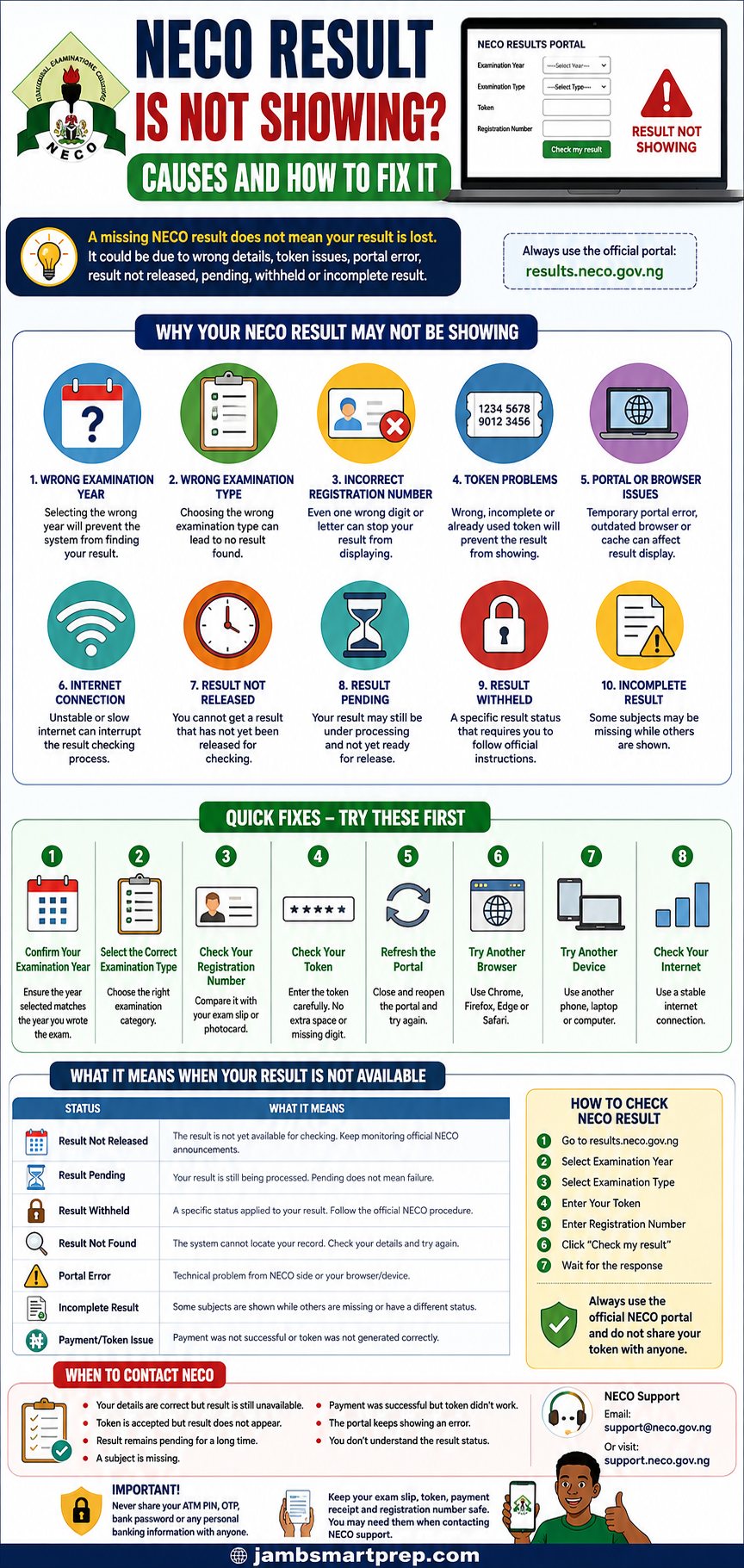
NECO Result Is Not Showing? Causes and How to Fix It
1. Wrong Examination Year
Select the year in which you actually sat for the examination.
2. Wrong Examination Type
Make sure the selected examination category matches your examination.
3. Wrong Registration Number
Compare the number with your examination slip.
4. Token Problem
Check that your token was entered correctly and that the purchase was successful.
5. Portal or Browser Problem
Try another browser, device or internet connection.
6. Result Not Released
Check official NECO information before assuming your result is missing.
7. Pending or Withheld Result
Check the status carefully and follow official instructions.
8. Still Not Showing?
Keep your examination and payment details and contact NECO through its official support channel.
Frequently Asked Questions About NECO Results Not Showing
Candidates searching for “NECO result is not showing” often have a very specific problem. The answers below address the most common questions and situations.
Why is my NECO result not showing?
Your NECO result may not be showing because of incorrect examination details, an invalid or incorrectly entered token, a browser or network problem, a result that is not yet available, or a specific result status such as pending or withheld.
Start by checking your:
- Examination year
- Examination type
- Registration number
- Token
Then try the official NECO Results Portal using another browser or device.
The current portal requires candidates to select the examination year and examination type, enter their token and registration number, and click “Check my result.”
Why is my NECO result not showing after checking?
If your NECO result is not showing after checking, first determine what happens after you submit your information.
If the portal does not load, investigate your browser, device and internet connection.
If the token is rejected, check the token and examination details.
If the token is accepted but the result is unavailable, investigate whether the result has been released or whether there is a specific result status.
Do not immediately purchase another token.
Why is my NECO result not showing on the portal?
A NECO result may not show on the portal because the information entered does not match the examination record or because the result is not currently available for retrieval.
Check the examination year, examination type and registration number carefully.
If the information is correct and the problem continues, try another browser or device.
If you still cannot retrieve the result, contact NECO through its official support channels.
Why is my NECO result checker not working?
The phrase “NECO result checker not working” can refer to different problems.
The website might not open, the page might not load correctly, the token might be rejected, or the result might not appear after submission.
Test the portal with:
- A stable internet connection
- An updated browser
- Another browser
- Another phone
- A laptop or desktop
If the problem occurs across multiple devices and connections, the issue may require NECO support.
What should I do if my NECO result is not showing?
Follow this order:
- Confirm the examination year.
- Confirm the examination type.
- Check your registration number.
- Check your token.
- Use the official NECO Results Portal.
- Try another browser.
- Try another device.
- Check whether the result has been released.
- Check for a pending or withheld status.
- Contact NECO if the problem remains unresolved.
This approach helps you avoid spending money unnecessarily.
Why is my NECO result pending?
A pending result means that the result information is not currently available to you as a completed result.
Do not interpret a pending status as a failed examination.
First make sure that your examination details are correct. If the result continues to show a pending status, monitor official NECO information and contact the Council if you need clarification.
Avoid paying an individual who claims to have a private way of changing a pending result.
How long does a pending NECO result take?
There is no single timeframe that should be applied to every pending result.
The duration can depend on the particular examination and the reason the result has not become available.
For that reason, avoid websites or individuals that promise that every pending result will be resolved within a particular number of days.
Use official NECO announcements and support channels for your specific case.
Why is my NECO result withheld?
A withheld result is a specific examination status. It should not be confused with a website error, an invalid token or a result that simply fails to load.
If the portal specifically identifies your result as withheld, follow the official instructions provided by NECO.
Do not pay an unofficial agent who promises to remove the withheld status.
What does “result not found” mean on NECO?
NECO result not found can mean that the portal cannot locate the expected record based on the information supplied or that the result is not currently available.
Check:
- Examination year
- Examination type
- Registration number
- Token
If all the information is correct, consider whether the result has been released and whether there is another status affecting its availability.
Why is only one subject missing from my NECO result?
If most of your subjects are showing but one subject is missing, do not automatically assume that your entire result has been lost.
Check whether the missing subject has a status attached to it.
If it remains unavailable after you have confirmed your examination details, contact NECO for clarification.
Can I check my NECO result without a token?
The current NECO Results Portal provides a token-based result-checking process. The official portal asks candidates to enter a token together with their examination year, examination type and registration number. It also provides a Purchase token option.
Therefore, candidates should follow the current official portal process rather than relying on older instructions found online.
What should I do if my NECO token is working but my result is not showing?
If the token is accepted but your result does not appear, the problem may not be the token.
Check:
- Examination year
- Examination type
- Registration number
- Result release status
- Pending status
- Withheld status
- Missing subjects
If everything is correct and the result remains unavailable, contact NECO.
Can I check my NECO result on my phone?
Yes. You can access the official NECO Results Portal through a mobile browser.
If your NECO result is not showing on your phone, try:
- Updating your browser
- Clearing the browser cache
- Opening an incognito/private window
- Switching between Wi-Fi and mobile data
- Trying another phone
- Trying a computer
If the result remains unavailable on several devices, investigate the examination details and result status.
What should I do if the NECO result portal is not opening?
First check your internet connection.
Then try:
- Refreshing the page.
- Opening the portal in another browser.
- Using another internet connection.
- Using another device.
- Trying again later if the website appears temporarily unavailable.
The official NECO result portal is results.neco.gov.ng.
Do not enter your token or examination information into an unofficial website simply because the official portal is temporarily difficult to access.
How do I contact NECO about a missing result?
The current NECO Results Portal lists support@neco.gov.ng as its support email.
NECO also provides an online support portal where users can search for assistance and submit a support ticket if they cannot find an answer.
When contacting support, provide enough information to explain the problem clearly.
Include:
- Examination year
- Examination type
- Registration number
- Exact problem
- Error message
- Token or payment information where relevant
- Screenshot where appropriate
Never include your ATM PIN, OTP, bank password or other sensitive financial credentials.
NECO Result Is Not Showing? Here Is the Best Way to Troubleshoot It
If you have read through this guide and still do not know what to do, use this simple decision process.
If the website will not open
Check:
- Internet
- Browser
- Device
- Official portal address
If the website opens but the token is rejected
Check:
- Token
- Examination year
- Examination type
- Registration number
If the token works but the result does not appear
Check:
- Whether the result has been released
- Examination details
- Pending status
- Withheld status
- Missing subjects
If only some subjects appear
Check the individual subject status and contact NECO if the missing subject remains unresolved.
If your payment was successful but the token does not work
Keep your payment evidence and contact NECO.
Do not automatically pay for another token.
If your result is pending
Do not assume that you failed.
Monitor official information and seek clarification from NECO when necessary.
If your result is withheld
Follow the official procedure applicable to the withheld status.
Do not rely on unofficial agents.
NECO Result Not Showing: What You Should Do Today
If you are currently facing this problem, you do not need to panic.
Take these steps in order:
Step 1: Open the official NECO Results Portal.
Step 2: Confirm your examination year.
Step 3: Confirm your examination type.
Step 4: Compare your registration number with your examination document.
Step 5: Enter your token carefully.
Step 6: Submit the request once.
Step 7: If the page fails, try another browser.
Step 8: If necessary, try another device or internet connection.
Step 9: Read the exact message displayed by the portal.
Step 10: Determine whether you are dealing with a technical problem, unavailable result, pending result, withheld result or incomplete result.
Step 11: Keep your examination and payment records.
Step 12: Contact NECO if the issue remains unresolved.
This is much safer than repeatedly purchasing tokens or paying strangers who claim they can fix the result.
NECO Result Is Not Showing: Final Checklist
Before contacting NECO, make sure you have checked everything below:
☐ Correct examination year
☐ Correct examination type
☐ Correct registration number
☐ Correct token
☐ Official NECO result portal
☐ Stable internet connection
☐ Updated browser
☐ Another browser tested
☐ Another device tested
☐ Result release status checked
☐ Pending status checked
☐ Withheld status checked
☐ Missing subjects checked
☐ Payment confirmation saved
☐ Error message recorded
☐ Screenshot saved where necessary
☐ Official NECO support information available
If all these checks have been completed and your NECO result is still not showing, it is time to seek help from NECO rather than continuing to guess at the cause.
Conclusion: A Missing NECO Result Does Not Automatically Mean Your Result Is Lost
Finding that your NECO result is not showing can be worrying, especially if you need the result for university admission, JAMB-related admission processing, scholarship applications or another important purpose.
However, a result that does not appear on the screen does not automatically mean that the result has been lost.
The problem could be as simple as selecting the wrong examination year or entering an incorrect registration number. It could also be a token problem, browser issue, network problem or temporary portal difficulty.
In other cases, the result itself may have a status such as pending, withheld or incomplete.
The safest approach is to diagnose the problem carefully.
Start by checking your examination year, examination type, registration number and token. Then test the official result portal with another browser or device if necessary.
If the result remains unavailable, find out whether the result has been released and whether a particular status has been attached to it.
Most importantly, do not spend money unnecessarily.
Buying another token will not fix an incorrect registration number, a pending result or a portal problem. Likewise, paying an unofficial agent to “release” a result can expose you to financial fraud and the loss of sensitive information.
The official NECO Results Portal currently provides the result-checking process and lists support@neco.gov.ng for support. NECO also provides an online support portal where candidates can search for answers and submit a support ticket.
If you are checking a result for admission or another important purpose, keep your examination documents, payment records and any communication with NECO until the issue has been resolved.
If your NECO result is still not showing after following the steps in this guide, use the official NECO support channel rather than relying on unofficial result agents or websites.
Related NECO Guides You May Need
If your problem is more specific, the following related topics can help you continue troubleshooting:
- NECO Result Checker Token Is Not Working
- NECO Result Portal Not Working
- What to Do If Your NECO Result Is Still Pending
- How to Buy a Genuine NECO Result Checker Token
- NECO Withheld Result: What Candidates Should Do
- How to Print Your NECO Result
- NECO Result Verification Guide
- NECO e-Verify Portal Login
- NERVS Portal: NECO Result Verification System
- How to Correct Errors on NECO Result
- How to Correct Wrong Name on NECO Certificate
- How to Correct Wrong Date of Birth on NECO Certificate
