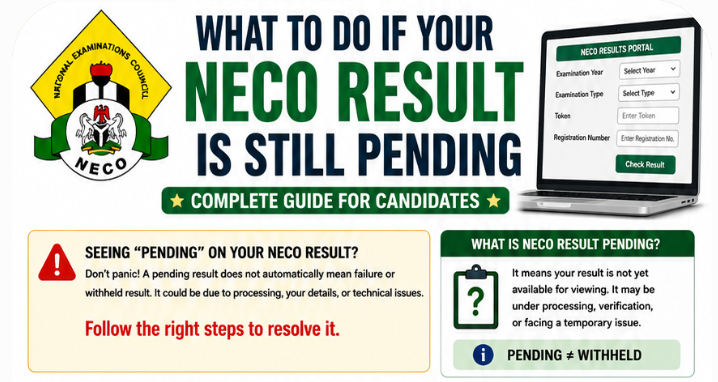
Is your NECO result still pending? Welcome to JambSmartPrep.com. In today’s post, we will be considering What to Do If Your NECO Result Is Still Pending. Thus, if you are here because you are in dire need of the processes involved in undertaking what to do if your NECO Result is still pending, you are in the right place.
Yes, before the end of this online guide, you will Learn what pending means, why it happens, how long to wait, when to report it, and how to resolve missing results. All you have to do is to follow all the instructions outlined in this guide and you will have all the information you need for resolving NECO result still pending issues.
As we all know, checking your NECO result should normally be a straightforward process. You enter your examination details, provide your result-checking token, and view your grades. But what happens when you complete the process and your result is still pending?
Seeing a NECO result pending message can be worrying, especially if you need the result for university admission, JAMB admission processing, scholarship applications, or another important deadline. You may also wonder whether the result has been withheld, whether something went wrong during the examination, or whether you need to contact the National Examinations Council immediately.
The good news is that a pending result does not automatically mean that your result has been cancelled or withheld.
There are several reasons why a NECO result may not be immediately available. It could be related to ongoing result processing, candidate records, examination details, technical problems with the result portal, or a specific issue that requires further attention.
This guide explains what to do if your NECO result is still pending, why the problem happens, how to distinguish a pending result from a withheld result, what you can troubleshoot yourself, and when you should contact your school or NECO.
The official NECO result portal requires candidates to select the correct examination year and examination type before entering their token and registration number. Therefore, checking these details carefully should be your first step whenever your result does not appear as expected.
Quick Answer: What Should I Do If My NECO Result Is Still Pending?
If your NECO result is still pending, do not immediately assume that it has been cancelled or withheld. First, confirm that you selected the correct examination year and examination type. Then check that your registration number and result-checking token are correct.
If the information is correct, try checking the result again through the official NECO result portal. You can also try another browser or device if the website is displaying an error.
If the result remains pending after you have confirmed your details and the problem continues, speak with your school or examination officer if you sat for the SSCE Internal examination. Where necessary, contact NECO through its official support channels and provide your examination details and evidence of the problem.
Most importantly, do not pay anyone who claims they can secretly “release” or “activate” a pending result.
What Does “NECO Result Pending” Mean?
A pending NECO result generally means that the result you are looking for is not yet available for viewing in the expected form.
It is important to understand that pending, withheld, not found, and portal error do not necessarily mean the same thing.
For example, a candidate may see a problem because the result is still being processed. Another candidate may have selected the wrong examination year. Someone else may be dealing with a temporary technical problem.
This is why the exact message displayed on the result portal matters.
If your result is pending, the safest approach is to identify what is actually causing the problem before taking further action.
Pending Result Does Not Automatically Mean Withheld Result
One of the biggest mistakes candidates make is assuming that a pending result is automatically a withheld result.
They are not necessarily the same.
A pending result may indicate that the result is not yet available for viewing. A withheld result, on the other hand, relates to a result that has been withheld by the examination body and may require an official review or investigation.
Do not tell yourself that your result has been withheld simply because it is not showing online.
First, check the exact status displayed by the official system and verify your examination details.
Pending Result vs Result Not Found
A NECO result not found message can have several possible explanations.
You may have entered:
- The wrong registration number
- The wrong examination year
- The wrong examination type
- Incorrect result-checking information
It could also be related to the availability of the result in the system.
The official result portal currently instructs candidates to select their examination year and examination type, enter a token, enter their registration number, and then click the result-checking button.
This means you should carefully verify these details before concluding that your result has disappeared.
Pending Result vs Portal Error
Sometimes the problem is not with your examination record at all.
A slow internet connection, temporary server congestion, browser problem, or other technical issue can prevent the result page from loading correctly.
For this reason, it is useful to try the result-checking process again after confirming that your examination details are correct.
Why Is My NECO Result Still Pending?
There is no single explanation that applies to every candidate.
NECO conducts both SSCE Internal and SSCE External examinations. The Council explains that the SSCE Internal examination is conducted for candidates at the end of their secondary school education, while the SSCE External examination is for candidates who have deficiencies to make up.
The circumstances surrounding a candidate’s result can therefore differ.
Here are some of the common possibilities.
1. Your Result Is Still Being Processed
One possible reason is that your examination result has not completed all necessary processing stages.
Candidates often expect every result to become visible immediately after an announcement that results have been released. In practice, an individual candidate may still encounter a result that is unavailable or pending while records are being processed.
Do not assume that a temporary delay means something is wrong with your examination.
2. Your Candidate Record May Require Additional Verification
Examination results depend on accurate candidate and examination records.
Where a candidate’s information requires additional checking, the result may not appear in the same way as another candidate’s result.
This is one reason candidates should keep their registration details, examination number, school information, and other examination records safe.
3. You Selected the Wrong Examination Year
This is a simple mistake that can produce confusing results.
For example, if you are checking a result from one examination year but select another year on the portal, the system may not return the result you expect.
Always check the year before submitting your request.
4. You Selected the Wrong Examination Type
NECO has different examination categories, including SSCE Internal and SSCE External.
Selecting the wrong examination type can prevent you from finding the correct result.
This is particularly important for candidates who have previously sat for NECO examinations and may have more than one examination record.
5. Your Registration Number Was Entered Incorrectly
Your registration number is one of the key details used when checking your result.
A single incorrect digit can cause the system to reject the request or fail to locate the expected record.
Before trying several times, take a moment to compare the number you entered with your registration slip or other official examination record.
6. There May Be a Temporary Portal Problem
The NECO result portal is an online service. Like other online systems, it may occasionally experience technical problems or heavy traffic.
The official result portal provides the result-checking service and token purchase option for candidates.
If the portal is slow, fails to load, or repeatedly returns an error, try again later rather than assuming that your examination result has a serious problem.
7. Your Result May Require Further Examination-Related Processing
Some candidates may have results that require additional attention before they become fully available.
This can involve examination records or other processes handled by the Council.
Candidates should avoid making assumptions about the reason unless NECO or an authorized school official provides the relevant information.
How to Tell Whether Your NECO Result Is Actually Pending
Before contacting NECO, take a few minutes to establish exactly what is happening.
Start by going to the official NECO result portal.
You should then carefully follow the result-checking process.
Step 1: Select the correct examination year
Choose the year in which you sat for the examination.
Step 2: Select the correct examination type
Make sure the examination category corresponds to the examination you took.
Step 3: Enter your result-checking token
Check that the token has been entered correctly.
Step 4: Enter your registration number
Compare the number with your registration slip before submitting it.
Step 5: Submit the request
Click the button to check your result.
Step 6: Read the message carefully
Do not simply close the page if the result does not appear.
Look at the exact message displayed.
There is a major difference between seeing a pending status, receiving a “result not found” message, encountering an invalid token error, and experiencing a page that simply refuses to load.
Knowing the exact problem will make it much easier to choose the correct solution.
NECO Result Still Pending vs Result Not Showing
These two searches may sound identical, but they can represent different situations.
If the system specifically indicates that your result is pending, the problem may relate to result processing or your examination record.
If nothing appears at all, the problem could instead involve the portal, your browser, your examination details, or the availability of the result.
Use this simple guide:
| Problem | What It May Mean | First Action |
|---|---|---|
| Result pending | Result may still be processing or unavailable | Wait and check again |
| Result not found | Details may be incorrect or record unavailable | Verify year, type and registration number |
| Invalid token | Token information may be incorrect or unusable | Recheck token |
| Missing subject | Part of the result may not be available | Check again and contact the appropriate authority if persistent |
| Blank page | Possible browser or portal problem | Refresh or try another browser |
| Website not loading | Possible connection or server issue | Check your internet and try later |
| Withheld result | Result may be subject to official action or review | Follow NECO’s instructions |
The table is a troubleshooting starting point, not a diagnosis of the reason behind an individual candidate’s result.
What to Do First When Your NECO Result Is Pending
Before making a complaint, work through these basic checks.
1. Confirm your examination year.
Make sure you have selected the year in which you actually took the examination.
2. Confirm your examination type.
Check whether you are trying to access an SSCE Internal or SSCE External result.
3. Verify your registration number.
Compare it with the number on your examination documents.
4. Check your token.
Make sure you are entering the correct result-checking token.
5. Try the official portal again.
If the first attempt fails, wait a little and repeat the process carefully.
6. Try another browser.
A browser problem can sometimes prevent an online page from working correctly.
7. Try another device or network.
If possible, use another phone or computer and a reliable internet connection.
8. Save a screenshot.
If the problem continues, take a screenshot of the exact message displayed.
This evidence can be useful if you later need to contact your school or NECO.
The National Examinations Council’s official website provides its result service, examination information, and official contact details.
Do not send your examination information to random social media accounts or individuals claiming to be NECO officials.
What If Your NECO Result Is Still Pending After Checking Again?
If you have confirmed your examination details and the result remains pending, do not keep changing your information randomly.
Instead, record what you have already checked and move to the next stage.
If you are a school candidate, contact your school’s examination officer or the person responsible for NECO matters. Your school may be able to confirm whether there is an issue with your candidate record or whether other candidates from the same centre are experiencing a similar problem.
If the issue cannot be resolved through the school, or if your situation clearly requires intervention from the examination body, you can then contact NECO through its official channels.
The important thing is to approach the problem with the correct information rather than repeatedly submitting incorrect details.
How to Troubleshoot a Pending NECO Result Step by Step
When your NECO result remains pending, the best approach is to troubleshoot the problem systematically. Do not start changing random details or buying multiple result-checking tokens.
Work through each possible cause one after another. In many cases, the problem can be identified by checking your examination information and using the official result portal correctly.
Step 1: Confirm the Correct NECO Examination Year
The first thing to check is the examination year.
If you sat for the NECO examination in one year but select another year while checking the result, the system may not display the record you expect.
This is particularly important for candidates who have taken NECO more than once.
For example, a candidate who sat for an earlier NECO examination and later registered again should make sure the selected year corresponds to the result being checked.
Before submitting your request, confirm:
- Examination year
- Examination type
- Registration number
- Result-checking token
Do not assume that selecting the most recent year is always correct.
Step 2: Select the Correct Examination Type
The NECO result portal requires candidates to select the appropriate examination type.
This matters because SSCE Internal and SSCE External are different examination categories.
If you select the wrong category, your result may not be located even when your registration number is correct.
If you are unsure which examination type applies to you, check your registration documents or contact your school or examination officer.
Step 3: Check Your NECO Registration Number
A single incorrect digit can prevent the system from locating your result.
Take your registration slip and compare the number carefully with what you entered.
Look for:
- Missing digits
- Extra digits
- Transposed numbers
- Incorrect characters
- Spaces or typing errors
Do not rely on memory.
If you registered through a school, ask the school’s examination officer to confirm the registration number in the official records.
Step 4: Confirm Your Result-Checking Token
The result-checking token is another important part of the process.
If you receive a token-related error, carefully confirm that you entered the correct token.
Do not immediately conclude that your NECO result is missing.
A token problem and a result problem are two different issues.
Keep your payment evidence if you purchased the token electronically. If there is a genuine problem with the transaction or token, this information may become useful when seeking assistance.
Step 5: Refresh the Result Page
Sometimes the page may fail to display correctly because of a temporary connection or browser issue.
Refresh the page and try again.
If the same problem continues, close the browser and reopen it before making another attempt.
Avoid repeatedly clicking the result button when the page appears frozen.
Step 6: Try Another Browser
A browser can sometimes interfere with how an online page loads.
If you are checking your result on a phone, try another browser if one is available.
You can also try checking from a computer.
The purpose is to determine whether the problem is specific to the device or browser rather than your NECO record.
Step 7: Check Your Internet Connection
A poor internet connection can make a result page appear blank, incomplete, or stuck while loading.
If you are using mobile data, move to an area with a stronger connection or try another network.
If you are using a Wi-Fi connection, reconnect and try again.
A technical connection problem should not be mistaken for a pending result.
Step 8: Try Again Later
If the portal is experiencing heavy traffic or a temporary technical problem, waiting before trying again can help.
This is particularly relevant when many candidates are attempting to check their results around the same period.
Avoid refreshing the page continuously for several minutes.
Give the system some time and try again later.
What to Do If Your NECO Result Is Not Showing Online
The search phrase “NECO result not showing” can describe several different situations.
Your result may not be showing because:
- You selected the wrong year.
- You selected the wrong examination type.
- Your registration number is incorrect.
- Your token information is incorrect.
- The result is not yet available.
- The portal is experiencing a technical problem.
- Your candidate record requires additional attention.
The first step is therefore not to panic. Go through your examination details carefully.
Use This NECO Result Troubleshooting Checklist
Before contacting anyone, confirm:
☐ Correct examination year
☐ Correct examination type
☐ Correct registration number
☐ Correct result-checking token
☐ Reliable internet connection
☐ Working browser
☐ Official NECO result portal
☐ Exact message displayed by the portal
If everything is correct and the problem remains, record the issue and proceed to the appropriate support channel.
What If NECO Says “Result Not Found”?
A NECO result not found message can be particularly worrying because candidates may immediately assume that their result has been lost.
That conclusion is premature.
The message may occur because the details supplied to the system do not correspond with the expected examination record.
Start by checking your registration number.
Then confirm the examination year and examination type.
If you have previously registered for NECO, make sure you are not checking an old registration record when you are looking for a more recent result.
Check Your Registration Slip
Your registration slip should be your main reference when entering your examination details.
Compare the information on the slip with the information you are entering on the result portal.
Pay particular attention to the registration number.
Check With Your School
If you are an SSCE Internal candidate, your school may be able to help confirm your registration information.
The school can also help determine whether other candidates from the same centre are experiencing a similar problem.
If several students are experiencing the same issue, it may indicate that the problem requires broader attention.
Contact NECO If the Problem Persists
If your information is correct and your result remains unavailable, contact NECO through its official channels.
When making a complaint, provide enough information for the issue to be investigated.
Do not simply write:
“My result is not showing.”
Instead, provide the examination year, examination type, registration number, school information where applicable, and the exact message displayed by the portal.
What If Only One Subject Is Missing From Your NECO Result?
A candidate may sometimes see most subjects on the result while one or more subjects are missing.
This is different from having the entire result marked as pending.
Do not immediately assume that the missing subject has been cancelled.
A missing subject may require further processing or investigation.
Check the Result Again
First, check the result again carefully.
Make sure the page has loaded completely.
If the subject is still missing, take a screenshot of the result as evidence.
Check Your Examination Records
Review your registration slip and confirm that the affected subject was actually among the subjects you registered for.
If the subject appears on your registration documents but is absent from the result, this information may be important when reporting the problem.
Contact Your School
For school candidates, the examination officer can help compare your registration records with the school’s records.
This is particularly useful when the missing subject affects several candidates from the same school.
Report Persistent Missing Subjects
If the subject remains missing after repeated checks, report the matter through the appropriate official channel.
Keep copies of all relevant documents and screenshots.
What If Your NECO Result Page Is Blank?
A blank result page does not necessarily mean that your result is missing.
It can sometimes be caused by a technical issue.
Try these solutions:
Refresh the Page
Refresh the page once and allow it to load completely.
Close and Reopen the Browser
Completely close your browser before trying again.
Use Another Browser
Try another supported browser if the current one is not displaying the page properly.
Use Another Device
If possible, check from another phone or computer.
Check Your Internet Connection
Make sure the connection is stable before submitting the request again.
Try Again Later
If the portal itself is experiencing problems, waiting may be the most sensible option.
Do not interpret a blank page as proof that your result has been withheld.
What If the NECO Result Portal Is Loading Forever?
A result page that keeps loading without displaying anything can be caused by several factors.
Possible causes include:
- Slow internet
- Heavy traffic
- Temporary server problems
- Browser problems
- Device-related issues
Start by checking your internet connection.
If the connection is stable, try another browser or device.
If other candidates are also reporting similar problems at the same time, the issue may be related to the portal rather than your individual examination record.
Avoid Repeatedly Submitting the Same Request
There is little benefit in clicking the result-checking button repeatedly while the page is frozen.
Instead:
- Stop the current request.
- Close the page.
- Wait for some time.
- Reopen the official portal.
- Enter your details carefully.
- Submit the request once.
- Wait for the result page to respond.
This approach is more useful than repeatedly refreshing a page that is already experiencing problems.
NECO Result Checker Problems You Should Not Ignore
Not every result-checking problem should simply be treated as a technical issue.
Pay attention when you notice:
- A persistent pending status
- A missing subject
- Incorrect candidate information
- An examination record you do not recognize
- A repeated “result not found” message despite correct details
- A persistent token problem
- A result that disappears after previously being visible
- A withheld-result notification
These situations may require further investigation.
Pending NECO Result vs Withheld NECO Result
Candidates often search for both terms because they are unsure whether they mean the same thing.
They do not.
A pending result generally means that the result is not yet available for the candidate to view in the expected form.
A withheld result is a separate situation in which NECO has withheld the result, potentially because it requires an official review or investigation.
Simple Comparison
| Feature | Pending Result | Withheld Result |
|---|---|---|
| Result available for viewing | May not yet be available | May be unavailable because it has been withheld |
| Automatically means malpractice | No | Not necessarily, but an official issue may be involved |
| Candidate should panic | No | No |
| First response | Verify details and monitor | Follow official instructions |
| May require official intervention | Sometimes | Often, depending on the circumstances |
The exact reason for a withheld result should come from NECO or an authorized source. Candidates should not rely on rumours circulating on social media.
What to Do If You Suspect Your NECO Result Has Been Withheld
If the portal or official communication clearly indicates that your result has been withheld, treat it differently from an ordinary pending result.
First, do not pay an individual who promises to “release” it.
A person claiming to have a private connection inside NECO cannot legitimately guarantee the outcome of an official examination review.
Instead:
- Read the official message carefully.
- Contact your school if you are an Internal candidate.
- Ask for clarification through the appropriate NECO channel.
- Keep all examination documents.
- Follow any official instructions provided.
- Avoid submitting false information or documents.
If the result is subject to an investigation, the outcome depends on the official process.
Can NECO Release a Pending Result Later?
A pending result can become available later if the reason for its unavailability is resolved and the result is subsequently released through the official system.
However, candidates should avoid anyone who promises a guaranteed release date or asks for money to “activate” a result.
The safest approach is to monitor the official NECO result portal and follow information from NECO or your school.
If your result remains pending for an unusually long period or you have a specific deadline approaching, escalate the issue through the appropriate official channel rather than relying on unofficial information.
What If Your School Says It Cannot Find Your Result?
Do not stop at the first response.
Ask the school examination officer to confirm:
- Your full name
- Registration number
- Examination year
- Examination type
- Subjects registered
- School or centre information
If the school records correspond with your own documents but the online result remains unavailable, ask what official channel should be used to report the matter to NECO.
Keep copies of any correspondence or evidence relating to the complaint.
What Information Should You Keep Before Reporting a NECO Result Problem?
Before contacting NECO, gather all relevant information in one place.
Your checklist should include:
- Full name
- Registration number
- Examination year
- Examination type
- School name
- State
- Registered subjects
- Result-checking token information where relevant
- Screenshot of the error
- Date and time of the failed result check
- Payment receipt where relevant
This makes it easier to explain the problem clearly.
It also prevents you from having to search for documents while communicating with the appropriate support office.
Do Not Give Your NECO Details to Unverified Agents
A pending result can make candidates vulnerable to fraud.
You may see individuals on social media claiming that they can:
- Release pending results
- Remove withheld results
- Change grades
- Add missing subjects
- Correct examination records instantly
Treat such claims with extreme caution.
NECO candidates should use official channels when dealing with examination records.
Never send your result-checking token, passwords, identity documents, or other sensitive information to strangers simply because they claim to work with NECO.
Can a Pending NECO Result Affect University Admission?
A pending NECO result can become more stressful when you are applying for admission.
For many Nigerian students, the result may be needed for university screening, polytechnic admission, College of Education applications, Direct Entry, scholarships, or other academic processes.
The important thing is to separate the NECO result problem from the institution’s admission requirements.
A pending result does not automatically mean that you cannot seek admission. However, each institution can have its own requirements and deadlines.
Before assuming that your admission is affected, check the specific instructions issued by the institution you are applying to.
What If Your University Requires Your O’Level Result?
If your university requires an O’Level result and your NECO result is still pending, contact the institution’s admission or screening office.
Ask whether candidates with an awaiting or pending result can proceed temporarily.
Do not rely solely on what another student says.
One university may allow a candidate to proceed with an awaiting result while another may impose a deadline for submitting the final result.
If you are applying through JAMB, also make sure your O’Level information is handled according to the requirements of your admission process.
What Should You Do If Your Admission Deadline Is Approaching?
Do not wait until the final day.
If your NECO result is pending and an admission deadline is close, take these steps:
- Check the institution’s official admission instructions.
- Contact the admission or screening office.
- Explain that your NECO result is still pending.
- Ask whether an awaiting-result option is available.
- Keep evidence showing that you have checked the NECO result portal.
- Continue monitoring the official NECO result portal.
- Contact your school or NECO if the result requires further investigation.
If the institution gives you permission to proceed temporarily, keep a record of that instruction.
This can be useful if you later need to explain why your final O’Level result was not available at the time of screening.
Can I Use a Pending NECO Result for Admission?
This is one of the most important questions for candidates searching for what to do if their NECO result is still pending.
The answer depends on the institution and the specific admission process.
Some admission exercises may provide an awaiting-result option. Others may require candidates to provide a valid O’Level result before completing a particular stage.
Therefore, do not assume that a pending NECO result is automatically accepted everywhere.
Check the official instructions of the university, polytechnic, College of Education, or other institution concerned.
If the institution accepts awaiting results, follow its instructions carefully and provide the final NECO result as soon as it becomes available.
What If Your JAMB Admission Process Is Already Underway?
Students who are waiting for NECO results often worry about how the delay may affect their JAMB admission process.
The two processes are related because O’Level results can form part of admission requirements, but they are not the same system.
If your admission process is active, check the requirements of the institution and programme you applied for.
If you have already uploaded an O’Level result and later receive your NECO result, follow the institution’s instructions on whether an update or additional submission is required.
Do not upload random documents simply because another candidate told you to do so.
What If You Need the Result for a Scholarship Application?
A pending NECO result can also affect scholarship applications.
Scholarship providers may request:
- WAEC result
- NECO result
- School transcript
- Admission letter
- JAMB result
- Academic certificates
If the scholarship application permits awaiting results, follow the instructions provided.
If it does not, contact the scholarship provider before submitting incomplete information.
Never alter a document or create a false result to meet an application deadline.
A genuine pending result is easier to explain than an inaccurate document.
How to Contact NECO About a Pending Result
If you have checked your examination details, tried the official result portal, spoken with your school where appropriate, and the problem remains unresolved, you may need to contact NECO.
The National Examinations Council provides official contact information through its website. NECO currently lists in**@******ov.ng among its official contact addresses.
Always verify contact details from the official NECO website before sending sensitive examination information.
Avoid using telephone numbers or email addresses posted by random social media accounts.
When Should You Contact NECO?
You should consider contacting NECO when:
- Your result remains pending after reasonable checking and monitoring.
- Your registration details are correct but the result cannot be found.
- A subject is missing from your result.
- Your result information appears incorrect.
- You receive a message that requires official clarification.
- You cannot resolve a persistent result-checking problem.
- Your result appears to be withheld.
- Your result needs official verification.
- Your school cannot resolve or explain the issue.
The aim is not to contact NECO for every temporary website problem.
Try the basic troubleshooting steps first.
If the issue persists, then provide a clear complaint with supporting information.
How to Write a NECO Result Complaint
A good complaint should be short, factual, and easy to understand.
Avoid sending a long emotional message.
State the problem clearly.
For example, explain that you are a candidate for a particular examination year, provide your registration number, state what happens when you check the result, and mention the exact message displayed.
Include screenshots where appropriate.
Do not exaggerate the situation.
If the portal says “result not found,” report that exact message.
If it says the result is pending, state that.
If only one subject is missing, identify the subject.
This gives the receiving office useful information to work with.
Information to Prepare Before Contacting NECO
Before making a complaint, gather your documents and examination information.
Your Full Name
Use the name associated with your examination registration.
If there is a name mismatch, mention it rather than changing the information yourself.
Registration Number
Check the number carefully before submitting it.
A wrong registration number can make it difficult for the issue to be investigated.
Examination Year
State the exact year of the examination.
Examination Type
Specify whether the examination was SSCE Internal or SSCE External.
School Name
If you are a school candidate, provide your school’s name.
State
Provide the state associated with the examination or school where relevant.
Subjects Affected
If the entire result is unavailable, state that.
If only one or two subjects are affected, name them.
Screenshot of the Error
A screenshot can show the exact message you are receiving.
Make sure the screenshot is clear and relevant.
Token or Payment Evidence
If your complaint concerns a result-checking token or payment, keep the relevant receipt or transaction information.
Do not publish sensitive payment information publicly.
NECO Result Complaint Checklist
Before submitting a complaint, make sure you have:
- Full name
- Registration number
- Examination year
- Examination type
- School name
- State
- Affected subject or subjects
- Exact error message
- Screenshot
- Relevant payment evidence
- Date you first noticed the problem
Having these details ready can make the complaint easier to understand.
Can Your School Help Resolve a Pending NECO Result?
Yes, your school can be an important first point of contact, particularly if you sat for the SSCE Internal examination.
The school may have access to registration records and examination information that can help clarify a problem.
Your school’s examination officer may also know whether other students from the same centre have experienced similar issues.
However, schools do not have unlimited control over NECO’s result system.
If the problem requires action by NECO, the school may need to direct you to the appropriate official channel.
What Your School Can Help You Check
Ask the examination officer to confirm:
- Your registered name
- Registration number
- Examination type
- Examination year
- Registered subjects
- Candidate information
- School or centre information
If the information matches your documents, explain the exact result problem you are experiencing.
What If Your School Cannot Resolve the Problem?
Do not repeatedly visit the school without gathering additional information.
If the school confirms your records but your result remains pending, document what you have already checked.
Then contact NECO through its official channels where necessary.
Keep any correspondence you receive.
This gives you a record of the steps you have taken.
NECO Result Verification After Your Result Is Released
Once your pending result becomes available, do not stop at simply viewing it.
Save a copy for your records.
Depending on what you need the result for, you may also need to verify it through NECO’s official verification system.
NECO operates an e-Verify Result Verification System for result verification and confirmation. The official platform provides services for individuals and institutions.
This can be particularly relevant when a university, employer, scholarship provider, government agency, or another organization asks for formal confirmation of an examination result.
What Is NECO e-Verify?
NECO e-Verify is an online result verification system associated with the National Examinations Council.
It is different from simply checking your result.
Result checking allows a candidate to view examination performance.
Verification is used to confirm that examination information is genuine and corresponds with NECO’s records.
The official e-Verify platform provides verification and confirmation services for individuals and institutions.
When Might You Need NECO Result Verification?
You may need verification when:
- A university requests confirmation.
- An employer needs to authenticate an examination result.
- A scholarship organization requests verification.
- An institution wants to confirm an O’Level qualification.
- You need formal confirmation of your examination record.
The exact procedure and requirements can depend on the type of verification being requested.
How to Verify Your NECO Result Online
Once your result has been released, use the appropriate official NECO verification platform when formal verification is required.
Before starting:
- Confirm that the result is actually available.
- Keep your examination details nearby.
- Use the official NECO verification website.
- Follow the instructions displayed on the platform.
- Enter the requested information carefully.
- Complete any required verification process.
- Keep evidence of the verification if the receiving institution requires it.
Do not use unofficial websites claiming to provide NECO verification.
What If Your Result Becomes Available but Contains an Error?
A pending result may eventually become available and reveal another issue, such as incorrect personal information or a missing subject.
Do not assume that every mistake can be corrected by simply checking the result again.
Examples of issues that may require attention include:
- Wrong name
- Wrong date of birth
- Wrong gender
- Missing subject
- Incorrect candidate details
- Other discrepancies between your examination documents and the displayed result
If you notice an error, document it immediately.
Compare the information with your registration documents and contact your school or NECO through the appropriate process.
What If the Name on Your NECO Result Is Wrong?
A name discrepancy should be treated seriously, especially if you intend to use the result for admission, employment, scholarship applications, or certificate collection.
First, compare the name on the result with your official registration information.
Do not attempt to solve the problem by creating another examination record.
If the error originated during registration, the correction procedure may be different from a problem caused during result processing.
Keep your registration documents as evidence.
You can also read a dedicated guide on how to correct errors on a NECO result for the appropriate procedure.
What If Your Date of Birth or Gender Is Incorrect?
The same principle applies to other personal details.
If your date of birth or gender is incorrect, document the discrepancy.
Check your original registration information.
Then follow the appropriate NECO correction procedure.
Avoid paying unverified agents who promise to change examination records instantly.
NECO Result Pending and Certificate Collection
A pending result can also create confusion about certificates.
A candidate should first ensure that the examination result has been properly released before worrying about certificate collection.
Once you receive the final result, keep your examination documents safely because they may be useful when collecting or verifying your certificate later.
If you are specifically looking for information about obtaining your NECO certificate, use a dedicated NECO Certificate Collection Guide rather than assuming that result checking and certificate collection are the same process.
Keep Your NECO Examination Records Safe
Many result problems become harder to resolve when candidates lose their original examination information.
After registration, keep copies of:
- Registration slip
- Examination number
- School information
- Examination year
- Examination type
- Candidate details
- Payment receipts
- Result-checking information
- Result printout
If you change your phone, lose your email access, or leave secondary school, these records can still be useful.
Do Not Pay Someone to “Release” Your Pending Result
This deserves special attention.
Whenever examination results are delayed, fraudsters may take advantage of worried candidates.
You may encounter claims such as:
- “I can release your pending result.”
- “I have someone inside NECO.”
- “Pay me and your result will appear.”
- “I can remove the withheld status.”
- “Send your token and registration number.”
Do not trust such claims.
A legitimate examination problem should be handled through the appropriate official process.
If someone asks for money in exchange for secretly changing an examination result, treat it as a serious warning sign.
What Happens After You Report a NECO Result Problem?
The next step depends on the nature of the complaint.
A simple portal problem may disappear after the technical issue is resolved.
An incorrect examination detail may require clarification.
A missing subject may require examination records to be checked.
A withheld result may involve an official review.
For this reason, there is no single resolution time that applies to every NECO complaint.
Avoid websites or individuals that promise that every complaint will be resolved within a specific number of hours or days.
The appropriate authority must determine what action is required.
How to Follow Up on a Pending NECO Result Complaint
If you have already submitted a complaint, keep a record of:
- Date of complaint
- Channel used
- Reference number, if provided
- Documents submitted
- Screenshots
- Any response received
When following up, refer to the original complaint instead of submitting completely different information each time.
Consistency helps prevent confusion.
If you receive new information from your school or NECO, keep it together with your original records.
What If You Have an Urgent Admission Deadline?
This is one situation where candidates should act quickly.
If your university screening deadline is approaching and your NECO result remains pending, contact the institution immediately.
Explain the situation and ask what documentation they will accept while the result is unavailable.
At the same time, continue resolving the NECO issue.
Do not assume that missing a deadline is unavoidable simply because the result is pending.
Sometimes the institution has a procedure for candidates whose results are not yet available, but you need to ask the institution directly.
Important: Do Not Confuse “Awaiting Result” With “Pending Result”
These expressions are often used interchangeably by students, but they can refer to different situations.
Awaiting result is commonly used during admission applications to indicate that a candidate has not yet received a required examination result.
Pending result refers to a result that has not become available or has not been fully processed in the examination system.
The exact requirements depend on the institution or organization involved.
If an admission form asks whether you have an awaiting result, follow the form’s instructions rather than assuming that the term has exactly the same technical meaning as the status displayed on the NECO portal.
Your Next Step Depends on the Exact Problem
At this point, your next action should depend on what the NECO system is showing.
If the result says pending
Confirm your details and continue monitoring the official portal.
If it says result not found
Check the examination year, examination type, and registration number.
If the portal is not loading
Troubleshoot your internet connection, browser, device, and try again later.
If a subject is missing
Compare your registration documents with the displayed result and report the issue if it persists.
If the result is withheld
Follow official instructions and seek clarification from NECO or your school where appropriate.
If the result contains incorrect personal details
Document the error and follow the appropriate correction procedure.
If you need the result urgently for admission
Contact the institution immediately while continuing to resolve the NECO issue.
This approach is much more effective than treating every NECO result problem as the same issue.
Common Mistakes Candidates Make When Their NECO Result Is Pending
A pending NECO result can make candidates anxious, especially when admission deadlines are approaching. That anxiety sometimes leads to mistakes that make the situation more confusing.
Before taking any action, avoid these common errors.
1. Assuming Pending Means Withheld
A pending result is not automatically a withheld result.
Do not tell friends, family members, or admission officers that NECO has withheld your result unless the official information actually says so.
First determine the exact status displayed by the result system.
2. Checking the Wrong Examination Year
This is one of the easiest mistakes to make.
If you have written NECO more than once, carefully select the year associated with the result you want to check.
3. Selecting the Wrong Examination Type
Make sure you select the correct examination category.
Choosing the wrong examination type can prevent the system from finding your result even when the registration number is correct.
4. Entering the Wrong Registration Number
Do not type the registration number from memory.
Use your registration slip or another reliable examination document.
Check every digit before submitting the request.
5. Buying Multiple Tokens Because the Result Is Pending
A pending result does not necessarily mean that your token is the problem.
If the token is valid and the issue is actually related to result processing or the portal, buying another token may not solve anything.
6. Using Unofficial Result Websites
Search engines and social media can produce many pages claiming to help candidates check NECO results.
Use the official NECO result portal for result checking. The official portal provides fields for examination year, examination type, token, and registration number. Also read: NECO Portal Problems: NECO Result Not Showing? Causes, Fixes, and Solutions
7. Giving Your Details to Random Agents
Do not send your examination information to people who claim they can release, change, or activate your result.
A pending result should be handled through legitimate examination channels.
8. Refreshing the Portal Excessively
If the website is slow, repeatedly refreshing the page may not solve the underlying problem.
Check your internet connection, try another browser, and return later if the portal appears overloaded.
9. Ignoring Your School
For candidates who sat for SSCE Internal, the school examination officer can be an important source of information.
If your school has not been contacted about the problem, consider asking them to verify your examination records.
10. Waiting Until an Admission Deadline Is Almost Over
If you need your NECO result for admission, do not wait until the final day before asking questions.
Contact the institution early and find out whether it accepts awaiting results or has another procedure for candidates whose results are not yet available.
How to Avoid NECO Result Problems in the Future
You cannot control every stage of examination result processing, but you can reduce avoidable problems by keeping your records and checking your information carefully.
Keep Your Registration Slip
Your registration slip can help you recover important information such as your registration number and candidate details.
Do not throw it away after the examination.
Save Your Examination Number
Store your NECO registration number somewhere safe.
You can keep a digital copy and a physical copy.
Keep Your Examination Details Together
Create a folder containing:
- Registration slip
- Examination number
- Examination year
- Examination type
- School details
- Payment receipts
- Result-checking information
- Result printout
This can save you considerable time if a problem develops later.
Use Official NECO Platforms
Whenever you need to check or verify your result, start with the official NECO platform.
Avoid websites that ask you to provide unnecessary personal information.
Check Your Details Before Submitting
During registration, carefully review your:
- Name
- Date of birth
- Gender
- Subjects
- School details
- Other candidate information
If you notice an error, report it through the appropriate procedure rather than waiting until after the examination.
Keep Payment Receipts
If you purchase a result-checking token or pay for another NECO service, keep the receipt or transaction evidence.
It can be useful if there is a payment-related problem.
NECO Result Pending: A Simple Troubleshooting Flowchart
If your result is still pending, use this order:
NECO result still pending
↓
Check examination year
↓
Check examination type
↓
Verify registration number
↓
Confirm token
↓
Try the official result portal again
↓
Try another browser or device
↓
Check your internet connection
↓
Wait and try again if there is a temporary portal problem
↓
Ask your school to verify your records
↓
Contact NECO if the problem persists
This process helps prevent candidates from jumping directly to the most serious explanation.
What to Do If Your NECO Result Is Still Pending
NECO RESULT STILL PENDING?
Follow These 8 Steps
1. CHECK THE YEAR
Make sure you selected the year you actually sat for NECO.
2. SELECT THE RIGHT EXAMINATION TYPE
Confirm whether you are checking SSCE Internal or SSCE External.
3. VERIFY YOUR REGISTRATION NUMBER
Compare every digit with your registration slip.
4. CHECK YOUR TOKEN
Make sure you are using the correct result-checking information.
5. USE THE OFFICIAL NECO PORTAL
Avoid unofficial result-checking websites.
6. TROUBLESHOOT THE PORTAL
Try another browser, device, or internet connection.
7. CHECK AGAIN LATER
A temporary processing or technical issue may require you to wait.
8. CONTACT THE RIGHT AUTHORITY
Speak with your school or NECO if the problem continues.
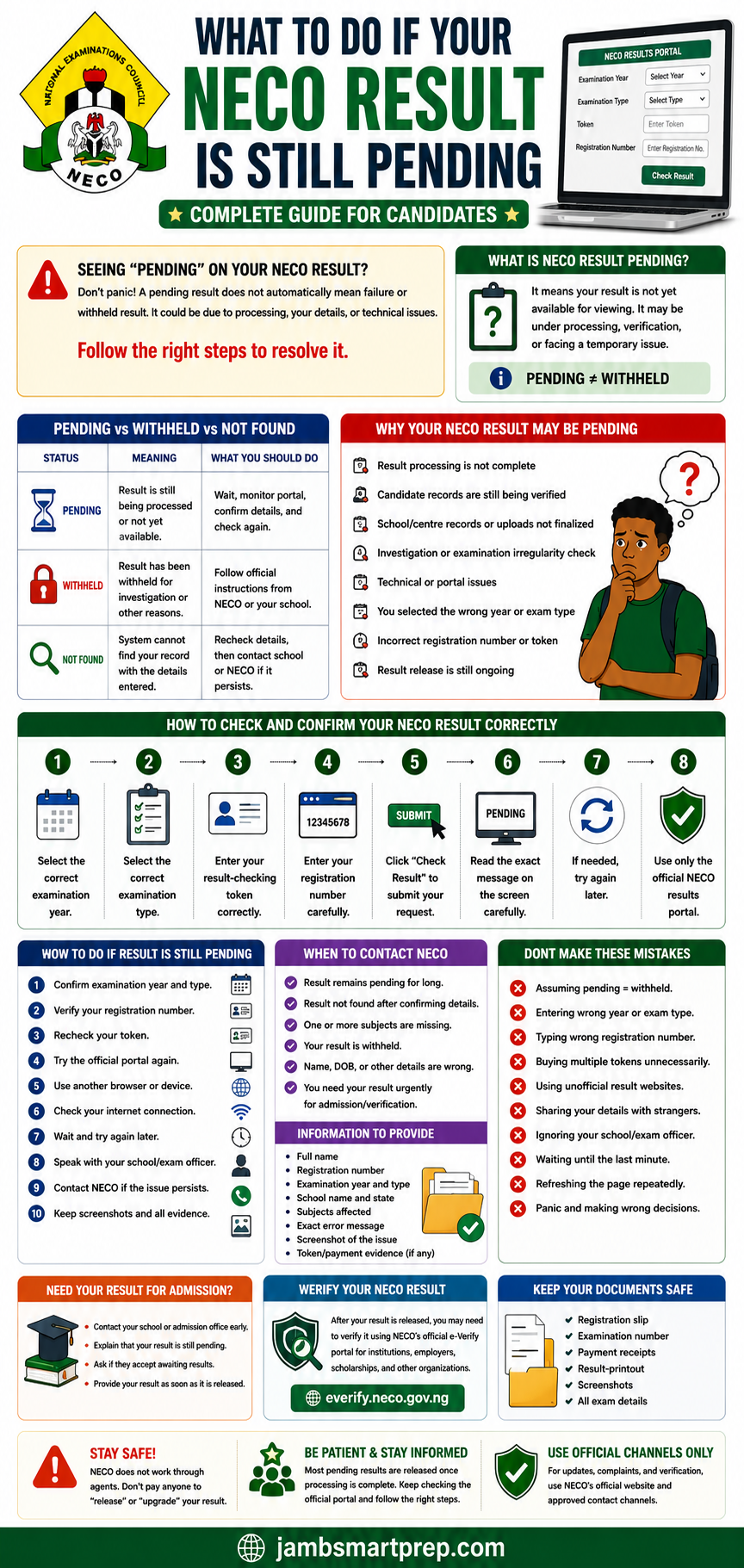
Important Reminder
PENDING DOES NOT AUTOMATICALLY MEAN WITHHELD
Do not pay anyone who promises to release your result.
Keep your registration documents safe.
Frequently Asked Questions About Pending NECO Results
Why is my NECO result still pending?
A NECO result may remain pending for different reasons, including ongoing result processing, candidate record issues, examination-related checks, or technical problems. First confirm your examination year, examination type, registration number, and result-checking details.
A pending status does not automatically mean that your result has been withheld.
What does pending mean on NECO result?
Pending generally means that the expected result is not yet available for viewing in the normal way.
The exact reason can vary from one candidate to another. If the status remains unchanged after you have confirmed your examination details and waited, consider contacting your school or NECO through an official channel.
How long does NECO result stay pending?
There is no single waiting period that applies to every pending result.
The time can depend on the reason the result has not become available. Candidates should monitor the official portal and seek clarification if the issue persists or an important admission deadline is approaching.
Why is my NECO result not showing online?
Possible reasons include selecting the wrong examination year or type, entering an incorrect registration number, using incorrect result-checking information, a temporary portal problem, or the result not yet being available.
Check each detail carefully before reporting the problem.
How do I fix a pending NECO result?
There is no single button that “fixes” every pending result.
Start by confirming your examination information and checking the official result portal again. If the problem persists, speak with your school where appropriate and contact NECO if official intervention is required.
Is a pending NECO result the same as a withheld result?
No.
A pending result and a withheld result should not automatically be treated as the same status.
Pending generally indicates that the result is not yet available in the expected form. A withheld result involves an official decision to withhold the result and may involve further examination or investigation.
Can NECO release a pending result later?
A pending result can become available later if the underlying issue is resolved and the result is subsequently released.
However, candidates should not rely on anyone who promises a guaranteed release date or asks for money to release a result privately.
What should I do if my NECO result is unavailable?
First, confirm the examination year, examination type, registration number, and result-checking information.
Then try the official portal again. If the problem continues, document the exact message displayed and contact your school or NECO as appropriate.
What if only one subject is missing from my NECO result?
Check your registration documents to confirm that you registered for the subject.
If the subject is still missing, save a screenshot of the result and speak with your school examination officer if applicable. If the problem cannot be resolved, report it through the appropriate NECO channel.
Can I use a pending NECO result for admission?
It depends on the institution and the particular admission exercise.
Some institutions may allow candidates to apply with awaiting results, while others may require a final O’Level result at a particular stage.
Check the official admission requirements of the institution you are applying to.
How do I contact NECO about a pending result?
Use the official NECO contact channels published on the Council’s website.
NECO lists in**@******ov.ng among its official contact addresses. NECO official contact information
When contacting NECO, provide your examination year, examination type, registration number, school information where relevant, and a clear explanation of the problem.
Can schools help resolve NECO result issues?
Schools can help verify registration and examination information, particularly for candidates who took the SSCE Internal examination.
However, some matters can only be addressed through NECO’s official processes.
How do I know if my NECO result has been withheld?
Do not assume that a result is withheld simply because it is pending or unavailable.
Look for an official status or communication indicating that the result has been withheld. If you are unsure, contact your school or NECO for clarification.
How do I verify my NECO result online?
NECO provides an official e-Verify system for result verification and confirmation. The verification process is separate from simply viewing your examination result. NECO e-Verify Result Verification System
Use the official NECO verification platform when a university, employer, scholarship provider, or another institution requests formal verification.
Can I check my NECO result again after it has been pending?
Yes. If your result has not yet become available, you can return to the official result portal and check again.
Before doing so, confirm that you are using the correct examination year, examination type, registration number, and result-checking information.
What if my NECO result becomes available but the information is wrong?
Save a copy of the result and compare the information with your registration records.
If you discover a wrong name, date of birth, gender, missing subject, or another discrepancy, follow the appropriate NECO correction procedure rather than attempting to create another result record.
Related NECO Articles You Should Read
- How to Check NECO Result Online
- How to Resolve NECO Result Issues
- How to Buy a Genuine NECO Result Checker Token
- How to Print Your NECO Result
- NECO Result Verification Guide
- NECO e-Verify Portal Guide
- NERVS Portal: NECO Result Verification System Guide
- How to Recover a Lost NECO Examination Number
- How to Correct Errors on NECO Result
- How to Correct Wrong Name on NECO Certificate
- NECO Certificate Collection Guide
- Common NECO Registration Mistakes
- NIN Errors in NECO Registration
- How to Correct Name Mismatch Between NIN and NECO Registration
These articles should form part of a wider NECO content cluster, with this article serving as the main guide for candidates whose results are pending or unavailable.
NECO Result Problems and Solutions at a Glance
| NECO Problem | First Thing to Check | Next Step |
|---|---|---|
| Result pending | Examination details | Monitor and troubleshoot |
| Result not showing | Year, type and registration number | Retry official portal |
| Result not found | Registration information | Verify against registration slip |
| Invalid token | Token details | Confirm token information |
| Blank page | Browser and connection | Try another browser/device |
| Portal not loading | Internet and server status | Try again later |
| Missing subject | Registered subjects | Contact school/NECO if persistent |
| Wrong personal details | Registration documents | Follow correction procedure |
| Withheld result | Official status | Follow NECO instructions |
| Verification problem | Verification details | Use official NECO e-Verify |
Important Things to Remember About a Pending NECO Result
Before leaving this guide, remember these points:
- A pending result is not automatically a withheld result.
- Do not assume that a missing result has been cancelled.
- Check your examination year carefully.
- Select the correct examination type.
- Verify your registration number.
- Check your result-checking token.
- Use the official NECO result portal.
- Try another browser or device when technical problems occur.
- Keep screenshots of persistent errors.
- Speak with your school when school records may be relevant.
- Contact NECO when the issue requires official intervention.
- Do not pay unofficial agents who promise to release or change examination results.
- Check your institution’s admission requirements if your result is needed urgently.
- Keep your examination documents safe.
- Verify your result through the appropriate official system when required.
Conclusion: What to Do If Your NECO Result Is Still Pending
Having a pending NECO result can be frustrating, especially when you are waiting to complete an admission application or another important process. However, the right response is to identify the actual problem instead of assuming the worst.
Start with the basics.
Confirm your examination year, examination type, registration number, and result-checking information. Make sure you are using the official NECO result portal and not an unofficial website.
If the portal is experiencing a temporary problem, trying again later may resolve the issue. If your result remains pending, missing, or unavailable after you have checked your information, speak with your school where appropriate and contact NECO through its official channels when necessary.
If you eventually receive your result, review every subject and personal detail carefully. Save a copy and complete formal verification if a university, employer, scholarship organization, or another institution requires it.
Most importantly, do not allow fear to push you into dealing with unverified agents. No legitimate shortcut should be necessary to access a genuine NECO result.
If your result is still pending, start with the troubleshooting steps in this guide today, keep your examination records safe, and escalate the matter through the proper channel if the problem continues.
What Is Your NECO Result Problem?
Are you seeing “pending,” “result not found,” “result unavailable,” or another message when you try to check your NECO result?
Tell us the exact problem you are experiencing in the comments. Sharing the message displayed on your screen can also help other candidates understand similar NECO result issues.
You can also explore our other NECO guides covering result checking, result verification, result corrections, examination-number recovery, result-checker tokens, NIN errors, and certificate collection.
