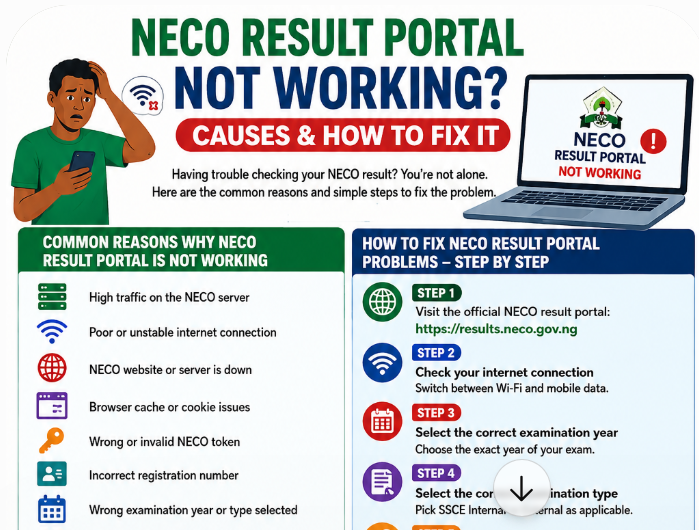
If the NECO result portal isn’t working, or your NECO result isn’t showing, the cause is almost always one of three things:
- a detail entered wrongly on the form (most often the year or examination type);
- a temporary problem with the portal itself, usually heavy traffic just after results are released;
- a result that NECO hasn’t released to you yet because it’s pending, withheld or cancelled.
This guide helps you work out which one you’re facing in about two minutes, and what to do next, without wasting money on a second token you may not need.
We’ve grouped every error message candidates report, with what it really means and the exact fix. You’ll also find a device-by-device troubleshooting checklist, what to do about missing subjects, and how to contact NECO so your complaint gets resolved instead of ignored.
- Use only the official portal: results.neco.gov.ng.
- Check the examination year (the year you sat, not this year).
- Check the examination type: SSCE Internal (June/July, in school) or SSCE External (November/December, often called NECO GCE).
- Retype your registration number and token exactly, with no spaces.
- If the site won’t load, wait and try early morning or late at night in Chrome, or on a laptop.
- Still no result? Read the error table below, then contact NECO through support.neco.gov.ng.
In this guide:
- First, check the four details you entered
- Is it the portal or your result? (2-minute diagnosis)
- Every NECO portal error message explained
- When the NECO portal won’t open or keeps loading
- Device-by-device fixes
- When one or more subjects are missing
- When a whole school or state can’t see results
- Which NECO portal is for what?
- How to contact NECO so your complaint gets resolved
- Protecting your admission while you wait
- What not to do
- FAQs
First, Check the Four Details You Entered
Most “result not found” messages come from a small mistake on the form, not a problem with your result. Before anything else, confirm each of these:
| Detail | Common mistake | How to get it right |
|---|---|---|
| Examination year | Selecting the current year when you sat the exam last year | Select the year you actually sat the exam |
| Examination type | Choosing SSCE External for a school exam, or the reverse | SSCE Internal = June/July, written in school. SSCE External = November/December, often called NECO GCE. |
| Registration number | One wrong digit or letter, or using your JAMB number | Copy it from your registration slip or photocard, character by character |
| Token | Added spaces; confusing O with 0, or I with 1 | Type it exactly as issued, or paste it carefully |
If you correct a detail and the result appears, you’re done. If the token is rejected, see our guide to NECO token problems. Lost your registration number? See how to recover a lost NECO examination number.
Why the examination type catches so many people
NECO runs two main SSCE examinations each year. Candidates often call the school exam “NECO” and the private exam “NECO GCE”, but the portal uses “Internal” and “External”. If you wrote NECO in school during the June/July period, choose SSCE Internal. If you registered privately for the November/December exam, choose SSCE External. Choosing the wrong one returns no record, even when everything else is correct.
Is It the Portal or Your Result? A 2-Minute Diagnosis
Answer these questions in order:
- Does results.neco.gov.ng open at all? If not, it’s a connection or portal-traffic problem. Go to the portal fixes.
- Does the form submit but show an error? Find the exact message in the error table.
- Does your result show but look incomplete or marked? If subjects are missing, see missing subjects. If it says pending, withheld or cancelled, follow the links in the table.
- Can classmates see their results while you can’t? That points to your details or your individual record.
- Can nobody in your school or state see results? That points to a group issue. See whole school or state.
Every NECO Portal Error Message Explained
Exact wording changes from time to time, but these are the messages candidates most often report:
| What you see | What it usually means | What to do |
|---|---|---|
| The site won’t open, keeps loading or shows a blank page | Heavy traffic or a connection problem | Try again later; switch browser or network (fixes below) |
| “This site can’t be reached” / timed out | Your connection, or the portal is overloaded | Check your data or Wi-Fi; retry at a quieter time |
| “Invalid token” | The token was typed wrongly or has a problem | Check the token character by character, then follow the token guide |
| Token already used for another registration number | The token was first used for a different candidate’s number | A token is tied to the first result it checks; you’ll need a new token |
| Token usage limit reached | The token has been used the maximum number of times allowed | Contact NECO support. NECO has said further checks of the same result go through its e-Verify platform rather than a new token. |
| “No record found” / “result not found” | Wrong year, examination type or registration number, or results not yet available for you | Recheck the details; wait if results were only just released |
| “Kindly verify the accuracy of the registration number and token” (or similar) | One of the two doesn’t match NECO’s records | Retype both carefully; check you’re using your NECO number, not JAMB |
| “Something went wrong” | A temporary portal error | Wait, clear your cache, and try again in another browser |
| Result shows, but a subject is missing | Records for that subject are still being processed or need checking | Ask your school, then contact NECO (see below) |
| “Pending” or “Outstanding” | NECO hasn’t finished processing your result | See NECO result pending |
| “Withheld” | NECO is reviewing something before releasing the result | See NECO result withheld |
| “Cancelled” | NECO has cancelled the result, usually over malpractice or an irregularity | See NECO result cancelled |
A word about repeated clicking
When the portal is slow, it’s tempting to press “Check result” again and again. Don’t. Repeated submissions can count against your token’s usage, and they add to the traffic that’s slowing the portal down. Submit once, wait, and if nothing happens after a minute or two, close the tab and try later.
When the NECO Result Portal Won’t Open or Keeps Loading
Right after NECO releases results, hundreds of thousands of candidates try to check at once, and the portal slows down or stops responding. That’s the most common reason “NECO portal is not working”. Work through these steps in order:
- Confirm your connection. Open another website. If that also fails, the problem is your data or Wi-Fi.
- Check the address. Type results.neco.gov.ng yourself. Copycat sites often appear in search results and social media around release time.
- Reload once, then wait. Pressing refresh repeatedly while a page is loading can resubmit your details.
- Use another browser. Chrome or Firefox usually works best. Mini or “data saver” browsers can break the form.
- Clear your browser cache, or open a private/incognito window, then try again.
- Turn off VPNs, ad blockers and data-saving modes, which can block parts of the page.
- Try another device or network. A laptop on a different network often succeeds when a phone fails.
- Check at a quieter time. Early morning (before 7 am) and late at night are usually faster than midday.
A slow or broken portal doesn’t mean anything is wrong with your result. Wait and try again before you contact anyone. Most candidates who are patient for a day or two see their result without needing support at all.
When is the portal busiest?
| Period | Why it’s busy | Better times |
|---|---|---|
| The first 24–72 hours after results are released | Most candidates check immediately | Very early morning or late night |
| JAMB O’level upload rush and admission deadlines | Candidates reprint results for uploads and screening | Check and print early, before the rush |
| Weekday working hours | Schools and cafés checking in bulk | Evenings and weekends |
When NECO results are usually released
Knowing the release pattern helps you tell the difference between “my result isn’t out yet” and “something is wrong”. SSCE Internal results are usually released a few months after the June/July exams. The 2025 results came out in mid-September 2025, and the 2026 results on 24 September 2026. SSCE External (GCE) results usually follow early in the next year. NECO announces each release on its official website and through the news.
| If… | Then… |
|---|---|
| NECO hasn’t announced the release | “No record found” is expected: results aren’t out yet. Don’t buy a token in a hurry from unofficial sellers. |
| Results were announced today or yesterday | Expect heavy traffic. Check at quiet hours and be patient. |
| Results were released over a week ago and classmates can see theirs | Work through the four details, then contact NECO. |
Prepare before release day
- Keep your registration number from your photocard or slip somewhere safe and easy to find.
- Buy your token only from the official result portal, and keep the payment receipt.
- Make sure you have a working browser (Chrome) and enough data.
- Have an email address ready to receive the token, and check its spam folder.
- Plan to check at a quiet time, such as early morning, rather than the moment results are announced.
Device-by-Device Fixes
Android phones
- Use Chrome, not a mini browser.
- Clear Chrome’s cache: Settings → Privacy and security → Clear browsing data → Cached images and files.
- Turn off Lite mode or data saver if the page loads without buttons.
- If the form looks squashed, open the browser menu and tick Desktop site.
iPhones
- Try Safari and Chrome; one may work when the other doesn’t.
- Clear Safari’s history and website data in Settings, or use a private tab.
- Turn off any content blockers for the portal.
Laptops and desktops
- Use an up-to-date version of Chrome, Firefox or Edge.
- Try an incognito or private window, which starts without cached files or extensions.
- Disable browser extensions such as ad blockers for the portal.
Cyber cafés
- Watch the operator enter your details, and make sure they use results.neco.gov.ng.
- Don’t leave your token or registration number written down at the café.
- Ask for a printout and a PDF copy.
When One or More Subjects Are Missing
A result that shows some subjects but not others is usually a records issue, not a failure. Common causes include:
- a practical score or continuous assessment record that hasn’t been matched yet;
- a mismatch between your registration details and the exam record (for example, a subject registered under a different code);
- a subject added late during registration;
- an answer script or score sheet that is still being reconciled.
What to do
- Recheck the result with the correct details to rule out an entry error.
- Compare the subjects shown with the subjects on your registration slip.
- For SSCE Internal, ask your school’s examination officer whether other candidates have the same problem. Schools can raise it with NECO for the whole group.
- If it’s only your record, contact NECO with the details listed in the contact section.
Don’t buy another token to keep rechecking. If the result appears but is incomplete, a new token will show the same thing until NECO updates the record.
Missing subject vs “absent”
If a subject shows as absent (or similar), NECO’s records show you didn’t sit that paper. If you did sit it, gather evidence, such as your attendance records through your school, and raise it with NECO quickly.
Real Situations and What Fixed Them
“It said no record found for three days”
A candidate who wrote NECO in school kept selecting “SSCE External” because a friend told her NECO GCE and NECO are “the same thing”. Switching to SSCE Internal showed her result immediately. If you’ve seen “no record found” several times, change the examination type before you do anything else.
“My token worked yesterday, now it says used”
A token is tied to the first registration number it checks. If a café operator or friend tested your token with a different number, or you mistyped your own number on the first try, the token may now be tied to the wrong record. Contact NECO support with the token serial and your correct number. If that fails, you’ll need a new token, and next time enter the details yourself.
“Everyone in my class can see theirs except me”
The likely causes are a detail mismatch on your record, or a withheld or pending result. Recheck your registration number against your photocard, and ask your examination officer to compare your registration details with NECO’s records. If they match, open a NECO ticket with your screenshot.
“Nobody in our school can see results”
This usually points to a centre-level issue. The principal should contact NECO directly. Individual candidates should keep watching NECO’s official announcements and avoid paying anyone who claims they can “release” results.
“The page loads, but the Check button does nothing”
This is usually a browser issue: a mini browser, data saver mode or an ad blocker stopping the form’s script. Switch to Chrome on a laptop, or Chrome on your phone with data saver off and Desktop site on.
Understanding Your NECO Result Printout
When your result finally appears, check every part of it before you print and upload it:
| Field | What to check |
|---|---|
| Candidate name | Spelling and order exactly as on your other documents |
| Registration number | Matches your photocard and slip |
| Examination type and year | Correct, e.g. SSCE Internal 2026 |
| Centre / school | Your actual school or centre |
| Subjects | Every subject you registered for is listed |
| Grades | A1–F9, with no blanks; see the NECO grading system |
| Personal details (such as date of birth) | Correct; if not, see correcting your date of birth |
If anything is wrong, raise it with NECO now, before you use the result for JAMB or admission.
Glossary: Terms You’ll See
| Term | Meaning |
|---|---|
| SSCE Internal | The June/July Senior School Certificate Examination written by school candidates |
| SSCE External | The November/December examination for private candidates, often called NECO GCE |
| Token | The result checker code you buy from NECO to view your result |
| Registration number | Your unique NECO examination number, on your photocard and slip |
| Pending / outstanding | Your result isn’t fully processed yet |
| Withheld | NECO is holding your result while it reviews something |
| Cancelled | NECO has cancelled the result, usually over malpractice |
| Examination officer | The school staff member who deals with NECO on behalf of candidates |
When a Whole School or State Can’t See Results
Sometimes the problem isn’t your details or the portal: a whole group of candidates can’t see results. That usually points to an administrative issue that affects the group, for example:
- Outstanding registration fees. In past years, there have been reports of candidates being unable to access their results because fees for their registration hadn’t been settled, for example where a state government or school was responsible for paying.
- A school under investigation, for example over suspected malpractice at a centre.
- Records still being processed for a particular centre.
What to do
- Ask your school first. The principal or examination officer usually knows if it’s a group issue.
- Follow NECO’s official announcements on neco.gov.ng.
- Don’t pay individuals who claim they can “release” your result.
- Tell your institution in writing if an admission deadline is close, and keep evidence of the problem.
Which NECO Portal Is for What?
Many candidates search for “NECO portal” and land on the wrong site. NECO runs several official services, each with its own purpose:
| Need | Official address | Notes |
|---|---|---|
| Check your result | results.neco.gov.ng | Buy a token, then check with your registration number |
| Complaints and support tickets | support.neco.gov.ng | For result problems, token issues and enquiries |
| News, announcements and contact details | neco.gov.ng | Release dates, notices and state office information |
| Verify a result (for institutions and employers) | NECO’s official verification service | See how to verify a NECO result |
If a site asks for your token but its address doesn’t end in neco.gov.ng, close it.
How to Contact NECO So Your Complaint Gets Resolved
Use only official channels:
- NECO support portal (tickets): support.neco.gov.ng. This is the best route for a written record.
- Result portal support email: su*****@******ov.ng
- Your school’s examination officer (SSCE Internal) or the NECO state office where you registered (SSCE External).
What to include in your complaint
- Your full name as registered
- Registration number
- Examination year and type (SSCE Internal or External)
- School or centre name
- The exact message the portal shows (attach a screenshot)
- The subjects affected, if any
- Your token’s serial number or payment reference, if the issue is token-related
- Your phone number and email address
A complaint template you can adapt
Dear NECO Support,
I sat the SSCE [Internal/External] [year] at [school/centre], registration number [number]. When I check my result on results.neco.gov.ng, [describe exactly what happens, e.g. “the portal shows ‘No record found'” or “my result shows but Biology is missing”]. I have confirmed the examination year, type and registration number. A screenshot is attached.
Please help me resolve this. My phone number is [number].
Thank you,
[Full name]
Tips for a faster response
- Send one clear, complete request. Several short or duplicate messages slow things down.
- Keep your ticket number and follow up on the same ticket.
- Be specific: the exact error message and screenshot help support staff find your record.
- Involve your school for SSCE Internal issues, especially if classmates are affected.
Protecting Your Admission While You Wait
A result that isn’t showing can delay your JAMB O’level upload and your institution’s screening. Protect yourself:
- Tell your institution in writing if a deadline is close, attaching evidence of your complaint to NECO.
- Keep your NECO ticket number and screenshots to show that you acted promptly.
- Upload as soon as the result appears. See uploading O’level results to JAMB.
- Know your institution’s awaiting-result rules. See using an awaiting result for admission.
- Check your admission status on CAPS. See how to know if JAMB has given you admission.
Once Your Result Shows: Do These Five Things
- Save it as a PDF and print at least two copies.
- Check every detail: your name, date of birth, subjects and grades. Errors are easier to fix early. See correcting errors on a NECO result.
- Keep your token safe; you may need it again.
- Upload the result to JAMB at an accredited CBT centre if you’re seeking admission.
- Understand your grades. See the NECO grading system.
If You Need the Result Urgently
Sometimes a deadline won’t wait, for example a screening upload closing tomorrow. Here’s how to prioritise:
- Try the portal at the quietest time available, usually between midnight and 6 am, on a laptop with a stable connection.
- Ask a classmate from your school whether results for your school are visible. If they are, focus on your own details.
- Open a NECO support ticket immediately with your screenshot, and note the ticket number.
- Write to your institution’s admissions office the same day. Explain the problem, attach the screenshot and ticket number, and ask for an extension or alternative arrangement.
- Visit your NECO state office if you’re close to one; in-person enquiries can clarify whether your result is pending or withheld.
Institutions are more likely to help candidates who can show they acted promptly through official channels. Keep every screenshot, email and ticket number in one folder so you can forward them quickly when someone asks.
What Not to Do
- Don’t pay anyone who promises to “release”, “upgrade” or “fix” your result. NECO doesn’t work through agents. Read our guide to NECO result scams.
- Don’t enter your token or registration number on copycat sites. Check that the address ends in neco.gov.ng.
- Don’t assume “not showing” means “cancelled”. Most missing results appear once the detail is corrected or processing finishes.
- Don’t keep buying tokens to recheck the same problem.
- Don’t share your token on social media or in group chats when asking for help.
Troubleshooting Checklist
- ☐ I’m on results.neco.gov.ng (typed, not clicked from a random link).
- ☐ I selected the year I sat the exam.
- ☐ I selected the right exam type (Internal or External).
- ☐ I copied my registration number from my slip or photocard.
- ☐ I typed my token exactly, with no spaces.
- ☐ I tried Chrome or Firefox, with the cache cleared or an incognito window.
- ☐ I tried another network or device.
- ☐ I tried at a quieter time (early morning or late night).
- ☐ I checked whether classmates have the same problem.
- ☐ I opened a ticket on support.neco.gov.ng with a screenshot.
Frequently Asked Questions
Why is my NECO result not showing?
Usually because of a wrong examination year, examination type or registration number, or because the portal is overloaded. Less often, your result is pending, withheld or cancelled. Use the error table above to find your case.
Why is my NECO result showing “not found”?
“Not found” usually means the details don’t match a record: recheck the year, type (Internal or External) and registration number. If results were only just released, wait and try again.
Why is the NECO portal not working?
Most often because of heavy traffic just after results are released, or because of your browser or connection. Try Chrome, clear your cache, switch networks and check at a quieter time.
What is the official NECO result portal?
results.neco.gov.ng. Don’t enter your token on any other site.
What is the NECO complaint website?
NECO’s support portal at support.neco.gov.ng, where you can open a ticket. You can also email su*****@******ov.ng.
How long after the release should I wait before worrying?
If results were released in the last few days, portal delays are normal. If classmates can see their results and you still can’t after checking every detail, contact your school or NECO.
Will a missing NECO result affect my admission?
It can delay your O’level upload to JAMB, so act early. Many institutions accept an awaiting result for a limited time.
Can my school fix a missing subject?
Your school can’t change your result, but for SSCE Internal it can confirm whether the problem affects other candidates and raise it with NECO, which often speeds things up.
Should I buy another token if my result isn’t showing?
Not until you’ve ruled out entry errors and portal problems. A new token won’t change a pending, withheld or incomplete result.
Can I check my NECO result by SMS?
NECO’s guidance for recent results points candidates to results.neco.gov.ng as the authorised platform. Be wary of SMS “result checking” offers from third parties.
How do I know if my NECO result is withheld or just not showing?
A withheld result is usually labelled as such when the result displays, or confirmed by your school or NECO. “Not showing” with “no record found” is more often an entry error or a result that isn’t available yet. If you’re unsure, ask your examination officer and open a NECO support ticket.
Why does the NECO portal open on my laptop but not my phone?
Mobile browsers, data saver modes and ad blockers can stop the form from working. Use Chrome with data saver off, or tick Desktop site in the browser menu.
Is necoportal the same as results.neco.gov.ng?
Search terms like “necoportal” or “neco result portal” often lead to unofficial sites. The official result portal is results.neco.gov.ng; NECO’s main website is neco.gov.ng.
My NECO result shows “absent” for a subject I wrote. What should I do?
Tell your school’s examination officer immediately, and open a ticket with NECO giving the subject, date and your registration number. Your school can help confirm your attendance.
Can I check an old NECO result?
Yes. Select the year you sat the examination and the correct examination type. If an older record doesn’t appear, contact NECO support with your details.
Where do I check if I lost my registration number?
See how to recover a lost NECO examination number.
Related guides: How to check your NECO result · NECO token not working · NECO result pending · NECO result withheld

NECO Result Missing vs Pending vs Withheld vs Cancelled: Meaning and What to Do – JambSmartPrep
Oct 4, 2026 -
[…] official NECO result portal asks candidates to select their examination year and examination type, enter their token and […]
NECO Result Checker Token Is Not Working 2026/2027? Here’s How to Fix It – JambSmartPrep
Oct 4, 2026 -
[…] the result page and reopen the official NECO Results Portal before entering your details again. The official portal is available at […]