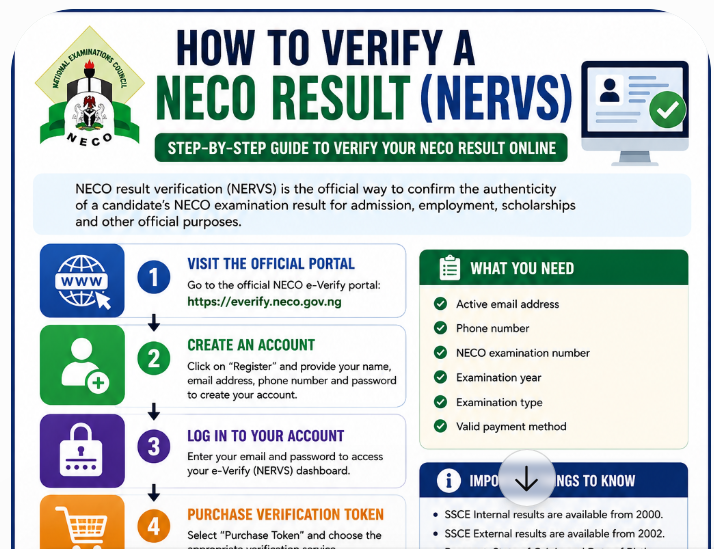
How to verify a NECO result on NERVS Portal or NECO Result Verification System is not a query that is frequently searched by students alone but by organisations that wishes to verify the authenticity of their employees NECO results’ status.
And as you may know, some students and organisations don’t really know the processes involved in getting the result verification done online.
In view of that, we decided to write this post covering virtually everything you need to know about how to verify a NECO result (NERVS).
Yes, during the course of this online guide, you will learn how to verify a NECO result on NERVS, create an e-Verify account, pay for verification, submit your details and download the report. All you need to do to get what you want is to keenly follow all the instructions outlined in this post.
Interestingly, if a school, employer, scholarship body or another organisation asks you to verify your NECO result, simply checking the result online may not be enough. NECO result checking allows you to view your grades, while result verification is used to confirm that the examination record matches the records held by the National Examinations Council.
Many candidates also search for this service as NERVS, NERVS portal, NECO result verification portal or NECO e-Verify. The current official platform is branded NECO e-Verify and provides result verification and confirmation services for individuals, candidates, organisations and tertiary institutions.
In this guide, you will learn what NERVS means, the difference between checking and verifying a NECO result, who can use the service, when verification is required, what you need before starting, and how the verification process works.
What Is NECO Result Verification?
NECO result verification is the process of confirming a candidate’s examination result against the records held by the National Examinations Council.
It is different from simply checking your grades.
For example, a candidate may check a result and see:
- English Language: B3
- Mathematics: C4
- Biology: B2
- Chemistry: C5
That result display tells the candidate what was recorded for the examination.
A university or employer may need something more. It may want confirmation that the result presented by the candidate is genuine and corresponds with NECO’s official records.
This is where the NECO e-Verify/NERVS system becomes important.
NECO describes its e-Verify service as an online result verification and confirmation system. The official platform supports individual verification as well as institutional verification for organisations and tertiary institutions.
What Is the Purpose of NECO Verification?
The main purpose is to provide an official means of confirming examination records.
Verification may be required when a candidate is:
- Applying for admission
- Completing an admission screening process
- Applying for a scholarship
- Seeking employment
- Providing academic records to an organisation
- Applying to an institution outside Nigeria
- Responding to a request for academic credential verification
The official NECO website describes e-Verify as a system designed for instant result verification and institutional bulk verification, including confirmation of academic or basic information for prospective candidates seeking admission or employment.
What Is NERVS?
NERVS refers to the NECO Result Verification System.
This is the terminology commonly used when referring to the NECO result verification platform. The official e-Verify website itself uses the wording “NERVS Portal | Result Verification System” on its pages.
This is why people may search Google for terms such as:
- NERVS portal
- NERVS login
- NERVS result verification
- NERVS NECO
- NECO NERVS
- NERVS verification
- NECO result verification system
The current official service is accessible through the NECO e-Verify platform.
Is NERVS the Same as NECO e-Verify?
For practical purposes, candidates searching for NERVS and those searching for NECO e-Verify are looking for the same official result verification service.
The distinction is mainly in the terminology used across the platform and search results.
The official portal is “NERVS Portal | Result Verification System”, while its main page describes the service as the NECO e-Verify Platform.
So, if you search for NERVS portal login, you should expect to arrive at the NECO e-Verify platform rather than a separate third-party website.
This distinction matters because candidates sometimes search for unofficial websites using the word “NERVS” and may accidentally submit personal or payment information to a fraudulent website.
Always check that you are using the official NECO domain before entering your details.
NECO Result Checking vs NECO Result Verification
One of the most common sources of confusion is the difference between checking a NECO result and verifying a NECO result.
They are related, but they serve different purposes.
| NECO Result Checking | NECO Result Verification |
|---|---|
| Used mainly to view examination grades | Used to confirm an examination record |
| Usually done by the candidate | Can be done by candidates and institutions |
| Shows the candidate’s result | Produces verification or confirmation information |
| Useful for knowing your grades | Useful for admission, employment and official purposes |
| Uses the NECO result-checking service | Uses the NECO e-Verify/NERVS platform |
The official NECO results portal instructs candidates to select their examination year and type, enter their token and registration number, and then check the result.
The e-Verify platform, on the other hand, is designed specifically for result verification and confirmation. It allows individuals to verify their own results or generate a verification report for institutional purposes.
Example
Imagine that Michael checks his NECO result and downloads or views his grades.
Later, a university tells him:
“Submit a verified NECO result.”
Michael should not assume that sending the result he viewed online is automatically the same thing as completing the university’s verification requirement.
He should first find out whether the university wants:
- A NECO e-Verify report
- Direct institutional verification
- A verification token or RRR
- Another form of NECO confirmation
This small distinction can save candidates from paying for the wrong service.
Do I Need NERVS Just to Check My NECO Result?
No.
If your only goal is to see your NECO grades, you normally use the official NECO result-checking portal.
The current NECO results portal asks candidates to select the examination year and examination type, enter a result token and registration number, and select the option to check the result.
NERVS/e-Verify becomes relevant when you need to verify or confirm the result, especially for an institution, employer or other organisation.
This is an important distinction for anyone searching for how to verify a NECO result online.
Who Can Verify a NECO Result?
The NECO e-Verify system is not restricted to universities.
The official platform provides separate services for individual and institutional users.
1. Individual Candidates
A candidate can use the platform to verify their result or generate a verification report for an institutional purpose.
For example, you may need a verified result when applying for admission or responding to a request from an organisation.
2. Universities and Tertiary Institutions
Universities and other tertiary institutions can use the institutional side of the platform to verify candidates’ NECO results.
NECO states that institutions can perform both single and bulk verification. Institutions can also integrate their systems with the NECO e-Verify API for automated verification.
This is particularly useful when an institution needs to check the results of many applicants.
3. Employers
An employer may need to confirm an applicant’s academic qualification during recruitment.
Instead of relying only on a certificate or result printout supplied by the applicant, an organisation can use an appropriate NECO verification process to confirm the record.
NECO’s official website specifically describes e-Verify as a system that supports confirmation of academic information for candidates seeking admission or employment.
4. Organisations and Other Institutions
Other organisations may also require confirmation of a candidate’s NECO result.
The official e-Verify platform states that its service is available to organisations and tertiary institutions within and outside Nigeria.
When Do You Need NECO Result Verification?
You may need to verify your NECO result when another organisation wants independent confirmation of your examination record.
Common situations include the following.
University Admission
A university may ask you to provide a verified examination record as part of its admission or screening process.
Polytechnic or College Admission
Similar verification may be required by polytechnics and colleges of education.
Scholarship Applications
A scholarship organisation may request verification before accepting your academic credentials.
Employment
An employer may need to confirm the authenticity of your secondary school qualification.
International Admission
A foreign institution may request confirmation of your Nigerian examination results.
Institutional Record Checking
A school or organisation may need to confirm a candidate’s result directly through an official verification system.
What If a School Tells You to Verify Your NECO Result?
Do not immediately assume that you must pay for the verification yourself.
First, read the school’s instruction carefully.
Find out:
- Whether the school wants you to generate the verification report.
- Whether the school will verify the result itself.
- Whether the school has an e-Verify account.
- Whether you have been given a reference code.
- Whether you are expected to provide a verification token or RRR.
- Whether the institution has provided specific instructions.
The NECO e-Verify platform supports a token transfer arrangement in which a candidate can process payment and provide the Remita Retrieval Reference to an institution for verification. The platform also describes a process where a candidate submits an application using a reference code supplied by an institution.
That means the correct procedure can depend on what the receiving institution has requested.
Can Someone Else Verify My NECO Result?
Yes, depending on the verification arrangement.
The NECO e-Verify system supports both individual and institutional verification. Institutions can carry out single or bulk verification, while candidates can also process verification and transfer the relevant token information to an institution where the supported workflow applies.
However, you should be careful when allowing another person to handle your verification.
Do not give an unknown person:
- Your email password
- Banking password
- ATM PIN
- OTP
- Account recovery code
If someone is helping you, they should not need control of your personal financial accounts simply to help with NECO result verification.
Important Information About Older NECO Results
Candidates verifying older results should understand that not every piece of information available on a recent record will necessarily appear on an older record.
The current official e-Verify platform states that:
- SSCE Internal results are available from 2000
- SSCE External results are available from 2002
- Passport information is available from 2019
- State of Origin and Date of Birth information is available from 2019
- The absence of a passport does not invalidate the verification report.
This is important if you are verifying an old NECO result and notice that certain personal information is missing.
A missing passport on an older report, for example, should not automatically be interpreted as evidence that the result is fake.
What Happens After You Verify a NECO Result?
The verification process can produce a report that can be viewed through the candidate’s dashboard.
According to the current e-Verify platform, after an application is submitted, a PDF report is generated. The report can be accessed through the View Report option on the dashboard, and the report is also sent to the recipient email supplied during the process.
This makes it important to use an email address that you can access.
If a school or employer specifically requests a verification report, keep a copy of the report and follow the organisation’s instructions on how it should be submitted.
What You Should Know Before Starting NECO Verification
Before opening the NERVS/e-Verify portal, have the relevant examination information available.
You should be prepared to provide information such as:
- Your email address
- Phone number
- Examination number
- Examination year
- Examination type
- Other information requested by the verification form
The individual registration page currently requires an account name, phone number, email address and password.
The most important thing is to enter your examination information carefully. A simple error in an examination number or year can create problems when the system attempts to locate the correct record.
How to Verify a NECO Result on NERVS/e-Verify
The most important part of NECO result verification is knowing where to start and what to enter. Many candidates search for NERVS login, NECO e-Verify portal login, or how to verify NECO result online, but the process is easier when you follow the official sequence.
The current NECO e-Verify platform provides an individual registration and verification process. The platform’s documented workflow involves creating an account, logging in, purchasing a verification token, completing payment, validating the payment, submitting an application and generating a verification report.
Below is the step-by-step process.
How to Verify a NECO Result Online
Step 1: Visit the Official NECO e-Verify Portal
Start by opening the official NECO e-Verify platform via https://everify.neco.gov.ng/?
Be careful when searching for the portal on Google. Several websites may use terms such as “NERVS,” “NECO verification,” or “NECO result verification” in their page titles.
Do not assume that a website is genuine because it displays the NECO logo.
Before entering your details, check that you are on the official neco.gov.ng or everify.neco.gov.ng domain.
Why this matters
A fake website can be designed to look almost identical to a genuine examination portal. It may ask for:
- Your email address
- Password
- Examination number
- Result details
- Payment information
- Bank details
For this reason, always start from NECO’s official website when you are uncertain about the correct verification portal.
Step 2: Create a NECO e-Verify Account
If you have never used the individual verification service before, you need to create an account.
The current registration page asks for basic account information, including:
- Account name
- Phone number
- Email address
- Password
- Password confirmation
Choose an email address that you can access. The official link is https://everify.neco.gov.ng/register?
This is important because the verification process can involve email communication and the generated report may be sent to the email address supplied during the application.
Use your own details
Avoid creating the account with another person’s email unless there is a genuine reason to do so.
If you are helping a younger candidate, make sure the candidate’s examination details are entered correctly.
Step 3: Confirm Your Account and Log In
After registration, proceed to the login page and enter the details associated with your account.
This is the stage many people refer to as NERVS login or NECO e-Verify login via the official link: https://everify.neco.gov.ng/login
If you cannot remember your password, use the password recovery option provided on the official platform rather than creating multiple accounts.
NERVS login problems
If you cannot log in, check:
- Whether you entered the correct email
- Whether Caps Lock is enabled
- Whether you entered the correct password
- Whether your internet connection is working
- Whether you are using the correct official website
The portal also provides a password-reset page for users who cannot remember their account credentials.
Step 4: Select the Option to Purchase a Verification Token
After logging into your account, follow the verification options displayed on your dashboard.
The current e-Verify workflow includes a Purchase Token option.
A verification token is used as part of the payment and verification process.
This is one area where candidates should be particularly careful because NECO result checker tokens and NECO verification tokens should not automatically be treated as the same thing.
If you are verifying a result rather than simply checking your grades, follow the specific instructions displayed inside the official e-Verify platform.
NECO Verification Token vs NECO Result Checker Token
This distinction deserves special attention.
A NECO result checker token is associated with checking a candidate’s examination result.
The e-Verify verification process has its own payment and token workflow.
Therefore, if a university asks you to verify your NECO result, do not automatically buy an ordinary result-checking token and assume that it will complete the verification.
Simple example
Suppose you have already checked your NECO result.
Later, your university says:
“Your NECO result must be verified.”
Buying another ordinary result-checking token may not solve the problem.
Instead, follow the verification instructions provided by the institution and use the official NECO e-Verify platform where applicable.
Step 5: Make the Required Payment
The current NECO e-Verify workflow directs users to make payment through Remita after generating the payment token.
The payment page may display the applicable amount and available instructions.
Because examination service fees can change, it is better to check the amount displayed on the official portal when you are completing the transaction.
Do not rely on an old blog post, Facebook comment or WhatsApp message for the current fee.
Before making payment
Check the following:
- You are on the official NECO e-Verify platform.
- The service you selected is the correct one.
- The payment amount is displayed clearly.
- Your account details are correct.
- You understand what the payment covers.
How Much Does NECO Result Verification Cost?
The verification fee should be treated as a current service charge, not a permanent figure.
NECO can change fees, payment arrangements or service procedures.
For this reason, the article should not encourage candidates to rely on a fixed price published months or years earlier.
Instead, check the amount displayed by the official e-Verify system before completing payment.
This approach also helps candidates avoid unofficial agents who advertise suspiciously cheap “NECO verification” services.
Step 6: Complete the Payment Through Remita
The official e-Verify instructions currently direct candidates to Remita for payment.
After selecting the relevant payment option, complete the transaction using the payment method provided by the payment gateway.
Keep your payment information.
This can include:
- Payment reference
- RRR
- Transaction confirmation
- Date of payment
- Amount paid
Do not throw away your payment evidence immediately after completing the transaction.
It can be useful if the payment does not immediately appear on your NECO account.
Step 7: Validate Your Payment
Completing a payment does not necessarily mean that the verification application has been completed.
The current e-Verify workflow instructs users to return to the platform and validate the payment before proceeding.
This step is important.
If your payment was successful but your dashboard still does not recognise it, do not immediately make another payment.
First:
- Check your payment confirmation.
- Check the transaction reference.
- Return to your e-Verify account.
- Use the payment validation option.
- Confirm whether the transaction has been recognised.
What if payment is deducted but not showing?
Do not panic.
A payment issue does not automatically mean that your money has disappeared.
Keep the transaction evidence and check the payment status through the appropriate official channels.
Avoid repeatedly paying for the same service simply because the first payment has not appeared immediately.
Step 8: Select “Submit Application”
Once your payment has been validated, proceed to the application stage.
The current e-Verify platform instructs users to select Submit Application after successful payment validation.
This is where you provide the information needed to locate and verify the examination record.
Read each field carefully before submitting the form.
Step 9: Enter Your NECO Examination Details
Your examination information must be accurate.
Depending on the verification workflow, you may need to provide information such as:
- Examination number
- Examination year
- Examination type
- Candidate details
- Other information requested by the portal
Check your examination number carefully
An examination number is not something you should enter from memory if you have access to the original document.
Check your:
- NECO registration details
- Result information
- Examination slip
- Previous official records
One wrong digit can prevent the system from finding the correct record.
Step 10: Select the Correct Examination Type
This is another area where mistakes can occur.
A candidate may have taken different types of NECO examinations at different times.
Make sure the examination type selected corresponds with the examination you are trying to verify.
Do not select an examination type simply because it is the first option on the screen.
Step 11: Enter the Correct Examination Year
Select the year in which you actually sat for the examination.
For example, if you took the examination in 2024, do not select 2023 because you completed the verification process in 2026.
The examination year refers to the examination record being verified, not necessarily the year in which you are applying for admission or employment.
Step 12: Submit the Verification Application
After entering your information, carefully review the details before submitting.
Check:
- Name
- Examination number
- Examination type
- Examination year
- Email address
- Other requested information
Once everything is correct, submit the application.
Avoid rushing through this stage.
Step 13: Generate the NECO Verification Report
After a successful application, the e-Verify platform provides access to the verification report.
The current official platform states that a PDF report is generated after submission. The report can be accessed through the dashboard using the View Report option. The platform also states that the report is sent to the recipient email supplied during the verification process.
This is one of the main differences between ordinary result checking and formal verification.
You are not merely viewing your grades.
You are obtaining a verification report associated with the verification process.
Step 14: Download and Save the NECO Verification Report
Once the report is available, download and save it.
You may also need to print it depending on the requirements of the institution requesting it.
Keep a digital copy in a safe location.
For example, you can save it in:
- Your phone
- Computer
- Secure cloud storage
- External storage device
If you are applying to several institutions, having a copy can save you from repeating unnecessary steps when an organisation requests the document again.
What Information Is Available on a NECO Verification Report?
The information displayed can depend on the examination record and year.
The current official e-Verify platform provides important information about its historical records.
It states that SSCE Internal results are available from 2000, while SSCE External results are available from 2002. It also states that passport information, state of origin and date of birth information are available from 2019.
This means that a candidate verifying an older result should not necessarily expect the report to contain exactly the same personal information found on a more recent examination record.
What If My NECO Verification Report Has No Passport?
A missing passport photograph can cause concern, especially when the candidate expects the verification report to contain all the information associated with a newer result.
However, the current NECO e-Verify platform specifically states that the absence of a passport does not invalidate the verification report.
This is particularly relevant to candidates verifying older examination records.
Do not assume that a missing passport automatically means your result is invalid.
How Far Back Can NECO Results Be Verified?
The current e-Verify platform states that:
- SSCE Internal: Results available from 2000
- SSCE External: Results available from 2002
Therefore, someone searching for how to verify an old NECO result should first check whether the examination falls within the records supported by the current platform.
If the result falls within the relevant period but cannot be located, check the examination number, examination type and year before assuming that the record does not exist.
What If NERVS Cannot Find My NECO Result?
If you enter your details and the system does not return the expected result, do not immediately conclude that your result has been cancelled.
Several things could be wrong.
Check:
1. Examination Number
Compare the number you entered with your original examination documentation.
2. Examination Year
Make sure you selected the correct year.
3. Examination Type
Confirm that you selected the examination you actually sat for.
4. Candidate Information
Check whether the information you entered matches the NECO record.
5. Historical Record Availability
If the examination is very old, check the period covered by the e-Verify system.
If everything appears correct and the problem continues, use NECO’s official support channels rather than paying an unofficial agent to “fix” the result.
What If the NECO e-Verify Portal Is Not Working?
A temporary technical problem does not necessarily mean that your result is missing.
Try these basic steps:
- Refresh the page.
- Check your internet connection.
- Close and reopen the browser.
- Try another browser.
- Clear the browser cache if necessary.
- Return to the official portal later.
- Check whether your payment was already processed before attempting another payment.
- Contact NECO support if the problem continues.
Do not create several accounts simply because one attempt fails.
What If My NERVS Payment Is Successful but Verification Is Not Complete?
This is one of the situations where candidates often make an expensive mistake.
They pay again because the first payment does not immediately appear.
Before making another payment:
- Check your bank or payment confirmation.
- Keep your RRR or transaction reference.
- Check your e-Verify dashboard.
- Use the payment validation option.
- Confirm whether the first transaction is pending or successful.
If the issue remains unresolved, contact the appropriate official support channel.
The goal is to avoid paying twice for the same verification request.
NECO e-Verify Report Not Showing: What Should I Do?
If your payment has been validated and your application has been submitted but the report is not immediately visible, check your dashboard.
The official platform states that a PDF report can be viewed through the dashboard after the verification application is successfully submitted. It also states that the report is sent to the recipient email supplied during the process.
Therefore, check:
- Your e-Verify dashboard
- Your email inbox
- Spam or junk folder
- The email address entered during the application
- Your application status
If the report remains unavailable, contact NECO through its official support channel.
NECO Result Verification for Admission
Admission is one of the most common reasons candidates may be asked to verify their examination results.
A university may want to confirm that the result used for admission is genuine.
This can be especially important when a candidate submits an examination result obtained several years earlier.
What Should You Do If Your University Requests NECO Verification?
Follow the university’s instructions first.
Ask:
- Does the school want a PDF verification report?
- Will the school verify the result itself?
- Has the school provided a reference code?
- Does the school require you to purchase a verification token?
- Should the report be sent directly to the institution?
Do not pay for a service that the university does not actually require.
Can a University Verify My NECO Result Directly?
Yes.
NECO provides institutional verification services.
The official e-Verify platform allows institutions to register for verification services. It also supports single verification and bulk verification, while institutions can integrate with the e-Verify API where applicable.
This means that a university may have its own verification workflow instead of asking every candidate to handle the process independently.
How Institutional NECO Verification Works
Institutions have a different workflow from ordinary individual candidates.
The institution first needs to register through the institutional side of the e-Verify system.
The current institutional registration page explains that the information submitted by an institution is subject to verification by NECO before the institution can access the relevant verification services.
Once approved, an institution can use the available verification services according to its account and requirements.
NECO Bulk Result Verification
Bulk verification is particularly useful for schools and organisations dealing with many candidates.
Instead of processing each candidate manually, an approved institution can use the bulk verification option provided by the system.
This can be useful for:
- University admissions
- Polytechnic admissions
- College admissions
- Recruitment
- Large scholarship programmes
- Institutional screening
The official e-Verify platform specifically lists bulk verification among its institutional services.
NECO e-Verify API for Institutions
Larger institutions may need to connect their own systems with NECO’s verification service.
The official e-Verify platform provides information about API integration for institutions.
This is more relevant to organisations than ordinary candidates.
If you are simply verifying your own NECO result, you do not need to worry about API integration.
What If a School Gives You a NECO Verification Reference Code?
Some institutional verification workflows involve a reference code.
If your school gives you one, follow the school’s specific instructions rather than starting a completely different verification process.
The official e-Verify platform includes a candidate application workflow involving a reference code supplied by an institution.
If the reference code does not work, contact the institution that issued it and confirm that:
- The code is correct.
- It has not expired or become invalid.
- You are using it on the correct page.
- Your candidate details are correct.
A Simple NECO Verification Checklist
Before submitting your NERVS/e-Verify application, confirm the following:
- I am using the official NECO e-Verify website.
- I have access to my email address.
- My phone number is correct.
- My examination number is correct.
- My examination year is correct.
- I selected the correct examination type.
- I understand what the verification payment is for.
- I saved my payment reference.
- I validated the payment.
- I checked my details before submitting.
- I saved the verification report after it was generated.
A simple checklist can prevent several avoidable mistakes.
Important Warning About NECO Verification Agents
You do not need to give an unknown “NECO agent” your email password, bank PIN or OTP to verify a result.
Be particularly cautious when someone claims:
- They can verify the result faster.
- They can change a grade.
- They can remove a withheld status.
- They can release a missing result.
- They can bypass the NECO system.
- They can obtain a verification report without payment.
- They have a special connection inside NECO.
These claims should be treated with suspicion.
Use the official NECO platform and support channels whenever possible.
For more protection tips, see our guide on [How to Protect Yourself From NECO Result Scams].
What to Do If You Entered the Wrong NECO Examination Number
Do not deliberately submit an incorrect examination number to see whether another candidate’s result appears.
If you notice the error before submission, correct it.
If you have already submitted the application, check the available options on your dashboard or contact NECO support for guidance.
Your examination number is sensitive examination information and should be handled carefully.
What to Do If Your Name Is Different From Your NECO Record
A name difference can create problems when an institution is comparing your NECO result with another document.
For example, your:
- NECO record may contain one spelling.
- JAMB record may contain another.
- International passport may contain another.
- School record may use a different arrangement.
Do not attempt to solve a name discrepancy by entering false information during verification.
Use the official correction process where applicable, and inform the institution requesting the verification if it needs an explanation.
What we have covered so far
The NECO result verification process is different from simply checking your grades.
For individual candidates, the current e-Verify workflow generally involves:
Create account → Log in → Purchase verification token → Pay through the provided payment gateway → Validate payment → Submit application → Enter examination details → Generate verification report.
The resulting report can be viewed through the dashboard, and the official platform states that it is also sent to the recipient email supplied during the application.
For institutions, NECO provides additional options, including single verification, bulk verification and API integration.
NECO Verification Report, Common Problems and What to Do
Getting through the payment stage is only part of the process. Candidates can still run into problems when the result does not appear, the verification report is unavailable, the examination details do not match, or an institution says it cannot confirm the result.
This section explains what different verification outcomes mean and what you should do before contacting NECO.
What Is a NECO Verification Report?
A NECO verification report is the document generated through the NECO e-Verify system after a successful result verification request.
The report is intended to help an organisation confirm information relating to a candidate’s NECO examination record.
The official e-Verify platform states that a PDF report is generated after the verification application is successfully completed. It can be accessed through the dashboard using the View Report option and is also sent to the recipient email address supplied during the application.
This makes the verification report different from an ordinary screenshot of your NECO result.
NECO Result Screenshot vs Verification Report
| Result screenshot | NECO verification report |
|---|---|
| Shows what the candidate sees after checking a result | Generated through the verification service |
| May be useful for personal reference | Designed for formal verification |
| Does not necessarily satisfy an institution’s verification requirement | Can be submitted where an institution requests verification |
| Can be saved as an image | Generated as a PDF report |
If a university or employer specifically requests a NECO verification report, sending a screenshot of your result may not satisfy its requirement.
Always follow the receiving organisation’s instructions.
How to Download a NECO Verification Report
After your verification request has been successfully processed, log in to your e-Verify account.
Look for the report or application section on your dashboard.
The official platform states that users can select View Report to access the generated PDF report.
You can then save the document to your device.
Save the report in more than one place
It is sensible to keep:
- A copy on your phone
- A copy on your computer
- A backup in secure cloud storage
- A copy in your email
Give the report a clear filename, such as:
NECO_Result_Verification_Report_Michael.pdf
This makes it easier to locate when an institution asks for it later.
What If I Did Not Receive the NECO Verification Report by Email?
First, check your e-Verify dashboard.
The official platform states that the report can be accessed from the dashboard after successful processing. It also states that the report is sent to the recipient email supplied during the application.
If it is not in your inbox, check:
- Spam folder
- Junk folder
- Promotions or filtered folders
- The email address you entered
- Your e-Verify dashboard
Do not immediately submit another application.
If the report is available from your dashboard, download it from there.
If the report is not available anywhere despite a successful application, use the appropriate NECO support channel.
What Does “Result Not Found” Mean During NECO Verification?
A result not being found does not automatically mean the result was cancelled.
There are several possible explanations.
Possible causes include:
- Incorrect examination number
- Wrong examination year
- Wrong examination type
- Typographical error in candidate information
- A mismatch between the information entered and the NECO record
- A record that requires further attention
- Technical problems with the verification service
- An examination record outside the available verification data
The first step should therefore be checking your information.
NECO Result Verification Error: Wrong Examination Number
An incorrect examination number can prevent the system from locating your record.
This can happen when a candidate:
- Misses a digit
- Adds an extra digit
- Confuses letters and numbers
- Copies the number incorrectly
- Uses an examination number from a different examination
Go back to your original NECO documentation and compare every character.
Do not guess the missing number.
If you cannot determine the correct examination number, contact the appropriate official NECO channel rather than entering random numbers.
NECO Result Verification Error: Wrong Examination Year
The examination year is another common source of errors.
Remember that the year you are verifying is the year you sat for the examination.
For example, if you sat for the examination in 2023 and are applying for university admission in 2026, the relevant examination year remains 2023.
Selecting 2026 because it is your current admission year will not retrieve a 2023 examination record.
NECO Verification Error: Wrong Examination Type
NECO has different examination categories.
If the wrong examination type is selected, the system may fail to locate the record you are looking for.
Before submitting your application, confirm the examination type shown on your original documentation.
Do not select an option simply because its name looks similar to the examination you took.
Why Does My NECO Result Show a Different Name?
A candidate may discover that the name on the NECO record differs from the name currently used on another document.
For example:
NECO: JOHN MICHAEL ADE
Other document: MICHAEL JOHN ADE
A difference in name arrangement does not necessarily mean that the result belongs to another person.
However, if there is a serious spelling difference, missing name or completely different name, the issue should be investigated before submitting the result to an institution.
This is especially important for:
- University admission
- Employment
- Scholarships
- International applications
- Professional registration
If the discrepancy is caused by an actual error in the NECO record, follow the official NECO correction procedure where available.
Do not alter the verification report yourself.
Can a NECO Verification Report Be Edited?
You should never edit a NECO verification report to change grades, names, examination numbers or other information.
Changing a PDF or image does not change the official NECO record.
If information on the report is incorrect, the proper approach is to contact NECO and follow its official correction or verification procedure.
Submitting an altered document to a school, employer or government organisation can create serious problems.
What If My NECO Result Is Missing From the Verification System?
This situation should be handled carefully.
A missing result can have different meanings depending on what the candidate sees.
For example, there is a difference between:
- The result is not displaying.
- The result is still pending.
- The result is withheld.
- Some subjects are missing.
- The result has been cancelled.
- The verification system cannot locate the record.
These statuses should not be treated as interchangeable.
If your result is missing, first determine exactly what the official NECO system is showing.
For a detailed guide, see: NECO Result Missing or Incomplete: What to Do When Your Result Is Not Showing
What If Only Some Subjects Appear?
Sometimes a candidate may expect to see all subjects but notice that one or more subjects are missing.
Do not immediately assume that the missing subjects have been cancelled.
Check the original result and compare it with the verification information.
If the missing subjects are present on the official result but absent from the verification information, the discrepancy needs to be investigated.
Record the details before contacting NECO.
Useful information includes:
- Examination number
- Examination year
- Examination type
- Missing subject
- Result-checking evidence
- Verification report
- Payment reference, where relevant
What If My NECO Result Is Pending?
A pending result is different from a missing result.
When a result is pending, the examination record may exist but the relevant result or subject information has not yet been made available.
Possible reasons can vary.
Candidates should avoid relying on unofficial explanations such as:
“Pay an agent and your pending result will be released.”
That is not a safe way to handle a pending result.
If your result remains pending, monitor official NECO information and use the appropriate support channel when necessary.
For a more detailed explanation, see: What to Do If Your NECO Result Is Still Pending
What If My NECO Result Is Withheld?
A withheld result is also different from a missing or pending result. Also read: NECO Result Missing vs Pending vs Withheld vs Cancelled: Meaning and What to Do
A withheld result generally means NECO has not released the result for normal use while an issue is being handled under its examination procedures.
The exact reason can vary.
Candidates should not assume that every withheld result will eventually be released or that every withheld result will be cancelled.
If your result is officially withheld, follow the instructions provided by NECO and wait for the relevant decision or update.
See our detailed guide: How to Handle a Withheld NECO Result
What If My NECO Result Has Been Cancelled?
A cancelled result is more serious than a result that simply does not appear on the portal.
If NECO officially records a result as cancelled, the candidate should not treat the situation as an ordinary portal error.
Do not pay an individual who promises to “uncancel” the result.
Instead:
- Confirm the status through an official NECO channel.
- Keep all relevant examination documents.
- Find out whether NECO has provided an appeal or review procedure.
- Follow the instructions issued by the examination council.
For more information, see: NECO Result Cancellation: What It Means and What to Do
NECO Verification and Old Results
One important point for candidates with older examination records is the availability of historical data.
The current NECO e-Verify platform states that:
- SSCE Internal results are available from 2000
- SSCE External results are available from 2002
- Passport information is available from 2019
- State of Origin and Date of Birth information are available from 2019
The platform also states that the absence of a passport does not invalidate a verification report.
This information is useful when verifying an old NECO result because candidates may expect an older record to contain the same personal information found on newer records.
How to Verify an Old NECO Result
If you are verifying an old NECO result, start with the same official e-Verify platform.
Before submitting the application, confirm:
- Examination year
- Examination type
- Examination number
- Candidate information
If your result falls within the historical records stated by NECO but the system does not locate it, double-check the information before assuming the result is unavailable.
If the information is correct and the problem continues, contact NECO for assistance.
Can NECO Results Be Verified From Outside Nigeria?
NECO’s official e-Verify platform states that its verification service can be used by organisations and tertiary institutions within and outside Nigeria.
This is useful for Nigerian candidates applying to:
- Foreign universities
- International scholarships
- Overseas employment
- Credential assessment services
- Other organisations outside Nigeria
However, an international institution may have additional document requirements.
For example, it may ask for:
- NECO verification
- Certificate
- Statement of result
- Academic transcript
- Certified copies
- Direct institutional confirmation
Therefore, check the receiving institution’s requirements before paying for any service.
NECO Result Verification for Foreign Universities
If you are using a NECO result for admission outside Nigeria, do not assume that a standard result printout will satisfy the institution.
Ask the foreign university exactly what it requires.
It may want the verification to be:
- Submitted electronically
- Sent directly from the examination body
- Uploaded by the applicant
- Provided as a PDF
- Accompanied by another academic document
The verification process should therefore be planned around the requirements of the institution receiving the document.
What If an Employer Wants to Verify My NECO Result?
An employer may want to confirm your secondary school qualification during recruitment.
If the employer provides specific instructions, follow them.
For example, the employer may ask you to:
- Complete NECO verification.
- Download the verification report.
- Send the report to the recruitment department.
- Provide a reference number.
- Authorise the organisation to verify your result.
Do not give an employer your NECO account password unless an official process explicitly requires something different. In ordinary circumstances, a verification request should not require you to surrender control of your personal account.
NECO Verification Token Not Working
A verification token or payment reference that does not work can be frustrating, especially when payment has already been made.
Before trying anything else, determine what exactly has failed.
If the payment was successful
Check your transaction evidence and attempt the platform’s payment validation process.
If the payment was unsuccessful
Check whether your bank or payment provider actually completed the transaction.
If money was deducted
Do not immediately make another payment.
Keep:
- RRR
- Transaction ID
- Payment receipt
- Date and time
- Amount paid
These details can help when investigating the transaction.
NECO e-Verify Account Locked or Password Forgotten
If you cannot access your account, use the official password recovery option.
Avoid creating multiple accounts because you have forgotten your password.
If password recovery does not work, use the official support route rather than giving your login information to an agent.
What If the NECO Verification Portal Is Down?
A website being temporarily unavailable is usually a technical issue.
Try again after a reasonable interval.
You can also:
- Check your internet connection.
- Try another browser.
- Try another device.
- Refresh the page.
- Avoid repeated payments.
- Keep evidence of any transaction already completed.
If the portal remains inaccessible for an extended period, check official NECO communication for updates.
Do not use an unofficial website simply because the official portal is temporarily unavailable.
How to Recognise a Fake NECO Verification Website
This is particularly important because searches for NERVS login and NECO result verification portal can produce many results.
Before entering personal details, look at the website address.
Be suspicious of websites that:
- Use unusual domain names.
- Claim to be NECO but are not on an official NECO domain.
- Ask for your bank PIN.
- Request your OTP.
- Promise to change examination grades.
- Promise to release a withheld result for a fee.
- Claim to have “inside contacts” at NECO.
- Ask you to send your password through WhatsApp.
- Pressure you to pay immediately.
The safest starting point is the official NECO website https://neco.gov.ng/ and its linked e-Verify service.
Can an Agent Verify My NECO Result for Me?
An agent may offer to assist with navigating an online service, but you should be cautious.
You do not need to hand over your:
- Email password
- Banking PIN
- OTP
- ATM information
- Account recovery code
If someone is helping you make an application, you should remain in control of your personal and financial information.
If an agent says they can alter your result, remove a withheld status or change your grade, do not proceed.
NECO Result Verification Scams to Avoid
Candidates searching for NECO result verification, NERVS portal, or NECO result checker may encounter fraudulent offers.
Common scam claims include:
“I can upgrade your NECO grade”
A legitimate verification service does not give an agent the power to change your examination grade.
“I can release your withheld result”
Do not pay a stranger based on this promise.
“I can remove cancellation”
Treat this as a major warning sign.
“Send me your OTP”
Never share your OTP with an unknown person.
“Pay me and I will verify the result without your details”
Be cautious about anyone who refuses to explain the official process.
For more information, read: How to Protect Yourself From NECO Result Scams
What to Do If You Have Already Paid a NECO Scam Agent
If you have already transferred money to someone claiming to be a NECO agent, do not send more money simply because the person says an additional fee is required.
Save all available evidence, including:
- Payment receipts
- Bank transfer details
- Phone numbers
- Emails
- WhatsApp messages
- Website addresses
- Screenshots
- Names or account details supplied by the person
Then contact your bank or payment provider promptly about the transaction and report the suspected fraud through the appropriate official channels.
Most importantly, do not give the person additional passwords, PINs or OTPs.
What Should I Do If My Verification Details Are Wrong?
If you discover an error before completing the application, correct it before submission.
If the verification has already been processed, do not edit the PDF report yourself.
Instead, determine whether the error is:
- A mistake you entered
- A discrepancy in the NECO record
- A legitimate difference between documents
- A technical problem
The solution depends on the type of error.
For an actual error in the examination record, use the official NECO procedure rather than attempting to manipulate the verification document.
NECO Result Verification Problems and Quick Solutions
| Problem | What to check first |
|---|---|
| NERVS login not working | Email, password and official login page |
| Result not found | Examination number, year and examination type |
| Payment not showing | Payment reference and payment validation |
| Verification report missing | Dashboard and email inbox |
| Report not received by email | Spam folder and recipient email |
| Wrong examination year | Select the actual year of the examination |
| Wrong examination type | Compare with original examination record |
| Old result not found | Check whether the record falls within available years |
| Missing passport | Older records may not contain passport data |
| Name discrepancy | Compare the NECO record with other documents |
| Portal not loading | Browser, internet connection and temporary outage |
| Agent asks for OTP | Do not share it |
| Agent promises grade change | Treat it as a scam |
When Should You Contact NECO?
You should consider contacting NECO when:
- Your examination information is correct but the record cannot be located.
- Your payment was successful but cannot be validated.
- Your verification application is stuck.
- Your report is not generated after the expected process.
- There is a serious discrepancy in your examination record.
- You cannot resolve an account problem through the available recovery options.
- An institution requires information that you cannot obtain through the normal verification process.
When contacting NECO, explain the problem clearly.
Include relevant information such as your examination year and examination number where appropriate, along with payment or application references if the problem concerns a transaction.
Do not send unnecessary sensitive information.
How to Prepare Before Contacting NECO Support
A vague message such as:
“My NERVS is not working.”
may not give support staff enough information to understand the problem.
A better explanation is:
“I completed payment for NECO result verification. The payment was deducted from my account, but my e-Verify dashboard does not recognise the transaction. My examination year is [year], and my payment reference is [reference].”
This gives the support team useful information without exposing passwords or financial security credentials.
NECO Verification: Common Mistakes to Avoid
Before moving to the final part of this guide, keep these mistakes in mind.
1. Using the Wrong Website
Always confirm that you are using the official NECO platform.
2. Confusing Result Checking With Verification
Checking your grades does not automatically mean that you have completed formal verification.
3. Entering the Wrong Examination Number
One incorrect character can cause the record search to fail.
4. Selecting the Wrong Examination Year
Use the year you actually sat for the examination.
5. Paying Twice
If your first payment has not appeared, investigate it before making another payment.
6. Giving an Agent Your Password
There is rarely a good reason to surrender control of your account to a stranger.
7. Editing a Verification Report
A modified PDF is not an official correction to a NECO record.
8. Assuming Every Missing Result Is Cancelled
Missing, pending, withheld and cancelled are different situations.
9. Ignoring the Institution’s Instructions
A university or employer may have its own procedure for receiving or conducting verification.
What we have covered so far
A problem during NECO result verification does not automatically mean that your result is invalid.
The safest approach is to identify the exact problem first.
Wrong details require correction. Payment problems require payment validation. Missing reports require dashboard and email checks. Record discrepancies may require NECO assistance.
Above all, use the official NECO e-Verify/NERVS platform and avoid agents who claim they can alter grades, remove result cancellations or bypass NECO procedures.
NECO Result Verification FAQs, Checklist and Final Guidance
By now, you should understand the difference between checking a NECO result and verifying a NECO result through NERVS/e-Verify. You also know how to create an account, make the required payment, submit your examination details and obtain the verification report.
This final section answers the questions candidates commonly ask about NECO result verification, including old results, verification time, payment problems, admission requirements and what to do when something goes wrong.
Frequently Asked Questions About NECO Result Verification
Is NECO Result Verification Compulsory?
No, not every candidate needs to verify a NECO result.
Verification is generally required when a university, employer, scholarship organisation or another institution specifically asks for confirmation of your examination record.
If you only want to view your grades for personal purposes, you can use the official NECO result-checking service.
However, if an institution tells you to submit a verified NECO result, follow its instructions rather than assuming that an ordinary result printout is sufficient.
Is NECO Result Checking the Same as Verification?
No.
NECO result checking allows you to view your examination grades.
NECO result verification confirms the examination record through the official verification system.
This distinction is important because a school may accept a result printout for one purpose but require formal verification for another.
What Is the Official NERVS Portal?
The official result verification service is provided through the NECO e-Verify platform.
The platform identifies its service as the NERVS Portal | Result Verification System and provides verification services for individuals and institutions.
Avoid using websites that claim to be the NERVS portal if they are not connected to the official NECO domain.
How Do I Log Into NERVS?
Use the official NECO e-Verify login page via https://everify.neco.gov.ng/login
Enter the email address and password associated with your account.
If you have forgotten your password, use the official password recovery option instead of creating another account.
How Do I Create a NERVS Account?
Visit the official e-Verify registration page and provide the information requested.
The current registration form asks for information such as:
- Account name
- Phone number
- Email address
- Password
- Password confirmation
Use an email address that you can access because it may be used during the verification process.
How Much Is NECO Result Verification?
The applicable verification fee can change.
For that reason, candidates should check the amount displayed on the official e-Verify platform when starting the verification process.
Do not rely on an old article, social media post or an agent’s message for the current price.
Most importantly, make sure you are paying for the correct service.
A NECO result-checking token should not automatically be assumed to be the same as a verification service.
How Do I Pay for NECO Result Verification?
The current e-Verify process directs users through Remita for payment.
After initiating the verification payment, follow the instructions displayed by the official platform.
Keep your payment reference and receipt until the entire verification process is complete.
If your bank account is debited but the e-Verify system does not immediately recognise the transaction, do not rush to pay again.
What Is an RRR in NECO Verification?
RRR means Remita Retrieval Reference.
It is a reference associated with a Remita payment.
If the NECO verification process gives you an RRR, keep it safely.
It can be useful when:
- Validating a payment
- Checking a payment status
- Following up on a transaction
- Providing payment evidence to support staff
Never publish your payment details publicly.
What Happens After I Pay for NECO Verification?
Payment is only one stage of the process.
The current e-Verify workflow involves:
Register → Log in → Purchase token → Make payment → Validate payment → Submit application → Enter examination details → Validate the details → Generate report.
The exact screen options may change as NECO updates the platform, so always follow the instructions currently displayed on the official website.
How Long Does NECO Result Verification Take?
The time can depend on the condition of the application and the service being used.
A straightforward online verification may proceed once payment and examination details have been successfully validated.
However, candidates should not assume that every verification request will be completed instantly.
Delays can occur because of:
- Incorrect examination details
- Payment validation problems
- Technical issues
- Record discrepancies
- Institutional verification requirements
- Other issues affecting the application
If your application does not progress, check your dashboard first and then contact NECO through an official channel if necessary.
Can I Verify My NECO Result Without a Token?
If the verification process requires a token or payment, you should follow the official process displayed on the e-Verify platform.
Do not trust anyone who claims to have a secret method for bypassing the official payment process.
A person offering to “verify your result without payment” may be attempting to obtain your personal information or money.
Can I Verify a NECO Result Without the Examination Number?
The examination number is important because the verification system needs enough information to identify the correct examination record.
If you have lost your examination number, look through your original documents first.
Check:
- Examination slip
- Result printout
- School records
- Previous application documents
- Other official examination records
If you still cannot recover it, contact NECO for guidance.
Do not guess an examination number.
Can I Verify an Old NECO Result?
Yes, the current NECO e-Verify platform provides historical result records.
According to the platform:
- SSCE Internal results are available from 2000
- SSCE External results are available from 2002
The availability of particular personal information can depend on the year of the examination.
For example, the platform states that passport, State of Origin and Date of Birth information are available from 2019.
Therefore, an older verification report may not contain every type of personal information found on a newer record.
Can I Verify a NECO Result From 2005?
A 2005 SSCE Internal result falls within the period identified by the current e-Verify platform for available SSCE Internal results.
You should still enter the examination year, examination type and examination number correctly.
If the record cannot be found despite using the correct information, contact NECO for assistance.
Can I Verify a NECO Result From 1999?
The current e-Verify information states that SSCE Internal results are available from 2000.
Therefore, a 1999 result does not fall within the SSCE Internal period currently stated on the platform.
If you need confirmation of an older examination record, contact NECO directly and ask what verification option is available for that record.
Do not assume that an unofficial website can provide a genuine NECO verification report.
Does a Missing Passport Make a NECO Verification Report Invalid?
No.
The current NECO e-Verify platform specifically states that the absence of a passport does not invalidate the verification report.
This is particularly useful for people verifying older examination records because passport information is not available for every historical record.
Can I Verify Someone Else’s NECO Result?
Institutional verification is supported by the NECO e-Verify system.
Universities, employers and other approved organisations may verify candidates’ results through the appropriate institutional process.
If you are an individual trying to verify another person’s result, make sure you have a legitimate reason and follow the official procedure.
Do not attempt to obtain another person’s account password or private financial information.
Can a University Verify My NECO Result?
Yes.
NECO provides institutional verification services.
The official platform supports single verification and bulk verification for institutions.
This means a university may verify an individual applicant or process verification for many applicants depending on its requirements.
If your school tells you that it will verify your result directly, ask whether you need to complete any additional action.
Can a Polytechnic Verify NECO Results?
Yes, an eligible tertiary institution can use the institutional verification service.
The same general principle applies to universities, polytechnics, colleges and other organisations that need to confirm examination records.
The institution should use the official NECO verification platform rather than relying on an unofficial agent.
Can Employers Verify NECO Results?
Yes.
The NECO e-Verify service is intended to support confirmation of academic information for candidates seeking employment as well as admission.
An employer may therefore request verification as part of its recruitment or credential-checking process.
Can Foreign Universities Verify NECO Results?
NECO’s e-Verify platform states that its verification service is available to organisations and tertiary institutions within and outside Nigeria.
If you are applying abroad, however, check the foreign institution’s instructions carefully.
It may request NECO verification alongside other documents such as certificates, transcripts or credential assessments.
What Does a NECO Verification Report Prove?
A verification report is intended to confirm the examination information recorded by NECO.
It should not be confused with a certificate or academic transcript.
The receiving organisation may have its own rules about which documents it accepts.
If a university requests a NECO certificate, for example, do not assume that a verification report automatically replaces the certificate.
If it asks for a verification report, provide the report generated through the official verification process.
Can I Use a NECO Verification Report for JAMB Admission?
It depends on what the institution or admission process requests.
NECO verification can confirm your examination record, but JAMB and individual institutions may have separate requirements for uploading or submitting O’Level results.
If a university asks for a verified NECO result, follow the university’s specific instructions.
Do not assume that completing NERVS automatically completes every other admission requirement.
What If JAMB Has a Different Name From My NECO Result?
A difference between your JAMB and NECO names can cause problems during admission processing.
First determine whether the difference is:
- A simple change in name order
- A spelling mistake
- A missing name
- An additional name
- A completely different name
Do not attempt to alter your NECO verification report manually.
If there is a genuine correction issue, use the official correction procedure applicable to the relevant record.
You may also need to provide supporting documents if the institution requests an explanation.
What If My NECO Result Is Showing but Verification Fails?
This can happen because result checking and verification are separate processes.
First confirm that:
- You are using the correct examination number.
- You selected the correct examination year.
- You selected the correct examination type.
- Your personal details are accurate.
- Your payment has been validated.
- You followed the current e-Verify application procedure.
If all the information is correct and verification still fails, contact NECO through its official support channels.
What If My NECO Verification Payment Was Deducted Twice?
If you were charged twice, do not make another payment.
Keep evidence of both transactions.
Record:
- Transaction references
- RRR numbers
- Bank debit alerts
- Dates
- Amounts
- Screenshots
Then follow the official payment support or NECO support process to investigate the duplicate transaction.
Your bank or payment provider may also be able to assist with the payment side of the problem.
What If My NECO Verification Token Has Expired?
If the system says that a token is invalid or expired, first determine whether you are using the correct token for the service.
Do not purchase another token immediately.
Check your dashboard and payment history.
If the problem persists, contact NECO or use the official support option available on the platform.
What If NERVS Says “Invalid Details”?
An invalid-details message does not automatically mean that your NECO result is fake.
Check:
- Examination number
- Examination year
- Examination type
- Name
- Other requested candidate information
Compare the information with your original NECO documents.
If everything matches and the system continues to reject the information, the problem may require official assistance.
What If the Verification Report Contains an Error?
Do not edit the PDF.
First identify whether the information was entered incorrectly during the application or whether the information already exists that way in the NECO record.
If the error is in the NECO record itself, ask NECO about the applicable correction procedure.
Keep the original report.
It may be useful when explaining the issue to an institution.
NECO Verification Checklist for Students
Before completing your application, use this checklist.
Account
- I am using the official NECO e-Verify website.
- I have access to my email.
- My phone number is correct.
- I know my account password.
Examination information
- Examination number is correct.
- Examination year is correct.
- Examination type is correct.
- My name and other information are entered correctly.
Payment
- I selected the correct verification service.
- I used the official payment process.
- I saved my RRR or transaction reference.
- I validated the payment.
- I did not make an unnecessary second payment.
Report
- My verification application was submitted.
- I checked the dashboard.
- I downloaded the PDF report.
- I checked my email.
- I saved a backup copy.
Quick Step-by-Step NERVS Guide
For readers who want the process in a shorter format, here is the complete sequence:
1. Open the official e-Verify website
Use the NECO e-Verify platform.
2. Register
Create an individual account if you do not already have one.
3. Log in
Use your registered email and password.
4. Purchase the verification token
Follow the option displayed on your dashboard.
5. Make payment
Complete the payment through the official payment gateway.
6. Validate payment
Confirm that the payment has been recognised.
7. Submit the application
Enter your examination details.
8. Validate the examination information
Check the examination number, year and type carefully.
9. Generate the report
Complete the verification process and generate the PDF report.
10. Save the report
Download it and check your email for the copy sent through the system.
NECO Result Verification: What You Should Never Do
There are several shortcuts you should avoid.
Never pay someone to change your NECO grade.
Never give an agent your bank PIN or OTP.
Never edit a NECO verification report.
Never use a suspicious website because it promises faster verification.
Never make repeated payments without checking the status of your first transaction.
Never assume that a missing result automatically means cancellation.
Never submit false examination details.
These mistakes can turn a simple verification problem into a much bigger issue.
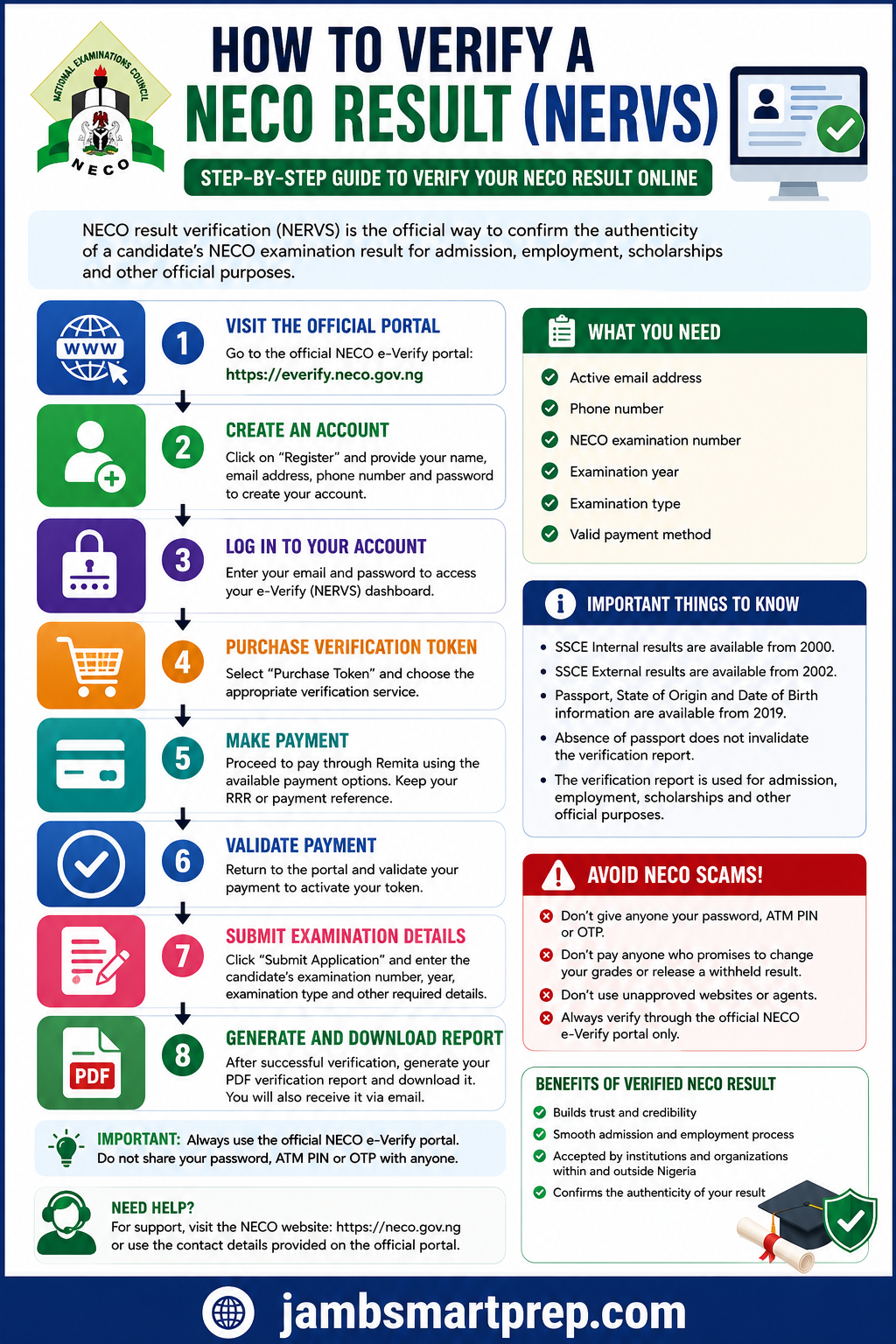
NECO Result Verification (NERVS): 8 Steps to Verify Your Result
1. Visit the Official Portal
Open the official NECO e-Verify website.
↓
2. Create an Account
Register with your correct email and phone number.
↓
3. Log In
Enter your e-Verify account details.
↓
4. Purchase Verification Token
Select the appropriate verification service.
↓
5. Pay Through the Official Gateway
Complete the required payment and keep your RRR.
↓
6. Validate Payment
Confirm that NECO has recognised the transaction.
↓
7. Submit Examination Details
Enter the correct examination number, year and examination type.
↓
8. Generate Your Report
View, download and save the NECO verification PDF.
NECO Result Verification vs Result Checking: Final Comparison
| Question | Result Checking | Result Verification |
|---|---|---|
| Main purpose | View examination grades | Confirm examination records |
| Main user | Candidate | Candidate, school, employer or organisation |
| Official service | NECO results portal | NECO e-Verify/NERVS |
| Payment | Uses the applicable result-checking process | Uses the applicable verification payment process |
| Report | Result display | Verification report |
| Institutional use | May not satisfy a formal verification request | Designed for formal verification |
| Old records | Depends on result-checking availability | e-Verify provides historical records within its stated coverage |
Understanding this distinction will help you avoid paying for the wrong service.
Related NECO Guides to Read
- NECO Result Checker Portal Login: How to Check Your NECO Result Online
- NECO Result Missing or Incomplete: What to Do When Your Result Is Not Showing
- What to Do If Your NECO Result Is Still Pending
- How to Handle a Withheld NECO Result
- NECO Result Cancellation: What It Means and What to Do
- NECO Result Checker Token Not Working: Causes and Solutions
- How to Print Your NECO Result
- How to Correct Errors on Your NECO Result
- How to Protect Yourself From NECO Result Scams
- NERVS Portal Login: NECO Result Verification System Guide
- NECO e-Verify Portal: How to Verify and Confirm NECO Results
Conclusion
Verifying a NECO result is straightforward when you use the correct service and enter your examination information carefully.
The key distinction to remember is simple:
Checking a NECO result tells you what grades are recorded. Verification confirms the examination record through the official verification system.
If a school, employer or other organisation asks for verification, find out exactly what it wants before paying for the service.
Use the official NECO e-Verify/NERVS platform, keep your payment evidence, check your examination details carefully and save the verification report after it is generated.
Most importantly, do not allow an agent to pressure you into sharing passwords, OTPs or financial security information. A genuine examination verification process should never require you to surrender control of your bank account.

NECO Result Token Problems: Invalid Token, Payment Failed, Token Not Working and How to Fix Them – JambSmartPrep
Oct 4, 2026 -
[…] or another institution needs formal verification of your result, you may need the appropriate NECO verification service […]
How To Correct Wrong NECO Registration Number: Step-by-Step Guide – JambSmartPrep
Oct 4, 2026 -
[…] to check your result, submit your O’Level result for admission, or verify your result through NECO e-Verify. A single incorrect digit can prevent a candidate from finding the expected examination […]