Hello there, are you having an issue with your NECO result and you are looking for a guide on how to get the problem resolve? This JambSmartPrep.com tutorial will take you through a complete steps by step guide on How to Resolve NECO Result Issues 2026.

Yes, if you are experiencing NECO result issues, you will learn in this online guide how to fix result not showing, invalid exam number, pending results, portal errors, and other NECO result problems. All you have to do is to follow the instructions in this guide accordingly and you get an answer to whatever you want.

Interestingly, many candidates eagerly wait for the release of their National Examinations Council (NECO) results because they are needed for university admission, job applications, scholarship opportunities, and other important purposes. It can therefore be worrying when you try to check your result only to receive an error message, discover that your result is not showing, or notice incorrect information on the result page.

Every year, thousands of candidates experience different kinds of NECO result issues. Some see “Result Not Found,” while others encounter NECO result checker problems, invalid examination number errors, missing subjects, pending results, or portal loading failures. In many cases, these issues have simple solutions. In other situations, candidates may need to contact NECO or their schools for assistance.

If you have been searching for How to Resolve NECO Result Issues 2026, you are in the right place.

This comprehensive guide explains every common NECO result problem, why it happens, and the practical steps you can take to resolve it. You will also learn how to avoid fake result checker websites, verify your result correctly, recover missing examination details, and know when it is appropriate to contact NECO.

Whether your NECO result is not showing, your NECO result is unavailable, or you simply want a complete NECO result troubleshooting guide, this article provides reliable information based on official NECO procedures and common experiences shared by Nigerian candidates.

Table of Contents

Quick Overview: Common NECO Result Issues

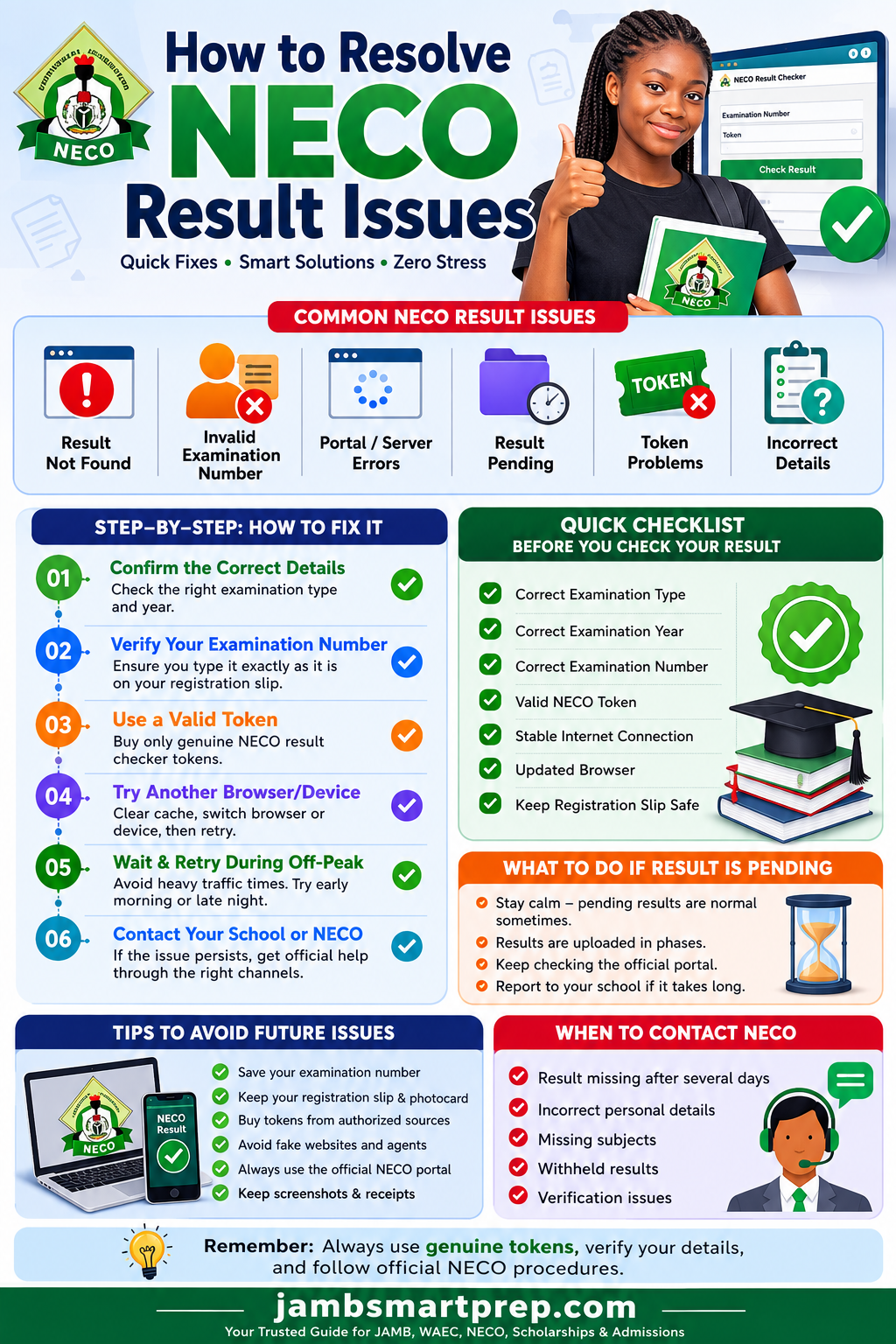
How to Resolve NECO Result Issues 2026

Common Problems

  • Result Not Found
  • Invalid Examination Number
  • Result Not Available
  • Pending Result
  • Missing Subjects
  • Invalid Result Checker Token
  • Portal Loading Errors
  • Wrong Candidate Information
  • Website Server Congestion
  • Withheld Result

Step 1: Verify Examination Number

Step 2: Select the Correct Examination Type

Step 3: Confirm Examination Year

Step 4: Use a Genuine NECO Result Checker Token

Step 5: Refresh Browser or Try Another Device

Step 6: Wait if NECO Servers Are Busy

Step 7: Contact Your School or NECO if the Issue Persists
How to Resolve NECO Result Issues 2026

Pro Tip: Always use the official NECO result checking portal and keep your examination number, registration slip, and payment receipt safe.

Understanding NECO Result Issues

Before trying to fix any problem, it is important to understand what qualifies as a NECO result issue.

A NECO result issue refers to any situation where a candidate cannot successfully access, verify, or use their examination result because of an error, missing information, or technical problem.

Some issues are caused by incorrect details entered by the candidate, while others result from temporary system errors or ongoing processing by NECO.

Examples of Common NECO Result Issues

  • NECO result not showing online
  • Result unavailable
  • Candidate details not found
  • Invalid examination number
  • Invalid token
  • Wrong personal information
  • Missing subject grades
  • Blank result page
  • Slow-loading result portal
  • Withheld result
  • Pending result
  • Incomplete result display
  • Failed result verification

Understanding the exact problem makes it much easier to find the correct solution instead of trying random fixes that may not work.

Why Resolving NECO Result Issues Quickly Matters

Many students underestimate the importance of resolving result problems immediately.

A delayed solution can affect:

  • JAMB admission screening
  • Post-UTME registration
  • University admission deadlines
  • Scholarship applications
  • Student visa applications
  • Employment opportunities
  • Professional licensing registrations
  • NYSC documentation in the future

For example, many Nigerian universities request O’Level results during admission screening. If your NECO result cannot be verified because of unresolved issues, your admission process may be delayed until the problem is corrected.

This is why it is advisable to address any NECO result error as soon as you notice it.

Why NECO Results Sometimes Develop Problems

Many candidates assume that every NECO result issue is caused by a system failure. In reality, most problems arise from simple mistakes made during result checking or temporary conditions affecting the result portal.

Below are the most common reasons candidates encounter NECO result checker problems.

Result Has Not Been Uploaded Yet

One of the most common reasons for a NECO result not showing is that the result has not yet been uploaded to the online portal.

Although NECO announces the official release of results, uploads may not happen simultaneously for every candidate. Some schools, examination centres, or states may experience slight delays before all results become available online.

If you check your result immediately after the official announcement and receive a “No Result Available” message, it may simply mean your result is still being processed.

What You Should Do

  • Wait for 24 to 72 hours.
  • Check again later.
  • Monitor official NECO announcements.
  • Avoid purchasing multiple tokens unnecessarily.

Wrong Examination Number Entered

Typing errors are among the biggest causes of NECO result not found messages.

Examples include:

  • Missing one digit
  • Swapping two numbers
  • Confusing “0” with “O”
  • Entering another candidate’s examination number
  • Using your registration number instead of your examination number

Before assuming something is wrong with your result, compare the examination number you entered with the one on your photocard or registration slip.

Wrong Examination Year Selected

Another surprisingly common mistake is selecting the wrong examination year.

For example, a candidate who sat for the examination in 2026 may accidentally choose 2025 or 2024 while checking the result.

The system will naturally fail to locate the record and may display messages such as:

  • Result Not Found
  • Invalid Candidate Details
  • No Record Exists

Always confirm the examination year before submitting your search.

Wrong Examination Type Selected

NECO conducts different examinations, including:

  • Senior School Certificate Examination (SSCE) Internal
  • Senior School Certificate Examination (SSCE) External
  • Basic Education Certificate Examination (BECE)
  • National Common Entrance Examination (NCEE)

Choosing the wrong examination type prevents the system from locating your result.

For instance, selecting SSCE External instead of SSCE Internal will almost certainly return an error, even if every other detail is correct.

Incorrect Result Checker Token Usage

Every NECO result checker token is designed according to specific usage rules.

Candidates sometimes experience NECO result checker problems because they:

  • Mistype the token
  • Use an already exhausted token
  • Purchase fake tokens
  • Enter unnecessary spaces before or after the token
  • Attempt to use tokens intended for another service

Always ensure you obtain your token from an authorised source and enter it exactly as provided.

Server Congestion

Every year, millions of candidates attempt to access the NECO result portal within the first few hours after results are released.

This sudden increase in traffic often overwhelms the server.

During peak periods, you may experience:

  • Slow loading
  • Website timeout
  • Blank pages
  • Login failures
  • Temporary portal unavailability

This does not necessarily mean your result has a problem.

In many cases, simply waiting until late evening or early morning resolves the issue.

Poor Internet Connection

A weak or unstable internet connection can interrupt communication between your device and the NECO result portal.

Common symptoms include:

  • Result page loading halfway
  • Blank white screen
  • Network timeout
  • Verification failure
  • Session expiration

If possible, switch to a stronger network before attempting another result check.

Browser Cache Problems

Modern web browsers store temporary files to improve browsing speed.

Sometimes these saved files interfere with updated versions of the NECO portal.

If you continue seeing unusual errors, try:

  • Clearing browser cache
  • Clearing cookies
  • Opening the portal in Incognito Mode
  • Using another browser such as Chrome, Firefox, Edge, or Safari

This simple step has resolved result-checking problems for many candidates.

Temporary Portal Maintenance

Like any online platform, the NECO result portal occasionally undergoes maintenance or system upgrades.

During maintenance, candidates may encounter messages indicating that the service is temporarily unavailable.

In such situations:

  • Avoid repeated refreshes.
  • Wait until maintenance is completed.
  • Follow official NECO announcements for updates.

Patience is often the best solution when maintenance is ongoing.

Most Common NECO Result Errors and Their Solutions

Knowing the meaning of common error messages can save you time and reduce unnecessary panic.

Below are some of the most frequent NECO result problems and solutions that candidates encounter.

“Result Not Found”

This is one of the most searched NECO-related issues every examination year.

Possible Causes

  • Incorrect examination number
  • Wrong examination year
  • Wrong examination type
  • Result not yet uploaded
  • Typographical errors
  • Database update still in progress

How to Fix It

  • Double-check your examination number.
  • Confirm the examination year.
  • Ensure you selected the correct examination type.
  • Wait for 24–72 hours if results have just been released.
  • Retry using a stable internet connection.
  • Contact your school if the problem persists after several days.

“Invalid Candidate Number”

This error usually indicates that the examination number entered does not match any record in the selected examination category.

Possible Reasons

  • Typing mistake
  • Incorrect digits
  • Wrong examination year
  • Wrong examination type
  • Using a registration number instead of the examination number

How to Verify Your Examination Number

The safest places to confirm your examination number include:

  • Your NECO photocard
  • Registration slip
  • School examination records
  • Official school examination officer
  • Previous printed result (if available)

Never rely on memory alone when entering examination details.

“Token Already Used”

Another common NECO result checker problem occurs when the portal displays the message “Token Already Used.” This often causes unnecessary panic, especially among candidates checking their results for the first time.

It is important to understand that a result checker token is not unlimited. Each token comes with a specified number of permitted checks. Once that limit is reached, the token cannot be used again.

Why This Happens

Some of the common reasons include:

  • The token has already been used the maximum number of times.
  • Someone else used the token before you.
  • You accidentally checked the result multiple times.
  • The token was purchased from an unreliable seller.
  • There was a mix-up during the purchase process.

How to Fix It

  • Confirm the usage limit of your token.
  • If the token has been exhausted, purchase a new genuine NECO result checker token.
  • Buy tokens only from approved NECO channels or authorized vendors.
  • Avoid sharing your token with other people unless necessary.

“No Result Available”

Seeing “No Result Available” does not always mean you failed the examination or that your result has been lost.

Possible Reasons

  • Your result is still being uploaded.
  • Your school’s results have not been processed completely.
  • There is a temporary delay in the NECO database.
  • You selected the wrong examination year.
  • You entered incorrect examination details.

What You Should Do

  • Wait for 24 to 72 hours if the results were recently released.
  • Verify all information before checking again.
  • Contact your school to confirm that your results have been uploaded.
  • Reach out to NECO if the issue continues for an extended period.

“Incorrect Candidate Information”

Sometimes the portal displays details that do not match yours, or it may reject your information completely.

Examples include:

  • Wrong surname
  • Wrong first name
  • Wrong middle name
  • Incorrect date of birth
  • Wrong gender
  • Different passport photograph

Possible Causes

  • Registration errors
  • Incorrect data uploaded during registration
  • Mistakes during data entry
  • Candidate selecting another person’s examination number

What You Should Do

  • Compare your details with your registration slip.
  • Contact your school’s examination officer immediately.
  • Report any discrepancy to the nearest NECO office if necessary.

Do not ignore incorrect personal information, especially if you intend to use the result for university admission or employment.

Missing Subject Results

Some candidates discover that one or more subjects are missing from their result.

For example, instead of seeing nine subjects, only seven or eight appear.

Why This Happens

Possible reasons include:

  • Subject records are still being processed.
  • Attendance records require verification.
  • Technical upload delays.
  • Examination irregularities affecting specific subjects.
  • Data synchronization issues.

Steps to Take

  • Wait a few days after the initial result release.
  • Confirm with your school whether all subjects were uploaded.
  • Contact NECO if the missing subjects remain unavailable after a reasonable period.

Blank Result Page

A blank result page usually points to a browser or network problem rather than an issue with your result.

Common Causes

  • Slow internet connection
  • Browser cache conflict
  • Unsupported browser
  • Session timeout
  • Temporary portal overload

Solutions

  • Refresh the page.
  • Clear your browser cache and cookies.
  • Restart your browser.
  • Try another internet connection.
  • Use another browser such as Google Chrome or Mozilla Firefox.
  • Attempt checking the result during off-peak hours.

Website Loading Forever

During result release periods, heavy traffic often affects portal performance.

Candidates sometimes mistake this for a system error when it is simply a temporary server overload.

Best Times to Check Your Result

If possible, avoid checking during the busiest hours.

Many candidates experience faster access:

  • Early morning
  • Late evening
  • After midnight

Checking outside peak periods often reduces waiting time significantly.

Step-by-Step Guide to Fix NECO Result Issues

If you are experiencing any NECO result error, follow this troubleshooting guide before contacting NECO.

Step 1: Confirm the Correct Examination Year

This sounds simple, but it is one of the most common mistakes.

Ensure that the year selected matches the year you actually sat for the examination.

Step 2: Select the Correct Examination Type

Always choose the appropriate examination category, such as:

  • SSCE Internal
  • SSCE External

Selecting the wrong examination type prevents the system from finding your result.

Step 3: Verify Your Examination Number

Take your time to compare every digit with your:

  • Registration slip
  • Examination photocard
  • School records

Even one incorrect digit will produce an error.

Step 4: Confirm Your Result Checker Token

Check that:

  • The token is genuine.
  • It has not exceeded its usage limit.
  • It was entered correctly.
  • There are no unnecessary spaces before or after the code.

Step 5: Refresh Your Browser

Sometimes a simple refresh resolves temporary loading issues.

If that does not work:

  • Clear cache.
  • Clear cookies.
  • Restart the browser.

Step 6: Try Another Device

If you are using a mobile phone, switch to a laptop or desktop computer.

If using a computer, try checking from another device.

This helps identify whether the issue is device-related.

Step 7: Use Another Browser

Different browsers sometimes behave differently with certain websites.

Try using:

  • Google Chrome
  • Microsoft Edge
  • Mozilla Firefox
  • Safari

This simple step often fixes display issues.

Step 8: Wait if the Portal Is Busy

Immediately after NECO releases results, millions of candidates attempt to access the portal at the same time.

If the portal becomes slow or unavailable:

  • Wait several hours.
  • Try again later.
  • Avoid repeated refreshing.

Step 9: Contact Your School

Schools usually receive updates directly from NECO.

Your examination officer may already know whether:

  • Results are still being uploaded.
  • There are delays affecting your school.
  • Certain candidates require additional verification.

Step 10: Contact NECO Support

If none of the above solutions work, contact NECO through its official support channels.

Prepare all relevant information before reaching out to make the process faster.

How to Verify Your NECO Result Correctly

Many NECO result issues happen because candidates skip important steps while checking their results.

Following the correct procedure reduces the chances of encountering unnecessary errors.

Use the Official NECO Result Portal

Always check your result using the official NECO result checking platform.

Avoid websites that promise “free NECO result checking” or request unnecessary personal information.

Using unofficial websites increases your risk of fraud and identity theft.

Choose the Correct Examination Type

Before entering your examination number, ensure that you have selected the correct examination category.

Choosing the wrong option is one of the leading causes of NECO result not found errors.

Enter the Correct Examination Number

Take your examination number directly from:

  • Registration slip
  • Photocard
  • School records

Avoid guessing or relying on memory.

Use a Valid Result Checker Token

Your token should:

  • Be genuine.
  • Have remaining usage.
  • Match the required format.

Never purchase tokens from suspicious online sellers offering unusually cheap prices.

Complete the Verification Process Carefully

After entering your details:

  • Review all information.
  • Confirm spelling.
  • Verify examination year.
  • Click Submit once.

Avoid clicking multiple times, as this may slow the process during periods of heavy traffic.

What to Do If Your NECO Result Is Still Pending

A pending result means that your result has not yet been finalized for release.

It does not automatically mean you failed the examination.

Reasons a Result May Be Pending

Some possible reasons include:

  • Ongoing marking processes
  • Verification of scripts
  • Processing delays
  • Administrative review
  • Technical database updates

How Long Should You Wait?

In many cases, pending results are updated after additional processing.

Candidates should:

  • Monitor official NECO announcements.
  • Check the portal periodically.
  • Stay in contact with their school.

Avoid assuming that your result has been permanently withheld unless NECO officially states so.

How to Handle Withheld NECO Results

A withheld result is different from a pending result.

Pending results are usually awaiting processing, while withheld results are temporarily restricted because further investigations are ongoing.

Common Reasons Results Are Withheld

Examination Malpractice Investigation

NECO investigates reported cases of examination malpractice before releasing affected results.

Identity Verification

If there are concerns about a candidate’s identity or registration records, additional verification may be required.

Centre-Based Investigation

Occasionally, an entire examination centre may be investigated due to reported irregularities.

This does not automatically mean every candidate is guilty of malpractice.

Can NECO Release Withheld Results?

Yes.

If investigations show that a candidate was not involved in any examination malpractice or irregularity, NECO may release the withheld result after completing its review.

Candidates should avoid relying on rumours and instead follow official updates from NECO.

In many cases, patience and proper communication with the examination body are the best approach.

How to Recover a Lost NECO Examination Number

Your NECO examination number is one of the most important details required for checking your result, verifying it online, applying for admission, and requesting future services from NECO. If you lose it, don’t panic. There are several legitimate ways to recover it.

Many candidates searching for How to recover a missing NECO result actually need to retrieve their examination number before they can access their result.

Check Your Registration Slip

The easiest place to find your examination number is your original NECO registration slip.

This document usually contains:

  • Full name
  • Examination number
  • Examination centre number
  • Subjects registered
  • Passport photograph
  • Examination year

If you kept a printed or digital copy, your examination number can be retrieved immediately.

Use Your NECO Photocard

Every registered candidate receives a photocard before the examination.

Apart from serving as proof of registration, the photocard contains your:

  • Examination number
  • Centre number
  • Candidate information
  • Passport photograph

Always keep this document even after writing your examination.

Contact Your School

If you registered through a secondary school, your school maintains copies of registration records.

Visit your school’s examination office with a valid means of identification and request your examination details.

Most schools can retrieve your examination number within a short time.

Visit the School Examination Officer

The examination officer usually has access to:

  • Registration records
  • Candidate lists
  • Examination numbers
  • Centre information

This should be your next option if your personal copies are unavailable.

Visit the Nearest NECO State Office

If your school cannot assist, you may visit the nearest NECO state office.

You may be asked to provide:

  • Full name
  • Examination year
  • School name
  • Examination centre
  • Means of identification

Providing accurate information helps officials locate your records faster.

What to Do If Your NECO Result Contains Errors

Finding mistakes on your result can be frustrating, especially when you need it for admission or employment.

Some errors are administrative and can be corrected through official NECO procedures, while others may require supporting documents before any correction is approved.

Common Errors Found on NECO Results

Candidates sometimes report issues such as:

  • Wrong surname
  • Incorrect first or middle name
  • Wrong date of birth
  • Incorrect gender
  • Missing subjects
  • Incorrect grades
  • Wrong passport photograph
  • Incorrect school details

These mistakes should never be ignored because they may affect future verification.

How to Correct Personal Information

If your personal details are incorrect:

  • Notify your school immediately.
  • Contact the nearest NECO office.
  • Complete any required correction forms.
  • Submit supporting documents where necessary.

Depending on the type of correction requested, NECO may require documents such as:

  • Birth certificate
  • Sworn affidavit
  • National Identification Number (NIN)
  • School confirmation letter
  • Court declaration (where applicable)

Always follow the official correction procedure instead of relying on third-party agents.

What About Incorrect Grades?

If you believe your grades are incorrect:

  • Compare the result with your examination records.
  • Confirm that you are viewing the correct candidate’s details.
  • Report the issue through your school or NECO.

Keep in mind that NECO does not alter grades without proper investigation and evidence.

NECO Result Checker Token Problems

One of the most common search queries every year is NECO result checker token because many candidates experience problems related to purchasing or using their tokens.

Fortunately, most token-related issues are easy to resolve.

The “Expired Token” Misconception

Many candidates believe that unused NECO result checker tokens expire within a few weeks.

In reality, the important issue is not always the age of the token but whether it is:

  • Genuine
  • Valid for the service
  • Within the allowed usage limit

If a token has never been used and remains valid under NECO’s terms, it should work when entered correctly.

Token Already Used

If you receive this error:

  • Confirm whether someone else has already used the token.
  • Check the number of permitted uses.
  • Purchase a new genuine token if the previous one has been exhausted.

Buying Genuine NECO Result Checker Tokens

To reduce the risk of fraud:

  • Buy only from approved NECO sales channels.
  • Avoid social media vendors offering unrealistic discounts.
  • Verify payment receipts.
  • Keep proof of purchase until you successfully access your result.

Beware of Fake Token Scams

Unfortunately, fraudsters take advantage of candidates during every result release period.

Avoid anyone who promises:

  • Unlimited result checks
  • Lifetime tokens
  • Free premium access
  • Discounted tokens without proof of authenticity
  • Instant result upgrades

If an offer sounds too good to be true, it probably is.

NECO Portal Problems and Quick Fixes

Sometimes the issue is not your result but the portal itself.

Knowing how to troubleshoot common portal problems can save you unnecessary stress.

Website Not Opening

Possible causes include:

  • Server maintenance
  • Heavy traffic
  • Internet connection problems
  • DNS issues

Quick Solutions

  • Refresh the page.
  • Try again later.
  • Restart your internet connection.
  • Use another browser.
  • Check whether other websites are opening normally.

Login or Access Issues

Although candidates primarily access the result portal using examination details and a token, some NECO online services may require account access.

If you encounter login issues:

  • Confirm your credentials.
  • Reset your password if applicable.
  • Clear browser cache.
  • Try another browser.

SSL or Security Errors

Occasionally, browsers may display security warnings.

If this happens:

  • Confirm you are visiting the official NECO website.
  • Ensure your browser is updated.
  • Check your device’s date and time settings.

Never enter your details on websites with suspicious security warnings.

Slow Loading Pages

Heavy traffic during result release is usually responsible for slow loading.

The best approach is to:

  • Wait a few hours.
  • Retry during off-peak periods.
  • Avoid refreshing the page repeatedly.

Browser Compatibility Problems

Older browsers may not display the portal correctly.

For the best experience, use updated versions of:

  • Google Chrome
  • Mozilla Firefox
  • Microsoft Edge
  • Safari

Keeping your browser updated improves security and performance.

When You Should Contact NECO

Many result issues can be resolved independently, but there are situations where contacting NECO becomes necessary.

You should consider official assistance if:

  • Your result remains unavailable several days after release.
  • Your examination number is confirmed correct but still returns an error.
  • Your personal details are incorrect.
  • Subjects are missing from your result.
  • Your result cannot be verified.
  • Your result has been withheld and you require clarification.
  • You encounter certificate-related issues after result release.

Always give yourself enough time to troubleshoot common problems before escalating the matter.

Information to Prepare Before Contacting NECO

Having complete information ready helps NECO process your complaint more efficiently.

Prepare the following:

Personal Information

  • Full name
  • Date of birth (if required)
  • Phone number
  • Email address

Examination Information

  • Examination number
  • Examination year
  • Examination type
  • School name
  • Examination centre (if available)
  • State where you wrote the examination

Supporting Documents

  • Registration slip
  • Photocard
  • Payment receipt
  • Result checker token details
  • Screenshot of the error message
  • Printed copy of the result page (if available)

Providing accurate information reduces delays and helps officials identify your record more quickly.

Why You Should Avoid Unofficial Agents

When candidates experience prolonged NECO result issues, they sometimes turn to individuals who claim to have “connections” within NECO.

This is risky and unnecessary.

Be cautious of anyone who promises to:

  • Change your grades for a fee.
  • Release a withheld result through unofficial means.
  • Generate a fake verification report.
  • Sell “special” result checker tokens.
  • Correct your personal details without following NECO’s official process.

Such offers are often fraudulent and may expose you to financial loss or legal consequences.

The safest approach is always to work through your school or NECO’s official channels.

Common Mistakes Candidates Make While Checking NECO Results

Many NECO result issues are caused by avoidable mistakes rather than technical faults. Taking a few extra minutes to verify your details before checking your result can save you a great deal of stress.

Below are some of the most common mistakes candidates make and how you can avoid them.

1. Selecting the Wrong Examination Type

NECO conducts several examinations, including:

  • SSCE Internal
  • SSCE External
  • Basic Education Certificate Examination (BECE)
  • National Common Entrance Examination (NCEE)

If you choose the wrong examination type, the portal may display messages such as:

  • Result Not Found
  • Invalid Candidate Details
  • No Result Available

Always confirm the exact examination you sat for before proceeding.

2. Choosing the Wrong Examination Year

This is another frequent cause of NECO result not found errors.

For example, if you sat for the examination in 2026 but accidentally selected 2025, the system will not locate your record.

Always double-check the examination year before submitting your details.

3. Typing the Wrong Examination Number

A single incorrect digit can prevent the portal from finding your result.

To avoid this:

  • Copy your examination number directly from your registration slip or photocard.
  • Read the number carefully before clicking the submit button.
  • Avoid relying on memory.

4. Using Fake Websites

Cybercriminals often create websites that look similar to the official NECO portal.

These fake websites may:

  • Steal your personal information.
  • Collect fake payments.
  • Sell invalid result checker tokens.
  • Display misleading information.

Always verify that you are using the official NECO result checking platform.

5. Buying Fake Result Checker Tokens

Some candidates purchase cheaper tokens from unverified online sellers.

Unfortunately, many of these tokens are:

  • Invalid
  • Already exhausted
  • Counterfeit
  • Generated fraudulently

Buying from trusted sources helps you avoid unnecessary frustration and financial loss.

6. Poor Internet Connection

An unstable internet connection can interrupt communication with the result portal.

This may lead to:

  • Blank pages
  • Timeout errors
  • Incomplete loading
  • Failed verification

If possible, use a reliable mobile or broadband connection before checking your result.

7. Refreshing the Portal Repeatedly

Repeatedly refreshing the page during periods of heavy traffic may increase waiting time or trigger temporary session errors.

Instead:

  • Wait patiently.
  • Reload only after a reasonable interval.
  • Try again later if the portal remains busy.

8. Panicking Immediately After Result Release

When NECO announces the release of results, millions of candidates visit the portal within the first few hours.

Heavy traffic often causes:

  • Slow loading
  • Temporary downtime
  • Delayed uploads

If your result does not appear immediately, wait for a while before assuming there is a serious problem.

Tips to Avoid NECO Result Issues

Although some problems are beyond a candidate’s control, many can be prevented through proper preparation.

Here are practical tips to help you avoid common NECO result problems and solutions in the future.

Save Your Examination Number

Store your examination number in multiple secure places.

You can:

  • Save it on your phone.
  • Write it in a notebook.
  • Email it to yourself.
  • Keep a printed copy.

This reduces the chances of losing it when you need it.

Keep Your Registration Slip Safe

Your registration slip contains valuable information that may be required for:

  • Result checking
  • Result verification
  • Admission screening
  • Certificate collection

Store both printed and digital copies if possible.

Buy Genuine Result Checker Tokens

Always purchase your token from authorized channels.

Avoid offers that promise:

  • Extremely low prices
  • Unlimited usage
  • Instant premium access

Buying genuine tokens protects you from scams.

Use Only Official Portals

Avoid websites that ask for unnecessary personal information or claim to offer unofficial shortcuts.

Using the official portal helps ensure that your information remains secure.

Verify Your Details Before Checking

Before clicking the submit button, confirm:

  • Examination year
  • Examination type
  • Examination number
  • Token details

A quick review can prevent many common errors.

Keep Your Payment Receipts

If you purchase a result checker token online, save your receipt.

It may be useful if there is any dispute regarding payment or token delivery.

Avoid Unreliable Cybercafés

Some cybercafés use outdated browsers, unstable internet connections, or insecure computers.

Whenever possible, use your own trusted device or visit a reputable business centre.

Frequently Asked Questions (FAQs)

Why is my NECO result not showing?

Your result may not be showing because it has not yet been uploaded, you entered incorrect examination details, selected the wrong examination type or year, or the portal is experiencing heavy traffic. Confirm your information and try again after some time.

Why does NECO say “Result Not Found”?

This usually happens when the examination number, examination year, or examination type entered does not match NECO’s records. It may also occur if your result has not yet been uploaded.

Can I check my NECO result without a token?

For most online result checks, a valid NECO result checker token is required. Always obtain your token through authorized channels.

How many times can one token be used?

The number of permitted uses depends on NECO’s current policy for the specific token. Check the terms provided when purchasing your token.

What should I do if my NECO result is pending?

Continue monitoring the official portal and stay in touch with your school. Pending results are often updated after additional processing or verification.

Can NECO correct errors on my result?

Yes. Certain administrative errors, such as incorrect personal information, may be corrected through official procedures. You may need to provide supporting documents depending on the type of correction.

How long does NECO take to resolve complaints?

The timeframe varies depending on the nature of the complaint. Straightforward administrative issues may be resolved relatively quickly, while investigations into withheld results or verification matters can take longer.

Can my school help resolve NECO result issues?

Yes. Your school’s examination officer is often the first point of contact and may be able to assist with examination numbers, registration records, and communication with NECO.

What happens if my result is withheld?

A withheld result usually means NECO is conducting an investigation. If the investigation is concluded in your favour, the result may be released according to NECO’s official procedures.

How do I know if my NECO result is genuine?

The safest way to confirm authenticity is through official NECO result verification services and the NECO e-Verify platform where applicable. Institutions can also verify results through approved NECO channels.

Related Articles You Should Read

To learn more about NECO services and solve other examination-related challenges, consider reading these guides on our website:

These articles provide step-by-step explanations that complement the information covered in this guide and can help you resolve other NECO-related concerns.

Conclusion

Experiencing NECO result issues can be stressful, especially when your admission, scholarship application, employment opportunity, or other important plans depend on accessing your examination result. Fortunately, most problems have practical solutions.

Whether you are dealing with a NECO result not showing, NECO result checker problems, an invalid examination number, NECO result pending, NECO result unavailable, or portal loading issues, the first step is to remain calm and carefully verify your examination details.

In many cases, simple actions such as selecting the correct examination type, confirming your examination year, using a genuine NECO result checker token, clearing your browser cache, or waiting until server traffic reduces can resolve the issue without further assistance.

If the problem persists after following the troubleshooting steps outlined in this guide, contact your school or NECO through its official channels. Avoid unofficial agents or websites that promise shortcuts, as they may expose you to scams or compromise your personal information.

Remember to keep important documents such as your registration slip, examination number, payment receipts, and result checker token details in a safe place. These records can save valuable time if you ever need to verify your result or request assistance.

By following the advice in this complete NECO result troubleshooting guide, you will be better prepared to resolve current issues and avoid similar challenges in the future.

NOW OVER TO YOU

Have you encountered any of the NECO result issues discussed in this guide? Share your experience or question in the comments section, and we’ll do our best to point you in the right direction.

If you found this article helpful, explore our other detailed NECO resources, including guides on result checking, result verification, certificate collection, correction of personal details, and admission requirements. You can also subscribe to our updates to receive the latest information on NECO, WAEC, JAMB, scholarships, admissions, and study opportunities as soon as they are published.