Having wrong date of birth on your NECO certificate or result? Welcome to Jambsmartprep.com, your no. 1 guide for Jamb, WAEC, NECO and admissions. In today’s post, we will be covering virtually everything you need to know about How to Correct Wrong Date of Birth on NECO Certificate Or Result.
Yes, during the course of this online guide, you will Learn how to correct a wrong date of birth on your NECO certificate or result, the documents required, where to apply, and what to do next. All you need to do to get what you want is to keenly follow all the instructions outlined in this post.
As we all know, a wrong date of birth on your NECO certificate can become a serious problem when you need to present your result for university admission, employment, scholarship applications, international study or official verification. The problem becomes more complicated when the date on your NECO record does not match your birth certificate, NIN, JAMB profile or other official documents.
If you have discovered a wrong date of birth on your NECO certificate, do not try to edit the certificate yourself or pay someone online to alter the record. The proper approach is to establish the correct date of birth, determine where the error occurred and follow the appropriate NECO correction procedure.
This guide explains how to correct wrong date of birth on NECO certificate, what changes can be handled during registration, what to do when the result has already been released, how verification affects the situation and the important mistakes candidates should avoid.
The timing of the correction matters. NECO’s registration guidelines require schools and candidates to validate important biodata, including the date of birth, before registration data is uploaded. NECO’s published guidelines also distinguish between corrections made during validation and requests made after online upload.
Can You Correct a Wrong Date of Birth on a NECO Certificate?
Yes, a NECO date of birth correction may be possible, but the procedure depends on the stage at which you discovered the error and the status of your examination record.
There is an important difference between correcting a date of birth while registration is still being processed and trying to correct information after the examination result or certificate has already been issued.
For example, consider a student whose correct date of birth is 14 March 2007, but the date entered during NECO registration was 14 March 2008. If the student notices the mistake during the registration validation stage, it can be addressed before the registration data is finally uploaded.
The situation is different if the student writes the examination, receives the result and later discovers that the certificate carries 14 March 2008.
That is why anyone searching for how to change date of birth on NECO certificate should first determine exactly where the error exists.
When can the date of birth error occur?
A wrong DOB can enter a NECO record at several stages:
- During the initial registration.
- When the school enters the candidate’s biodata.
- During the validation of registration information.
- After the candidate’s registration data has been uploaded.
- In the examination result record.
- On the printed certificate.
- During result verification.
The earlier an error is discovered, the better.
NECO’s published registration guidance instructs schools to allow candidates to verify important details, including their date of birth, before registration information is uploaded. The guidance also says registration errors committed by schools should be corrected during the validation process.
For this reason, students should never assume that the details shown on a registration form or photocard are unimportant. Those details form part of the candidate’s examination record.
Why You Should Correct a Wrong DOB on Your NECO Record
A date of birth may appear to be a small piece of information compared with examination grades, but it can become important when an institution wants to verify your identity.
Suppose your NECO certificate says you were born in 2006 while your birth certificate says 2005. A university, employer or foreign institution may notice the discrepancy when it compares the documents.
The problem can become more noticeable when your NECO result is subjected to official verification.
NECO’s e-Verify platform provides result confirmation and verification services for individuals and institutions. NECO currently states that State of Origin and Date of Birth are available in verification reports for records from 2019 onward.
This means that a DOB discrepancy is worth resolving before you submit your documents for an important application.
A wrong date of birth can potentially affect:
- University admission documentation
- School screening exercises
- Scholarship applications
- Employment verification
- International school applications
- Result verification
- Other official processes requiring consistent identity information
It is therefore better to investigate the problem early rather than wait until an institution rejects or queries your documents.
Wrong Date of Birth on NECO Certificate vs NECO Result
One of the most common sources of confusion is treating a NECO result and a NECO certificate as though they are exactly the same document.
They are related, but the correction situation can differ depending on the record involved.
Wrong DOB on NECO registration record
If you are still at the registration stage, the process is generally more straightforward.
For SSCE Internal registration, NECO’s published guidelines require schools to validate candidate biodata before uploading the registration information. Candidates are expected to check details such as their name, date of birth, gender, subjects and other registration information.
If you notice that your date of birth is wrong at this stage, notify the school immediately if you are an internal candidate.
Do not wait until after the examination simply because you assume the school will correct it later.
Wrong DOB on NECO result
If you have already written the examination and the result has been released, the situation requires greater care.
At this point, you should first establish whether the error was already present in your original registration details or whether there is another issue with the examination record.
Check your:
- NECO registration information
- Examination photocard
- Result
- Certificate, if already issued
- Birth certificate or other reliable evidence of your correct DOB
This comparison can help you understand where the discrepancy began.
Wrong DOB on a printed NECO certificate
If the physical certificate has already been issued with the wrong date of birth, do not attempt to modify the printed document.
Do not use correction fluid, edit the certificate digitally, replace the date yourself or submit an altered copy to a university or employer.
A certificate is an official examination document. If you believe information on it is incorrect, the safer approach is to request guidance from NECO through its official channels.
The exact remedy can depend on the nature and stage of the record, so candidates should not rely on claims from unofficial agents that they can simply “edit” a NECO certificate.
How to Correct Wrong Date of Birth on NECO Certificate
If you are looking for the actual NECO certificate correction procedure, start by establishing the facts before making any payment or submitting documents.
Step 1: Confirm the exact date of birth error
First, compare the date appearing on your NECO document with the document you consider authoritative.
Check all three parts of the date:
- Day
- Month
- Year
Do not assume that only the year matters.
For example, these are different errors:
12/04/2006 instead of 12/04/2005
The year is wrong.
12/04/2006 instead of 21/04/2006
The day is wrong.
12/04/2006 instead of 04/12/2006
There may be a date-format misunderstanding rather than an actual difference in the underlying date.
This is why you should write the dates out in full before requesting a correction.
Step 2: Check your original NECO registration information
If you still have your NECO photocard or registration documents, check them.
This can help answer an important question:
Was the wrong date of birth entered during registration, or did the error appear later?
For example, if your registration photocard already shows the wrong DOB, the problem may have originated during registration.
If your registration record shows the correct DOB but another NECO document later shows a different date, you should clearly point this out when seeking assistance.
NECO’s registration guidelines place responsibility on schools to validate candidate biodata before uploading registration data. The guidelines also state that corrections should be made during the validation process.
Step 3: Gather evidence of the correct date of birth
Before approaching NECO, gather the documents that establish the correct information.
Depending on your particular case, useful documents may include:
- Birth certificate
- Declaration of age, where applicable
- Valid identification
- NECO registration documents
- NECO examination photocard
- NECO result or certificate
- NIN-related documentation
- Other documents specifically requested by NECO
However, do not assume that every document listed above is automatically required for every NECO DOB correction.
The appropriate documents can depend on the nature of the correction and the stage of the examination record. Confirm the current requirements before submitting an application.
This is particularly important if your documents contain different dates.
For example, if your birth certificate says 2005, your NIN says 2006 and your NECO certificate says 2006, you should first establish which date is correct before asking NECO to change its record.
Changing NECO alone will not automatically correct the date on your other documents.
Step 4: Determine whether you are an internal or external candidate
Your examination type can also matter.
NECO conducts the Senior School Certificate Examination for both internal and external candidates. Internal candidates are generally registered through schools, while the external examination serves candidates who are taking the examination outside the internal school-registration arrangement.
If you are an SSCE Internal candidate and the mistake was made during school registration, your school may have an important role in identifying how the error entered the record.
If you are an external candidate, you may need to deal with the applicable NECO process directly.
This distinction is worth establishing before you begin looking for where to correct your date of birth on NECO certificate.
What If You Discover the Wrong DOB Before the NECO Examination?
If you discover the mistake before the examination, act immediately.
For internal candidates, inform the school registration officer or examination officer and ask them to check the registration record.
Do not simply tell a teacher verbally and assume that the correction has been made.
After the correction is supposedly completed, check the updated information again.
NECO’s published guidelines emphasize the validation of candidate information before online upload. They specifically include date of birth among the biodata candidates should verify.
This is one reason students should take the validation stage seriously.
A candidate who signs a validation document without checking the date of birth may discover the mistake much later when the result has already been processed.
What If the Wrong DOB Is Already on Your NECO Result?
If the result has already been released, do not immediately assume that you can log into the ordinary result-checking portal and change the information yourself.
The current NECO results portal is designed for checking results. It asks users to select the examination year and type, then enter a token and registration number to access the result.
That is different from a formal NECO result correction process.
In other words, checking your result online and correcting your examination biodata are two separate things.
If the result contains a wrong DOB, first document the discrepancy and gather the evidence showing the correct date. Then use NECO’s official channels to determine the appropriate correction procedure for your case.
Do not give your examination details or personal documents to someone simply because they claim to have a private “NECO editing portal.”
What If the Error Is Discovered During NECO Result Verification?
This situation deserves particular attention.
An institution may verify a candidate’s result before admission, employment or another official process. NECO’s e-Verify platform is specifically designed for result confirmation and verification, including institutional verification.
NECO’s current e-Verify information states that date of birth is available for verification reports for records from 2019 onward.
Therefore, if the DOB displayed during verification does not agree with your other official documents, do not ignore the discrepancy.
Instead:
- Identify exactly which date appears in the NECO record.
- Compare it with your supporting documents.
- Determine whether the error was present from registration.
- Contact the appropriate NECO channel.
- Keep evidence of your correction request.
- Confirm the record again after the matter has been resolved.
This approach is especially important if the verification is connected to a university admission or employment application.
A Simple Example of a NECO DOB Correction Problem
Consider a Nigerian student named Daniel.
His birth certificate shows 15 September 2006. His JAMB profile also contains 15 September 2006. However, after checking his NECO result, he discovers that the date displayed is 15 September 2007.
Daniel should not immediately change his JAMB or NIN information just to make everything match the NECO result.
First, he should establish which date is genuinely correct and gather the documents supporting that date.
If the NECO registration record also contains 2007, the error may have originated during registration.
If the original NECO registration information shows 2006 but the later record shows 2007, Daniel should preserve the registration evidence because it may help explain the discrepancy.
The important lesson is simple: find the source of the error before trying to correct it.
What You Should Do Right Now
If your NECO certificate or result has a wrong date of birth, follow this initial checklist:
- Check the exact DOB appearing on the NECO document.
- Check your original NECO registration information if available.
- Compare it with your birth certificate.
- Check your NIN and JAMB records for inconsistencies.
- Write down the correct date in full.
- Gather the documents that support the correct date.
- Determine whether you are an internal or external candidate.
- Do not edit the certificate yourself.
- Do not pay an unofficial agent to change the record.
- Contact NECO through its official channels to confirm the applicable correction process.
NECO’s official website provides its examination information, contact details and links to its result verification services.
The next step depends largely on whether the error was discovered during registration, after the examination or after the certificate was issued.
How to Correct Wrong Date of Birth on NECO Certificate
Once you have confirmed that your NECO record contains the wrong date of birth, the next step is to determine where the error occurred and what stage your examination record has reached.
This matters because the procedure for correcting a date of birth during registration is not necessarily the same as dealing with an error that appears after the result has been released.
For candidates still within the registration process, NECO’s current guidelines provide a clear validation process. Schools are expected to give candidates an opportunity to check their biodata, including their date of birth, before the registration information is uploaded. Where an error is discovered, it is to be corrected during the validation process.
If the result has already been released, you should not assume that the ordinary NECO result-checking portal is where the correction is made. The result portal is primarily for checking results using the examination details, token and registration number.
Here is the safest way to approach the problem.
Step 1: Confirm the Wrong Date of Birth
Before requesting a NECO DOB correction, make sure there is actually an error.
Write down the date appearing on your NECO document and compare it with your supporting records.
For example:
| Document | Date of Birth |
|---|---|
| Birth certificate | 15 March 2006 |
| NECO result | 15 March 2007 |
| JAMB record | 15 March 2006 |
| NIN record | 15 March 2006 |
In this example, the NECO record is clearly different from the other records.
However, you should not rely on the number of documents showing a particular date as proof that the date is legally correct. Your objective is to establish the correct date from reliable documentation.
Check all three parts of the date:
- Day
- Month
- Year
Also check whether the problem is actually a formatting issue.
For example, 05/07/2006 can be interpreted differently depending on the date format being used. Nigerian official records generally present dates in a day-month-year format, so do not request a correction until you are certain about what the document means.
Check the NECO photocard if you still have it
Your old examination photocard can be particularly useful because it may show the biodata that was submitted during registration.
Compare the photocard with the result or certificate.
If the photocard already contains the wrong date of birth, that suggests the error was present in the registration record.
If the photocard contains the correct date but the final result or certificate contains a different date, make a note of that difference. Keep the original document because it may help explain the history of the record.
NECO’s registration guidelines require schools to ensure that candidates check biodata such as their name, date of birth, gender, state of origin and other registration information during the registration process.
Step 2: Identify When the Error Was Made
The next question is simple:
When did the wrong date of birth enter the NECO record?
There are several possibilities.
Case 1: The error is discovered during registration
This is the easiest stage to address.
If you are an internal candidate and your school has not completed the validation and upload process, report the error to the person handling NECO registration.
Ask the school to correct the information on the offline application before the final registration data is uploaded.
NECO’s 2026 guidelines state that errors discovered by candidates during offline validation should be corrected on the offline application. The signed validation list is then returned to the relevant NECO State Office with the other validation documents.
Do not simply assume that telling a teacher or class representative is enough.
After the correction has supposedly been made, check the information again.
Case 2: The error is discovered after online upload but before the examination ends
This situation is different from discovering the error during initial validation.
NECO’s current guidelines classify a request to correct certain biodata after online upload as a non-validation case. The 2026 guidelines specifically state that corrections involving date of birth, gender, subjects, state of origin, local government area and certain name corrections may be entertained before the end of the examination. They also state that a non-validation penalty applies to the school.
For the 2026 guidelines, NECO states that the non-validation penalty is ₦10,000 per candidate, regardless of the nature of the non-validation.
This is an important distinction.
It does not mean every person with an old NECO certificate should simply pay ₦10,000 and expect the DOB to be changed.
The provision appears in the current registration and non-validation rules for schools. A candidate dealing with an already released result or certificate should confirm the applicable procedure directly with NECO.
Step 3: If You Are an Internal Candidate, Speak to Your School
For an SSCE Internal candidate, the school is an important part of the registration process.
If the wrong DOB was entered by the school, tell the school’s examination officer or the person responsible for NECO registration.
Take the relevant documents with you.
You should be prepared to show:
- Your NECO registration details
- Your examination photocard
- Evidence of the correct date of birth
- Your examination number, where available
- Your NECO result, if already released
Ask the school to explain whether the error is still within the correction period or whether the record has already been uploaded and processed.
NECO’s current SSCE Internal registration portal is operated for schools, with school administrators logging in using their school credentials.
This is one reason candidates should be cautious about anyone who claims that a private website can directly change their NECO examination record.
Step 4: Gather the Documents That Support Your Correct DOB
The documents required can depend on the particular case.
The safest approach is to gather the documents that establish your identity and correct date of birth before contacting NECO.
These may include:
- Birth certificate
- Declaration of age, where applicable
- Valid government-issued identification
- NIN-related documents
- NECO photocard
- NECO registration documents
- NECO result
- NECO certificate
- Other documents specifically requested by NECO
Do not assume that every document listed here is automatically required.
For example, a candidate with an error discovered during school registration may be dealing with a different process from someone who has already received a certificate several years ago.
The important thing is to have evidence available and then confirm which documents NECO wants for your specific request.
Why your supporting documents matter
Suppose your NECO certificate says:
10 October 2005
while your birth certificate says:
10 October 2004.
If you simply tell NECO that the certificate is wrong, the officer handling the case may need evidence before any change can be considered.
This is especially important when the requested correction changes the year of birth.
A change from 10 October 2005 to 10 October 2004 is not the same as correcting a simple typographical error in a name.
For this reason, never create or alter a supporting document simply to make your records match.
Step 5: Contact NECO Through an Official Channel
If the error has already gone beyond the school registration stage, use NECO’s official channels to establish what applies to your record.
NECO’s official website provides its contact information and identifies its result verification system as an online solution for result verification and confirmation. The Council lists its headquarters in Minna, Niger State, along with official telephone numbers and the email address.
When contacting NECO, explain the situation clearly.
For example:
“My NECO certificate contains an incorrect date of birth. My correct date of birth is shown on my supporting documents. I would like to know the current procedure for correcting the DOB on my NECO record.”
Give the information requested by the official channel.
This may include:
- Full name
- Examination number
- Examination year
- Examination type
- Current date of birth on the NECO record
- Correct date of birth
- Your contact details
Avoid sending sensitive documents to random social media accounts simply because someone claims to work with NECO.
Step 6: Find Out Whether Your Request Is a Registration Correction or Certificate Correction
This is one of the most important parts of the process.
The word “correction” can refer to different services.
For example, NECO’s published annual report lists Correction of Name and Re-print of Certificate as separate services. The report also specifies requirements and fees for those services.
Therefore, you should not automatically use the fee for one correction service as the price for another.
If someone tells you:
“NECO correction costs ₦X.”
Ask:
Which NECO correction service are you referring to?
Then confirm the amount through NECO’s current official information.
This is particularly important because fees and procedures can change.
Step 7: Ask for the Current Fee Before Making Payment
One of the most common mistakes candidates make is paying first and asking questions later.
Do the opposite.
Find out:
- What correction service applies to your case?
- What documents are required?
- Where should the application be submitted?
- What is the official fee?
- What payment method should be used?
- What evidence of payment should you keep?
NECO’s 2026 registration guidelines state that payments for the school registration process are made into the NECO Treasury Single Account through the specified payment arrangements on the NECO portal.
That does not mean every post-result certificate correction uses exactly the same payment process.
The payment method should therefore be confirmed for the specific service you are requesting.
Step 8: Keep Every Receipt and Reference Number
Once you begin the correction process, keep a file containing everything connected to the request.
This should include:
- Payment receipt
- Remita or transaction reference, where applicable
- Application/reference number
- Copies of your documents
- NECO result printout
- Certificate copy
- Photocard
- Emails sent to NECO
- Responses received
- Any official acknowledgment
Do not depend on memory.
If you later need to follow up, these details can help you explain exactly what you submitted and when.
What If the Wrong Date of Birth Is Already on Your NECO Certificate?
If you have already received your certificate, do not try to correct the printed date yourself.
This deserves emphasis.
Do not edit your NECO certificate
Never:
- Use correction fluid
- Scratch out the date
- Replace the printed date
- Edit a scanned copy and present it as the original
- Use image-editing software to alter the certificate
- Ask an unofficial agent to produce a “corrected” certificate
A modified certificate can create a much bigger problem when an institution attempts to verify it.
If your certificate is wrong, the objective should be to obtain an official solution from the examination body.
Keep the original certificate
Even if the DOB is wrong, keep the original document safely.
You may need it when making your correction request.
Make a clear copy for your records, but do not destroy or discard the original simply because it contains an error.
Ask NECO what document will be issued after correction
Do not assume that NECO will necessarily issue a brand-new certificate in every case.
The appropriate outcome depends on the service available for your particular record.
Ask the official office handling the request whether the correction will result in:
- An amended record
- A replacement document
- A reprinted certificate
- A correction acknowledgment
- Another official form of confirmation
Get the answer before making assumptions about what your university, employer or other institution will receive.
How Much Does NECO Date of Birth Correction Cost?
This is one of the most frequently searched questions.
The honest answer is that you should not rely on an old article or social media post for the current fee.
NECO has different services with different requirements and charges.
Its published 2024 annual report, for example, separately lists services such as certificate reprinting and name correction. It records a certificate reprint fee of ₦50,000 in the service table and also shows separate charges associated with other certificate services.
That information should not be interpreted as proof that ₦50,000 is the current fee for date-of-birth correction.
It is not.
The correct approach is to confirm the current charge for the particular DOB correction service you require.
Other expenses you may need to consider
Apart from any NECO fee, you could have costs associated with:
- Obtaining certified documents
- Printing documents
- Photocopying
- Transportation
- Affidavit or declaration, if specifically required
- Other official processing requirements
Do not pay an agent a large amount simply because they say the correction is “urgent.”
Ask for an official explanation of the charge and a receipt for any payment.
Can You Correct Your NECO Date of Birth Online?
This is another important question.
Do not confuse checking your NECO result online with changing your NECO examination biodata online.
The current NECO results portal allows candidates to select their examination year and examination type, enter a result-checking token and registration number, and check their result.
That portal should not be treated as a general biodata-editing page.
The fact that you can log in or check a result online does not mean you can simply replace the date of birth displayed on your examination record.
What about the NECO registration portal?
Registration systems can collect date-of-birth information during the registration process.
For example, the NECO candidate registration interface includes Date of Birth as part of the personal information required during registration.
However, a registration form collecting DOB is different from a system that allows a candidate to modify an already processed examination record.
Therefore, if you have an old result or certificate with the wrong date, do not assume that creating a new registration account will solve the problem.
Do Not Register for NECO Again Just to Fix Your DOB
A new examination registration is not a substitute for correcting an old examination record.
NECO’s registration guidelines specifically state that duplicate registration is not entertained because a candidate’s biometric information is unique.
If your old NECO certificate has the wrong date of birth, registering for another examination will not automatically rewrite the information on the old certificate.
You should deal with the existing record through the applicable correction procedure.
This is particularly important for graduates who need their old NECO certificate for admission, employment or verification.
What If Your NECO Date of Birth Does Not Match Your NIN?
Do not rush to change either record simply because they do not match.
Start by making a comparison table.
| Record | Date of Birth |
|---|---|
| Birth certificate | Check |
| NECO | Check |
| NIN | Check |
| JAMB | Check |
| International passport, if applicable | Check |
Then establish which date is correct.
For example, imagine that:
- Birth certificate: 8 August 2005
- NIN: 8 August 2005
- JAMB: 8 August 2005
- NECO: 8 August 2006
The immediate question is not “How do I change my NIN?”
The immediate question is:
Why does the NECO record contain 2006?
You should investigate the NECO record and follow the appropriate correction process.
Changing another document merely to hide a NECO error can create additional problems later.
What If Your NECO DOB Does Not Match JAMB?
The same principle applies to JAMB.
This can become particularly important during university admission and screening because institutions may review several documents belonging to the same candidate.
If your JAMB record says 20 January 2005 and your NECO certificate says 20 January 2006, identify which date is correct before requesting any amendment.
Do not assume that NECO is automatically wrong.
Do not assume that JAMB is automatically wrong either.
Use your reliable supporting documentation to establish the correct information.
Then address the record that contains the error through the appropriate authority.
How to Correct NECO Date of Birth Before the Certificate Is Printed
For candidates who discover the problem before their certificate is issued, the situation can be easier to address than a problem discovered years later.
If you are an internal candidate:
- Contact your school’s examination officer.
- Ask to see the relevant registration information.
- Compare the DOB with your supporting documents.
- Ask whether the registration data has already been uploaded.
- If it is still within the applicable correction period, request the correction.
- Check the corrected information again.
- Keep any validation document or acknowledgment you receive.
NECO’s current guidelines state that candidates should check their biodata during the validation stage and that errors discovered at that stage should be corrected before upload.
The lesson is simple.
Do not wait for the certificate to arrive before checking information that you can verify during registration.
NECO Date of Birth Correction for Internal and External Candidates
The basic issue is the same for both groups, but the registration arrangements differ.
| Candidate | What You Should Do |
|---|---|
| SSCE Internal | Start with the school if the error arose during school registration |
| SSCE External | Follow the applicable NECO external registration or correction channel |
| Candidate awaiting result | Check registration information and keep evidence |
| Candidate with released result | Establish the error and confirm the current post-result correction process |
| Candidate with printed certificate | Contact NECO about the applicable certificate correction or replacement process |
NECO officially describes SSCE Internal as the examination conducted for candidates at the end of secondary school education, while SSCE External is conducted for candidates who have attempted the examination and have deficiencies to make up.
For an external candidate, do not assume that the school-based correction procedure applies to you.
What If NECO Says the Correction Cannot Be Done?
If your correction request is rejected, do not immediately assume that the matter is finished.
Ask why the request was rejected.
Possible issues could include:
- Insufficient supporting documents
- Incorrect examination details
- Inconsistency between documents
- The nature of the requested change
- The age or status of the examination record
- Failure to follow the required procedure
Ask the relevant NECO office what additional information or documentation is required.
Keep a written record of the response.
If you originally made the request verbally, ask whether you can obtain written confirmation of the requirements.
This is much better than repeatedly visiting different people and receiving conflicting instructions.
How to Avoid Fake NECO Certificate Correction Agents
A wrong date of birth can make a candidate vulnerable to fraud because the person is usually looking for a quick solution.
Be especially careful if someone promises:
- “Instant NECO certificate correction”
- “Guaranteed DOB change”
- “Private NECO editing portal”
- “No documents required”
- “I can change it in 24 hours”
- “Send your certificate and NIN to my WhatsApp”
- “Pay now and I will handle everything”
Such claims should be treated with caution.
Use official NECO channels to verify the actual procedure.
NECO’s official website provides its contact information and identifies its e-Verify platform as the Council’s result verification and confirmation solution.
Never send your examination documents, identification information or payment to an unknown person merely because they use the NECO logo on a social media profile.
NECO e-Verify Is for Verification, Not a Shortcut for Editing Your Record
NECO’s e-Verify platform is useful when an institution or other authorized user needs to verify examination information.
The platform states that SSCE Internal results are available from 2000 and SSCE External results from 2002. It also states that State of Origin and Date of Birth are available from 2019.
This is useful for candidates who want to understand what information may appear during verification.
However, a verification platform should not be confused with a general certificate-editing service.
If a verification report reveals a wrong DOB, the correct response is to investigate the underlying NECO record and follow the official correction route.
Keep Your Documents Together While the Correction Is Pending
If you have an urgent admission or employment deadline, organize your documents before contacting NECO.
Create one folder containing:
- NECO certificate or result
- NECO photocard
- Birth certificate
- NIN documentation
- JAMB record, if relevant
- Valid identification
- Payment receipt
- Correction request
- Reference number
- Official correspondence
This makes it easier to respond if NECO asks for additional evidence.
It also prevents the common problem of submitting one document with one date and another document with a different date without realizing it.
A Quick NECO DOB Correction Checklist
Before submitting your request, ask yourself:
Have I confirmed the exact error?
Do I know the correct date of birth?
Have I checked my original NECO registration information?
Do my supporting documents agree with each other?
Do I know whether I am dealing with a registration, result or certificate issue?
Have I confirmed the applicable NECO procedure?
Have I confirmed the current fee before paying?
Do I have proof of payment?
Am I dealing with an official NECO channel?
Have I kept copies of everything submitted?
If you can answer these questions, you are in a much better position to handle the correction properly.
What Comes Next?
Correcting a wrong date of birth on a NECO certificate is not simply a matter of changing a number on a document.
You need to establish the correct information, determine where the error occurred, identify the status of your examination record and follow the procedure applicable to that stage.
For candidates still undergoing registration, NECO’s current guidelines provide a specific validation process and state that errors discovered during validation should be corrected before the registration data is uploaded.
For candidates whose results or certificates have already been issued, the safest approach is to confirm the applicable post-result or certificate correction procedure directly with NECO.
Do not edit the certificate yourself, create a duplicate registration or trust an unofficial agent who promises an instant change.
Documents Needed for NECO Date of Birth Correction
One of the first questions candidates ask after discovering a wrong date of birth is, “What documents do I need for NECO date of birth correction?”
There is no good reason to submit a correction request with incomplete information if you can prepare your records beforehand.
However, it is important to distinguish between documents that can help establish your identity and documents that NECO may specifically require for a particular correction service.
The exact requirements can depend on whether the mistake is still at the registration stage, has appeared on a released result or is already printed on a certificate.
For that reason, use the following list as a preparation checklist rather than assuming every item is compulsory in every case.
1. Your NECO result or certificate
If the error is already appearing on your result or certificate, keep a clear copy of the affected document.
It allows the correction officer to see exactly what information is wrong.
For example, if your certificate shows 18 February 2007 when your correct date is 18 February 2006, the document showing 2007 is part of the evidence that there is a discrepancy.
Do not alter the document before submitting it.
2. Your NECO examination number
Your examination number helps identify the particular examination record involved.
Keep the number together with:
- Examination year
- Examination type
- Full name used during registration
- School name, where applicable
This information can become particularly useful when discussing an older result.
3. NECO photocard or registration record
If you still have your original examination photocard, keep it.
It may help establish what information was entered during registration.
This is especially useful if you want to determine whether the wrong date was already present before the examination.
NECO’s registration guidelines require candidates to check biodata such as their name, date of birth, gender and other details during the validation process.
4. Birth certificate or other evidence of the correct DOB
You should have documentary evidence of the date of birth you are asking NECO to recognize.
Depending on your circumstances and the requirements communicated by NECO, this may include a birth certificate or another accepted document establishing your date of birth.
If you have several documents, compare them before submitting anything.
5. Valid identification
A valid identification document may help establish that the person requesting the correction is the same person associated with the examination record.
The particular identification accepted should be confirmed for your case.
6. NIN-related documentation
If your NIN record contains the correct date of birth, it may be useful when explaining a discrepancy.
However, do not assume that a NIN document by itself automatically proves that NECO must change its record.
The purpose of supporting documents is to help establish the correct information and identity.
7. Declaration of age or affidavit, where applicable
Some candidates may be asked about a declaration of age or affidavit when trying to correct personal information.
Do not assume that an affidavit is automatically mandatory for every NECO date-of-birth correction.
The article should be careful on this point because the requirement can depend on the particular correction and the documents NECO asks the candidate to provide.
If NECO specifically requests an affidavit or declaration, follow the instructions given by the Council rather than relying on a generic template found online.
8. Proof of payment
If the applicable correction service requires payment, keep the official receipt or transaction reference.
Never throw it away after submitting your application.
A receipt can become important if you need to follow up on a delayed request.
Documents Needed for NECO DOB Correction: Quick Checklist
Before approaching NECO, put these together where available:
- NECO certificate or result
- Examination number
- Examination year
- Examination type
- NECO photocard
- Registration details
- Birth certificate
- Accepted identification
- NIN-related evidence, where relevant
- Declaration of age or affidavit, if specifically requested
- Payment receipt
- Correction application or reference number
Again, this does not mean that NECO will require every document listed above.
The safest practice is to confirm the current requirements for your particular case before making payment or travelling to an office.
How Much Does NECO Date of Birth Correction Cost?
The question “How much does NECO date of birth correction cost?” is one of the areas where candidates need to be particularly careful.
You will find different figures on blogs, WhatsApp groups and social media posts. Some may be old. Others may refer to a completely different NECO service.
Do not assume that a fee mentioned in an old article is still applicable.
More importantly, do not assume that the fee for correcting a name is automatically the fee for correcting a date of birth.
NECO’s published materials show that different services can have different charges.
For example, NECO’s published annual report lists separate services and charges relating to certificates and corrections. That information demonstrates why candidates should identify the exact service involved before relying on a quoted amount.
What about the ₦10,000 non-validation fee?
This figure needs to be explained properly because it is easy to misunderstand.
NECO’s current 2026 registration guidelines state that when a school requests correction of certain information, including Date of Birth, after online upload, the request is treated as “NON-VALIDATION.”
The guidelines state that the penalty is ₦10,000 per candidate, irrespective of the nature of the non-validation. They also state that cases involving Date of Birth, Gender, Subjects, State, Local Government Area and certain name corrections can be entertained before the end of the examination.
This is a registration-stage rule.
It should not be presented as proof that every person with an already-issued NECO certificate can pay ₦10,000 and have the date of birth corrected.
That would be misleading.
If your examination was completed years ago and your printed certificate contains the wrong DOB, confirm the applicable current service and fee directly with NECO.
Other expenses you may encounter
Depending on your situation, you may also have expenses for:
- Photocopying
- Printing
- Certified documents
- Transportation
- Affidavit or declaration, where specifically required
- Official processing fees
- Certificate-related services, if applicable
The important thing is to distinguish between the NECO official fee and expenses you incur while preparing your documents.
How to Avoid Fake NECO Date of Birth Correction Agents
Candidates searching for how to correct wrong date of birth on NECO certificate should be especially careful about unofficial agents.
A person may contact you and claim:
“Send me your NECO certificate. I will change the date for you.”
Another person may say:
“I have access to the NECO database. Pay me and your DOB will be corrected today.”
Do not send money or sensitive documents simply because someone sounds confident.
Warning signs of a possible scam
Be cautious if someone:
- Promises an instant correction
- Refuses to issue a receipt
- Requests payment into a personal account without official confirmation
- Claims to have a secret NECO portal
- Requests your password
- Requests your email verification code
- Asks you to send your NIN details through an unknown WhatsApp account
- Says no supporting documents are required
- Guarantees that NECO will approve the change
- Uses an unofficial website that copies NECO branding
NECO’s official website provides its contact information and identifies e-Verify as its online result verification and confirmation system.
Use official information to establish the correct procedure.
Can You Correct Your NECO Date of Birth Without an Affidavit?
This question comes up frequently because many candidates have heard that an affidavit is compulsory for every correction involving date of birth.
That should not be treated as a universal rule.
An affidavit is a legal document, but the existence of an affidavit does not automatically mean that NECO must change an examination record.
What matters is the procedure and evidence NECO requires for your particular case.
If the correction is being made during the registration validation stage, the process described in NECO’s guidelines focuses on checking the candidate’s biodata and correcting errors on the offline application before upload.
That is different from a candidate who has already received a certificate.
When an affidavit may become relevant
An affidavit or declaration may become relevant where an authority specifically requests one as supporting evidence.
If you are told to obtain one, make sure:
- You understand why it is required.
- The information on it is accurate.
- The name and date of birth match the documents you are using.
- You obtain it through the proper legal process.
- You submit it only through the official correction channel.
Do not create an affidavit containing a date of birth that you know is false simply because you want your documents to match.
How Long Does NECO Date of Birth Correction Take?
Another common search is:
“How long does NECO date of birth correction take?”
There is no responsible reason to promise every candidate a fixed processing time.
The time can depend on the type of request, the stage of the examination record, the completeness of the supporting documents and the applicable NECO process.
A correction discovered during registration can be handled differently from a request involving an old certificate.
For example, a school correcting a candidate’s DOB during the validation stage is dealing with a registration record that has not yet reached the same stage as a certificate that was issued several years ago.
Why processing can take longer
A request may require additional attention if:
- The candidate’s documents contain conflicting dates.
- The examination is old.
- The certificate has already been printed.
- The original registration record needs to be checked.
- Supporting documents are incomplete.
- The candidate submitted the request through the wrong channel.
- The request involves information that requires further verification.
For this reason, be cautious about anyone who guarantees:
“Your NECO DOB will be corrected in 24 hours.”
An unofficial promise is not the same as an official processing commitment.
What If Your NECO Date of Birth Is Different From Your Birth Certificate?
This is one of the most important situations to handle carefully.
Suppose your records look like this:
| Document | Date of Birth |
|---|---|
| Birth certificate | 11 June 2004 |
| NECO certificate | 11 June 2005 |
| JAMB profile | 11 June 2004 |
| NIN | 11 June 2004 |
In this example, there is a clear discrepancy involving NECO.
The first step is not to change the other three documents.
Instead, establish why the NECO record contains 2005.
If your NECO registration documents also show 2005, the incorrect date was probably present in the information submitted during registration.
If the registration record shows 2004 but the final certificate shows 2005, preserve that evidence and explain the discrepancy when contacting NECO.
The more clearly you document the history, the easier it becomes to explain what needs to be investigated.
What If Your NECO Date of Birth Is Different From Your NIN?
A mismatch between NECO and NIN can be worrying, particularly when you are preparing documents for admission or another official process.
Start by checking the source documents.
Use a simple comparison:
Birth Certificate → NIN → JAMB → NECO → Passport or other ID
Write down the date appearing on each record.
Then ask:
Which date is supported by the most reliable evidence?
Do not change your NIN simply because the NECO certificate is wrong.
Likewise, do not change your NECO record simply because your NIN says something different.
The correct date should be established first.
Once you know which record contains the error, deal with that record through its appropriate correction process.
What If Your NECO Date of Birth Is Different From JAMB?
A discrepancy between JAMB and NECO can become important during university admission.
Imagine that your JAMB profile shows:
22 September 2005
while your NECO certificate shows:
22 September 2006.
If your university asks for both documents, an admissions officer may notice the difference.
The solution is not to change one record blindly.
First determine your correct date of birth.
Then correct the record that contains the error through the appropriate authority.
This is particularly important because JAMB and NECO are separate examination bodies. Correcting information with one organization does not automatically change your information with the other.
If both records need correction, you may need to deal with each organization separately.
NECO Date of Birth Correction for University Admission
A wrong DOB can become especially stressful when you are trying to secure admission.
For example, a candidate may have received a NECO result and later discover that the date of birth differs from the information used during JAMB registration.
If your university screening deadline is approaching, do not wait until the last day to investigate the discrepancy.
Prepare your documents early.
You should have:
- NECO result or certificate
- JAMB profile information
- Birth certificate or other evidence of correct DOB
- NIN information
- Valid identification
- Any correction reference or correspondence from NECO
If the university has already raised a query about the discrepancy, keep the query as part of your records.
It may help demonstrate that you are actively resolving the problem.
NECO Date of Birth Correction After Graduation
Some people do not discover the error until years after leaving secondary school.
This can happen when they need their certificate for:
- University admission
- Employment
- Professional registration
- Scholarship applications
- International education
- Visa-related documentation
- Result verification
An old certificate does not become unimportant simply because the examination was taken years ago.
However, you should also avoid assuming that a correction rule published for the current registration year automatically applies to an old certificate.
The current NECO 2026 registration guidelines specifically describe corrections within the registration and examination period.
Someone dealing with a certificate issued years ago should therefore ask NECO about the procedure applicable to that older record.
This is one of the reasons a good NECO correction guide should not tell every candidate to follow the same steps.
What If the NECO Certificate Has Already Been Verified?
Suppose a university or employer has already verified your NECO result and the verification report shows the wrong date of birth.
Do not panic.
The verification report does not mean that the information can never be investigated or corrected.
NECO’s e-Verify platform explains that its verification system allows individuals and institutions to verify results. It also states that Date of Birth is available in verification reports for records from 2019 onward.
If the wrong DOB appears in such a report, the discrepancy should be treated as a record issue that needs to be addressed with NECO.
What to do
- Keep a copy of the verification report.
- Identify the incorrect information.
- Compare it with your NECO certificate and supporting documents.
- Determine whether the same error appears everywhere.
- Contact the appropriate NECO channel.
- Explain that the discrepancy has appeared during verification.
- Keep the reference or evidence of your request.
Do not attempt to manipulate the verification report.
A verification document should reflect the official record.
How to Check If Your NECO Date of Birth Has Been Corrected
After submitting a correction request, do not simply assume the change has been made because someone told you it was processed.
You should confirm the outcome through an appropriate official channel.
NECO’s e-Verify platform allows individuals to generate verification reports for institutional purposes. Its current platform explains that users can register, purchase a verification token, submit the application and view the resulting report from their dashboard.
For records where DOB is available, the verification report can help establish what information is currently held in the NECO system. NECO states that State of Origin and Date of Birth are available from 2019 onward.
Do not confuse result checking with verification
There are two different activities:
Result checking: You want to see your examination grades.
Result verification: An individual or institution wants to authenticate the result and associated information.
A candidate may be able to check a result without resolving a biodata discrepancy.
That is why verification can be useful when confirming whether a correction has actually reflected.
How NECO e-Verify Can Help After a Correction
The NECO e-Verify platform is designed for result confirmation and verification.
NECO says the system supports individual verification and institutional verification, including verification for admission and employment purposes.
The platform also states that verification reports can be sent to the email address supplied during the request.
If your institution needs to verify your result, it is therefore useful to understand that the information in the verification system can matter just as much as the information printed on your copy of the certificate.
That is another reason to resolve a DOB discrepancy rather than simply hoping nobody notices it.
What If NECO Refuses Your Date of Birth Correction?
A rejected request does not necessarily mean that you should give up.
First, find out why the request was rejected.
The reason matters.
For example, there is a difference between:
“Your documents are incomplete.”
and:
“The requested change cannot be entertained under the applicable procedure.”
Those two responses require different next steps.
Ask for clarification
If possible, ask the responsible NECO office what part of the request needs attention.
You may need to provide:
- Additional evidence
- A clearer copy of a document
- Correct examination details
- A missing receipt
- A different application form
- Further information about the original registration
Check for conflicting information
Look again at your documents.
If your birth certificate says 2005, your NIN says 2006 and your JAMB record says 2005, the issue is not limited to NECO.
You should resolve the wider discrepancy before expecting a straightforward correction.
Keep your correspondence
Save:
- Emails
- Letters
- Receipts
- Reference numbers
- Application forms
- Responses from NECO
If you need to follow up later, these records give you a clear history of what happened.
Common Reasons NECO Date of Birth Corrections Become Difficult
A correction request can become complicated for several reasons.
1. The error was discovered too late
The candidate may have ignored the registration information and only checked the DOB after the certificate was issued.
2. Supporting documents disagree
If different official documents contain different dates, NECO may need more information before the matter can be resolved.
3. The candidate does not know the examination details
An incorrect examination number or year can make it difficult to identify the correct record.
4. The candidate relies on an unofficial agent
An agent may give incorrect instructions or collect money without resolving anything.
5. The candidate confuses result checking with correction
Being able to check a result online does not mean the candidate can edit the underlying examination record.
6. The candidate creates another NECO registration
A new registration does not automatically repair an old certificate. NECO’s guidelines also state that duplicate registration is not entertained because candidate biometrics are unique.
7. The candidate changes another document simply to match NECO
This can make the problem worse.
Always establish the correct information first.
What You Should Do If Your Correction Is Urgent
Sometimes a candidate discovers the problem shortly before an admission or employment deadline.
If this happens, do not wait several weeks before taking action.
Prepare your documents immediately and contact the appropriate NECO office or official support channel.
At the same time, inform the institution that is waiting for your documents if appropriate.
For example, if a university has noticed a mismatch between your NECO result and another identity document, ask the admissions office whether they will accept evidence that a correction request is being processed.
Do not assume that every institution will give the same response.
The university decides how it handles its admission documentation, while NECO controls its examination records.
A Practical Document Folder for NECO DOB Correction
One simple way to make the process easier is to keep a dedicated folder.
Put these documents inside:
Section A: NECO
- Result
- Certificate
- Photocard
- Registration details
- Examination number
Section B: Identity
- Birth certificate
- NIN document
- Valid identification
- Other relevant identity documents
Section C: Other examination records
- JAMB profile information
- Other relevant examination records
Section D: Correction process
- Application
- Payment receipt
- Reference number
- Emails
- Official responses
This may seem excessive for a simple date correction, but it becomes useful if you need to explain the discrepancy to more than one organization.
The Most Important Rule: Do Not Change the Wrong Document
When people discover conflicting dates, they sometimes think the easiest solution is to make everything match.
That is risky.
If your NECO certificate says 2006 and your birth certificate says 2005, do not change the birth certificate simply because it is easier to leave NECO alone.
If your NIN says 2006 but your birth certificate supports 2005, do not automatically conclude that the birth certificate should be changed.
The correct approach is to establish the genuine date of birth and then correct the inaccurate record through its proper authority.
This protects you from creating a chain of incorrect information.
Thus, if you have a wrong DOB on your NECO result or certificate, preparation is just as important as the correction request itself.
You should:
- Confirm the exact error.
- Check your original NECO registration information.
- Gather evidence supporting the correct DOB.
- Keep your NECO result, certificate and examination number.
- Check whether your NIN and JAMB records contain the same information.
- Confirm the applicable NECO correction procedure.
- Confirm the current fee before paying.
- Keep every receipt and reference number.
- Avoid unofficial agents.
- Do not alter your certificate.
- Do not create a new NECO registration simply to fix an old record.
- Verify the result after the correction has been processed where appropriate.
NECO’s current registration guidelines provide specific rules for correcting DOB during the registration and examination period, while the e-Verify platform provides a way to confirm result information for eligible records.
The situation becomes more sensitive when the certificate has already been issued, so candidates should confirm the procedure that applies to their particular record rather than assuming that a current registration rule automatically applies to an old certificate.
How To Correct Wrong Date of Birth On NECO Certificate
What to Do If NECO Does Not Correct the Wrong Date of Birth
If you have submitted a request to correct your date of birth and the issue has not been resolved, do not immediately submit another application or pay another person to “fix” it.
First, find out what happened to the original request.
Check whether you have:
- A payment receipt
- An application or reference number
- A tracking number
- An official acknowledgment
- A response from NECO
- A request for additional documents
If NECO has asked for additional information, provide exactly what is requested.
If you have not received a response, follow up through an official NECO channel.
The official NECO website currently lists its headquarters in Minna, Niger State, together with official telephone numbers and the email address in**@******ov.ng.
Do not allow frustration to push you toward an unofficial “NECO agent” who promises to change the record immediately.
What If the Wrong DOB Is a School’s Mistake?
If your school entered the wrong date of birth during NECO registration, inform the school as soon as you discover the error.
This is particularly important while registration is still ongoing.
NECO’s current guidelines require schools to validate candidate biodata before online upload. The guidelines specifically state that candidates should check information such as their name, date of birth, gender, state of origin and other registration details.
Where a school requests a correction after online upload, NECO’s 2026 guidelines classify it as a non-validation case. The published guidelines state that corrections involving date of birth and certain other biodata can be entertained before the end of the examination, subject to the applicable rules.
This makes early reporting important.
If you notice the wrong DOB while you are still in school, do not wait until you receive your certificate.
Ask the school to show you the corrected information
Do not rely entirely on a verbal assurance such as:
“We have corrected it.”
Ask to confirm the information where possible.
This gives you an opportunity to catch another mistake before the examination record moves further through the process.
What If You Made the Mistake Yourself?
Candidates sometimes discover that they supplied the wrong date during registration.
For example, you may have accidentally entered:
12/08/2005
instead of:
12/08/2004.
The fact that the mistake originated from you does not mean you should hide it.
Report it as soon as possible.
NECO’s registration guidelines provide a validation process precisely so that candidates can check the information submitted on their behalf.
The earlier the error is identified, the easier it is to determine whether it can still be corrected under the applicable registration rules.
Can NECO Change the Date of Birth on an Old Certificate?
This is where candidates should avoid giving themselves false expectations.
NECO’s published 2026 guidelines clearly address date-of-birth corrections during the current registration and examination process. They state that certain DOB correction requests can be entertained before the end of the examination and provide a non-validation rule for corrections requested after online upload.
Those rules should not automatically be interpreted as a blanket procedure for every old certificate.
If you completed your NECO examination several years ago and the physical certificate already carries the wrong DOB, contact NECO and ask for the procedure that applies to an already-issued certificate.
This distinction is important because an old certificate correction and a current registration correction are not necessarily the same administrative service.
Can a Wrong NECO DOB Affect University Admission?
Yes, it can create a documentation problem if the university compares your NECO information with other records and finds conflicting dates.
For example:
- NECO: 17 May 2006
- JAMB: 17 May 2005
- NIN: 17 May 2005
A university may ask why the dates do not match.
That does not automatically mean your admission will be cancelled. The institution’s response will depend on its own admission and screening rules.
However, it is better to resolve the discrepancy before it becomes an admission problem.
If your admission deadline is close
If you are already in the admission process and discover the discrepancy, do three things.
First, gather your documents.
Second, begin the official correction process as soon as possible.
Third, if the university has already queried the difference, inform the admissions office that you are addressing the discrepancy and ask whether they require evidence of the correction request.
Do not submit an altered certificate as a temporary solution.
Can a Wrong NECO DOB Affect NYSC?
The effect depends on the particular records being compared and the requirements of the organization involved.
The important principle remains the same.
Your examination record should contain accurate personal information.
If you discover a discrepancy before using your NECO certificate for another official purpose, it is better to address it early.
Do not wait until several government or institutional records have copied the incorrect information.
Can a Wrong NECO DOB Affect Scholarship Applications?
It can create difficulties when a scholarship provider asks applicants to submit several identity and academic documents.
For example, if the scholarship application contains one date of birth while the NECO verification record contains another, the organization may request clarification.
If you are applying for scholarships, international education or employment, check your documents before submitting them.
A few minutes spent comparing the dates can save you from explaining a discrepancy later.
Can a Wrong NECO DOB Affect International Applications?
It can be particularly important when several documents are being submitted together.
An international university, employer or other institution may compare:
- Passport
- Birth certificate
- Academic certificates
- Examination results
- Application form
- Other identity documents
If the dates do not match, the institution may request an explanation.
NECO’s e-Verify platform is designed to support result verification for individuals and institutions, including educational and employment purposes.
The platform currently states that Date of Birth is available in verification reports for records from 2019 onward.
This makes it especially important to resolve a NECO DOB discrepancy before submitting documents for a process that involves verification.
How NECO Result Verification Relates to Your DOB
Many candidates think of their NECO certificate as the only record that matters.
That is no longer a safe assumption when an institution requests electronic verification.
NECO’s e-Verify system allows individuals to verify results and generate verification reports for institutional purposes. It also supports institutional verification for schools and organizations.
The platform states that results are available from 2000 for SSCE Internal and from 2002 for SSCE External. It also states that State of Origin and Date of Birth are available from 2019.
Therefore, if you have a NECO result from 2019 onward and your DOB is wrong, do not assume that the discrepancy will remain hidden simply because the printed certificate is what you normally submit.
An institution may verify the record electronically.
How to Verify Your NECO Record After a Correction
After you have been informed that your record has been corrected, confirm the result through an appropriate official verification route where applicable.
The NECO e-Verify platform explains that an individual can:
- Register on the platform.
- Log in.
- Purchase a verification token.
- Make payment through the available payment gateway.
- Validate the payment.
- Submit the examination details.
- Generate a verification report.
- View or download the report from the dashboard.
The platform also states that a soft copy of the report is available and can be sent to the email address supplied during the request.
If your record is eligible for DOB information, compare the verification report with your corrected documents.
NECO Result Portal vs NECO e-Verify Portal
These two services should not be confused.
NECO Results Portal
The result portal is used to check your examination result.
The current portal asks candidates to select their examination year and examination type, enter a token and registration number, and then check the result.
NECO e-Verify
The e-Verify system is designed for result verification and confirmation.
It supports individual and institutional verification and can generate a verification report for institutional purposes.
So, if your question is:
“Where can I check my NECO grades?”
Use the result-checking service.
If your question is:
“How can an institution verify my NECO result?”
The e-Verify system is the relevant service.
If your question is:
“How do I correct the DOB on an already-issued certificate?”
Neither portal should be treated as a simple self-service editing page. You should confirm the applicable correction procedure with NECO.
What If Your Correct DOB Is Not the Same Across All Documents?
This is a situation where you should slow down.
Suppose you have:
- Birth certificate: 2004
- NIN: 2005
- JAMB: 2004
- NECO: 2005
You have more than a NECO problem.
You have a wider identity-record discrepancy.
Trying to correct NECO before understanding the other records may lead to further confusion.
Create a simple table and identify the date appearing on every document.
Then determine which date is supported by your most reliable evidence.
If necessary, resolve the underlying identity documentation issue before submitting a NECO correction request.
Do Not Change Your Date of Birth Just to Meet an Age Requirement
This is particularly important for students applying for opportunities with age limits.
If a programme requires applicants to be a particular age, do not deliberately change your date of birth on an examination or identity record to qualify.
A date-of-birth correction should correct a genuine error.
It should not be used to create a false identity.
If several official documents contain the same incorrect date, the proper solution is to follow the applicable legal and administrative correction processes rather than creating a new date for one particular application.
Common Mistakes to Avoid When Correcting NECO DOB
Mistake 1: Waiting until the certificate is issued
If you can check your DOB during registration, do so.
NECO’s registration guidelines provide a validation stage for candidates to check their biodata before upload.
Mistake 2: Assuming the school has corrected it
Always confirm.
Mistake 3: Paying an unofficial agent
Use NECO’s official channels.
Mistake 4: Editing the certificate yourself
Never alter an official examination document.
Mistake 5: Changing your NIN just to match NECO
First establish which date is correct.
Mistake 6: Changing your JAMB record just to match NECO
Again, establish the correct date first.
Mistake 7: Using an old correction fee
Fees and procedures can change.
Confirm the current charge from NECO before making payment.
Mistake 8: Assuming ₦10,000 is the universal NECO DOB correction fee
NECO’s 2026 guidelines mention ₦10,000 as the penalty for a school non-validation request after online upload. That is a registration-stage provision and should not be presented as a universal fee for correcting every already-issued NECO certificate.
Mistake 9: Registering for another examination
A new registration does not automatically correct an old examination record.
NECO’s guidelines also state that duplicate registration is not entertained because candidate biometric information is unique.
Mistake 10: Throwing away the wrong certificate
Keep the original document.
It may be required when you make the correction request.
Can Someone Correct My NECO DOB for Me?
A school official can assist with registration matters where the school is responsible for the candidate’s registration.
An institution or authorized representative may also assist with administrative communication where appropriate.
However, be careful about private individuals who claim they can independently edit NECO’s database.
A legitimate correction should leave an official record.
If someone tells you:
“I can change your NECO DOB without NECO knowing,”
do not proceed.
That is not a legitimate correction.
What Information Should You Give NECO When Reporting the Error?
Make your explanation short and precise.
Include:
- Your full name
- Examination type
- Examination year
- Examination number
- Wrong DOB currently showing
- Correct DOB
- How the correct date is supported
- The document where the discrepancy appears
- Your contact information
For example:
My NECO SSCE certificate for the 2024 examination contains an incorrect date of birth. The certificate shows 14 June 2006, while my supporting birth record shows 14 June 2005. I would like to know the official procedure for correcting the date of birth on my NECO record.
This gives the person handling the inquiry enough information to understand the problem without sending unnecessary personal information.
Should You Send Your NIN to an Agent for NECO Correction?
Be careful with sensitive identity information.
If NECO officially requests a particular document through an appropriate channel, follow the instructions.
Do not send your NIN, passwords, verification codes or other sensitive information to an unknown person simply because they claim to be a NECO agent.
The official NECO website publishes its contact details, while the e-Verify platform has its own official support information.
Use those official channels to establish who you are dealing with.
Frequently Asked Questions About NECO Date of Birth Correction
Can I change my date of birth on my NECO certificate?
A genuine error may be subject to correction, but the procedure depends on the stage and status of your NECO record. Current NECO guidelines specifically provide for DOB corrections during the registration and examination period. For an already-issued certificate, confirm the applicable procedure directly with NECO.
How do I correct a wrong date of birth on my NECO result?
First, compare the result with your original registration information and supporting documents. If the result has already been released, contact NECO through its official channels to determine the applicable correction procedure.
Can I correct NECO date of birth online?
Do not assume that the ordinary NECO result-checking portal provides a self-service DOB editing function. The result portal is designed for checking results, while e-Verify is designed for verification and confirmation.
How much is NECO date of birth correction?
The applicable fee depends on the service and stage of the record. NECO’s 2026 guidelines specify a ₦10,000 per-candidate non-validation penalty for certain school correction requests made after online upload. That should not be treated as a universal fee for correcting an already-issued certificate.
How long does NECO DOB correction take?
Do not rely on a fixed processing period unless NECO gives you one for your particular request. Processing can depend on the type of correction, supporting documents and status of the examination record.
Can I correct NECO DOB after graduation?
If the error is discovered after graduation, contact NECO and ask for the procedure applicable to your already-issued examination record. Do not assume that current registration-stage rules automatically apply to an old certificate.
Can I correct NECO DOB after collecting my certificate?
You should contact NECO to determine the appropriate procedure for an already-issued certificate. Keep the original certificate and supporting documents.
Can I use an affidavit to correct my NECO DOB?
An affidavit does not by itself guarantee a change to an NECO record. If NECO requests an affidavit or declaration as part of your particular case, obtain and submit it according to the instructions given.
What if my NECO DOB does not match my NIN?
First establish which date is correct. Compare your supporting documents and then correct the record that contains the genuine error through the relevant authority.
What if my NECO DOB does not match JAMB?
Do not automatically change either record. Establish the correct date first, then address the incorrect record with the appropriate examination body.
Will a wrong NECO DOB affect university admission?
It can create a documentation discrepancy if your university compares NECO with JAMB, NIN or other identity records. If you discover the problem during admission, begin the correction process and inform the institution if it has already raised a query.
Can I edit my NECO certificate with a computer?
No. Do not digitally alter an official NECO certificate. Use the official correction process.
Can a NECO agent correct my DOB?
Only rely on an authorized and verifiable NECO process. Be suspicious of individuals who promise secret database changes or instant certificate editing.
Does NECO e-Verify show date of birth?
NECO’s current e-Verify information states that State of Origin and Date of Birth are available in verification reports from 2019 onward.
Can an institution verify my NECO result?
Yes. NECO’s e-Verify system supports institutional result verification, including individual and bulk verification.
What should I do if my NECO correction request is rejected?
Find out the reason for the rejection, check whether additional documents are required and follow up through the official NECO channel. Keep your original application, receipts and correspondence.
Final NECO Date of Birth Correction Checklist
Before you begin, use this checklist.
If you are still registering
- Check your full name.
- Check your date of birth.
- Check your gender.
- Check your state and local government information.
- Check your subjects.
- Confirm the details before validation.
- Report errors immediately.
- Confirm that corrections have been made.
NECO’s current guidelines specifically emphasize candidate validation of biodata before online upload.
If your result has already been released
- Check the NECO result.
- Check your photocard.
- Check your registration details.
- Identify where the error originated.
- Gather your supporting documents.
- Contact NECO.
- Confirm the applicable correction procedure.
- Confirm the current fee.
- Keep proof of payment.
- Keep your application/reference number.
If your certificate has already been printed
- Do not edit it.
- Do not destroy it.
- Keep the original.
- Make a safe copy for your records.
- Gather evidence of the correct DOB.
- Contact NECO about the applicable certificate correction procedure.
- Ask what document will be issued after the correction.
- Verify the updated record where appropriate.
The Bottom Line
If you discover a wrong date of birth on your NECO certificate, the most important thing is to deal with the problem through the proper channel.
Start by confirming the correct date.
Then check your original NECO registration information to determine whether the error was introduced during registration.
If you are still within the registration or examination process, the current NECO guidelines provide procedures for correcting date-of-birth errors, including rules covering corrections after online upload.
If your result has already been released or your certificate has already been printed, do not assume that the same registration procedure applies. Contact NECO and ask specifically about the correction process for your existing examination record.
Keep your certificate intact.
Keep your supporting documents.
Keep your receipts and reference numbers.
And most importantly, do not give your documents or money to an unofficial person who promises to change your NECO record instantly.
NECO’s official e-Verify system is also important when your result needs to be authenticated by a university, employer or another institution. The platform currently states that Date of Birth is available in verification reports for records from 2019 onward.
If your NECO record contains a genuine DOB error, resolving it before an important admission, employment, scholarship or verification exercise is usually much better than waiting until the discrepancy becomes a problem.
NECO Date of Birth Correction
Wrong Date of Birth on NECO Certificate? Follow These Steps
Step 1: Check the error
Compare your NECO result or certificate with your birth record and other official documents.
Step 2: Check your NECO registration details
Find your photocard or registration information and determine whether the wrong DOB was entered during registration.
Step 3: Gather supporting documents
Prepare your NECO certificate/result, examination number, photocard, birth record, valid identification and any other documents specifically requested.
Step 4: Identify your situation
Still registering: Contact your school and correct the information during the applicable validation process.
Result already released: Confirm the official NECO procedure for your examination record.
Certificate already issued: Contact NECO specifically about correction of an already-issued certificate.
Step 5: Confirm the official fee
Do not rely on old blog posts, WhatsApp messages or unofficial agents.
Step 6: Submit through the proper channel
Use NECO’s official channels and keep your payment receipt and reference number.
Step 7: Do not edit the certificate
Never use correction fluid, Photoshop or another editing tool to change an official certificate.
Step 8: Verify after correction
Where applicable, use NECO’s official e-Verify service to confirm the information held in the verification record.
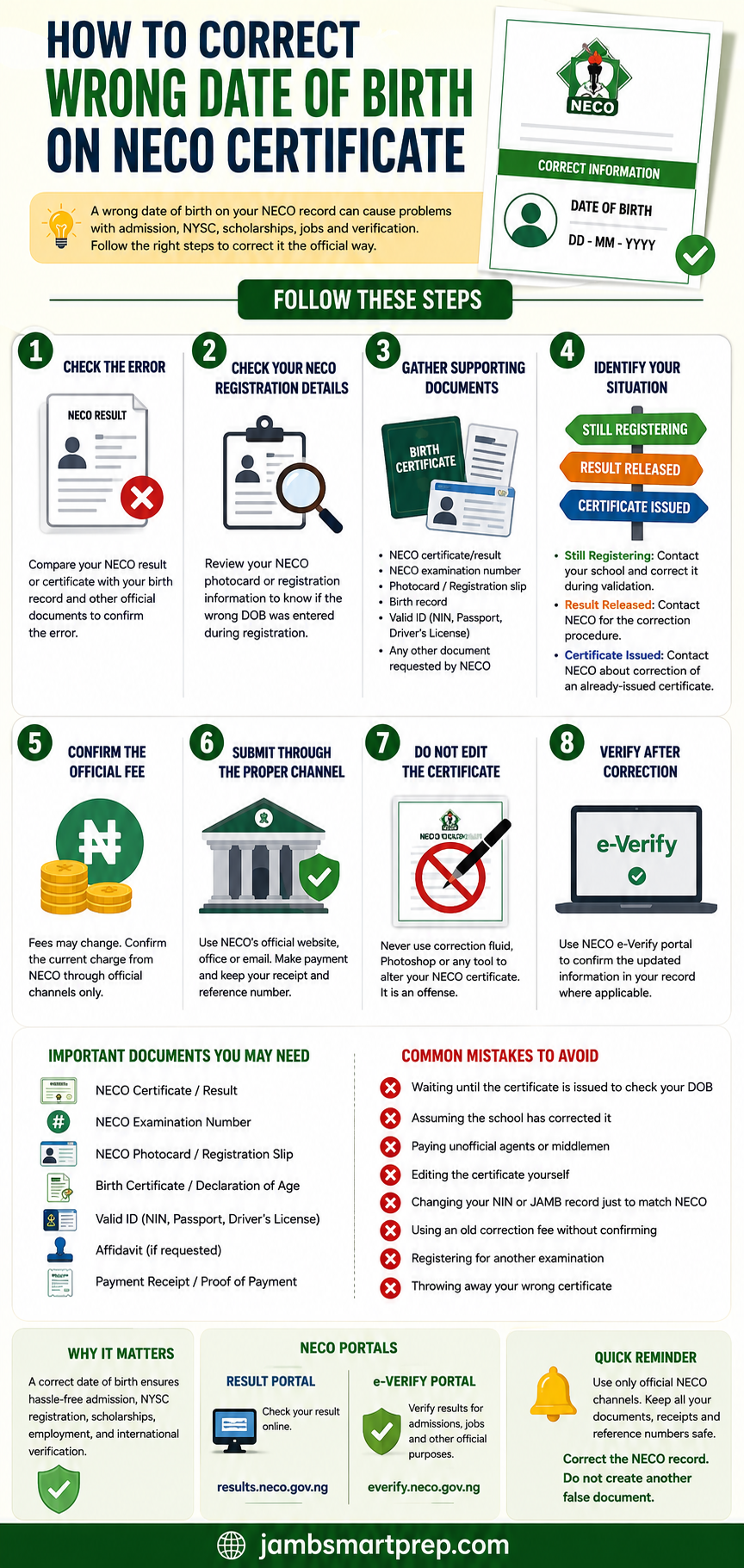
Related NECO Guides
- How to Correct Wrong Name on NECO Certificate
- How to Correct Wrong Gender on NECO Result
- How to Correct Wrong Date of Birth on NECO Registration
- NECO Certificate Error: How to Correct Errors on Your Certificate
- NECO Result Verification Guide
- NECO e-Verify Portal Login
- NERVS Portal: NECO Result Verification System
- How to Print Your NECO Result
- NECO Result Portal Not Working
- What to Do If Your NECO Result Is Still Pending
- How to Recover a Lost NECO Examination Number
- How to Buy a Genuine NECO Result Checker Token
Conclusion
A wrong date of birth on a NECO certificate is an issue you should address carefully, especially when the document will be used for admission, employment, scholarship applications or result verification.
The correct procedure depends on when the mistake was discovered and the status of the examination record.
If the error is found during registration, act immediately and use the validation process provided by NECO. If the result has already been released, identify the source of the error and contact NECO for the applicable correction procedure. If the certificate has already been issued, do not alter it yourself. Ask NECO specifically how an already-issued certificate or examination record should be handled.
NECO’s current information confirms that its e-Verify platform is used for result confirmation and institutional verification, and that Date of Birth is included in verification reports for records from 2019 onward.
The safest rule is straightforward:
Use genuine documents, follow the official NECO process and keep evidence of every correction request you make.
