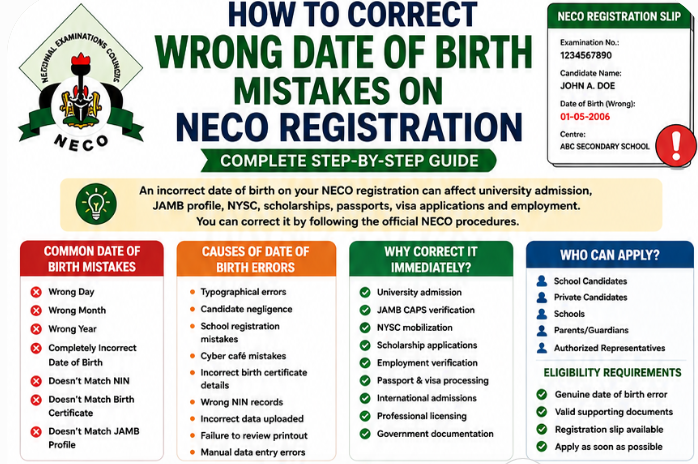
Welcome to JambSmartPrep.com. In today’s guide, we will be sharing with you how to correct the wrong date of birth on NECO registration, including required documents, official procedures, fees, timelines, and expert tips.
Thus, if you are among the candidates who have this Wrong date of birth issues, you are in the right place. All you have to do is to follow the instructions in this article and you will get the problem solved ASAP.
Well, it will interest you to know that, every year, hundreds of thousands of candidates register for the National Examinations Council (NECO) Senior School Certificate Examination (SSCE).
During registration, candidates are required to provide accurate personal information such as their full name, date of birth, gender, passport photograph, National Identification Number (NIN) where applicable, and other biodata.
Unfortunately, mistakes sometimes occur. One of the most common registration errors is entering the wrong date of birth. Some candidates mistakenly type the wrong day, month, or year, while others discover that the date of birth uploaded by their school or registration centre does not match their birth certificate or National Identification records.
Although a wrong date of birth may appear to be a small mistake, it can create significant challenges later. Universities often compare applicants’ biodata across JAMB, NECO, WAEC, birth certificates, and other official records before granting admission.
Likewise, scholarship providers, employers, government agencies, passport offices, and foreign institutions expect applicants’ personal details to be consistent.
A mismatch in your date of birth may delay:
- University admission
- JAMB CAPS verification
- NYSC mobilization
- Scholarship applications
- Employment screening
- Passport processing
- Visa applications
- International admissions
- Professional licensing
The good news is that candidates who discover a NECO registration date of birth mistake may be able to request a correction by following the appropriate administrative procedures and providing the required supporting documents.
If you’ve searched online for:
- How To Correct Wrong Date of Birth Mistakes On NECO Registration 2026
- NECO date of birth correction
- Correct date of birth on NECO registration
- How to change date of birth on NECO registration
- NECO biodata correction
- NECO registration correction
- NECO DOB correction
- NECO registration amendment
- NECO correction of date of birth
- How can I correct my date of birth on NECO registration?
- Can I change my date of birth after NECO registration?
this guide has been prepared to answer those questions in detail.
In this comprehensive article, you’ll learn:
- What NECO date of birth correction means
- Whether NECO allows date of birth correction
- Common date of birth mistakes
- Causes of registration errors
- Why correcting your date of birth early is important
- Eligibility requirements
- Documents required
- Step-by-step correction process
- Processing time
- Fees
- Common mistakes to avoid
- Frequently asked questions
Whether you’re a school candidate or a private candidate, this guide will help you understand the NECO biodata correction process and prepare the correct documents before submitting your application.
How To Correct Wrong Date of Birth on NECO Registration
This simple visual guide summarizes the official correction process.
NECO Date of Birth Correction Process
Identify the Error
⬇
Compare with Your Birth Certificate
⬇
Gather Supporting Documents
⬇
Inform Your School (School Candidates)
⬇
Visit the Appropriate NECO Office
⬇
Complete the Correction Request
⬇
Submit Supporting Documents
⬇
Pay the Approved Administrative Fee
⬇
Receive Acknowledgement Slip
⬇
Wait for Processing
⬇
Verify the Corrected Date of Birth
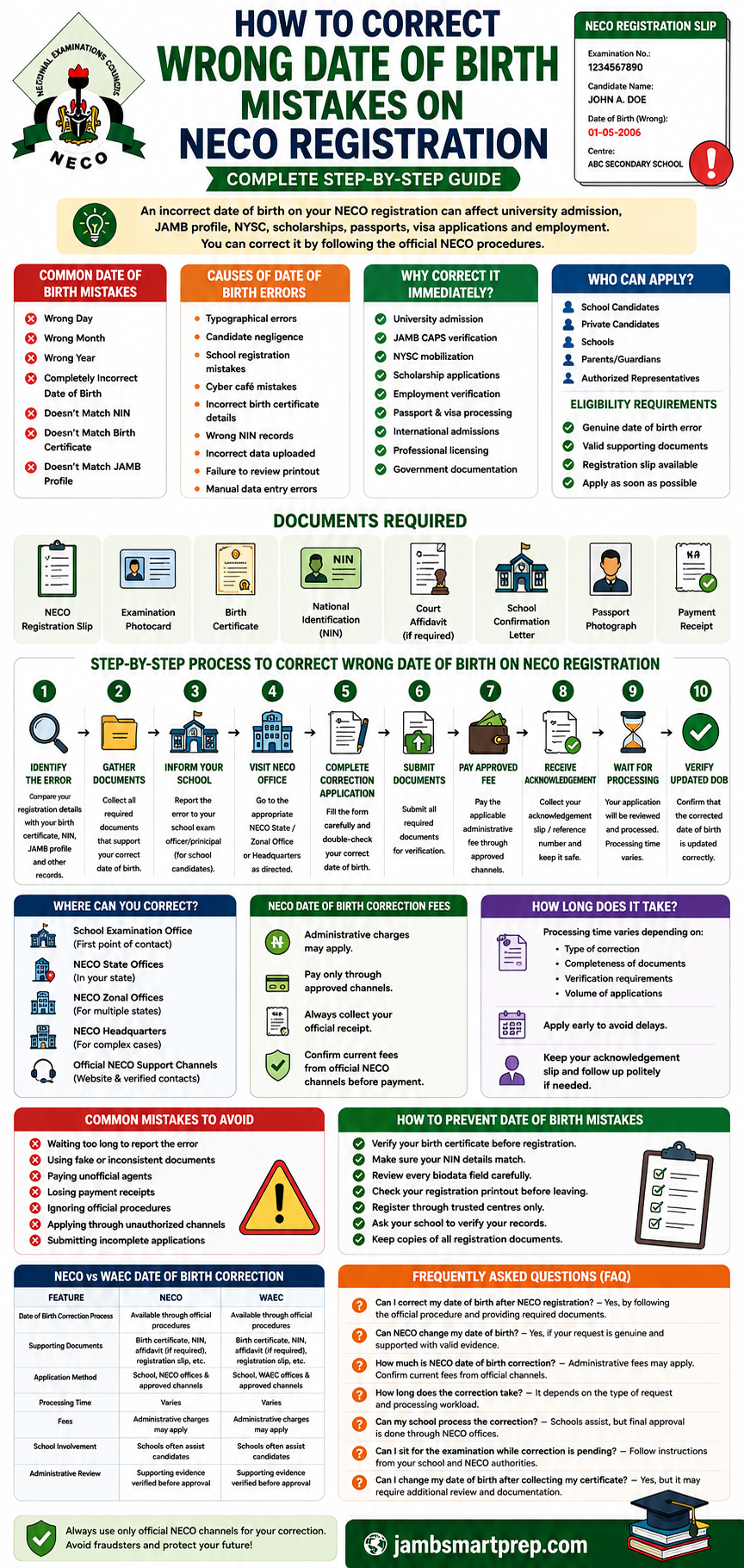
Documents You’ll Need
- NECO Registration Slip
- Examination Photocard
- Birth Certificate
- National Identification (NIN)
- Court Affidavit (where applicable)
- School Confirmation Letter
- Passport Photograph
- Payment Receipt
Why Correct It Early?
Correcting your date of birth as soon as you discover the error can help you avoid:
- Admission delays
- JAMB CAPS mismatches
- NYSC documentation problems
- Scholarship verification issues
- Employment screening delays
- Passport and visa complications
- International admission challenges
What Is NECO Date of Birth Correction?
NECO date of birth correction is the official administrative process used to request an amendment to a candidate’s registered date of birth after an error has been discovered in the information submitted during NECO registration.
The purpose of this process is to ensure that the candidate’s personal information accurately reflects their legal identity and matches other official records.
Unlike academic corrections, date of birth correction does not involve changing examination scores or subjects. It is strictly concerned with correcting a candidate’s biodata.
Why Candidates Request Date of Birth Corrections
There are many reasons why candidates may need to request a correction.
Some of the most common include:
- Wrong day entered during registration
- Wrong month selected
- Incorrect birth year
- Typographical errors
- Data entry mistakes by registration centres
- Incorrect information uploaded by schools
- Mismatch with birth certificate
- Mismatch with National Identification (NIN)
- Mismatch with JAMB profile
Regardless of the cause, it is always advisable to address the issue as early as possible.
Difference Between Registration Correction and Certificate Correction
Many candidates confuse these two processes.
| Registration Correction | Certificate Correction |
|---|---|
| Corrects biodata submitted during registration | Applies to changes affecting an already issued certificate, where permitted |
| Usually handled before examination records are finalized | May require additional administrative approval |
| Helps prevent future inconsistencies | Often follows separate procedures |
Understanding this distinction helps candidates follow the appropriate correction process.
Why an Accurate Date of Birth Matters
Your date of birth is used to verify your identity throughout your academic and professional journey.
It should match:
- Birth Certificate
- National Identification Number (NIN)
- JAMB profile
- WAEC records
- International Passport
- Admission records
- Scholarship applications
- Employment documents
Consistent biodata helps institutions verify your identity quickly and reduces the risk of administrative delays.
Why Biodata Consistency Is Important
A candidate whose personal records match across all official documents is less likely to encounter problems during:
- University admission
- NYSC mobilization
- Professional licensing
- Employment verification
- Immigration processing
- International scholarship applications
Even a one-year difference in your date of birth can trigger additional verification.
Can You Correct the Wrong Date of Birth on NECO Registration?
One of the most common questions candidates ask is:
“Can I change my date of birth after NECO registration?”
Candidates who discover genuine biodata errors may be able to request corrections through the appropriate administrative procedures, provided they meet the applicable requirements and submit acceptable supporting documents.
However, every request is assessed individually.
Approval may depend on:
- The nature of the mistake
- Supporting evidence
- Consistency of submitted documents
- Compliance with NECO procedures
- Timing of the application
Situations Where Correction May Be Possible
Examples include:
- Wrong day entered
- Wrong month selected
- Wrong birth year
- Typographical errors
- Data entry mistakes
- School registration errors
Where sufficient evidence supports the request, candidates may be able to proceed with the correction process.
Situations That May Require Additional Verification
Some applications may require further review, especially where:
- Birth certificate details conflict with other documents.
- Multiple official records contain different dates of birth.
- Legal declarations are required.
- Supporting documents are incomplete.
In such cases, candidates may be asked to provide additional evidence before a decision is made.
Why You Should Apply Immediately
Delaying a correction increases the likelihood of future complications.
Correcting the error early helps avoid issues during:
- University admission
- JAMB CAPS processing
- Scholarship applications
- Employment verification
- NYSC registration
- Certificate collection
Checking your registration printout immediately after registration is one of the easiest ways to identify mistakes before they become more difficult to resolve.
Common Date of Birth Errors During NECO Registration
Several types of date of birth mistakes occur during registration.
Some are simple typing errors, while others involve more significant discrepancies.
Wrong Day
A candidate may accidentally enter the correct month and year but the wrong day.
Example:
- Correct: 15 March 2008
- Registered: 16 March 2008
Although the difference is only one day, it creates inconsistency with official identity records.
Wrong Month
Sometimes candidates select the wrong month from a drop-down menu.
Example:
- Correct: 15 March
- Registered: 15 April
This type of mistake is common during hurried registration.
Wrong Year
Entering an incorrect birth year is one of the most serious biodata errors.
Example:
- Correct: 2008
- Registered: 2006
A wrong birth year may affect age-related eligibility for admissions, scholarships, or employment.
Completely Incorrect Date of Birth
In rare situations, the entire date of birth is incorrect due to data entry errors or the use of inaccurate records.
This should be reported immediately.
Date of Birth Doesn’t Match NIN
Many institutions now compare examination records with National Identification data.
If your NECO registration contains a different date of birth from your NIN records, you may experience delays during verification.
Date of Birth Doesn’t Match Birth Certificate
The birth certificate remains one of the primary documents used to establish a candidate’s legal date of birth.
Differences between these records should be resolved as early as possible.
Date of Birth Doesn’t Match JAMB Profile
Candidates seeking admission into tertiary institutions should ensure that their NECO registration details match their JAMB profile.
Inconsistent biodata can complicate admission processing.
Causes of Wrong Date of Birth Mistakes
Understanding why these errors occur can help candidates avoid them in future registrations.
Some of the most common causes include:
Typographical Errors
Simple keyboard mistakes remain one of the leading causes of incorrect dates of birth.
Candidate Negligence
Some candidates fail to review their biodata before final submission.
Taking just a few extra minutes to verify your information can prevent months of administrative stress.
School Registration Mistakes
Schools registering large numbers of candidates may occasionally make data entry errors.
Cyber Café Mistakes
Candidates who register through cyber cafés may experience errors if operators enter incorrect information.
Incorrect Birth Certificate Information
Where the birth certificate itself contains an error, inconsistencies may appear across academic records.
Wrong NIN Records
If your National Identification record contains inaccurate information, this may also create conflicts during verification.
Incorrect Data Uploaded
Mistakes can occur during electronic data uploads if incorrect information is selected or imported.
Failure to Review Registration Printout
Many candidates collect their registration slip without reading it carefully.
Reviewing the printout remains one of the simplest ways to identify errors early.
Manual Data Entry Errors
Where handwritten forms are used before electronic registration, unclear handwriting may lead to incorrect data entry.
Why You Should Correct Your Date of Birth Immediately
Correcting your biodata promptly helps protect your academic and professional future.
An accurate date of birth supports smoother processing for:
- University admissions
- JAMB CAPS verification
- NYSC mobilization
- Scholarship applications
- Employment screening
- Professional registration
- Government documentation
- Passport applications
- Visa processing
- International admissions
The earlier you identify and address an error, the easier it is to resolve.
Who Can Apply for NECO Date of Birth Correction?
Many candidates assume that only NECO officials can initiate a correction once registration has been completed. In reality, the person or institution that can assist with the process depends on how the candidate registered and the nature of the correction being requested.
If you discover that your date of birth is incorrect, you should begin the correction process as soon as possible through the appropriate channel.
School Candidates
Candidates who registered through their secondary schools should first report the error to:
- The school principal
- The examination officer
- The NECO registration coordinator
The school may help verify the mistake, prepare supporting documents, and advise on the next steps before the application is forwarded through the appropriate NECO administrative channel.
Private Candidates
Private candidates who completed their registration independently are generally responsible for initiating the correction request themselves.
They should ensure that:
- Their supporting documents are complete.
- Their identification documents are consistent.
- They follow the official NECO correction procedure.
Schools
Schools have an important responsibility in helping candidates avoid registration errors.
Where necessary, schools may assist by:
- Verifying candidate biodata
- Confirming registration records
- Preparing recommendation letters
- Advising candidates on correction procedures
- Liaising with NECO where required
Parents or Guardians
Parents and guardians often assist younger candidates by:
- Providing birth certificates
- Obtaining affidavits where necessary
- Following up with the school
- Keeping important documents safe
- Helping candidates complete administrative requirements
Authorized Representatives
In some situations, an authorized representative may assist a candidate with enquiries or document submission where permitted by NECO’s administrative procedures.
Eligibility Requirements
Before requesting a NECO date of birth correction, candidates should generally ensure they:
- Have a genuine date of birth error.
- Possess valid supporting documents.
- Can provide their NECO registration slip.
- Follow official NECO procedures.
- Apply immediately after discovering the mistake.
The earlier you begin the process, the easier it usually becomes to resolve the issue.
Documents Required for NECO Date of Birth Correction
Preparing your documents before visiting your school or a NECO office can save considerable time.
Although document requirements may vary depending on the nature of the request, candidates are commonly asked to provide the following.
| Document | Purpose |
|---|---|
| NECO Registration Slip | Confirms registered biodata |
| Examination Photocard | Candidate identification |
| Birth Certificate | Shows the correct date of birth |
| National Identification (NIN) | Identity verification |
| Court Affidavit | Legal declaration where applicable |
| School Confirmation Letter | Institutional verification |
| Passport Photograph | Candidate identification |
| Payment Receipt | Evidence of payment |
NECO Registration Slip
Your registration slip serves as one of the most important documents during the correction process.
It contains:
- Examination number
- Candidate’s name
- Registered date of birth
- Examination year
- Examination type
Always keep both printed and digital copies.
Examination Photocard
The examination photocard helps verify:
- Candidate identity
- Examination number
- Passport photograph
- Examination centre
It may also be requested during verification.
Birth Certificate
Your birth certificate remains the primary document used to establish your legal date of birth.
Ensure that:
- It is genuine.
- The information is readable.
- It matches your other official records.
National Identification (NIN)
Many institutions now compare educational records with National Identification records.
Candidates should ensure that their NIN details match their birth certificate and other official documents.
Court Affidavit
Where applicable, a sworn affidavit may be required to explain the discrepancy in your date of birth.
The affidavit should accurately reflect your personal information.
School Confirmation Letter
School candidates may need a letter signed by the principal or examination officer confirming:
- Their identity
- Their registration details
- The correction request
Passport Photograph
A recent passport photograph may be requested for identification purposes.
Ensure it matches the photograph used during registration.
Payment Receipt
Never discard your payment receipt.
It serves as proof that the applicable administrative fee has been paid and may be required during follow-up enquiries.
Step-by-Step Guide to Correct Wrong Date of Birth on NECO Registration
The following guide explains the typical administrative process candidates should follow after discovering a wrong date of birth.
Step 1 — Identify the Error
Carefully compare your registration details with:
- Birth Certificate
- National Identification (NIN)
- JAMB Profile
- Passport
- School records
Determine whether the mistake involves:
- Wrong day
- Wrong month
- Wrong year
- Completely incorrect date
Tip: Do not rely on memory alone. Compare your registration slip with your original documents.
Step 2 — Gather Supporting Documents
Prepare every document that supports your correction request before beginning the application.
Organize them neatly to avoid delays.
Photocopy important documents where necessary and keep the originals safe.
Tip: Carry both originals and photocopies if you visit a NECO office.
Step 3 — Inform Your School (School Candidates)
Candidates registered through their schools should notify the examination officer immediately.
The school may:
- Confirm the mistake
- Advise on documentation
- Prepare recommendation letters
- Guide the candidate through the next stage
Early notification often makes the process easier.
Step 4 — Visit the Appropriate NECO Office
Depending on your circumstances, you may be directed to:
- A NECO State Office
- A Zonal Office
- NECO Headquarters
- Another officially designated office
Avoid relying on social media rumours or unofficial agents.
Tip: Contact the office before visiting to confirm office hours and document requirements.
Step 5 — Complete the Correction Application
Complete every section of the correction application carefully.
Before submission:
- Review every entry.
- Confirm your date of birth.
- Ensure supporting documents agree with one another.
One small mistake can create another correction request.
Step 6 — Submit Required Documents
Attach every required document before submission.
Incomplete applications are one of the leading causes of processing delays.
Before leaving:
- Confirm your application has been received.
- Ensure every attachment is included.
- Ask whether additional documents are needed.
Step 7 — Pay the Approved Fee
Where an administrative fee applies, payment should only be made through approved payment channels.
After payment:
- Collect your receipt.
- Verify the payment reference.
- Keep several copies.
Never pay money into a personal bank account claiming to represent NECO.
Step 8 — Receive an Acknowledgement
After submitting your application, you may receive an acknowledgement slip or reference number confirming that your request has been received.
Keep this document until the correction has been completed.
Step 9 — Wait for Processing
The application will undergo administrative review.
Processing time depends on:
- Type of correction
- Volume of applications
- Accuracy of submitted documents
- Internal verification procedures
Avoid submitting duplicate applications while your request is still under review.
Step 10 — Verify the Updated Date of Birth
Once processing has been completed:
- Review the updated record carefully.
- Confirm the correct day, month, and year.
- Report any remaining discrepancies immediately.
This final verification is extremely important before using your NECO record for admission or employment purposes.
Where Can You Correct Your NECO Date of Birth?
Candidates frequently ask:
“Where can I process my NECO date of birth correction?”
Depending on your registration category and the nature of the correction, the following offices may be involved.
School Examination Office
School candidates should first contact:
- Examination officer
- School principal
- Registration coordinator
The school will advise whether further action is required.
NECO State Offices
Many administrative services are handled through NECO State Offices.
Candidates may be referred there for biodata correction requests.
NECO Zonal Offices
Some applications are processed through zonal offices responsible for supervising multiple states.
NECO Headquarters
More complex requests requiring higher administrative approval may be handled through the NECO Headquarters.
Official NECO Communication Channels
Always rely on official NECO communication channels when seeking information about:
- Correction procedures
- Required documents
- Approved payment methods
- Administrative timelines
This helps you avoid fraud and misinformation.
NECO Date of Birth Correction Fees
One of the most common questions candidates ask is:
“How much is NECO date of birth correction?”
Administrative charges may apply depending on the type of correction requested and the applicable NECO guidelines at the time of your application.
Because fees may change over time, candidates should always confirm the latest charges through official NECO communication channels before making payment.
Possible Charges
Depending on the request, administrative costs may relate to:
- Processing fees
- Record amendment
- Document verification
- Administrative services
Approved Payment Methods
Where applicable, payment may be made through:
- Approved online payment platforms
- Designated banking channels
- Other officially approved payment methods
Payment Safety Tips
To protect yourself:
- Request an official receipt.
- Verify every payment reference.
- Keep digital copies of receipts.
- Avoid cash payments to unauthorized individuals.
Important Note
Always confirm the current NECO date of birth correction fees, payment procedures, and applicable deadlines through official NECO communication channels before making any payment, as administrative requirements and charges may change over time.
How Long Does NECO Date of Birth Correction Take?
One of the first questions candidates ask after submitting a correction request is:
“How long does NECO date of birth correction take?”
The processing period is not the same for every application. The time required depends on the nature of the correction, the completeness of your documents, and the volume of applications being handled at the time.
Candidates who submit complete and accurate documentation generally experience a smoother process than those whose applications require additional verification.
Average Processing Time
While there is no universally fixed timeline for all applications, candidates should expect the process to involve:
- Document verification
- Administrative review
- Identity confirmation
- Record update
- Final approval
Processing times may vary depending on official administrative procedures.
Factors That May Affect Processing Time
Several factors can influence how quickly your application is handled.
These include:
- Incomplete documentation
- Incorrect application forms
- Missing payment receipts
- High volume of correction requests
- Peak examination registration periods
- Additional verification requirements
- Conflicting personal records
The more accurate your application is, the fewer delays you are likely to encounter.
Busy Registration Periods
Applications submitted during major registration or examination seasons may take longer because NECO offices are handling thousands of candidate records simultaneously.
Submitting your correction request early can help reduce waiting time.
Follow-Up Procedures
After submitting your application:
- Keep your acknowledgement slip.
- Retain payment receipts.
- Keep copies of every document submitted.
- Contact the office politely if you require an update.
Avoid submitting multiple applications for the same correction unless you are specifically instructed to do so.
How to Track Your Correction Request
To monitor your application:
- Keep your application reference number.
- Maintain copies of all submitted documents.
- Follow official communication channels.
- Respond promptly if additional information is requested.
Good record keeping makes follow-up much easier.
Can Schools Correct Date of Birth on Behalf of Candidates?
Many school candidates wonder whether they must personally visit a NECO office or whether their school can handle the correction.
The answer depends on the type of correction and the applicable administrative procedures.
Responsibilities of Schools
Schools play an important role in helping candidates maintain accurate examination records.
Their responsibilities often include:
- Registering candidates
- Verifying biodata
- Preparing registration records
- Identifying obvious mistakes
- Assisting candidates during correction requests
Role of the Examination Officer
The examination officer is usually the first person candidates should contact after discovering a wrong date of birth.
The officer may:
- Verify the registration records.
- Confirm the reported error.
- Explain available correction procedures.
- Prepare supporting documentation where necessary.
Role of the School Principal
School principals may be required to:
- Confirm the identity of the candidate.
- Endorse official letters.
- Certify school records.
- Recommend administrative action where applicable.
Candidate Responsibilities
Although schools may assist, candidates also have important responsibilities.
Candidates should:
- Report mistakes immediately.
- Provide genuine supporting documents.
- Cooperate during verification.
- Keep copies of all submitted records.
- Follow official instructions carefully.
Remember that the candidate remains responsible for ensuring the accuracy of personal information.
Common Mistakes to Avoid During Date of Birth Correction
Many correction requests experience unnecessary delays because candidates make avoidable mistakes.
Avoiding these common errors can save time and reduce frustration.
Waiting Too Long
Some candidates ignore the mistake because they believe it is insignificant.
Unfortunately, a wrong date of birth can later affect:
- Admission
- NYSC
- Employment
- Scholarships
- Passport processing
Report the error as soon as possible.
Using Fake Documents
Never submit forged:
- Birth certificates
- Affidavits
- Identification documents
- School letters
Providing false information may lead to rejection of your application and other administrative consequences.
Submitting Inconsistent Records
All supporting documents should agree with one another.
If your:
- Birth Certificate
- National Identification
- School records
- JAMB profile
contain conflicting information, additional clarification may be required.
Paying Unofficial Agents
Fraudsters often claim they can process corrections quickly.
To protect yourself:
- Use only approved payment methods.
- Visit recognized offices.
- Avoid unofficial middlemen.
Losing Payment Receipts
Your receipt serves as evidence that payment has been made.
Keep:
- Original receipt
- Photocopies
- Digital scans
until your application has been completed.
Ignoring Official Procedures
Skipping required steps often causes unnecessary delays.
Always:
- Submit complete documents.
- Follow official guidance.
- Confirm every requirement before applying.
Applying Through Unauthorized Channels
Only use officially recognized channels for correction requests.
Avoid websites, social media pages, or individuals claiming to provide “special access.”
What Happens If You Don’t Correct Your Date of Birth?
Some candidates believe they can ignore the mistake because it does not affect their examination scores.
Unfortunately, incorrect biodata can create serious administrative challenges later.
Admission Delays
Universities routinely compare candidates’ personal records before issuing admission offers.
Differences between your NECO registration and other official documents may require additional verification.
JAMB Profile Mismatch
Many institutions compare NECO records with JAMB registration details.
If your dates of birth do not match, your admission process could become more complicated.
NYSC Documentation Issues
Graduates whose educational records contain inconsistent biodata may face additional verification during NYSC mobilization.
Resolving discrepancies early helps reduce future complications.
Scholarship Challenges
Many scholarship providers carefully verify applicants’ identities before awarding funding.
Conflicting dates of birth may delay application processing or require additional documentation.
Examples include:
- Federal Government Scholarship Awards
- PTDF Scholarship Programme
- NNPC scholarship schemes
- State government scholarship programmes
- International scholarship applications
Employment Verification Problems
Many employers now verify applicants’ educational credentials before employment.
If your date of birth differs across documents, employers may request further clarification.
International Study Complications
Students applying abroad often submit:
- Academic certificates
- Passports
- Birth certificates
- Visa documents
Consistency across all records helps prevent unnecessary delays during admission and immigration processing.
Passport and Visa Issues
Immigration authorities carefully compare personal information across submitted documents.
Correcting discrepancies before applying for an international passport or student visa is always advisable.
How to Prevent Date of Birth Mistakes During Future NECO Registration
Preventing registration errors is much easier than correcting them.
Follow these practical recommendations whenever you register for NECO or any other public examination.
Verify Your Birth Certificate
Before registration:
- Confirm your exact day.
- Confirm your month.
- Confirm your birth year.
Never rely on memory alone.
Match Your NIN Details
Your National Identification records should contain the same date of birth shown on your birth certificate.
Resolve any inconsistencies before examination registration whenever possible.
Review Every Biodata Field
Before clicking “Submit,” carefully review:
- Full name
- Date of birth
- Gender
- Subjects
- Passport photograph
- Contact information
Even one incorrect digit can create future problems.
Check Your Registration Printout
Never leave the registration centre without reading your printout carefully.
This simple habit helps candidates discover mistakes immediately.
Register Through Trusted Centres
Whether registering through your school or an accredited centre, ensure experienced personnel handle your application.
Avoid hurried registrations.
Ask Your School to Verify Your Records
School candidates should request that examination officers cross-check their biodata before final submission.
A second review often catches mistakes that candidates overlook.
Keep Copies of Every Registration Document
Maintain both printed and electronic copies of:
- Registration slip
- Photocard
- Birth Certificate
- NIN records
- Payment receipts
Proper record keeping makes future corrections much easier if they become necessary.
Registration Checklist
Before completing your NECO registration, confirm the following:
✅ Your date of birth matches your birth certificate.
✅ Your NIN contains the same date of birth.
✅ Your name matches all official documents.
✅ Your passport photograph is correct.
✅ Your subjects are accurate.
✅ Your examination centre is correct.
✅ Your registration number is accurate.
✅ You have reviewed your printout carefully.
✅ You have saved copies of every registration document.
Taking five extra minutes to complete this checklist can save you months of administrative stress later.
NECO Date of Birth Correction vs WAEC Date of Birth Correction
Many Nigerian students register for both NECO and WAEC during their secondary school education. If you notice an error in your date of birth, you may wonder whether both examination bodies follow the same correction process.
While NECO and WAEC have similar goals of maintaining accurate candidate records, their administrative procedures, documentation requirements, approval process, and timelines may differ. Candidates should always follow the specific guidelines issued by the examination body involved.
The comparison below provides a general overview.
| Feature | NECO | WAEC |
|---|---|---|
| Date of Birth Correction Process | Available through approved administrative procedures | Available through approved administrative procedures |
| Supporting Documents | Registration slip, birth certificate, NIN, affidavit (where applicable), school confirmation and other required documents | Similar supporting documents depending on the correction request |
| Application Method | School, designated NECO offices, and approved administrative channels | School, WAEC offices, and approved administrative channels |
| Processing Time | Varies depending on the complexity of the request | Varies depending on the complexity of the request |
| Administrative Fees | Administrative charges may apply | Administrative charges may apply |
| School Involvement | Schools often assist school candidates | Schools also assist school candidates |
| Administrative Review | Supporting evidence is verified before approval | Supporting evidence is verified before approval |
Although both examination bodies provide administrative procedures for handling genuine biodata issues, candidates should avoid assuming that one body’s process is identical to the other’s.
Frequently Asked Questions (FAQs)
Below are answers to some of the questions Nigerian students frequently ask about NECO date of birth correction.
Can I Correct My Date of Birth After NECO Registration?
Yes. Candidates who discover a genuine error in their registered date of birth may be able to request a correction by following the appropriate administrative procedures and submitting the required supporting documents.
The earlier you report the mistake, the better.
Can NECO Change My Date of Birth?
Where a candidate provides sufficient supporting evidence and satisfies the applicable administrative requirements, a correction request may be considered in line with NECO’s procedures.
Approval depends on the documentation provided and the circumstances surrounding the request.
How Much Is NECO Date of Birth Correction?
Administrative charges may apply.
Because fees can change over time, candidates should always confirm the current amount through official NECO communication channels before making payment.
How Long Does NECO Date of Birth Correction Take?
There is no fixed processing period for every application.
The timeline depends on several factors, including:
- Type of correction
- Completeness of documentation
- Administrative workload
- Verification requirements
Submitting accurate documents can help reduce delays.
Can My School Process the Correction?
Schools often assist candidates who registered through them by:
- Confirming the reported error
- Preparing recommendation letters
- Verifying candidate records
- Guiding candidates through the process
However, certain stages may still require processing through designated NECO offices.
Can I Use Only an Affidavit?
An affidavit may be required in some cases, but it is usually not the only supporting document.
Candidates should also be prepared to provide other documents such as:
- Birth Certificate
- Registration Slip
- National Identification (NIN)
- School confirmation letter
- Payment receipt
Can I Correct Multiple Biodata Errors at Once?
If more than one genuine biodata error exists, candidates should disclose all identified issues during the correction process.
The final decision depends on the applicable administrative procedures and the supporting documents provided.
What If My Application Is Rejected?
If your application is not approved:
- Contact the office handling your request.
- Ask whether additional documentation is required.
- Correct any deficiencies identified.
- Follow the official guidance before submitting another application.
Can I Sit for the Examination While the Correction Is Pending?
Candidates should always follow the guidance provided by their school and the appropriate NECO authorities regarding examination participation while administrative requests are being processed.
Can I Change My Date of Birth After Collecting My Certificate?
Requests involving already issued certificates may be subject to separate administrative procedures and additional requirements.
Candidates should contact the appropriate NECO office for guidance specific to their situation.
Best Practices Before NECO Registration
The easiest way to avoid the stress of correcting your date of birth is to prevent mistakes during registration.
Below are practical recommendations that every candidate should follow.
Verify Every Biodata Detail
Before submitting your registration, carefully review:
- Full name
- Date of birth
- Gender
- Subjects
- Examination centre
- Passport photograph
Small mistakes can have significant consequences later.
Match Your Birth Certificate
Always use the information shown on your official birth certificate when completing your registration.
Avoid estimating or relying on memory.
Confirm Your NIN Records
Ensure that the date of birth on your National Identification Number (NIN) matches the information on your birth certificate.
Consistency across official records helps simplify future verification.
Confirm Your JAMB Profile
Candidates planning to seek admission into Nigerian tertiary institutions should ensure that the biodata used for NECO registration matches their JAMB profile.
Matching records reduce the risk of admission delays.
Review Your Registration Printout Carefully
Never leave the registration centre without checking your registration printout.
Take time to verify:
- Date of birth
- Name spelling
- Passport photograph
- Examination subjects
- Examination centre
Many registration mistakes are discovered at this stage.
Keep Certified Copies of Important Documents
Maintain both printed and digital copies of:
- Registration Slip
- Examination Photocard
- Birth Certificate
- NIN Slip
- Payment Receipts
- Affidavit (where applicable)
Good record keeping makes future verification much easier.
Correct Discrepancies Immediately
If you notice any error:
- Report it without delay.
- Gather supporting documents.
- Follow official procedures.
- Keep copies of every correspondence.
Early action often prevents larger administrative problems later.
Pre-Registration Checklist
Before submitting your NECO registration, ensure the following:
✅ Your date of birth matches your birth certificate.
✅ Your NIN contains the same date of birth.
✅ Your name is correctly spelled.
✅ Your passport photograph belongs to you.
✅ Your examination subjects are correct.
✅ Your examination centre is accurate.
✅ Your registration slip contains no errors.
✅ You have reviewed every biodata field carefully.
✅ You have saved printed and digital copies of your registration documents.
Spending a few extra minutes reviewing your details can save weeks or even months of correction procedures.
How To Correct Wrong Date of Birth on NECO Registration
Step 1: Identify the Error
⬇
Step 2: Compare with Your Birth Certificate
⬇
Step 3: Gather Supporting Documents
⬇
Step 4: Inform Your School
⬇
Step 5: Visit the Appropriate NECO Office
⬇
Step 6: Submit Correction Request
⬇
Step 7: Pay the Approved Administrative Fee
⬇
Step 8: Receive Acknowledgement
⬇
Step 9: Wait for Processing
⬇
Step 10: Verify the Corrected Record
Documents You’ll Need
- NECO Registration Slip
- Examination Photocard
- Birth Certificate
- National Identification Number (NIN)
- Court Affidavit (if required)
- School Confirmation Letter
- Passport Photograph
- Payment Receipt
Why Correct It Early?
Correcting your date of birth promptly can help you avoid problems during:
- University admission
- JAMB CAPS verification
- NYSC mobilization
- Scholarship applications
- Employment verification
- Passport processing
- Visa applications
- International admissions
Conclusion
A wrong date of birth on your NECO registration may seem like a small mistake, but it can create significant challenges throughout your academic and professional journey if left unresolved. University admissions, JAMB record verification, scholarship applications, employment screening, NYSC mobilization, passport processing, and international study opportunities all rely on accurate and consistent personal information.
The best approach is to identify any error as early as possible, gather the required supporting documents, and follow only the official NECO administrative procedures. Avoid relying on unofficial agents or inaccurate information from social media, as this can lead to unnecessary delays or financial loss.
Before every future examination registration, take time to carefully review your biodata. Confirm that your date of birth matches your birth certificate, National Identification Number (NIN), JAMB profile, and other official records. A few extra minutes of careful checking can save you months of correction procedures later.
If you found this guide helpful, explore our other detailed articles on NECO, WAEC, JAMB, admissions, scholarships, and study opportunities. You can also subscribe to receive trusted updates, examination guides, and practical education resources that will help you stay informed throughout your academic journey.
Related Articles
- How to Check Your NECO Result Online
- How to Buy a Genuine NECO Result Checker Token
- How to Print Your NECO Result
- How to Correct Errors on Your JAMB Profile
- NECO GCE Registration Guide
- Common Mistakes Students Make During WAEC and NECO Registration
