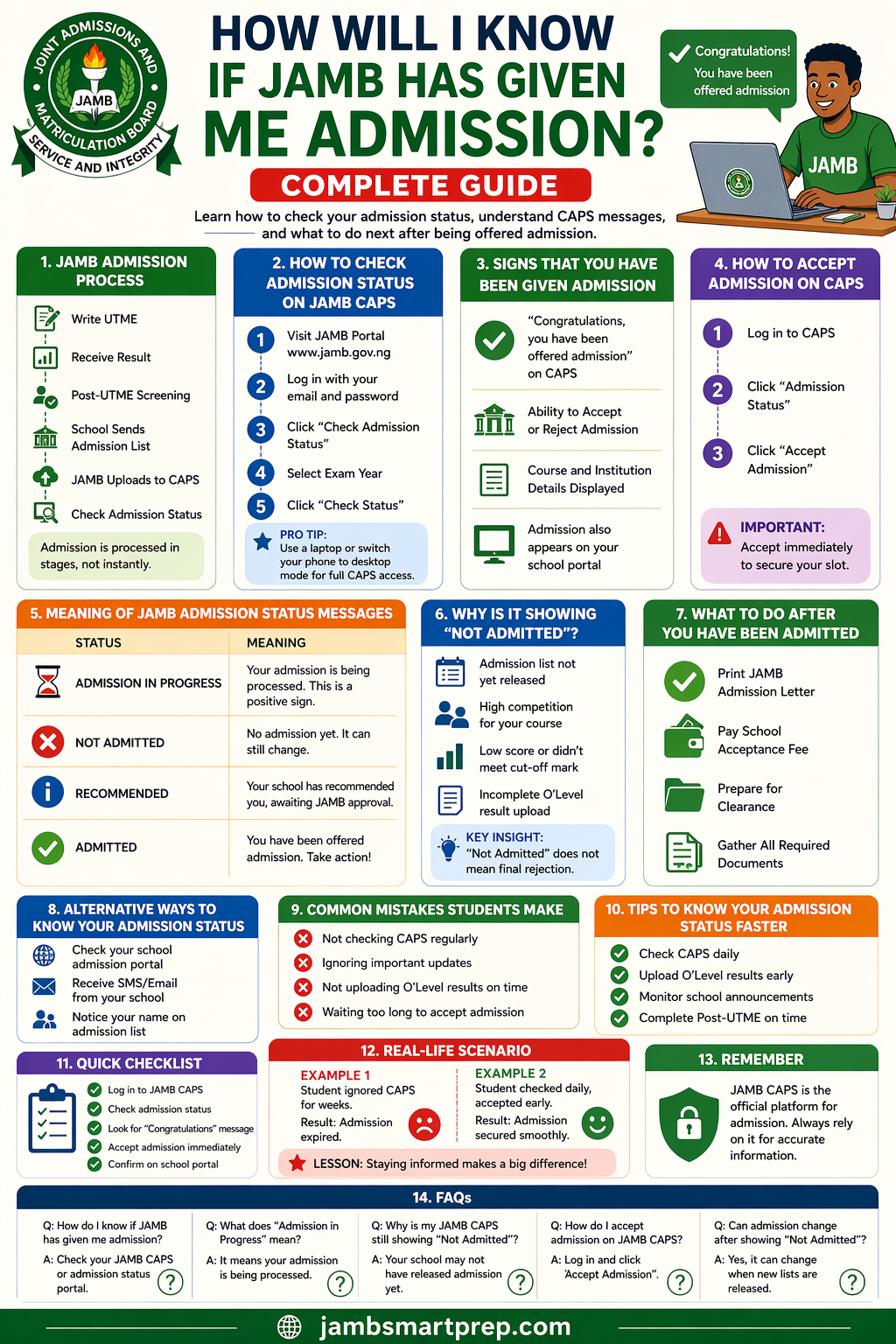
Many students finish writing JAMB and immediately start asking one question: “How will I know if JAMB has given me admission?”
It is a familiar situation. You log in daily, refresh your dashboard, and still see “Not Admitted.” At the same time, friends begin to share screenshots of their admission offers. The pressure builds.
Some candidates also struggle with:
- Not understanding how JAMB CAPS works
- Checking the wrong portal repeatedly
- Missing important updates
The real issue is not lack of effort. It is lack of clear information about how admission notifications actually work in Nigeria.
If you are in this situation, you are not alone.
In this guide, you will learn how to check admission status JAMB, understand what each message means, and know exactly what to do once admission is offered.
Understanding the JAMB Admission Process in Nigeria
Before you can confirm admission, you need to understand how the JAMB admission process Nigeria works.
Admission is not automatic after your UTME. It follows a structured process:
Step-by-step process:
- You write the UTME (JAMB exam)
- JAMB releases results
- Universities conduct Post-UTME screening
- Schools compile admission lists
- Lists are sent to JAMB
- JAMB uploads candidates to CAPS
Also Read: JAMB CAPS and Admission Status Explained 2026
Important Insight
Admission is processed in stages. It does not happen overnight.
According to past trends, over 1.6 million candidates sit for JAMB yearly, but only a portion secure admission immediately. This is why updates take time.
How Will I Know If JAMB Has Given Me Admission 2026?
This is the main question.
The answer is simple, but many students miss it.
You will know JAMB has given you admission when:
- You log in to your JAMB CAPS portal
- You see the message:
“Congratulations, you have been offered admission”
That message is the official confirmation.
Main ways to confirm admission:
- JAMB CAPS portal
- JAMB admission status checker
- Your school’s admission portal
Out of these, JAMB CAPS is the most reliable source.
How to Check Admission Status on JAMB CAPS
If you are unsure how to check your status, follow this guide carefully.
Steps to check admission status JAMB:
- Visit the JAMB result checker portal
- Log in with your email and password
- Click “Check Admission Status”
- Select your exam year
- Click “Check Status”
Pro Tip
- Use a laptop or switch your phone browser to desktop mode
- CAPS features may not show fully on mobile view
JAMB CAPS Login Guide (Beginner-Friendly)
Many candidates struggle with JAMB CAPS login, especially for the first time.
How to access CAPS properly:
- Go to the JAMB portal
- Log in with your registered email
- Navigate to CAPS section
Common login issues and fixes:
- Forgotten password → Use “Reset Password” option
- Page not loading → Switch browser or use Chrome
- CAPS not showing → Enable desktop mode
Best device to use
- Laptop or desktop is more reliable
- Mobile phones can work, but may require adjustments
Signs That JAMB Has Given You Admission
You do not have to guess. There are clear signs.
Look out for these indicators:
- “Congratulations” message on CAPS
- Option to accept or reject admission
- Course and institution details displayed
- Admission also appearing on school portal
Once you see these, your admission is confirmed.
Meaning of Different JAMB Admission Status Messages
Understanding your JAMB admission status checker messages is very important.
Common statuses explained:
1. Admission in Progress
- Your admission is being processed
- This is a positive sign
2. Not Admitted
- You have not been offered admission yet
- It can still change
3. Recommended
- Your school has suggested you
- Awaiting JAMB approval
4. Admitted
- You have been offered admission
- Action is required immediately
What Does “Admission in Progress” Mean on JAMB CAPS?
This status confuses many students.
What it means:
- Your details are under review
- Your school is processing your admission
What you should do:
- Stay calm
- Keep checking regularly
Why it is a good sign:
It shows you are already being considered.
Why Is My JAMB CAPS Not Showing Admission?
Many candidates ask: “Why is my JAMB CAPS not showing admission?”
Here are common reasons:
- Your school has not released admission list
- Your course is highly competitive
- Your score is below cut-off
- You have not uploaded O’Level results
Key Insight
“Not Admitted” does not mean rejection. It simply means not yet.
How to Accept Admission on JAMB CAPS
Once admission is offered, you must act quickly.
Steps on how to accept admission on JAMB CAPS:
- Log in to CAPS
- Click “Admission Status”
- Click “Accept Admission”
Important Note
- Accept immediately to secure your slot
- Delay can lead to losing the offer
What to Do After You Have Been Given Admission
After acceptance, your journey is not over.
Next steps:
- Print your JAMB admission letter
- Pay your school acceptance fee
- Prepare for clearance
- Gather documents (WAEC, birth certificate, etc.)
Alternative Ways to Know If You Have Been Given Admission
Apart from CAPS, you can also check:
- School admission portal
- SMS or email notification
- Official admission list
However, always confirm on CAPS for accuracy.
Common Mistakes Students Make
Avoid these errors:
- Not checking CAPS regularly
- Ignoring admission updates
- Failing to upload O’Level results
- Waiting too long to accept admission
These mistakes can cost you admission.
Real-Life Scenario
Example 1:
A student ignored CAPS for weeks.
Result: Admission expired.
Example 2:
Another student checked daily and accepted immediately.
Result: Admission secured smoothly.
Lesson
Awareness and quick action matter.
Tips to Know Your Admission Status Faster
If you want faster updates, follow these tips:
- Check CAPS daily
- Upload O’Level results early
- Monitor school announcements
- Complete Post-UTME on time
Quick Checklist
Before concluding, use this checklist:
- Log in to JAMB CAPS
- Check admission status
- Look for “Congratulations” message
- Accept admission immediately
- Confirm on school portal
FAQs (Comprehensive Section)
How do I know if JAMB has given me admission?
Check your JAMB CAPS or admission status portal.
What does “Admission in Progress” mean?
It means your admission is being processed.
Why is my JAMB CAPS still showing “Not Admitted”?
Your school may not have released admission yet.
How do I accept admission on JAMB CAPS?
Log in and click “Accept Admission.”
Can admission change after showing “Not Admitted”?
Yes, it can change anytime.
How often should I check JAMB CAPS?
At least once daily during admission period.
Is JAMB CAPS the final confirmation of admission?
Yes, it is the official platform.
How to Know If JAMB Has Given You Admission
Check Here:
- JAMB CAPS
- School portal
Admission Signs:
- Congratulations message
- Course details
Next Steps:
- Accept admission
- Print admission letter
- Prepare for school
Avoid:
- Ignoring CAPS ❌
- Delaying acceptance ❌
- Missing updates ❌
Conclusion
Knowing whether JAMB has given you admission becomes easy once you understand how CAPS works.
Admission updates may take time, and that is normal. What matters is staying informed and acting quickly when your status changes.
Many students miss admission not because they failed, but because they did not follow up properly.
Final Advice:
- Check your CAPS regularly
- Stay patient but alert
- Act immediately when admitted
Now Over To You
- Start checking your JAMB CAPS today
- Share this guide with fellow candidates
- Explore more admission tips to stay ahead
What does your JAMB admission status currently show? Share your experience.