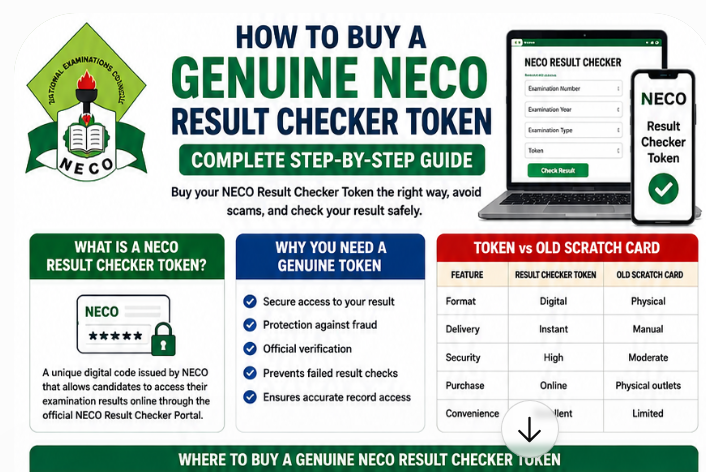
If you are looking for a comprehensive and straight to the point guide on How to Buy a Genuine NECO Result Checker Token, you have come to the right place. This article covers in-depth the complete steps you need to follow to buy a genuine NECO result checker token.
As we may all know, every year, millions of candidates sit for the National Examinations Council (NECO) Senior School Certificate Examination (SSCE) and other examinations across Nigeria. Once the results are released, the next important step is checking them online. To do this successfully, every candidate needs a NECO Result Checker Token.
Unfortunately, many students and parents fall victim to fraudsters who sell fake tokens or direct them to unofficial websites. Some candidates also experience delays because they purchase the wrong token or do not know the correct process for checking their results.
If you have been searching for how to buy a genuine NECO Result Checker Token, this comprehensive guide will walk you through everything you need to know. You’ll learn where to buy an original token, how to avoid scams, accepted payment methods, common mistakes to avoid, and how to use your token to check your result successfully.
Whether you’re checking your NECO result for university admission, JAMB admission processing, scholarship applications, employment, or personal records, this guide will help you complete the process safely and confidently.
What Is a NECO Result Checker Token?
A NECO Result Checker Token is a unique digital code issued by the National Examinations Council that allows candidates to access their examination results through the official NECO Result Checker Portal.
Instead of the traditional scratch cards that were commonly used in the past, NECO now uses electronic tokens. This system is more secure, easier to purchase, and more convenient for candidates across Nigeria and abroad.
Once you purchase a genuine token, you can use it alongside your examination details to check your result online.
Why Did NECO Replace Scratch Cards with Result Checker Tokens?
NECO introduced digital tokens to improve security and simplify the result-checking process.
The change offers several advantages, including:
- Faster delivery after payment.
- Better protection against fraud.
- Easier online purchase.
- Improved transaction tracking.
- Reduced risk of counterfeit scratch cards.
Digital tokens also make it possible for candidates to purchase access from almost anywhere with an internet connection.
How Does the NECO Result Checker Token Work?
After purchasing the token, you’ll receive a unique code.
To use it, you’ll need:
- Your examination number.
- The examination year.
- The correct examination type.
- Your Result Checker Token.
After entering these details on the NECO Result Checker Portal, the system verifies your information and displays your result if everything is correct.
Why Is the Token Required?
The token serves several important purposes:
- It protects candidates’ examination records.
- It limits unauthorized access.
- It verifies genuine users.
- It supports secure online result checking.
- It helps NECO maintain a reliable digital record system.
Without a valid token, candidates cannot check their results through the official online portal.
Result Checker Token vs. Old Scratch Card
| Feature | NECO Result Checker Token | Old Scratch Card |
|---|---|---|
| Format | Digital | Physical card |
| Delivery | Instant after payment | Manual purchase |
| Security | High | Moderate |
| Purchase Method | Online and accredited centres | Mostly physical outlets |
| Convenience | Excellent | Limited |
| Fraud Protection | Better | Lower |
The introduction of electronic tokens has significantly reduced the circulation of fake scratch cards while making result checking faster and more convenient.
Why You Need a Genuine NECO Result Checker Token
Buying a genuine NECO Result Checker Token is more than just a requirement. It is the safest way to protect your money, your personal information, and your examination record.
Here are the main reasons why using an original token is important.
1. Secure Access to Your Result
Only genuine tokens allow you to access your official examination record through the NECO Result Checker Portal.
Using fake tokens often results in:
- Invalid Token errors.
- Payment loss.
- Failed result checks.
- Delays in accessing your result.
2. Protection Against Online Fraud
Every result season, scammers create fake websites and social media pages claiming to sell discounted NECO Result Checker Tokens.
Buying from unauthorized sellers may expose you to:
- Financial fraud.
- Identity theft.
- Fake payment confirmations.
- Invalid tokens.
Using only approved channels greatly reduces these risks.
3. Accurate Result Verification
A genuine token works directly with NECO’s official database.
This ensures that:
- Your examination details are correctly verified.
- Your grades are displayed accurately.
- Your result can be downloaded safely.
4. Reliable Customer Support
When you buy from an authorized source, you can seek assistance if:
- Payment fails.
- The token is delayed.
- You experience technical problems.
- You need transaction confirmation.
Unofficial sellers rarely provide reliable customer support.
5. Peace of Mind
Knowing that you purchased your token through the proper channel allows you to focus on what truly matters, checking your result and planning your next academic step.
Where to Buy a Genuine NECO Result Checker Token
One of the most common questions candidates ask is:
“Where can I buy an original NECO Result Checker Token?”
The safest answer is simple: purchase only through authorized channels.
Below are the most reliable options.
1. Official NECO Payment Platform
The official NECO payment platform remains the safest place to purchase a genuine Result Checker Token.
Buying directly through the official system helps ensure:
- Genuine token delivery.
- Secure payment processing.
- Reliable transaction records.
- Reduced risk of fraud.
Always confirm that you are using the official NECO payment website before entering any payment information.
2. Authorized Online Vendors
NECO also works with approved online payment partners that provide genuine Result Checker Tokens.
Before making payment:
- Confirm that the vendor is officially recognized.
- Check that the website uses secure payment technology.
- Review available customer support options.
3. Accredited Cybercafés
Many accredited cybercafés across Nigeria assist candidates with:
- Purchasing Result Checker Tokens.
- Checking NECO results.
- Printing result copies.
- Downloading PDF versions.
Choose reputable cybercafés with a history of providing educational services.
4. Approved Banks (Where Available)
Depending on NECO’s current payment arrangements, some approved financial institutions may facilitate the purchase of Result Checker Tokens through their electronic payment services.
Always confirm availability before visiting a bank branch.
5. Educational Service Centres
Some recognized educational service centres assist candidates with:
- Token purchases.
- Result checking.
- Admission processing.
- O’Level verification.
These centres can be especially helpful for candidates who are unfamiliar with online payment systems.
Avoid Buying Tokens from Social Media Sellers
Every year, countless candidates lose money to fraudsters advertising “cheap” Result Checker Tokens.
Be cautious if a seller:
- Requests payment into a personal account.
- Offers prices far below the official rate.
- Refuses to provide a receipt.
- Communicates only through private messaging apps.
- Cannot verify their authorization.
If an offer appears too good to be true, it probably is.
How to Buy a Genuine NECO Result Checker Token Online (Step-by-Step)
Purchasing a genuine token is straightforward if you follow the correct process.
Step 1: Visit the Official NECO Payment Platform
Begin by accessing the official payment platform or another authorized payment channel approved by NECO. The NECO result checker website is https://results.neco.gov.ng/
Always verify that you are on the correct website before proceeding.
Step 2: Select “Result Checker Token”
Choose the service labeled Result Checker Token from the available options.
Selecting the wrong service may delay your purchase.
Step 3: Enter Your Required Information
You may be asked to provide basic details such as:
- Full name
- Email address
- Phone number
Ensure that the information is accurate so your payment confirmation and token can be delivered correctly.
Step 4: Choose Your Preferred Payment Method
Most authorized platforms support several payment options, allowing you to choose the one that is most convenient for you.
We’ll discuss these payment methods in detail in the next section.
Step 5: Complete Your Payment
Review your payment details carefully before confirming the transaction.
Once payment is successful, keep the receipt or confirmation message for your records.
Step 6: Receive Your Result Checker Token
After payment is confirmed, your token will typically be delivered through the platform, email, SMS, or another approved method, depending on the service used.
Store the token securely and avoid sharing it publicly.
Step 7: Use the Token on the NECO Result Checker Portal
Finally:
- Visit the official NECO Result Checker Portal via https://results.neco.gov.ng/
- Enter your examination number.
- Select the correct examination year.
- Choose the correct examination type.
- Enter your Result Checker Token.
- Click Check Result.
If all your details are correct, your result should be displayed successfully.
How to Buy a Genuine NECO Result Checker Token in 7 Easy Steps
Step 1
Visit the Official NECO Payment Platform
⬇
Step 2
Select Result Checker Token
⬇
Step 3
Enter Your Details
⬇
Step 4
Choose a Secure Payment Method
⬇
Step 5
Complete Payment
⬇
Step 6
Receive Your Genuine Token
⬇
Step 7
Use the Token to Check Your NECO Result
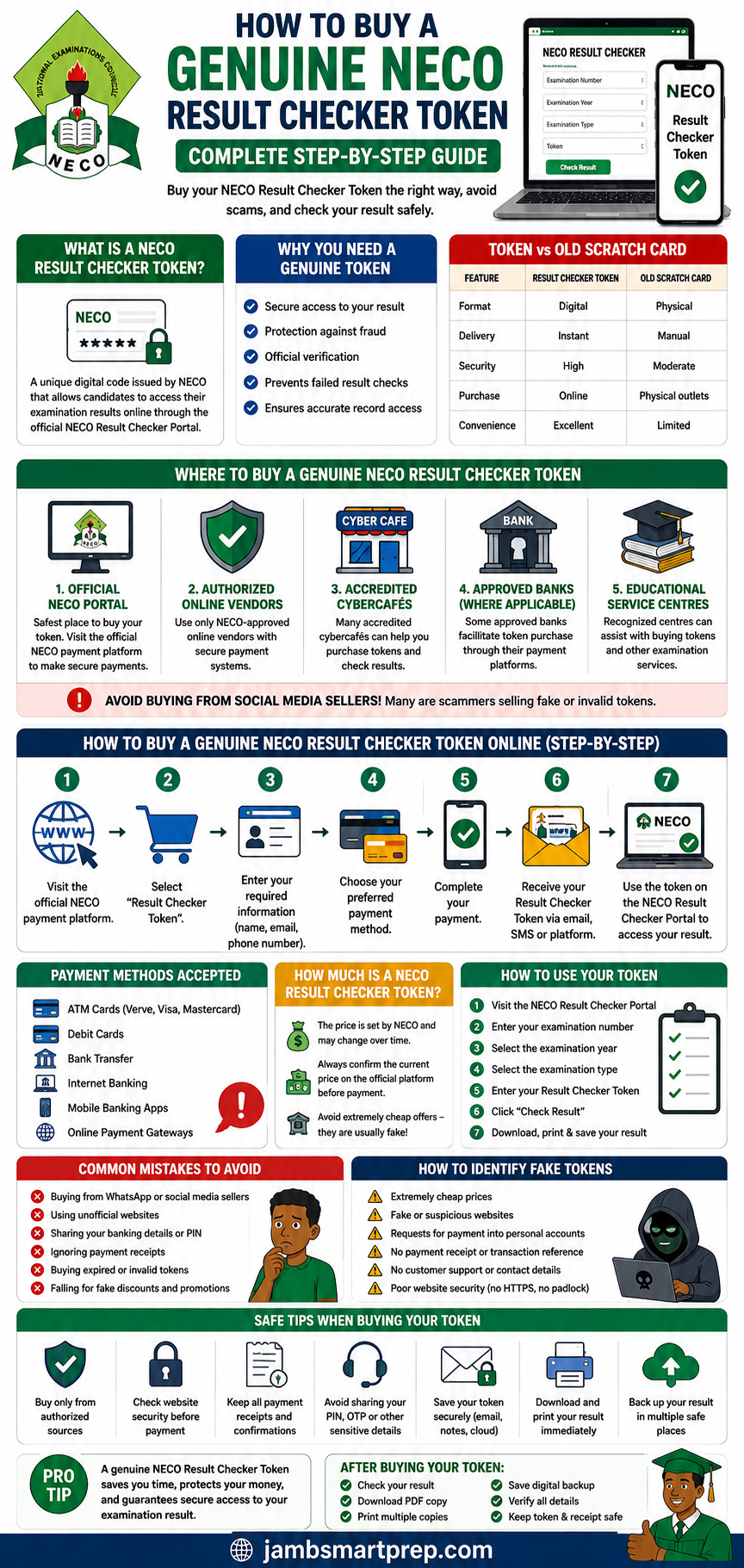
Quick Tips
- Buy only from authorized sources.
- Avoid social media token sellers.
- Save your payment receipt.
- Keep your token confidential.
- Download and print your result immediately after checking.
Payment Methods, Token Price, How to Use Your Token, and Common Buying Mistakes
Payment Methods Accepted for Buying a NECO Result Checker Token
One of the reasons the NECO Result Checker Token system has become more popular than the old scratch card method is its flexibility. Candidates can purchase a token using several convenient payment options without visiting a physical office.
Whether you are a student, parent, or guardian, you can choose the payment method that suits you best.
1. ATM Cards
Most official payment platforms accept Nigerian ATM cards issued by commercial banks.
Supported cards usually include:
- Verve
- Visa
- Mastercard
Using an ATM card allows you to complete your purchase within a few minutes.
Tips for Safe Card Payments
- Confirm that you are on the official payment website.
- Never share your card PIN with anyone.
- Ensure the website uses a secure connection before entering your card details.
2. Debit Cards
Debit cards linked to your bank account are another convenient payment option.
Before making payment:
- Ensure your card is activated for online transactions.
- Confirm you have sufficient funds.
- Enable transaction alerts to monitor payments.
3. Bank Transfer
Many payment platforms now allow direct bank transfers.
This method is useful for candidates who:
- Do not own an ATM card.
- Prefer transferring money from their banking app.
- Want to pay through internet banking.
Always wait for payment confirmation before leaving the payment page.
4. Internet Banking
Candidates who use internet banking can complete payments directly from their bank’s online portal.
Advantages include:
- Fast processing
- Secure authentication
- Convenient payment tracking
5. Mobile Banking Apps
Most Nigerian banks provide mobile banking applications that support online payments.
Popular mobile banking apps make it possible to purchase a token from anywhere without visiting a bank branch.
6. Online Payment Gateways
Official payment platforms often integrate trusted payment gateways that support multiple payment methods.
After completing payment successfully, your Result Checker Token is usually generated automatically.
Which Payment Method Is Best?
There is no universally “best” option. Choose the method that is:
- Secure
- Convenient
- Supported by the official payment platform
Regardless of your payment method, always save your transaction receipt until you have successfully checked your result.
How Much Is a NECO Result Checker Token?
One of the most searched questions every examination season is:
“How much is the NECO Result Checker Token?”
The answer is simple.
The official price is determined by NECO and may be reviewed from time to time. Because prices can change, candidates should always confirm the current amount through official channels before making payment.
Avoid relying on outdated blog posts or social media comments that may no longer reflect the current price.
Why the Price May Change
Several factors can influence the final amount you pay.
These include:
- Official pricing updates by NECO.
- Payment processing charges.
- Vendor service fees (where applicable).
- Banking transaction charges.
Beware of Extremely Cheap Offers
Fraudsters often attract candidates with unrealistic promises.
Be suspicious if someone advertises:
- “Half-price NECO tokens”
- “Unlimited Result Checker Tokens”
- “Special student discount”
- “Lifetime access”
These offers are rarely legitimate.
Buying from unofficial sellers can result in:
- Invalid tokens.
- Financial loss.
- Delayed access to your result.
- Identity theft.
The safest option is to purchase only through authorized channels.
Factors That Affect the Cost of Buying a Token
Although the official token price is standardized, the total amount paid may vary slightly depending on:
| Factor | Possible Effect |
|---|---|
| Official NECO pricing updates | May increase or decrease the base price |
| Payment gateway charges | Small processing fee |
| Bank transaction charges | Depends on your bank |
| Vendor service fee | May apply through accredited agents |
Before completing payment, carefully review the final amount displayed.
How to Use Your NECO Result Checker Token
After successfully purchasing your token, the next step is checking your examination result.
Fortunately, the process is straightforward.
Step 1: Visit the NECO Result Checker Portal
Open the official NECO Result Checker Portal using a reliable browser.
Avoid clicking links from suspicious websites or social media pages.
Step 2: Enter Your Examination Number
Type your examination number exactly as it appears on your registration slip.
A single incorrect digit may prevent the system from finding your record.
Step 3: Select the Examination Year
Choose the correct examination year.
Many “Result Not Found” errors occur because candidates accidentally select the wrong year.
Step 4: Select the Examination Type
Examples include:
- SSCE Internal
- SSCE External
- BECE
Selecting the correct examination category is essential.
Step 5: Enter Your Result Checker Token
Carefully type your token.
Before submitting:
- Check every character.
- Avoid unnecessary spaces.
- Confirm there are no typing errors.
Step 6: Click “Check Result”
Once all information has been entered correctly, click the Check Result button.
If everything matches NECO’s records, your result should appear.
Step 7: Save and Print Your Result
Immediately after viewing your result:
- Download a PDF copy.
- Print several copies.
- Save the file to cloud storage.
- Email yourself a backup copy.
These simple precautions can save you time later during admission or scholarship applications.
Common Mistakes When Buying NECO Result Checker Tokens
Many candidates experience unnecessary problems because of avoidable mistakes.
Here are the most common ones.
1. Buying from WhatsApp Sellers
This is perhaps the biggest mistake candidates make.
Many fraudsters advertise fake Result Checker Tokens through:
- WhatsApp groups
- Telegram channels
- Facebook comments
- Instagram pages
Avoid making payments simply because someone claims to have “cheap tokens.”
2. Using Unofficial Websites
Some websites imitate the appearance of genuine education portals.
These fake websites are designed to:
- Collect your payment.
- Steal personal information.
- Generate fake confirmation pages.
Always verify that you are using an authorized platform.
3. Sharing Your Banking Details
Never share:
- ATM PIN
- Online banking password
- One-Time Password (OTP)
- CVV number
No genuine vendor should request these details.
4. Ignoring Payment Receipts
Many candidates delete payment confirmations immediately after purchasing their token.
This is risky.
Your receipt serves as proof of payment if any issue arises.
Keep:
- Email confirmations
- SMS alerts
- Bank transaction receipts
- Payment reference numbers
5. Buying the Wrong Product
Some candidates mistakenly purchase services unrelated to result checking.
Before paying, confirm that you are buying a NECO Result Checker Token and not another examination service.
6. Falling for Fake Discounts
Scammers often advertise unbelievable offers such as:
- “Buy one, get one free”
- “50% student discount”
- “Lifetime Result Checker Token”
Official tokens are sold through approved channels using standardized pricing. Extremely low prices should raise suspicion.
How to Identify Fake NECO Result Checker Tokens
Because online fraud continues to increase, candidates should know how to recognize fake tokens before making payment.
Warning Sign 1: Extremely Cheap Prices
If the advertised price is significantly lower than the official rate, be careful.
Fraudsters often use unrealistic prices to attract victims.
Warning Sign 2: Fake Websites
Before entering payment details:
- Check the website address carefully.
- Look for secure browsing indicators.
- Avoid websites filled with pop-up advertisements or suspicious redirects.
Warning Sign 3: Personal Bank Account Requests
Authorized vendors usually process payments through secure payment systems.
Be cautious if someone insists that you transfer money into a personal account without any official payment process.
Warning Sign 4: No Payment Receipt
Legitimate transactions normally generate:
- Payment confirmations
- Email receipts
- Reference numbers
If no receipt is provided, reconsider the transaction.
Warning Sign 5: No Customer Support
Reliable vendors usually provide customer support through:
- Phone
- Live chat
- Help desk
If there is no way to contact the seller after payment, that is a major warning sign.
Warning Sign 6: Poor Website Security
Before entering payment details, check whether the website appears secure and professional. Poorly designed pages, broken links, or requests for unnecessary sensitive information should make you cautious.
How to Spot a Genuine NECO Result Checker Token
Always Do This
✅ Buy from authorized platforms
✅ Confirm the website is official
✅ Keep your payment receipt
✅ Verify the final payment amount
✅ Save your token securely
Avoid This
❌ Cheap social media offers
❌ Personal bank account payments
❌ Sharing your ATM PIN or OTP
❌ Ignoring transaction receipts
❌ Clicking suspicious links
Pro Tip: A genuine NECO Result Checker Token helps you access your result securely. Taking a few extra minutes to verify the seller can save you from fraud and unnecessary delays.
Token Problems, Reusability, Safety Tips, and Best Practices After Purchase
What If Your NECO Result Checker Token Does Not Work?
Buying a genuine NECO Result Checker Token should make checking your result straightforward. However, some candidates occasionally encounter errors after entering their token on the portal.
If your NECO Result Checker Token is not working, don’t panic. Most token-related issues are temporary or can be resolved with a few simple checks.
Let’s look at the most common causes and their solutions.
1. Typing Mistakes
This is the most frequent reason a token is rejected.
Candidates sometimes:
- Enter the wrong character.
- Mistake the number 0 for the letter O.
- Mistake the number 1 for the letter I.
- Leave unnecessary spaces before or after the token.
- Skip one or more characters.
Solution
Before submitting the token:
- Compare it carefully with your purchase receipt.
- Type slowly rather than copying from an unreliable source.
- Remove any extra spaces.
A small typing error is enough to trigger an Invalid Token message.
2. Fake or Invalid Token
If the token was purchased from an unauthorized seller, it may never work.
Signs of a fake token include:
- Invalid Token error immediately after entry.
- Seller becomes unreachable after payment.
- No payment receipt.
- No transaction reference.
Solution
Always buy your token through an authorized platform.
If you suspect fraud, avoid making another payment to the same seller.
3. Payment Is Still Processing
Sometimes payment is successful, but token generation takes a little longer because of:
- Banking delays.
- Network interruptions.
- Payment gateway maintenance.
Solution
- Wait for payment confirmation.
- Check your email and SMS.
- Review your payment dashboard.
- Keep your transaction receipt.
Avoid making repeated payments while the first transaction is still being processed.
4. Wrong Result Checker Portal
Some candidates unknowingly enter their token on unofficial websites.
Besides being unsafe, these websites cannot verify genuine NECO tokens.
Solution
Always use the official NECO Result Checker Portal when checking your result.
5. Browser Problems
Outdated browser data can interfere with secure login sessions.
Common symptoms include:
- Blank pages.
- Invalid Token errors.
- Session timeout.
- Loading failures.
Solution
Try the following:
- Clear your browser cache.
- Delete cookies.
- Restart the browser.
- Use another browser.
- Restart your device.
6. Session Timeout
If you remain inactive for too long while entering your details, the website may automatically end your session.
Solution
Refresh the page and start again.
Quick Troubleshooting Checklist
Before assuming your token is invalid, ask yourself:
✔ Did I enter every character correctly?
✔ Did I buy the token from an authorized source?
✔ Has my payment been confirmed?
✔ Am I using the official Result Checker Portal?
✔ Have I refreshed the page?
✔ Have I tried another browser?
If the answer is Yes to all of the above and the problem persists, contact the seller or NECO support if appropriate.
Is the NECO Result Checker Token Reusable?
Another question frequently asked by candidates is:
“Can I use my NECO Result Checker Token more than once?”
The answer depends on NECO’s current token usage policy at the time you purchase it.
Since NECO may revise how tokens are used, always check the instructions provided with your purchase or on the official portal.
Why You Should Save Your Result Immediately
Regardless of the token policy, it is always wise to save your result as soon as it is displayed.
Doing this reduces the need to revisit the portal later.
After checking your result:
- Download a PDF copy.
- Print several copies.
- Save the file on your phone.
- Back it up to cloud storage.
- Email yourself a copy.
These simple steps can save you time during university admission or scholarship applications.
Difference Between NECO Result Checker Token and Scratch Card
Many candidates still refer to the old NECO scratch cards when searching online.
Although both are used for result checking, there are important differences.
| Feature | Result Checker Token | Scratch Card |
|---|---|---|
| Format | Digital | Physical |
| Delivery | Online | Printed card |
| Purchase | Electronic payment | Physical purchase |
| Security | Higher | Lower |
| Availability | Instant | Depends on location |
| Fraud Protection | Better | More vulnerable |
| Convenience | Excellent | Moderate |
The digital token system offers better convenience and stronger protection against counterfeit products.
Advantages of Using a Result Checker Token
Compared to the old scratch card system, digital tokens provide several benefits.
Faster Delivery
Candidates usually receive their token shortly after payment is confirmed.
Improved Security
Electronic delivery reduces the circulation of counterfeit scratch cards.
Easy Online Purchase
Candidates can purchase tokens from anywhere with internet access.
Better Record Keeping
Electronic receipts make it easier to verify transactions if problems occur.
How to Keep Your Result Checker Token Safe
After purchasing your token, treat it like any other important document.
Losing your token unnecessarily can create additional work if you need to revisit your result.
Store It in Your Email
Most candidates use email daily.
Keeping the confirmation email makes future retrieval easier.
Save It in Cloud Storage
Services such as:
- Google Drive
- Microsoft OneDrive
- Dropbox
can safely store your purchase confirmation and token.
Keep Your Payment Receipt
Never delete:
- Payment confirmation emails.
- SMS notifications.
- Bank alerts.
- Transaction receipts.
These documents may be needed if payment issues arise.
Write It Down
Keeping a handwritten copy in a secure notebook provides an additional backup.
Avoid Public Sharing
Never post your Result Checker Token on:
Protecting your token helps safeguard your examination information.
Can Someone Else Buy a NECO Result Checker Token for You?
Yes.
A parent, guardian, sibling, friend, or school representative can purchase a Result Checker Token on your behalf, provided the purchase is made through an authorized channel.
This is particularly helpful for candidates who:
- Do not have access to online banking.
- Live in rural communities.
- Are currently outside Nigeria.
- Need assistance with online payments.
However, only share the minimum information required to complete the purchase.
Safety Tips When Buying a NECO Result Checker Token
Online fraud continues to target students every examination season.
Following these simple precautions can protect both your money and your personal information.
Buy Only from Authorized Sources
This remains the most important rule.
Avoid purchasing tokens through:
- Unknown WhatsApp groups.
- Telegram channels.
- Facebook comments.
- Random social media accounts.
Check Website Security
Before making payment:
- Confirm that the website address is correct.
- Ensure the connection appears secure.
- Avoid websites filled with suspicious advertisements.
Never Reveal Your Banking PIN
No genuine seller should ever ask for:
- ATM PIN.
- Mobile banking password.
- One-Time Password (OTP).
- Internet banking login details.
If anyone requests this information, stop the transaction immediately.
Keep Every Transaction Record
Save:
- Payment receipts.
- Email confirmations.
- SMS alerts.
- Transaction reference numbers.
These records make resolving payment disputes much easier.
Verify Payment Confirmation
Before leaving the payment page:
- Confirm that payment has been processed.
- Wait for confirmation.
- Ensure your token has been generated or is being processed.
What to Do After Buying Your NECO Result Checker Token
After receiving your token, follow these important steps.
Check Your Result Immediately
Use your token while all your purchase details are still available.
Download a PDF Copy
A digital copy is useful for:
- University admission.
- Scholarship applications.
- Employment opportunities.
- Personal records.
Print Multiple Copies
Printing several copies saves time later when institutions request your result.
Store Your Result Securely
Save copies in multiple locations, including:
- Your smartphone.
- Computer.
- Cloud storage.
- Email account.
Verify Your Grades
Before leaving the portal, confirm that:
- Your name is correct.
- Your examination number is correct.
- All registered subjects appear.
- Your grades are clearly displayed.
If you notice any unusual issue, contact the appropriate authorities promptly.
Quick Safety Checklist
| Task | Completed |
|---|---|
| Bought from an authorized seller | ✔ |
| Verified website authenticity | ✔ |
| Saved payment receipt | ✔ |
| Stored token safely | ✔ |
| Checked result successfully | ✔ |
| Downloaded PDF copy | ✔ |
| Printed hard copies | ✔ |
| Backed up result online | ✔ |
Real-Life Example
Consider two candidates preparing to check their NECO results.
Chinedu purchased his Result Checker Token through an approved online platform. He received a confirmation email, successfully checked his result, downloaded a PDF copy, and saved backups in both his email and cloud storage.
Blessing, however, bought a heavily discounted token from an unknown seller on social media. After payment, the seller stopped responding, and the token never worked. She eventually had to purchase another token through an authorized source before she could access her result.
Their experiences highlight an important lesson: buying a genuine NECO Result Checker Token from a trusted source not only saves money but also protects your personal information and ensures a smoother result-checking experience.
Frequently Asked Questions(FAQs)
Here are answers to some of the most common questions candidates ask about buying and using a NECO Result Checker Token.
1. How do I buy a genuine NECO Result Checker Token?
You can buy a genuine NECO Result Checker Token through the official NECO payment platform or other authorized sales channels approved by NECO. Avoid purchasing tokens from unknown social media sellers or unofficial websites.
2. Where can I buy an original NECO Result Checker Token?
The safest places include:
- Official NECO payment platform
- Authorized online vendors
- Accredited cybercafés
- Approved educational service centres
- Other authorized payment channels announced by NECO
Always verify that you are using an official or approved platform before making payment.
3. How much is the NECO Result Checker Token?
The official price is determined by NECO and may change from time to time. Before making payment, always check the latest price on the official payment platform or through an authorized vendor.
Be cautious of sellers advertising unusually low prices, as these may be scams.
4. Can I buy a NECO Result Checker Token online?
Yes.
Most candidates now purchase their tokens online using secure payment methods such as:
- ATM cards
- Debit cards
- Internet banking
- Mobile banking
- Bank transfers
Online purchasing is convenient and usually provides instant or near-instant token delivery after payment confirmation.
5. Is the NECO Result Checker Token reusable?
Token usage depends on NECO’s current policy. Since this policy may change, always read the instructions that accompany your purchase or those displayed on the official portal.
To avoid future inconvenience, download and save your result immediately after checking it.
6. Why is my NECO Result Checker Token not working?
Common reasons include:
- Typing mistakes
- Invalid or fake token
- Payment still processing
- Wrong portal
- Browser issues
- Session timeout
Verify your details carefully before trying again.
7. Can I use another person’s Result Checker Token?
If the token is valid and unused according to NECO’s current usage policy, it may technically work with the correct examination details. However, candidates should obtain tokens through legitimate channels and avoid sharing personal examination information unnecessarily.
8. Can accredited cybercafés sell genuine NECO Result Checker Tokens?
Yes.
Many reputable cybercafés work with authorized payment systems and can assist candidates in purchasing genuine Result Checker Tokens and checking their results.
Choose only trusted cybercafés with a good reputation.
9. Is the old NECO scratch card still available?
NECO now primarily uses digital Result Checker Tokens instead of the traditional scratch card system.
Candidates should follow the current method approved by NECO for result checking.
10. How long does it take to receive my token after payment?
In most cases, token delivery is quick after payment confirmation.
However, slight delays may occur because of:
- Network issues
- Banking delays
- Payment gateway processing
- High transaction volume
Keep your payment receipt until your token is received.
11. What should I do if I lose my Result Checker Token?
If you purchased the token through an authorized platform:
- Check your email.
- Review your SMS messages.
- Look for your payment confirmation.
- Contact the vendor if necessary.
This is another reason why keeping payment records is important.
12. Can I check my NECO result without a Result Checker Token?
No.
A valid Result Checker Token is required before your result can be accessed through the official NECO Result Checker Portal.
Common Myths About NECO Result Checker Tokens
Many students receive incorrect advice from friends or social media. Here are a few myths worth clearing up.
Myth 1: Cheaper Tokens Are the Same as Official Tokens
Fact: Fraudsters often use very low prices to lure unsuspecting buyers. Genuine tokens should always be purchased through authorized channels.
Myth 2: Social Media Sellers Always Have Special Discounts
Fact: Not every online seller is fraudulent, but many fake token scams begin on social media platforms. Always verify the source before making payment.
Myth 3: One Token Can Be Shared Freely Among Many Candidates
Fact: Token usage is governed by NECO’s current policy. Candidates should follow the official instructions provided with their purchase instead of relying on rumours.
Myth 4: Once You Check Your Result, You No Longer Need the Token
Fact: Even after successfully checking your result, it is wise to keep your token and payment receipt until you are certain they are no longer needed under the applicable policy.
Quick Buying Checklist
Before purchasing your NECO Result Checker Token, use this checklist to avoid mistakes.
| Task | Completed |
|---|---|
| Confirmed the official payment platform | ✔ |
| Verified the website before payment | ✔ |
| Selected the correct Result Checker Token service | ✔ |
| Used a secure payment method | ✔ |
| Saved the payment receipt | ✔ |
| Received the token | ✔ |
| Stored the token safely | ✔ |
| Successfully checked the result | ✔ |
| Downloaded a PDF copy | ✔ |
| Printed multiple copies | ✔ |
Related Articles
To make your admission journey easier, consider reading these guides on your website:
- NECO Result Checker Portal Login: How to Check Your NECO Result Online
- NECO Portal Problems: NECO Result Not Showing? Causes, Fixes, and Solutions
- How to Print Your NECO Result Online
- How to Verify an Original NECO Result
- WAEC Result Checker Portal Login Guide
- How to Recover a Lost NECO Examination Number
- JAMB CAPS Admission Status Checker Explained
- How to Upload Your O’Level Result on JAMB CAPS
- Universities That Accept NECO Results for Admission
- Common Admission Mistakes Nigerian Students Should Avoid
These internal links help readers find additional information while improving your website’s SEO structure.
Buy a Genuine NECO Result Checker Token Safely
START
⬇
Visit an Authorized NECO Payment Platform
⬇
Select “Result Checker Token”
⬇
Enter Your Details Correctly
⬇
Choose a Secure Payment Method
⬇
Complete Payment
⬇
Receive Your Token
⬇
Visit the Official NECO Result Checker Portal
⬇
Enter Your Exam Details + Token
⬇
Check, Download & Print Your Result
Safety Reminder
✔ Buy only from official or authorized sellers.
✔ Save your payment receipt.
✔ Keep your token private.
✔ Download your result immediately after checking.
✔ Back up your result in your email or cloud storage.
Conclusion
Buying a genuine NECO Result Checker Token is one of the most important steps in accessing your examination result safely and without unnecessary stress. While the process is straightforward, candidates who purchase tokens from unauthorized sellers or unofficial websites often experience avoidable problems such as invalid tokens, payment disputes, or failed result checks.
The safest approach is to use only approved payment channels, verify every transaction before completing payment, and keep your payment receipt until you have successfully checked and saved your result. It is equally important to enter your examination details carefully, use a secure internet connection, and avoid sharing your token with strangers.
Once your result is available, download a PDF copy, print several hard copies, and store digital backups in multiple locations. These simple habits can save you time when applying for university admission, scholarships, jobs, or other opportunities that require your NECO result.
By following the steps explained in this guide, you can confidently purchase a genuine NECO Result Checker Token, avoid common scams, and complete the result-checking process with ease.
NOW OVER TO YOU
Have you successfully purchased your NECO Result Checker Token, or did you encounter any challenges during the process? Share your experience or ask your questions in the comments below, and we’ll be happy to help.
If you found this guide useful, bookmark this page, share it with your classmates, parents, and friends, and explore our other articles on NECO, WAEC, JAMB, university admissions, scholarships, and study opportunities in Nigeria to stay informed throughout your academic journey.
