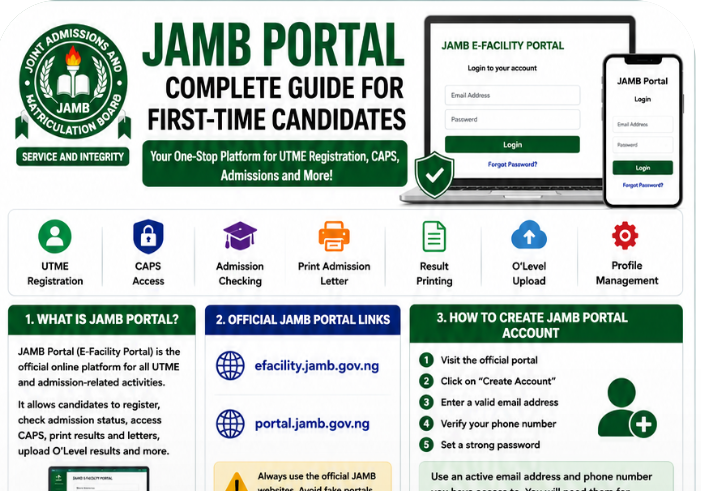
Every year, millions of Nigerian students visit the JAMB portal to register for UTME, check admission status, print results, upload O’Level results, and access JAMB CAPS. Yet, many first-time candidates still struggle to understand how the portal works.
Some students forget their login details. Others cannot access the JAMB CAPS portal properly. Many candidates also get confused during admission periods because they do not understand the difference between the JAMB e-facility portal, CAPS, and the general JAMB website.
If you are preparing for UTME or planning to gain admission into a university, polytechnic, or college of education in Nigeria, understanding how the JAMB Portal 2026 works is extremely important.
This detailed guide explains everything first-time candidates need to know about:
- JAMB portal login
- JAMB portal registration
- JAMB CAPS login explained
- admission status checking
- printing admission letters
- uploading O’Level results
- recovering forgotten passwords
- and solving common JAMB portal problems
By the end of this article, you will understand how to use JAMB Portal 2026 successfully without confusion.
What Is JAMB Portal 2026?
The JAMB portal is the official online platform created by the Joint Admissions and Matriculation Board for UTME and Direct Entry candidates.
The portal allows students to manage almost every admission-related activity online.
Purpose of the JAMB E-Facility Portal
The JAMB e-facility portal helps candidates:
- register for UTME,
- check admission status,
- access JAMB CAPS,
- print admission letters,
- upload O’Level results,
- correct registration details,
- and monitor admission progress.
Without the portal, many admission processes would be stressful and time-consuming.
Why the Portal Is Important for UTME Candidates
Every student writing UTME must use the portal at different stages of the admission process.
For example:
- During registration
- During result checking
- During admission processing
- During school clearance
Also read: How to Pass UTME in One Sitting Without Malpractice
This is why first-time candidates should understand how the system works early.
Official JAMB Portal Links for 2026
One major problem Nigerian students face is visiting fake JAMB websites.
Many scammers now create fake portals that resemble the official platform.
Official JAMB Portal Links
The official JAMB portal links include:
efacility.jamb.gov.ng
and
portal.jamb.gov.ng
These are the approved websites for JAMB portal login and candidate activities.
Difference Between efacility.jamb.gov.ng and portal.jamb.gov.ng
Many students think both portals are completely different.
In reality:
- the e-facility portal handles most candidate services,
- while the general portal contains broader JAMB information and updates.
Most important student activities happen inside the e-facility dashboard.
Why Students Should Avoid Fake Portals
Fake portals can:
- steal passwords,
- collect candidate information,
- or scam students financially.
Always confirm the official website before entering login details.
How to Create a JAMB Portal Account
Before you can access most JAMB services, you need to create a JAMB profile account.
Step-by-Step JAMB Portal Account Registration
Step 1: Visit the Official Portal
Open the official JAMB e-facility website via efacility.jamb.gov.ng
Step 2: Create Profile Account
Select the account creation option.
Step 3: Enter a Valid Email Address
Use an active email address you can access anytime.
This is extremely important because JAMB sends important updates through email.
Step 4: Verify Phone Number
Use a personal phone number linked to your registration details.
Step 5: Create a Strong Password
Choose a secure but memorable password.
Avoid weak passwords like:
- 123456
- password
- your first name only
Why Active Email Addresses Matter
Many candidates lose access to their JAMB profiles because they use inactive email addresses.
Your email will be needed for:
- password recovery,
- CAPS updates,
- admission notifications,
- and profile management.
How to Login to JAMB Portal 2026
Many first-time candidates find the login process confusing initially.
Fortunately, it becomes easy after the first attempt.
Step-by-Step JAMB Portal Login Guide
Step 1: Visit JAMB Portal
Open the official portal.
Step 2: Enter Registered Email
Input the email used during profile registration.
Step 3: Enter Password
Type your password carefully.
Step 4: Click Login
Select the login button.
Step 5: Access Dashboard
Once successful, your dashboard will appear.
You can now access services such as:
- CAPS login,
- admission checking,
- O’Level uploads,
- and admission letter printing.
Mobile Phone Login Tips
Many Nigerian students now use smartphones for JAMB portal activities.
Phones work well for:
- checking admission status,
- CAPS monitoring,
- and result printing.
However, desktop mode may improve visibility on some browsers.
Best Browsers for JAMB Portal Login
The most recommended browsers include:
- Google Chrome
- Mozilla Firefox
- Microsoft Edge
Google Chrome usually provides smoother experience for portal navigation.
Services Available on JAMB Portal 2026
The JAMB portal handles many important services.
Major JAMB Portal Services
UTME Registration
Candidates can complete UTME registration online.
JAMB CAPS Login
Students can monitor admission progress through CAPS.
Admission Status Checking
Candidates can track admission updates.
Admission Letter Printing
Students can print official admission letters.
Result Printing
UTME result slips can be printed online.
O’Level Upload
WAEC, NECO, and NABTEB results can be uploaded.
Change of Institution
Students can modify institution choices.
Change of Course
Course corrections are also possible.
Correction of Data
Candidates can fix errors in registration details.
How to Register for UTME on JAMB Portal 2026
UTME registration remains one of the most important portal activities.
Step-by-Step JAMB Registration Process
Step 1: Create Profile
Create your JAMB profile account first.
Step 2: Obtain Profile Code
JAMB usually provides a profile code after SMS registration procedures.
Step 3: Purchase e-PIN
Candidates must buy JAMB e-PIN from approved vendors.
Step 4: Complete Registration
Visit an accredited CBT centre to finalize registration.
Step 5: Print Registration Slip
Always print and keep registration slips safely.
Accredited CBT Centres Matter
Students should avoid unapproved registration centres.
Accredited CBT centres help reduce registration mistakes and biometric issues.
Common Registration Mistakes Students Should Avoid
Many first-time candidates make avoidable errors such as:
- wrong names,
- incorrect subject combinations,
- wrong email addresses,
- and incorrect phone numbers.
Always review your details carefully before submission.
How to Access JAMB CAPS Through the Portal
CAPS means:
Central Admission Processing System
It is one of the most important sections of the JAMB portal.
Why JAMB CAPS Is Important
CAPS helps students:
- monitor admission status,
- accept admission offers,
- reject admission offers,
- and track admission progress.
JAMB CAPS Login Explained
To access CAPS:
- Login to the JAMB portal
- Open dashboard
- Locate CAPS section
- Access admission dashboard
Students should monitor CAPS regularly during admission periods.
How to Accept Admission on CAPS
When offered admission:
- click “Accept Admission”
- confirm your choice
- and monitor further instructions.
How to Reject Admission on CAPS
Students can also reject admission offers if necessary.
However, rejecting admission should be considered carefully.
How to Check Admission Status on JAMB Portal
Admission checking is one of the most searched JAMB portal activities online.
Step-by-Step Admission Status Guide
Step 1: Login to Portal
Access your dashboard.
Step 2: Open Admission Status Section
Locate admission services.
Step 3: Select Examination Year
Choose the correct UTME year.
Step 4: Enter Registration Number
Input your JAMB registration number.
Step 5: View Admission Status
Your admission update will appear immediately.
Meaning of Common Admission Messages
Admission in Progress
Your admission is still being processed.
Not Admitted
No admission offer has been made yet.
Congratulations
You have been offered admission successfully.
How to Print JAMB Admission Letter
Admission letters are very important during school clearance.
Step-by-Step Admission Letter Printing
Step 1: Login to Portal
Access your dashboard.
Step 2: Select “Print Admission Letter”
Locate the printing section.
Step 3: Complete Payment
Some services may require payment.
Step 4: Download and Print Document
Print several copies safely.
Why Admission Letters Matter
Admission letters are required for:
- clearance,
- registration,
- hostel applications,
- scholarship processing,
- and verification exercises.
How to Upload O’Level Results on JAMB Portal
Many institutions now require O’Level uploads before admission processing.
Why O’Level Uploads Matter
Without uploading WAEC, NECO, or NABTEB results, admission processing may become difficult.
Approved Upload Centres
Students should use:
- accredited CBT centres,
- or approved JAMB centres.
Also read: How Many Hours Should UTME First-Time Candidates Study Daily?
Accepted Examination Types
JAMB accepts:
- WAEC,
- NECO,
- and NABTEB results.
WAEC, NECO, and NABTEB Upload Instructions
Students should ensure:
- names match correctly,
- grades are accurate,
- and uploaded documents are clear.
How to Recover Forgotten JAMB Portal Password
Forgotten passwords are very common among candidates.
Fortunately, recovery is simple.
Step-by-Step Password Recovery Process
Step 1: Visit Login Page
Open the official portal.
Step 2: Click “Forgot Password”
Locate the recovery option.
Step 3: Enter Registered Email
Use the exact registration email.
Step 4: Check Inbox
JAMB will send reset instructions.
Step 5: Reset Password
Create a stronger password afterward.
Strong Password Recommendations
Good passwords usually combine:
- letters,
- numbers,
- and symbols.
Avoid using predictable passwords.
Common JAMB Portal Problems and Solutions
Many candidates experience technical problems during busy periods.
Wrong Password
Solution
- re-enter carefully,
- check capitalization,
- or reset password.
Invalid Email
Solution
Use the exact email linked to your profile.
Slow Portal
Heavy traffic often slows portal performance.
Solution
Try again during off-peak hours.
CAPS Not Loading
Solution
- refresh the page,
- use stronger internet,
- or switch browsers.
Admission Not Showing
Admissions are usually released in batches.
Solution
Continue checking regularly.
Browser Issues
Old browsers may affect portal performance.
Solution
Use updated browsers like Google Chrome.
Security Tips for JAMB Portal Users
Online safety is extremely important during admission periods.
Protect Your Password
Never share passwords publicly.
Avoid Fake Websites
Always verify official portal links carefully.
Be Careful With Cybercafes
Public systems may save passwords accidentally.
Avoid Admission Scams
No agent can “upgrade” admission illegally through CAPS.
Logout After Portal Use
Always logout after using public devices.
Best Devices and Browsers for JAMB Portal Login
Students often ask whether phones or laptops work better.
Smartphones
Phones work well for:
- quick portal checks,
- CAPS monitoring,
- and result access.
Laptops and Desktop Computers
Laptops usually provide smoother experience for:
- printing,
- registration,
- and document management.
Recommended Browsers
Best browsers include:
- Google Chrome
- Mozilla Firefox
- Microsoft Edge
Google Chrome remains highly recommended.
Common Mistakes Students Make During JAMB Portal Usage
Several avoidable mistakes create unnecessary problems.
Using Wrong Emails
Always use accessible email addresses.
Sharing Passwords Publicly
This increases security risks greatly.
Ignoring CAPS Updates
Students should monitor CAPS regularly.
Visiting Fake Websites
Fake portals are increasingly common online.
Uploading Wrong Documents
Always verify uploaded files carefully.
Best CBT App for JAMB Preparation
Preparing for UTME requires regular CBT practice.
One helpful platform many Nigerian students use is:
JambSmartPrep CBT App
Benefits of JambSmartPrep CBT App
- CBT simulation practice
- Mock examinations
- Speed improvement
- Weak subject identification
- Performance tracking
Regular CBT practice helps candidates build confidence before UTME.
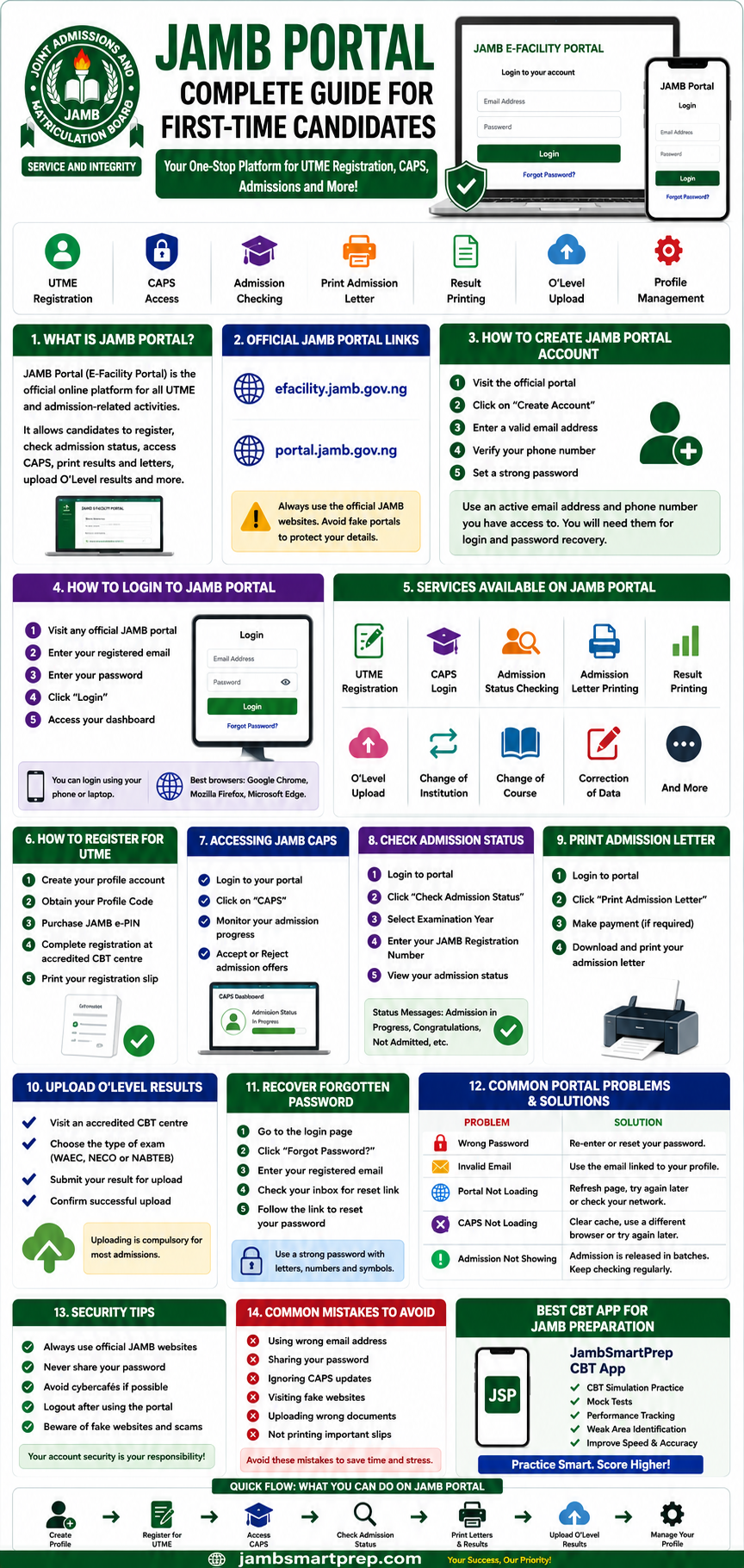
📘 Quick Guide to JAMB Portal 2026
Portal Login Steps
✅ Visit official JAMB portal
✅ Enter registered email
✅ Enter password
✅ Access dashboard
CAPS Access Guide
✅ Open CAPS section
✅ Check admission updates
✅ Accept or reject admission
Admission Status Checking
✅ Login to portal
✅ Select admission status
✅ Enter registration number
Password Recovery Process
✅ Click “Forgot Password”
✅ Enter registered email
✅ Reset password safely
O’Level Upload Process
✅ Visit accredited CBT centre
✅ Upload WAEC/NECO/NABTEB result
✅ Verify uploaded details
Frequently Asked Questions About JAMB Portal 2026
What is JAMB Portal 2026?
It is the official online platform for UTME registration, CAPS access, and admission processing.
What is the official JAMB portal?
The official portal includes:
- efacility.jamb.gov.ng
- portal.jamb.gov.ng
How do I login to JAMB portal?
Visit the official portal and enter your registered email and password.
How do I recover my JAMB password?
Use the “Forgot Password” option on the login page.
How do I check admission status?
Login to your dashboard and open the admission status section.
What is JAMB CAPS?
CAPS means Central Admission Processing System.
How do I upload O’Level results?
Visit an accredited CBT centre for upload assistance.
Can I use my phone for JAMB portal login?
Yes. Smartphones work for most portal activities.
Why is my JAMB portal not opening?
Heavy traffic or browser issues may cause temporary problems.
How do I print my admission letter?
Login to the portal and select “Print Admission Letter.”
What is the official efacility.jamb.gov.ng link?
It is the official JAMB e-facility portal.
Can cybercafes access my JAMB profile?
Yes, especially if passwords are saved accidentally.
What browser works best for JAMB portal?
Google Chrome usually works best.
Can I change institution on JAMB portal?
Yes. Change of institution services are available online.
Is JAMB CAPS compulsory?
Yes. CAPS plays an important role during admission processing.
Can I print my JAMB result online?
Yes. Result slips can be printed through the portal.
What should I do if CAPS is not loading?
Refresh the page or try again later.
How often should I check CAPS?
Students should monitor CAPS regularly during admission periods.
Is JAMB portal free to use?
Basic portal access is free, although some services require payment.
Can I access JAMB portal at night?
Yes. The portal is accessible anytime internet connection is available.
Conclusion
Understanding how the JAMB Portal 2026 works can make the UTME and admission process much easier for first-time candidates.
From registration and CAPS monitoring to admission status checking and O’Level uploads, the JAMB e-facility portal remains one of the most important platforms for Nigerian students seeking admission.
Students should always:
- use official JAMB portals,
- protect login details carefully,
- avoid fake websites,
- and monitor CAPS updates regularly.
A good understanding of the portal helps candidates avoid unnecessary mistakes and admission delays.
Have you checked your JAMB CAPS admission status yet? Share this guide with another UTME candidate and bookmark this page for future JAMB updates.
