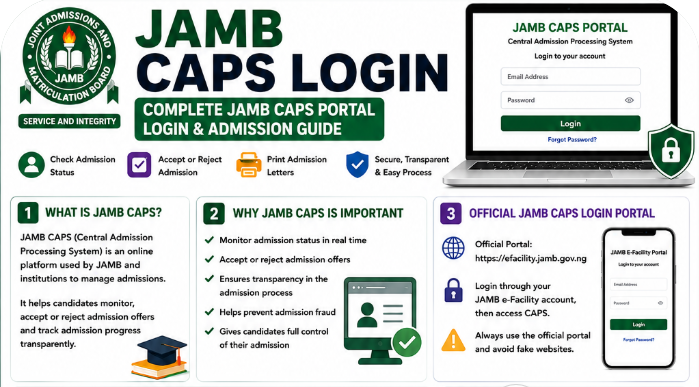
Every year, thousands of Nigerian students become confused during admission periods because they do not fully understand how the Joint Admissions and Matriculation Board CAPS system works.
Some candidates check their admission status once and stop checking afterward. Others do not know how to login to JAMB CAPS properly. Many students even miss admission opportunities because they fail to monitor updates on time.
If you are preparing for admission into any Nigerian university, polytechnic, or college of education, understanding the JAMB CAPS portal is extremely important.
The JAMB CAPS portal helps candidates:
- Check admission status
- Accept or reject admission offers
- Monitor admission progress
- Print admission letters
- Track institutional admission updates
Many first-time candidates still ask questions such as:
- How do I login to JAMB CAPS?
- Why is my admission not showing on CAPS?
- What does “Admission in Progress” mean?
- How do I accept admission on JAMB CAPS?
- Can I access JAMB CAPS on my phone?
This complete JAMB CAPS login guide explains everything in a simple and beginner-friendly way.
By the end of this article, you will understand how to login to JAMB CAPS successfully, check your admission status, accept admission offers, recover forgotten passwords, and avoid common CAPS login mistakes.
What Is JAMB CAPS?
JAMB CAPS means:
Central Admission Processing System
It is an online admission management platform introduced by JAMB to make admission processing more transparent and organized.
Before CAPS was introduced, many students complained about unclear admission processes and irregular admission practices.
Today, CAPS allows candidates to monitor admission activities directly online.
Why JAMB Introduced CAPS
JAMB introduced CAPS to:
- improve transparency,
- reduce admission fraud,
- simplify admission monitoring,
- and give students direct access to admission updates.
The platform also helps institutions manage admissions more effectively.
How Schools Use CAPS During Admission
Universities and polytechnics now use CAPS to:
- recommend candidates for admission,
- process admission approvals,
- upload admission lists,
- and monitor candidate eligibility.
This means your CAPS profile plays a major role during admission processing.
Important for UTME and Direct Entry Candidates
Whether you applied through:
- UTME,
- or Direct Entry,
you still need JAMB CAPS for admission processing and confirmation.
Why JAMB CAPS Is Important for Candidates
Many students underestimate the importance of CAPS until admission season begins.
That mistake can create unnecessary stress later.
Admission Monitoring
JAMB CAPS allows candidates to monitor admission progress directly.
Students no longer need to depend entirely on rumors or unofficial admission lists.
Admission Acceptance
CAPS gives candidates the ability to:
- accept admission,
- reject admission,
- or wait for updates.
Without accepting admission on CAPS, admission processing may remain incomplete.
Transparency in Admission Process
One major benefit of CAPS is transparency.
Students can now see admission updates themselves instead of relying on unofficial information.
Preventing Admission Fraud
The system also helps reduce fake admission offers and admission scams.
That is why candidates should always monitor their CAPS dashboard regularly.
Official JAMB CAPS Login Portal
Students should always use the official JAMB portal to avoid scams and fake websites.
Official JAMB CAPS Login Link
The official CAPS portal is accessed through:
https://efacility.jamb.gov.ng/
Students must first login to the JAMB e-facility portal before accessing CAPS.
Difference Between CAPS and Regular JAMB Portal
Many students think CAPS is completely separate from the JAMB portal.
The truth is that CAPS is a section inside the JAMB e-facility portal.
The regular portal handles:
- registration,
- corrections,
- result printing,
- and other services.
CAPS specifically focuses on admission processing.
Important Security Tips
Before logging in:
- Confirm the official website properly
- Avoid suspicious links from WhatsApp groups
- Never share passwords publicly
- Logout after using public computers
Many fake websites now imitate JAMB portals.
How to Login to JAMB CAPS
Many first-time candidates find CAPS login confusing initially.
Fortunately, the process is simple.
Step-by-Step JAMB CAPS Login Process
Step 1: Visit the Official JAMB Portal
Open your browser and visit:
https://efacility.jamb.gov.ng/
Step 2: Login to the E-Facility Portal
Enter:
- your registered email address,
- and your password.
Step 3: Access Your Dashboard
Once logged in successfully, your dashboard will appear.
Step 4: Locate CAPS Section
Find and click the CAPS option on your dashboard.
Step 5: Open CAPS Dashboard
Your JAMB CAPS dashboard will load successfully.
You can now:
- check admission status,
- accept admission,
- or monitor admission updates.
Mobile Login Instructions
Students can access JAMB CAPS using smartphones.
Most Android devices work well for CAPS activities.
However, desktop mode may improve visibility on mobile browsers.
Laptop Login Recommendations
Laptops and desktop computers usually provide smoother CAPS navigation.
This is especially useful when:
- printing admission letters,
- checking detailed admission updates,
- or accessing advanced portal features.
Best Browsers for CAPS Login
The most recommended browsers include:
- Google Chrome
- Mozilla Firefox
- Microsoft Edge
Google Chrome usually works best for CAPS activities.
How to Check Admission Status on JAMB CAPS
Checking admission status is one of the most important CAPS activities.
Step-by-Step Admission Status Guide
Step 1: Login to CAPS
Access your CAPS dashboard.
Step 2: Open Admission Status Section
Locate the admission area.
Step 3: Enter Examination Details
Select the correct examination year.
Step 4: Check Admission Progress
Your admission status will appear immediately.
Meaning of Admission Messages on JAMB CAPS
Many students panic because they do not understand the messages displayed on CAPS.
Below are the most common messages and what they mean.
Admission in Progress
This means your admission is still being processed.
Students should continue checking regularly.
Not Admitted
This means no admission offer has been made yet.
It does not always mean you have failed completely.
Some schools release admissions in batches.
Congratulations
This confirms you have been offered admission successfully.
Students should accept admission immediately.
Recommended
This usually means your institution has recommended you for admission approval.
Awaiting Approval
This means your admission recommendation is still being reviewed.
What Students Should Do After Seeing Each Message
| CAPS Message | Recommended Action |
|---|---|
| Admission in Progress | Keep checking regularly |
| Not Admitted | Stay patient and monitor updates |
| Congratulations | Accept admission immediately |
| Recommended | Wait for final approval |
| Awaiting Approval | Continue monitoring CAPS |
How to Accept Admission on JAMB CAPS
Admission acceptance is one of the most important steps after being offered admission.
Step-by-Step Admission Acceptance Process
Step 1: Login to CAPS
Access your CAPS dashboard.
Step 2: Check Admission Offer
Confirm your institution and course details.
Step 3: Click “Accept Admission”
Select the acceptance option carefully.
Step 4: Confirm Acceptance
Your admission status will update after confirmation.
Why Students Should Accept Admission Quickly
Some students delay admission acceptance unnecessarily.
That can create problems during:
- school clearance,
- registration,
- or admission verification.
Accept admission immediately once you are satisfied with the offer.
What Happens After Admission Acceptance?
After accepting admission:
- your admission becomes officially recognized,
- you can print your admission letter,
- and prepare for school clearance.
How to Reject Admission on JAMB CAPS
Although rare, some students may decide to reject admission offers.
When Rejection May Become Necessary
Students sometimes reject admission because:
- they prefer another institution,
- they want another course,
- or they plan to reapply later.
Risks of Rejecting Admission
Rejecting admission can be risky.
Students should think carefully before doing so.
Once rejected, recovering that admission may become impossible.
What Happens After Accepting Admission on JAMB CAPS?
Several important activities follow admission acceptance.
Admission Confirmation
Your admission becomes officially recognized by JAMB.
Admission Letter Printing
Students can now print admission letters.
School Clearance Preparation
Schools usually request admission letters during screening and clearance.
Acceptance Fee Payment
Many institutions also require acceptance fee payments after admission confirmation.
How to Print JAMB Admission Letter After CAPS Acceptance
The admission letter is an important document during registration.
Step-by-Step Admission Letter Printing
Step 1: Login to JAMB Portal
Access your dashboard.
Step 2: Select “Print Admission Letter”
Locate the printing section.
Step 3: Complete Payment
Some services may require payment.
Step 4: Download and Print Letter
Print multiple copies for future use.
Why Admission Letters Are Important
Admission letters are required for:
- school registration,
- hostel applications,
- clearance,
- scholarship processing,
- and verification exercises.
Common JAMB CAPS Login Problems and Solutions
Many candidates experience login problems occasionally.
Below are common issues and practical solutions.
Wrong Password
Typing mistakes are common.
Solution
- Re-enter carefully
- Confirm capital letters
- Use password recovery if needed
Invalid Email Address
Some students forget the email linked to registration.
Solution
Use the exact registration email.
CAPS Not Loading
Heavy traffic sometimes affects CAPS performance.
Solution
- Refresh the page
- Try again later
- Use stronger internet connection
Browser Issues
Old browsers may affect CAPS activities.
Solution
- Update browser
- Clear cache
- Use Google Chrome
Portal Maintenance
JAMB occasionally updates the portal temporarily.
Solution
Wait patiently and try again later.
Admission Not Showing
Many students panic when admission does not appear immediately.
Solution
Admission lists are often released gradually.
Keep checking regularly.
How to Recover Forgotten JAMB CAPS Password
Forgotten passwords are common among candidates.
Fortunately, recovery is easy.
Password Recovery Steps
Step 1: Visit Login Page
Open the official portal.
Step 2: Click “Forgot Password”
Locate the recovery option.
Step 3: Enter Registered Email
Use your registration email.
Step 4: Check Inbox
JAMB will send reset instructions.
Step 5: Reset Password
Create a strong but memorable password.
Strong Password Recommendations
Use passwords that contain:
- letters,
- numbers,
- and symbols.
Avoid weak passwords like:
- 123456
- password
- your surname only
Check Spam Folder
Reset emails sometimes enter spam folders accidentally.
Security Tips for JAMB CAPS Users
Protecting your CAPS account is extremely important.
Protect Login Details
Never share passwords publicly.
Avoid Fake Portals
Always confirm official links carefully.
Be Careful With Cybercafes
Public computers may save passwords unknowingly.
Watch Out for Scams
Some fake agents claim they can manipulate admission offers.
Most of these claims are scams.
Logout After Use
Always logout completely after using public devices.
Best Devices and Browsers for JAMB CAPS Login
Students often ask whether phones or laptops work better.
Mobile Phones
Phones work well for:
- admission checks,
- CAPS monitoring,
- and quick updates.
Laptops and Desktop Computers
Laptops usually provide smoother experience for:
- printing documents,
- CAPS navigation,
- and portal management.
Recommended Browsers
The best browsers for CAPS activities include:
- Google Chrome
- Mozilla Firefox
- Microsoft Edge
Google Chrome often works best.
Common Mistakes Students Make During JAMB CAPS Login
Several avoidable mistakes create unnecessary problems.
Ignoring CAPS Updates
Students should check CAPS regularly during admission periods.
Sharing Passwords
This increases security risks greatly.
Using Wrong Email Addresses
Always use the email linked to registration.
Visiting Fake Websites
Fake portals are now very common online.
Delaying Admission Acceptance
Students should not delay acceptance unnecessarily.
Best CBT App for JAMB Preparation
Preparing for UTME requires regular CBT practice.
One helpful platform many students use is:
JambSmartPrep CBT App
Benefits of JambSmartPrep CBT App
- CBT simulation practice
- Daily mock tests
- Speed improvement
- Performance tracking
- Weak subject identification
Regular CBT practice helps students feel more confident during examinations.
📘 Quick Guide to JAMB CAPS Login and Admission Acceptance
CAPS Login Steps
✅ Visit official JAMB portal
✅ Enter registered email
✅ Enter password
✅ Access CAPS dashboard
Admission Status Guide
✅ Check admission updates
✅ Monitor CAPS regularly
✅ Understand admission messages
Admission Acceptance Steps
✅ Open CAPS dashboard
✅ Click “Accept Admission”
✅ Confirm acceptance
✅ Print admission letter
Password Recovery Process
✅ Click “Forgot Password”
✅ Enter registration email
✅ Check inbox
✅ Reset password
Security Tips
✅ Avoid fake portals
✅ Protect passwords
✅ Logout after use
✅ Use secure devices
<
p data-start=”14571″ data-end=”14659″><img class=”aligncenter size-full wp-image-2448″ src=”http://jambsmartprep.com/wp-content/uploads/2026/05/ChatGPT-Image-May-9-2026-07_49_47-PM.png” alt=”Use the below workflow to write a standard article outline for the title: “WAECDIRECT ONLINE – WAEC RESULT CHECKER | www.waecdirect.org
please ensure to target high traffic keywords.
✅ How to Turn Your Article Structures into High-Quality Blog Content
The outlines and keywords you already have are the “skeleton.” To flesh them out into SEO-friendly, human-like blog posts that can rank on Google, here’s the process you should follow:
- Start with the Search Intent
Ask yourself: What exactly is the reader looking for when they type this keyword into Google? Example:
Keyword: "How to Pass Jamb Without Expo 2026"
Search intent: Students want practical study tips, exam hacks, and assurance that they can succeed without malpractice.
Match your article’s intro and structure directly to this intent. Don’t wander.
- Craft Strong Intros
Hook readers in the first 2–3 sentences.
Mention the problem (e.g., WAEC stress, JAMB fear).
Give a promise (e.g., “By the end of this article, you’ll know exactly how to…”).
- Use the Outlines as Subheadings
Each heading (H2, H3) in your outline becomes a section.
Keep paragraphs short (2–4 sentences).
Use bullet points or numbered lists for readability.
Include statistics, examples, or Nigerian-specific references to make it real.
- Sprinkle in Keywords Naturally
Primary keyword: Use in title, intro, and at least one subheading. Secondary keywords: Place them where they fit logically.
Long-tail keywords: Use them as questions or FAQs.
Example:
Instead of writing “WAEC exam tips” over and over, you might ask:
“What are the best ways to prepare for WAEC without relying on expo?”
- Add Real Value
This is where many AI-written blogs fail. To stand out:
Share practical, tested advice (e.g., JAMB CBT apps Nigerian students already use).
Mention current policies (e.g., new Nigerian student loan bill).
Add simple tables, lists, or case studies.
- Optimize for SEO
Title: Clear, with keyword near the start. Meta description: 150–160 characters summarizing the article.
Images: Use free stock photos (or Canva), rename them with keywords (e.g., waec-study-tips.jpg).
Internal linking: Link to your other posts (e.g., from “WAEC prep tips” to “Free WAEC past questions download”).
- Make It Engaging
Google looks at user signals (bounce rate, dwell time).
Use conversational but professional tone.
Break text with headings and visuals.
End with a CTA (e.g., “Have you tried JAMB mock exams? Share your experience in the comments.”).” width=”1024″ height=”1536″ />
Frequently Asked Questions About JAMB CAPS Login
What is JAMB CAPS?
JAMB CAPS means Central Admission Processing System.
How do I login to JAMB CAPS?
Visit the official JAMB portal and login through the e-facility dashboard.
How do I check admission status on CAPS?
Login to CAPS and open the admission status section.
What does “Admission in Progress” mean?
It means your admission is still being processed.
How do I accept admission on JAMB CAPS?
Login to CAPS and click “Accept Admission.”
Can I reject admission on CAPS?
Yes, although students should think carefully before rejecting admission.
Why is my admission not showing?
Admissions are often released gradually in batches.
Can I access CAPS on my phone?
Yes. Smartphones work for most CAPS activities.
How do I recover my CAPS password?
Use the “Forgot Password” option on the login page.
What happens after accepting admission?
You can proceed with admission letter printing and school clearance preparations.
What is the official JAMB CAPS portal link?
The official portal is:
https://efacility.jamb.gov.ng/
How often should I check CAPS?
Students should monitor CAPS regularly during admission periods.
Is CAPS compulsory for admission?
Yes. CAPS acceptance is important for admission confirmation.
Can cybercafes access my CAPS account?
Yes, especially if passwords are saved accidentally.
What browser works best for CAPS?
Google Chrome usually works best.
What should I do if CAPS is not loading?
Refresh the page or try again later.
Can I print my admission letter from CAPS?
Yes. Admission letters can be printed after admission acceptance.
How long does admission processing take?
Admission processing varies by institution and admission batch.
What should I do after admission acceptance?
Prepare for school clearance and print important documents.
Is JAMB CAPS free to use?
Basic CAPS access is free.
Conclusion
Understanding how JAMB CAPS works is extremely important for every Nigerian student seeking admission.
From checking admission status to accepting admission offers and printing admission letters, CAPS remains one of the most important parts of the admission process.
Students should monitor CAPS regularly, protect login details carefully, and avoid fake portals online.
A proper understanding of JAMB CAPS can help candidates avoid unnecessary confusion and admission delays.
Have you checked your CAPS admission status today? Share this guide with another UTME candidate and bookmark this article for future CAPS updates.
