NECO e-Verify Portal is what we are covering in this article. Yes, in the online guide, you will learn how to use the NECO e-Verify Portal to verify NECO results online. All you have to do is to follow this complete guide for login, verification, fees, troubleshooting, and authentication.
As we all know, in today’s digital world, simply presenting a printed examination result is no longer enough in many situations. Universities, employers, scholarship organizations, government agencies, and even foreign institutions now prefer to verify academic credentials directly through official online verification systems before making important decisions.
This shift has made digital verification an essential part of Nigeria’s education system. Whether you are applying for university admission through the Joint Admissions and Matriculation Board (JAMB), seeking employment, applying for a scholarship, or processing international admission, you may be asked to provide a verified examination result instead of just a printed copy.
To improve transparency and reduce examination fraud, the National Examinations Council (NECO) introduced the NECO e-Verify Portal, an official platform that allows institutions and individuals to authenticate NECO examination results online.
Unlike the traditional result checker that simply displays examination grades, the NECO e-Verify system confirms that a result genuinely belongs to a candidate and was officially issued by NECO.
If you’re searching for NECO e-Verify Portal Login, How to Use the NECO e-Verify Portal, How to Verify NECO Result Online, or How to Authenticate a NECO Certificate, you’ve come to the right place.
This comprehensive guide explains everything you need to know, including:
- What the NECO e-Verify Portal is
- How it works
- Who can use it
- Step-by-step login instructions
- How to verify NECO results online
- Common verification problems and solutions
- Fees, processing time, and security tips
- Frequently asked questions
By the end of this guide, you’ll understand how to use the official NECO verification portal confidently and avoid the mistakes that often delay admissions, employment, and scholarship applications.
Quick Infographic: NECO e-Verify Portal Login
Use the following simple workflow whenever you need to verify a NECO result online.
Visit the Official NECO e-Verify Portal
⬇
Create an Account (If Required)
⬇
Log In Securely
⬇
Choose Result Verification
⬇
Enter Candidate Details
⬇
Review Your Information Carefully
⬇
Pay the Verification Fee
⬇
Submit Your Request
⬇
View Verification Status
⬇
Download or Print the Verification Report
Documents You’ll Need
- Candidate Examination Number
- Examination Year
- Examination Type
- Candidate’s Full Name
- Valid Payment Method
- Stable Internet Connection
- Email Address (where applicable)
SEO Tip: Turn this section into a branded infographic for your website to improve user engagement and increase time on page.
What Is the NECO e-Verify Portal?
The NECO e-Verify Portal is an official online verification platform developed by the National Examinations Council (NECO) to help individuals and organizations verify the authenticity of NECO examination results and certificates.
Instead of relying on printed result slips that can be forged or altered, authorized users can verify examination records directly through NECO’s official database.
This gives employers, schools, scholarship providers, and government agencies greater confidence that the academic credentials presented by candidates are genuine.
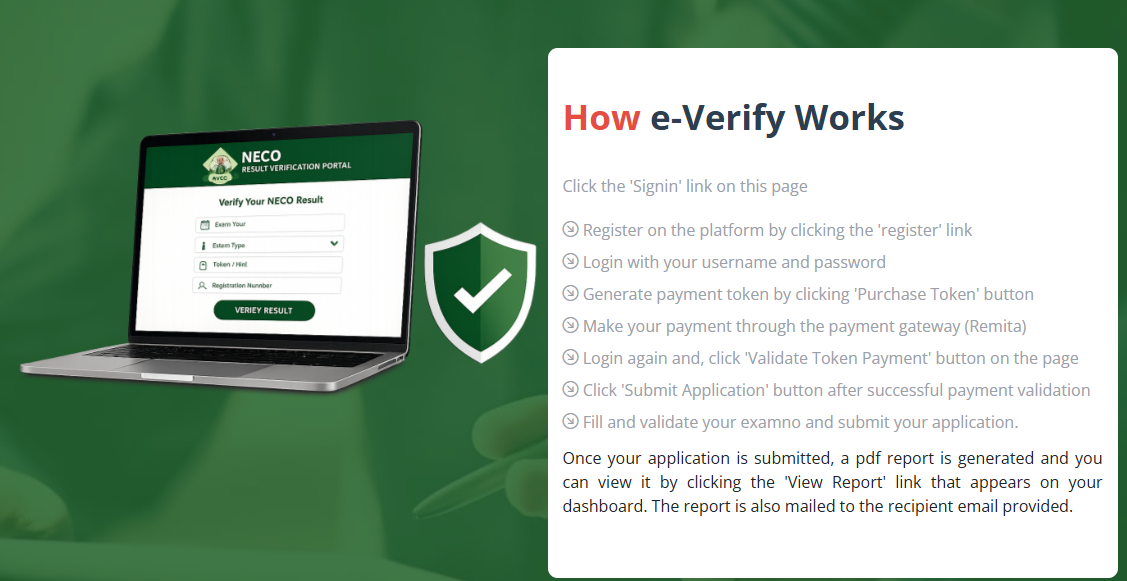
Purpose of the NECO e-Verify Portal
The platform was created to:
- Verify authentic NECO examination results
- Reduce certificate forgery
- Improve trust in Nigerian educational qualifications
- Provide secure online verification
- Support admissions and employment screening
- Simplify academic credential verification
- Promote digital education services in Nigeria
As more organizations move toward paperless verification systems, the importance of the NECO e-Verify Portal continues to grow.
Difference Between Checking a NECO Result and Verifying a NECO Result
Many candidates confuse result checking with result verification.
Although they appear similar, they serve different purposes.
| NECO Result Checker | NECO e-Verify Portal |
|---|---|
| Allows candidates to view examination grades | Confirms the authenticity of a candidate’s result |
| Mainly used by candidates | Used by candidates, employers, universities, scholarship bodies, and government agencies |
| Shows examination performance | Confirms that the result is officially recognized by NECO |
| Intended for personal use | Intended for official verification and authentication |
A candidate may successfully check a result online but still be asked by a university or employer to complete official verification through the NECO e-Verify Portal.
Why Did NECO Introduce the e-Verify System?
Over the years, educational institutions and employers have become increasingly concerned about forged certificates and altered examination records.
Digital verification helps solve these challenges by allowing authorized users to confirm information directly from the examination body’s official records.
The NECO e-Verify system supports:
- Greater transparency
- Faster verification
- Improved security
- Reduced examination fraud
- Better confidence in Nigerian qualifications
This also aligns with the growing global shift toward digital academic verification systems.
How the Portal Improves Credibility
A verified examination record provides greater assurance than a photocopy of a result.
For example:
A Nigerian student applying for admission into a university in Canada or the United Kingdom may be asked to provide verified academic credentials before receiving an admission offer.
Similarly, a company recruiting graduate trainees may verify applicants’ NECO results before finalizing employment.
The NECO e-Verify Portal makes this process easier, more secure, and more reliable.
What Is NECO Result Verification?
NECO result verification is the official process of confirming that an examination result genuinely belongs to a candidate and exists within NECO’s official records.
Verification helps organizations determine whether:
- The result is authentic.
- The candidate’s details are correct.
- The examination record matches official NECO data.
Unlike ordinary result checking, verification provides additional confidence that the information has not been altered.
Verification vs Authentication
Although these terms are sometimes used interchangeably, they have slightly different meanings.
Verification
Verification involves checking whether the examination record exists in NECO’s official database and confirming that the candidate’s information is accurate.
Authentication
Authentication goes a step further by confirming that the certificate or examination record is genuine and officially issued.
Together, these processes help reduce academic fraud.
Why Institutions Verify Examination Results
Several organizations now require verified academic records before approving applications.
Examples include:
Universities
During admission screening, universities may verify candidates’ O’Level results before offering admission.
JAMB Direct Entry Applications
Institutions admitting Direct Entry candidates often verify previous academic qualifications before completing admission processing.
Employers
Many companies now verify applicants’ educational qualifications during recruitment.
This is particularly common in:
- Banks
- Oil and gas companies
- Government ministries
- Telecommunications firms
- International organizations
Scholarship Providers
Scholarship organizations frequently verify academic records before awarding financial support.
Examples include:
- MTN Foundation Scholarship
- PTDF Scholarship
- NNPC Scholarship schemes
- Federal Government Scholarships
- Commonwealth Scholarships
- Mastercard Foundation Scholars Program
Foreign Universities
International institutions increasingly rely on digital verification systems instead of accepting paper documents without confirmation.
Benefits of Digital Verification
Using the NECO online result verification system offers several advantages.
1. Reduces Certificate Fraud
Verification helps institutions identify fake examination results.
2. Faster Processing
Instead of waiting for manual confirmation, many verification requests can be completed much more quickly.
3. Improved Security
Official verification provides better protection against document manipulation.
4. Greater Trust
Verified results give universities, employers, and scholarship providers greater confidence in applicants’ credentials.
5. Convenience
Users can complete many verification processes online without unnecessary paperwork.
Why the NECO e-Verify Portal Is Important
The introduction of online verification has significantly improved the credibility of Nigerian examination records.
Below are some situations where the portal plays an important role.
University Admission
Admission officers often verify applicants’ examination records before granting admission.
Using verified results helps reduce errors and fraudulent claims.
Direct Entry Admission
Candidates applying through Direct Entry may also undergo qualification verification.
Employment Screening
Many organizations verify educational qualifications before confirming appointments.
This is especially common for graduate trainee programmes and public sector recruitment.
NYSC Documentation
Graduates participating in the National Youth Service Corps (NYSC) may need consistent academic records throughout the mobilization process.
Scholarship Applications
Both local and international scholarship providers frequently verify academic qualifications before selecting beneficiaries.
Visa Applications
Some visa applications involving study or skilled migration may require authenticated educational credentials.
Professional Licensing
Professional bodies responsible for fields such as nursing, engineering, accounting, medicine, and law may verify educational qualifications before granting registration.
Who Can Use the NECO e-Verify Portal?
One of the strengths of the NECO verification portal is that it serves different categories of users.
Students
Students can verify their own examination records before applying for admission or scholarships.
Graduates
Graduates often require verified examination records when applying for employment or postgraduate studies.
Universities
Universities use the portal during admission screening and document verification.
Polytechnics
Polytechnics verify applicants’ O’Level qualifications before offering admission.
Colleges of Education
Colleges of Education also rely on authentic examination records during their admission processes.
Employers
Private companies and government organizations use verified examination records to confirm applicants’ educational qualifications.
Government Agencies
Public institutions involved in recruitment, training, or licensing may also use official verification systems.
Foreign Institutions
International universities and credential evaluation agencies increasingly rely on digital verification systems to confirm Nigerian examination records.
Scholarship Organizations
Scholarship boards often verify examination results before approving successful applicants.
Key Features of the NECO e-Verify Portal
The portal offers several useful features that make academic verification easier and more reliable.
Some of the major features include:
- Official online result verification
- Digital certificate authentication
- Secure examination database
- Reliable candidate identification
- Reduced certificate forgery
- Printable verification reports
- Faster institutional verification
- Improved credibility for Nigerian academic qualifications
- Support for multiple categories of authorized users
Requirements for Using the NECO e-Verify Portal
Before beginning the verification process, ensure that you have the necessary information available.
| Requirement | Purpose |
|---|---|
| Candidate Examination Number | Identifies the candidate |
| Examination Year | Locates the examination record |
| Examination Type | Specifies the examination category (such as SSCE Internal or SSCE External where applicable) |
| Candidate’s Full Name | Confirms identity |
| Valid Payment Method | Pays any applicable verification fee |
| Internet Connection | Accesses the portal |
| Email Address (if required) | Receives notifications or account information |
Having these details ready before starting the process will help reduce errors and make verification smoother.
Step-by-Step Guide: How to Use the NECO e-Verify Portal
If you’ve been wondering how to verify your NECO result online, the good news is that the NECO e-Verify system is designed to make the verification process straightforward for eligible users. Whether you are verifying your own result or confirming another candidate’s academic record for official purposes, following the correct procedure helps ensure accurate results.
While the portal interface may receive updates from time to time, the overall verification process generally follows the steps below.
Step 1: Visit the Official NECO e-Verify Portal
The first step is to access the official NECO e-Verify platform through NECO’s approved online verification service.
Always ensure you are using the official website to protect your personal information and avoid fraudulent websites that imitate government portals.
Before entering any personal details, check that:
- The website belongs to NECO.
- The page loads correctly.
- The web address is secure.
- You are not using a suspicious third-party website.
Using unofficial verification websites may expose your personal information or payment details to fraudsters.
Step 2: Create an Account (If Required)
Depending on the verification service you intend to use, you may need to create an account before accessing certain features.
Account registration may require information such as:
- Full name
- Email address
- Phone number
- Password
Choose a strong password that combines:
- Uppercase letters
- Lowercase letters
- Numbers
- Special characters
Avoid using passwords that are easy to guess, such as your date of birth or examination number.
Step 3: Login to the Portal
Once your account has been created, proceed with your NECO e-Verify Portal Login.
Typically, you’ll be required to enter:
- Registered email or username
- Password
After successful login, you’ll gain access to the available verification services.
If you’re using a public computer, remember to log out after completing your session.
Step 4: Select the Verification Service
After logging in, choose the appropriate verification option.
Depending on your purpose, available services may include:
- Result verification
- Certificate verification
- Authentication services
- Other approved verification options
Read each option carefully before proceeding.
Step 5: Enter Candidate Details
Accurate information is essential.
You may be required to provide details such as:
- Examination number
- Examination year
- Examination type
- Candidate’s full name
Before continuing, carefully compare the information with the candidate’s official examination records.
Even one incorrect digit in the examination number may prevent successful verification.
Step 6: Review the Information
Before submitting your request, review every detail carefully.
Confirm that:
- Examination year is correct.
- Candidate’s name is properly entered.
- Examination number is accurate.
- Examination type matches the candidate’s record.
Taking a few extra seconds to review your entries can save time later.
Step 7: Pay the Verification Fee
If payment is required, complete the transaction using an approved payment method.
Payment options may include:
- Debit cards
- Online payment gateways
- Other officially approved payment channels
Always wait for payment confirmation before closing the page.
Keep your payment receipt for future reference.
Step 8: Submit the Verification Request
After payment (where applicable), submit your request for processing.
The portal will begin verifying the candidate’s examination record against NECO’s official database.
Do not refresh the page repeatedly while the request is being processed.
Step 9: View the Verification Result
Once verification is completed, the portal will display the outcome.
Depending on the request, you may see confirmation of:
- Candidate identity
- Examination details
- Verified examination record
- Authentication status
Review the displayed information carefully.
Step 10: Print or Download the Verification Report
Where available, download or print the verification report.
This report may be useful for:
- University admission
- Employment screening
- Scholarship applications
- Official documentation
- Institutional record keeping
Save both printed and digital copies for future reference.
How to Login to the NECO e-Verify Portal
One of the most searched questions online is:
How to login to the NECO e-Verify Portal?
The login process is usually straightforward.
Enter Your Login Credentials
Input:
- Registered email address or username
- Password
Ensure there are no typing errors.
Password fields are case-sensitive, meaning uppercase and lowercase letters matter.
Forgot Your Password?
If you cannot remember your password:
- Click the Forgot Password option.
- Enter your registered email address.
- Follow the password reset instructions.
- Create a new secure password.
Avoid creating passwords you’ve previously used on other websites.
Account Security Tips
To protect your account:
- Never share your password.
- Enable additional security features if available.
- Log out after each session.
- Avoid using public computers.
- Do not save passwords on shared devices.
How to Verify NECO Result Online
The NECO online result verification process may vary depending on who is requesting the verification.
Below are the common categories of users.
Candidate Verification
Candidates often verify their own results before:
- University admission
- Scholarship applications
- Employment
- Visa applications
Personal verification also helps confirm that examination details are accurate.
Employer Verification
Employers may verify applicants’ educational qualifications before offering employment.
This is especially common in sectors such as:
- Banking
- Telecommunications
- Oil and gas
- Civil service
- Healthcare
- Education
Official verification helps employers confirm that applicants possess genuine qualifications.
University Verification
Higher institutions frequently verify applicants’ examination results before granting admission.
Verification may be required during:
- Post-UTME screening
- Direct Entry admission
- Registration
- Clearance
This helps institutions maintain the integrity of their admission process.
Scholarship Verification
Many scholarship providers now verify applicants’ O’Level qualifications.
Examples include:
- MTN Foundation Scholarship
- NNPC Scholarship
- PTDF Scholarship
- Federal Government Scholarship
- Commonwealth Scholarship
Official verification reduces the risk of fraudulent applications.
International Verification
Foreign universities increasingly verify Nigerian examination records before issuing admission offers.
Verified results improve confidence in applicants’ academic credentials.
Third-Party Verification
In some situations, authorized organizations may verify examination records on behalf of candidates.
Examples include:
- Credential evaluation agencies
- Professional licensing organizations
- Government recruitment agencies
Such organizations should always follow official verification procedures.
Difference Between NECO Result Checker and NECO e-Verify Portal
Many candidates believe these two services perform the same function.
They do not.
Understanding the difference can help you choose the right service.
| Feature | NECO Result Checker | NECO e-Verify Portal |
|---|---|---|
| Primary Purpose | View examination results | Official verification and authentication |
| Main Users | Candidates | Candidates, universities, employers, scholarship organizations and government agencies |
| Authentication | No | Yes |
| Printable Verification Report | Limited | Available where applicable |
| Official Verification | No | Yes |
| Fraud Prevention | Limited | Stronger verification measures |
| Typical Use | Personal result checking | Admission, employment and official credential verification |
When Should You Use the NECO Result Checker?
The result checker is suitable when you simply want to:
- View your examination grades.
- Confirm subject scores.
- Print your result for personal use.
- Check whether your result has been released.
It is mainly intended for candidates.
When Should You Use the NECO e-Verify Portal?
Use the NECO result verification portal when an organization requires official confirmation that your examination record is genuine.
Common situations include:
- University admission screening
- Direct Entry applications
- Job recruitment
- Scholarship applications
- Professional registration
- Visa processing
- International admissions
- Government employment
Practical Example
Consider two candidates applying for the same university.
Candidate A uploads only a printed copy of the NECO result.
Candidate B submits the printed result along with an officially verified record obtained through the NECO e-Verify process where required.
Where an institution specifically requests official verification, Candidate B’s documentation is more likely to meet the verification requirement because it confirms the authenticity of the examination record directly through NECO’s system.
Quick Checklist Before Verifying Your NECO Result
Before starting the verification process, make sure you have:
✔ Correct examination number
✔ Correct examination year
✔ Correct examination type
✔ Candidate’s full name
✔ Stable internet connection
✔ Valid payment method (if required)
✔ Active email address (if applicable)
✔ A secure device for accessing the portal
Preparing these details in advance helps reduce errors and ensures a smoother verification experience.
NECO e-Verify Portal Fees
One of the most common questions candidates, employers, and institutions ask is:
“How much does NECO result verification cost?”
The answer depends on the type of verification service being requested and NECO’s current pricing policy.
Unlike examination registration fees, NECO e-Verify Portal fees may change periodically. For this reason, candidates and organizations should always confirm the latest charges through the official NECO verification platform or an authorized NECO office before making payment.
This helps prevent underpayment, failed transactions, or reliance on outdated information found on blogs or social media.
What Does the Verification Fee Cover?
The fee paid for NECO result verification generally supports the administrative process of authenticating examination records through the official database.
Depending on the verification service selected, the payment may cover:
- Online verification processing
- Result authentication
- Certificate verification
- Official verification report generation
- Administrative handling
- Digital verification services
Institutions carrying out multiple verifications may have different payment arrangements depending on NECO’s current policies.
Approved Payment Methods
To avoid fraud, payments should only be made through officially approved channels.
Common payment options may include:
- Debit cards
- Online payment gateways
- Bank-supported payment platforms
- Other NECO-approved electronic payment methods
Always ensure that your payment is completed through an official platform before proceeding with verification.
Payment Confirmation
After successful payment:
- Save the payment receipt.
- Take a screenshot of the confirmation page if applicable.
- Record your transaction reference number.
- Keep your payment details until the verification process is completed.
These records may be useful if there is a delay or payment dispute.
Important Notice About Fees
Never pay money to individuals who claim they can verify your result outside the official system.
Fraudsters often advertise fake verification services online.
To protect yourself:
- Use only official NECO verification channels.
- Avoid unofficial agents.
- Never share your banking details with unknown persons.
- Confirm payment instructions before making any transaction.
How Long Does NECO Verification Take?
Another frequently searched question is:
How long does NECO verification take?
The answer depends on several factors.
Some verification requests are processed quickly through the online system, while others may require additional checks before completion.
Factors That Affect Processing Time
Several issues can influence verification speed.
These include:
- Internet connectivity
- Server availability
- Accuracy of candidate information
- Payment confirmation
- Database updates
- System maintenance
- Volume of verification requests
If all required information is entered correctly and payment is confirmed, verification is generally completed more smoothly.
Instant Verification
In many situations, online verification can be completed shortly after the request is successfully submitted and processed.
However, this depends on system availability and whether additional review is required.
Delayed Verification
Occasionally, verification may take longer due to:
- Temporary server issues
- Heavy website traffic
- Scheduled maintenance
- Incorrect candidate information
- Pending payment confirmation
- Technical issues affecting the verification platform
Candidates should remain patient and avoid submitting multiple verification requests for the same result unless advised to do so.
Following Up
If verification appears delayed:
- Confirm that payment was successful.
- Review all submitted information.
- Check for announcements regarding system maintenance.
- Contact official NECO support if necessary.
Having your transaction reference number available will make follow-up easier.
Common Problems When Using the NECO e-Verify Portal
Although the portal is designed to simplify verification, users occasionally encounter technical or data-related issues.
Understanding these common problems can help you resolve them quickly.
Login Failure
Sometimes users cannot access their accounts.
Possible causes include:
- Incorrect password
- Wrong email address
- Typing errors
- Forgotten login credentials
- Temporary server issues
How to Fix It
- Check your email address carefully.
- Confirm that your password is correct.
- Use the “Forgot Password” option if necessary.
- Wait a few minutes if the website is temporarily unavailable.
Invalid Examination Number
This is one of the most common errors.
Possible reasons include:
- Typographical mistakes
- Wrong examination year
- Wrong examination type
- Missing digits
Solution
Compare the examination number with the original NECO result or registration slip before submitting the request again.
Result Not Found
Many candidates search online:
“Why is my NECO result not showing on e-Verify?”
Possible explanations include:
- Incorrect examination details
- Wrong examination year selected
- Database synchronization delay
- Candidate information entered incorrectly
Before assuming the result is unavailable, double-check all submitted information.
Payment Failure
Sometimes payment may not process successfully.
Possible causes include:
- Poor internet connection
- Bank network issues
- Expired debit card
- Interrupted transaction
What You Should Do
- Check your bank account.
- Confirm whether payment was deducted.
- Wait for confirmation before making another payment.
- Contact your bank if necessary.
Slow Website
Heavy traffic may occasionally slow down the verification portal.
This is common during:
- University admission season
- Scholarship application periods
- Major recruitment exercises
- Examination result release periods
Using the portal during off-peak hours may improve performance.
Browser Compatibility Issues
Older browsers may not display some portal features correctly.
For the best experience:
- Update your browser.
- Enable JavaScript.
- Clear your browser cache.
- Disable unnecessary browser extensions if they interfere with page loading.
Server Downtime
Like many online services, the NECO e-Verify Portal may occasionally undergo maintenance.
If the website is temporarily unavailable:
- Wait until maintenance is completed.
- Check for official announcements.
- Avoid repeated refreshes that may overload your browser.
Verification Delay
If verification remains pending after payment:
- Verify your payment status.
- Ensure all candidate information is accurate.
- Contact official NECO support with your transaction details if necessary.
Tips for Successful NECO Result Verification
Following a few simple practices can make your verification process much smoother.
Double-Check Candidate Information
Before submitting your request, verify:
- Examination number
- Examination year
- Candidate’s full name
- Examination type
One incorrect digit may prevent successful verification.
Use the Official Portal Only
Always use the official NECO e-Verify Portal.
Avoid unofficial websites claiming to offer faster verification services.
Confirm Payment
After making payment:
- Check your receipt.
- Save your transaction number.
- Confirm payment before leaving the page.
Download the Verification Report
Once verification is completed, download the report immediately.
Keep both:
- Digital copy
- Printed copy
These may be required during admission or employment.
Use a Stable Internet Connection
Interrupted internet connections can affect payment and verification.
Whenever possible:
- Use reliable broadband.
- Avoid unstable public Wi-Fi during payment.
Keep Your Records
Maintain copies of:
- Verification report
- Payment receipt
- Transaction reference
- Confirmation email (if available)
These documents are useful for future reference.
Security Tips When Using the NECO e-Verify Portal
Cybersecurity is increasingly important when handling educational records online.
The following precautions will help protect your information.
Protect Your Login Credentials
Never share your:
- Password
- Email verification code
- Account details
with anyone.
Avoid Public Wi-Fi
Public networks are often less secure.
If possible, complete verification using a trusted internet connection.
Beware of Phishing Websites
Fraudsters sometimes create fake websites that resemble official government portals.
Before entering your details:
- Confirm the website address.
- Look for official branding.
- Avoid clicking suspicious advertisements.
Use Strong Passwords
A secure password should contain:
- Uppercase letters
- Lowercase letters
- Numbers
- Symbols
Avoid using predictable passwords like:
- 123456
- Password
- Your examination number
Log Out After Every Session
If you use a shared computer:
- Sign out completely.
- Close your browser.
- Clear saved passwords if necessary.
Protect Payment Information
Never send your debit card details through:
- Social media
- Messaging apps
Official payment pages should always use secure payment gateways.
NECO e-Verify vs WAEC Certificate Verification
Many candidates who possess both NECO and WAEC qualifications often wonder how the two verification systems compare.
The table below provides a general overview.
| Feature | NECO e-Verify | WAEC Verification |
|---|---|---|
| Online Verification | Yes | Yes |
| Certificate Authentication | Available through official verification services | Available through official verification services |
| Digital Verification Report | Available where applicable | Available where applicable |
| Employer Verification | Supported | Supported |
| University Verification | Supported | Supported |
| Payment | Subject to official charges | Subject to official charges |
| Processing Time | Depends on verification requirements and system availability | Depends on verification requirements and system availability |
| Security | Official digital verification | Official digital verification |
Both examination bodies continue to improve their digital services to enhance trust in Nigerian educational qualifications and reduce certificate fraud.
Frequently Asked Questions (FAQs)
Below are answers to some of the most frequently searched questions about the NECO e-Verify Portal Login and NECO result verification.
How Do I Verify My NECO Result Online?
To verify your NECO result online:
Visit the official NECO e-Verify Portal via https://everify.neco.gov.ng/
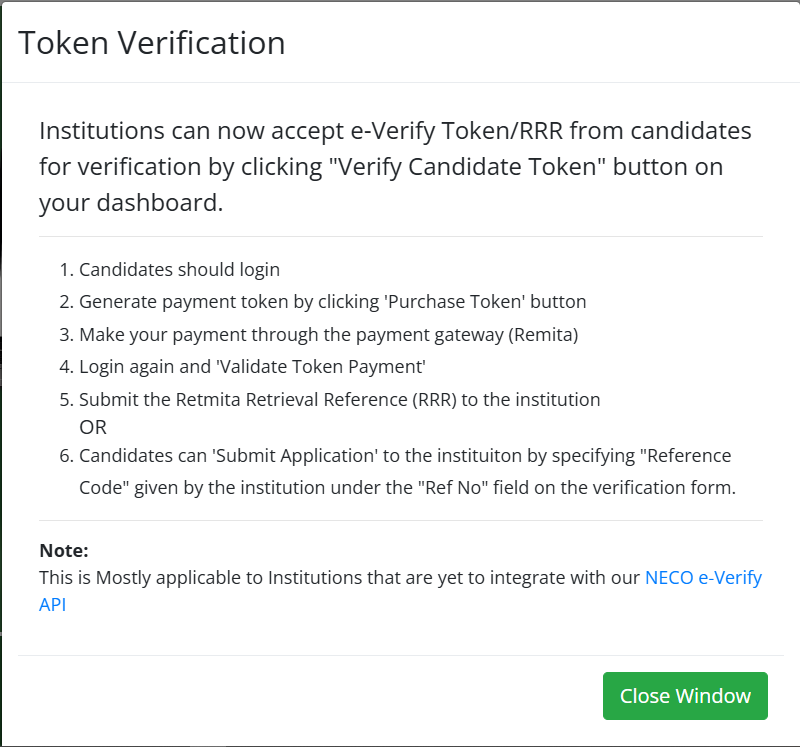
Log in or create an account if required.
Select the result verification service.
Enter the candidate’s examination details.
Make payment if applicable.
Submit the verification request.
View and download the verification report.
Always ensure that the information entered matches the candidate’s official NECO records.
Is the NECO e-Verify Portal Free?
Some verification services may require payment, while others may be available without additional charges depending on the service being requested.
Since fees may change over time, always confirm the current charges through official NECO channels before making any payment.
Can Employers Verify NECO Results?
Yes.
Many employers now verify applicants’ academic qualifications before offering employment.
The NECO e-Verify Portal enables employers to authenticate examination results, helping them confirm that certificates presented during recruitment are genuine.
Can Universities Verify My NECO Certificate?
Yes.
Universities frequently verify NECO qualifications during:
- Admission screening
- Direct Entry processing
- Registration
- Clearance exercises
This helps institutions maintain the integrity of their admission process.
What If My Result Is Not Found?
If your result cannot be located:
- Confirm that the examination number is correct.
- Check the examination year.
- Verify the examination type.
- Ensure the candidate’s name is correctly entered.
If the issue persists after reviewing your details, contact the appropriate NECO support office for further assistance.
How Long Does Verification Take?
Processing time depends on several factors, including:
- System availability
- Accuracy of submitted information
- Payment confirmation
- Database synchronization
Many requests are completed promptly, while others may require additional verification.
Can I Verify NECO GCE Results?
Yes.
Where supported by the official verification platform, candidates who sat for the Senior School Certificate Examination (SSCE) External, commonly known as NECO GCE, can verify their examination records through the appropriate verification service.
Can I Print My Verification Report?
Yes.
After successful verification, users should download and print the report where the portal provides that option.
Keeping both digital and printed copies is recommended for future use.
Is the Portal Available 24 Hours a Day?
The online portal is generally accessible whenever the service is operational.
However, temporary interruptions may occur because of:
- System maintenance
- Technical upgrades
- Heavy user traffic
- Unexpected server issues
What Should I Do If Payment Fails?
If payment is unsuccessful:
- Confirm whether your bank account has been debited.
- Wait for any pending confirmation.
- Avoid making repeated payments immediately.
- Contact your bank if necessary.
- Reach out to NECO support if the issue continues.
Always retain your payment reference number.
Best Practices for Institutions Using the NECO e-Verify Portal
Educational institutions, employers, scholarship bodies, and government organizations should follow proper verification procedures to ensure accurate decision-making.
Verify Before Offering Admission
Universities and colleges should verify candidates’ examination records before issuing admission offers.
This helps reduce the risk of admitting applicants using altered or forged documents.
Cross-Check Candidate Information
Verification should include confirmation of:
- Candidate’s full name
- Examination number
- Examination year
- Examination type
- Subjects and grades, where applicable
Any discrepancy should be investigated before final decisions are made.
Keep Verification Reports
Institutions should securely store downloaded verification reports for future reference.
Maintaining organized records helps during audits and accreditation exercises.
Protect Applicant Information
Personal information obtained during verification should be handled responsibly.
Institutions should:
- Limit access to authorized personnel.
- Store records securely.
- Comply with applicable data protection regulations.
Train Admission and HR Officers
Staff responsible for admissions or recruitment should understand:
- How the NECO e-Verify Portal works
- Official verification procedures
- Common verification errors
- Fraud prevention measures
Proper training improves efficiency and reduces mistakes.
Avoid Third-Party Verification Services
Organizations should rely only on official NECO verification channels.
Using unofficial services increases the risk of inaccurate information and potential fraud.
Future of Digital Examination Verification in Nigeria
Nigeria’s education sector continues to embrace digital transformation, and examination verification is expected to become even more efficient in the coming years.
Several developments are likely to shape the future of academic credential verification.
Greater Digital Integration
Examination bodies are increasingly adopting online systems that simplify access to verified academic records.
This reduces paperwork and speeds up verification for institutions and candidates.
QR Code Verification
Digital certificates with QR codes are becoming more common worldwide.
Such technology allows institutions to verify credentials instantly by scanning a secure code.
Improved Fraud Detection
Advanced verification systems can help identify altered documents more effectively, making certificate forgery more difficult.
Integration with Admission Platforms
Future improvements may allow educational institutions to integrate verification systems directly into their admission portals, reducing manual checks.
International Recognition
As more Nigerian examination records become digitally verifiable, international universities and employers may find it easier to assess applicants’ qualifications.
This can improve confidence in Nigerian educational credentials globally.
Enhanced User Experience
Future updates to the NECO e-Verify Portal may include:
- Faster processing
- Improved mobile compatibility
- Better search functionality
- Stronger security features
- More convenient payment options
These improvements would further simplify result verification for candidates and institutions.
Common Mistakes to Avoid When Using the NECO e-Verify Portal
Many verification problems occur because users make avoidable mistakes.
Below are some common errors and how to avoid them.
Entering the Wrong Examination Number
Even a single incorrect digit may prevent successful verification.
Always compare the number with the original examination record.
Selecting the Wrong Examination Year
Candidates sometimes choose the wrong examination year, especially if they sat for multiple examinations.
Verify the correct year before submitting your request.
Using Incorrect Examination Type
Ensure you choose the correct examination category, such as the appropriate SSCE examination, where applicable.
Ignoring Payment Confirmation
Never leave the payment page before confirming that the transaction has been completed successfully.
Always save your receipt.
Using Unofficial Websites
Fraudulent websites may imitate official government portals.
Only use the official NECO verification platform.
Failing to Save the Verification Report
Download your verification report immediately after successful processing.
Keeping a copy prevents unnecessary repeat verification.
Quick Verification Checklist
Before starting the verification process, confirm that you have completed the following:
✔ Correct examination number
✔ Correct examination year
✔ Correct examination type
✔ Candidate’s full name
✔ Stable internet connection
✔ Valid payment method
✔ Official verification portal
✔ Secure password
✔ Saved payment receipt
✔ Downloaded verification report
Following this checklist helps minimize delays and verification errors.
Conclusion
The NECO e-Verify Portal has become an important tool for confirming the authenticity of examination results in today’s increasingly digital education system. Whether you are applying for university admission, seeking employment, pursuing a scholarship, or submitting documents for international study, official verification provides confidence that your academic records are genuine and recognized.
Understanding the difference between checking a result and verifying a result is equally important. While a result checker allows candidates to view their examination grades, the NECO e-Verify Portal provides official authentication that many universities, employers, government agencies, and scholarship organizations now require.
To ensure a smooth verification experience:
- Use only the official NECO verification platform.
- Enter your examination details carefully.
- Keep copies of payment receipts and verification reports.
- Protect your login credentials.
- Confirm current verification fees through official NECO channels before making payment.
- Resolve any verification issues well before admission or employment deadlines.
By following the steps outlined in this guide, you can complete the NECO result verification process with confidence and avoid common mistakes that may delay important applications.
If you found this guide helpful, consider bookmarking it for future reference and sharing it with friends, classmates, or colleagues who may also need assistance with verifying their NECO results online.
Related Articles You May Find Helpful
To learn more about NECO services and examination processes, you may also want to read:
- How to Check Your NECO Result Online
- How to Buy a Genuine NECO Result Checker Token
- How to Print Your NECO Result Online
- How to Correct Errors on Your NECO Result
- NECO Result Checker Token vs NECO e-Verify Portal
- NECO GCE Registration Guide
- NECO Certificate Collection Guide
- How to Link Your O’Level Result to JAMB CAPS
- WAEC Certificate Verification Guide
- Common Admission Mistakes Nigerian Students Should Avoid
These related resources will help you better understand NECO services, avoid common mistakes, and prepare your academic documents for admissions, employment, scholarships, and international opportunities.