NECO Result Checker Portal Login: How to Check Your NECO 2026 Result Online and via SMS is what we will be covering in this article. So if you are here because you are in dire need of the of the processes involve in checking your NECO result, this article has gotten you covered. All you need to do is to follow the steps we have outlined in this article accordingly.
Well, before we proceed with the steps involved in checking your NECO RESULT, its interesting to remind you that every year, millions of Nigerian students eagerly wait for the release of their National Examinations Council (NECO) results.
Whether you sat for the Senior School Certificate Examination (SSCE) Internal, SSCE External (GCE), Basic Education Certificate Examination (BECE), or the National Common Entrance Examination (NCEE), checking your result is one of the most important steps after the examination.
Once NECO announces that results are available, thousands of candidates immediately begin searching online using phrases such as NECO Result Checker Portal Login, Check NECO 2026 result, NECO result checker portal 2026, and How to check NECO result online. Unfortunately, many students run into avoidable problems. Some visit fake websites, others use incorrect examination details, while many struggle with invalid result checker tokens or portal login errors.
If you are one of those candidates, you are in the right place.
This comprehensive guide explains everything you need to know about using the NECO Result Checker Portal Login successfully. You will learn how to:
- Check your NECO 2026 result online.
- Find out whether NECO result checking via SMS is available.
- Purchase an authentic NECO Result Checker Token.
- Print your result correctly.
- Fix common result-checking errors.
- Verify the authenticity of your NECO result.
- Protect your examination information from scammers.
Whether you are checking your result for university admission, scholarship applications, employment, or personal records, this guide walks you through the entire process in simple language.
What Is the NECO Result Checker Portal?
The NECO Result Checker Portal is the official online platform provided by the National Examinations Council for candidates to access their examination results securely.
Instead of waiting for printed result slips from schools, candidates can log into the portal using their examination details and a valid NECO Result Checker Token to view and print their results from anywhere.
The portal operates throughout the year and serves as the primary channel for accessing examination results.
Purpose of the NECO Result Checker Portal
The portal was created to make result checking:
- Fast
- Secure
- Convenient
- Accessible nationwide
- Available from any internet-enabled device
Rather than visiting examination offices, candidates can check their results within minutes.
Who Can Use the Portal?
The portal is available to:
- Secondary school students
- Private candidates
- Parents
- Schools
- Universities
- Employers
- Scholarship organizations
- Government agencies requiring educational verification
Anyone with the required examination details and a valid result checker token can access eligible results.
Types of Results Available
Depending on the examination you wrote, the portal may provide access to several NECO examinations.
1. SSCE Internal
This is the examination conducted for students in their final year of secondary school.
It is the most popular NECO examination and is accepted by universities, polytechnics, colleges of education, and employers across Nigeria.
2. SSCE External (GCE)
Private candidates who are no longer in secondary school can sit for the SSCE External examination.
The result checking process is similar to that of the internal examination.
3. Basic Education Certificate Examination (BECE)
Students completing Junior Secondary School may also access their BECE results through the appropriate NECO channels where applicable.
4. National Common Entrance Examination (NCEE)
Candidates seeking admission into Federal Government Unity Colleges may also use NECO services related to examination records where applicable.
Although each examination has different requirements, the result checking process remains largely similar.
Has NECO Released the 2026 Results?
One of the most common questions candidates ask after completing their examinations is:
“Has NECO released the 2026 results?”
The answer depends on the official announcement made by the National Examinations Council.
Typically, NECO releases examination results several weeks after the completion of marking and quality assurance. The exact release date varies each year depending on the volume of scripts and administrative processes.
How NECO Announces Result Releases
NECO usually announces the release of examination results through its official communication channels.
Candidates should rely only on verified announcements rather than rumors circulating on social media.
Official announcements are commonly made through:
- Official NECO website
- Official press releases
- National newspapers
- Television news
- Radio announcements
- Verified social media accounts
Expected Timeline
Although release dates differ annually, candidates generally receive their results within a few weeks after examinations conclude.
Patience is important because NECO completes several quality assurance checks before publishing examination results.
How to Confirm Your Result Has Been Released
You can confirm availability by:
- Checking the official NECO announcements.
- Logging into the official result checker portal.
- Asking your school examination officer.
- Following credible education news websites.
Avoid paying anyone who claims they can release your result early. NECO results become available to all eligible candidates once officially published.
Requirements for Checking Your NECO Result
Before visiting the NECO Result Checker Portal Login page, ensure you have all the required information ready.
Having everything prepared beforehand makes the process faster and reduces the chances of making mistakes.
You Will Need
| Requirement | Purpose |
|---|---|
| Examination Number | Identifies your script |
| Examination Year | Select the correct examination year |
| Examination Type | SSCE Internal, SSCE External, etc. |
| NECO Result Checker Token | Grants access to your result |
| Internet Connection | Required to access the portal |
| Smartphone, Tablet or Computer | Used to view your result |
Understanding Each Requirement
1. Examination Number
This is the unique number assigned to every candidate.
Always double-check every digit before submitting it.
2. Examination Year
Select the exact year you sat for the examination.
Choosing the wrong year is one of the most common reasons candidates receive “Result Not Found” messages.
3. Examination Type
Ensure you choose the correct examination category.
Examples include:
- SSCE Internal
- SSCE External
- BECE
Choosing the wrong examination type prevents the system from locating your record.
4. NECO Result Checker Token
Unlike previous years when scratch cards were commonly used, NECO now primarily uses electronic result checker tokens.
These tokens are unique and should only be purchased from authorized sources.
5. Internet Connection
A stable internet connection reduces loading errors and prevents interrupted sessions.
6. Device
You can check your result using:
- Android phones
- iPhones
- Tablets
- Laptops
- Desktop computers
Modern smartphones work perfectly for result checking.
Official NECO Result Checker Portal Login
One of the biggest mistakes candidates make is visiting fake websites that imitate the official NECO result checker portal.
Scammers often create websites that look convincing and ask users to enter examination numbers or purchase fake result tokens.
To stay safe, always use the official NECO Result Checker Portal provided by the National Examinations Council.
Using the official portal helps ensure that:
- Your personal information remains secure.
- Your result is retrieved directly from NECO’s database.
- You receive authentic examination records.
- Your payment for a result checker token is valid.
- You avoid phishing scams and fraudulent websites.
How to Access the Portal Safely
Before entering your details:
- Confirm you are using the official NECO result checking portal.
- Avoid clicking links shared in random WhatsApp groups or social media comments.
- Type the official website address directly into your browser whenever possible.
- Ensure the website connection is secure before entering sensitive information.
How to Identify Fake NECO Result Websites
Watch out for these warning signs:
- Requests for your ATM PIN or banking password.
- Offers to “upgrade” your grades.
- Promises to release results before NECO officially announces them.
- Suspicious pop-up advertisements.
- Poor website design with spelling mistakes.
- Requests for unusual payments through personal bank accounts.
Remember that NECO does not authorize third parties to alter examination results.
If a website promises guaranteed grade upgrades or early access to results, it is almost certainly fraudulent.
How to Check Your NECO 2026 Result Online (Step-by-Step)
Checking your result online is straightforward when you have the correct information ready.
Follow these steps carefully.
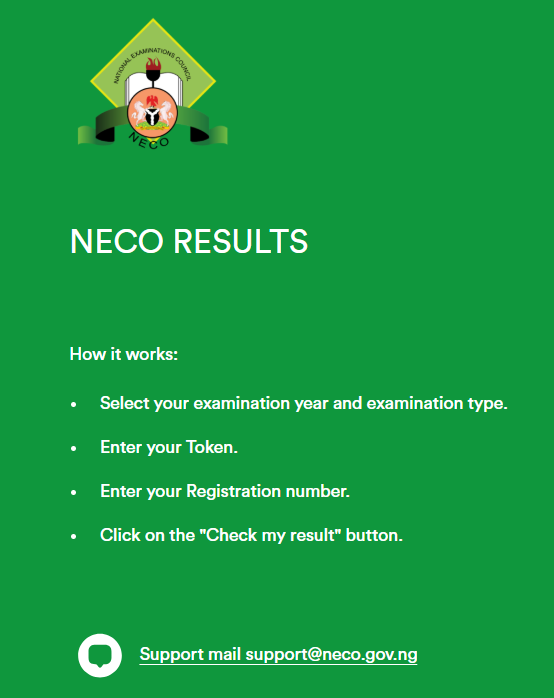
Step 1: Visit the Official Result Checker Portal
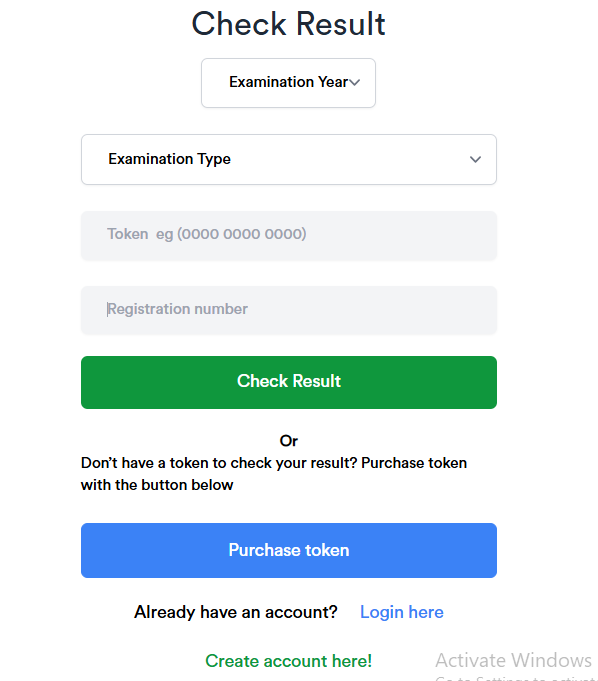
Open your preferred web browser on your phone or computer and navigate to the official NECO Result Checker Portal via: https://results.neco.gov.ng/
Wait for the page to load completely before entering any information.
Step 2: Enter Your Examination Number
Type your examination number exactly as it appears on your registration slip or examination documents.
Double-check every character to avoid errors.
Step 3: Select the Examination Year
Choose 2026 if you are checking your NECO 2026 result.
Selecting the wrong year may prevent the portal from finding your record.
Step 4: Select the Examination Type
Choose the appropriate examination category, such as:
- SSCE Internal
- SSCE External (GCE)
- BECE
Make sure this matches the examination you actually sat for.
Step 5: Enter Your NECO Result Checker Token
Input your valid token carefully.
Avoid typing extra spaces or confusing similar-looking characters.
Step 6: Click “Check Result”
Once all details have been entered correctly, click the Check Result button.
The portal will process your request.
Step 7: View, Download, and Save Your Result
If all information is correct, your result will appear on the screen.
It is advisable to:
- Save a PDF copy.
- Take a screenshot.
- Print multiple copies for future use.
- Store the file in cloud storage or email for backup.
NECO Result Checker Portal Login: How to Check Your NECO 2026 Result Online and via SMS
Step 1: Get your Examination Number
⬇
Step 2: Buy a Genuine NECO Result Checker Token
⬇
Step 3: Visit the Official NECO Result Checker Portal
⬇
Step 4: Select Examination Year (2026)
⬇
Step 5: Choose Examination Type
⬇
Step 6: Enter Your Token
⬇
Step 7: Click Check Result
⬇
Step 8: View, Download, Save, and Print Your Result
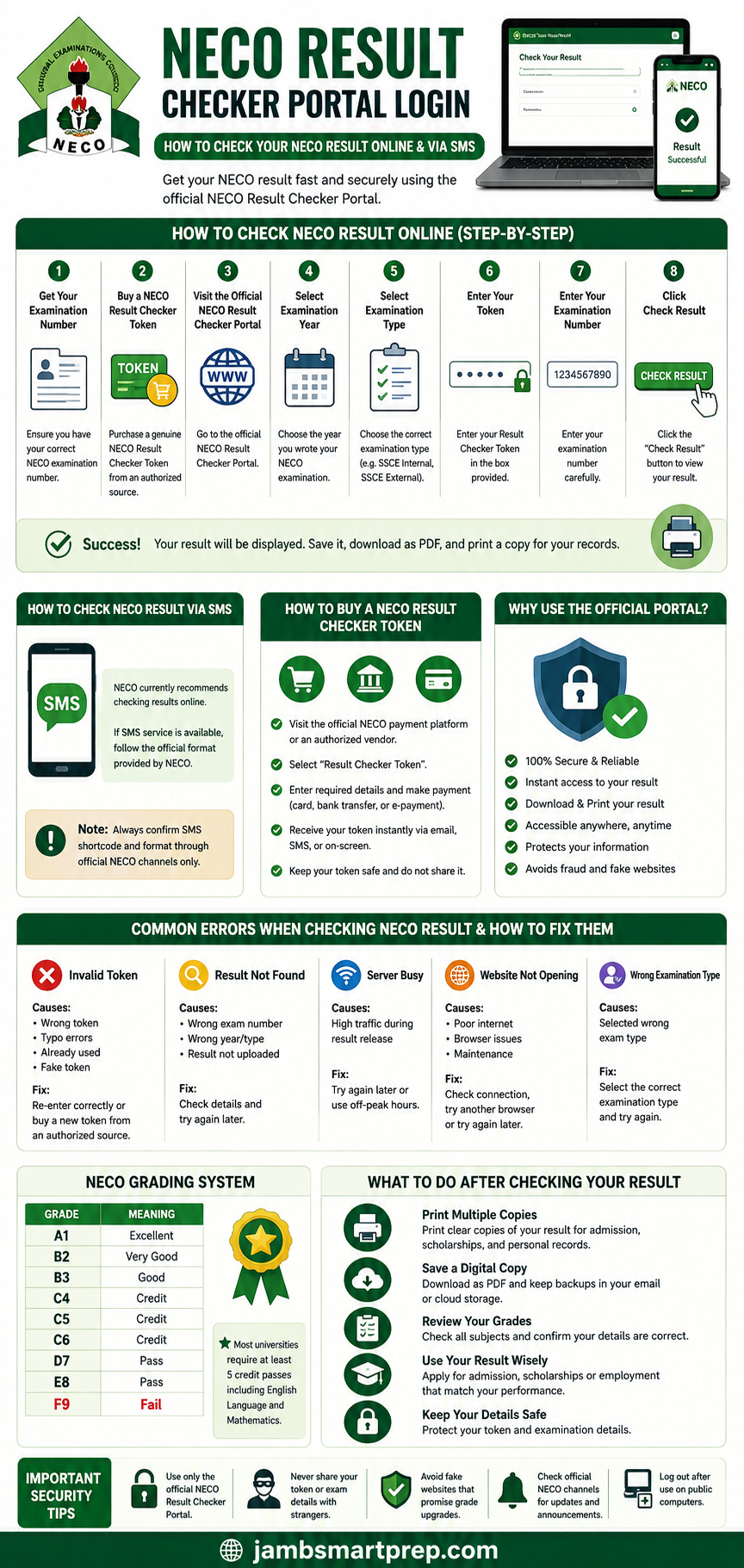
Pro Tip: Always use the official NECO portal and never share your result checker token with untrusted individuals.
Checking Your NECO Result, Buying Tokens, Printing Results, and Solving Common Problems
How to Check NECO Result via SMS
Many candidates search for “How to check NECO result using SMS in Nigeria” because SMS can be convenient, especially in areas with poor internet connectivity.
In previous years, some examination bodies introduced SMS result-checking services. However, NECO has shifted its focus to online result checking through the official NECO Result Checker Portal.
Is NECO Result Checking via SMS Available in 2026?
As of the time of writing, the primary official method recommended by NECO is checking results through the online Result Checker Portal using a valid Result Checker Token.
Candidates should always confirm the availability of any SMS service through official NECO announcements before attempting to use it.
If NECO introduces or reactivates an SMS option for the 2026 examination cycle, it will be announced through its official communication channels.
Why NECO Prefers Online Result Checking
The online portal offers several advantages over SMS, including:
- Instant access to complete subject grades
- Better security through token authentication
- Ability to download and print results
- Reduced risk of SMS delivery failures
- Access from anywhere with an internet connection
If SMS Service Becomes Available
Should NECO officially provide an SMS service in the future, candidates should expect information such as:
- Supported mobile networks
- Official SMS shortcode
- Correct SMS format
- Applicable service charges
- Delivery time for responses
Always avoid SMS numbers shared by unofficial sources, as fraudsters sometimes exploit candidates during result release periods.
Benefits of Using the Online Portal Instead
Using the official portal allows you to:
- View your complete grades
- Save your result as a PDF
- Print multiple copies
- Access your result at any time
- Verify your result for admission or employment purposes
For most candidates, online checking remains the fastest and safest option.
How to Buy a NECO Result Checker Token
Before you can check your result, you must obtain a valid NECO Result Checker Token.
This token acts as a secure digital key that grants access to your examination record.
What Is a NECO Result Checker Token?
A NECO Result Checker Token is a unique electronic code generated by NECO’s result-checking system.
Unlike the old scratch cards, tokens are issued electronically and can be purchased online.
Where Can You Buy a Genuine Token?
Always purchase your token through approved channels.
Common options include:
- Official NECO online payment platform
- Accredited education service providers
- Authorized cybercafés
- Approved banks (where applicable)
- Licensed educational technology partners
Avoid purchasing tokens from unknown individuals on social media.
How to Buy a Token Online
The general process involves:
- Visit the official NECO payment portal.
- Select the Result Checker Token option.
- Enter the required details.
- Make payment using your preferred payment method.
- Receive your token electronically.
- Use the token on the official result checker portal.
Accepted Payment Methods
Depending on the available payment platform, you may be able to pay using:
- ATM cards
- Debit cards
- Bank transfers
- Internet banking
- Approved online payment gateways
How Much Does a NECO Result Checker Token Cost?
The price of a token may change from one examination year to another.
Candidates should always confirm the current official price before making payment.
Be cautious of sellers advertising unusually cheap tokens, as they may be fraudulent or invalid.
Safety Tips When Buying Tokens
Follow these precautions:
- Buy only from authorized sources.
- Never share your banking PIN.
- Keep your payment receipt.
- Save your token securely.
- Avoid buying from random WhatsApp or Facebook sellers.
- Verify that the website is genuine before making payment.
Difference Between NECO Result Token and Scratch Card
Many candidates still ask whether they need a scratch card or a token.
Understanding the difference helps prevent confusion.
| Feature | Result Token | Scratch Card |
|---|---|---|
| Format | Digital code | Physical card |
| Availability | Purchased online | Previously sold physically |
| Delivery | Instant electronic delivery | Manual purchase |
| Security | Higher security | Lower security |
| Convenience | Accessible anywhere | Requires physical handling |
| Risk of Damage | Very low | Can be scratched or lost |
| Current Usage | Widely used | Mostly phased out |
Why NECO Switched to Tokens
The transition from scratch cards to electronic tokens provides several benefits:
- Improved security
- Faster delivery
- Reduced fraud
- Easier online purchase
- Better record management
- Greater convenience for candidates
For the 2026 examination cycle, candidates should rely on the official token system unless NECO announces otherwise.
How to Print Your NECO Result
After successfully checking your result, the next important step is saving and printing it.
Many universities, scholarship boards, and employers require a printed copy during application or screening.
Option 1: Save Your Result as a PDF
Most browsers allow you to save webpages as PDF files.
Benefits include:
- Easy sharing
- Permanent backup
- Cloud storage compatibility
- Convenient future printing
Option 2: Print at a Cybercafé
If you do not own a printer, visit a reputable cybercafé.
Ensure that:
- The operator prints the correct result.
- Your details are not saved on public computers.
- You log out after use.
Option 3: Print at Home
Candidates with printers can print directly after downloading the result.
Use quality paper to produce a clear copy.
Should You Print in Colour?
Although black-and-white copies are generally readable, a colour print often provides better clarity and is preferred for official documentation.
How Many Copies Should You Print?
It is advisable to print at least:
- One copy for personal records
- One for university admission
- One for scholarship applications
- One for employment purposes
Keeping extra copies can save time later.
Backing Up Your Result
Besides printing, save your result in multiple places:
- Google Drive
- OneDrive
- Dropbox
- External hard drive
- USB flash drive
Multiple backups reduce the risk of losing your result.
Common Errors When Checking NECO Result and How to Fix Them
Even when using the official portal, candidates occasionally experience errors.
Fortunately, many of these problems have simple solutions.
1. Invalid Token
Possible Causes
- Wrong token entered
- Typographical errors
- Already used beyond permitted limits
- Invalid purchase source
Solutions
- Re-enter the token carefully.
- Check for extra spaces.
- Confirm you purchased from an authorized source.
- Contact the seller if the token appears invalid.
2. Result Not Found
Possible Causes
- Incorrect examination number
- Wrong examination year
- Wrong examination type
- Result not yet uploaded
Solutions
- Double-check every detail entered.
- Verify your examination year.
- Confirm your examination category.
- Try again later if results are still being uploaded.
3. Incorrect Examination Number
Entering a single wrong digit prevents the portal from locating your record.
Always compare your entry with:
- Examination slip
- Registration documents
- School records
4. Server Busy
This is common during result release periods when thousands of candidates access the portal simultaneously.
Solutions
- Wait for a few minutes.
- Refresh the page.
- Try during off-peak hours such as early morning or late evening.
- Ensure your internet connection is stable.
5. Website Not Opening
Possible reasons include:
- Poor internet connection
- Browser issues
- Temporary server maintenance
- Incorrect website address
Solutions
- Restart your browser.
- Clear browser cache.
- Switch to another browser.
- Confirm you are visiting the official portal.
- Try again later.
6. Wrong Examination Type
Selecting SSCE External instead of SSCE Internal (or vice versa) is a common mistake.
Always verify your examination category before submitting your details.
7. Expired Login Session
If you spend too much time on the portal before submitting your information, your session may expire.
Solution
Simply refresh the page and enter your details again.
Why Your NECO Result May Not Be Showing
Seeing a blank page or a “Result Not Found” message can be frustrating, but it does not always mean something is wrong with your examination.
Several factors may prevent your result from appearing immediately.
1. Incorrect Examination Details
The most common reason is entering incorrect information.
Check:
- Examination number
- Examination year
- Examination type
- Token
2. Result Still Being Processed
Sometimes NECO releases results in batches.
If your result is unavailable immediately after the official announcement, wait and check again later.
3. Technical Issues
Heavy traffic on the portal may temporarily affect result retrieval.
Trying again after some time often resolves the issue.
4. Withheld Result
In certain cases, NECO may withhold results pending investigations into examination malpractice or administrative issues.
Candidates affected should follow official NECO announcements regarding withheld results.
5. Network Problems
A weak internet connection may interrupt communication with the portal.
Switch to a stronger network before trying again.
6. Wrong Examination Year Selected
Choosing 2025 instead of 2026, or another incorrect year, prevents the system from locating your examination record.
7. Pending Upload
Occasionally, some examination centres may experience delays in result uploads.
If this happens, candidates should remain patient and continue checking through the official portal.
When Should You Contact NECO?
If you have verified all your information and your result remains unavailable after a reasonable period following the official release, you should contact NECO or your school for guidance
Verifying Your NECO Result, Portal Security, Grading System, and What to Do Next
How to Verify an Original NECO Result
Checking your result online is only the first step. In many situations, institutions or employers may ask you to verify that your NECO result is genuine.
Result verification confirms that the grades presented belong to you and were officially issued by the National Examinations Council (NECO).
Verification is commonly required for:
- University admissions
- Polytechnic admissions
- College of Education admissions
- Scholarship applications
- Employment screening
- International education applications
- Professional licensing and recruitment
Using an authentic, verified result helps prevent delays during admission or recruitment.
Official NECO Result Verification Process
NECO provides official channels through which institutions and organizations can verify candidates’ examination records.
The verification process generally involves checking the candidate’s details against NECO’s official database.
Information commonly required includes:
- Candidate’s full name
- Examination number
- Examination year
- Examination type
- Date of birth (where applicable)
Always ensure that the details supplied match exactly with your examination records.
Verification for University Admissions
Most Nigerian tertiary institutions require candidates to present valid O’Level results during admission screening.
Universities may verify results submitted during:
- Post-UTME screening
- Admission processing
- Physical clearance
- Final registration
Candidates should ensure that the information uploaded matches the original NECO result.
Verification for Employment
Many employers now verify educational qualifications before offering employment.
This is especially common in:
- Government agencies
- Banks
- Oil and gas companies
- Telecommunications firms
- Educational institutions
- Healthcare organizations
Submitting altered or fake results can lead to disqualification or legal consequences.
Verification for International Applications
Students applying abroad may also need to verify their NECO results.
Foreign universities sometimes request official confirmation from examination bodies before granting admission.
It is advisable to begin this process early, especially if application deadlines are approaching.
Can You Check NECO Result Without a Token?
One of the most searched questions online is:
“Can I check my NECO result without a token?”
The Simple Answer
No.
The official NECO Result Checker Portal requires a valid Result Checker Token before candidates can access their examination results.
The token serves as a security measure that helps protect examination records from unauthorized access.
Why Is a Token Required?
The token system helps:
- Protect candidate information
- Reduce unauthorized access
- Improve result security
- Prevent automated attacks
- Ensure only authorized users can retrieve results
Without a valid token, the portal will not display your examination record.
What If You Lose Your Token?
If you lose your token after purchasing it:
- Check your email if it was delivered electronically.
- Review your payment receipt.
- Contact the authorized seller.
- Reach out to the official support channel if necessary.
Avoid purchasing a new token until you have confirmed that the original one cannot be recovered.
Can Someone Else Check Your Result for You?
Yes, another person can assist you in checking your result, provided they have the correct details and your permission.
However, caution is important.
Information Required
Anyone checking your result will usually need:
- Examination number
- Examination year
- Examination type
- Valid Result Checker Token
Since these details provide access to your examination record, they should only be shared with trusted individuals.
Potential Risks
Sharing your examination details carelessly may expose you to:
- Identity theft
- Result fraud
- Unauthorized access
- Token misuse
- Privacy breaches
Avoid posting your examination number or token on social media.
Best Practice
If someone helps you check your result:
- Ensure they use the official portal.
- Do not allow them to save your personal information.
- Change any saved passwords if public computers were used.
- Keep your token confidential after use.
How Many Times Can a NECO Result Token Be Used?
Many candidates assume that one token provides unlimited access.
In reality, usage depends on the official policy applicable to the token purchased.
Understanding Token Usage
A Result Checker Token is designed to authenticate access to examination records.
Depending on the official terms of use, there may be limits on how often it can be used.
Candidates should read the instructions accompanying their token carefully.
Best Practices for Using Your Token
To avoid unnecessary problems:
- Use the token only on the official portal.
- Keep a secure record of the token.
- Save your result after successful access.
- Print copies immediately.
- Avoid sharing the token with strangers.
Should You Buy Multiple Tokens?
Generally, one valid token is sufficient for accessing your result according to its permitted usage.
However, if you misplace your token or exceed its allowed use, you may need to purchase another one.
Is the NECO Result Checker Portal Safe?
Yes, provided you use the official NECO Result Checker Portal.
The greatest security risk usually comes from fake websites pretending to offer result-checking services.
Security Features of the Official Portal
The official portal is designed to:
- Protect candidate information
- Authenticate users through tokens
- Prevent unauthorized access
- Maintain examination record integrity
Candidates also have a role to play in protecting their information.
How to Recognize Fake Websites
Be cautious if a website:
- Promises to upgrade your grades.
- Requests your ATM PIN.
- Offers guaranteed admission.
- Claims to release results before NECO.
- Uses suspicious payment methods.
- Contains obvious spelling mistakes or poor design.
These are common warning signs of fraudulent websites.
Online Safety Tips
Protect yourself by following these simple guidelines:
- Use only the official NECO portal.
- Avoid clicking unknown links.
- Never disclose your banking PIN.
- Keep your examination details private.
- Do not save passwords on public computers.
- Log out after checking your result.
NECO Result Grading System Explained
Understanding your grades is just as important as checking your result.
The NECO grading system helps schools, universities, and employers evaluate candidates’ academic performance.
NECO Grading Table
| Grade | Meaning |
|---|---|
| A1 | Excellent |
| B2 | Very Good |
| B3 | Good |
| C4 | Credit |
| C5 | Credit |
| C6 | Credit |
| D7 | Pass |
| E8 | Pass |
| F9 | Fail |
What Do These Grades Mean?
A1 (Excellent)
This is the highest grade obtainable and reflects outstanding performance in a subject.
B2 and B3 (Very Good and Good)
These grades indicate strong performance and are widely accepted for admission into higher institutions.
C4, C5 and C6 (Credit)
Credits are important because many universities require at least five credit passes, including English Language and Mathematics, depending on the course of study.
D7 and E8 (Pass)
These indicate that the candidate passed the subject but did not earn a credit.
For many competitive courses, pass grades may not satisfy admission requirements.
F9 (Fail)
An F9 indicates that the candidate did not meet the minimum standard in that subject.
Candidates may need to rewrite the examination if the subject is required for admission or employment.
How Grades Affect University Admission
Different institutions have different admission requirements.
Highly competitive courses such as:
- Medicine
- Pharmacy
- Law
- Nursing
- Engineering
often require strong credit passes in relevant subjects.
Candidates should carefully review the admission requirements of their preferred institutions.
What to Do After Checking Your NECO Result
Successfully checking your result is only the beginning.
There are several important steps you should take immediately afterward.
1. Print Multiple Copies
Print several clear copies of your result.
You may need them for:
- Admission screening
- Scholarship applications
- Employment
- Personal records
2. Save a PDF Copy
Store a digital version on your phone, laptop, and cloud storage.
Having multiple backups reduces the risk of losing your records.
3. Review Your Grades Carefully
Check every subject to ensure the grades displayed are correct.
Pay attention to:
- Candidate name
- Examination number
- Examination year
- Subject grades
Report any discrepancies through the appropriate official channels.
4. Apply for Admission
If you meet the admission requirements, proceed with:
- JAMB admission processes
- Post-UTME registration
- Institutional screening
- Acceptance procedures
Do not wait until deadlines approach.
5. Upload Your O’Level Result Where Required
Many Nigerian institutions require candidates to upload their O’Level results during admission processing.
Ensure that the uploaded information matches your official NECO result.
6. Keep Your Token Safe
Even after checking your result, keep your Result Checker Token in a secure place.
You may need it again in the future, depending on the applicable usage policy.
Tips to Keep Your NECO Result Safe
Your NECO result is one of your most important educational documents.
Protecting it now can save you considerable stress later.
Email Yourself a Copy
Attach the PDF version to an email and send it to yourself.
This ensures you can retrieve it from anywhere.
Use Cloud Storage
Upload your result to trusted cloud services such as:
- Google Drive
- Microsoft OneDrive
- Dropbox
Cloud backups provide extra protection if your phone or computer is lost.
Keep Printed Copies
Store printed copies in a waterproof document folder.
Avoid folding or damaging them unnecessarily.
Protect Your Token
Never post your Result Checker Token online or share it with strangers.
Treat it like any other sensitive personal information.
Secure Your Examination Details
Keep your examination number, registration documents, and result copies in a safe location where they can be easily retrieved when needed.
Frequently Asked Questions (FAQs)
Below are answers to some of the most common questions candidates ask about the NECO Result Checker Portal Login, NECO Result Checker Token, and how to check NECO 2026 results.
1. Is the NECO Result Checker Portal free to use?
Accessing the official NECO Result Checker Portal is free. However, you must have a valid NECO Result Checker Token before you can view your examination result.
2. How much is a NECO Result Checker Token?
The price of a NECO Result Checker Token may change from time to time. Candidates should always check the official NECO payment platform or an authorized vendor for the current price before making payment.
3. Can I use one NECO Result Checker Token more than once?
Token usage depends on NECO’s current policy. Always read the instructions provided with your token and save or print your result after successfully checking it to avoid unnecessary repeat access.
4. Can I check my NECO result without my examination number?
No. Your examination number is one of the essential details required to retrieve your result. If you have misplaced it, contact your school or examination centre for assistance.
5. Can I check my NECO result using only my name?
No. The official portal does not allow candidates to search for results using names alone. You must provide the required examination details.
6. Can I check my NECO result on my mobile phone?
Yes. The official NECO Result Checker Portal is accessible on smartphones, tablets, laptops, and desktop computers with a stable internet connection.
7. Is NECO result checking through SMS available?
Candidates should rely on the official NECO announcements regarding SMS services. The online Result Checker Portal remains the primary method for checking results.
8. Why is my NECO result not showing?
Your result may not appear for several reasons, including:
- Incorrect examination number
- Wrong examination year
- Wrong examination type
- Invalid token
- Temporary server congestion
- Result still being processed
- Technical issues
- Withheld result
Carefully verify your details before trying again.
9. What should I do if my Result Checker Token is invalid?
First, confirm that you entered the token correctly. If the problem persists, contact the authorized vendor or official support channel where the token was purchased.
10. Can universities verify my NECO result?
Yes. Many universities verify candidates’ O’Level results during admission screening to confirm authenticity.
11. Can employers verify my NECO result?
Yes. Employers may request official verification before offering employment, especially in government agencies and regulated industries.
12. Can I print my NECO result immediately after checking it?
Yes. Once your result appears on the screen, you can print it immediately or save it as a PDF for future printing.
13. Is a printed online result accepted for admission?
Many institutions accept printed online results during initial screening. However, candidates should follow the specific requirements of their chosen institution, as some may request additional verification or the original certificate later.
14. How long should I keep my Result Checker Token?
Keep your token safely even after checking your result. Depending on NECO’s current usage policy, you may need it again.
15. What should I do if I lose my examination number?
You should:
- Check your examination registration slip.
- Contact your school.
- Speak with your examination officer.
- Visit the examination centre where you registered.
16. Is the NECO Result Checker Portal available all day?
The portal is generally accessible throughout the day, although temporary interruptions may occur because of maintenance or heavy traffic during result release periods.
17. What browser works best for checking NECO results?
Modern browsers such as:
- Google Chrome
- Microsoft Edge
- Mozilla Firefox
- Safari
usually provide the best experience.
18. Can I check previous years’ NECO results?
Yes, provided the result remains available on the official portal and you have the necessary examination details and valid Result Checker Token where required.
19. What should I do if the portal keeps showing “Server Busy”?
Wait for a while and try again during off-peak hours, such as early morning or late evening. This issue is common immediately after results are released due to high traffic.
20. Is it safe to use cybercafés for checking my result?
Yes, but take precautions:
- Do not save your login information.
- Log out after checking your result.
- Do not leave your token on public computers.
- Delete downloaded copies if using a shared device.
Related Articles You May Find Helpful
To help you through your admission journey, consider reading these related guides on your website:
- WAEC Result Checker Portal Login: Step-by-Step Guide
- How to Print Your Original NECO Certificate
- Complete NECO GCE Registration Guide
- JAMB CAPS Admission Status Checker Explained
- How to Upload O’Level Result on JAMB CAPS
- WAEC vs NECO: Which Examination Is Better for University Admission?
- Common JAMB Admission Mistakes and How to Avoid Them
- Nigerian Universities That Accept Two O’Level Sittings
- How to Calculate Your O’Level Aggregate Score
- Best Courses to Study with Your NECO Result
These internal links help readers discover more useful information while improving your website’s SEO.
Final Thoughts
Checking your examination result is one of the most important moments in every student’s academic journey. Fortunately, the NECO Result Checker Portal Login makes the process simple, secure, and accessible from virtually anywhere.
By following the steps explained in this guide, you can confidently check your NECO 2026 result online, obtain a genuine Result Checker Token, save and print your result, troubleshoot common issues, and understand what each grade means for your educational future.
Always remember to use only the official NECO Result Checker Portal. Avoid fake websites, protect your Result Checker Token, and keep digital and printed copies of your result in safe locations.
If you experience difficulties while checking your result, remain calm and verify your examination details before trying again. Most common issues can be resolved by correcting simple mistakes or waiting for temporary server congestion to clear.
Your NECO result is more than just a list of grades. It is an important document that can open doors to higher education, scholarships, vocational training, and employment opportunities. Handle it with care and keep it accessible whenever needed.
Quick Summary: How to Check Your NECO 2026 Result
| Step | Action |
|---|---|
| 1 | Obtain your Examination Number |
| 2 | Purchase a genuine NECO Result Checker Token |
| 3 | Visit the official NECO Result Checker Portal |
| 4 | Select the correct examination year |
| 5 | Choose the correct examination type |
| 6 | Enter your Result Checker Token |
| 7 | Click Check Result |
| 8 | Save, download, and print your result |
Final Checklist Before Leaving the Portal
✔ Confirm your name is correct.
✔ Verify your examination number.
✔ Check every subject grade carefully.
✔ Save a PDF copy.
✔ Print at least three copies.
✔ Store your Result Checker Token securely.
✔ Back up your result using email or cloud storage.
✔ Log out if using a public computer.
NOW OVER TO YOU
We hope this complete guide has helped you understand everything about the NECO Result Checker Portal Login and how to check your NECO 2026 result online safely and successfully.
If you found this article useful, bookmark this page so you can easily return whenever you need it. You can also share it with your classmates, friends, and family members who may be searching for reliable information about checking their NECO results.
Do you have a question about checking your NECO result or using the Result Checker Portal? Leave a comment below, and we’ll do our best to help you.
For more helpful guides on NECO, WAEC, JAMB, university admissions, scholarships, and educational opportunities in Nigeria, be sure to explore our other articles and subscribe to stay updated with the latest education news and resources.
