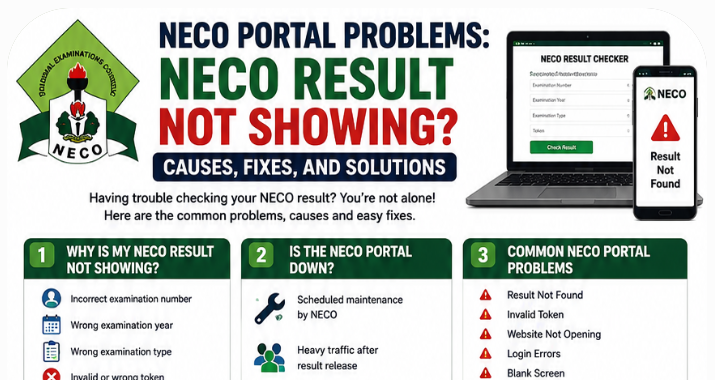
NECO Portal Problems and NECO Result Not Showing issues are what we will be covering in this article. Interestingly, we will be considering the possible causes, fixes, and solutions to NECO portal problems so that you can easily access the NECO online portal and check your result.
Well, before we will proceed with getting the NECO Result Not Showing issues fixed, let me remind us that every year, millions of candidates across Nigeria eagerly wait for the release of their National Examinations Council (NECO) results.
After weeks of anticipation, many students rush to the official result checker portal hoping to see the grades that will determine their next academic step.
For some, the process is smooth. For others, it quickly turns into frustration when the portal displays messages such as “Result Not Found,” “Invalid Token,” “Server Busy,” or simply refuses to load.
If you’re searching for answers because your NECO result is not showing, you’re certainly not alone. During every result release period, thousands of candidates experience temporary portal issues caused by heavy traffic, incorrect examination details, delayed result uploads, browser problems, or invalid result checker tokens.
The good news is that most of these problems are temporary and completely fixable. In many cases, the issue is not with your result itself but with the information entered or the condition of the portal at that particular time.
In this detailed guide, you’ll learn:
- Why your NECO result is not showing.
- How to fix common NECO portal problems.
- What “Result Not Found” actually means.
- How to solve invalid token errors.
- What to do if the NECO website is not opening.
- When to contact NECO for assistance.
- Practical tips to avoid portal problems in the future.
Also read: Common Mistakes Students Make During WAEC & NECO Practical Exams
Whether you’re checking your result for JAMB admission, university screening, scholarship applications, or employment, this guide will help you identify the cause of the problem and resolve it step by step.
Why Is My NECO Result Not Showing?
One of the most common questions candidates ask immediately after results are released is:
“Why is my NECO result not showing?”
Fortunately, a missing result does not automatically mean you failed or that your result has been lost. Several common issues can prevent your result from appearing on the portal.
Let’s examine each one.
1. Incorrect Examination Number
This is the leading cause of the NECO result not showing problem.
Many candidates accidentally:
- Omit a digit.
- Enter the wrong candidate number.
- Mistype one or more characters.
- Use another student’s examination number.
Even a single incorrect digit will prevent the system from locating your record.
Solution
Always compare the examination number you entered with:
- Your registration slip.
- Examination photocard.
- School examination records.
- Previous result printouts.
Double-check before clicking Check Result.
2. Wrong Examination Year
Another common mistake is selecting the wrong examination year.
For example, a candidate who sat for the 2026 SSCE Internal examination but accidentally selects another year will likely receive a “Result Not Found” message.
Solution
Always verify the examination year before submitting your request.
3. Wrong Examination Type
NECO conducts several examinations, including:
- SSCE Internal
- SSCE External (GCE)
- Basic Education Certificate Examination (BECE)
- National Common Entrance Examination (NCEE)
Selecting the wrong examination category prevents the portal from finding your result.
Solution
Choose the exact examination you sat for.
4. Invalid Result Checker Token
An invalid or incorrectly entered token is another major reason candidates cannot access their results.
This usually happens because:
- The token contains typing mistakes.
- The token was purchased from an unauthorized seller.
- An incorrect token was entered.
- There was an interruption during payment.
Solution
- Enter the token carefully.
- Avoid unnecessary spaces.
- Confirm that the token came from an authorized source.
- Keep your payment receipt.
5. Result Has Not Been Uploaded Yet
Sometimes NECO releases results in stages rather than making every candidate’s result available at the same time.
Some examination centres may experience slight delays before their results become accessible online.
Solution
If the official announcement has just been made, wait several hours or a day before checking again.
6. Portal Congestion
Immediately after NECO announces that results have been released, hundreds of thousands of candidates try to access the portal at once.
This heavy traffic can lead to:
- Slow loading
- Timeout errors
- Server busy messages
- Blank pages
- Login failures
Fortunately, these issues usually disappear once traffic reduces. Note that the NECO official result checking portal is https://results.neco.gov.ng/
7. Withheld Result
In some cases, NECO may temporarily withhold results while investigating issues such as:
- Examination malpractice
- Centre-related irregularities
- Administrative reviews
Candidates affected should monitor official NECO announcements for updates.
8. Scheduled Technical Maintenance
Like every online platform, the NECO Result Checker Portal occasionally undergoes maintenance to improve security and performance.
During maintenance, candidates may experience:
- Login failures
- Blank pages
- Temporary downtime
- Slow response times
Waiting until maintenance is completed usually resolves the issue.
Is the NECO Result Checker Portal Down?
Another question that frequently appears online is:
“Is the NECO Result Checker Portal down today?”
The answer depends on what is happening behind the scenes.
Scheduled Maintenance
NECO occasionally performs maintenance to:
- Improve portal security.
- Upgrade servers.
- Fix technical issues.
- Enhance performance.
During these periods, temporary interruptions are normal.
Heavy Traffic After Result Release
Whenever NECO announces that results are available, thousands of candidates attempt to check their grades within the first few hours.
This sudden surge in visitors can temporarily overwhelm the portal.
Common symptoms include:
- Website not opening
- Extremely slow loading
- Server busy notifications
- Login failures
- Blank result pages
These issues generally improve once traffic decreases.
Temporary Server Outages
Like many government websites, unexpected server outages can occur.
Possible causes include:
- Network disruptions
- Hosting problems
- Maintenance activities
- Technical upgrades
These outages are usually temporary.
How to Know If the Portal Is Officially Down
Before assuming there is a problem with your result, check whether:
- Other candidates are experiencing similar issues.
- NECO has announced scheduled maintenance.
- Education news platforms have reported portal downtime.
- The website becomes accessible after some time.
If everyone is unable to access the portal, the issue is likely with the server rather than your result.
Common NECO Portal Problems
Besides NECO Result Not Showing, candidates regularly encounter several other portal-related issues.
Understanding these problems can help you identify the correct solution more quickly.
1. Result Not Found
The portal cannot locate your examination record.
Possible reasons include:
- Wrong examination number
- Wrong examination year
- Wrong examination type
- Result not yet uploaded
2. Invalid Token
The portal rejects your Result Checker Token.
Possible causes include:
- Incorrect entry
- Fake token
- Unauthorized seller
- Payment issue
3. Website Not Opening
Sometimes the portal refuses to load altogether.
This may result from:
- Poor internet connection
- Browser issues
- Temporary server downtime
- DNS problems
4. Login Errors
Candidates may receive unexpected login failures because of:
- Incorrect details
- Session timeout
- Portal maintenance
5. Blank Screen
After clicking Check Result, the page may remain blank.
Possible causes include:
- Browser cache problems
- Weak internet connection
- Temporary server overload
6. Server Busy
This is one of the most common errors immediately after result release.
It simply means too many candidates are using the portal simultaneously.
7. Session Expired
If you remain inactive for several minutes, the portal may automatically end your session.
Refreshing the page and starting again usually solves the issue.
8. Slow Loading
The portal may take longer than usual to process requests during peak periods.
Patience is often the best solution.
9. Payment Issues
Candidates occasionally experience payment failures while purchasing Result Checker Tokens.
Always keep your payment confirmation until the token is successfully delivered.
10. Token Not Working
If your newly purchased token does not work:
- Check for typing mistakes.
- Confirm you bought it from an authorized source.
- Contact the seller if necessary.
How to Fix NECO Result Not Showing (Step-by-Step)
If your result refuses to appear, don’t panic. Work through the following troubleshooting steps one by one.
Step 1: Confirm the Official Result Release
Before attempting any troubleshooting, verify that NECO has officially announced the release of the examination results.
Checking too early will naturally produce no result.
Step 2: Check Your Examination Number
Carefully compare your examination number with your registration slip.
Even a single incorrect digit can prevent the portal from locating your record.
Step 3: Verify the Examination Year
Confirm that you selected the correct examination year before submitting your request.
Step 4: Select the Correct Examination Type
Ensure you choose the exact examination category, such as:
- SSCE Internal
- SSCE External
- BECE
Step 5: Confirm Your Result Checker Token
Re-enter your token carefully.
Avoid copying extra spaces when pasting the code.
Step 6: Refresh the Portal and Try Again Later
If the portal appears overloaded, wait for some time before trying again.
Many temporary issues resolve themselves once traffic decreases.
Step 7: Use Another Browser
If you’re using one browser, try another.
Modern browsers such as Chrome, Firefox, Edge, or Safari often perform differently with busy websites.
Step 8: Clear Your Browser Cache
Old cached files can interfere with how the portal loads.
Clearing your browser’s cache and cookies may solve loading issues.
Step 9: Try Another Device
If your phone isn’t working properly, switch to:
- Another smartphone
- Laptop
- Desktop computer
- Tablet
This helps determine whether the problem is device-specific.
Step 10: Contact NECO if the Problem Persists
If you’ve carefully completed all the steps above and your result is still unavailable after a reasonable period following the official release, it may be time to contact NECO or your examination centre for further assistance.
NECO Result Not Showing? Quick Troubleshooting Guide
NECO Result Not Showing
⬇
Check Examination Number
⬇
Confirm Examination Year
⬇
Select Correct Examination Type
⬇
Verify Result Checker Token
⬇
Refresh the Portal
⬇
Try Another Browser or Device
⬇
Wait if Server Is Busy
⬇
Contact NECO if the Issue Persists
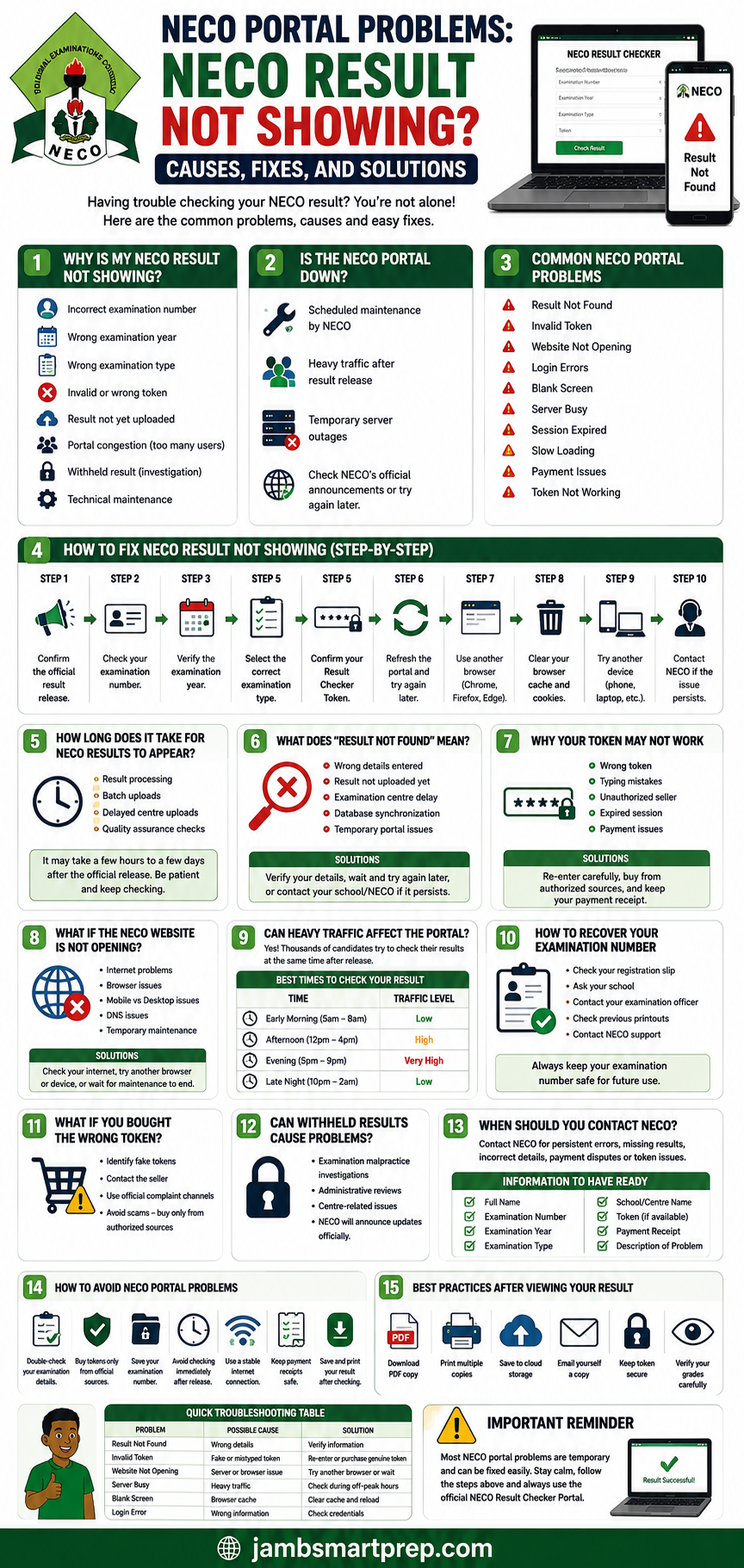
Quick Tip: Most NECO portal issues are temporary. Always use the official result checker portal, enter your details carefully, and avoid purchasing tokens from unauthorized sellers.
Understanding Result Delays, “Result Not Found” Errors, Token Problems, and Website Issues
How Long Does It Take for NECO Results to Appear?
One of the biggest concerns among candidates after the official release of NECO results is how long they should wait if their result is still unavailable.
If your NECO result is not showing after release, it does not always mean something is wrong. The National Examinations Council (NECO) follows several stages before every candidate’s result becomes available on the portal.
Understanding this process can help reduce unnecessary panic.
1. Result Processing Takes Time
After candidates complete their examinations, NECO begins a detailed process that includes:
- Collection of scripts from examination centres
- Marking by appointed examiners
- Moderation of scores
- Quality assurance checks
- Approval of final results
- Uploading results to the online portal
Although NECO announces an official release date, some technical updates may continue shortly afterward.
2. Results May Be Uploaded in Batches
Many candidates assume that once NECO announces results, every student’s result becomes available immediately.
In reality, uploads may occur in batches.
Factors that can affect upload schedules include:
- Examination centre processing
- Internet synchronization
- Internal verification
- Regional updates
If your friend has successfully checked their result while yours is unavailable, don’t immediately assume there is a problem with your examination.
3. Delayed Centre Uploads
Occasionally, certain examination centres experience delays because of:
- Administrative verification
- Technical issues
- Data synchronization
- Centre-related investigations
These situations are usually resolved once the required updates have been completed.
4. Quality Assurance Checks
Before publishing results, NECO conducts several quality assurance procedures to ensure:
- Scores are correctly recorded.
- Candidate information matches registration records.
- Examination malpractice cases are reviewed.
- Missing scripts are investigated.
- Result integrity is maintained.
These checks help ensure that candidates receive accurate results.
5. Expected Waiting Period
If your result is unavailable immediately after release:
- Wait a few hours before trying again.
- Check again later in the day.
- Continue monitoring official announcements.
- Avoid repeatedly refreshing the portal every few seconds.
Most temporary portal issues resolve themselves within a short period.
What Does “Result Not Found” Mean?
One of the most frustrating messages candidates encounter is:
“Result Not Found.”
Fortunately, this message does not always indicate that your result has been lost.
Several factors may cause this error.
1. Wrong Examination Details
The most common cause is incorrect information.
Examples include:
- Wrong examination number
- Wrong examination year
- Wrong examination type
Even one incorrect digit can prevent the portal from locating your record.
Solution
Carefully compare every detail with your examination documents before trying again.
2. Result Has Not Yet Been Uploaded
Although results may have been officially released, some records might still be uploading.
Solution
Wait a few hours or check again the following day.
3. Examination Centre Delay
Some centres may experience administrative or technical delays during the upload process.
Solution
Remain patient and monitor updates from your school or NECO.
4. Database Synchronization
Large examination databases require synchronization across multiple systems.
Temporary synchronization delays can occasionally prevent results from appearing immediately.
5. Temporary Portal Issues
Heavy traffic may interrupt communication between your browser and the result database.
Trying again later often resolves the issue.
Quick Checklist for “Result Not Found”
Before assuming there is a serious problem, verify:
✔ Correct examination number
✔ Correct examination year
✔ Correct examination type
✔ Valid Result Checker Token
✔ Stable internet connection
✔ Official result release has been announced
Why Your NECO Result Checker Token May Not Work
Another common complaint from candidates is:
“My NECO Result Checker Token is not working.”
There are several possible explanations.
1. Wrong Token Entered
Typing mistakes remain the most common cause.
Candidates sometimes:
- Confuse the letter “O” with the number “0”
- Enter unnecessary spaces
- Miss one or more characters
Solution
Type the token carefully instead of copying it repeatedly.
2. Unauthorized Seller
Buying tokens from unknown websites or social media vendors can result in invalid or fake codes.
Always purchase from approved sources.
3. Payment Problems
Occasionally, payment succeeds but token generation is delayed.
Possible reasons include:
- Slow payment confirmation
- Banking delays
- Network interruptions
Solution
Keep your payment receipt and wait for confirmation before attempting another purchase.
4. Expired Session
If your browser session expires while checking your result, the portal may reject the token temporarily.
Solution
Refresh the page and start the process again.
5. Browser Issues
Some browsers may store outdated information that interferes with the portal.
Clearing your browser cache can solve this problem.
How to Avoid Token Problems
Follow these tips:
- Buy only from authorized vendors.
- Save your payment receipt.
- Keep the token confidential.
- Enter it carefully.
- Avoid purchasing “cheap” tokens from unofficial sources.
What If the NECO Website Is Not Opening?
A website that refuses to load can be just as frustrating as a missing result.
Fortunately, the cause is often easy to identify.
1. Poor Internet Connection
Before blaming the portal, check your internet connection.
Weak mobile networks can cause:
- Blank pages
- Loading failures
- Timeout errors
Try switching to a stronger Wi-Fi or mobile data connection.
2. Browser Problems
Older browser versions sometimes struggle with secure government websites.
Recommended Browsers
- Google Chrome
- Mozilla Firefox
- Microsoft Edge
- Safari
Updating your browser may improve performance.
3. Mobile vs Desktop
If the portal refuses to open on your phone, try using:
- A laptop
- Desktop computer
- Tablet
Likewise, if it fails on a computer, test it on a smartphone.
4. DNS Issues
Internet Service Providers occasionally experience DNS problems that affect website accessibility.
Switching networks may solve the issue.
5. Temporary Maintenance
Government examination portals occasionally undergo maintenance.
If maintenance is in progress:
- Wait patiently.
- Avoid repeated refreshes.
- Check official announcements.
Can Heavy Traffic Affect the Portal?
Yes.
Every year, immediately after NECO announces that results have been released, the portal experiences a dramatic increase in visitors.
Thousands of candidates attempt to check their results at exactly the same time.
This often results in:
- Slow loading
- Server busy errors
- Blank pages
- Login failures
- Session timeouts
Fortunately, these issues are usually temporary.
Best Times to Check Your Result
| Time | Traffic Level |
|---|---|
| Early Morning (5:00–8:00 a.m.) | Low |
| Afternoon (12:00–4:00 p.m.) | High |
| Evening (5:00–9:00 p.m.) | Very High |
| Late Night (10:00 p.m.–2:00 a.m.) | Low |
If you encounter repeated errors during peak periods, try checking your result during early morning or late-night hours when fewer candidates are online.
Signs the Portal Is Experiencing Heavy Traffic
- Website loads slowly.
- “Server Busy” message appears.
- Login page takes several minutes to open.
- Result page freezes.
- Portal logs you out unexpectedly.
In most cases, patience is the best solution.
How to Recover Your NECO Examination Number
Without your examination number, checking your result becomes difficult.
If you have misplaced it, don’t panic.
Several options are available.
1. Check Your Registration Slip
Your registration slip usually contains your examination number.
Many candidates still have:
- Printed registration forms
- Photocopies
- Digital scans
2. Ask Your School
Schools typically keep examination records for their candidates.
Visit your examination officer or school administrator.
3. Contact Your Examination Officer
The examination officer who handled your registration may still have access to your candidate records.
4. Check Previous Printouts
If you have previously checked your result or downloaded examination documents, your examination number may already be available there.
5. Contact NECO Support
If all other methods fail, contact NECO with sufficient identification details for assistance.
Be prepared to provide:
- Full name
- School name
- Examination year
- Examination type
- Date of birth (where applicable)
This information helps NECO locate your records more efficiently.
Fake Tokens, Withheld Results, Contacting NECO, Prevention Tips, and Best Practices
What If You Bought the Wrong NECO Result Checker Token?
One of the most frustrating situations candidates face is discovering that the NECO Result Checker Token they purchased does not work. In many cases, the issue is not the NECO Result Checker Portal itself but the source of the token.
Over the years, cybercriminals have taken advantage of the rush that follows NECO result releases by advertising fake or invalid result checker tokens on social media, messaging apps, and unofficial websites.
If your token is rejected, don’t panic. First, determine whether the problem is with the token or simply a typing mistake.
How to Identify a Fake NECO Result Checker Token
Be cautious if:
- The seller promises “lifetime” or unlimited access without official backing.
- The token is sold at a price far below the official rate.
- Payment is requested through a personal account with no receipt.
- The seller cannot provide proof of authorization.
- The website has no contact information or secure payment system.
These are common warning signs of fraudulent sellers.
What Should You Do If You Purchased a Fake Token?
If you suspect that your token is fake:
- Double-check that you entered the code correctly.
- Compare the token with the purchase confirmation.
- Contact the vendor immediately.
- Request proof that the token was generated through an authorized channel.
- If the issue is not resolved, purchase a new token from an approved source.
Unfortunately, NECO is generally not responsible for losses resulting from purchases made through unauthorized sellers.
How to Avoid Fake Tokens
To protect yourself:
- Buy only from official or accredited vendors.
- Keep your payment receipt.
- Avoid “discount” offers from strangers.
- Verify the website before making payment.
- Never share your banking PIN or online banking credentials.
Can Withheld Results Cause Portal Problems?
Yes. A withheld result can sometimes make candidates believe that the portal is malfunctioning when, in reality, the issue relates to the examination record itself.
What Is a Withheld Result?
A withheld result is one that NECO temporarily suspends while certain issues are investigated.
This does not automatically mean that a candidate is guilty of examination malpractice. In some cases, investigations involve an entire examination centre or administrative irregularities rather than individual candidates.
Reasons Why NECO May Withhold Results
Possible reasons include:
- Alleged examination malpractice
- Identity verification issues
- Centre-related irregularities
- Incomplete documentation
- Administrative reviews
- Ongoing investigations
How Are Withheld Results Announced?
NECO normally communicates decisions regarding withheld results through official announcements after completing its investigations.
Candidates should avoid relying on rumours circulating on social media.
Can a Withheld Result Be Released Later?
Yes. If investigations are concluded in the candidate’s favour, the withheld result may later be released.
However, every case is assessed individually based on the available evidence and NECO’s examination regulations.
When Should You Contact NECO?
Most NECO portal problems can be resolved by checking your details carefully or waiting for the portal to stabilize.
However, there are situations where contacting NECO becomes necessary.
You Should Contact NECO If:
- Your result remains unavailable several days after the official release.
- The portal repeatedly displays incorrect personal information.
- Your token appears invalid despite being purchased from an authorized source.
- Your payment was successful but no token was issued.
- You have lost your examination details and cannot recover them through your school.
- Your result contains obvious errors that require official clarification.
Information to Prepare Before Contacting NECO
To speed up the support process, have the following information ready:
- Full name
- Examination number
- Examination year
- Examination type
- School or examination centre
- Result Checker Token (if applicable)
- Payment receipt
- Description of the problem
- Screenshots of any error messages
Providing complete information makes it easier for support staff to investigate your issue.
Checklist Before Contacting NECO
Use this checklist to ensure you’ve completed the basic troubleshooting steps.
| Question | Completed? |
|---|---|
| Have you confirmed the official result release? | ✔ |
| Did you enter the correct examination number? | ✔ |
| Did you select the correct examination year? | ✔ |
| Did you choose the correct examination type? | ✔ |
| Is your Result Checker Token valid? | ✔ |
| Have you refreshed the portal? | ✔ |
| Have you tried another browser? | ✔ |
| Have you tested another device? | ✔ |
| Have you checked during off-peak hours? | ✔ |
If you’ve answered Yes to all the above and your result is still unavailable, contacting NECO is the next logical step.
How to Avoid NECO Portal Problems in the Future
Although some portal issues are unavoidable, many can be prevented with a little preparation.
1. Double-Check Your Examination Details
Before clicking Check Result, confirm:
- Examination number
- Examination year
- Examination type
- Result Checker Token
A few extra seconds can prevent unnecessary frustration.
2. Buy Tokens Only from Approved Sources
Avoid purchasing tokens through:
- Facebook comments
- WhatsApp groups
- Telegram channels
- Unknown websites
Always use authorized sellers.
3. Keep Your Examination Number Safe
Store your examination number in multiple locations:
- Notebook
- Phone notes
- Cloud storage
Losing your examination number can delay access to your result.
4. Avoid Checking Immediately After Release
Many candidates rush to the portal within minutes of the official announcement.
If possible, wait until traffic reduces.
Checking during early morning or late-night hours often provides a smoother experience.
5. Use a Stable Internet Connection
Weak internet connections frequently cause:
- Blank pages
- Timeout errors
- Interrupted loading
Whenever possible, use a reliable Wi-Fi or strong mobile data connection.
6. Keep Your Payment Receipt
Never delete your payment confirmation until you have successfully checked and saved your result.
Receipts are useful if payment disputes arise.
7. Save Your Result Immediately
Once your result appears:
- Download a PDF copy.
- Print several copies.
- Save it to cloud storage.
- Email a copy to yourself.
This reduces the need to repeatedly access the portal.
Best Practices After Successfully Viewing Your Result
Successfully checking your result is only the beginning.
Taking a few additional steps can help protect your academic records.
Download a PDF Copy
Most browsers allow you to save your result as a PDF.
Digital copies are easy to share with universities and scholarship providers.
Print Multiple Copies
Print at least three clear copies.
You may need them for:
- JAMB admission
- Post-UTME screening
- Scholarships
- Employment
- Personal records
Back Up Your Result
Store copies in:
- Google Drive
- Microsoft OneDrive
- Dropbox
- External hard drive
- USB flash drive
Multiple backups reduce the risk of permanent loss.
Email Yourself a Copy
Sending your result to your email provides another convenient backup that can be accessed from anywhere.
Keep Your Token Secure
Even after checking your result, keep your Result Checker Token in a safe place in case it is needed again under the applicable usage policy.
Verify Your Grades Carefully
Before leaving the portal, review:
- Your full name
- Examination number
- Examination year
- Subject names
- Grades awarded
Report any obvious discrepancies through the appropriate official channels.
Quick Troubleshooting Table
| Problem | Possible Cause | Recommended Solution |
|---|---|---|
| Result Not Found | Wrong examination details | Verify and re-enter your information |
| Invalid Token | Fake or mistyped token | Re-enter carefully or purchase a genuine token |
| Website Not Opening | Browser or server issue | Try another browser or wait |
| Server Busy | Heavy portal traffic | Check during off-peak hours |
| Blank Screen | Browser cache or weak internet | Clear cache and reload |
| Login Error | Incorrect details | Review your entries and try again |
| Slow Loading | Heavy demand | Wait patiently and refresh later |
| Session Expired | Long period of inactivity | Refresh the page and log in again |
| Payment Failure | Banking or network issue | Confirm payment before retrying |
| Result Pending | Upload still in progress | Wait and check again later |
Practical Example
Imagine two students, Ada and Ibrahim, checked their results on the same afternoon immediately after NECO announced the release.
- Ada entered the wrong examination year and received a “Result Not Found” message. After selecting the correct year, her result appeared instantly.
- Ibrahim used a newly purchased token from an unofficial seller. The portal rejected it because it was invalid. After buying a genuine token from an authorized source, he was able to access his result without further issues.
Their experiences show that many portal problems have simple solutions once the actual cause is identified.
Frequently Asked Questions
Below are answers to some of the most common questions candidates ask when they experience NECO portal problems or discover that their NECO result is not showing.
1. Why is my NECO result not showing?
There are several possible reasons, including:
- Incorrect examination number
- Wrong examination year
- Wrong examination type
- Invalid Result Checker Token
- Temporary portal congestion
- Delayed result upload
- Technical maintenance
- Withheld result
Before assuming there is a major problem, carefully verify all the information you entered on the NECO Result Checker Portal.
2. Why does the portal say “Result Not Found”?
The “Result Not Found” message usually appears when the system cannot match the information you entered with any available record.
This may happen because:
- You entered incorrect details.
- Your result has not yet been uploaded.
- There is a temporary synchronization issue.
- You selected the wrong examination category.
Double-check your details before trying again.
3. How long should I wait if my result is unavailable?
If NECO has just announced the release of results, it is advisable to wait a few hours or even until the following day before checking again.
Heavy traffic immediately after result release often causes temporary delays.
4. Can I check my NECO result without a Result Checker Token?
No.
A valid NECO Result Checker Token is required before you can access your result through the official portal.
Always obtain your token from an authorized source.
5. Is the NECO Result Checker Portal down today?
The portal may occasionally become temporarily unavailable because of:
- Scheduled maintenance
- Heavy traffic
- Server upgrades
- Network issues
If many candidates experience the same problem, the issue is likely temporary.
6. Why is my Result Checker Token invalid?
Possible reasons include:
- Typing mistakes
- Fake token
- Purchase from an unauthorized seller
- Payment processing issues
Carefully re-enter the token before assuming it is invalid.
7. Can my school help if my result is not showing?
Yes.
Your school may assist by:
- Confirming your examination number
- Verifying registration records
- Advising whether your centre has reported any delays
- Directing you to the appropriate NECO office if necessary
8. Can NECO correct incorrect personal details?
If you notice an error involving your name or examination information, contact NECO or your school as soon as possible.
Corrections usually require supporting documentation and follow NECO’s official procedures.
9. What if I lose my examination number?
If you have misplaced your examination number, you can:
- Check your registration slip.
- Contact your school.
- Speak with your examination officer.
- Review previous examination documents.
- Contact NECO if necessary.
10. Does NECO upload results in batches?
Yes.
Depending on administrative processing and technical updates, some results may become available before others.
This explains why classmates from the same examination may access their results at different times.
11. What if my result has been withheld?
A withheld result does not necessarily mean permanent cancellation.
NECO may temporarily withhold results while reviewing issues such as:
- Examination malpractice allegations
- Centre-related investigations
- Administrative reviews
Candidates should monitor official announcements for updates.
12. Can I use another person’s Result Checker Token?
If the token is valid and unused according to the applicable policy, it may technically retrieve a result when entered with the correct examination details. However, candidates should always use tokens obtained legitimately and avoid sharing sensitive examination information unnecessarily.
13. Why is the NECO website not opening on my phone?
Possible reasons include:
- Weak internet connection
- Browser compatibility issues
- Temporary server congestion
- Maintenance work
Try switching to another browser or device before assuming the website is unavailable.
14. Why does the portal keep saying “Server Busy”?
The Server Busy message usually appears when thousands of candidates are trying to access the portal simultaneously.
Checking during early morning or late-night hours often provides a better experience.
15. Can I check previous years’ NECO results?
Yes, provided you have the required examination details and a valid Result Checker Token where applicable.
16. Is it safe to check my result at a cybercafé?
Yes, but you should:
- Avoid saving your login information.
- Log out after checking your result.
- Delete downloaded files from public computers.
- Keep your token confidential.
17. What should I do after successfully checking my result?
Immediately:
- Download a PDF copy.
- Print several copies.
- Save your result to cloud storage.
- Email yourself a backup copy.
- Store your Result Checker Token safely.
Related Articles
To continue your admission journey, you may also find these guides helpful. Linking these articles internally can improve user experience and strengthen your website’s SEO.
- NECO Result Checker Portal Login: How to Check Your NECO Result Online
- How to Buy a Genuine NECO Result Checker Token
- How to Print Your NECO Result Successfully
- How to Verify an Original NECO Result
- WAEC Result Checker Portal Login Guide
- JAMB CAPS Admission Status Checker Explained
- How to Upload Your O’Level Result on JAMB CAPS
- Universities That Accept NECO Results Without Restriction
- How to Correct Errors on Your NECO Registration
- Difference Between NECO SSCE Internal and NECO GCE
These related articles help readers solve additional admission-related challenges while encouraging longer engagement on your website.
Key Takeaways
If your NECO result is not showing, remember these important points:
- Most portal issues are temporary.
- Confirm that NECO has officially released the results.
- Enter your examination number carefully.
- Select the correct examination year and examination type.
- Use only a genuine Result Checker Token.
- Avoid checking during periods of extremely heavy traffic.
- Save and print your result immediately after viewing it.
- Contact NECO only after completing the recommended troubleshooting steps.
Following these simple practices can save you time and unnecessary stress.
Quick Troubleshooting Summary
| Issue | Likely Cause | Recommended Action |
|---|---|---|
| Result Not Showing | Incorrect details or delayed upload | Verify your information and try again later |
| Result Not Found | Wrong examination number or year | Re-enter the correct details |
| Invalid Token | Fake or incorrectly entered token | Use a genuine token and type it carefully |
| Server Busy | Heavy traffic | Check during off-peak hours |
| Website Not Opening | Browser, internet, or maintenance issue | Switch browsers or wait |
| Slow Loading | High number of users | Refresh after a short wait |
| Session Expired | Inactivity | Log in again |
| Payment Problem | Network or banking delay | Keep your receipt and verify payment |
Final Thoughts
Experiencing NECO portal problems can be stressful, especially when your result is needed for JAMB admission, post-UTME screening, scholarships, employment, or other important opportunities. Fortunately, most issues such as NECO result not showing, NECO result checker not working, NECO result not found, and NECO website not opening are temporary and can often be resolved without difficulty.
The most important step is to remain calm and troubleshoot systematically. Start by confirming that the results have officially been released. Next, verify your examination number, examination year, examination type, and Result Checker Token. If the portal is busy, wait until traffic reduces before trying again. In many cases, simply checking during off-peak hours resolves the issue.
Avoid unofficial websites or individuals claiming they can “unlock” your result or sell heavily discounted tokens. Using only genuine NECO channels protects your personal information and reduces the risk of fraud.
Remember that your NECO result is one of the key documents required for higher education and many career opportunities. Once you successfully access it, save digital copies, print multiple hard copies, and store your records securely for future use.
With patience and the right approach, most candidates are able to resolve these issues and continue with their admission or career plans without further complications.
NOW OVER TO YOU
Has your NECO result not shown on the portal? Tell us the exact error message you’re seeing, such as “Result Not Found,” “Invalid Token,” “Server Busy,” or “Website Not Opening,” in the comments below, and we’ll guide you through the most likely solution.
If this guide helped you, bookmark this page for future reference and share it with your classmates, friends, and family members who may also be facing NECO portal problems.
For more expert guides on NECO, WAEC, JAMB, university admissions, scholarships, and study opportunities in Nigeria, explore our other articles and subscribe to stay informed with the latest education updates.
