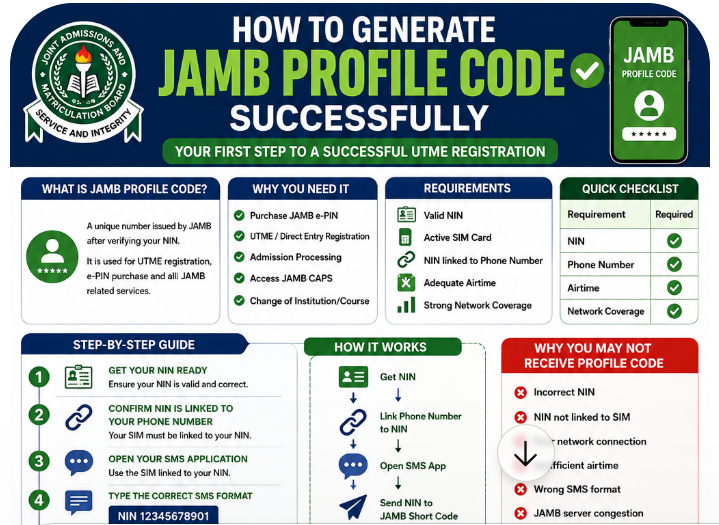
To generate a JAMB profile code, send an SMS in the format NIN 12345678901 (the word NIN, a space, then your 11-digit National Identification Number) to 55019 or 66019 from the phone line you want to use for JAMB. JAMB replies with a 10-character profile code, which you use to buy your e-PIN and register at a CBT centre. Most errors come from the wrong format, insufficient airtime, a phone number already linked to another profile, or a NIN that’s already been used.
This guide walks you through generating the code, explains every common error message and fix, covers previous candidates retrieving an old code, and shows how to protect your code once you have it.
- Check that your NIN details (name, date of birth, gender, state of origin) are correct with NIMC.
- Use a phone line registered in your name that you’ll keep throughout admission.
- Make sure you have airtime for the SMS charge.
- Text NIN 12345678901 (your own NIN) to 55019 or 66019.
- Save the 10-character profile code JAMB sends you.
Previous JAMB candidates: in 2026, candidates who’d registered before could text RESEND to reactivate an old code. Follow JAMB’s current instructions.
In this guide:
- What a profile code is
- Before you send the SMS
- Step-by-step: generating the code
- Error messages and fixes
- Previous candidates and lost codes
- After you get your code
- Protecting your code and details
- FAQs
What a profile code is
The profile code is a 10-character code that links you, your NIN and your phone number to JAMB’s system. You need it to:
- Buy your e-PIN for the UTME or Direct Entry through approved payment channels.
- Register at a CBT centre, where the operator uses it with your e-PIN to open your registration.
- Retrieve services such as a lost e-PIN, which JAMB sends to the linked phone number.
Generating the profile code is free apart from the SMS charge. Nobody needs to sell you a profile code.
Why JAMB uses NIN-linked profile codes
JAMB links every candidate’s registration to their National Identification Number to reduce impersonation, multiple registrations and identity fraud. Your NIN record supplies your core personal details, and your phone number becomes the channel for codes and notices. That’s why JAMB is strict about one NIN and one phone number per profile, and why fixing NIN errors before you start saves trouble later.
If you don’t have a NIN yet
- Find an official NIMC enrolment centre. NIMC has set up ward-level points to make enrolment easier for students. Enrolment is free at official centres.
- Bring your documents: birth certificate or statutory declaration of age. Under-16s need a parent or guardian with a valid NIN.
- Complete enrolment: your details, photograph and fingerprints are captured.
- Collect your NIN and check every detail before leaving.
- Wait for your record to be active before generating your JAMB profile code.
Start early. NIN enrolment and corrections can take time, especially close to JAMB registration. JAMB’s 9 November 2026 advisory for 2027 candidates included verifying NIN details early.
Before you send the SMS
| Check | Why it matters |
|---|---|
| Your NIN details are correct | JAMB pulls your name, date of birth, gender and state of origin from NIMC. They can’t be changed at the CBT centre |
| The SIM is registered in your name | The number will receive your codes and notices for the whole admission process |
| The number isn’t linked to another JAMB profile | Each phone number can be used for only one profile |
| You have airtime | The SMS is charged |
| You’ll keep this number | You’ll need it to check results, retrieve PINs and use other services |
If you’ve bought a new SIM, consider your network’s “Keep My Number” service so you keep the same number when changing phones. See how to create a JAMB profile with your phone number for more on choosing and protecting your number.
Step-by-step: generating the code
- Open your messaging app on the phone with the SIM you want to use.
- Type the message: NIN, then a space, then your 11-digit NIN. Example: NIN 12345678901.
- Send it to 55019 or 66019.
- Wait for JAMB’s reply. It may take a few minutes during busy periods.
- Read the reply carefully. It should contain your 10-character profile code.
- Save the code: screenshot the message and write the code on paper.
Format checklist
| Correct | Incorrect |
|---|---|
| NIN 12345678901 | NIN12345678901 (no space) |
| NIN 12345678901 | 12345678901 (no “NIN”) |
| NIN 12345678901 | NIN: 12345678901 (extra punctuation) |
| 11 digits | 10 or 12 digits (typo) |
Understanding JAMB’s reply
A successful reply typically includes:
- Your name as it appears on your NIN record. Check the spelling carefully.
- Your 10-character profile code.
- Instructions for the next step, such as buying your e-PIN.
If the name in the reply isn’t yours, stop. You may have typed someone else’s NIN by mistake. Check your NIN slip and contact JAMB through its support portal if needed.
Error messages and fixes
Exact wording can vary, but these are the most common problems:
| Problem or message | Likely cause | Fix |
|---|---|---|
| No reply | Network delay; no airtime; wrong short code | Check airtime; wait; resend once; try the other short code (55019 or 66019) |
| “Invalid NIN” or similar | Typo in the NIN; wrong format | Check the 11 digits against your NIN slip; use the exact format |
| “NIN already used” or similar | A profile already exists for that NIN | Use the phone number that created it, or follow JAMB’s instructions for previous candidates (e.g. RESEND in 2026) |
| “Phone number already used” or similar | That number is linked to another profile | Use a different number registered in your name |
| Name or date of birth wrong in the reply | NIMC record error | Correct your NIN record with NIMC first; then follow JAMB’s process for updating your profile |
| Reply received but code lost | Message deleted | Follow JAMB’s retrieval instructions from the same number |
If none of these fixes work, raise a ticket at support.jamb.gov.ng with your NIN, phone number and a screenshot of the SMS you sent. See how to contact JAMB support.
A step-by-step troubleshooting flow
- Did you get any reply? If no, check airtime, signal and the short code, wait 15–30 minutes, then resend once.
- Is the format exact? “NIN”, one space, 11 digits, nothing else.
- Is the NIN yours and correct? Compare digit by digit with your NIN slip.
- Has this number been used for JAMB before? If yes, use a different personal number.
- Have you registered for JAMB before? If yes, follow JAMB’s instructions for previous candidates rather than creating a new profile.
- Are the details in the reply correct? If not, correct your NIN record with NIMC.
- Still stuck? Raise a ticket with screenshots.
NIN data errors
Your profile uses your NIMC data. If your name is misspelt, your date of birth is wrong or your gender is incorrect, fix it with NIMC before generating the code if you can. If you’ve already generated a code with wrong data, correct it with NIMC and follow JAMB’s official update process for your cycle. Reports on the 2026 cycle described a re-query process for candidates who updated NIMC details after creating a profile; check JAMB’s current instructions.
Choosing the right phone number
| Good choice | Poor choice |
|---|---|
| Your own SIM, registered in your name | A parent’s or friend’s line |
| A number you’ve used for a while and will keep | A new SIM you might lose or replace |
| A line on a network with good coverage where you live | A line with poor signal at home or school |
| A number not linked to any other JAMB profile | A sibling’s previous JAMB number |
If you lose the number later, retrieve it from your network provider. JAMB also offered a one-time change of phone number and email at designated centres from 21 September 2026.
Common NIN problems and fixes
| NIN problem | Effect on JAMB | Fix |
|---|---|---|
| Name misspelt | Wrong name on JAMB records, result and admission letter | Request a correction from NIMC, with supporting documents |
| Wrong date of birth | Age checks and document mismatches | Request a correction from NIMC with your birth certificate |
| Wrong gender | Record mismatch | Request a correction from NIMC |
| Name order different from O’level result | Possible mismatch at clearance | Make records consistent; keep evidence of the correct order |
| Multiple NINs (rare) | Risk of duplicate profiles | Resolve with NIMC; use only one NIN |
NIMC corrections can take time and may involve fees for some modifications. Start early.
Twins and siblings
Siblings, especially twins, sometimes mix up NINs or phone numbers. Each candidate must use their own NIN and their own phone number. Label each child’s documents clearly, and double-check the NIN before sending the SMS.
Previous candidates and lost codes
If you registered for JAMB in an earlier year, you already have a profile linked to your NIN. Don’t try to create a new one with a different NIN or number. For 2026, previous candidates could text RESEND to 55019 or 66019 to reactivate an old code. Follow the instructions JAMB announces for your cycle.
Lost e-PIN
If you’ve paid for your e-PIN but lost the SMS, JAMB allowed candidates in 2026 to retrieve it by texting UTMEPIN (or DEPIN for Direct Entry) to 55019 or 66019 from the registered number. Check the current instructions.
Keep good records
Create a JAMB folder (paper and phone) with your NIN slip, the profile code SMS screenshot, e-PIN SMS screenshot, payment receipt and registration slip. You’ll need some of these again for exam slip printing, results, the original result slip, change of course and admission. Good records turn small problems into quick fixes.
Before you press send: three questions
- Is this my own phone line, and will I keep it?
- Is this my NIN, typed correctly?
- Have I registered for JAMB before? (If yes, follow the previous-candidate instructions.)
After you get your code
- Buy your e-PIN through an approved channel using your profile code. Choose the right product: UTME with mock, UTME without mock, or Direct Entry. In 2026, they cost ₦8,700, ₦7,200 and ₦5,700.
- Wait for your e-PIN SMS and save it.
- Go to an accredited CBT centre with your profile code, e-PIN and choices of subjects, institutions and courses. See our CBT centre list.
- Complete registration and biometrics, and check every detail before confirming.
See how to register for JAMB step by step.
Example situations
Chidi gets no reply. He typed “NIN12345678901” without a space. After adding the space and topping up airtime, he receives his code within minutes.
Aisha’s number is already used. She tried to use her mother’s line, which had been used for her brother’s JAMB registration. She uses her own SIM instead.
Tunde wrote JAMB last year. He gets a “NIN already used” style message. He follows JAMB’s instructions for previous candidates (texting RESEND in 2026) from his old registered number, reactivating his existing code.
Ngozi’s date of birth is wrong. Her reply shows the wrong year. She corrects her NIN record at NIMC first, then follows JAMB’s update process before registering, so her result and admission records will be correct.
Ahmed loses his e-PIN SMS. He texts UTMEPIN from his registered number, as JAMB allowed in 2026, and gets the PIN again.
Profile codes for Direct Entry
Direct Entry candidates generate a profile code in exactly the same way: NIN followed by the 11-digit NIN, sent to 55019 or 66019. The difference is the e-PIN you buy afterwards: choose the Direct Entry e-PIN (₦5,700 in 2026), not the UTME e-PIN, and register within the DE window (2 March to 25 April in 2026). See Direct Entry admission in Nigeria.
When to generate your code
| When | What to do |
|---|---|
| Before registration opens | Check NIN details; choose your phone number; follow JAMB’s advisories |
| When JAMB opens profile creation | Generate your code early, before the rush |
| Same week | Buy your e-PIN with the code |
| Early in the registration window | Register at an accredited CBT centre |
As of 12 November 2026, JAMB hasn’t announced the official 2027 registration start date. Some reports suggested profile creation might begin around 10 December 2026; treat that as unconfirmed and watch jamb.gov.ng.
Paying for your e-PIN safely
- Use approved channels: banks, POS agents, approved fintech apps and partners listed in JAMB’s announcements.
- Give your profile code, not your NIN, to the payment agent.
- Choose the correct product: UTME with mock, UTME without mock, or Direct Entry. e-PINs are non-refundable.
- Keep the receipt and a screenshot of the confirmation.
- Wait for the e-PIN SMS on your registered number. If it doesn’t arrive, confirm the payment and follow JAMB’s retrieval instructions.
What happens at the CBT centre
- The operator uses your profile code and e-PIN to open your registration.
- Your personal details are pulled from your NIN record.
- You provide your subjects, institutions, courses, exam town and O’level details (or “awaiting result”).
- Your fingerprints and live photo are captured.
- You check every detail on the screen and confirm.
- Your registration slip is printed.
In 2026, JAMB required CBT centres to stream registration activity to its headquarters to curb extortion and impersonation, and the e-PIN price included the centre’s registration fee. Don’t pay extra charges. See accredited CBT centres.
Registration mistakes linked to profile codes
- Using a code generated with someone else’s NIN by accident.
- Buying the wrong e-PIN (DE instead of UTME, or without the mock when you wanted it).
- Losing access to the registered phone before results and admission.
- Creating a second profile instead of reactivating an old one.
- Ignoring NIN errors that later cause mismatches with O’level and admission records.
See common JAMB registration mistakes.
Getting help at a cybercafé or CBT centre
If you’re not confident sending the SMS or paying for the e-PIN, ask a trusted adult or a reputable centre to guide you, but:
- Send the SMS from your own phone.
- Read the reply yourself and save it.
- Don’t leave your NIN slip, profile code or e-PIN with anyone.
- Pay only official charges and ask for receipts.
Candidates with special needs or outside Nigeria
JAMB has made arrangements for candidates with special needs and has used approved foreign centres in past cycles. If either applies to you, read JAMB’s current announcement for the procedure, and ask for help early so your profile, e-PIN and registration are done in good time.
The full journey: from NIN to exam slip
| Step | What you do | What you get |
|---|---|---|
| 1 | Enrol for NIN (if needed) and check details | NIN |
| 2 | Send NIN SMS to 55019/66019 | Profile code |
| 3 | Pay for e-PIN with profile code | e-PIN by SMS |
| 4 | Register at an accredited CBT centre | Registration slip |
| 5 | Print exam slip when JAMB opens printing | Exam date, time and centre |
| 6 | Sit the UTME | Result by SMS (UTMERESULT to 55019/66019) |
2026 fees at a glance
| Product | 2026 price |
|---|---|
| UTME e-PIN with mock | ₦8,700 |
| UTME e-PIN without mock | ₦7,200 |
| Direct Entry e-PIN | ₦5,700 |
| Profile code | Free (SMS charge only) |
2027 fees haven’t been announced.
If you lose your SIM after registering
- Retrieve the same number from your network provider with your ID. This is the quickest fix.
- If that’s impossible, use JAMB’s official phone number change service. In 2026, a one-time change opened at designated centres from 21 September.
- Keep your registration slip and profile code safe while you sort it out.
- Raise a ticket at support.jamb.gov.ng if you need guidance.
For schools and tutorial centres
Schools often help candidates through registration. The safest approach: run a NIN check session early, help candidates fix data errors with NIMC, insist that each candidate uses their own phone line, and explain how to protect codes. Never collect students’ codes and PINs in bulk, and never charge for profile codes.
Generating your code during busy periods
When JAMB opens profile creation, millions of candidates send SMS messages at once, and replies can be slow. To avoid frustration:
- Send at quieter times, such as early morning or late evening.
- Send once, then wait. Repeated messages in quick succession can waste airtime without speeding things up.
- Try the other short code if one seems slow.
- Don’t panic if the reply takes a while; network delays are common in the first days.
- Don’t wait until the last week of registration; delays and queues are worst then.
SMS charges and airtime
JAMB’s SMS services are charged to your airtime. Keep a small balance on your registered line throughout the registration and admission period, because you’ll also use SMS to retrieve a lost e-PIN and to check your result. If your network deducts airtime but you get no reply, keep a screenshot of the sent message and the time, in case you need to raise a ticket.
Protecting your code and details
- Don’t share your profile code and e-PIN with strangers. Together, they open your registration.
- Don’t post screenshots of your codes on social media.
- Keep the SIM active; recharge it regularly so it isn’t recycled.
- Give the payment agent your profile code, not your NIN, and confirm the product before paying.
- Beware of people selling “profile codes”. You generate it yourself.
For parents and helpers
- Help the candidate check their NIN details, but send the SMS from the candidate’s own line.
- Don’t use a family number that’s already linked to another child’s JAMB profile.
- Keep the candidate’s codes private; don’t share them in family or school group chats.
- Pay for the e-PIN through approved channels only, using the profile code.
Myths about profile codes
| Myth | Fact |
|---|---|
| “I need to buy a profile code.” | You generate it yourself by SMS; only the SMS charge applies. |
| “Any phone can be used.” | Each number can be linked to only one profile, and it should be yours. |
| “I can fix my name at the CBT centre.” | Your details come from NIMC; fix them there first. |
| “A new profile solves old problems.” | Multiple profiles can lead to cancellation. Use JAMB’s processes for previous candidates. |
Checklist
- ☐ NIN details checked and correct
- ☐ Own SIM, registered in my name, with airtime
- ☐ Number not linked to another JAMB profile
- ☐ SMS sent in the exact format to 55019 or 66019
- ☐ Profile code saved (screenshot and paper)
- ☐ Correct e-PIN bought through an approved channel
- ☐ e-PIN SMS saved
Beware of profile code scams
- “Profile code vendors” who charge to generate codes you can generate yourself.
- Fake JAMB WhatsApp numbers asking for your NIN, profile code or e-PIN.
- Overpriced e-PINs sold by unofficial sellers.
- “Early registration” offers before JAMB opens registration.
Use only JAMB’s official short codes and approved payment channels.
Summary
Check your NIN details, use your own phone line, and text NIN followed by your 11-digit NIN to 55019 or 66019. Save the 10-character profile code, buy the right e-PIN through an approved channel, and register at an accredited CBT centre. If something goes wrong, the table above covers the usual causes, and JAMB’s support portal handles the rest.
What comes after registration
Your profile code is the first step in a long process. After registration, you’ll print your exam slip, sit the UTME, check your result by SMS, print your original result slip, apply for post-UTME screening and track admission on JAMB CAPS. The same phone number and email follow you through every stage, so protect them. See how to check your JAMB result and what to do after writing JAMB.
Use the time well
Generating your profile code takes minutes; preparing for the UTME takes months. While you sort out registration, keep studying from the official syllabus for each of your subjects. A 15–25 March 2027 UTME window has been proposed, which would be earlier than in 2026. See the JAMB syllabus for every subject and how to prepare for JAMB in three months.
Example: a correct SMS, step by step
Suppose your NIN is 12345678901 (use your own). Here’s exactly what you do:
- Open a new message on the phone with your own SIM.
- In the recipient box, type 55019.
- In the message box, type NIN 12345678901: capital letters N-I-N, one space, then the 11 digits.
- Check the message once more for typos.
- Press send and wait.
- When the reply arrives, check the name and save the profile code.
If 55019 seems slow, repeat the same steps with 66019.
Take your time and get it right the first time.
Frequently asked questions
What is the JAMB profile code SMS format?
NIN, a space, then your 11-digit NIN, for example NIN 12345678901, sent to 55019 or 66019.
How many characters is a JAMB profile code?
10 characters.
Can I use someone else’s phone to generate my profile code?
It’s strongly discouraged. The number becomes linked to your JAMB profile, and you’ll need it for codes and results throughout admission.
Can I create two JAMB profiles?
No. Each NIN and each phone number can be linked to only one profile. Multiple profiles can lead to cancellation.
Why am I not receiving my profile code?
Usually because of format errors, no airtime, network delays or a number already used. See the error table above.
How long does it take to receive the profile code?
Usually a few minutes, but it can take longer during busy periods. Wait before resending.
Can I change the phone number linked to my profile?
JAMB has offered official change services; in 2026, a one-time change of phone number and email opened at designated centres from 21 September. Check current instructions.
Do I need a smartphone?
No. Any phone that can send and receive SMS works.
What if my NIN slip is lost?
Retrieve your NIN through NIMC’s official channels before generating your code.
Can I generate the code before JAMB opens registration?
Follow JAMB’s announcements. Profile creation opens when JAMB says so for each cycle.
Can I use a NIN slip photocopy?
You only need the 11-digit NIN for the SMS. Make sure the digits are correct.
Does the profile code expire?
Previous candidates have been able to reactivate old codes (by texting RESEND in 2026). Follow JAMB’s instructions for each cycle.
Can I use a dual-SIM phone?
Yes, but make sure you send the SMS from the SIM you want linked to JAMB, and keep that SIM active.
Can I generate the code with a NIN from a virtual NIN or app?
Use the 11-digit NIN itself, as JAMB’s format requires. Follow JAMB’s current instructions if anything changes.
Will JAMB send my profile code by email?
The profile code is sent by SMS to the phone that sent your NIN. Keep that message safe.
Can I register without a profile code?
No. You need the profile code to buy your e-PIN and register.
Can I use my profile code from a different phone?
The code itself is used at payment and the CBT centre, but JAMB’s SMS services (like retrieving your e-PIN or checking results) are tied to your registered number. Keep that line active.
What does “profile code already generated” mean?
It usually means a code already exists for that NIN or number. Use JAMB’s instructions to retrieve or reactivate it from the registered number.
Can JAMB support generate a code for me?
You generate it yourself by SMS. If it fails after all the fixes in this guide, JAMB support can advise through a ticket.
Should I write my profile code down?
Yes. Keep a screenshot and a paper copy in your JAMB folder, separate from your phone, in case the phone is lost.
Is the profile code the same as my registration number?
No. The profile code comes first; your JAMB registration number is issued when you complete registration at a CBT centre.
Is the profile code free?
Yes, apart from the SMS charge. Don’t pay anyone for a profile code.
Get your NIN right, use your own number, and send the exact format. That’s all it takes to start your JAMB registration smoothly.
Related guides: Create a JAMB profile with your phone number · How to register for JAMB · Common JAMB registration mistakes · Contact JAMB support
