
Welcome to JambSmartPrep.com. In this online guide, we will be taking you through everything you need to know to avoid costly NECO registration mistakes.
Interestingly, before the end of this article, you will be able to learn about the most common registration errors, how to correct them, and expert tips for a successful NECO registration.
As we all know, every year, Nigerian students register for the National Examinations Council (NECO) examinations with the hope of earning good grades that will help them secure admission into universities, polytechnics, colleges of education, and other higher institutions.
While many candidates focus on preparing for the examination itself, some overlook one of the most important stages of the entire process, which is accurate registration.
A small mistake made during NECO registration may seem harmless at first, but it can create serious problems later. An incorrectly spelled name, the wrong date of birth, an incorrect passport photograph, or selecting the wrong subject combination can delay result processing, complicate admission screening, create certificate discrepancies, and even affect scholarship or employment opportunities.
These errors are more common than many people realize. Some happen because candidates rush through the registration process, while others occur due to poor guidance, typing mistakes, or registering through unauthorized centres.
Also read: How to Buy a Genuine NECO Result Checker Token 2026: Complete Step-by-Step Guide
The good news is that most NECO registration mistakes are completely avoidable. With careful attention and proper preparation, you can complete your registration correctly the first time and avoid unnecessary stress later.
In this comprehensive guide, you’ll learn:
- The most common NECO registration mistakes students make
- Why accurate registration is so important
- How to avoid registration errors
- Whether mistakes can be corrected after registration
- Practical tips to ensure a successful registration
- A complete registration checklist before final submission
Whether you are registering for NECO SSCE Internal, SSCE External, BECE, or NCEE, this guide will help you complete your registration confidently and correctly.
Why Accurate NECO Registration Matters
Many candidates believe that registration is simply about entering personal details and selecting examination subjects. In reality, the information you provide during registration becomes part of your permanent examination record.
Every detail entered during registration is used throughout your examination journey, from biometric verification to result processing and certificate issuance. If any of these details are incorrect, they can affect several important stages of your academic and professional life.
How NECO Uses Your Registration Information
The National Examinations Council relies on the information submitted during registration to:
- Generate your examination number
- Assign your examination centre
- Produce your examination photo card
- Verify your identity during the examination
- Process your examination result
- Print your certificate
- Verify your academic records when requested by institutions or employers
This is why every piece of information must be entered accurately before your registration is finalized.
Consequences of Incorrect Registration
A simple typing error can create long-term complications. Depending on the type of mistake, candidates may experience:
- Delays in result processing
- Incorrect information on certificates
- Problems during admission screening
- Difficulties with JAMB O’Level verification
- Scholarship application challenges
- Employment verification issues
- Delays in collecting original certificates
- Identity mismatches during future verification
For example, if the name on your NECO certificate does not match the name on your JAMB registration or birth certificate, you may be asked to provide additional documentation during admission or employment verification.
Also read: How to Recover a Lost NECO Examination Number 2026
Why Corrections Can Be Difficult
Although some registration errors may be corrected, not every mistake can be changed after registration closes.
Certain corrections require:
- Approval from your school
- Supporting documents
- Official NECO procedures
- Administrative processing time
In some cases, corrections may not be possible until after the examination, making it much easier to avoid mistakes before final submission.
Taking a few extra minutes to review your information can save weeks or even months of unnecessary stress.
Understanding the NECO Registration Process
Before discussing the common mistakes students make, it helps to understand how the NECO registration process works.
Although the exact procedure may vary slightly depending on the examination category, the basic stages are similar.
SSCE Internal Registration
The Senior School Certificate Examination (Internal) is intended for students in their final year of secondary school.
Registration is coordinated by approved secondary schools, which collect candidates’ information and submit it to NECO.
Students usually register through:
- Their school examination officer
- The school administration
- Authorized registration personnel
SSCE External Registration
The SSCE External examination is designed for private candidates who are no longer in secondary school or who wish to improve their previous grades.
Unlike internal candidates, private candidates register individually through approved registration centres following NECO’s official registration procedures.
BECE Registration
The Basic Education Certificate Examination (BECE) is conducted for students completing Junior Secondary School.
Registration is usually managed by schools in collaboration with the relevant education authorities.
NCEE Registration
The National Common Entrance Examination (NCEE) is for pupils seeking admission into Federal Government Unity Colleges.
Parents and guardians should ensure all registration information is accurate because the examination serves as an important admission requirement.
Stages of the NECO Registration Process
Although registration varies slightly by examination type, candidates generally complete the following steps:
- Personal information entry
- Biometric fingerprint capture
- Passport photograph upload
- Subject selection
- Examination centre confirmation
- Payment verification
- Registration preview
- Final submission
- Printing of registration slip
- Issuance of examination photo card
Each stage is important. Skipping proper verification at any point increases the likelihood of registration errors.
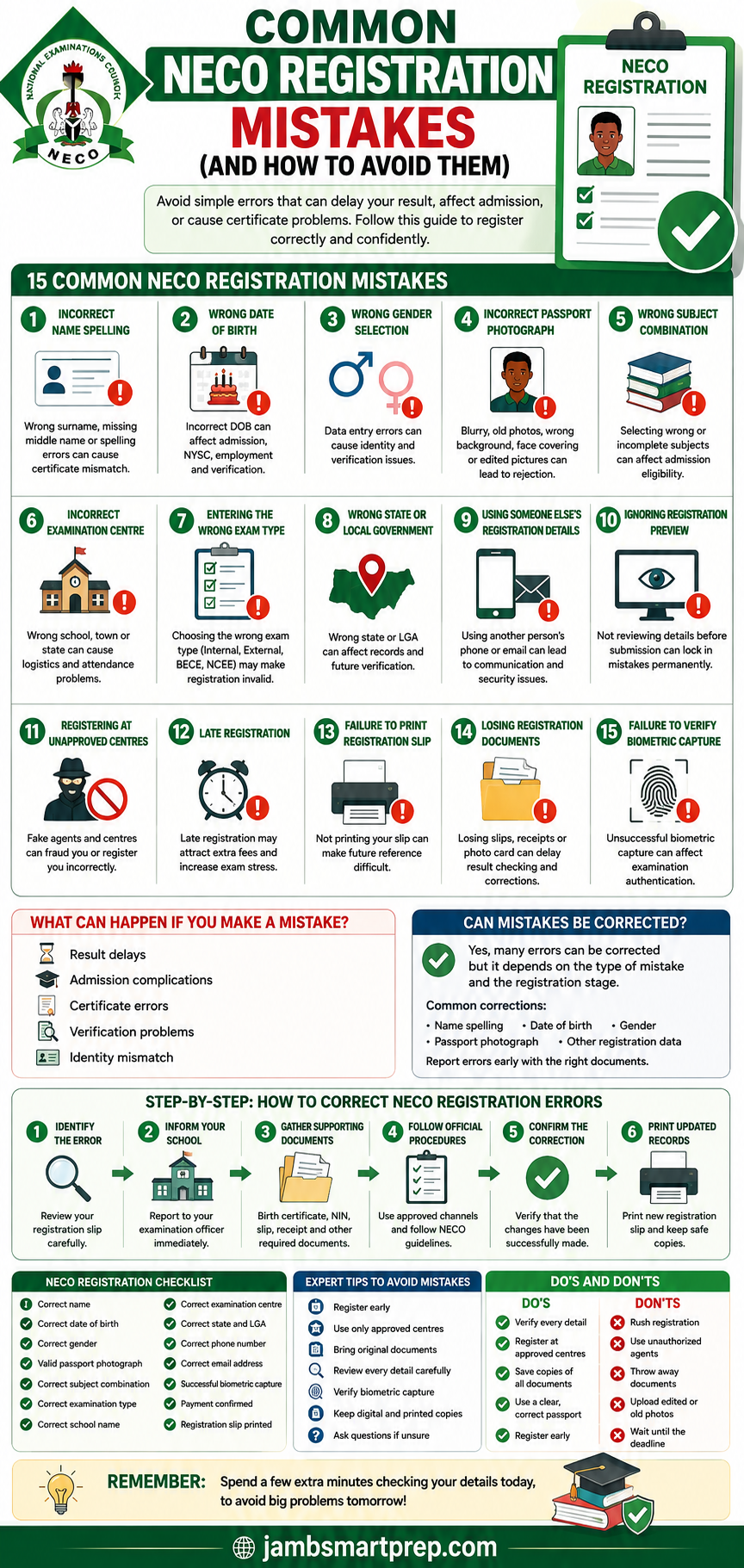
Common NECO Registration Mistakes
Most registration mistakes are preventable. They often occur because candidates rush through the process or fail to review their information before submission.
Below are some of the most common NECO registration problems and practical ways to avoid them.
1. Incorrect Name Spelling
One of the most common NECO registration mistakes is entering the wrong name or spelling a name incorrectly.
This may involve:
- Misspelling your surname
- Typing your first name incorrectly
- Omitting your middle name
- Arranging names in the wrong order
- Using a nickname instead of your official name
For instance, a candidate whose birth certificate reads Adebayo Chinedu Michael may accidentally register as Michael Chinedu Adebayo or omit one of the names entirely.
Although this may appear minor, it can create complications when your NECO certificate is compared with your:
- JAMB profile
- Birth certificate
- National Identification Number (NIN)
- Admission records
- International passport
How to Avoid This Mistake
- Use the exact name shown on your birth certificate or official identification.
- Compare your registration details with your previous academic records.
- Ask someone else to review your details before submission.
- Read every name carefully during the registration preview.
2. Wrong Date of Birth
Another common mistake is entering the wrong date of birth.
Sometimes candidates accidentally:
- Reverse the day and month
- Select the wrong year
- Make typing errors
- Use an unofficial date instead of their legal birth record
A wrong date of birth may create inconsistencies across important educational documents.
This can become a problem during:
- University admission
- NYSC registration
- Employment screening
- Scholarship applications
- International study applications
How to Avoid This Mistake
Before registration:
- Check your birth certificate.
- Verify your National Identification Number (NIN) details.
- Confirm the correct date with your parents or guardians if necessary.
Never guess your date of birth during registration.
3. Wrong Gender Selection
Although selecting gender seems straightforward, mistakes still occur.
Some common causes include:
- Accidental clicking
- Typing errors by registration officers
- Failure to review the registration preview
An incorrect gender entry may lead to:
- Candidate profile mismatch
- Identity verification delays
- Administrative corrections
- Admission documentation issues
Fortunately, this mistake is easy to prevent through careful review.
How to Avoid This Mistake
Before submitting your registration:
- Check your gender selection.
- Review your printed registration slip.
- Report any error immediately if discovered.
4. Incorrect Passport Photograph
Your passport photograph is one of the most important parts of your NECO registration.
Poor-quality photographs can create identification challenges during the examination.
Common passport photo mistakes include:
- Blurry images
- Low-resolution photographs
- Poor lighting
- Busy or coloured backgrounds
- Wearing hats or face coverings that obscure facial features
- Excessive editing or beauty filters
- Uploading an old photograph that no longer resembles your current appearance
NECO Passport Photograph Requirements
Although specific technical requirements may vary, a suitable passport photograph should generally:
- Be recent
- Clearly show your face
- Use a plain background
- Have good lighting
- Be sharp and properly cropped
- Avoid sunglasses or heavy filters
A professional passport photograph taken specifically for examination purposes is usually the safest choice.
5. Wrong Subject Combination
Choosing the wrong subjects is another registration mistake that can have serious academic consequences.
Some candidates:
- Omit compulsory subjects
- Register unnecessary subjects
- Select subjects unrelated to their intended university course
- Fail to confirm admission requirements before registration
For example:
Science Students commonly require subjects such as:
- English Language
- Mathematics
- Biology
- Chemistry
- Physics
Commercial Students often need:
- English Language
- Mathematics
- Economics
- Financial Accounting
- Commerce
Arts Students may require:
- English Language
- Literature in English
- Government
- Christian Religious Studies or Islamic Studies
- History
Choosing the wrong combination can affect JAMB admission processing because many universities require specific O’Level subject combinations for particular courses.
How to Avoid This Mistake
Before registering:
- Confirm your intended university course requirements.
- Review the JAMB O’Level subject requirements.
- Consult your teachers or school counsellor.
- Verify your subject list before final submission.
6. Incorrect Examination Centre
Another common NECO registration mistake is selecting the wrong examination centre. This usually happens when candidates register through unauthorized agents or fail to verify the centre information before submitting their registration.
Being assigned to the wrong examination centre can create unnecessary stress during the examination period. In some cases, candidates may discover too late that they have been posted to a centre far from their residence or school.
Common examination centre mistakes include:
- Selecting the wrong school
- Choosing the wrong town or state
- Being registered under another school’s centre
- Entering an incorrect centre code
These mistakes can affect:
- Examination logistics
- Attendance
- Candidate verification
- Examination day planning
How to Avoid This Mistake
Before final submission:
- Confirm the examination centre name.
- Verify the centre address.
- Cross-check the centre code if provided.
- Review your examination slip immediately after registration.
If you notice an error, report it to your school or registration centre before registration closes.
7. Entering the Wrong Examination Type
NECO conducts different examinations, and selecting the wrong examination type can lead to registration complications.
The major examination categories include:
- SSCE Internal
- SSCE External
- BECE
- NCEE
Each examination serves a different category of candidates.
For example:
- A final-year secondary school student should register for SSCE Internal through their school.
- A private candidate seeking to improve previous grades should register for SSCE External.
Selecting the wrong examination type may result in:
- Invalid registration
- Wrong examination centre allocation
- Delayed processing
- Administrative corrections
How to Avoid This Mistake
Always confirm:
- Your examination category
- Registration eligibility
- School guidance
- Official NECO registration instructions
If you are unsure, ask your school’s examination officer before registering.
8. Wrong State or Local Government
Many candidates underestimate the importance of selecting the correct state and Local Government Area (LGA).
Although this information may appear minor, it forms part of your official examination record.
Errors commonly occur when:
- Registration officers choose the wrong state from the drop-down menu.
- Candidates rush through the registration form.
- Candidates fail to review the registration preview.
Incorrect state or LGA details may affect:
- Candidate identification
- Examination records
- Future verification
- Statistical reporting
- Administrative processing
How to Avoid This Mistake
Compare your registration details with:
- School records
- Birth certificate
- National Identification Number (NIN)
- Other official documents
Review these fields carefully before submission.
9. Using Someone Else’s Registration Details
Some candidates use another person’s phone number or email address because they do not have their own.
Although this may seem convenient, it can create serious communication and security problems.
Examples include:
- Using a friend’s email address
- Using a cyber café operator’s phone number
- Registering with another student’s contact details
Possible consequences include:
- Missing important notifications
- Difficulty recovering registration records
- Identity confusion
- Security risks
How to Avoid This Mistake
Whenever possible:
- Use your personal phone number.
- Register with your own email address.
- Keep your login credentials secure.
- Avoid sharing sensitive registration information.
Having your own contact details makes future communication much easier.
10. Ignoring the Registration Preview
One of the easiest ways to prevent NECO registration errors is by reviewing the registration preview carefully.
Unfortunately, many candidates simply click “Submit” without reading the information displayed on the screen.
This final review stage allows you to identify mistakes before they become permanent.
Registration Preview Checklist
Before submitting, verify:
- ✔ Correct name spelling
- ✔ Correct date of birth
- ✔ Correct gender
- ✔ Correct passport photograph
- ✔ Correct school name
- ✔ Correct examination type
- ✔ Correct subject combination
- ✔ Correct examination centre
- ✔ Correct phone number
- ✔ Correct email address
Taking five extra minutes to review your details can prevent months of future complications.
11. Registering at Unapproved Centres
Every registration season, fraudulent individuals claim they can register candidates quickly or at a lower cost.
Some candidates fall victim to these operators without confirming whether the registration centre is authorized.
Risks of using unapproved centres include:
- Fake registrations
- Incorrect candidate information
- Invalid payment receipts
- Missing registration records
- Financial loss
In extreme cases, candidates may discover that they were never successfully registered.
How to Avoid This Mistake
Always register through:
- Your approved secondary school
- Official NECO registration centres
- Authorized registration facilities
Avoid individuals who advertise “special registration” through social media or roadside business centres without proper authorization.
12. Late Registration
Procrastination is another major cause of registration problems.
Some students wait until the final registration week before beginning the process.
Late registration often results in:
- Long queues
- Network congestion
- Increased stress
- Limited time to correct mistakes
- Missed deadlines
Where late registration windows exist, additional fees may apply.
Benefits of Registering Early
Early registration gives you enough time to:
- Review your details
- Correct mistakes
- Replace incorrect passport photographs
- Resolve payment issues
- Confirm your examination centre
It also reduces unnecessary pressure as the examination approaches.
13. Failure to Print Your Registration Slip
Many candidates assume that once registration has been completed online, there is no need to print their registration slip.
This is a costly mistake.
Your registration slip serves as an important record containing:
- Personal details
- Examination information
- Subject combination
- Examination centre
- Candidate details
It may also be required during future verification.
Why You Should Print Multiple Copies
Keep at least three copies:
- Personal copy
- School copy (where applicable)
- Backup copy stored safely at home
You should also save a scanned digital version.
14. Losing Important Registration Documents
Some candidates successfully complete registration but later lose essential documents.
Commonly misplaced documents include:
- Registration slip
- Payment receipt
- Examination photo card
- Registration confirmation printout
Losing these documents may make it more difficult to:
- Recover examination details
- Check examination results
- Correct registration errors
- Verify examination records
How to Keep Your Documents Safe
After registration:
- Scan every document.
- Save digital copies.
- Email copies to yourself.
- Store originals inside a waterproof folder.
- Keep backup copies with trusted family members.
Good document management saves time later.
15. Failure to Verify Biometric Capture
Biometric verification has become an important part of many public examinations in Nigeria.
During NECO registration, candidates are usually required to capture their fingerprints or other biometric information.
Some students fail to confirm whether the biometric capture was successful before leaving the registration centre.
Problems with biometric capture may lead to:
- Identity verification issues
- Examination authentication challenges
- Delays during examination
- Additional verification requirements
How to Avoid Biometric Problems
Before leaving the registration centre:
- Confirm that your fingerprints were captured successfully.
- Ask for confirmation if you are unsure.
- Ensure your biometric details appear correctly in your registration records.
If any issue occurs, report it immediately so it can be addressed before registration closes.
Summary of the 15 Common NECO Registration Mistakes
| Mistake | Possible Consequence |
|---|---|
| Incorrect name spelling | Certificate and admission mismatch |
| Wrong date of birth | Documentation and verification problems |
| Wrong gender | Identity mismatch |
| Incorrect passport photograph | Examination identification issues |
| Wrong subject combination | Admission complications |
| Incorrect examination centre | Centre allocation problems |
| Wrong examination type | Invalid registration |
| Wrong state or LGA | Record inconsistencies |
| Using someone else’s contact details | Communication and security issues |
| Ignoring registration preview | Permanent registration errors |
| Registering at unapproved centres | Fraud or invalid registration |
| Late registration | Missed deadlines and added stress |
| Failure to print registration slip | Difficulty verifying records |
| Losing registration documents | Challenges retrieving information |
| Failure to verify biometric capture | Examination authentication issues |
Most of these mistakes can be avoided simply by taking your time during registration, using official registration channels, and reviewing every detail before final submission.
What Happens If You Make a Mistake During NECO Registration?
Mistakes during NECO registration can range from minor typographical errors to serious issues that affect your examination records and future academic plans. While some errors can be corrected, others may require lengthy verification or remain on your records if they are not reported early.
This is why every candidate should review their registration details carefully before the registration window closes.
Below are some of the most common consequences of NECO registration errors.
1. Delayed Release of Examination Results
When candidate information contains inconsistencies, additional verification may be required before results are processed.
Although not every registration mistake causes a delay, incorrect personal information can complicate verification procedures.
2. Admission Challenges
Universities and other tertiary institutions compare your O’Level details with the information on your JAMB profile and other admission documents.
Differences in names, dates of birth, or subject combinations may require additional verification during admission screening.
3. Certificate Errors
The information submitted during registration is used when producing your NECO certificate.
An incorrect name, gender, or date of birth may appear on the certificate if the error is not corrected in time.
Correcting certificate information later can be more complicated than correcting registration details before the examination.
4. Problems During Result Verification
Many employers, scholarship providers, and educational institutions verify examination results.
Incorrect registration details may slow down this verification process or require supporting documents to explain inconsistencies.
5. Identity Mismatch
Your NECO records may later be compared with:
- Birth certificate
- National Identification Number (NIN)
- JAMB profile
- International passport
- University records
Any mismatch can lead to additional questions during document verification.
The good news is that some registration errors can be corrected if they are reported promptly.
Can NECO Registration Mistakes Be Corrected?
A common question students ask is:
“Can I correct mistakes after NECO registration?”
The answer is yes, in some cases.
However, the possibility of correction depends on several factors, including:
- The type of mistake
- The stage of registration
- Whether registration has officially closed
- NECO’s applicable procedures
- Your school’s involvement
For this reason, candidates should report errors immediately after discovering them.
Common Corrections That May Be Possible
Depending on official procedures, candidates may be able to request corrections relating to:
- Name spelling
- Date of birth
- Gender
- Passport photograph
- Candidate information
- Other registration data requiring verification
Always consult your school examination officer or the appropriate NECO office to determine the correction procedure applicable to your situation.
Documents You May Need
Supporting documents commonly requested include:
- Registration slip
- Birth certificate
- National Identification Number (NIN)
- School identification
- Passport photographs
- Payment receipt
- Sworn affidavit (where applicable)
- Other supporting records
Requirements may vary depending on the type of correction requested.
Step-by-Step Guide to Correcting NECO Registration Errors
If you discover a mistake, act quickly instead of waiting until the examination period.
Step 1: Identify the Error
Review your registration slip carefully.
Check:
- Name
- Date of birth
- Gender
- Subject combination
- Passport photograph
- Examination type
- School name
- Examination centre
The earlier you identify an error, the easier it is to begin the correction process.
Step 2: Inform Your School Immediately
School candidates should notify their:
- Examination Officer
- Principal
- School Administrator
Private candidates should contact the appropriate NECO registration centre or follow official NECO guidance.
Step 3: Gather Supporting Documents
Prepare all documents needed to verify the correct information.
Examples include:
- Birth certificate
- NIN slip
- Registration receipt
- Registration slip
- School records
Providing complete documentation helps speed up verification.
Step 4: Follow Official Correction Procedures
Avoid unofficial shortcuts.
Use only the correction process approved by:
- Your school
- Approved registration centres
- NECO
Following official procedures protects your records and reduces the risk of fraud.
Step 5: Confirm the Correction
Do not assume the correction has been completed.
Request confirmation by reviewing the updated registration details.
Verify that every correction has been properly reflected.
Step 6: Print Updated Registration Records
Once corrections have been made:
- Print a fresh registration slip.
- Save a digital copy.
- Keep multiple backup copies.
This ensures you have accurate records for future reference.
NECO Registration Checklist Before Final Submission
Before clicking the final submission button, go through this checklist carefully.
Personal Information
✔ Correct surname
✔ Correct first name
✔ Correct middle name
✔ Correct date of birth
✔ Correct gender
Registration Information
✔ Correct examination type
✔ Correct school name
✔ Correct examination centre
✔ Correct state
✔ Correct Local Government Area (LGA)
Academic Information
✔ Correct subject combination
✔ Required compulsory subjects selected
✔ Subjects match your intended course of study
Passport Photograph
✔ Recent photograph
✔ Clear image
✔ Plain background
✔ Face clearly visible
✔ Correct size
Contact Information
✔ Correct phone number
✔ Correct email address
Verification
✔ Successful biometric capture
✔ Payment confirmed
✔ Registration preview reviewed
✔ Registration slip printed
Completing this checklist can significantly reduce the risk of registration errors.
Expert Tips to Avoid NECO Registration Mistakes
Many registration errors happen because candidates rush through the process or fail to prepare in advance.
These practical tips can help you register successfully.
1. Register Early
Avoid waiting until the deadline.
Early registration provides enough time to:
- Correct mistakes
- Replace documents
- Resolve payment issues
2. Use Approved Registration Centres
Register only through:
- Your school
- Officially approved registration centres
- Authorized NECO facilities
Avoid roadside operators claiming to offer cheaper registration.
3. Bring Original Documents
Carry documents such as:
- Birth certificate
- NIN slip
- Previous academic records
Using original documents reduces typing mistakes.
4. Read Every Screen Carefully
Never rush.
Review every page before clicking Next or Submit.
5. Verify Your Biometric Capture
Before leaving the registration centre, confirm that your fingerprint registration was successful.
6. Save Multiple Copies
After registration:
- Print copies.
- Scan documents.
- Save them on your phone.
- Upload them to cloud storage.
- Email copies to yourself.
7. Ask Questions
If you are uncertain about any part of the registration process, ask your school examination officer or an authorized registration official.
It is better to ask questions than to correct avoidable mistakes later.
Real-Life Registration Mistakes Nigerian Students Make
The following examples illustrate how small registration errors can create unnecessary difficulties.
Case Study 1: Misspelled Surname
A student noticed during university admission screening that the surname on the NECO registration slip differed from the surname on the birth certificate by one letter.
The discrepancy required additional verification before the admission process could continue.
This situation highlights why candidates should carefully review name spellings before final submission.
Case Study 2: Wrong Subject Combination
Another candidate intending to study Engineering mistakenly omitted a required science subject during NECO registration.
The error created complications when meeting O’Level requirements for admission and emphasized the importance of confirming subject combinations before registration.
Case Study 3: Lost Registration Slip
A candidate misplaced the registration slip shortly after completing registration.
When it was time to check examination details, extra time was needed to retrieve the necessary information.
Keeping printed and digital copies would have prevented this inconvenience.
NECO Registration Do’s and Don’ts
The table below summarizes good registration practices.
| Do | Don’t |
|---|---|
| Verify every detail before submission | Rush through registration |
| Register at approved centres | Use unauthorized agents |
| Save printed and digital copies | Throw away registration documents |
| Upload a clear passport photograph | Use edited or filtered pictures |
| Register early | Wait until the registration deadline |
15 Common NECO Registration Mistakes (And How to Avoid Them)
15 Common NECO Registration Mistakes Every Candidate Should Avoid
Step 1
✍️ Check Your Name Carefully
↓
Step 2
📅 Confirm Your Date of Birth
↓
Step 3
👤 Verify Your Gender
↓
Step 4
📸 Upload a Proper Passport Photograph
↓
Step 5
📚 Select the Correct Subjects
↓
Step 6
🏫 Confirm Your Examination Centre
↓
Step 7
📝 Choose the Right Examination Type
↓
Step 8
📍 Verify Your State and LGA
↓
Step 9
📱 Use Your Own Phone Number and Email
↓
Step 10
👀 Review the Registration Preview
↓
Step 11
🏢 Register Only at Approved Centres
↓
Step 12
⏰ Register Before the Deadline
↓
Step 13
🖨️ Print Your Registration Slip
↓
Step 14
📂 Keep All Registration Documents Safe
↓
Step 15
🖐️ Confirm Successful Biometric Capture
Quick Registration Checklist
- ✅ Correct Name
- ✅ Correct Date of Birth
- ✅ Correct Subjects
- ✅ Correct Passport Photo
- ✅ Correct Examination Centre
- ✅ Successful Biometrics
- ✅ Printed Registration Slip
- ✅ Digital Backup Saved
Helpful Reminder
Spend five extra minutes reviewing your registration today to avoid weeks of corrections later.
Frequently Asked Questions (FAQs)
Below are answers to some of the most common questions candidates ask about NECO registration. These responses will help clear up common misconceptions and guide you through the registration process with confidence.
What Are the Most Common NECO Registration Mistakes?
The most common NECO registration mistakes include:
- Incorrect name spelling
- Wrong date of birth
- Selecting the wrong gender
- Uploading an incorrect passport photograph
- Choosing the wrong subject combination
- Selecting the wrong examination centre
- Entering the wrong examination type
- Using another person’s phone number or email address
- Registering at an unauthorized centre
- Failing to print and keep the registration slip
Fortunately, nearly all of these mistakes can be avoided by reviewing your details carefully before final submission.
Can I Change My Name After NECO Registration?
Some name-related corrections may be possible depending on NECO’s registration policies and the stage of the registration process.
If you notice an error:
- Inform your school immediately.
- Contact the appropriate NECO office if you registered as a private candidate.
- Provide supporting documents such as your birth certificate or National Identification Number (NIN) where required.
The earlier you report the error, the greater the chance of resolving it before the examination.
Can I Correct My Date of Birth?
In some situations, date of birth corrections may be processed according to NECO’s official procedures.
Candidates should avoid waiting until after the examination before reporting such errors.
Supporting documents may be requested during verification.
What Happens If I Upload the Wrong Passport Photograph?
Your passport photograph is used to identify you throughout the examination process.
An incorrect photograph may lead to:
- Identity verification issues
- Delays during examination authentication
- Administrative complications
If you discover the mistake before registration closes, notify your school or registration centre immediately.
Can I Change My Subjects After Registration?
Subject correction depends on the registration stage and applicable NECO procedures.
This is why candidates should carefully review their intended university course requirements before selecting subjects.
Always seek guidance from your school’s examination officer if you discover an error.
What If I Lose My Registration Slip?
If you lose your registration slip:
- Contact your school.
- Check whether you saved a digital copy.
- Look for your registration confirmation.
- Keep your payment receipt available.
Your registration slip contains important information that may be required later.
Can I Register Twice?
No.
Candidates should complete only one valid registration for the examination category they intend to write.
Multiple registrations can create unnecessary complications and confusion during examination processing.
How Do I Know My Registration Was Successful?
Successful registration is usually confirmed when you receive:
- Registration confirmation
- Printed registration slip
- Examination details
- Successful biometric capture
- Payment confirmation
Always review these documents before leaving the registration centre.
Can Someone Else Register on My Behalf?
Although a trusted person may assist with data entry, you should personally verify every detail before submission.
Where biometric capture is required, you will normally need to be physically present.
Never allow anyone to submit your registration without reviewing the information yourself.
How Do I Avoid Registration Fraud?
Protect yourself by following these simple rules:
- Register only through approved centres.
- Avoid unofficial registration agents.
- Request official receipts.
- Keep all payment records.
- Never share confidential personal information carelessly.
- Verify every document before leaving the registration centre.
Being cautious during registration protects both your money and your academic records.
Related NECO Guides You Should Read
If you found this guide helpful, you may also benefit from these related articles:
- How to Recover a Lost NECO Examination Number
- How to Buy a Genuine NECO Result Checker Token
- How to Check Your NECO Result Online
- How to Print Your NECO Result
- How to Correct Errors on Your NECO Result
- NECO Registration Requirements Explained
- NECO Examination Timetable Guide
- NECO Result Verification Guide
Reading these guides will give you a complete understanding of the NECO registration process, examination procedures, result checking, and certificate management.
Final Registration Checklist
Before completing your NECO registration, use this quick checklist.
Personal Information
- ✅ Correct surname
- ✅ Correct first name
- ✅ Correct middle name
- ✅ Correct date of birth
- ✅ Correct gender
Academic Information
- ✅ Correct subject combination
- ✅ Appropriate examination type
- ✅ Correct school name
- ✅ Correct examination centre
Documents
- ✅ Valid passport photograph
- ✅ Payment confirmation
- ✅ Registration slip printed
- ✅ Examination photo card collected (when available)
Verification
- ✅ Biometric capture completed
- ✅ Registration preview reviewed
- ✅ Digital copies saved
- ✅ Printed copies stored safely
Completing this checklist takes only a few minutes but can save you from weeks of stress later.
Conclusion
Your NECO registration is the foundation of your entire examination process. Every detail you submit, from your name and date of birth to your subject combination and passport photograph, becomes part of your permanent examination record. A small error today can create unnecessary challenges when checking your results, applying for admission, requesting scholarships, collecting your certificate, or verifying your academic qualifications.
The good news is that the common NECO registration mistakes discussed in this guide are largely preventable. By registering early, using only approved registration centres, checking your details carefully, verifying your biometric capture, and keeping multiple copies of your registration documents, you can avoid many of the problems that candidates experience each year.
Remember that accurate registration is not just about completing a form. It is about protecting your educational future. Spending a few extra minutes reviewing your information before final submission can save you considerable time, money, and frustration later.
Whether you are registering for SSCE Internal, SSCE External, BECE, or NCEE, make accuracy your priority. If you discover any error, report it promptly through the proper channels and follow the official correction process where applicable.
With careful preparation and attention to detail, you can complete your NECO registration confidently and focus on what matters most, preparing well for your examinations.
NOW OVER TO YOU
Have you ever made a mistake during NECO registration, or have you helped someone correct a registration error successfully?
Share your experience, questions, or helpful tips in the comments below. Your contribution may help another candidate avoid the same mistake.
If you found this guide useful, share it with your classmates, friends, and family members who are preparing for NECO registration. You can also explore our other NECO resources for practical guides on result checking, registration requirements, examination number recovery, result verification, certificates, and admission preparation.
Finally, if you are preparing for JAMB alongside NECO, consider using a trusted CBT practice platform to strengthen your preparation. Consistent practice with realistic computer-based tests can improve your speed, confidence, and overall examination performance.
