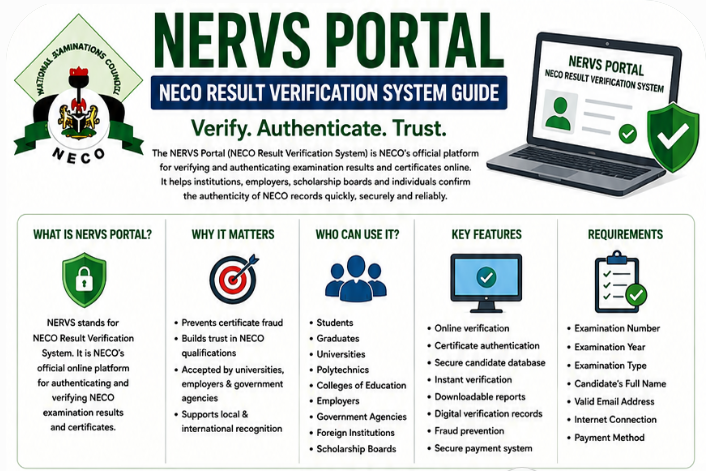
Looking for a guide on what NERVS Portal is all about and want to learn how to use the NERVS Portal for NECO result verification? If yes, you are in the right place. Here, you will discover registration, login, verification steps, fees, troubleshooting tips, and frequently asked questions on NECO NERVS portal.
Interestingly, digital verification has become an essential part of academic documentation in Nigeria and around the world.
Today, universities, employers, scholarship providers, immigration authorities, and professional organizations increasingly verify examination results directly with examination bodies instead of relying solely on printed result slips or certificates.
This shift has strengthened trust in academic qualifications while reducing the growing problem of certificate forgery and document alteration. As more institutions adopt electronic verification systems, candidates who understand how these platforms work have a significant advantage during admission, employment, and scholarship applications.
To meet this need, the National Examinations Council (NECO) introduced the NERVS Portal, short for the NECO Result Verification System. The platform provides an official and secure way to verify NECO examination results and certificates online, ensuring that institutions receive authentic information directly from NECO’s database.
Whether you are a student preparing for university admission, a graduate applying for a job, an employer verifying an applicant’s credentials, or an institution conducting admission screening, understanding how the NERVS Portal works is becoming increasingly important.
If you’ve been searching for any of the following:
- NERVS Portal
- NECO Result Verification System
- NERVS Portal Login
- How to use the NERVS Portal
- Verify NECO result online
- NECO certificate verification
- NECO online verification
- NERVS registration guide
this detailed guide covers everything you need to know.
In this article, you’ll learn:
- What the NERVS Portal is
- How the NECO Result Verification System works
- Who can use the portal
- How to register and log in
- How to verify NECO results online
- Common verification issues and solutions
- Verification fees and processing time
- Security tips for safe portal usage
- Frequently asked questions
By the end of this guide, you’ll have a clear understanding of how to use the official NECO Result Verification System correctly while avoiding common mistakes that could delay your admission, employment, or scholarship application.
NERVS Portal Verification Process
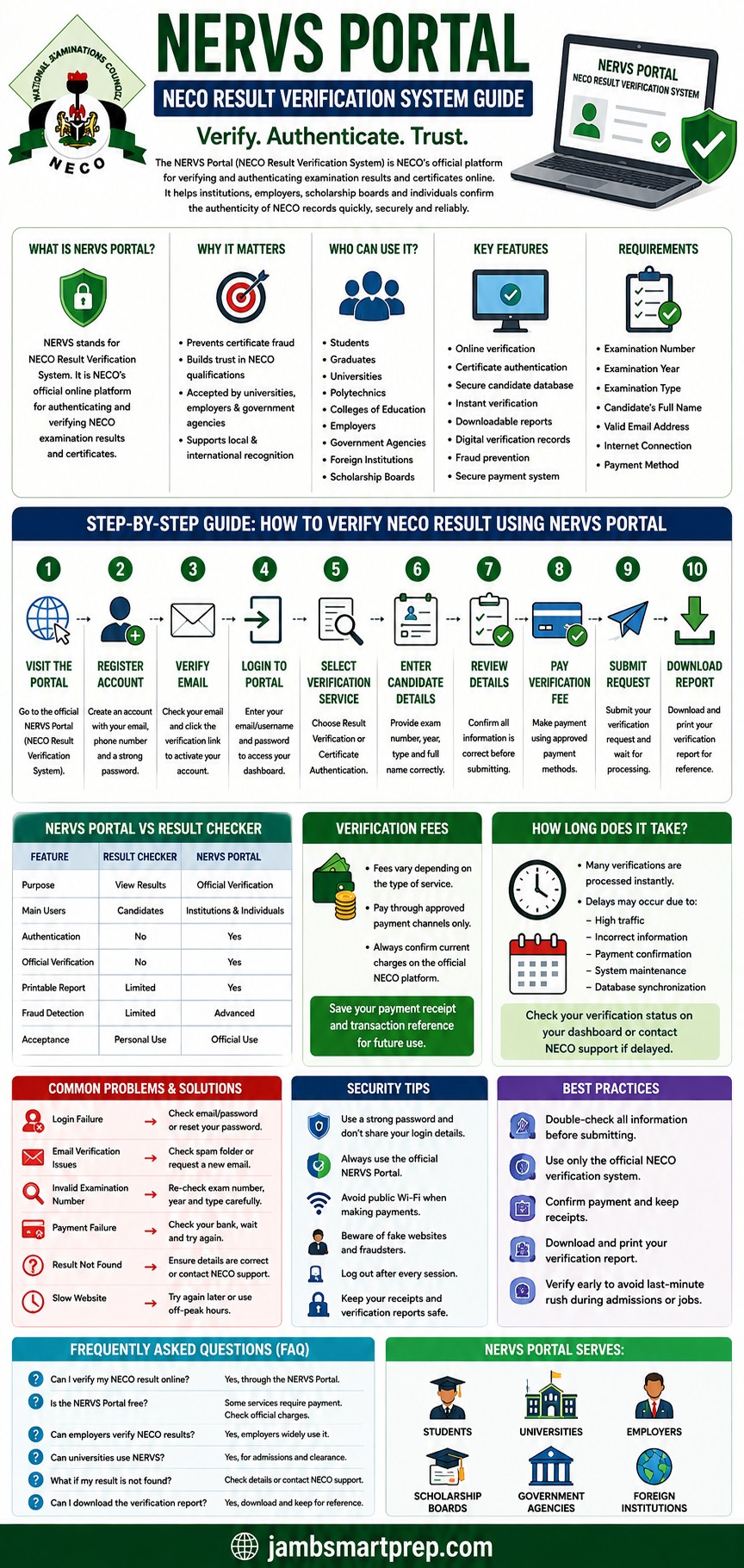
The following workflow summarizes the entire verification process.
NERVS Portal Result Verification Flow
Visit the Official NERVS Portal
⬇
Create Your Account
⬇
Verify Your Email Address
⬇
Login Securely
⬇
Select Result Verification
⬇
Enter Candidate Information
⬇
Review Entered Details
⬇
Pay Verification Fee
⬇
Submit Verification Request
⬇
Download Verification Report
Documents You’ll Need
- Examination Number
- Examination Year
- Examination Type
- Candidate’s Full Name
- Valid Email Address
- Internet Connection
- Debit Card or Other Approved Payment Method
What Is the NERVS Portal?
The NERVS Portal is the official online platform developed by the National Examinations Council (NECO) for verifying and authenticating examination results and certificates.
NERVS stands for NECO Result Verification System.
Rather than relying on printed examination results that may be altered or forged, authorized users can verify candidates’ examination records directly from NECO’s official database.
This digital verification system helps maintain the integrity of Nigeria’s educational qualifications while simplifying the verification process for organizations worldwide.
Full Meaning of NERVS
NERVS means:
NECO Result Verification System
It is an online verification service designed to provide secure access to authentic examination records for approved verification purposes.
Purpose of the NERVS Portal
The platform was created to:
- Verify genuine NECO examination results
- Authenticate NECO certificates
- Reduce certificate forgery
- Support university admissions
- Assist employers with applicant screening
- Improve confidence in Nigerian academic qualifications
- Simplify digital verification
- Promote secure online credential verification
As organizations continue moving toward digital document verification, platforms like NERVS have become increasingly important.
Why Did NECO Introduce the NERVS Portal?
For many years, organizations relied mainly on printed examination results submitted by candidates.
Although convenient, this system made it easier for fraudulent individuals to alter grades, modify candidate details, or present fake certificates.
The introduction of the NECO Result Verification System helps solve these problems by allowing institutions to verify examination records directly from NECO’s official database.
The portal improves:
- Transparency
- Security
- Accuracy
- Trust
- Speed of verification
It also reduces the need for lengthy manual verification procedures.
Evolution from Manual Verification to Digital Verification
Academic verification in Nigeria has changed significantly over the past decade.
Traditional Verification
Previously, institutions often relied on:
- Photocopies of certificates
- Printed result slips
- Manual confirmation letters
- Physical document submission
These methods could be slow and vulnerable to fraud.
Modern Digital Verification
Today, online verification systems offer several advantages.
Institutions can:
- Verify records electronically
- Confirm candidate information quickly
- Reduce paperwork
- Detect fraudulent documents more effectively
- Maintain digital verification records
This transition reflects the global movement toward electronic credential verification.
Benefits of Digital Verification
Using the NERVS Portal provides several important benefits.
Improved Security
Verification is performed using official examination records, reducing the risk of fake certificates.
Faster Processing
Digital verification eliminates many manual administrative procedures.
Greater Trust
Employers and educational institutions gain greater confidence in verified qualifications.
Reduced Fraud
Official online verification makes certificate forgery more difficult.
Convenience
Candidates and institutions can complete verification through an online platform without excessive paperwork.
What Is the NECO Result Verification System?
The NECO Result Verification System is the official process through which examination records are confirmed using NECO’s secure digital database.
Instead of merely viewing examination grades, the system verifies whether a candidate’s academic record is authentic.
This distinction is particularly important during:
- University admission
- Employment
- Scholarship selection
- Visa applications
- Professional registration
How the Verification System Works
The system compares the information submitted during verification with official examination records maintained by NECO.
Typical information used during verification includes:
- Candidate’s examination number
- Examination year
- Examination type
- Candidate’s identity
If the information matches the official records, verification is completed successfully.
Difference Between Checking a Result and Verifying a Result
Many candidates mistakenly believe that checking a result and verifying a result are the same process.
They are not.
| NECO Result Checker | NERVS Portal |
|---|---|
| Displays examination grades | Confirms authenticity of examination records |
| Mainly used by candidates | Used by institutions and individuals |
| Intended for personal reference | Intended for official verification |
| Does not authenticate certificates | Supports official verification processes |
A printed result alone may not satisfy an institution that specifically requests official verification.
Verification vs Authentication
These two terms are often used interchangeably, but they describe slightly different processes.
Verification
Verification confirms that a candidate’s examination record exists within NECO’s official database.
Authentication
Authentication provides assurance that the examination record or certificate is genuine and officially recognized.
Together, these processes help protect the credibility of Nigerian educational qualifications.
Why Official Verification Matters
Official verification plays an important role in many situations.
University Admission
Admission officers often verify O’Level qualifications before offering admission.
This helps prevent admission fraud and ensures fairness.
Direct Entry
Candidates applying through Direct Entry may also have their qualifications verified.
Employment
Many employers verify educational qualifications during recruitment.
Verification is common in sectors such as:
- Banking
- Oil and gas
- Telecommunications
- Healthcare
- Civil service
- Education
Scholarship Applications
Organizations awarding scholarships frequently verify examination results before selecting successful applicants.
Examples include:
- MTN Foundation Scholarship
- PTDF Scholarship
- Federal Government Scholarship Awards
- NNPC Scholarship Programmes
- Mastercard Foundation Scholars Program
International Admissions
Foreign universities increasingly verify examination records before issuing admission offers.
Official verification strengthens confidence in Nigerian qualifications.
Why the NERVS Portal Is Important
The NERVS Portal benefits both candidates and institutions by providing a trusted method for confirming academic records.
University Admissions
Admission officers use verified examination records to ensure that applicants meet admission requirements.
Employment Screening
Employers can confidently verify applicants’ academic qualifications before making hiring decisions.
Professional Licensing
Professional regulatory bodies may verify candidates’ educational credentials before granting licences or certification.
Scholarships
Verification helps scholarship providers identify genuine applicants and reduce fraudulent claims.
Immigration and Visa Applications
Some foreign institutions and immigration authorities require verified educational records as part of their assessment process.
International Recognition
Digital verification strengthens the credibility of Nigerian examination qualifications internationally.
Who Can Use the NERVS Portal?
The portal serves a wide range of users involved in education, employment, and credential verification.
Students
Students can verify their examination records before applying for admission or scholarships.
Graduates
Graduates often require official verification when applying for jobs or postgraduate programmes.
Universities
Higher institutions verify applicants’ qualifications during admission screening and clearance.
Polytechnics
Polytechnics use verified examination records when assessing admission applications.
Colleges of Education
Colleges also rely on verified O’Level qualifications during their admission processes.
Employers
Private companies and government agencies use the portal to confirm applicants’ educational credentials.
Government Agencies
Government organizations involved in recruitment or certification may use the portal for official verification.
Foreign Universities
International institutions increasingly request official digital verification of Nigerian examination results.
Scholarship Boards
Scholarship organizations use verified examination records to support fair and transparent selection processes.
Key Features of the NERVS Portal
The NECO Result Verification System offers several features that improve the verification experience.
Key features include:
- Official online result verification
- Certificate authentication
- Secure candidate database
- Reliable identity confirmation
- Downloadable verification reports
- Digital verification records
- Fraud prevention measures
- Institution-friendly verification process
- Secure electronic payment integration
Requirements for Using the NERVS Portal
Before beginning the verification process, ensure you have the required information available.
| Requirement | Purpose |
|---|---|
| Examination Number | Candidate identification |
| Examination Year | Locate examination record |
| Examination Type | Identify the correct examination category |
| Candidate’s Full Name | Identity confirmation |
| Valid Email Address | Registration and notifications |
| Approved Payment Method | Verification payment |
| Internet Connection | Access to the online portal |
Preparing these details in advance helps ensure a faster and smoother verification experience.
Step-by-Step Guide to Using the NERVS Portal
Whether you are a student verifying your own examination record or an institution confirming a candidate’s credentials, understanding the correct verification procedure can save time and prevent unnecessary delays.
The NERVS Portal (NECO Result Verification System) has been designed to provide a secure and streamlined verification process. While the portal interface may change over time as NECO improves its online services, the general verification workflow remains largely the same.
Follow the steps below to complete your verification successfully.
Step 1: Visit the Official NERVS Portal
The first step is to access the official NERVS Portal through NECO’s authorized online verification platform.
Before entering any personal information, ensure that:
- You are using the official NECO verification website.
- The website address is secure.
- The page loads correctly without browser security warnings.
- You are not accessing a fake or unofficial portal.
Unfortunately, fraudulent websites sometimes imitate official government platforms in an attempt to steal users’ personal or payment information. Always verify the website before proceeding.
Step 2: Register an Account
If you are using the platform for the first time, you may need to create a NERVS account.
Registration generally requires information such as:
- Full name
- Email address
- Phone number (where applicable)
- Password
Use an email address that you check regularly, as important notifications or account updates may be sent there.
Tips for Creating a Strong Password
To improve your account security:
- Use at least eight characters.
- Include uppercase and lowercase letters.
- Add numbers and symbols.
- Avoid predictable passwords such as your name, examination number, or date of birth.
A strong password reduces the risk of unauthorized access to your account.
Step 3: Verify Your Email Address (If Applicable)
Some online systems require email verification before granting full access.
If prompted:
- Open your email inbox.
- Locate the verification email.
- Click the verification link.
- Return to the NERVS Portal and continue with the login process.
If you cannot find the email:
- Check your spam folder.
- Wait a few minutes.
- Request another verification email if necessary.
Step 4: Login to the Portal
After creating your account, proceed to the NERVS Portal Login page.
Enter your:
- Registered email address or username
- Password
Ensure that your login details are entered correctly, paying attention to uppercase and lowercase letters.
Once authenticated, you will gain access to the available verification services.
Step 5: Select Result Verification
After logging in, choose the Result Verification option from the available services.
Depending on your purpose, the portal may offer options for:
- Result verification
- Certificate authentication
- Institutional verification
- Other official verification services
Carefully select the service that matches your requirements.
Step 6: Enter Candidate Information
You will now be required to provide the candidate’s examination details.
Common information requested includes:
- Examination number
- Examination year
- Examination type
- Candidate’s full name
Take your time to ensure every detail matches the candidate’s official NECO records.
One incorrect character may prevent successful verification.
Step 7: Review Entered Details
Before submitting your request, review all information carefully.
Confirm that:
- The examination number is correct.
- The examination year is accurate.
- The candidate’s name matches official records.
- The selected examination type is correct.
This simple review can prevent unnecessary delays.
Step 8: Pay the Verification Fee
Where applicable, complete payment using an approved payment method.
Accepted payment options may include:
- Debit cards
- Online payment gateways
- Bank-supported electronic payment services
- Other officially approved payment channels
Wait until your payment has been successfully confirmed before leaving the page.
Always save your payment receipt.
Step 9: Submit Your Verification Request
After confirming your payment, submit your request.
The portal will compare the supplied information with NECO’s official examination database.
Avoid refreshing the page repeatedly while processing is in progress.
Step 10: Download Your Verification Report
Once verification is complete, the portal may provide a downloadable verification report.
Depending on the verification service, the report may include:
- Candidate’s identity
- Examination details
- Verification status
- Authentication confirmation
Download and save both digital and printed copies for future reference.
How to Register on the NERVS Portal
Creating a NERVS account is usually the first step before accessing many verification services.
A properly registered account allows users to manage verification requests, access reports, and monitor their verification history.
Registration Requirements
Before registering, prepare the following:
- Valid email address
- Full name
- Strong password
- Stable internet connection
Providing accurate information during registration helps avoid account-related issues later.
Email Verification
If the system requests email verification:
- Open the verification email.
- Click the activation link.
- Return to the portal.
- Log in using your newly created credentials.
Do not ignore the verification email, as some features may remain unavailable until your account is activated.
Choosing a Secure Password
A secure password should:
- Be difficult to guess.
- Contain a mix of letters, numbers, and symbols.
- Be different from passwords used on other websites.
Avoid sharing your password with anyone.
Common Registration Errors
New users occasionally encounter problems such as:
- Misspelled email addresses
- Weak passwords
- Duplicate account creation
- Failure to verify email
- Typographical mistakes
Review your registration details carefully before submitting the form.
NERVS Portal Login Guide
Logging into your account is straightforward once registration has been completed.
Login Steps
- Visit the official NERVS Portal via https://everify.neco.gov.ng/
- Click the Sign in option.
- Click on either individual or institution option
- Enter your registered email address.
- Enter your password.
- Click Sign In.
After successful authentication, you can access your dashboard.
Forgot Your Password?
If you cannot remember your password:
- Select Forgot Password.
- Enter your registered email address.
- Follow the password reset instructions sent to your inbox.
- Create a new secure password.
Always keep your new password confidential.
Account Security Tips
To protect your account:
- Never share your login credentials.
- Avoid saving passwords on public computers.
- Log out after every session.
- Use a trusted internet connection.
- Change your password periodically.
How to Verify NECO Results Using NERVS
The NERVS Portal supports several categories of users.
Although the verification process is similar, the purpose of verification may differ depending on who is making the request.
For Candidates
Students often verify their own examination records before:
- University admission
- Direct Entry applications
- Scholarship applications
- Visa processing
- Employment opportunities
Personal verification allows candidates to confirm that their academic records are accurate before submitting applications.
For Employers
Many employers now verify applicants’ educational qualifications before employment.
This is common in:
- Commercial banks
- Government ministries
- Oil and gas companies
- Telecommunications firms
- Educational institutions
- Healthcare organizations
Official verification helps employers recruit qualified candidates with genuine academic credentials.
For Universities
Universities frequently use official verification during:
- Admission screening
- Post-UTME processing
- Direct Entry evaluation
- Student registration
- Clearance exercises
Verification strengthens the credibility of the admission process.
For Scholarship Organizations
Scholarship providers increasingly verify applicants’ examination results before awarding scholarships.
Examples include:
- MTN Foundation Scholarship
- PTDF Scholarship
- NNPC Scholarship
- Federal Government Scholarship Awards
- State Government Scholarship Boards
Official verification reduces fraudulent scholarship applications.
For Government Agencies
Government organizations responsible for recruitment, licensing, or educational assessment may verify candidates’ examination records before making official decisions.
For Foreign Universities
International universities increasingly require verified educational qualifications before offering admission.
Digital verification through NERVS improves confidence in Nigerian academic credentials.
Difference Between the NECO Result Checker and the NERVS Portal
Many people assume that checking a NECO result and verifying it are identical processes.
In reality, they serve different purposes.
| Feature | NECO Result Checker | NERVS Portal |
|---|---|---|
| Primary Purpose | View examination results | Official verification and authentication |
| Authentication | No | Yes |
| Main Users | Candidates | Institutions and individuals |
| Printable Verification Report | Limited | Available where applicable |
| Official Verification | No | Yes |
| Fraud Detection | Limited | Advanced verification process |
When Should You Use the Result Checker?
Use the NECO Result Checker when you simply want to:
- View your examination grades.
- Confirm subject performance.
- Print your result for personal reference.
When Should You Use the NERVS Portal?
Use the NERVS Portal when official verification is required for:
- University admission
- Employment
- Scholarships
- Professional licensing
- Immigration
- International admission
- Government recruitment
Quick Checklist Before Using the NERVS Portal
Before starting your verification request, ensure you have:
✔ Correct examination number
✔ Correct examination year
✔ Correct examination type
✔ Candidate’s full name
✔ Valid email address
✔ Stable internet connection
✔ Approved payment method
✔ Access to the official NERVS Portal
Preparing these details in advance will help you complete the verification process quickly and accurately.
NERVS Portal Verification Fees
One of the most frequently asked questions by students, employers, and educational institutions is:
“How much does it cost to verify a NECO result through the NERVS Portal?”
The cost of verification depends on the type of verification service being requested and NECO’s current pricing structure.
Unlike examination registration fees, NERVS verification charges may be reviewed periodically. For this reason, users should always confirm the latest fees through the official NECO verification platform or an authorized NECO office before making payment.
Doing so helps prevent payment errors and protects users from scammers who advertise fake verification services.
What Does the Verification Fee Cover?
The fee paid through the NECO Result Verification System generally covers the administrative and technical processes involved in authenticating examination records.
Depending on the verification service requested, the payment may include:
- Official online result verification
- Certificate authentication
- Secure access to NECO’s verification database
- Generation of a verification report
- Administrative processing
- Digital verification services
Institutional users who verify large numbers of candidates may have different arrangements depending on NECO’s prevailing policies.
Accepted Payment Methods
To ensure secure transactions, payments should only be made through approved channels.
Common payment methods may include:
- Debit cards
- Online payment gateways
- Bank-supported electronic payment platforms
- Other officially approved payment options
Never transfer money to individuals claiming they can process verification outside the official system.
After Payment
Once payment is successful:
- Save the payment receipt.
- Record your transaction reference number.
- Download any payment confirmation available.
- Keep the receipt until the verification process is completed.
These records will be helpful if you need to contact support regarding your transaction.
Important Reminder
Verification fees may change without prior notice.
Before making payment, always confirm the latest charges using official NECO communication channels.
How Long Does NERVS Verification Take?
Many users also ask:
“How long does NECO result verification take?”
Processing time varies depending on several factors.
In many cases, verification is completed promptly through the online platform, while some requests may require additional review before final confirmation.
Factors That Affect Processing Time
Several factors influence how quickly a verification request is completed.
These include:
- Accuracy of submitted information
- Internet connectivity
- System availability
- Payment confirmation
- Database synchronization
- Website traffic
- Scheduled maintenance
Submitting accurate information the first time usually helps avoid unnecessary delays.
Normal Processing
Once all required details are correctly entered and payment is confirmed, many verification requests can be processed without significant delay.
However, actual processing times may vary depending on system conditions and the type of verification requested.
Reasons for Delays
Occasionally, users may experience delays because of:
- Incorrect examination number
- Wrong examination year
- Incorrect examination type
- Temporary server maintenance
- Heavy traffic during admission periods
- Pending payment confirmation
- Technical updates to the portal
How to Follow Up
If your verification request remains pending:
- Confirm that payment was successful.
- Review the submitted candidate information.
- Check whether the portal is undergoing maintenance.
- Contact official NECO support if the issue continues.
Always have your payment reference number available when requesting assistance.
Common Problems on the NERVS Portal
Although the NECO Result Verification System is designed for ease of use, users occasionally experience technical or account-related issues.
Below are some of the most common problems and practical ways to resolve them.
Login Failure
Users may sometimes be unable to access their accounts.
Common causes include:
- Incorrect password
- Wrong email address
- Typographical errors
- Forgotten login credentials
- Temporary server issues
Solution
- Check your login details carefully.
- Ensure Caps Lock is not enabled.
- Use the Forgot Password option if necessary.
- Wait and try again if the portal is temporarily unavailable.
Email Verification Problems
Some users do not receive their account activation email.
Possible reasons include:
- Spam filtering
- Incorrect email address
- Delayed email delivery
Solution
- Check your Spam or Junk folder.
- Verify that your email address was entered correctly.
- Request another verification email.
Invalid Examination Number
One of the most common verification errors occurs when an incorrect examination number is entered.
Possible causes include:
- Missing digits
- Typographical mistakes
- Wrong examination year
- Wrong examination type
Solution
Compare your entries with the original NECO registration slip or result before resubmitting.
Payment Failure
Online payment may occasionally fail because of:
- Poor internet connection
- Bank network issues
- Expired debit card
- Interrupted transaction
Solution
- Check whether your account has been debited.
- Wait for payment confirmation.
- Avoid making multiple payments immediately.
- Contact your bank if necessary.
Result Not Found
Many users search online:
“Why is my NECO result not found on NERVS?”
Possible explanations include:
- Incorrect examination details
- Wrong examination year
- Incorrect examination type
- Temporary database synchronization delay
Before contacting support, verify that all submitted information is accurate.
Slow Website
The portal may occasionally load slowly during periods of heavy demand.
Examples include:
- University admission season
- Scholarship application periods
- Major recruitment exercises
- Examination result release periods
Using the portal during less busy periods may improve performance.
Server Downtime
Like many government online services, the NERVS Portal may occasionally undergo maintenance.
During such periods:
- Wait until maintenance is completed.
- Monitor official announcements.
- Avoid repeated page refreshes.
Verification Delay
If your verification request remains pending:
- Confirm payment.
- Review candidate information.
- Keep your transaction reference.
- Contact official support where necessary.
Security Tips When Using the NERVS Portal
Protecting your personal information is just as important as completing the verification successfully.
The following security practices are recommended.
Protect Your Login Details
Never share your:
- Password
- Email verification code
- Account credentials
with anyone.
Use Strong Passwords
A secure password should contain:
- Uppercase letters
- Lowercase letters
- Numbers
- Symbols
Avoid using simple passwords such as:
- Password123
- 12345678
- Your examination number
Beware of Phishing Websites
Cybercriminals sometimes create fake websites that resemble official government portals.
Before logging in:
- Confirm the website address.
- Ensure the page is secure.
- Avoid clicking suspicious advertisements.
Avoid Cyber Café Risks
If you must use a public computer:
- Do not save your password.
- Log out after completing your session.
- Clear browser history where appropriate.
Whenever possible, use your personal computer or smartphone.
Use Secure Internet Connections
Avoid making payments while connected to unsecured public Wi-Fi networks.
A stable and trusted internet connection provides better protection for your personal information.
Protect Your Payment Information
Never share your:
- Debit card PIN
- Card security code
- Online banking credentials
through social media, email, or messaging applications.
Official payment pages should always use secure payment gateways.
Best Practices for Successful Verification
Following these recommendations can help you complete verification smoothly.
Double-Check Candidate Details
Before submitting your request, review:
- Examination number
- Examination year
- Examination type
- Candidate’s full name
Accuracy is essential.
Use the Official Portal
Always perform verification through the official NERVS Portal.
Avoid unofficial agents promising faster verification.
Confirm Payment Before Leaving
Wait until payment confirmation appears before closing your browser.
Always keep your receipt.
Download Your Verification Report
After successful verification:
- Download the report.
- Save a digital copy.
- Print a hard copy for future use.
Maintain Accurate Records
Keep copies of:
- Payment receipts
- Transaction references
- Verification reports
- Email confirmations (where available)
These records are valuable if you need support later.
NERVS Portal vs WAEC Certificate Verification
Candidates who possess both NECO and WAEC qualifications often wonder how the two verification systems compare.
The table below provides a general comparison.
| Feature | NERVS Portal | WAEC Certificate Verification |
|---|---|---|
| Official Online Verification | Yes | Yes |
| Certificate Authentication | Yes | Yes |
| Employer Verification | Supported | Supported |
| University Verification | Supported | Supported |
| Digital Verification Report | Available where applicable | Available where applicable |
| Secure Payment System | Yes | Yes |
| Processing Time | Depends on verification requirements and system availability | Depends on verification requirements and system availability |
| Fraud Prevention | Strong digital verification | Strong digital verification |
Both examination bodies continue to improve their online verification systems to increase confidence in Nigerian educational qualifications while reducing examination fraud.
Frequently Asked Questions (FAQs)
Below are answers to some of the most frequently asked questions about the NERVS Portal and the NECO Result Verification System.
1. What Is the NERVS Portal?
The NERVS Portal (NECO Result Verification System) is the official online platform developed by the National Examinations Council (NECO) for verifying and authenticating NECO examination results and certificates.
It allows universities, employers, scholarship organizations, government agencies, and candidates to verify the authenticity of examination records through NECO’s official database.
2. How Do I Register on the NERVS Portal?
To register:
- Visit the official NERVS Portal.
- Click the registration option.
- Enter your personal information.
- Provide a valid email address.
- Create a secure password.
- Verify your email if required.
- Log in to access the portal.
Always use accurate information during registration.
3. How Do I Log In to the NERVS Portal?
After registration:
- Open the official NERVS Portal.
- Enter your registered email address.
- Type your password.
- Click Login.
If you forget your password, use the password recovery option to reset it.
4. How Do I Verify My NECO Result Using NERVS?
The verification process generally involves:
- Logging into the portal.
- Selecting Result Verification.
- Entering the candidate’s examination details.
- Paying the applicable verification fee.
- Submitting the request.
- Downloading the verification report after successful processing.
5. Is the NERVS Portal Free?
Some verification services may require payment, while others may be available without additional charges depending on the service requested.
Since fees may change over time, users should always confirm the latest charges through official NECO communication channels.
6. Can Employers Use the NERVS Portal?
Yes.
Employers frequently verify applicants’ educational qualifications before employment.
Using the NERVS Portal helps organizations:
- Confirm genuine academic credentials.
- Reduce recruitment fraud.
- Improve hiring confidence.
7. Can Universities Verify NECO Results Through NERVS?
Yes.
Universities commonly verify candidates’ examination records during:
- Admission screening
- Direct Entry processing
- Student registration
- Clearance exercises
Official verification supports fair and transparent admissions.
8. What Should I Do If My Result Is Not Found?
If your result cannot be located:
- Verify the examination number.
- Confirm the examination year.
- Check the examination type.
- Ensure the candidate’s name matches official records.
If the problem continues after reviewing your information, contact the appropriate NECO support office for assistance.
9. Can I Download My Verification Report?
Yes.
Where the portal provides this feature, users should download and securely store the verification report.
It is advisable to keep both digital and printed copies.
10. How Long Does Verification Take?
Processing time depends on:
- System availability
- Payment confirmation
- Accuracy of submitted information
- Database synchronization
- Current verification workload
Most requests proceed smoothly when all required details are correctly provided.
11. What Should I Do If Payment Fails?
If your payment is unsuccessful:
- Confirm whether your account has been debited.
- Wait for payment confirmation.
- Avoid making repeated payments immediately.
- Contact your bank if necessary.
- Reach out to official NECO support if the issue remains unresolved.
Always keep your transaction reference number.
12. Is My Information Secure on the NERVS Portal?
The portal is designed to protect users’ information through secure verification processes.
However, users should also take personal responsibility by:
- Protecting passwords.
- Using secure internet connections.
- Avoiding fake websites.
- Logging out after every session.
Best Practices for Universities and Employers
Educational institutions and organizations play an important role in maintaining the integrity of academic verification.
The following practices are recommended.
Verify Before Admission
Universities should verify candidates’ examination records before issuing admission offers.
This helps reduce admission fraud and ensures that applicants meet the required academic qualifications.
Verify Before Employment
Employers should authenticate applicants’ educational credentials before making final recruitment decisions.
This is especially important for graduate positions and professional roles.
Cross-Check Candidate Information
Verification should include:
- Candidate’s full name
- Examination number
- Examination year
- Examination type
- Relevant examination details
Any inconsistencies should be clarified before decisions are made.
Maintain Secure Verification Records
Downloaded verification reports should be stored securely for future reference.
Proper record management supports institutional accountability and compliance.
Protect Personal Data
Organizations should safeguard candidates’ personal information by:
- Restricting access to authorized personnel.
- Using secure storage systems.
- Following applicable data protection requirements.
Train Verification Officers
Admission officers, recruitment teams, and examination administrators should understand:
- How the NERVS Portal works.
- Official verification procedures.
- Common verification issues.
- Security best practices.
Well-trained personnel help reduce errors and improve efficiency.
Avoid Unofficial Verification Services
Only official NECO verification channels should be used.
Third-party services claiming to offer unofficial verification may provide inaccurate information or expose institutions to fraud.
Future of Digital Academic Verification in Nigeria
Nigeria’s education sector continues to embrace digital transformation, and academic verification is expected to become even more efficient in the coming years.
Several emerging trends are likely to shape the future of credential verification.
Greater Digital Integration
Examination bodies are increasingly integrating digital verification into admission, recruitment, and scholarship systems.
This reduces paperwork and improves efficiency.
QR Code Verification
Future certificates may include secure QR codes that allow institutions to verify credentials instantly using approved digital systems.
Artificial Intelligence
Artificial intelligence may help identify suspicious verification requests, improve fraud detection, and streamline document authentication.
National Education Databases
Improved integration between examination bodies and educational institutions could simplify credential verification across Nigeria.
International Recognition
As digital verification becomes more widespread, Nigerian examination records may become easier for foreign universities and employers to verify.
This could strengthen global confidence in Nigerian educational qualifications.
Improved User Experience
Future enhancements to the NERVS Portal may include:
- Faster processing
- Better mobile compatibility
- Improved dashboard navigation
- Enhanced security features
- More flexible payment options
- Improved accessibility for institutional users
Common Mistakes to Avoid When Using the NERVS Portal
Many users experience delays because of avoidable errors.
The following are some of the most common mistakes.
Entering Incorrect Examination Details
Always double-check:
- Examination number
- Examination year
- Examination type
- Candidate’s name
Incorrect information is one of the leading causes of unsuccessful verification.
Using Unofficial Websites
Only use the official NERVS Portal.
Fraudulent websites may attempt to collect your personal or payment information.
Ignoring Payment Confirmation
Never close your browser immediately after payment.
Wait until you receive confirmation that the transaction has been completed successfully.
Not Saving Verification Reports
Download your verification report immediately after successful processing.
Having a copy readily available can save time during future applications.
Sharing Login Credentials
Never disclose your password or account information to anyone.
Protecting your account reduces the risk of unauthorized access.
Quick Verification Checklist
Before beginning the verification process, ensure you have:
✔ Correct examination number
✔ Correct examination year
✔ Correct examination type
✔ Candidate’s full name
✔ Valid email address
✔ Stable internet connection
✔ Approved payment method
✔ Access to the official NERVS Portal
✔ Saved payment receipt
✔ Downloaded verification report
Completing this checklist helps ensure a smooth verification experience.
Conclusion
The NERVS Portal (NECO Result Verification System) has become an essential digital service for verifying NECO examination results and certificates. As universities, employers, scholarship providers, government agencies, and international institutions increasingly rely on official online verification, understanding how to use the platform correctly is more important than ever.
Rather than depending solely on printed result slips, the NERVS Portal provides a trusted way to confirm the authenticity of academic records directly through NECO’s official database. This helps reduce certificate fraud, strengthens confidence in Nigerian qualifications, and supports fair admissions and recruitment processes.
To enjoy a smooth verification experience:
- Use only the official NERVS Portal.
- Enter candidate details accurately.
- Confirm verification fees through official NECO channels before making payment.
- Save all payment receipts and verification reports.
- Protect your account credentials.
- Complete verification well before admission, employment, or scholarship deadlines.
By following the guidance in this comprehensive article, candidates and institutions can confidently use the NECO Result Verification System while avoiding common mistakes that often delay important applications.
Related Articles You Should Read
To learn more about NECO services and examination processes, explore these helpful guides:
- How to Check Your NECO Result Online
- NECO e-Verify Portal Login: How to Use NECO e-Verify Portal to Verify Results Online
- How to Buy a Genuine NECO Result Checker Token
- How to Print Your NECO Result Online
- How to Correct Errors on Your NECO Result
- NECO Certificate Collection Guide
- NECO GCE Registration Guide
- WAEC Certificate Verification Guide
- How to Link Your O’Level Result to JAMB CAPS
- Common Admission Mistakes Nigerian Students Should Avoid
These related resources will help you better understand NECO services, prepare accurate academic records, and complete admissions, employment, scholarship, and international application processes with confidence.
