Welcome to JambSmartPrep.com. In today’s post, we will be considering How to Correct Name Mismatch Between NIN and NECO Registration. Thus, if you are here because you are in dire need of the processes involved in fixing Name Mismatch Between NIN and NECO Registration, you are in the right place.
Yes, before the end of this online guide, you will Learn how to correct name mismatch between NIN and NECO registration, fix NIN verification errors, update your records, and complete registration successfully. All you have to do is to follow all the instructions outlined in this guide and you will have all the information you need for correcting your name mismatch between NIN and NECO registration.
One of the most frustrating problems candidates encounter during NECO registration is discovering that their National Identification Number (NIN) does not match the personal details entered on the registration portal. A simple difference in your name can stop your registration, trigger a verification error, or delay the entire process.
For many candidates, the issue appears unexpectedly. You may receive messages such as “Name Mismatch,” “NIN Verification Failed,” “Validation Error,” or “Unable to Verify Candidate Information.” In most cases, the problem is not with your NIN itself but with differences between your NIMC records and the information supplied during NECO registration.
Common situations include:
- A surname that is spelled differently.
- A missing middle name.
- A wrongly entered first name.
- Typographical mistakes.
- Rearranged names.
- Abbreviated names instead of full names.
- A legal or marriage-related name change that has not been updated.
Although these errors can be worrying, they are usually fixable when you identify where the mismatch originated and follow the correct correction procedure.
In this detailed guide, you’ll learn how to correct name mismatch between NIN and NECO registration, why these errors happen, how to determine whether the mistake is from NIMC or your NECO registration, the documents you may need, and practical steps to complete your registration successfully.
Whether you are experiencing a NIN verification error, NECO registration name mismatch, or NIN validation problem, this guide will walk you through the process in a simple and easy-to-follow manner.
How to Correct Name Mismatch Between NIN and NECO Registration
Name Mismatch Correction Process
Common Name Mismatch Problems
- Wrong surname
- Missing middle name
- Incorrect first name
- Typographical errors
- Rearranged names
- Abbreviated names
- Legal name change not updated
- NIN verification failure
⬇
How to Fix the Problem
✔ Compare your NIN Slip with your NECO registration details.
✔ Identify exactly which name is different.
✔ Determine whether the error is from NIMC or the NECO registration form.
✔ Update incorrect NIMC records where necessary.
✔ Retry NECO registration after the correction has been processed.
✔ Review your registration slip before submission.
⬇
Best Practices
- Register early.
- Use your full official names.
- Avoid abbreviations.
- Verify every spelling.
- Keep your NIN Slip safe.
- Register only at approved NECO centres.
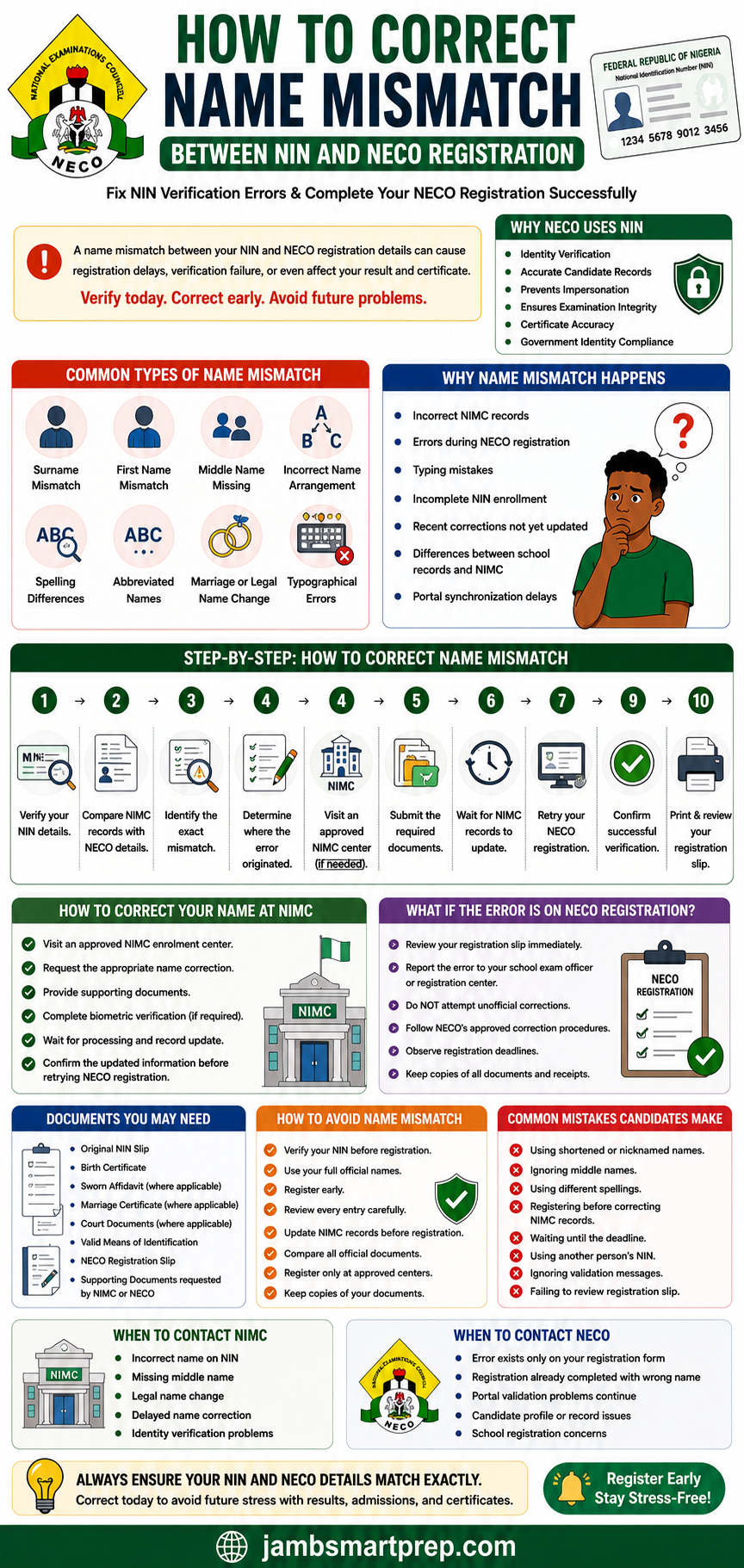
Helpful Tip: Always make sure your NIMC records and NECO registration details are identical before submitting your registration. Correcting mistakes before registration is much easier than resolving them after registration has been completed.
Understanding Name Mismatch Between NIN and NECO Registration
Before learning how to fix a name mismatch, it is important to understand what the error actually means.
A name mismatch occurs when the personal name recorded in the National Identity Management Commission (NIMC) database is different from the name entered during NECO registration.
Because the NECO registration system verifies candidates using information stored in the NIMC database, any inconsistency between the two records may interrupt the registration process.
The mismatch may involve your:
- First name
- Middle name
- Surname
- Order of names
- Spelling of names
Even a small spelling difference can trigger a verification error.
What Is Name Verification?
Name verification is the process of comparing the personal information entered during NECO registration with the official records linked to your National Identification Number.
The registration portal checks whether:
- Your surname matches.
- Your first name matches.
- Your middle name matches.
- The order of your names is correct.
- Your identity records correspond with your NIN.
If all the details match, registration continues successfully.
If they do not, the system displays an error message requesting correction.
Why Matching Records Matter
Matching records are important because they help ensure:
- Accurate candidate identification.
- Correct examination records.
- Proper result processing.
- Accurate certificate issuance.
- Easier verification by universities and employers.
Candidates whose records match are less likely to experience delays during registration or certificate processing.
Why NECO Uses NIN to Verify Candidate Names
The National Examinations Council uses NIN verification as an additional layer of identity confirmation.
This helps improve the accuracy of candidate information and reduces identity-related errors.
Identity Verification
Every candidate is expected to register using their own National Identification Number.
The verification process confirms that the person registering is the rightful owner of the identity provided.
Accurate Candidate Records
Correct name verification helps NECO maintain reliable records throughout the examination process.
Accurate information reduces future correction requests involving:
- Names
- Dates of birth
- Gender
- Certificates
Prevention of Impersonation
Matching NIN records make it more difficult for another individual to register or sit examinations using someone else’s identity.
This supports examination integrity across the country.
Examination Integrity
Proper identity verification strengthens confidence in the examination process by ensuring that every candidate is correctly identified.
Certificate Accuracy
The information used during registration contributes to the records used for certificate production.
Correct names help prevent future certificate correction requests.
Government Identity Compliance
As more public services rely on NIN verification, educational examination bodies also use the system to improve record consistency and candidate identification.
Common Types of Name Mismatch During NECO Registration
Understanding the different forms of name mismatch makes it easier to identify and correct the specific problem affecting your registration.
Surname Mismatch
A surname mismatch occurs when your family name differs between your NIMC record and your NECO registration.
Example
NIMC Record:
Okafor
NECO Registration:
Okafur
Although the difference involves only one letter, verification may fail.
First Name Mismatch
Your first name must appear exactly as recorded by NIMC.
Examples include:
NIMC:
Chinedu
Registration:
Chinedum
Small spelling differences are often enough to trigger a validation error.
Middle Name Missing
Many candidates accidentally omit their middle names during registration.
For example:
NIMC:
Grace Amarachi Nwosu
Registration:
Grace Nwosu
The missing middle name may cause verification to fail if the registration system expects a complete match.
Incorrect Name Arrangement
Sometimes all the names are correct, but they appear in the wrong order.
Example:
NIMC:
John David Musa
Registration:
David John Musa
Although both contain the same names, the arrangement may prevent successful verification.
Spelling Differences
Typing mistakes remain one of the leading causes of verification failure.
Examples include:
- Chukwuemeka → Chukwemeka
- Ibrahim → Ibraheem
- Oluwaseun → Oluwaseyi
Always verify every letter carefully before submitting your registration.
Name Abbreviations
Using shortened versions of names can also create problems.
Examples:
NIMC:
Emmanuel
Registration:
Emma
or
NIMC:
Christopher
Registration:
Chris
Always use your complete official names during registration.
Marriage or Legal Name Change
Candidates who have legally changed their names but have not updated their NIMC records may experience verification difficulties.
This commonly affects married women who have adopted new surnames.
Updating your NIMC information before registration usually resolves this issue.
Typographical Errors
Simple typing mistakes made during registration are among the easiest problems to fix.
Examples include:
- Missing letters
- Extra letters
- Wrong capitalization (where applicable)
- Accidental spacing errors
Taking time to review every entry before submission can prevent these avoidable mistakes.
Why Name Mismatch Happens During NECO Registration
Many candidates assume the registration portal is faulty whenever a name mismatch appears.
In reality, several factors can cause this problem.
Understanding these causes makes it easier to choose the correct solution.
Incorrect NIMC Records
Sometimes the information stored by NIMC itself contains errors.
Examples include:
- Wrong surname
- Missing middle name
- Incorrect spelling
- Outdated personal information
In such situations, correcting the NIMC record is usually necessary before registration can proceed.
Errors During NECO Registration
Not every mismatch originates from NIMC.
Candidates occasionally make mistakes while entering their personal details on the registration form.
Examples include:
- Misspelled names
- Wrong name order
- Missing names
- Typographical errors
Always compare your registration entries with your official NIN Slip before submitting the form.
Typing Mistakes
Simple keyboard errors remain one of the biggest causes of registration problems.
Even one missing or incorrect letter may prevent successful verification.
Incomplete NIN Enrollment
If your NIN enrollment process was not fully completed, some personal information may not yet be available for verification.
Candidates experiencing this issue should confirm the status of their enrollment before attempting registration again.
Recent Name Corrections Not Yet Updated
If you recently corrected your name through NIMC, the updated information may take some time to synchronize across verification systems.
Trying to register immediately after the correction may still produce a mismatch message.
Waiting until the update is fully reflected often resolves the issue.
Differences Between School Records and NIMC
Some candidates use names that appear on school records but differ slightly from their official NIMC records.
Examples include:
- Inclusion or omission of middle names.
- Different surname spellings.
- Alternative spellings used during school admission.
Whenever possible, ensure consistency across all official documents.
Portal Synchronization Delays
Occasionally, temporary synchronization delays between the NECO registration portal and the NIMC database can affect name verification.
If your records are correct but verification still fails, waiting a while before trying again may solve the problem.
How to Identify a Name Mismatch Between NIN and NECO Registration
Before you begin correcting a name mismatch, you need to determine exactly where the error originated. Some candidates assume that the mistake is from the NECO registration portal when, in reality, the incorrect information may already exist in their NIMC records.
Carefully comparing all your official documents can help you identify the source of the problem and save you time during the correction process.
Compare Your NIN Slip with Your NECO Registration Details
Your NIN Slip is the first document you should examine.
Compare the following information:
- Surname
- First name
- Middle name
- Order of names
- Date of birth
- Gender
Every detail should match exactly.
Even a missing middle name or a single misspelled letter may trigger a verification error.
Check Your NECO Registration Form
If you have already started your registration, carefully review the information you entered.
Look out for:
- Typing mistakes
- Missing names
- Wrong arrangement of names
- Extra spaces
- Wrong spellings
- Abbreviated names
Many candidates accidentally introduce errors while rushing to complete the registration.
Review Your School Records
Compare your details with the records maintained by your school.
These may include:
- Admission records
- Continuous assessment records
- Previous examination records
- School registration forms
If your school records differ from your NIMC records, identify which information is officially correct before proceeding.
Check Your Birth Certificate
Your birth certificate is another important reference document.
It helps confirm:
- Correct spelling of names
- Proper name arrangement
- Official date of birth
If there are inconsistencies between your birth certificate and your NIMC record, you may need to update your NIMC information.
Review Previous Examination Records
If you have previously registered for examinations such as:
- WAEC
- BECE
- Common Entrance
- Other recognized examinations
Compare the names used on those records with your NIN details.
Consistent records make future verification easier.
Create a Personal Verification Checklist
Before attempting registration again, confirm the following:
✔ Surname matches exactly.
✔ First name matches exactly.
✔ Middle name matches exactly.
✔ Names appear in the correct order.
✔ No abbreviations are used.
✔ Spellings are identical.
✔ Date of birth is correct.
✔ Gender matches your NIMC record.
Completing this checklist can help you identify most verification problems before they occur.
Step-by-Step Guide to Correct Name Mismatch Between NIN and NECO Registration
Once you have identified the exact difference between your records, follow these practical steps to resolve the issue.
Step 1: Verify Your NIN Details
Begin by checking your official NIN Slip or other NIMC-issued document.
Ensure that every personal detail is accurate.
Never rely on memory when entering your information.
Step 2: Compare Your NIMC Record with Your NECO Registration
Place both records side by side and compare:
- Surname
- First name
- Middle name
- Date of birth
- Gender
Highlight every difference you discover.
Step 3: Identify the Exact Mismatch
Determine the specific problem.
Examples include:
- Wrong surname
- Missing middle name
- Misspelled first name
- Incorrect arrangement of names
- Typographical error
Knowing the exact mismatch makes the correction process much easier.
Step 4: Determine Where the Error Originated
Ask yourself:
- Is the mistake already in my NIMC record?
- Did I enter the wrong information during NECO registration?
The answer determines whether you should visit NIMC or seek assistance through your registration centre.
Step 5: Visit an Approved NIMC Enrolment Centre (If Necessary)
If the incorrect information exists in your NIMC record, visit an approved NIMC enrolment centre.
Examples of corrections handled by NIMC include:
- Wrong surname
- Wrong first name
- Missing middle name
- Legal name updates
Avoid unauthorized agents promising instant corrections.
Step 6: Submit the Required Documents
Depending on the type of correction, you may need:
- Original NIN Slip
- Birth Certificate
- Sworn Affidavit (where applicable)
- Court documents (where applicable)
- Valid identification
- Supporting documents requested by NIMC
Providing complete documentation helps speed up processing.
Step 7: Wait for Your NIMC Records to Update
After submitting your correction request, allow sufficient time for the updated information to be reflected in the NIMC database.
The update may not appear immediately on external verification systems.
Avoid repeatedly attempting registration while the correction is still being processed.
Step 8: Retry Your NECO Registration
Once your records have been updated, return to the NECO registration portal.
Enter your details carefully.
Ensure every name appears exactly as recorded by NIMC.
Step 9: Confirm Successful Verification
If the verification is successful:
- Continue with registration.
- Review every detail again.
- Ensure there are no additional errors.
Never rush this stage.
Step 10: Print and Review Your Registration Slip
After completing registration, print your registration slip immediately.
Check:
- Full name
- Examination number (if available)
- Date of birth
- Gender
- Subjects
- Other personal information
Report any mistakes immediately while correction procedures are still available.
How to Correct Your Name at NIMC
If the incorrect name exists in your NIMC records, the correction must be completed through the National Identity Management Commission before attempting NECO registration again.
Trying to register with incorrect identity records will usually result in repeated verification failures.
Visit an Approved NIMC Enrolment Centre
Always use an officially approved NIMC enrolment centre.
Avoid unauthorized operators who claim they can modify your records outside the official process.
Official centres will explain the required documents and procedures for your specific correction.
Request the Appropriate Name Correction
Common correction requests include:
- Wrong surname
- Incorrect first name
- Missing middle name
- Incorrect spelling
- Rearranged names
- Legal name change
Explain the exact issue clearly to the enrolment officer.
Provide Supporting Documents
Depending on your situation, you may be required to provide:
- Birth Certificate
- Sworn Affidavit
- Court declaration (where applicable)
- Marriage certificate (for legal name changes)
- Valid means of identification
- Other supporting documents required by NIMC
The documents required may differ depending on the type of correction requested.
Complete Biometric Verification if Required
Certain correction requests may require fresh biometric verification.
Follow the instructions provided by the enrolment officer.
Wait for Processing
Name corrections are processed according to official procedures.
Candidates should be patient and avoid submitting multiple correction requests for the same issue.
Verify the Updated Information
Once your correction has been completed, verify that:
- Your surname is correct.
- Your first name is correct.
- Your middle name appears correctly.
- Spellings are accurate.
Only then should you proceed with your NECO registration.
What If the Error Is on the NECO Registration Form?
Not every name mismatch originates from NIMC.
Sometimes candidates enter incorrect information during NECO registration.
Fortunately, identifying the source of the mistake early can prevent future complications.
Review Your Registration Slip Immediately
As soon as your registration is completed, examine your registration slip carefully.
Check:
- Full name
- Date of birth
- Gender
- Examination type
- Other personal details
Early detection gives you the best chance of resolving any errors.
Report the Error Promptly
If you discover a mistake, notify your:
- School examination officer
- Approved registration centre
- Appropriate NECO support channel
Do not wait until the examination period before reporting the issue.
Do Not Attempt Unofficial Corrections
Never allow unauthorized individuals to modify your registration details.
Using unofficial methods may create additional problems with your examination records.
Follow Approved Correction Procedures
Where corrections are permitted, follow the official instructions provided by NECO or your registration centre.
The available correction process depends on:
- The type of error
- The stage of registration
- Official NECO registration guidelines
Observe Registration Deadlines
Many correction requests can only be processed within specific registration periods.
Reporting errors early gives you a better chance of resolving them before registration closes.
Keep Copies of Every Document
Retain copies of:
- Registration slip
- Payment receipt
- Correction request
- Supporting documents
- Correspondence relating to your registration
These records may be useful if additional verification becomes necessary.
Required Documents for Name Correction
If you discover that your name does not match between your NIN records and your NECO registration, you should prepare the appropriate documents before requesting a correction. Having the correct documents ready will help prevent unnecessary delays and make the correction process smoother.
The exact documents required depend on the type of correction being requested and whether the correction will be handled by the National Identity Management Commission (NIMC) or through the approved NECO registration process.
Original NIN Slip
Your NIN Slip is one of the most important documents.
It confirms your:
- National Identification Number
- Official names
- Date of birth
- Gender
Always present the original document where required.
Birth Certificate
A birth certificate is commonly requested to verify your correct name and date of birth.
It serves as one of the primary supporting documents for identity corrections.
Sworn Affidavit (Where Applicable)
For certain name correction requests, you may be asked to provide a sworn affidavit explaining the reason for the correction.
This may apply to:
- Name correction
- Name rearrangement
- Missing middle name
- Minor spelling corrections
Always follow the instructions provided by the relevant authority.
Marriage Certificate (Where Applicable)
Candidates who have legally changed their surname after marriage may be required to provide a marriage certificate or other supporting legal documents.
Court Documents (Where Applicable)
Where a legal name change has been approved by a court, the relevant court documents may be required during the correction process.
Valid Means of Identification
Depending on the correction, additional identification documents may be requested.
Examples include:
- National Identification documents
- School Identification Card
- Other government-issued identification
NECO Registration Slip
If you have already completed part of your NECO registration, your registration slip will help officials compare your submitted information with your NIMC records.
Supporting Documents Requested by NIMC or NECO
Additional documents may be requested depending on the specific correction being processed.
Candidates should always follow official instructions and provide genuine documents.
Will Name Mismatch Affect Your NECO Result or Certificate?
Many candidates ask whether a name mismatch can affect their examination result or certificate.
The answer depends largely on when the problem is discovered and whether it is corrected promptly.
Ignoring a name mismatch may create difficulties not only during registration but also after the examination has been completed.
Registration Delays
The most immediate consequence is delayed registration.
If the system cannot verify your identity, your registration may remain incomplete until the issue has been resolved.
This can become stressful if registration deadlines are close.
Verification Failure
A mismatch between your NIN and registration details may prevent successful identity verification.
Without successful verification, candidates may be unable to complete certain stages of the registration process.
Incorrect Examination Records
Your examination records rely on the information provided during registration.
If incorrect names are used, those errors may appear in your examination records.
Correcting records after examinations are completed is often more complicated than correcting them beforehand.
Certificate Inconsistencies
Your NECO certificate is expected to reflect your correct personal information.
If the names on your registration records are inconsistent with your official identity records, you may later need to request certificate corrections where permitted under official procedures.
Admission Challenges
Many tertiary institutions compare applicants’ academic records with their identification documents.
Name inconsistencies between your:
- NIN
- NECO certificate
- JAMB records
- Admission documents
may require additional verification before admission processing can continue.
Scholarship Verification
Scholarship providers often verify applicants’ educational records.
Consistent names across all official documents help simplify this process.
Employment Documentation
Employers may also compare:
- Academic certificates
- National Identification
- Other official documents
Matching records reduce unnecessary verification questions during employment screening.
How to Avoid Name Mismatch During NECO Registration
The best solution is to prevent the problem before it occurs.
Following these practical tips will greatly reduce the chances of experiencing name verification issues.
Verify Your NIN Before Registration
Before visiting any registration centre, confirm that your NIN details are correct.
Carefully review:
- Surname
- First name
- Middle name
- Date of birth
- Gender
Use Your Full Official Names
Always use the complete names appearing on your NIMC records.
Avoid:
- Nicknames
- Shortened names
- Initials
- Abbreviations
Register Early
Registering early provides enough time to resolve unexpected verification problems before the registration deadline.
Last-minute registration often creates unnecessary pressure.
Review Every Entry Carefully
Before submitting your registration, read every field carefully.
Many candidates discover mistakes only after printing their registration slip.
Update NIMC Records Before Registration
If you already know your NIMC records contain errors, correct them before beginning NECO registration.
This approach is usually much easier than requesting corrections after registration.
Compare All Official Documents
Ensure that your:
- Birth Certificate
- NIN Slip
- School records
- Previous examination records
all contain consistent personal information.
Register Only at Approved Centres
Approved registration centres understand the official registration procedures and can often identify common mistakes before submission.
Avoid unauthorized registration agents.
Keep Copies of Your Documents
Store copies of your:
- NIN Slip
- Registration slip
- Payment receipt
- Supporting documents
These documents may be useful if future verification becomes necessary.
Common Mistakes Candidates Make
Many name mismatch problems are entirely avoidable.
Below are some of the most common mistakes candidates make during registration.
Using Shortened Names
Examples include:
- Chris instead of Christopher
- Emma instead of Emmanuel
- Alex instead of Alexander
Always use your complete official names.
Ignoring Middle Names
Some candidates omit their middle names because they believe they are optional.
If your middle name appears in your NIMC records, include it during registration unless official instructions state otherwise.
Using Different Spellings
Examples include:
- Chukwuebuka vs Chukwu Ebuka
- Oluwaseun vs Oluwaseyi
Always copy the spelling exactly as recorded by NIMC.
Registering Before Correcting NIMC Records
Attempting registration while your NIMC information is still incorrect usually results in repeated verification failures.
Correct the records first.
Waiting Until the Deadline
Candidates who postpone registration often have little time to resolve unexpected problems.
Early registration provides greater flexibility.
Using Another Person’s NIN
Every candidate must register with their own National Identification Number.
Using another person’s NIN may create serious identity verification problems.
Ignoring Error Messages
Validation messages usually indicate the exact problem that needs attention.
Read every message carefully before attempting another registration.
Failing to Review the Registration Slip
Always inspect your registration slip immediately after registration.
Small mistakes discovered early are generally easier to address.
When to Contact NIMC
Some name mismatch problems can only be resolved through the National Identity Management Commission.
Contact NIMC if your issue involves:
Incorrect Name on Your NIN
If your surname, first name, or middle name is incorrect in the NIMC database, you should request an official correction.
Missing Middle Name
Where your middle name has been omitted from your NIMC records, visit an approved enrolment centre for guidance.
Legal Name Change
Candidates who have legally changed their names should update their NIMC records before attempting NECO registration.
Delayed Name Correction
If your approved correction has not yet been reflected after a reasonable period, follow up through the appropriate NIMC office.
Identity Verification Problems
Persistent NIN verification failures involving incorrect personal information should also be reported to NIMC.
When to Contact NECO
Although identity records are handled by NIMC, certain registration issues require assistance from NECO.
Contact NECO if:
The Error Exists Only on Your Registration Form
If your NIMC records are correct but your NECO registration contains incorrect information, seek guidance through your registration centre or the appropriate NECO support channel.
Registration Has Already Been Completed
Candidates who discover name errors after completing registration should report the issue immediately.
Early reporting provides the best opportunity for correction where applicable.
Portal Validation Problems Continue
If verification continues to fail despite having correct NIMC records, NECO may investigate whether the issue relates to the registration portal.
Candidate Profile Issues
Problems involving your registration profile or examination records should also be reported promptly.
School Registration Concerns
Candidates registering through schools should first inform their school’s examination officer, who can provide guidance or escalate the issue where necessary.
