
Every year, millions of Nigerian students register for the Joint Admissions and Matriculation Board examination with hopes of gaining admission into universities, polytechnics, and colleges of education.
After registration, many candidates suddenly become confused about the different JAMB websites available online.
Some students hear about:
- efacility.jamb.gov.ng
- portal.jamb.gov.ng
- www.jamb.gov.ng
but do not fully understand what each portal is used for.
As a result, many students struggle with:
- JAMB portal login
- checking admission status
- accessing CAPS
- printing admission letters
- recovering passwords
- uploading O’Level results
Some candidates even fall victim to fake websites and online scams because they cannot identify the official JAMB portal correctly.
The truth is simple.
Understanding how the JAMB portals work can save students from unnecessary stress during registration and admission periods.
If you have been searching for:
- how to login to efacility.jamb.gov.ng
- official JAMB portal login guide
- how to access portal.jamb.gov.ng
- JAMB CAPS login explained
- how to recover JAMB portal password
- services available on efacility.jamb.gov.ng
this detailed guide will help you.
In this article, you will learn the difference between efacility.jamb.gov.ng, portal.jamb.gov.ng, and www.jamb.gov.ng, how to login successfully, how to access CAPS, how to print admission letters, and how to avoid common JAMB portal problems.
What Is efacility.jamb.gov.ng?
The JAMB e-facility portal is the main online dashboard created for UTME and Direct Entry candidates.
It is one of the most important platforms students use during admission processing.
The portal allows candidates to manage their JAMB profiles and access important examination services online.
Why the JAMB E-Facility Portal Is Important
Students use the portal for several important activities such as:
- checking admission status,
- printing admission letters,
- printing original result slips,
- accessing CAPS,
- changing institutions,
- uploading O’Level results,
- and correcting personal data.
Without the e-facility portal, many admission processes would become difficult.
Main Dashboard for Candidates
Think of efacility.jamb.gov.ng as your personal JAMB dashboard.
Once candidates login successfully, they can monitor almost every important admission activity from one place.
Important During Admission Processing
Many universities now depend heavily on CAPS updates and portal records during admission screening.
That is why students should learn how to use the JAMB e-facility portal properly.
What Is portal.jamb.gov.ng?
Many students also see portal.jamb.gov.ng online and wonder whether it is different from efacility.jamb.gov.ng.
The answer is yes, although both are connected.
Purpose of portal.jamb.gov.ng
The portal.jamb.gov.ng platform supports several JAMB online services and registration-related activities.
Students often access this portal during:
- UTME registration,
- result checking,
- profile management,
- and admission activities.
Difference Between portal.jamb.gov.ng and efacility.jamb.gov.ng
While efacility.jamb.gov.ng mainly serves as the candidate login dashboard, portal.jamb.gov.ng provides broader access to JAMB services and information.
Both portals are useful during the admission process.
Used During Registration and Admission
Candidates may interact with both portals at different stages of:
- registration,
- examination,
- admission,
- and school clearance.
What Is www.jamb.gov.ng?
The website www.jamb.gov.ng is the official JAMB website.
It is mainly used for official announcements, registration news, policy updates, and public information.
Source of Official JAMB Announcements
Students should visit the official website regularly for updates concerning:
- UTME registration,
- examination dates,
- mock exams,
- admission policies,
- and CAPS updates.
Why Official Information Matters
During admission seasons, fake information spreads quickly online.
Many students become confused because of false news circulating on WhatsApp and Facebook groups.
The safest approach is to rely on official JAMB announcements.
Avoid Fake Websites and Scam Links
Students should avoid websites requesting suspicious payments or login details outside the official portals.
Always confirm the correct JAMB website before entering personal information.
Difference Between efacility.jamb.gov.ng and portal.jamb.gov.ng
Many first-time candidates struggle to understand the difference between the major JAMB portals.
The simple comparison below explains it clearly.
| Portal | Main Purpose |
|---|---|
| efacility.jamb.gov.ng | Candidate login dashboard |
| portal.jamb.gov.ng | General JAMB services |
| www.jamb.gov.ng | Official information website |
Which Portal Should Students Use?
Students should use:
- efacility.jamb.gov.ng for login activities and CAPS,
- portal.jamb.gov.ng for broader JAMB services,
- and www.jamb.gov.ng for official information and announcements.
Understanding this difference helps students avoid confusion.
How to Login to efacility.jamb.gov.ng
Many students ask how to login to the JAMB portal successfully.
Fortunately, the process is simple.
Step-by-Step Login Process
Step 1: Visit the Official Portal
Open your browser and visit:
https://efacility.jamb.gov.ng/
Step 2: Enter Your Registered Email Address
Use the same email linked to your JAMB registration.
Step 3: Enter Your Password
Type your password carefully.
Passwords are case-sensitive.
Step 4: Click Login
Click the login button to access your JAMB dashboard.
Step 5: Access Your Dashboard
Once logged in, students can access services such as:
- CAPS,
- admission status,
- admission letter printing,
- and result checking.
Mobile and Laptop Login Tips
Students can access the portal using:
- smartphones,
- laptops,
- tablets,
- and desktop computers.
However, laptops often provide smoother navigation for CAPS activities and printing services.
Recommended Browsers
Most students use:
- Google Chrome,
- Mozilla Firefox,
- or Microsoft Edge.
Google Chrome usually works smoothly for JAMB portal activities.
Services Available on the JAMB E-Facility Portal
The JAMB portal provides several important services for Nigerian students.
Admission Status Checking
Students can monitor admission progress directly online.
CAPS Login
Candidates can:
- accept admission,
- reject admission,
- or monitor CAPS updates.
Result Printing
Students can print original result slips directly from the portal.
Admission Letter Printing
Candidates can print official admission letters required during school clearance.
Change of Course and Institution
Students can apply for:
- course changes,
- institution changes,
- or corrections.
O’Level Result Upload
Candidates can upload:
- WAEC,
- NECO,
- NABTEB,
- or equivalent results.
Correction of Data
The portal also supports correction of:
- names,
- dates of birth,
- gender,
- and subject combinations.
How to Check Admission Status on JAMB Portal
Checking admission status is one of the most important reasons students visit the JAMB portal.
Step-by-Step Guide
Step 1: Login to Your Portal
Access your JAMB dashboard.
Step 2: Click “Check Admission Status”
Locate the admission section.
Step 3: Select Examination Year
Choose the correct UTME year.
Step 4: Enter Registration Number
Input your JAMB registration number correctly.
Step 5: View Admission Result
Your admission status will appear immediately.
Understanding Admission Messages
Students may see messages such as:
“Admission in Progress”
This means admission is still being processed.
“Not Admitted”
This means admission has not yet been offered.
“Congratulations”
This confirms admission has been offered successfully.
Students should check regularly because updates can change frequently.
How to Access JAMB CAPS Through the Portal
CAPS is one of the most important parts of the JAMB admission process.
What Is JAMB CAPS?
CAPS stands for:
Central Admission Processing System
It is the platform institutions use to process admissions.
Why CAPS Is Important
Without CAPS acceptance:
- admission may remain incomplete,
- school clearance may become difficult,
- and admission records may not update properly.
How to Access CAPS
- Login to your JAMB portal
- Open CAPS section
- Check admission updates
- Accept or reject admission
Students should monitor CAPS regularly during admission periods.
How to Recover Forgotten JAMB Portal Password
Forgotten passwords are very common among UTME candidates.
Fortunately, recovery is simple.
Password Recovery Steps
Step 1: Visit Login Page
Go to the official portal.
Step 2: Click “Forgot Password”
Locate the recovery option.
Step 3: Enter Registered Email Address
Use the email linked to your JAMB profile.
Step 4: Check Your Inbox
JAMB will send reset instructions.
Step 5: Reset Password
Create a strong but memorable password.
Important Password Recovery Tips
Check Spam Folder
Reset emails sometimes enter spam folders.
Use Strong Passwords
Strong passwords improve account security.
Save Passwords Properly
Store passwords securely to avoid future login problems.
Common Problems Students Face While Using JAMB Portals
Many students experience login issues during registration and admission periods.
Wrong Passwords
Typing mistakes are common.
Solution
- Re-enter carefully
- Confirm capital letters
- Use password recovery if necessary
Invalid Emails
Some students forget the email linked to registration.
Solution
Always use the exact email submitted during registration.
Slow Portal Loading
Heavy traffic often slows the portal.
Solution
- Refresh the page
- Use stronger internet
- Try again later
Browser Issues
Old browsers sometimes affect login activities.
Solution
- Update browsers
- Clear cache
- Use Google Chrome
Portal Maintenance
JAMB occasionally updates the portal temporarily.
Solution
Wait patiently and try again later.
Security Tips for JAMB Portal Users
Protecting your JAMB profile is extremely important.
Avoid Fake Websites
Always confirm the correct portal address.
Protect Your Passwords
Never share passwords publicly.
Avoid Scam Agents
Many fake agents claim they can manipulate admission processes.
Most of these claims are scams.
Logout After Use
Students using cybercafes should logout completely after using the portal.
Important Things Students Can Do on JAMB Portal
The portal supports several useful student activities.
Print Examination Slips
Students can print CBT slips online.
Print Admission Letters
Admission letters are important during school clearance.
Check Results
Candidates can print original result slips.
Upload O’Level Results
WAEC and NECO results can be uploaded through approved centres.
Monitor CAPS Admission
Students should monitor admission updates regularly.
Correct Personal Details
The portal supports correction of personal information.
Best Devices and Browsers for JAMB Portal Login
Students often ask whether phones or laptops work better.
Mobile Phones
Phones work well for:
- quick login,
- admission checks,
- and CAPS updates.
Laptops and Desktop Computers
Laptops usually provide smoother experience for:
- CAPS activities,
- printing,
- and data corrections.
Best Browsers
The most recommended browsers include:
- Google Chrome
- Mozilla Firefox
- Microsoft Edge
Common Mistakes Students Make While Using JAMB Portal
Several mistakes create avoidable problems for candidates.
Using Wrong Emails
Students should always use the registration email.
Sharing Passwords Publicly
This increases security risks greatly.
Visiting Fake Portals
Always confirm official links properly.
Ignoring CAPS Updates
Admission updates change frequently during admission periods.
Best CBT App for JAMB Preparation
Students preparing for UTME can improve their CBT familiarity through regular practice.
One helpful platform many candidates use is:
JambSmartPrep CBT App
Benefits of JambSmartPrep CBT App
- Mock CBT examinations
- Daily practice sessions
- Speed improvement
- Performance tracking
- Weak subject identification
Regular CBT practice helps students feel more confident during examinations.
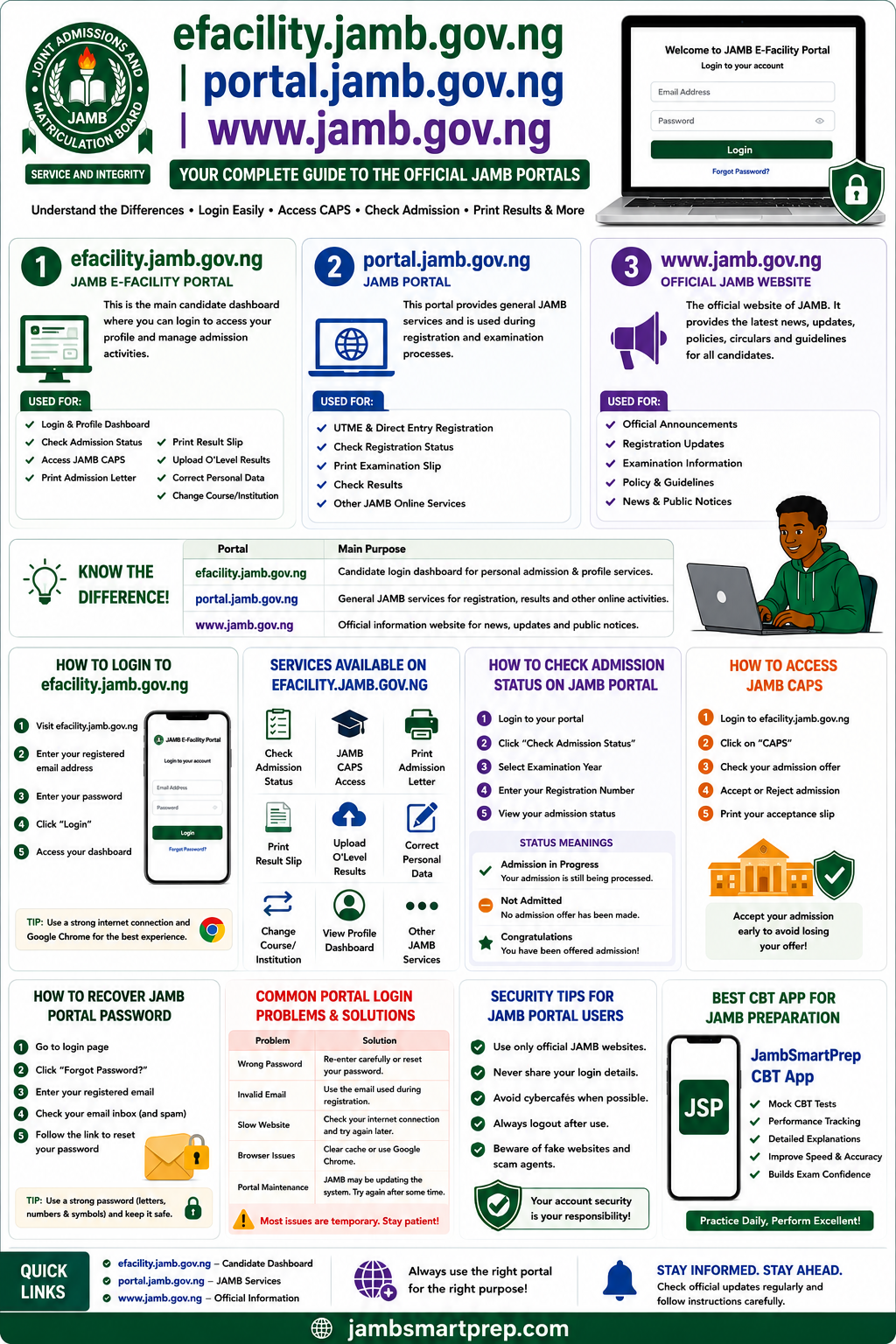
📘 Quick Guide to efacility.jamb.gov.ng and portal.jamb.gov.ng
JAMB Portal Login Steps
✅ Visit official portal
✅ Enter registered email
✅ Enter password
✅ Access dashboard
CAPS Access Guide
✅ Login to CAPS
✅ Check admission status
✅ Accept admission
✅ Print admission letter
Password Recovery Process
✅ Click “Forgot Password”
✅ Enter registered email
✅ Check inbox
✅ Reset password
Security Tips
✅ Avoid fake websites
✅ Protect passwords
✅ Logout after use
✅ Use secure devices
Common Portal Problems
❌ Wrong password
❌ Invalid email
❌ Slow internet
❌ Browser issues
Frequently Asked Questions About JAMB Portals
What is efacility.jamb.gov.ng?
It is the official JAMB e-facility portal used for admission checks, CAPS access, and candidate services.
What is portal.jamb.gov.ng used for?
It supports several JAMB online services during registration and admission stages.
What is the official JAMB website?
The official website is:
https://www.jamb.gov.ng/
How do I login to JAMB portal?
Visit the official portal and enter your registered email and password.
How do I recover my JAMB password?
Use the “Forgot Password” option on the login page.
How do I check admission status?
Login to your portal and select “Check Admission Status.”
What is JAMB CAPS?
CAPS stands for Central Admission Processing System.
Can I use my phone for JAMB login?
Yes. Smartphones work well for most portal activities.
Why is my JAMB portal not opening?
Possible reasons include:
- slow internet,
- wrong password,
- browser problems,
- or portal maintenance.
How do I print my admission letter?
Login to your portal and select “Print Admission Letter.”
What is the official JAMB portal link?
The official portal is:
https://efacility.jamb.gov.ng/
Can cybercafes access my JAMB profile?
Yes, especially if passwords are saved accidentally.
Always logout properly.
How often should I check CAPS?
Students should monitor CAPS regularly during admission periods.
Can I change institution on JAMB portal?
Yes. JAMB allows institution and course changes during approved periods.
Is JAMB CAPS compulsory?
Yes. CAPS acceptance is important for admission confirmation.
Can I upload O’Level results online?
Yes, usually through accredited CBT centres.
What browser works best for JAMB login?
Google Chrome works smoothly for most portal activities.
What should I do if the portal is slow?
Refresh the page, clear browser cache, or try again later.
Can I print my result online?
Yes. Original result slips can be printed through the portal.
Is JAMB portal free to use?
Basic access is free, although some services require payment.
Conclusion
Understanding the difference between efacility.jamb.gov.ng, portal.jamb.gov.ng, and www.jamb.gov.ng is extremely important for every Nigerian student preparing for admission.
These portals help candidates manage:
- registration,
- admission status,
- CAPS activities,
- result printing,
- and other important services.
Students should always use official websites, protect their login details carefully, and monitor CAPS updates regularly.
A good understanding of the JAMB portal system can save students from confusion, fake websites, and unnecessary admission stress.
Have you checked your JAMB CAPS admission status yet? Share this guide with another UTME candidate and bookmark this article for future JAMB portal access.
