Every year, millions of Nigerian students register for the Unified Tertiary Matriculation Examination (UTME) with the hope of securing admission into universities, polytechnics, colleges of education, and other tertiary institutions.
Before any candidate can complete JAMB registration, one important requirement must be fulfilled first: generating a JAMB profile code.
Unfortunately, many students encounter difficulties at this stage. Some do not receive their profile code after sending their NIN. Others use the wrong phone number or discover that their NIN is not properly linked to their SIM card.
If you are facing any of these challenges, you are not alone.
This detailed JAMB profile code generation guide explains everything you need to know about how to generate JAMB profile code successfully, how to get JAMB profile code on MTN, Airtel, Glo, and 9mobile, how to fix profile code errors, and how to complete your JAMB registration without unnecessary stress.
By the end of this guide, you will know exactly how the system works and how to avoid the mistakes that prevent thousands of candidates from completing their registration every year.
What Is a JAMB Profile Code?
Meaning of JAMB Profile Code
A JAMB profile code is a unique identification number issued by JAMB after a candidate successfully submits their National Identification Number (NIN) through the approved process.
The profile code serves as your registration identity within the JAMB system.
Without a valid profile code, you cannot:
- Purchase a JAMB e-PIN
- Register for UTME
- Register for Direct Entry
- Access JAMB services
- Process admission-related requests
In simple terms, the profile code is the key that unlocks the entire JAMB registration process. Also read: Common JAMB Registration Mistakes
Why JAMB Requires a Profile Code
JAMB introduced profile code generation to strengthen candidate verification and reduce identity fraud.
Before the introduction of NIN integration, some candidates created multiple registrations using different names and details.
The profile code system helps JAMB:
- Verify candidate identity
- Link registration to NIN records
- Eliminate duplicate registrations
- Improve admission transparency
- Reduce examination malpractice
Importance of Profile Code During Registration
Many first-time candidates assume the profile code is only needed during registration.
In reality, it remains important throughout your admission journey.
Your profile code helps with:
- UTME registration
- Direct Entry registration
- Admission processing
- CAPS access
- Result checking
- Change of course
- Change of institution
- Admission letter printing
Difference Between NIN and JAMB Profile Code
Many candidates confuse these two numbers.
| NIN | JAMB Profile Code |
|---|---|
| Issued by NIMC | Issued by JAMB |
| Permanent identity number | Registration identification code |
| Used nationally | Used for JAMB services |
| Usually 11 digits | Generated after NIN verification |
Think of your NIN as your national identity number and your profile code as your JAMB registration identity.
Why You Need a JAMB Profile Code Before Registration
Purchase of JAMB e-PIN
The first major reason you need a profile code is to buy your JAMB e-PIN.
No bank, CBT centre, mobile app, or online platform can process your e-PIN purchase without a valid profile code.
UTME Registration
Every UTME candidate must present a profile code during registration.
The profile code allows JAMB to retrieve your verified information from the NIN database.
Admission Processing
Admission processing begins from the information attached to your profile.
Your profile helps institutions verify your identity and academic records.
Access to JAMB CAPS
The Central Admission Processing System (CAPS) allows candidates to: Also read: How to Create JAMB Profile with Phone Number 2026: Complete Beginner’s Guide
- Monitor admission status
- Accept admission
- Reject admission
- Track institution decisions
Without a valid profile, access becomes difficult.
Change of Institution and Course
Students often change courses or institutions after results are released.
A functioning JAMB profile is required before these changes can be processed.
Requirements for Generating a JAMB Profile Code
Before beginning profile code generation, ensure you meet all the requirements below.
Valid National Identification Number (NIN)
The most important requirement is your NIN.
JAMB has made NIN compulsory for all candidates.
Without a valid NIN, profile code generation cannot proceed.
Active SIM Card
The phone number you intend to use must:
- Be active
- Be accessible
- Be capable of sending SMS
- Remain active throughout the admission process
Linked NIN and Phone Number
Your SIM card must be linked to your NIN.
This is where many candidates experience problems.
If the number is not linked to your NIN, the profile code request may fail.
Adequate Airtime Balance
The SMS request attracts a service charge.
Always ensure sufficient airtime is available before sending the message.
Strong Mobile Network
Poor network coverage may delay SMS delivery.
Where possible, move to an area with stronger network reception before sending your request.
Quick Requirements Table
| Requirement | Required |
| NIN | Yes |
| Phone Number | Yes |
| Airtime | Yes |
| Network Coverage | Yes |
Step-by-Step Guide on How to Generate JAMB Profile Code Successfully
This section contains the exact JAMB profile code generation step-by-step guide candidates should follow.
Step 1: Get Your NIN Ready
Before doing anything else, ensure your NIN is available.
If you do not have one:
- Visit a NIMC enrollment centre.
- Complete registration.
- Obtain your NIN slip.
Double-check every digit before proceeding.
Step 2: Confirm NIN Is Linked to Your Phone Number
This step is extremely important.
Your phone number should be linked to the same NIN you intend to use for JAMB.
Candidates who skip this verification often encounter profile code generation failures.
Step 3: Open Your SMS Application
Using the phone number linked to your NIN:
- Open your messaging application.
- Create a new message.
Step 4: Type the Correct SMS Format
The standard format usually follows:
NIN 12345678901
Replace the sample number with your actual NIN.
Ensure there are no extra spaces or typing errors.
Step 5: Send to Official JAMB Short Code
Send the message to the official JAMB short code announced for the registration year.
Always verify the current code through official JAMB channels before sending.
Step 6: Wait for JAMB Confirmation Message
Once your information is verified, JAMB sends a confirmation SMS containing:
- Candidate details
- Profile code
- Registration instructions
Response times vary.
Some candidates receive their code within minutes, while others may wait several hours during peak registration periods.
Step 7: Save Your Profile Code
Many students make the mistake of deleting important SMS messages.
Once you receive your profile code:
- Save it in your phone
- Write it in a notebook
- Store it in your email
You will need it multiple times.
Step 8: Use the Code for JAMB Registration
After receiving the code, you can:
- Purchase your e-PIN
- Visit an accredited CBT centre
- Complete registration
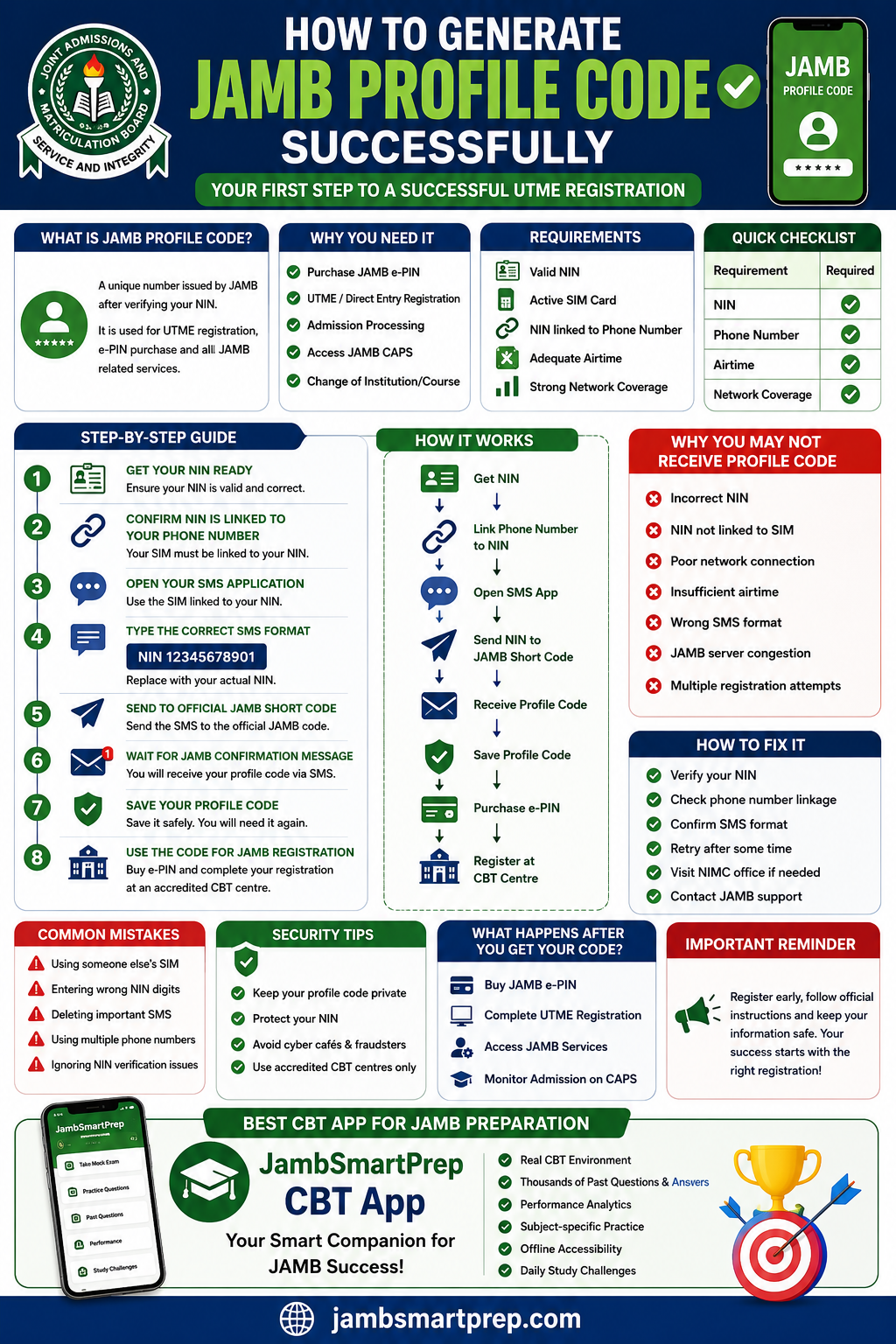
How to Generate JAMB Profile Code Successfully
Visual Flow:
Get NIN
↓
Link Phone Number to NIN
↓
Open SMS App
↓
Send NIN to JAMB Short Code
↓
Receive Profile Code
↓
Save Profile Code
↓
Purchase e-PIN
↓
Register at CBT Centre
This simple process is the foundation of successful JAMB registration.
How to Generate JAMB Profile Code on Different Networks
Many students ask whether the process differs across mobile networks.
Fortunately, the procedure remains largely the same.
How to Get JAMB Profile Code on MTN
MTN subscribers should:
- Verify NIN linkage
- Ensure adequate airtime
- Send the correct SMS format
MTN remains one of the most widely used networks among UTME candidates.
How to Generate JAMB Profile Code on Airtel
Airtel users follow the same process.
The phone number used must match the NIN records submitted to NIMC.
How to Get JAMB Profile Code on Glo
Glo subscribers should verify network stability before sending requests.
Network interruptions occasionally delay SMS responses.
How to Generate JAMB Profile Code on 9mobile
The procedure remains identical for 9mobile users.
Ensure the SIM card is active and linked correctly.
Important Tips for All Networks
- Use only your personal SIM card.
- Avoid borrowed numbers.
- Verify NIN details.
- Save every SMS received.
- Register early to avoid congestion.
What Happens After You Receive Your JAMB Profile Code?
Receiving your JAMB profile code is a major milestone, but it is only the beginning of the registration journey.
Many candidates mistakenly assume that once the profile code arrives, they are fully registered. This is not true. Several important steps still need to be completed.
Buying JAMB e-PIN
The first thing you should do after receiving your profile code is purchase your JAMB e-PIN.
You can buy the e-PIN through:
- Accredited CBT centres
- Approved banks
- Mobile banking platforms
- Designated payment channels approved by JAMB
Your profile code will be required during the purchase process.
Completing UTME Registration
After purchasing your e-PIN, visit an accredited CBT centre to complete your registration.
You will provide:
- Personal information
- Choice of institutions
- Choice of course
- O’Level details
- Biometric information
Accessing JAMB Services
Your profile remains useful after registration.
Through your JAMB profile, you can:
- Check admission status
- Print examination slips
- Access CAPS
- Print admission letters
- Request corrections
Admission Monitoring
JAMB’s Central Admission Processing System (CAPS) relies on your profile information to process admissions.
This is why your profile details must be accurate from the beginning. Also read: How to Pass JAMB UTME Without Malpractice
Common Reasons JAMB Profile Code Is Not Received
One of the most searched questions every registration season is:
“Why am I not receiving my JAMB profile code?”
Several factors can cause this issue.
Incorrect NIN
Even a single wrong digit can prevent successful verification.
Before sending your request, compare your NIN carefully with the number on your NIN slip.
NIN Not Linked to SIM
This remains one of the most common causes of profile code failure.
If the phone number used is not linked to your NIN, JAMB may be unable to verify your identity.
Poor Network Connection
Weak network signals can delay SMS delivery.
Sometimes the message is sent successfully, but the response arrives much later.
Insufficient Airtime
Candidates often forget that SMS requests require airtime.
Always maintain enough balance before sending the message.
Wrong SMS Format
Incorrect SMS formatting can lead to automatic rejection.
Examples of common mistakes include:
- Missing spaces
- Wrong keywords
- Incorrect NIN digits
JAMB Server Congestion
During peak registration periods, millions of students attempt profile code generation simultaneously.
This can slow down response times.
Multiple Registration Attempts
Repeated requests within a short period may create verification delays.
If you have already sent a request, wait patiently before trying again.
How to Fix JAMB Profile Code Not Received Issues
If you have not received your profile code, do not panic.
The problem can usually be resolved by following these steps.
Solution 1: Verify Your NIN
Check every digit carefully.
Many candidates discover that a typing mistake caused the failure.
Solution 2: Check Phone Number Linkage
Visit a NIMC office or your network provider if you are unsure whether your SIM is linked to your NIN.
Solution 3: Confirm SMS Format
Ensure you used the approved JAMB format exactly as instructed.
Small mistakes can prevent successful processing.
Solution 4: Retry Later
Sometimes the issue is simply temporary congestion.
Wait a few hours and try again.
Solution 5: Visit NIMC Office
Where NIN verification problems exist, NIMC can assist with corrections and updates.
Solution 6: Contact JAMB Support
If all other solutions fail, contact the nearest JAMB office for assistance.
Keep copies of:
- NIN slip
- SMS records
- Airtime transaction details
These may be useful during troubleshooting.
How to Retrieve a Lost JAMB Profile Code
Losing your profile code is more common than many students realize.
Fortunately, recovery options exist.
SMS Recovery Method
Check old messages carefully.
Many candidates later discover the profile code was received but overlooked.
CBT Centre Assistance
Accredited CBT centres can sometimes help candidates retrieve profile details during registration.
JAMB Office Support
JAMB offices can provide assistance where verification is required.
Important Recovery Tips
To avoid future problems:
- Save the code in your phone contacts
- Write it in a notebook
- Send it to your email
- Keep screenshots
Having multiple backups can save you considerable stress.
Common Mistakes Students Make During Profile Code Generation
Thousands of candidates experience delays every year because of avoidable mistakes.
Using Someone Else’s SIM Card
Never use a parent’s, sibling’s, or friend’s phone number.
The SIM card should belong to you and be linked to your NIN.
Entering Wrong NIN Digits
A single incorrect digit can cause rejection.
Always cross-check before sending.
Deleting Important SMS Messages
Many candidates delete messages to free storage space.
Unfortunately, some later lose important profile information.
Using Multiple Phone Numbers
Using different phone numbers for different stages of registration can create confusion.
Stick with one verified number.
Ignoring NIN Verification Issues
Some candidates discover errors in their NIN records but proceed anyway.
This often creates larger problems later during admission processing.
Security Tips for Protecting Your JAMB Profile Code
Your profile code is valuable information and should be protected.
Keep Your Code Private
Do not share your profile code publicly.
Only provide it when necessary during official registration procedures.
Protect Your NIN
Your NIN is sensitive personal information.
Avoid posting it online or sharing it with unauthorized individuals.
Avoid Cyber Cafes and Fraudsters
Many scammers target students during registration periods.
Never pay unofficial agents who claim they can generate profile codes faster.
Use Accredited CBT Centres Only
Accredited centres are authorized by JAMB and follow official procedures.
This reduces the risk of fraud and registration errors.
Latest JAMB Registration Updates Every Candidate Should Know
JAMB policies continue to evolve.
Candidates should stay informed about current requirements.
New NIN Policies
NIN verification remains compulsory for all candidates.
This policy has significantly improved identity verification across the registration process.
Profile Code Verification Requirements
JAMB now places greater emphasis on matching candidate details with NIMC records.
CBT Registration Procedures
Candidates must complete:
- Biometric verification
- Photograph capture
- Data validation
before registration can be finalized.
Important Registration Deadlines
One mistake candidates make every year is waiting until the last minute.
Registering early helps you avoid:
- Server congestion
- Long queues
- Technical delays
Common JAMB Registration Changes
Always monitor official announcements for updates regarding:
- Registration dates
- Examination schedules
- Profile code procedures
- Admission policies
Best CBT Apps for JAMB Preparation
Generating your profile code is only the first step.
Passing JAMB requires proper preparation.
Why CBT Practice Is Important
JAMB is a computer-based examination.
Candidates who regularly practice CBT often perform better because they understand:
- Question navigation
- Time management
- Computer interface usage
Benefits of Mobile-Based Preparation
Mobile CBT practice offers several advantages:
- Flexibility
- Convenience
- Instant feedback
- Progress monitoring
Study Smarter with JambSmartPrep CBT App
JambSmartPrep CBT App is designed specifically for Nigerian students preparing for UTME.
Key Features
Real CBT Environment
Practice using a system similar to the actual JAMB examination interface.
Thousands of Past Questions and Answers
Access extensive question banks across major subjects.
Performance Analytics
Track your strengths and weaknesses.
Subject-Specific Practice
Focus on areas requiring improvement.
Offline Accessibility
Study even when internet access is unavailable.
Daily Study Challenges
Build consistency and improve retention through regular practice.
Frequently Asked Questions (FAQs)
How do I generate my JAMB profile code?
Send your NIN using the approved SMS format through the phone number linked to your NIN.
How much does JAMB profile code generation cost?
A service charge applies to the SMS request. Check current JAMB registration guidelines for the latest amount.
How long does it take to receive a JAMB profile code?
Most candidates receive it within minutes, although delays may occur during peak periods.
Why am I not receiving my JAMB profile code?
Common reasons include incorrect NIN, poor network, wrong SMS format, insufficient airtime, or NIN linkage issues.
Can I generate my JAMB profile code twice?
Generally, a candidate is expected to maintain one profile linked to one NIN.
Can I use another person’s phone number?
No. Always use your personal phone number linked to your NIN.
What should I do if I lose my profile code?
Visit an accredited CBT centre or contact JAMB support for assistance.
Can I register JAMB without a profile code?
No. The profile code is mandatory.
Can I change my phone number after profile code generation?
Changes may require official procedures and verification.
Is NIN compulsory for profile code generation?
Yes. NIN remains a mandatory requirement.
Real-Life Example of Successful Profile Code Generation
Case Study: How a First-Time Candidate Generated a JAMB Profile Code Successfully
A student from Lagos preparing for UTME attempted profile code generation but received no response.
Challenge Faced
The student’s phone number was not linked properly to the NIN.
Solution Applied
After visiting the network provider and confirming NIN linkage, the request was resent successfully.
Lessons Learned
- Verify NIN early.
- Use a personal phone number.
- Avoid last-minute registration.
Expert Tips to Avoid Delays During JAMB Registration
Register Early
Early registration reduces stress and technical issues.
Verify NIN Before Registration
Do not wait until registration opens before checking your NIN status.
Use a Personal Phone Number
This prevents identity and verification problems.
Save Important Messages
Keep copies of profile codes and registration details.
Follow Official JAMB Instructions
Avoid information from unofficial sources.
Conclusion
Learning how to generate JAMB profile code successfully is one of the most important steps in your UTME journey.
The process becomes much easier when you have a valid NIN, a properly linked phone number, sufficient airtime, and the correct SMS format.
Remember that your profile code is not just for registration. It remains important throughout admission processing, CAPS access, result checking, and other JAMB services.
To avoid delays, verify your NIN early, register as soon as registration opens, and keep all important messages safe.
Most importantly, begin preparing for the examination immediately after registration. Consistent practice using the JambSmartPrep CBT App can help improve your confidence, time management, and overall performance on exam day.
If you found this guide helpful, share it with other JAMB candidates and leave your questions in the comments section.
Related Articles
- How to Create JAMB Profile with Phone Number
- Common JAMB Registration Mistakes and How to Avoid Them
- JAMB Portal Login Problems and Solutions
- How to Use Computer in JAMB CBT Exam
- JAMB CBT Instructions for First-Time Candidates
- How to Score Above 300 in JAMB
- JAMB Subject Combination for All Courses
- Best JAMB Reading Timetable for Serious Candidates
- What to Carry to the JAMB Exam Hall
- How to Pass JAMB Without Malpractice
