The National Examinations Council (NECO) Senior School Certificate Examination (SSCE) is one of the most important exams for Nigerian students. Every year, thousands of candidates sit for it to qualify for university admission, scholarships, or career opportunities.
Once the exams are over, the next big moment is the release of results. The anxiety that builds up in those weeks is something most Nigerian families can relate to. Students worry about passing English and Mathematics, parents pray for good news, and cyber cafés prepare for the rush.
By the end of this guide, you will know exactly how to check NECO 2026 SSCE results online and via SMS using the official result checker.
NECO 2026 Result Release Date And Statistics
NECO usually releases SSCE results six to eight weeks after the last paper. For example, the 2024 SSCE results were released in early September, about seven weeks after the exams.
For NECO 2025 SSCE, candidates can expect the results to be available by late August or early September 2025.
To confirm if results are officially out, always check the NECO portal (www.neco.gov.ng) or follow updates from trusted media outlets. Avoid fake rumors on social media.
Interestingly, the National Examinations Council (NECO) announced the released of the 2025 Senior School Certificate Examination (SSCE) Internal results on Wednesday, 17th September 2025, at its Headquarters in Minna, Niger State.
According to the NECO official website, a total of 1,367,210 candidates registered for the examination, of which 685,514 males and 681,696 females. Its further stated that out of the registered candidates, 1,358,339 candidates sat for the exams.
From the 1,358,339 candidates sat for the exams, a total of 818,492 candidates which is 60.26% obtained at least five credits including Mathematics and English and a total of 1,144,496 candidates which is 84.26% scored five credits and above irrespective of Mathematics and English.
On this note, all concerned candidates can now head over to the National Examinations Council (NECO) official website and check their results by following the guides we have outlined in the later end of this article.
Requirements Before Checking Your NECO Result
Before you start, make sure you have:
-
NECO Examination Number – the 10-digit number on your exam slip.
-
NECO Result Checker Token (Scratch Card) – works like a PIN to access your result.
-
Device – an internet-enabled phone, tablet, or computer.
-
Exam Details – year of exam (2025) and type (June/July SSCE or Nov/Dec GCE).
Without the token, you cannot view your result online.
Step-by-Step Guide: How To Check NECO 2025 Result Online
The online method is the most common and reliable way. Here’s how:
Go to the official NECO result checker portal: www.result.neco.gov.ng.
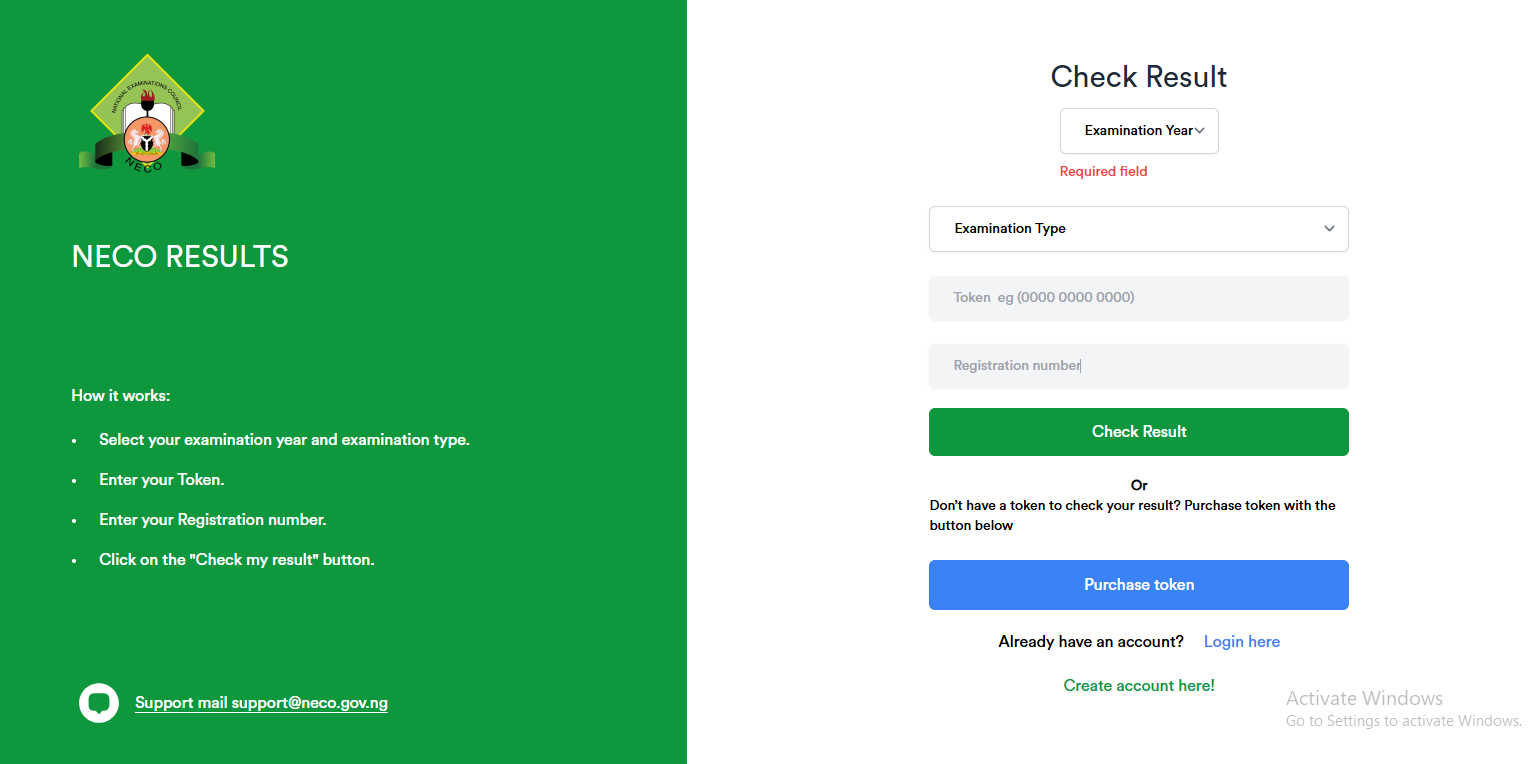
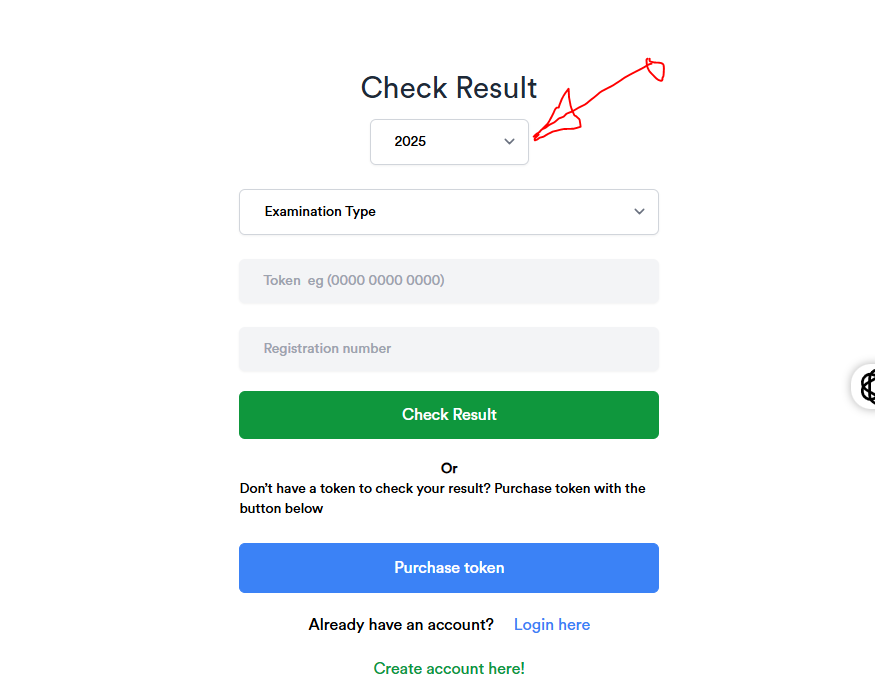
Select Exam Year (2025) by clicking on the examination year under the check result section and a dropdown menu will appear.
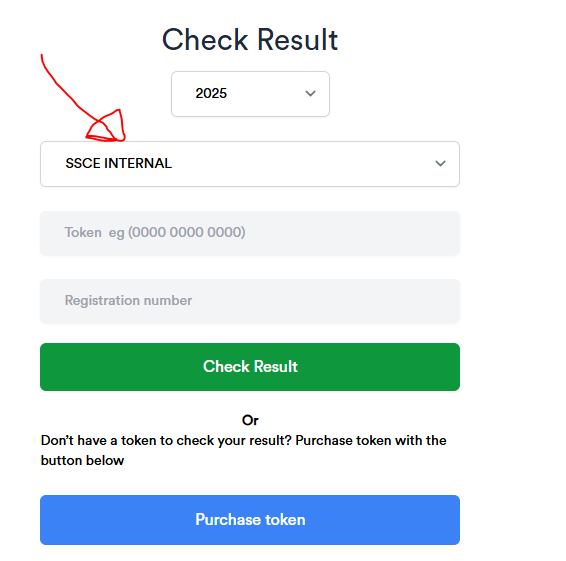
Choose Exam Type (SSCE Internal for June/July or SSCE External for Nov/Dec).
Input your Result Token Number (PIN) in the space provided.
Enter your Registration Number in the space provided.
Lastly, click “Check Result.”

Your result will be displayed. Print or screenshot it immediately for safekeeping.
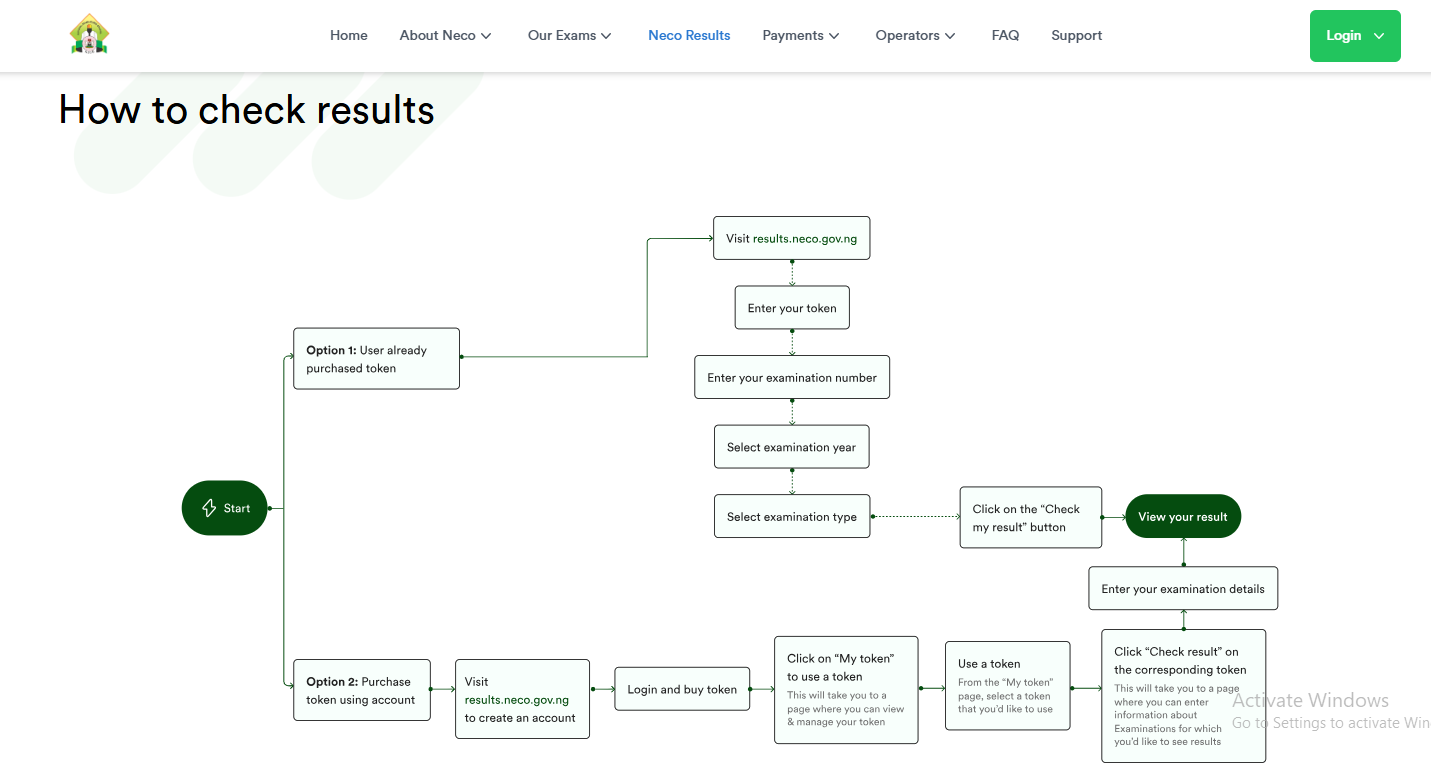
Interestingly, if you don’t have a token to check your result, you can easily purchase token the NECO 2025 RESULT CHECKER page. Follow the steps provided below to figure out how to purchase NECO result checker token.
How To Purchase/Buy NECO Result Token Number (PIN)
The steps involved in checking your Result Token Number (PIN) on www.result.neco.gov.ng is pretty simple and easy.
First off, you will need to visit www.result.neco.gov.ng
Next, locate and click on the Purchase Token button. See the screenshot below for guide.

Next, you will need to enter your email address and password in the spaces provided.
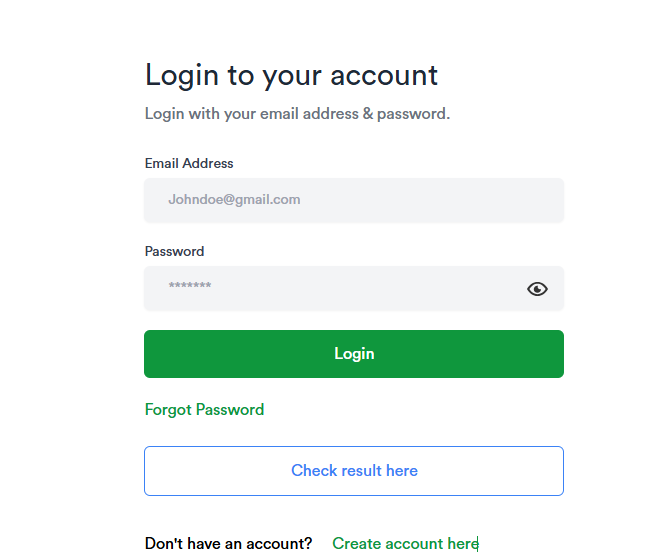
Lastly, click on the login button to proceed to your profile account.
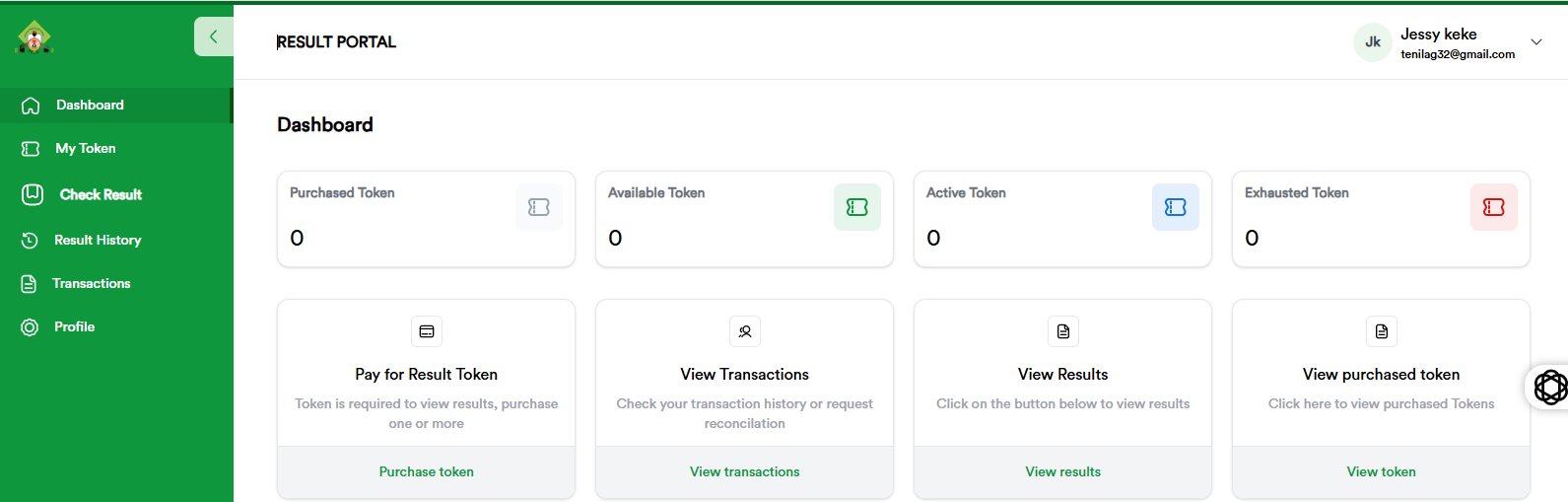
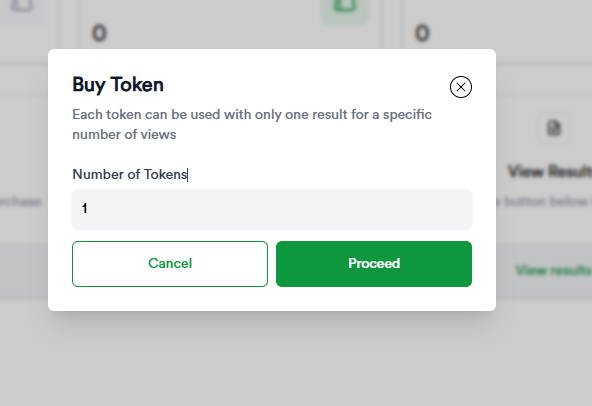
Afterward, locate and click on the Pay for Result Token option and a popup will appear like the one below. Enter the number of token you need and then click on the proceed button.
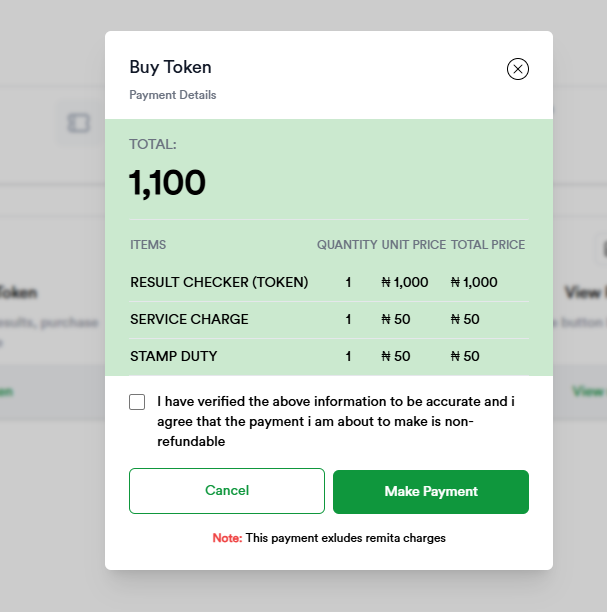
Next, tick on the small box next to “I have verified the above information to be accurate and i agree that the payment i am about to make is non-refundable” and then click on the make payment button. See the screenshot below.
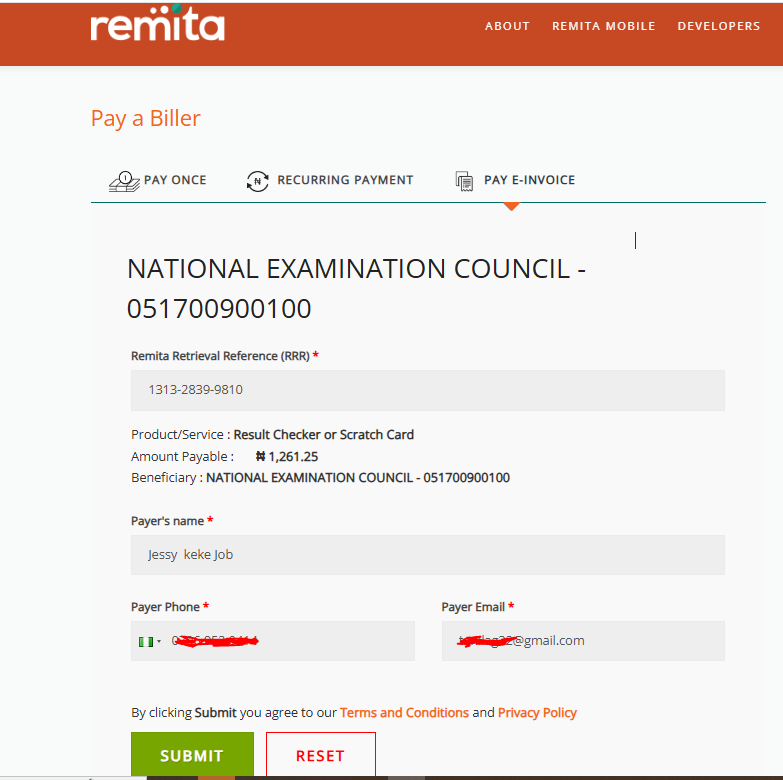
Once you are done with the above steps, you will be taken to a payment gateway. Wait a little for the page to finish loading and then check to ensure that your details are correctly written. Click on the submit button to proceed.
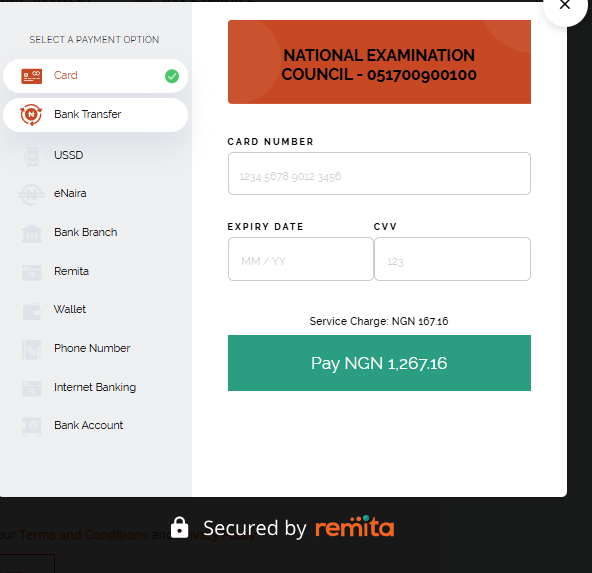
On the next popup, you will need to enter your card details in the spaces provided and then click on the Pay NGN1267.16 and authorized the transaction.
Once you are done with the above steps, your token will be sent to your email and SMS.
You can always access your token on your dashboard. You can get that done by logging into your account using your email and password and then click on the view purchased token option.
How To Create Account On NECO Result Checker Page
If on the other hand, you don’t have an account, you will need to create one for yourself to proceed. Here is a quick guide on how to create a profile account on NECO result check 2026 portal.
Visit the NECO result check portal via www.result.neco.gov.ng
Next, locate and click on the Create Account Here! at the bottom right of the page. See a screenshot below.
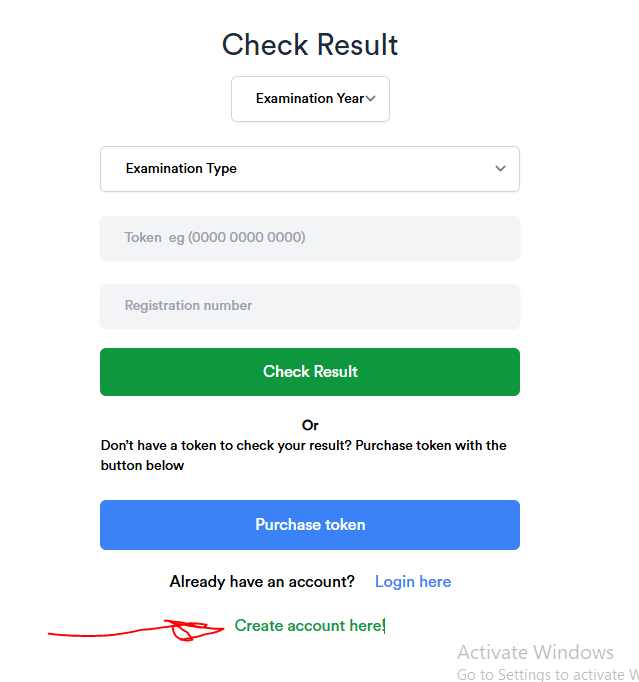
Once you are done with the above steps, you will be taken to another page. Now, yo will need to follow out the account registration form accordingly.
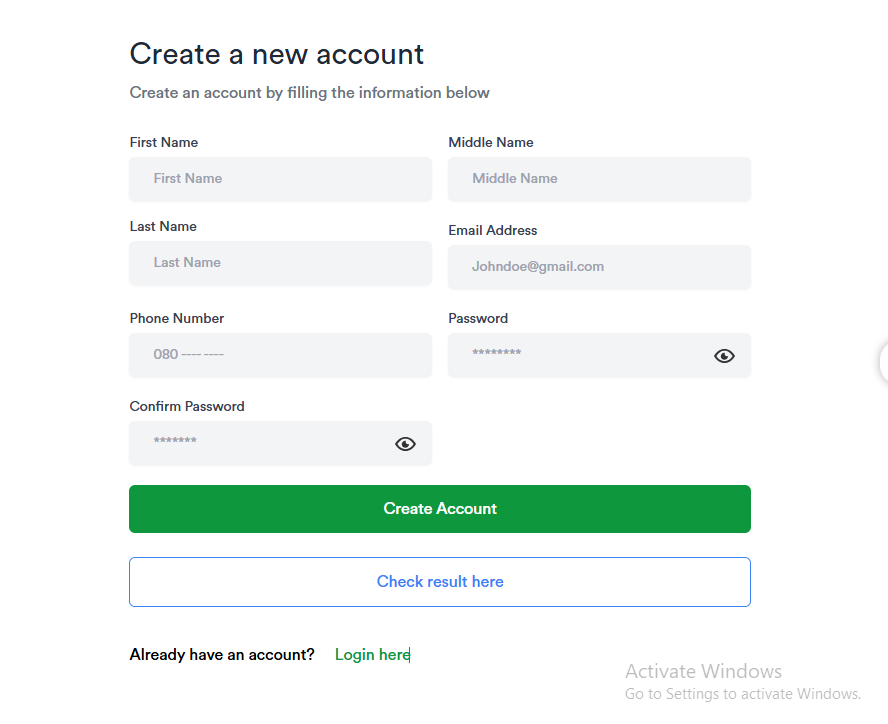
Next, click on the Create Account Button and you are ready to go. Interestingly, you will get a message like the one below. Click on the Go to Login to proceed with accessing your created account.
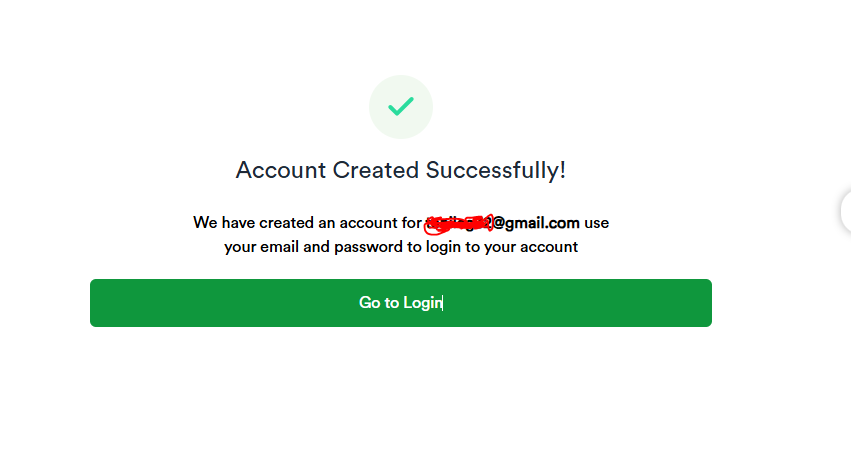
Now, enter your email and password in the spaces provided.
Now, click on the login button and you will be taken to your profile account.
Tip: Use Google Chrome or Firefox for best performance.
How To Check NECO Result Via SMS (Offline Method)
For candidates without internet access, NECO also provides an SMS option (which is always activated every examination year). The format is usually:
Send it to the designated NECO short code (often 55019 or as announced that year).
-
Example:
NECO*12345678AB*123456789012*2025 -
Cost: ₦30–₦50 per SMS.
-
You will receive your grades directly on your phone.
Always confirm the official code on the NECO website or trusted newspapers before sending SMS.
Common Errors and How To Fix Them
Students sometimes encounter issues while checking results. Here are common problems and solutions:
-
Invalid PIN/Token: Ensure the token is correctly typed. Each token is 12 digits.
-
Portal Not Loading: Try again at off-peak hours (early morning or late night).
-
Wrong Exam Year/Type: Double-check if you selected June/July SSCE or Nov/Dec GCE.
-
Lost Token: Buy a new one from the NECO office or accredited vendor.
Where To Buy NECO Result Checker Token (Scratch Card)
You can purchase NECO tokens from:
-
NECO State Offices nationwide.
-
Accredited Online Vendors – many allow you to pay online and receive the token instantly via email or SMS.
-
Banks and Authorized Dealers.
Price (2025): ₦1,100 Avoid suspicious sellers offering cheap tokens. Below is a break down of the charges.
Can I Check NECO Result Without Scratch Card or Token?
No. The token (PIN) is compulsory for checking results. Without it, you cannot access the portal.
Also read: What Are the Best Ways to Prepare for NECO Without Relying on Expo?
If you lose yours, simply buy another one. Each token can only be used for one candidate’s result (up to five times).
NECO Grading System Explained
Like WAEC, NECO uses a grading scale from A1 to F9. Here’s the breakdown:
| Grade | Score Range (%) | Interpretation |
|---|---|---|
| A1 | 75 – 100 | Excellent |
| B2 | 70 – 74 | Very Good |
| B3 | 65 – 69 | Good |
| C4 | 60 – 64 | Credit |
| C5 | 55 – 59 | Credit |
| C6 | 50 – 54 | Credit |
| D7 | 45 – 49 | Pass |
| E8 | 40 – 44 | Pass |
| F9 | 0 – 39 | Fail |
Key subjects: Passing English and Mathematics is compulsory for most Nigerian university admissions.
FAQs on NECO Result Checker 2026
Q1: Is NECO 2025 result out?
Yes. The results were released on Wednesday, 17th September 2025. Always confirm via the official NECO portal.
Q2: How many times can I use one token?
A token can be used five times for the same candidate only.
Q3: Can I check multiple results with one token?
No. Each candidate needs their own unique token.
Q4: How do I print my result?
After checking online, click the Print Result button. You can also save it as PDF.
Q5: Does NECO result expire for admission?
No. NECO results do not expire. However, universities may request recent sitting results for certain programs.
Final Tips for Students After Checking NECO Result
-
If you failed one or two subjects: You can register for the NECO GCE (Nov/Dec) to make up.
-
If awaiting result for JAMB: Quickly upload your result to the JAMB CAPS portal once released.
-
For university admission: Prioritize schools that accept NECO results directly.
Remember, one exam does not define your future. Many successful Nigerians had setbacks but later excelled. Stay focused and keep improving.
Conclusion
The NECO Result Checker 2025 makes it easy for candidates to check results online or via SMS. By preparing your exam number, token, and correct details, you can avoid common errors and access your grades instantly.
Bookmark the NECO portal (www.result.neco.gov.ng) for updates.
Subscribe to admission alerts to avoid missing deadlines.
Read our related guide: [How to Upload NECO Result on JAMB Portal].
Your journey does not end with NECO. With determination, you can move from result checking to securing admission, scholarships, and a bright future.