Every admission season in Nigeria, thousands of students encounter avoidable problems while trying to use the JAMB portal. Some candidates struggle with login failures, others mistakenly upload wrong details, while many panic after seeing CAPS errors or payment problems during registration and admission processing.
For first-time candidates especially, the JAMB portal can feel confusing and stressful.
A small mistake during registration or admission processing may later affect UTME participation, CAPS admission status, correction of data, or even final admission into a university, polytechnic, or college of education.
Unfortunately, many students do not fully understand how the JAMB portal works before using it.
As a result, they rush important steps, trust unofficial websites, forget login details, or ignore critical updates that later create serious problems.
The good news is that most JAMB portal mistakes are avoidable and fixable.
This detailed pillar guide explains the common mistakes students make when using the JAMB portal, why these problems happen, how to avoid them, and the best practical solutions Nigerian students can use to protect their admission chances.
Whether you are preparing for UTME registration, checking CAPS admission status, correcting data, or monitoring results online, this guide will help you use the JAMB portal more confidently and safely.
What Is the JAMB Portal and Why Is It Important?
Meaning of the JAMB Portal
The JAMB portal is the official online platform created by the Joint Admissions and Matriculation Board for managing student registration, admission processing, CAPS access, and other UTME-related services.
It serves as the main digital platform where Nigerian students interact with JAMB during the admission process.
Instead of visiting physical offices repeatedly, candidates can perform many activities online through the JAMB online portal.
What Students Use the Portal For
The JAMB candidate portal is extremely important because students use it for several activities, including:
- UTME registration
- Printing examination slips
- CAPS access
- Admission status checking
- Result checking
- Correction of data
- Change of institution
- Change of course
- O’Level uploads
- Profile management
Because the portal handles sensitive student information, mistakes can create serious admission problems later.
Why Portal Mistakes Can Affect Admission
Many students underestimate the importance of careful portal usage.
However, wrong updates or failed processing can affect:
- Admission eligibility
- CAPS approval
- Result verification
- Institution screening
- Scholarship applications
- NYSC processing later
Even small errors like wrong names or incorrect email addresses may create long-term complications.
This is why students must understand how to avoid JAMB portal mistakes early.
Most Common JAMB Portal Mistakes Students Make
Many students across Nigeria repeat the same JAMB portal errors every year.
Understanding these common mistakes can help candidates avoid unnecessary stress.
Using the Wrong Email Address
One of the most common JAMB portal mistakes is entering the wrong email address during registration.
This creates several problems because the email becomes connected to:
- JAMB portal login
- CAPS access
- Password recovery
- Admission notifications
- Profile updates
Some students accidentally:
- Misspell their email
- Use inactive emails
- Forget which email was used
- Use someone else’s email address
A wrong email can lock students out of their JAMB accounts completely.
Always verify your email carefully before submission.
Forgetting Login Credentials
Many students forget their passwords shortly after registration.
Poor password management creates:
- JAMB portal login failed errors
- Delayed admission access
- CAPS login problems
- Password recovery stress
Some candidates also use weak passwords they cannot remember later.
Students should save login details safely in notebooks or password managers.
Using Fake or Unofficial JAMB Websites
Fake JAMB websites remain one of the biggest dangers Nigerian students face online.
Some unofficial sites imitate the real portal and collect:
- Student passwords
- Email addresses
- Payment information
- Registration details
Many students searching “JAMB portal login” on Google accidentally visit fake platforms.
Always confirm official portal URLs carefully before logging in.
Ignoring Desktop Mode on Mobile Phones
A major CAPS-related mistake students make is using mobile browsers without enabling desktop mode.
This often causes:
- CAPS display problems
- Missing admission buttons
- Loading issues
- Incomplete dashboard display
Desktop mode improves compatibility significantly.
Entering Wrong Biodata
Many students mistakenly enter incorrect biodata such as:
- Wrong date of birth
- Incorrect names
- Wrong gender
- Wrong state or local government
These errors later create:
- Verification issues
- Admission screening problems
- Correction expenses
Students should always double-check biodata carefully before submission.
Uploading Incorrect Documents
Some students upload:
- Wrong O’Level results
- Incomplete documents
- Incorrect certificates
This creates admission processing delays.
O’Level upload mistakes are especially common among first-time candidates.
Multiple Login Attempts During Downtime
When the portal becomes slow, many students repeatedly attempt login aggressively.
This may trigger temporary restrictions or worsen loading issues.
Patience is important during heavy traffic periods.
Common JAMB Portal Login Problems Students Face
Many students experience login-related JAMB portal problems yearly.
Invalid Email or Password Error
This happens when:
- Wrong credentials are entered
- Students forget passwords
- Incorrect email spelling occurs
Typing errors are extremely common.
Portal Refusing to Open
Many students complain that the JAMB portal is not opening.
Possible causes include:
- Server congestion
- Browser problems
- Weak internet
- Maintenance periods
This usually becomes worse during admission season.
Endless Loading Problem
Some users experience portal loading issues where pages refuse to finish loading.
This often happens because of:
- Poor internet connection
- Heavy server traffic
- Corrupted browser cache
Login Redirect Loops
Some students encounter repeated redirect loops after login.
This may happen because of:
- Browser conflicts
- Cache problems
- Unsupported mobile browsers
Access Denied Error
Access denied errors usually happen because of:
- Temporary server restrictions
- Browser compatibility problems
- Multiple failed login attempts
Mistakes Students Make During JAMB Registration on the Portal
Registration mistakes remain one of the biggest causes of admission problems in Nigeria.
Wrong Subject Combination
Wrong JAMB subject combination mistakes affect thousands of candidates yearly.
Examples include:
- Medicine candidates missing Biology
- Law candidates ignoring Literature
- Engineering students replacing Physics incorrectly
Wrong subject combinations may make students ineligible for their chosen course.
Incorrect Institution Selection
Some students mistakenly select:
- Wrong university
- Wrong polytechnic
- Incorrect institution category
This often happens during rushed registration.
Wrong Course Choice
Many candidates choose courses without understanding admission requirements.
Some simply follow friends blindly instead of researching carefully.
Wrong Phone Number Entry
Phone numbers are important for:
- OTP verification
- Profile code generation
- Portal recovery
Using incorrect phone numbers creates future access problems.
Failure to Verify Information Before Submission
Many students leave CBT centres without checking final printouts properly. Also read: List of JAMB Prohibited Items in the Exam Hall & Biometric Verification Instructions 2026
Always review:
- Names
- Subjects
- Institution
- Course
- Phone number
before final submission.
CAPS-Related Mistakes Students Make
CAPS mistakes remain one of the most searched JAMB problems online. Also read: CAPS Login Problems – JAMB CAPS Login Error | JAMB CAPS Login Problems & Fixes
Not Checking CAPS Regularly
Some students ignore CAPS completely until admission deadlines approach.
Regular monitoring is important during admission season.
Ignoring Admission Transfer Notifications
JAMB sometimes recommends admission transfers.
Ignoring these notifications may reduce admission opportunities.
Delaying Admission Acceptance
Some students delay admission acceptance unnecessarily.
This may create confusion later.
Failing to Use Desktop Mode
CAPS works better in desktop mode.
Students who ignore this often experience loading issues.
Confusing “Not Admitted” With Rejection
Many candidates panic immediately after seeing:
“Not Admitted”
This does not always mean permanent rejection.
Institutions may still be processing admissions gradually.
Mistakes Students Make While Checking JAMB Results
Using Wrong Registration Number
Simple typing errors often prevent successful result checking.
Using Fake Result Checking Websites
Fake result portals remain common online.
Students should avoid unofficial websites completely.
Repeated Refresh During Server Downtime
Aggressive refreshing may worsen portal performance.
Panic During Temporary Result Delays
Temporary result delays are normal during high-traffic periods.
Students should remain calm.
Common Payment Mistakes on the JAMB Portal
Payment-related errors create major frustration for students. Also read: Complete Guide to JAMB Portal Problems and Fixes
Making Multiple Payments
Some candidates panic during payment delays and pay repeatedly.
This creates unnecessary financial problems.
Using Wrong Remita Details
Incorrect Remita details often lead to failed payment verification.
Students should verify all payment information carefully.
Paying Through Unverified Agents
Many fake agents scam students yearly.
Always use accredited CBT centres or official channels.
Ignoring Payment Confirmation
Students should always save:
- Payment receipts
- Transaction screenshots
- Remita references
These records help during disputes.
Technical Mistakes That Cause JAMB Portal Problems
Using Outdated Browsers
Old browsers often create compatibility issues.
Recommended browsers include:
- Chrome
- Firefox
- Edge
Poor Internet Connection
Weak internet causes:
- Loading problems
- Failed submissions
- Interrupted processing
Corrupted Browser Cache
Corrupted cache files may interfere with portal performance.
Clearing browser cache often helps.
Unsupported Mobile Browsers
Some lightweight browsers do not support JAMB systems properly.
Opening Too Many Portal Tabs
Multiple tabs may confuse portal sessions and trigger errors.
How Students Can Avoid JAMB Portal Mistakes
Use Official JAMB Websites Only
Always verify portal links carefully before login. Also read: Common JAMB Portal Problems and Solutions | Complete Guide to JAMB Portal Problems and Fixes
Keep Login Details Safe
Students should save:
- Email addresses
- Passwords
- Registration numbers
securely.
Double-Check Every Submission
Never rush submission processes.
Review all information carefully.
Use Updated Browsers
Modern browsers improve compatibility significantly.
Register Early to Avoid Pressure
Late registration periods increase stress and mistakes.
What to Do If You Already Made a JAMB Portal Mistake
How to Recover Forgotten Passwords
Students can use official password recovery options.
Avoid unofficial recovery agents.
How to Correct Biodata Errors
JAMB allows certain correction procedures during approved periods.
How to Fix Wrong Course or Institution
Course and institution changes are possible after registration. Also read: Wrong JAMB Subject Combination 2026: Mistakes That Can Cost You Admission
How to Resolve Payment Problems
Students should keep payment evidence and contact official support if necessary.
How to Contact JAMB Support
Official JAMB support channels remain safer than random online helpers. Also read: JAMB Support Contact – JAMB Help Centre | JAMB Complaint Solution
Difference Between Temporary Portal Issues and Serious Problems
Temporary Server Downtime
Heavy traffic periods may temporarily slow the portal.
Heavy Traffic During Admission Season
Admission periods increase server congestion nationwide.
Incorrect Student Information
Some errors are student-specific rather than server-wide.
Account-Specific Errors
Wrong credentials may affect only individual accounts.
Important JAMB Portal Safety Tips
Avoid Cyber Café Scams
Some café operators exploit inexperienced students.
Always monitor your registration personally.
Never Share Passwords Publicly
Protect your login details carefully.
Verify Portal URLs Carefully
Fake websites remain a major security risk. Always use the JAMB official website https://efacility.jamb.gov.ng/
Keep Screenshots and Receipts
Evidence helps during complaints or corrections.
Avoid Random Social Media “Helpers”
Many fake online helpers target desperate students.
Best CBT Apps for JAMB Preparation
Why CBT Practice Is Important
CBT familiarity improves:
- Speed
- Accuracy
- Confidence
- Time management
Students who practice regularly often perform better during UTME.
Recommended CBT Platform
JambSmartPrep CBT App
JambSmartPrep CBT App helps Nigerian students prepare effectively for CBT examinations.
Features include:
- CBT practice questions
- Mock exams
- Subject-by-subject revision
- Performance tracking
- Real JAMB CBT simulation
Regular practice improves confidence significantly before examination day.
Frequently Asked Questions About JAMB Portal Problems
Why Is the JAMB Portal Not Opening?
Possible causes include server congestion, weak internet, browser issues, or maintenance downtime.
Why Does My JAMB Login Keep Failing?
Wrong email or password errors remain the most common causes.
Can I Access JAMB CAPS on My Phone?
Yes. However, enabling desktop mode improves functionality significantly.
How Do I Correct Wrong Information on the Portal?
Students can apply for approved correction procedures through official channels.
What Happens If I Make a Portal Mistake?
Some mistakes are minor and fixable, while others may affect admission processing seriously.
What Is the Official JAMB Portal Website?
Students should verify official JAMB URLs carefully before login. The JAMB official website is https://efacility.jamb.gov.ng/
Can Browser Cache Affect JAMB Portal Login?
Yes. Corrupted cache files may interfere with portal performance.
Why Does JAMB Portal Work Better at Night?
Late-night browsing often reduces server congestion.
Can CBT Centres Help With Portal Problems?
Yes. Accredited CBT centres can assist with many technical issues.
How Long Does JAMB Portal Downtime Last?
Downtime may last minutes or several hours depending on traffic or maintenance.
Common JAMB Portal Mistakes and How to Avoid Them
Include:
- Login errors
- CAPS mistakes
- Registration problems
- Payment issues
- Portal safety tips
- Best CBT preparation platform:
- JambSmartPrep CBT App
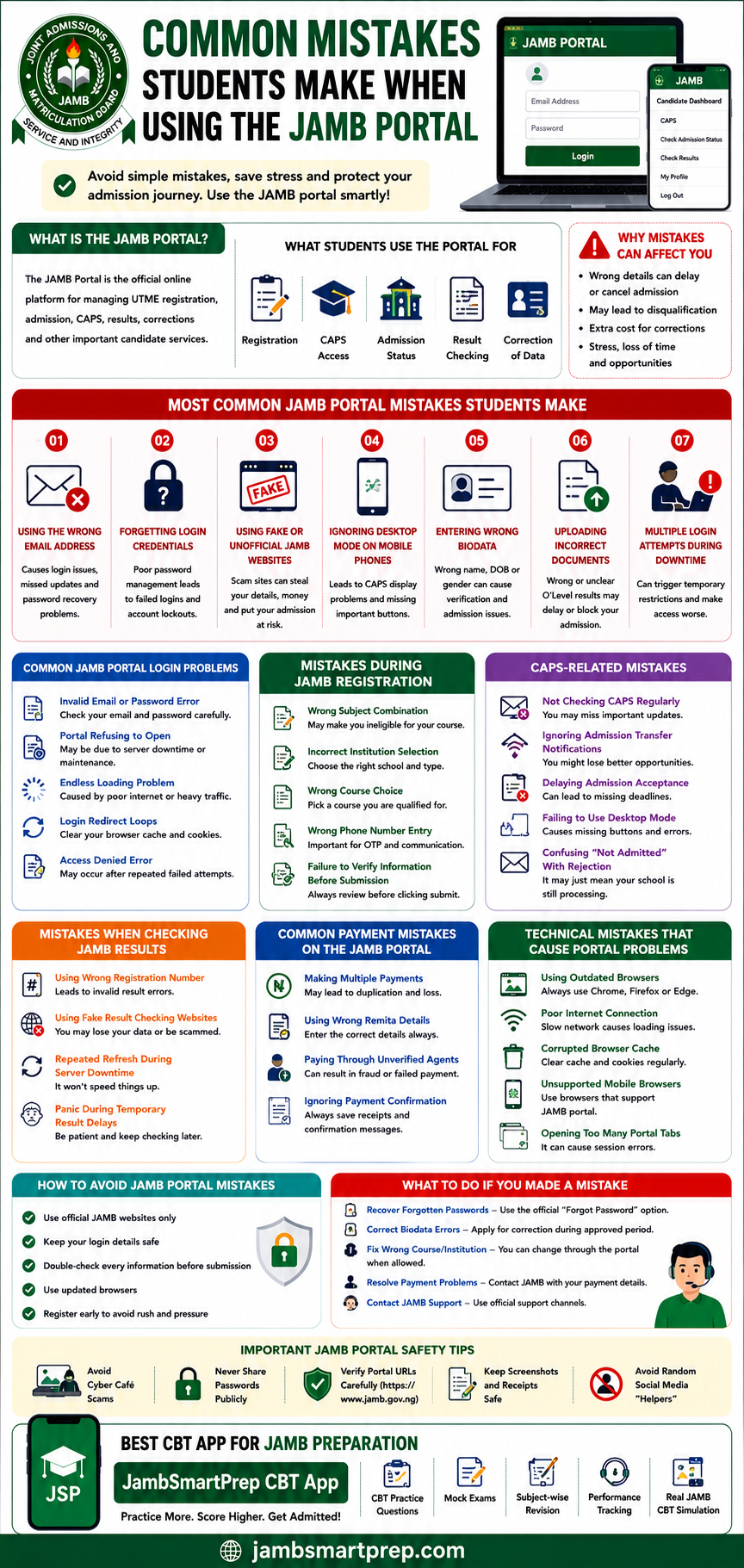
Important Links
- CAPS Login Problems and Fixes
- How to Fix JAMB Portal Login Problems
- Common JAMB Registration Mistakes
- JAMB Support Contact Guide
- How to Check JAMB Result Online
- Best CBT Apps for JAMB Preparation
Conclusion
Many JAMB portal mistakes are common and fixable, especially when students understand how the portal works before rushing important updates or registration processes.
Students should remain patient during admission and registration periods because heavy traffic often affects portal performance temporarily.
It is also important to use only official JAMB platforms and accredited CBT centres to avoid scams and incorrect processing.
Before submitting any portal updates, candidates should carefully review every detail to prevent avoidable errors later.
If you found this guide helpful, consider sharing your JAMB portal experiences or lessons you learned during registration or admission processing.
You can also explore related admission guides and portal troubleshooting resources to improve your understanding of the Nigerian admission system further.
For stronger CBT confidence and better UTME preparation, students should practice regularly using the JambSmartPrep CBT App before examination day.
