
Hey there, welcome to your one stop online platform. In today’s post, we will be treating how to fix NIN errors during NECO registration process. Thus, if you are looking for a straight to the point article on NIN Errors In NECO Registration 2026, you are in the right place.
Yes, during the course of this guide, you will learn how to fix NIN errors during NECO registration, including name mismatch, date of birth errors, NIN verification issues, and validation problems.
As we all know, registering for the National Examinations Council (NECO) examination should be a straightforward process. However, many candidates encounter unexpected NIN verification errors that prevent them from completing their registration successfully.
Some candidates discover that their National Identification Number (NIN) cannot be verified, while others receive frustrating messages such as “Invalid NIN,” “Name Mismatch,” “Unable to Retrieve NIN Details,” or “Validation Failed.” These problems often leave students wondering whether they will miss the NECO registration deadline.
Fortunately, most NECO registration NIN problems can be resolved without starting the registration process all over again. In many cases, the issue is caused by incorrect information in the National Identity Management Commission (NIMC) database, typing mistakes, outdated personal records, or temporary server problems.
If you are experiencing any of these issues, there is no need to panic.
This comprehensive guide explains everything you need to know about NIN Errors In NECO Registration 2026, including why they happen, how to correct them, where to seek assistance, and practical tips to ensure your registration is completed successfully before the deadline.
Whether your problem involves a NIN mismatch, NECO biometric verification, invalid NIN, date of birth mismatch, or portal validation error, this article provides step-by-step solutions based on official registration procedures.
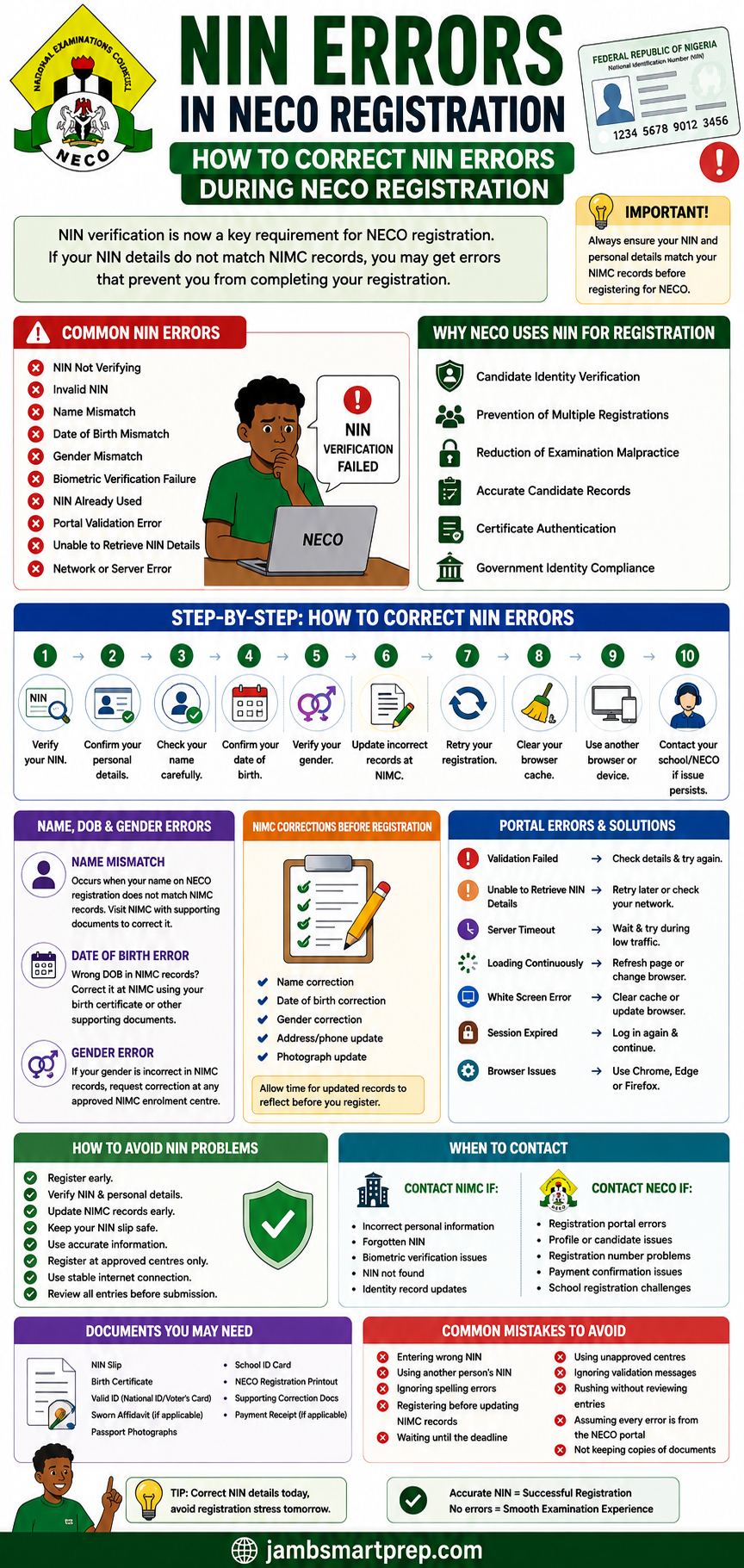
NIN Errors During NECO Registration
Common NIN Errors
- NIN Not Verifying
- Invalid NIN
- Name Mismatch
- Date of Birth Mismatch
- Gender Mismatch
- Biometric Verification Failure
- Portal Validation Error
- Unable to Retrieve NIN Details
- Network or Server Error
⬇
How to Fix Them
✔ Verify your NIN carefully.
✔ Confirm your personal details.
✔ Update incorrect records at NIMC.
✔ Retry registration after corrections.
✔ Use the correct browser and stable internet connection.
✔ Contact your school or NECO if the issue persists.
⬇
Before Registering
- Verify your NIN.
- Confirm your name matches your NIN records.
- Check your date of birth.
- Ensure your gender is correct.
- Register only at approved centres.
- Complete registration before the deadline.
Helpful Tip: Correcting your NIN details before starting NECO registration is much easier than trying to fix mistakes after your registration has been completed.
Understanding NIN Errors During NECO Registration
Before learning how to solve these problems, it is important to understand why they occur.
A NIN error during NECO registration simply means that the information supplied during registration does not match or cannot be verified against the records maintained by the National Identity Management Commission (NIMC).
Since NECO relies on NIN verification to confirm a candidate’s identity, any inconsistency between the registration details and the NIMC database may interrupt the registration process.
These errors can affect both first-time candidates and returning candidates.
What Is NIN Verification?
NIN verification is the process of confirming that the National Identification Number entered during registration belongs to the candidate and matches the information stored in the NIMC database.
During verification, the system checks details such as:
- Full name
- Date of birth
- Gender
- NIN status
- Identity information
If all records correspond correctly, registration proceeds normally.
If not, the system generates an error message.
Why NECO Requests Your NIN
The introduction of NIN into examination registration has made candidate identification more reliable.
Rather than depending solely on manually entered information, NECO can confirm a candidate’s identity using an officially recognized national database.
This reduces the likelihood of identity-related mistakes during registration.
How NIN Is Linked to Candidate Records
When you provide your NIN during registration, your personal information is compared with your NIMC record.
The registration system attempts to verify that:
- Your name matches.
- Your date of birth is correct.
- Your gender corresponds with official records.
- Your NIN is valid.
- Your identity information is complete.
If any of these checks fail, registration may not continue until the issue is resolved.
Why Accurate NIN Information Is Important
Providing accurate NIN information helps ensure that:
- Your registration is completed successfully.
- Your examination records are correctly linked.
- Future result verification becomes easier.
- Certificate information remains consistent.
- Identity disputes are minimized.
For this reason, candidates should never ignore NIN-related warnings during registration.
Why NECO Uses NIN for Registration
Many candidates wonder why NECO now places so much importance on the National Identification Number during registration.
The reason is simple. NIN has become one of Nigeria’s primary means of verifying identity across various government services, including education.
Using NIN during NECO registration helps improve the accuracy and security of candidate records.
Candidate Identity Verification
The primary purpose of NIN verification is to ensure that every registered candidate can be properly identified.
This reduces the possibility of mistaken identity during examination registration and result processing.
Prevention of Multiple Registrations
Using NIN helps discourage candidates from attempting multiple registrations under different identities.
Each candidate is expected to register using their own valid National Identification Number.
Reduction of Examination Malpractice
Proper identification makes it more difficult for impersonators to register or sit examinations on behalf of another candidate.
This strengthens the integrity of the examination process.
Accurate Candidate Records
When registration details match NIMC records, NECO can maintain more accurate candidate information.
This reduces errors involving:
- Candidate names
- Gender
- Date of birth
- Identity records
Accurate records are particularly important when issuing certificates and verifying examination results.
Certificate Authentication
Correct identity information helps ensure that certificates issued after the examination correspond to the correct candidate.
This minimizes future correction requests.
Government Identity Compliance
The increasing use of NIN across government institutions supports efforts to standardize identity verification nationwide.
Educational examination bodies are part of this broader initiative.
Common NIN Errors During NECO Registration
Understanding the most common errors makes troubleshooting much easier.
Below are the problems candidates frequently encounter while registering for NECO.
NIN Not Verifying
This is perhaps the most common complaint.
Instead of confirming your identity, the portal simply indicates that your NIN cannot be verified.
Possible causes include:
- Incorrect NIN entry
- Temporary server issues
- Incomplete NIMC records
- Poor internet connection
- Delayed synchronization between systems
Invalid NIN
An invalid NIN message usually means the number entered cannot be recognized by the verification system.
Possible reasons include:
- Typographical errors
- Incorrect digits
- Inactive enrollment
- Wrong NIN entered
Always compare the number entered with your official NIN slip before trying again.
Name Mismatch
Sometimes the name entered during NECO registration differs from the name stored in the NIMC database.
Examples include:
- Missing middle name
- Different surname spelling
- Swapped first and last names
- Abbreviated names
Even small spelling differences may interrupt verification.
Date of Birth Mismatch
Your date of birth must correspond with your NIMC records.
Differences often occur because:
- Incorrect information was provided during NIN enrollment.
- Errors were made during NECO registration.
- Supporting documents contained conflicting dates.
Gender Mismatch
Although less common, differences between the gender entered during registration and your NIMC record can also trigger validation errors.
Candidates should verify this information before submitting their registration.
Biometric Verification Failure
Some candidates experience biometric-related verification problems.
Possible causes include:
- Poor fingerprint capture
- Incomplete biometric enrollment
- Fingerprint recognition failure
- Temporary device issues
These problems usually require further verification or biometric updates.
NIN Already Used Error
Occasionally, candidates may receive a message suggesting that the NIN has already been associated with another registration.
This should be investigated immediately through the appropriate registration authorities.
Portal Validation Error
General validation errors often indicate that one or more pieces of information failed the system’s verification checks.
Reading the exact error message carefully often provides clues about the source of the problem.
Unable to Retrieve NIN Details
This message usually indicates that the portal cannot access your NIMC information at that moment.
Possible causes include:
- Temporary NIMC server downtime
- Network interruptions
- Heavy system traffic
- Maintenance activities
Trying again later often resolves the issue.
Network or Server Errors
Not every problem originates from your NIN.
Sometimes the registration portal itself experiences:
- Slow loading
- Server overload
- Session timeouts
- Temporary maintenance
Waiting until traffic reduces may solve these problems without further action.
Why NIN Verification Fails on the NECO Registration Portal
Many candidates assume that every verification failure means their NIN is invalid.
In reality, several different factors can prevent successful verification.
Understanding these causes helps you choose the correct solution instead of making unnecessary corrections.
Incorrect NIN Entry
The simplest explanation is often the correct one.
Entering one incorrect digit is enough to prevent successful verification.
Always compare your NIN with your official NIN slip before submitting it.
Typographical Errors
Typing mistakes involving:
- Names
- Examination details
- NIN digits
can all trigger verification failures.
Double-check every entry carefully.
Incomplete NIN Enrollment
Candidates who have not completed all stages of NIMC enrollment may experience verification problems because their records are not yet fully available.
Outdated NIMC Records
If your personal information has changed but your NIMC record has not been updated, verification may fail.
This commonly affects:
- Name corrections
- Date of birth updates
- Gender corrections
Poor Internet Connection
Unstable internet connections can interrupt communication between the NECO registration portal and the verification system.
Always use a reliable internet connection during registration.
Temporary NIMC Server Downtime
High demand or scheduled maintenance may temporarily affect NIMC verification services.
Waiting and trying again later often resolves the issue.
NECO Portal Maintenance
The NECO registration portal occasionally undergoes updates or maintenance.
During these periods, verification services may be temporarily unavailable.
Browser Issues
Outdated browsers, corrupted cache files, or incompatible browser settings can also interfere with registration.
If problems continue, try:
- Clearing your browser cache.
- Updating your browser.
- Using another browser.
- Switching to another device.
Step-by-Step Guide to Correct NIN Errors During NECO Registration
If your NECO registration is interrupted because of a NIN-related error, do not rush to start the registration again or assume your NIN is invalid. Most verification problems can be resolved by following the correct procedure.
The steps below will help you identify the source of the problem and complete your registration successfully.
Step 1: Verify Your NIN
The first thing to do is confirm that the National Identification Number you entered is correct.
Check your NIN against your official:
- NIN Slip
- NIN Printout
- NIMC Mobile ID (where applicable)
Pay close attention to every digit.
Even one incorrect number can cause verification to fail.
Step 2: Confirm Your Personal Details
Compare the information you entered during NECO registration with your NIMC records.
Verify that the following details match exactly:
- Full name
- Date of birth
- Gender
Any inconsistency may trigger a validation error.
Step 3: Check Your Name Carefully
Many candidates experience verification problems because their names do not match exactly.
Examples include:
- Missing middle name
- Wrong surname spelling
- Abbreviated names
- Different order of names
For example:
NIMC Record
Michael Jude Okeke
NECO Registration
Michael Okeke
Although both names belong to the same person, the system may detect a mismatch.
Always use the official name appearing on your NIMC record.
Step 4: Confirm Your Date of Birth
Your date of birth must match your NIMC record exactly.
Many candidates accidentally enter:
- Wrong day
- Wrong month
- Wrong year
If your NIMC record itself contains the wrong date of birth, update it before continuing your registration.
Step 5: Verify Your Gender
Gender mismatches can also prevent successful verification.
Ensure that the gender selected during NECO registration corresponds with your NIMC record.
If necessary, update your NIMC information before attempting registration again.
Step 6: Update Incorrect NIMC Records
If your NIMC information is incorrect, visit an approved NIMC enrollment centre to request the necessary corrections.
Common updates include:
- Name correction
- Date of birth correction
- Gender correction
- Other personal information
Once the correction has been processed, wait for the updated records to reflect before attempting registration again.
Step 7: Retry Your Registration
After confirming that all your information is correct, return to the NECO registration portal and restart the verification process.
Many candidates complete registration successfully after correcting their details.
Step 8: Clear Your Browser Cache
Old browser data may interfere with verification.
Clear:
- Cache
- Cookies
- Browsing data
Then restart your browser before trying again.
Step 9: Use Another Browser or Device
If verification still fails, try another browser such as:
- Google Chrome
- Microsoft Edge
- Mozilla Firefox
You may also use another computer or mobile device.
Step 10: Contact Your School or NECO
If all verification attempts fail despite having correct information, contact:
- Your school’s examination officer
- Approved NECO registration centre
- NECO support
They can help determine whether the issue originates from the registration portal or your records.
How to Correct Name Mismatch Between NIN and NECO Registration
One of the most common registration challenges is a name mismatch.
This occurs when the name entered during NECO registration differs from the name stored in the NIMC database.
Common Causes
Examples include:
- Typographical errors
- Missing middle name
- Wrong surname
- Different arrangement of names
- Name change after NIN enrollment
Even small differences can prevent successful verification.
How to Confirm the Correct Name
Compare your registration details with your official NIMC records.
Ensure that:
- First name matches.
- Middle name matches.
- Surname matches.
- Name order is correct.
Do not guess.
Use your official NIMC record as your reference.
Required Documents for Name Correction
Where a correction is required, supporting documents may include:
- NIN Slip
- Birth Certificate
- Sworn Affidavit (where applicable)
- Valid Identification
- Supporting legal documents (where necessary)
The exact documents required depend on the type of correction being requested.
Visit an Approved NIMC Centre
Name corrections are handled through approved NIMC enrollment centres.
Candidates should avoid unauthorized agents who promise quick corrections.
Wait for Records to Update
After your correction request has been processed, allow sufficient time for the updated information to reflect in the database before attempting NECO registration again.
How to Correct Date of Birth Errors
An incorrect date of birth is another common reason why NIN verification fails.
Why Date of Birth Errors Occur
Possible reasons include:
- Wrong information supplied during NIN enrollment.
- Mistakes during NECO registration.
- Incorrect supporting documents.
- Data entry errors.
Why You Should Correct It Early
Waiting until the NECO registration deadline may create unnecessary pressure.
Candidates should update incorrect records as soon as possible.
Supporting Documents
Depending on the correction being requested, documents may include:
- Birth Certificate
- Declaration of Age
- Court Affidavit
- Other supporting documents accepted by NIMC
Correction Procedure
Visit an approved NIMC centre and request a date of birth update following the official procedure.
Once the correction is completed, verify that the updated information appears correctly before restarting your registration.
How to Correct Gender Errors
Although less common, gender mismatches can interrupt the verification process.
Possible Causes
Examples include:
- Incorrect information during NIN enrollment.
- Typing mistakes.
- Data entry errors.
- Wrong gender selected during registration.
Required Documents
Depending on the circumstances, NIMC may request supporting documentation before processing corrections.
Always follow official procedures.
Retry Registration After Correction
After your gender information has been updated, return to the registration portal and repeat the verification process.
What to Do If Your NIN Is Invalid
Receiving an “Invalid NIN” message does not always mean your NIN does not exist.
Several situations may produce this error.
Check for Typing Errors
Many invalid NIN messages result from entering:
- Incorrect digits
- Extra spaces
- Missing numbers
Carefully compare your entry with your NIN Slip.
Confirm Your NIN Status
If the number is correct but still fails verification, confirm that your enrollment has been successfully completed.
Incomplete enrollment may affect verification.
Recover a Forgotten NIN
If you cannot remember your NIN, retrieve it through the official NIMC recovery methods instead of guessing.
Using the wrong NIN repeatedly may delay your registration.
Visit an Approved NIMC Centre
Where verification problems continue, visit a NIMC office for assistance.
Officials can confirm whether your NIN record is active and complete.
Biometric Verification Problems
Some candidates experience biometric-related errors during registration.
These usually involve fingerprint verification or identity confirmation.
Common Causes
Examples include:
- Poor fingerprint capture
- Incomplete biometric enrollment
- Fingerprint recognition failure
- Device malfunction
- Temporary system errors
How to Solve Biometric Problems
Possible solutions include:
- Re-capturing your fingerprints.
- Visiting a NIMC enrollment centre.
- Updating biometric records.
- Using another approved registration device.
- Trying again when the verification system is available.
When to Seek Assistance
If biometric verification continues to fail after repeated attempts, contact your registration centre or visit the nearest approved NIMC office for guidance.
Most biometric issues can be resolved through official verification procedures.
NIMC Data Correction Before NECO Registration
If your National Identification Number (NIN) contains incorrect information, it is important to correct those records before completing your NECO registration. Since the NECO registration portal verifies your details against the National Identity Management Commission (NIMC) database, any mismatch may prevent successful registration.
Updating your NIMC records early reduces the chances of registration delays and future issues with your examination records.
What Information Can Be Corrected at NIMC?
Depending on your situation, NIMC allows eligible candidates to request corrections to certain personal details.
These may include:
- Full name
- Date of birth
- Gender
- Residential address
- Phone number
- Email address
- Photograph (where applicable)
Some corrections require additional supporting documents and may attract official administrative charges.
When Should You Update Your NIN Details?
You should request corrections immediately if you notice that your NIMC records differ from the information you intend to use during NECO registration.
Examples include:
- Your surname is misspelled.
- Your middle name is missing.
- Your date of birth is incorrect.
- Your gender is wrongly recorded.
- Your phone number has changed.
Waiting until the final days of NECO registration may leave insufficient time for the updated records to reflect in the verification system.
Visit an Approved NIMC Enrolment Centre
Always process NIN corrections through an approved NIMC enrolment centre or other officially authorized service points.
Avoid unauthorized individuals who promise instant updates or unofficial modifications to NIN records.
Using unofficial channels may expose your personal information to fraud and could create additional problems during verification.
Allow Time for Data Synchronization
After NIMC approves your correction request, the updated information may not appear immediately across all government systems.
Allow reasonable processing time before attempting NECO registration again.
If the update has just been completed, waiting a short period before retrying may resolve the verification issue.
NECO Registration Portal Errors Related to NIN
Not every registration problem is caused by incorrect NIN information.
Sometimes the issue originates from the registration portal itself.
Below are some common portal-related errors and practical solutions.
Validation Failed
A validation error usually indicates that one or more of your details could not be confirmed.
Possible Causes
- Incorrect NIN
- Name mismatch
- Date of birth mismatch
- Gender mismatch
- Temporary server interruption
Possible Solutions
- Verify your personal details.
- Retry registration after confirming your NIMC information.
- Wait if the system is temporarily unavailable.
Unable to Retrieve NIN Details
This error means the registration portal cannot retrieve your NIMC record.
Possible Causes
- Temporary NIMC server downtime
- Internet interruption
- Heavy traffic
- System maintenance
What You Should Do
- Refresh the page.
- Try again after some time.
- Use a stable internet connection.
- Retry during off-peak hours.
Server Timeout
A timeout occurs when communication between the registration portal and verification servers takes too long.
Solutions
- Check your internet connection.
- Close unnecessary browser tabs.
- Retry later.
- Avoid registering during periods of heavy traffic.
Portal Loading Continuously
Some candidates experience pages that continue loading without displaying any results.
Possible reasons include:
- Browser problems
- Server congestion
- Poor network quality
Try:
- Refreshing the page.
- Restarting your browser.
- Using another browser.
- Switching to another internet connection.
White Screen Error
A blank white page may appear if the browser fails to load certain registration components.
Quick Fixes
- Clear browser cache.
- Enable JavaScript if disabled.
- Update your browser.
- Use another supported browser.
Session Expired
Registration sessions automatically expire after a period of inactivity.
When this occurs:
- Log in again if required.
- Restart the registration process.
- Save information frequently where possible.
Browser Compatibility Issues
Some browsers perform better than others when accessing online registration portals.
If problems persist, try:
- Google Chrome
- Microsoft Edge
- Mozilla Firefox
Using an updated browser often improves compatibility.
How to Avoid NIN Problems During NECO Registration
Many registration issues can be prevented through proper preparation.
The following tips will help you complete your registration smoothly.
Register Early
Do not wait until the registration deadline.
Early registration provides enough time to resolve unexpected verification issues without unnecessary pressure.
Verify Your NIN Before Registration
Confirm that your NIN is active and that all personal information is accurate before visiting the registration centre.
Update NIMC Records Early
If corrections are needed, complete them before beginning NECO registration.
This reduces delays during verification.
Keep Your NIN Slip Safe
Store your NIN slip securely because you may need it during:
- Registration
- Result verification
- Certificate collection
- Future educational applications
Use Accurate Personal Information
Always enter your details exactly as they appear on your official NIMC records.
Do not guess spellings or dates.
Register Only at Approved Centres
Approved registration centres understand NECO registration procedures and are more likely to identify problems quickly.
Avoid roadside business centres or unauthorized operators.
Use a Stable Internet Connection
Reliable internet service reduces the likelihood of interrupted verification.
Avoid unstable public networks whenever possible.
Review Every Entry Before Submission
Before submitting your registration:
- Check your NIN.
- Verify your names.
- Confirm your date of birth.
- Verify your gender.
- Review every field carefully.
Spending a few extra minutes reviewing your information can prevent days of correction work later.
When to Contact NIMC
Some registration problems can only be resolved through the National Identity Management Commission.
You should contact NIMC if your issue involves your identity records.
Examples include:
Incorrect Personal Information
If your name, date of birth, or gender is incorrect in the NIMC database, only NIMC can process the necessary corrections.
Forgotten NIN
If you cannot remember your NIN, use the official recovery process provided by NIMC instead of attempting to register with incorrect information.
Biometric Verification Failure
Persistent fingerprint or biometric issues should be reported to an approved NIMC enrolment centre.
NIN Cannot Be Found
If your NIN cannot be located despite successful enrolment, NIMC should investigate the issue.
Identity Record Updates
Changes involving personal information should always be handled through official NIMC procedures.
When to Contact NECO
Although NIMC handles identity information, some problems require assistance from NECO instead.
Contact NECO if:
Your Registration Has Already Been Completed but Contains Errors
If incorrect information appears after successful registration, seek guidance immediately.
Registration Portal Problems Continue
If repeated portal errors occur despite having accurate NIMC information, NECO may provide additional assistance.
Candidate Profile Issues
Problems involving your registration profile should be reported through the appropriate NECO registration channels.
Registration Number Problems
If your registration number cannot be generated correctly after successful registration, contact the registration centre or NECO.
Payment Confirmation Issues
Where payment has been completed but the portal fails to recognize it, retain your payment evidence and seek assistance promptly.
School Registration Challenges
Candidates registering through schools should first report issues to the school’s examination officer before escalating them to NECO where necessary.
Documents Required to Correct NIN Errors During NECO Registration
Preparing the correct documents before visiting NIMC or your registration centre can speed up the correction process.
Depending on the type of correction, you may need:
- Original NIN Slip
- Birth Certificate
- National Identification documents
- Sworn Affidavit (where applicable)
- Passport photographs
- School Identification Card
- NECO Registration Printout (if already generated)
- Supporting correction documents
- Official payment receipt (where applicable)
Always carry original documents together with photocopies if requested.
Common Mistakes Candidates Make During NECO Registration
Many NIN-related registration problems are avoidable.
Avoid these common mistakes:
- Entering the wrong NIN.
- Using another person’s NIN.
- Ignoring spelling mistakes.
- Registering before updating NIMC records.
- Waiting until the registration deadline.
- Registering through unauthorized centres.
- Ignoring validation error messages.
- Rushing through the registration form without reviewing entries.
- Assuming every error is caused by the NECO portal.
- Failing to keep copies of registration documents and payment receipts.
Avoiding these mistakes can save you time and help ensure a smooth registration process.
Frequently Asked Questions (FAQs)
Below are answers to the most frequently asked questions about NIN errors during NECO registration and how to resolve them successfully.
Why is my NIN not verifying during NECO registration?
Your NIN may fail verification for several reasons, including:
- Incorrect NIN entered
- Name mismatch
- Date of birth mismatch
- Gender mismatch
- Incomplete NIMC enrollment
- Temporary NIMC server downtime
- Poor internet connection
- NECO registration portal maintenance
Start by checking that your NIN and personal details exactly match your NIMC records.
Can I register for NECO without a NIN?
NECO registration requirements may vary depending on official registration guidelines for the examination year. Candidates should always follow the current NECO registration instructions regarding NIN and other required documents.
If NIN verification is required, complete your NIMC enrollment before attempting registration.
How do I correct my NIN details?
If your NIN information contains errors, visit an approved NIMC enrollment centre with the necessary supporting documents.
Depending on the correction required, you may need:
- Birth Certificate
- Sworn Affidavit (where applicable)
- National Identification documents
- Other supporting documents requested by NIMC
After your records are updated, wait for the changes to reflect before retrying your NECO registration.
Can I change my name after completing NECO registration?
If you discover that your name is incorrect after registration, contact your school or NECO immediately. Also read: How To Correct Name Mistakes On NECO Registration – Complete Guide 2026
The available correction process depends on the stage of your registration and NECO’s official correction policy.
The earlier the issue is reported, the easier it is to resolve.
What if my date of birth is wrong?
If the incorrect date of birth exists in your NIMC records, correct it through NIMC before attempting registration again.
If the error occurred only during NECO registration, report it promptly through the appropriate registration channel.
Can I use another person’s NIN for NECO registration?
No.
Every candidate must use their own National Identification Number.
Using another person’s NIN may lead to registration failure, identity verification problems, examination irregularities, and future certificate issues.
How long does NIMC take to process corrections?
Processing times vary depending on:
- Type of correction
- Volume of applications
- Supporting documentation
- Administrative processing
Candidates are encouraged to begin corrections well before the NECO registration deadline.
Can NECO correct NIN mistakes after registration?
Some registration-related issues may be corrected through official NECO procedures, depending on the nature of the error.
However, identity information stored by NIMC generally needs to be corrected through NIMC before corresponding NECO records can be properly verified.
Always contact your school or NECO immediately after discovering any registration error.
Will an incorrect NIN affect my NECO certificate?
Incorrect personal information during registration may lead to inconsistencies in your examination records and could create challenges during certificate processing or verification.
That is why candidates should ensure that their NIN records are accurate before completing registration.
Who should I contact if my NIN cannot be verified?
The appropriate organization depends on the nature of the problem.
Contact NIMC if the issue involves:
- Incorrect personal information
- Forgotten NIN
- Biometric verification
- Identity record updates
Contact NECO if the issue involves:
- Registration portal errors
- Registration profile issues
- Candidate records
- Registration number problems
- Registration support
Related Articles You May Find Helpful
To better understand the NECO registration process and resolve other examination-related challenges, explore these comprehensive guides:
- Complete NECO Registration Guide
- Common NECO Registration Mistakes and How to Avoid Them
- How to Correct Wrong Name During NECO Registration
- How to Correct Wrong Date of Birth During NECO Registration
- How to Correct Gender Errors During NECO Registration
- How to Resolve NECO Result Issues
- NECO Certificate Collection Guide
- NECO Result Verification Guide
- How to Recover a Lost NECO Examination Number
- NECO e-Verify Portal Guide
- How to Buy a Genuine NECO Result Checker Token
- How to Correct Errors on NECO Result
Reading these related articles will help you understand every stage of the NECO process, from registration and result checking to certificate collection and verification.
Conclusion
Experiencing a NIN error during NECO registration can be frustrating, especially when registration deadlines are approaching. Fortunately, most of these problems have straightforward solutions once the underlying cause is identified.
Whether the issue involves a name mismatch, date of birth error, gender inconsistency, invalid NIN, or biometric verification failure, the key is to remain calm and follow the correct procedures. Rushing the process or relying on unofficial agents often creates additional complications.
Before attempting your registration again, carefully compare your personal details with your NIMC records. Correct any inaccurate information through approved NIMC channels and allow sufficient time for the updates to be reflected in the verification system. If the problem is related to the NECO registration portal, try practical troubleshooting steps such as clearing your browser cache, using a different browser, or registering during periods of lower traffic.
Registering early remains one of the best ways to avoid unnecessary pressure. Candidates who begin the process well before the deadline have enough time to resolve unexpected verification issues without risking late registration.
Most importantly, use only approved NECO registration centres and official NIMC offices whenever assistance is required. Protect your personal information, keep copies of all registration documents, and retain every payment receipt until your registration has been successfully completed.
With proper preparation and accurate records, you can complete your NECO registration smoothly and avoid future complications involving your examination records, results, and certificate.
Key Takeaways
Before you begin your NECO registration, remember these important points:
- Verify your NIN before starting registration.
- Ensure your name exactly matches your NIMC records.
- Confirm your correct date of birth and gender.
- Correct any NIMC errors before registering.
- Register only through approved NECO centres.
- Keep your NIN slip and registration documents safe.
- Review every detail before submitting your registration.
- Start your registration early to allow enough time for corrections.
- Contact NIMC for identity-related issues and NECO for registration-related problems.
- Avoid unofficial agents who promise shortcuts or unauthorized data corrections.
Following these simple steps will significantly reduce the chances of encountering NIN verification problems during NECO registration.
NOW OVER TO YOU
Have you encountered a NIN verification error while registering for NECO? Share the exact error message or describe your experience in the comments section below. We will do our best to point you toward the appropriate solution.
If you found this guide helpful, explore our other detailed NECO resources covering registration corrections, result checking, result verification, certificate collection, NECO e-Verify, examination number recovery, and other essential examination services. You can also bookmark this page and subscribe to receive the latest updates on NECO, WAEC, JAMB, admissions, scholarships, and educational opportunities in Nigeria.
