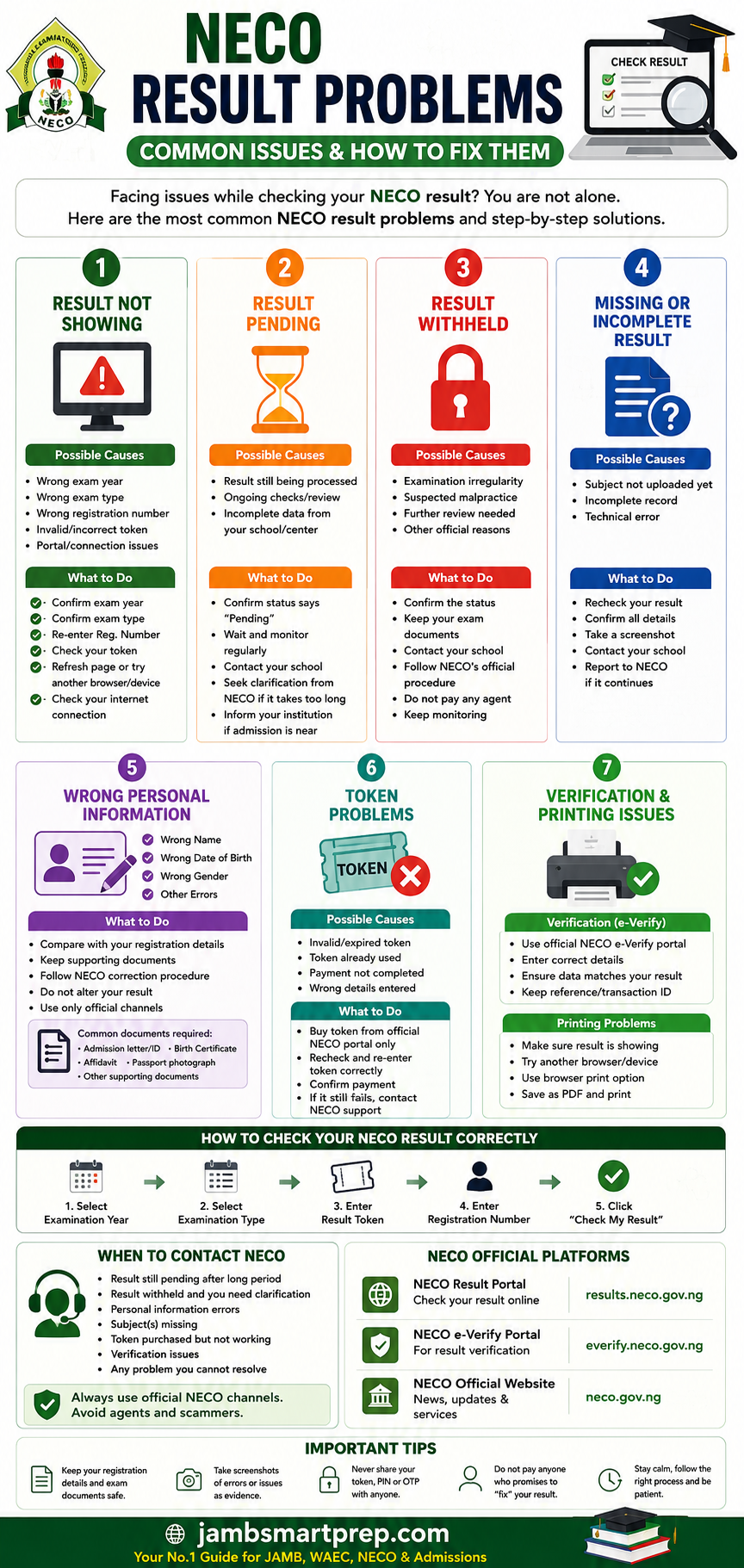
Having NECO result problems? Welcome to Jambsmartprep.com, your no. 1 guide for Jamb, WAEC, NECO and admissions. In today’s post, we will be covering virtually everything you need to know about NECO result problems, common issues and how to fix them.
Yes, during the course of this online guide, you will learn how to fix result checking, portal, withheld, pending, missing, correction, verification, printing and token issues. All you need to do to get what you want is to keenly follow all the instructions outlined in this post.
Interestingly, checking your NECO result should be straightforward, but candidates sometimes encounter problems such as NECO result not showing, portal errors, invalid tokens, pending results, withheld results, missing subjects or incorrect personal information. These problems can be especially stressful when a university admission deadline is approaching.
The good news is that not every NECO result problem means something is wrong with your examination record. Some issues may come from entering the wrong examination details, using an incorrect token or experiencing a temporary portal problem. Other situations require direct follow-up with NECO or your school.
This guide explains the most common NECO result problems and solutions, including what to do when your result is not showing, your result is pending or withheld, your name or date of birth is wrong, your token is not working, or you need to verify or print your result.
NECO Result Problems: What Could Be Wrong?
A NECO result problem can take several forms.
You may enter your details and receive an error message. You may be able to access the portal but see no result. Your result may show a pending or withheld status. In other cases, the result may appear but contain incorrect personal information or missing subjects.
The first step is to identify exactly what is wrong.
Do not immediately assume that your NECO result has been cancelled or that you have lost your result.
Some common NECO result problems include:
| Problem | What You May See | Possible Next Step |
|---|---|---|
| Result not showing | No grades displayed | Check examination details and retry |
| Portal not working | Error, loading or connection problem | Check browser and internet connection |
| Wrong examination details | Result cannot be found | Confirm year and examination type |
| Pending result | Result is marked pending | Monitor the status and seek clarification if necessary |
| Withheld result | Result displays a withheld status | Follow the appropriate official process |
| Missing subject | One or more subjects are absent | Seek clarification about the result record |
| Wrong name | Name differs from your records | Follow the official correction procedure |
| Wrong date of birth | Incorrect DOB displayed | Check the available correction procedure |
| Wrong gender | Gender is incorrect | Seek official correction guidance |
| Token problem | Token is rejected or does not work | Confirm the token and examination details |
| Verification problem | Result cannot be verified | Use the appropriate NECO verification system |
| Printing problem | Result will not print or save | Try another browser or save a PDF copy |
The most important thing is to identify whether you are dealing with a technical problem, an information-entry problem, or an actual result-status problem.
That distinction can save you from taking the wrong action.
How to Check Your NECO Result Correctly
Before trying to fix a NECO result problem, make sure you are using the correct result-checking process.
The official NECO Results Portal currently asks candidates to select their examination year and examination type, enter their token and registration number, and then select the option to check the result. The portal also provides an option for candidates who need to purchase a token.
What You Need to Check Your NECO Result
You should have the following information available:
- Your NECO examination year
- Your examination type
- Your registration number
- A valid NECO result-checking token
Enter each detail carefully.
A simple typing mistake in your registration number or selecting the wrong examination year can prevent the system from finding the expected result.
How to Check NECO Result Online
Follow these steps:
- Open the official NECO Results Portal https://results.neco.gov.ng/
- Select the correct examination year.
- Select the correct examination type.
- Enter your result-checking token.
- Enter your NECO registration number.
- Check the information you entered.
- Click Check my result.
- Wait for the result page to load.
- Review the result displayed.
If the result appears correctly, save a copy for your records.
If it does not appear, do not immediately purchase another token. First determine what type of problem you are experiencing.
NECO Result Not Showing: What Should You Do?
NECO result not showing is one of the most important problems candidates search for after results are released.
You may enter your details correctly but still fail to see your grades.
Before assuming that your result is missing, work through the basic checks.
Check Your Examination Year
Make sure you selected the year in which you actually sat for the examination.
If you select the wrong year, the system may not return the result you expect.
For example, if you sat for the examination in one year but accidentally selected another year on the result portal, your registration details may not produce the expected result.
Check Your Examination Type
The examination type is also important.
Make sure you select the examination category that corresponds with the examination you took.
Do not select an examination type simply because it looks similar to the one you remember.
Check Your Registration Number
Read your registration number carefully before submitting it.
Common mistakes include:
- Missing a number
- Adding an extra number
- Swapping digits
- Leaving out letters where applicable
- Entering another candidate’s number
If you copied the number from an old document, compare it with your original NECO registration information.
Check Your Token
The official result portal requires a token for result checking.
If the token is rejected, check that you entered it correctly.
Do not assume that buying another token is the first solution.
First confirm whether the problem is actually with the token.
Try Checking Again
If your examination details and token are correct but the page does not load properly, try again after a short period.
A temporary technical problem can sometimes prevent a page from loading as expected.
You can also try:
- Refreshing the page
- Closing and reopening your browser
- Using another browser
- Using another device
- Checking your internet connection
If the problem continues, investigate whether you are dealing with a portal problem or a result-status problem.
Why Is My NECO Result Not Showing?
There are several possible explanations for a result that does not appear.
The immediate cause may be as simple as incorrect information entered into the portal.
Other possibilities include:
- Incorrect examination year
- Incorrect examination type
- Wrong registration number
- Invalid or incorrectly entered token
- Temporary portal problem
- Result processing issue
- Pending result
- Withheld result
- Another issue affecting the examination record
Do not treat all these situations as the same problem.
For example, NECO result portal not working is different from NECO result withheld.
In the first situation, the website or connection may be preventing you from accessing the information.
In the second situation, the portal may be working correctly but displaying a particular status for your result.
The solution will therefore be different.
NECO Result Portal Not Working
Sometimes the problem is not your result at all.
The NECO result portal may fail to load, display an error or respond slowly.
Before contacting anyone about your examination record, determine whether other parts of the portal are working.
Signs That You May Be Experiencing a Portal Problem
You may notice:
- The page refuses to open.
- The page keeps loading.
- The result-checking form does not submit.
- An error appears after you click the result button.
- The page suddenly stops responding.
- The website works on one device but not another.
These symptoms do not automatically mean that your NECO result is missing.
What to Do When the NECO Result Portal Is Not Working
Try these basic troubleshooting steps:
- Confirm that your internet connection is working.
- Refresh the page.
- Close the browser and reopen it.
- Try a different browser.
- Try another device if one is available.
- Check that you are using the official NECO result portal.
- Try again later if the problem appears to be temporary.
Avoid repeatedly entering incorrect information because you are frustrated.
If the official portal is experiencing a technical problem, repeated attempts may not solve it.
NECO Website Not Opening
If the NECO result website does not open at all, first check whether the problem is limited to your device or internet connection.
Open another trusted website.
If other websites also fail to load, your internet connection may be the problem.
If other websites work normally but the NECO portal does not, try again later and check official NECO communication for any relevant update.
The official NECO result portal remains the appropriate starting point for checking your result.
NECO Result Portal Keeps Loading
A page that keeps loading without displaying the result can be caused by several factors.
Try the following:
1. Refresh the page
Reload the result page and enter your information again.
2. Check your connection
A weak or unstable internet connection can interrupt the request.
3. Try another browser
If you are using one browser, try another.
4. Try another device
If possible, use another phone or computer.
5. Wait and try again
If the portal itself is experiencing heavy traffic or a temporary technical problem, waiting may be necessary.
Do not assume that a constantly loading page means your result has been withheld.
A withheld result normally needs to be distinguished from a technical failure to access the result.
NECO Result Page Is Blank
A blank result page can be confusing because it may look as though the examination record has disappeared.
Before concluding that your result is missing, check:
- Examination year
- Examination type
- Registration number
- Token
- Internet connection
- Browser
Then try accessing the official result portal again.
If other candidates can access their results while yours remains blank after you have confirmed that your details are correct, the problem may require further investigation.
Keep a screenshot of the problem if possible.
A screenshot can help you explain what you are seeing if you later need to contact your school or NECO.
NECO Result Says “No Record Found”
Seeing a message that suggests no record was found can be worrying.
However, do not immediately conclude that NECO has lost your result.
Start with the information you entered.
Check these details:
Examination year: Is it the correct year?
Examination type: Did you select the correct examination?
Registration number: Is every digit correct?
Token: Did you enter the correct token?
If all four are correct and the problem continues, try checking again later.
If you still cannot access the result, keep evidence of the problem and seek clarification through the appropriate official channel.
NECO Result Checking Error
An error during result checking can occur at different stages.
You may receive an error immediately after entering your information, or the page may fail after you click the result button.
The first thing to determine is whether the error is caused by your information or by the portal.
If the error appears after entering your details
Check:
- Registration number
- Examination year
- Examination type
- Token
If the page does not respond
Check:
- Internet connection
- Browser
- Device
- Portal availability
If the result status itself displays an unusual message
Do not try random solutions.
Record the exact message.
The wording of the message can help determine whether you are dealing with a technical problem or a specific result status.
What If You Have Checked Everything but Your NECO Result Still Does Not Show?
If you have confirmed your:
- Examination year
- Examination type
- Registration number
- Token
and the result still does not appear, the next step is to determine whether the result is pending, withheld, missing or affected by another official issue.
This is where many candidates make a mistake.
They continue entering the same details repeatedly without identifying the actual problem.
Instead, look carefully at the message displayed by the portal.
If the result shows a specific status, use that status to determine your next step.
If no useful information is displayed, keep a record of the error and seek official clarification.
NECO Result Pending: What Does It Mean?
A pending NECO result is different from a simple portal error.
If the result-checking system indicates that your result is pending, the candidate should not automatically treat it as a failed result.
A pending status means that the expected result information is not yet available in the normal form.
The exact reason can vary, so avoid relying on unofficial explanations.
Why Is My NECO Result Still Pending?
A pending result may require further processing or clarification before the expected result information becomes available.
However, the status alone does not provide enough information to determine the exact reason in every case.
This is why candidates should avoid statements such as:
“Every pending NECO result will be released within exactly seven days.”
Such claims should not be treated as official unless NECO has specifically published that information.
What Should I Do If My NECO Result Is Pending?
Start with these steps:
- Confirm that you selected the correct examination year.
- Confirm the examination type.
- Confirm your registration number.
- Check that the result status actually says pending.
- Save a screenshot if appropriate.
- Keep your registration documents.
- Contact your school if you were a school candidate.
- Seek clarification from NECO through the appropriate official channel if necessary.
- Continue monitoring the result.
Do not pay anyone who claims that they can remove a pending status in exchange for money.
Can a Pending NECO Result Affect Admission?
It can create a problem if an institution requires an available O’level result before completing a particular stage of admission.
However, the effect depends on the institution and the admission requirement.
If your admission deadline is approaching, contact the institution rather than assuming that your admission is automatically lost.
If you have another acceptable O’level result, such as WAEC, ask whether it can be used.
The institution should provide the final answer on what it accepts for its admission process.
NECO Result Withheld: What Does It Mean?
A withheld NECO result is another major result problem.
If the result portal displays a withheld status, do not confuse it with a technical problem.
The portal may be functioning normally while displaying the status attached to your examination record.
A withheld result means the result has not been released normally.
It should not automatically be described as a failed result or a cancelled result.
Does a Withheld NECO Result Mean Malpractice?
Not automatically.
A candidate should not conclude from the word “withheld” alone that malpractice has been established.
The circumstances surrounding withheld results can vary, and the final outcome depends on the relevant official process.
If you are affected by a withheld result, follow the appropriate NECO procedure instead of relying on rumours.
What Should You Do If Your NECO Result Is Withheld?
The basic approach is to:
- Confirm the withheld status.
- Keep your registration and examination documents.
- Contact your school where applicable.
- Seek clarification through an official NECO channel when necessary.
- Follow any instructions provided.
- Continue monitoring the result status.
- Keep your admission plans moving if you have relevant deadlines.
Do not pay an unofficial agent who promises to release the result.
Can a Withheld NECO Result Be Released?
A withheld result may later be released depending on the outcome of the relevant official review or process.
However, nobody outside the authorised process should promise you a guaranteed outcome.
If your result is withheld, focus on obtaining accurate information and following the official procedure.
The detailed process for dealing with this situation is covered in our guide on How to Handle Withheld NECO Results.
NECO Result Missing or Incomplete
Another problem occurs when a candidate can access the result but discovers that something appears to be missing.
For example, you may notice that:
- A subject is not displayed.
- A grade is missing.
- Only part of the result appears.
- The information does not look complete.
Do not immediately assume that the subject has been removed permanently.
First, check whether the issue is simply a display or processing problem.
What If One Subject Is Missing From My NECO Result?
Record the exact subject that is missing.
Then check whether other candidates are experiencing the same issue or whether the problem appears to affect only your record.
If the information remains missing after checking again, contact your school or the appropriate NECO channel for clarification.
Keep your examination documents because they may be useful when explaining the problem.
What If Several Subjects Are Missing?
If multiple subjects are missing, pay close attention to the result status and any message displayed by the portal.
Do not try to alter the result yourself.
A result screenshot should never be edited to insert grades that are not displayed officially.
If you need to submit the result to a university or another institution, explain the situation honestly and ask what documentation they require while the matter is being resolved.
The Difference Between a Technical NECO Problem and a Result Problem
This distinction is worth remembering.
Technical problem
A technical problem affects your ability to access or use the portal.
Examples include:
- Website not loading
- Page freezing
- Error message
- Browser problem
- Connection problem
Result-status problem
A result-status problem concerns the examination record itself.
Examples include:
- Pending
- Withheld
- Missing result
- Incomplete result
- Incorrect result information
The solution to a technical problem may involve checking your device, browser or internet connection.
A result-status problem may require clarification from your school or NECO.
Knowing the difference helps you avoid wasting time.
What You Should Have Before Troubleshooting a NECO Result Problem
Keep these details close:
- NECO registration number
- Examination year
- Examination type
- Result-checking token
- Registration slip
- Photocard where applicable
- Screenshot of the problem
- Previous correspondence about the issue
- Admission deadline information if admission is affected
Having these details ready makes it easier to explain your situation accurately.
It also prevents you from repeatedly searching for information that is already on your examination documents.
Do Not Pay Someone to “Fix” Your NECO Result
Candidates with result problems can become easy targets for fraud.
Someone may claim to be a NECO staff member, school agent or examination insider and promise to fix the problem for a fee.
Be careful.
Do not give strangers your:
- Bank PIN
- OTP
- Internet banking details
- Card details
- Passwords
- Other sensitive account information
Do not send money simply because someone claims to have an “inside connection.”
If a person promises to change a withheld, pending or cancelled result privately, treat the claim as suspicious.
Use official NECO channels instead.
NECO Result Withheld: How to Handle the Problem
A withheld NECO result can be one of the most worrying problems for a candidate, especially when the result is needed for university admission, scholarship applications, employment or another academic purpose.
If your NECO result shows a withheld status, the first thing to understand is that you should not treat the status as a final conclusion about your examination.
A withheld result means the result has not been released in the normal way. The circumstances behind the status can differ from one case to another.
The safest approach is to confirm the status, keep your records and follow the appropriate official process.
Why Is My NECO Result Withheld?
Candidates often ask this question immediately after checking their results.
There is no single explanation that should be applied to every withheld result.
Possible issues may involve:
- Examination irregularities
- Suspected examination malpractice
- Centre-related issues
- Further review of examination records
- Other matters requiring official attention
However, candidates should avoid assuming that one particular reason applies to their case without official information.
A withheld status by itself does not provide enough information to determine the complete circumstances behind the result.
Does a Withheld NECO Result Mean Malpractice?
No, not automatically.
The word “withheld” should not be interpreted as a final finding that a candidate committed malpractice.
If NECO determines that a specific examination irregularity or malpractice issue affects a candidate’s result, the candidate should rely on the official information provided by the examination authority.
This distinction is important because students sometimes panic after seeing the word “withheld” and immediately conclude that they have failed or that their entire examination has been cancelled.
Do not make that assumption.
Can a Withheld NECO Result Be Released?
A withheld result can potentially be released after the relevant review or official process.
The eventual outcome depends on the circumstances of the case and the decision reached by NECO.
This means candidates should be suspicious of anyone who promises to release a withheld result for a fixed payment.
An unofficial agent cannot guarantee the outcome of an official examination process simply because they claim to know someone inside the organisation.
What Should I Do If My NECO Result Is Withheld?
Use a careful approach.
Step 1: Confirm the status.
Check your result through the official NECO result portal and make sure that the status actually says withheld.
Step 2: Keep your documents.
Save your registration information, examination number and other relevant examination records.
Step 3: Contact your school if applicable.
If you registered through a school, ask whether the school has received any information concerning the result.
Step 4: Seek official clarification.
If you need further information, use an official NECO contact or complaints channel.
Step 5: Follow instructions.
If you are asked to provide genuine information or documentation, provide it through the appropriate channel.
Step 6: Monitor your result.
Continue checking for an official update.
Step 7: Protect your admission plans.
If you are applying for admission, contact the institution if the withheld result could affect a deadline.
Can a Withheld NECO Result Affect Admission?
It can, depending on the admission requirements of the institution.
A university may require candidates to provide an acceptable O’level result before completing a particular admission or screening stage.
If your NECO result is withheld, contact your institution and explain the situation.
If you have another acceptable O’level result, ask whether it can be used instead.
Do not assume that every Nigerian university handles withheld results in exactly the same way.
NECO Result Pending: What to Do
A pending NECO result creates a different situation.
Candidates sometimes confuse a pending result with a withheld result or assume that a pending status means the examination has been lost.
That conclusion is not justified by the status alone.
What Does Pending Mean on NECO Result?
A pending status generally means that the expected result information is not yet available in the normal form.
The reason for the pending status can depend on the particular examination record and the processing involved.
Therefore, avoid relying on claims that every pending result has the same cause or will be resolved within the same period.
Why Is My NECO Result Still Pending?
There can be several reasons why a result may not yet be available.
The important point is that a candidate should first confirm that the result really shows a pending status.
Check:
- Examination year
- Examination type
- Registration number
- Result status
- Any message displayed by the portal
If the details are correct and the result remains pending, keep a record of the status.
What Should I Do If My NECO Result Is Still Pending?
Follow these steps:
- Check the official NECO result portal again.
- Confirm your examination details.
- Save a screenshot of the pending status.
- Keep your registration documents.
- Contact your school if you are a school candidate.
- Seek clarification from NECO if necessary.
- Continue monitoring the result.
- Contact your university if an admission deadline is approaching.
The most important thing is to avoid paying an unofficial person who claims that they can change the status.
How Long Does a NECO Result Stay Pending?
There is no single period that should be presented as the guaranteed resolution time for every pending NECO result.
Different situations can require different processes.
Therefore, be cautious when you see online claims that every pending result will become available after a specific number of days.
If your result remains pending and you have an urgent academic deadline, contact the relevant institution and NECO rather than relying on a general timeframe.
NECO Result Missing or Incomplete: What to Do
A result can sometimes appear incomplete from the candidate’s point of view.
You may see some subjects but not others, or a particular grade may not appear as expected.
This situation requires careful checking.
What If One Subject Is Missing From My NECO Result?
First, record the subject that is missing.
Then check the result again to make sure you are looking at the correct examination record.
Confirm:
- Examination year
- Examination type
- Registration number
- Subject list
If the subject remains absent, contact your school or the appropriate NECO channel for clarification.
Do not add the missing grade yourself.
Do not edit a screenshot and present it as an official result.
What If Several Subjects Are Missing?
If several subjects are missing, check the exact status and message displayed by the result portal.
If the portal is working but the examination information remains incomplete, keep a screenshot and your examination documents.
You may need to provide these details when making an enquiry.
If the issue affects admission, inform the institution rather than waiting until the deadline.
Can a Missing NECO Subject Be Added?
Candidates should not assume that a missing subject can simply be added.
If a subject is absent from the official result, the candidate should seek clarification through the appropriate process.
Only official examination records should be relied upon.
NECO Result Correction Problems
Another major category involves candidates whose results have been released but contain incorrect personal information.
Common examples include:
- Wrong name
- Wrong spelling of name
- Wrong date of birth
- Wrong gender
- Other registration information errors
These problems can become particularly important when a student is preparing for admission, verification or certificate collection.
Wrong Name on NECO Result
A wrong name is one of the most common concerns candidates raise after checking examination results.
The error may be minor, such as a spelling mistake, or more significant, such as an incorrect arrangement of names.
Why Is My Name Wrong on My NECO Result?
A name may appear differently because of an error made during registration or because the information carried into the examination record was incorrect.
Before taking any action, compare the result with your original registration information.
Do not assume that every difference is necessarily a NECO processing error.
Can I Correct a Wrong Name on My NECO Result?
If your name is incorrect, you should follow the official NECO correction procedure applicable to your examination record.
Do not attempt to edit the result yourself.
Do not create a new document showing your preferred name.
If a correction process is available, use it and provide genuine supporting documents when requested.
What Documents May Be Useful?
The exact documents required can depend on the correction involved.
Keep relevant records such as:
- NECO registration documents
- Valid identification where required
- Other official personal records
- Supporting documents requested by the relevant authority
Do not submit false documents to support a correction request.
Wrong Spelling vs Completely Wrong Name
Not every name problem is identical.
For example:
Example 1: Your name is written as “Michael Okafor” instead of “Michael Okaforh.”
This may be a spelling issue.
Example 2: Your result displays a completely different name.
That is a more serious discrepancy and may require more detailed verification.
In either situation, use the official correction process rather than attempting an informal fix.
Wrong Date of Birth on NECO Result
A wrong date of birth can create problems when your NECO information does not match other academic or identification records.
This can become particularly noticeable during admission or verification.
What Should I Do If My NECO Date of Birth Is Wrong?
Start by checking the date of birth on your original NECO registration information.
If the date was already incorrect during registration, the correction process may be different from a situation where the information was entered correctly but later appears differently.
Keep the relevant documents and follow the applicable NECO correction procedure.
Can NECO Date of Birth Be Corrected?
Candidates should use the official process available for correcting examination information.
Do not assume that every date-of-birth error can be corrected in exactly the same way.
Do not pay an unofficial agent who claims to have a private method for changing the record.
What If My JAMB and NECO Date of Birth Are Different?
This is an important issue for students seeking admission.
If your JAMB profile contains one date of birth while your NECO record contains another, the difference may create questions during document verification.
The correct response is not to change whichever record is easier.
First determine which information is correct and then follow the appropriate correction procedure for the record that contains the error.
If you are already undergoing admission screening, speak with the institution about what documentation it requires.
Wrong Gender on NECO Result
A candidate may also discover that the gender displayed on the NECO result is incorrect.
For example, a candidate registered with the wrong gender and only noticed the mistake after the result was released.
Can Wrong Gender on NECO Result Be Corrected?
If the gender information is incorrect, seek the official correction procedure applicable to your examination record.
Do not alter the result printout yourself.
The information on the official examination record should be corrected through an authorised process.
What Should You Prepare?
Keep:
- Registration details
- Examination number
- Result information
- Supporting personal documents where required
- Evidence of the error
The exact documents and procedure should be confirmed through the appropriate NECO channel.
How to Correct Errors on Your NECO Result
If your result contains an error, the first question should be:
What type of error is it?
This determines what you should do next.
Personal Information Errors
These may include:
- Name
- Date of birth
- Gender
Result Information Problems
These may include:
- Missing subject
- Missing grade
- Unexpected result information
Portal or Access Problems
These may include:
- Result not showing
- Error message
- Token problem
- Website problem
Do not treat all three categories as the same.
A wrong name requires a different approach from a website that refuses to load.
NECO Result Correction: What You Should Not Do
When candidates discover errors, they sometimes make the situation worse by trying unofficial methods.
Avoid these mistakes.
Do not edit your result
An edited screenshot is not an official examination record.
Do not create a fake certificate
A fake certificate cannot correct an official NECO record.
Do not pay an unknown agent
Someone claiming to have a connection inside NECO may be attempting to exploit your situation.
Do not submit false documents
If NECO requires supporting evidence, provide genuine documents.
Do not change unrelated information
Only pursue the correction that is actually necessary.
How to Tell Whether Your NECO Problem Is Serious
Not every result problem requires the same level of urgency.
Usually a technical problem
Examples:
- Portal does not load
- Page keeps refreshing
- Browser error
- Internet connection problem
These can often be investigated through basic troubleshooting first.
Requires closer attention
Examples:
- Pending result
- Withheld result
- Missing subject
- Incorrect personal information
- Result verification failure
These may require follow-up with the school or NECO.
Urgent when admission is involved
If your university has requested your O’level result and you have a deadline approaching, do not wait until the final day.
Contact the institution and explain the problem.
You should also continue resolving the NECO issue separately.
NECO Result Problems During University Admission
A result problem can become more stressful when it happens during admission.
A university may ask candidates to upload or present their O’level results during screening.
If your NECO result is pending, withheld or incomplete, find out what the institution requires.
What If NECO Is Your Only O’level Result?
If NECO is your only available O’level result, contact your institution as soon as possible.
Explain the exact status of the result.
Ask whether you can continue the process while waiting for the result to be resolved.
Do not assume that every institution will automatically reject your application.
What If You Have Both WAEC and NECO?
Having another recognised O’level result may give you an alternative.
For example, if your WAEC result contains the required subjects and grades for your chosen course, ask the institution whether it can be used for the relevant admission requirement.
The final decision belongs to the institution.
What If Your Admission Deadline Is Close?
This is where timing becomes important.
Do not wait for the NECO issue to disappear before contacting your university.
You can deal with both matters at the same time.
NECO: Follow up on the result problem.
University: Explain the problem and ask what documents or alternatives are acceptable.
Keep copies of any response you receive.
NECO Result Problems and JAMB CAPS
Candidates who have already begun the admission process may also worry about how a NECO result problem affects JAMB CAPS.
The answer depends on the particular admission and O’level requirements.
If you already have an admission offer or your admission status is being processed, continue monitoring the relevant JAMB and institution portals.
A withheld, pending or incomplete result should not be treated as an automatic cancellation of every admission opportunity.
At the same time, candidates should not ignore an institution’s O’level requirements.
If the university needs an available result before completing a particular process, contact its admissions office.
What to Do If Your NECO Problem Has Not Been Resolved
If you have already tried the basic troubleshooting steps and the problem remains, prepare your information before making an official enquiry.
Have these details ready:
- Full name
- Registration number
- Examination year
- Examination type
- School or examination centre information where relevant
- Exact problem
- Screenshot of the result or error
- Date you first noticed the issue
- Previous complaint or enquiry details
Explain the problem clearly.
For example, instead of saying:
“My NECO result is not working.”
Give a more useful explanation:
“I selected the correct examination year and type and entered my registration number and token, but the portal still does not display my result.”
Specific information makes it easier for the person handling the enquiry to understand the issue.
When Should You Contact NECO?
You should consider seeking official assistance when:
- Your result remains pending.
- Your result remains withheld and you need clarification.
- Your result is not showing after you confirm your details.
- A subject appears to be missing.
- Your personal information is incorrect.
- You have a serious verification problem.
- The problem continues despite basic troubleshooting.
- Your admission deadline is approaching.
The official NECO website is the appropriate starting point for current information about the Council and its services.
Where a complaint or enquiry is necessary, use the official channel rather than a person claiming to be an unofficial NECO agent.
Keep Evidence of Your NECO Result Problem
This simple step is often overlooked.
If the portal displays an error, take a screenshot.
If your result says pending or withheld, save a copy of the status.
If you submit a complaint and receive a reference number or acknowledgement, keep it.
Create a small folder containing:
- Result screenshots
- Registration documents
- Examination number
- Token information
- Complaint references
- Relevant emails
- School correspondence
This can save time if you need to explain the problem again later.
NECO Result Problems: Quick Action Checklist
If you are currently experiencing a problem, use this checklist.
If Your Result Is Not Showing
-
Confirm examination year
-
Confirm examination type
-
Check registration number
-
Check token
-
Retry the official portal
-
Try another browser or device
-
Record the error if it continues
If Your Result Is Pending
-
Confirm the status
-
Keep your registration details
-
Contact your school where applicable
-
Monitor the official result portal
-
Seek official clarification if necessary
-
Contact your university if admission is affected
If Your Result Is Withheld
-
Confirm the withheld status
-
Keep examination documents
-
Ask your school for relevant information
-
Follow the official NECO process
-
Avoid unofficial agents
-
Monitor for an official update
If Your Personal Information Is Wrong
-
Identify the exact error
-
Check your original registration details
-
Keep genuine supporting documents
-
Follow the applicable correction procedure
-
Avoid editing the result yourself
NECO Result Token Problems
A NECO result-checking token is required when using the official result-checking system. Because of this, a token problem can prevent a candidate from seeing a result even when the result itself is available.
The first step is to determine whether the problem is actually caused by the token.
The official NECO Results Portal provides the option to enter a token and also includes an option for candidates who need to purchase one.
What Is a NECO Result Checker Token?
A NECO result-checking token is used to access a candidate’s examination result through the official result-checking platform.
When checking a result, candidates should enter the token carefully together with the correct examination year, examination type and registration number.
A mistake in any of these details can prevent the result from being displayed.
Why Is My NECO Token Not Working?
There are several things to check when a NECO result checker token is not working.
Start by checking whether you entered the token correctly.
Also confirm that you selected:
- The correct examination year
- The correct examination type
- The correct registration number
If all the information is correct and the token is still rejected, do not immediately buy another token.
First determine whether the problem is with the token or with the result-checking portal.
Common NECO Token Problems
Candidates may encounter issues such as:
- Token entered incorrectly
- Registration number entered incorrectly
- Wrong examination year selected
- Wrong examination type selected
- Portal error
- Token-related error message
- Difficulty completing the result-checking process
The exact error message matters.
Take a screenshot if possible, especially if you need to make an enquiry later.
What to Do If Your NECO Token Is Not Working
Follow this order:
- Re-enter the token carefully.
- Confirm the examination year.
- Confirm the examination type.
- Check your registration number.
- Refresh the result page.
- Try another browser.
- Try another device if available.
- Check the official NECO result portal again.
- Seek official assistance if the problem continues.
Avoid buying several tokens simply because the first attempt failed.
If the issue is actually caused by incorrect examination details or a technical problem, another token may not solve it.
How to Buy a Genuine NECO Result Checker Token
If you need a token, use the official result-checking system or another authorised NECO channel.
Be cautious when dealing with websites, social media accounts or individuals claiming to sell “cheap NECO tokens.”
Before paying, make sure you understand exactly what you are purchasing and keep evidence of the transaction.
Do not send your banking PIN, OTP or other confidential financial information to a person claiming to be a NECO representative.
What If You Paid for a NECO Token but It Does Not Work?
Keep your payment evidence.
You should have information such as:
- Payment reference
- Date of payment
- Amount paid
- Token information
- Examination details
- Screenshot of the error
Then determine whether the issue is related to the token, your examination details or the portal.
If the problem remains unresolved, seek assistance through an appropriate official channel.
Do not pay another person simply because they claim they can “activate” the token.
NECO Result Verification Problems
Checking your NECO result and verifying a NECO result are two different processes. Also read: NERVS Portal | NECO Result Verification System Guide 2026
Result checking allows a candidate to view examination results.
Result verification is used to confirm examination results for purposes such as admission, employment, documentation or institutional checks.
NECO operates an official e-Verify platform for result confirmation and verification. The platform provides services for individual and institutional verification.
What Is NECO Result Verification?
NECO result verification is the process of confirming that an examination result corresponds with the official examination record.
This can become important when a university, employer or another organisation needs confirmation of a candidate’s result.
A result printout and an online verification request should therefore not be treated as exactly the same thing.
How to Verify a NECO Result Online
The exact information required can depend on the verification service being used.
Start from the official NECO e-Verify platform.
Review the instructions displayed on the official system and enter the requested information accurately.
Do not rely on a third-party website simply because it appears in a search result.
What Is NECO e-Verify?
NECO e-Verify is the Council’s online platform for result verification and confirmation.
The official platform provides different verification options, including services for individuals and institutions.
This distinction matters because a student trying to confirm their own result may have a different process from an organisation attempting to verify a candidate’s credentials.
NECO e-Verify Login Problems
If you cannot access the verification system, first determine whether you are experiencing a login problem or a verification problem.
Login problem
You cannot access the relevant account or page.
Verification problem
You can access the system but cannot complete the result verification.
These situations may require different solutions.
Check your:
- Login information
- Internet connection
- Browser
- Verification details
- Reference or transaction information where applicable
If the issue continues, record the exact message displayed by the platform.
What If NECO e-Verify Cannot Find My Result?
First confirm that the information entered matches your official examination record.
Check:
- Examination year
- Examination type
- Examination number
- Candidate information
- Other required verification details
If everything appears correct but the result still cannot be verified, do not assume that the result is fake or missing.
The issue may require official clarification.
Keep your result documents and any verification reference information available.
What If a University Cannot Verify My NECO Result?
If a university says it cannot verify your NECO result, ask the institution to tell you exactly what information or verification response it received.
Then compare that information with your official NECO result.
If there is a mismatch, investigate the source of the discrepancy.
If the university requires an official NECO verification, use the appropriate NECO verification process.
Do not create or edit a result document to satisfy an institution.
How to Print Your NECO Result
After successfully checking a NECO result, candidates may need a copy for admission screening, personal records or other purposes.
The method available to you can depend on the result page and the device you are using.
How to Print NECO Result
A simple process is:
- Check your result through the official NECO result portal.
- Make sure the correct result is displayed.
- Look for the available print or download option.
- Select your printer if you are printing directly.
- Check the page preview.
- Print the result.
- Keep an electronic copy where possible.
If your browser provides a Save as PDF option, you can also save a copy electronically before printing.
How to Save NECO Result as PDF
If you need a digital copy, use your browser’s print function.
Select the PDF option instead of a physical printer.
Choose where to save the file and give it a clear filename.
For example:
Michael-NECO-Result.pdf
Keep the file somewhere secure.
It can be useful when applying for admission or sending documents electronically.
NECO Result Print Button Not Working
If the print button does not work, try basic browser troubleshooting.
You can:
- Refresh the page
- Reopen the result
- Try another browser
- Try another device
- Check whether pop-ups are being blocked
- Use the browser’s print command
- Save the page as PDF where appropriate
If the result itself is correct but printing fails, the issue may be related to the browser or device rather than your examination record.
Can I Print My NECO Result More Than Once?
Keep an electronic copy of your result if the system allows you to save one.
This can reduce the need to repeatedly access the portal whenever you need a copy.
However, candidates should distinguish between a result printout and an official certificate or other examination document.
If an institution specifically requests a particular document, confirm exactly what it requires.
NECO Result Portal Login and Access Problems
Candidates sometimes describe every access problem as a “NECO login problem.”
In reality, there are several different situations.
You may:
- Be unable to open the website
- Be unable to load the result form
- Enter your details but receive an error
- Reach the result page but see no result
- Experience a browser problem
- Experience an internet connection problem
Identifying the exact stage at which the problem occurs makes troubleshooting easier.
NECO Result Portal Keeps Loading
If the portal keeps loading:
- Check your internet connection.
- Refresh the page.
- Close and reopen the browser.
- Try another browser.
- Try another device.
- Wait and try again.
If the same issue continues across different devices and connections, it may be worth checking official NECO information before continuing to retry.
NECO Result Portal Shows an Error
Write down the exact error message.
Do not rely on memory if you later need help.
A screenshot is even better.
Then check the basic information you entered.
If your examination details are correct and the error continues, seek appropriate assistance.
What If the NECO Portal Works for Others but Not Me?
This can happen for several reasons.
The issue may be related to:
- Your browser
- Your device
- Your internet connection
- Your examination details
- Your individual result record
Try another device or browser first.
If the problem follows your examination details across different devices, record the exact message and investigate further.
How to Contact NECO About a Result Problem
Some problems cannot be solved through ordinary browser troubleshooting.
If the issue concerns your actual examination record, you may need official assistance.
The official NECO website provides information about the Council and its services.
When Should You Contact NECO?
Consider seeking official assistance if:
- Your result remains pending.
- Your result remains withheld.
- Your result does not appear despite correct details.
- A subject appears to be missing.
- Your personal information is incorrect.
- You cannot resolve a verification issue.
- Your result-checking problem continues.
- You have an urgent admission deadline.
What Information Should You Have Before Contacting NECO?
Prepare the information needed to identify your examination record.
This may include:
- Full name
- Registration number
- Examination year
- Examination type
- School or examination centre information
- Exact description of the problem
- Screenshot of the error
- Payment information if the problem involves a token
- Previous complaint or reference number
The more clearly you explain the problem, the easier it is for the person handling your enquiry to understand what happened.
How to Explain a NECO Result Problem
Avoid vague statements such as:
“My NECO result is not working.”
Instead, describe the exact problem.
For example:
“I selected the correct examination year and type, entered my registration number and token, but the result is not displaying.”
Or:
“My NECO result is showing as pending, and I would like to know the appropriate process for following up.”
This makes your enquiry easier to understand.
Keep Your Complaint Reference
If you receive a complaint number, reference number, acknowledgement or other tracking information, keep it.
Do not delete relevant emails or messages.
You may need the reference if you follow up later.
Common Mistakes to Avoid When Fixing NECO Result Problems
A result problem can become harder to resolve when a candidate takes the wrong approach.
Here are some common mistakes to avoid.
1. Using the Wrong NECO Portal
Search engines can display many websites discussing NECO results.
That does not mean every website is an official NECO platform.
Start from the official NECO website and official result services.
2. Entering the Wrong Examination Details
A wrong examination year or examination type can prevent the system from finding the expected result.
Always check these fields before submitting the form.
3. Repeatedly Entering Incorrect Information
If the system rejects your details, stop and check them.
Do not repeatedly enter random combinations hoping one will work.
4. Buying Multiple Tokens Without Identifying the Problem
A second token may not solve a problem caused by:
- Wrong registration number
- Wrong examination year
- Wrong examination type
- Browser problem
- Portal problem
Identify the issue first.
5. Assuming a Pending Result Has Been Cancelled
Pending and cancelled are not interchangeable terms.
If the portal says pending, use the appropriate pending-result troubleshooting process.
6. Assuming a Withheld Result Means You Failed
A withheld result should not automatically be interpreted as a failed result.
Follow the official process and wait for the relevant outcome.
7. Editing a Result Screenshot
Changing grades, names or other information on a screenshot does not change the official NECO record.
It can also create a much more serious problem if the altered document is submitted to a school or institution.
8. Paying an Agent Who Promises to Fix the Result
Be particularly careful with people who claim they can:
- Release a withheld result
- Remove a pending status
- Change grades
- Add missing subjects
- Alter examination records
No legitimate result troubleshooting guide should encourage candidates to bypass official procedures.
9. Ignoring Admission Deadlines
If a NECO problem occurs while you are applying for admission, do not wait until the deadline before contacting the institution.
Explain the situation early.
10. Throwing Away Examination Documents
Keep your registration information and other examination records.
They may become important if you need to prove or clarify your examination details.
NECO Result Problems: What You Should Never Share Online
A candidate seeking help may be tempted to post every examination detail publicly.
Avoid exposing sensitive information unnecessarily.
Do not publicly share:
- Banking PIN
- OTP
- ATM PIN
- Internet banking password
- Card security information
- Email password
- Social media password
Be cautious about posting complete examination information on public forums as well.
If you need help from a legitimate institution, provide only the information required through the appropriate channel.
A Simple NECO Result Troubleshooting Process
When you encounter a problem, use this sequence.
Step 1: Identify the exact problem
Is the portal inaccessible, or is your result displaying a particular status?
Step 2: Check your details
Confirm the examination year, examination type, registration number and token.
Step 3: Retry the official portal
Use a stable internet connection and, if necessary, another browser or device.
Step 4: Read the message carefully
Do not skip the wording displayed on the screen.
Step 5: Save evidence
Take a screenshot of the problem.
Step 6: Check the relevant solution
A token problem requires a different response from a withheld result.
Step 7: Contact the school where appropriate
School candidates may benefit from checking whether the school has received relevant information.
Step 8: Seek official NECO assistance
Do this when the problem concerns the actual examination record or remains unresolved.
Step 9: Protect your admission plans
If an institution has a deadline, contact it promptly.
Step 10: Keep following up
Save reference numbers and relevant correspondence.
NECO Result Problems: Quick Troubleshooting Table
| NECO Problem | First Check | Recommended Next Step |
|---|---|---|
| Result not showing | Examination details | Confirm details and retry |
| Portal not loading | Internet and browser | Try another browser or device |
| No record found | Registration number and year | Confirm information |
| Token not working | Token and examination details | Recheck information |
| Result pending | Status message | Monitor and seek clarification if necessary |
| Result withheld | Official result status | Follow the relevant official process |
| Missing subject | Subject list | Seek clarification |
| Wrong name | Registration information | Follow correction procedure |
| Wrong date of birth | Original records | Follow correction procedure |
| Wrong gender | Original records | Seek official correction guidance |
| Verification failure | Verification details | Check e-Verify information |
| Print problem | Browser/device | Retry or save as PDF |
| Admission affected | Institution requirements | Contact the institution promptly |
This table can also serve as a quick-reference section for readers who do not want to read the entire guide.
What If None of These Solutions Works?
If you have worked through the troubleshooting steps and your problem remains unresolved, stop trying random solutions.
At that point, the issue may require information that only NECO or the relevant institution can provide.
Prepare:
- Your registration number
- Examination year
- Examination type
- Result status
- Screenshot
- Relevant examination documents
- Payment information where applicable
- Admission deadline if relevant
Then make an official enquiry.
If you are a school candidate, speak with your school as well.
Do not allow frustration to push you into using unofficial agents or submitting altered documents.
Final Advice for Candidates With NECO Result Problems
The most important thing is to identify the exact problem before looking for a solution.
A NECO result not showing is different from a pending result. A pending result is different from a withheld result. A wrong name requires a different approach from a token problem, while a printing problem may have nothing to do with the examination record itself.
Use the official NECO result services, keep your examination documents and record any error messages you encounter.
If the problem involves your actual result record and cannot be resolved through ordinary troubleshooting, seek assistance through the appropriate official channel.
If admission is involved, contact the institution early and explain the situation.
Most importantly, do not pay an unknown person who promises to manipulate, release or alter an official NECO result.
Frequently Asked Questions About NECO Result Problems
Why is my NECO result not showing?
First check your examination year, examination type, registration number and result-checking token. If the details are correct, retry the official portal and investigate whether the result is pending, withheld or affected by another issue.
Why is the NECO result portal not working?
The problem may be related to your internet connection, browser, device or the portal itself. Try refreshing the page, using another browser or device and checking again later.
Why is my NECO result still pending?
A pending status means the expected result information is not currently available in the normal form. Confirm the status, keep your records and seek appropriate clarification if it remains unresolved.
What does withheld mean on a NECO result?
A withheld status means the result has not been released in the normal way. It should not automatically be interpreted as a final finding of malpractice or failure.
Can a withheld NECO result be released?
The outcome depends on the circumstances and the relevant official process. Candidates should follow the instructions provided by the appropriate authority and avoid anyone who promises a guaranteed release for payment.
What should I do if one subject is missing from my NECO result?
Check the result again and confirm that you are viewing the correct examination record. If the subject remains missing, keep a screenshot and seek clarification from your school or the appropriate NECO channel.
How do I correct a wrong name on my NECO result?
Check your original registration information and follow the applicable official NECO correction procedure. Do not edit the result yourself or submit an altered document.
Can I correct my date of birth on my NECO result?
If the date of birth is incorrect, follow the applicable official correction procedure and provide genuine supporting information where required.
What should I do if my NECO result token is not working?
Confirm the token, examination year, examination type and registration number. Retry the official result portal before purchasing another token.
How do I verify my NECO result?
Use the official NECO e-Verify platform and follow the instructions for the relevant verification service.
How do I print my NECO result?
After successfully accessing the result, use the available print function. If necessary, use your browser’s print option to save the result as a PDF.
Can NECO result problems affect admission?
They can affect an admission process if an institution requires an available or verifiable O’level result. Contact the institution directly to find out what it requires in your particular situation.
How do I contact NECO about a result problem?
Start with the official NECO website and its current contact or service channels. Avoid relying on unofficial social media accounts or agents who claim to have special access to NECO systems.
How long does it take to resolve a NECO result problem?
There is no single guaranteed timeframe for every type of NECO result problem. The time can depend on the nature of the issue and the process required to resolve it.
NECO Result Problems: Complete Troubleshooting Checklist
If you are facing a NECO result problem, use the checklist below before escalating the issue.
Result not showing
- Confirm the examination year.
- Confirm the examination type.
- Check your registration number.
- Check your result-checking token.
- Retry the official NECO result portal.
- Try another browser or device.
- Save a screenshot if the problem continues.
Result pending
- Confirm that the status actually says pending.
- Keep your registration details.
- Check for official updates.
- Speak with your school where applicable.
- Contact NECO through the appropriate official channel if the problem remains unresolved.
- Inform your institution if an admission deadline is approaching.
Result withheld
- Confirm the withheld status.
- Keep your examination documents.
- Ask your school whether it has received relevant information.
- Follow the official procedure.
- Do not pay an unofficial agent.
- Keep monitoring the result.
Wrong name
- Compare the result with your registration information.
- Identify the exact spelling or name problem.
- Keep genuine supporting documents.
- Follow the applicable correction procedure.
Wrong date of birth
- Check your original registration details.
- Confirm which record contains the error.
- Follow the official correction procedure.
- Inform your institution if the discrepancy affects admission or verification.
Wrong gender
- Confirm the error.
- Keep your examination information.
- Follow the applicable official correction process.
- Avoid altering the result yourself.
Token problem
- Confirm the token.
- Check the examination year.
- Check the examination type.
- Check the registration number.
- Retry the official portal.
- Keep payment evidence if the token was purchased.
Verification problem
- Use the official NECO e-Verify platform.
- Enter the requested information carefully.
- Check the examination details.
- Save the verification reference where applicable.
- Seek official clarification if the result cannot be verified.
Printing problem
- Confirm that the result itself is accessible.
- Refresh the result page.
- Try another browser.
- Try another device.
- Use the browser’s print function.
- Save the result as PDF where appropriate.
NECO Result Problems: When to Wait and When to Act
One of the biggest mistakes candidates make is treating every problem with the same level of urgency.
Some issues can be handled by waiting briefly and trying the portal again.
Others require follow-up.
When You Can Retry the Portal
A short retry may be reasonable when:
- The website is not loading.
- The page is temporarily unresponsive.
- Your browser displays an error.
- Your internet connection is unstable.
- The result page fails to load correctly.
In these situations, basic troubleshooting should come first.
When You Should Investigate Further
Take further action when:
- Your result remains pending.
- Your result remains withheld.
- A subject is missing.
- Your personal information is incorrect.
- Your result cannot be verified.
- Your token continues to fail despite correct information.
These situations concern the examination record or the services connected to it.
When You Should Act Quickly
Act promptly when a NECO problem is affecting:
- University admission
- Admission screening
- Scholarship documentation
- Employment verification
- Certificate verification
- An application with a fixed deadline
Do not wait until the final day.
What to Do If Your NECO Result Problem Affects Admission
A result problem can become more serious when it occurs during an admission period.
Suppose a university asks you to upload your O’level result and your NECO result is still pending.
The wrong approach is to ignore the deadline while waiting for NECO.
Instead, handle both issues at the same time.
Step 1: Find out exactly what the institution requires
Ask whether the institution requires:
- A NECO result
- A WAEC result
- Another accepted O’level qualification
- A result upload
- Physical presentation of the result
- Verification through an official platform
Step 2: Explain the problem
If your result is pending or withheld, explain the situation to the appropriate admissions office.
Step 3: Ask about alternatives
If you have another acceptable O’level result, ask whether you can use it.
Step 4: Continue following up with NECO
Resolving the admission issue does not remove the need to resolve the NECO problem.
Keep both processes moving.
Can You Use WAEC If Your NECO Result Is Pending?
This depends on the requirements of the institution and the admission process.
If you have a valid WAEC result containing the required subjects and grades, the institution may accept it where its rules permit.
However, candidates should not assume that WAEC automatically replaces every NECO requirement.
Check with the specific university, polytechnic, college or organisation involved.
This is particularly important when an institution has stated a specific O’level requirement.
What If Your NECO Result Is Withheld During Admission?
If your NECO result is withheld while you are seeking admission, contact the institution as early as possible.
Explain that the result is currently withheld.
If you have another acceptable O’level result, ask whether it can be submitted instead.
If NECO later releases the result, follow the institution’s instructions for updating your records.
Keep copies of all communication.
What If Your NECO Result Is Pending After the Admission Deadline?
If the deadline has already passed, do not assume that there is nothing you can do.
Contact the institution immediately.
Explain:
- Your examination year
- Your result status
- When you discovered the problem
- What steps you have taken
- Whether you have another O’level result
The institution will determine whether it can accept an alternative document or allow you to update the result later.
NECO Result Problems and Result Verification
Verification deserves special attention because candidates sometimes believe that successfully checking a result automatically means every institution can verify it immediately.
These are related but separate processes.
A candidate may be able to view a result and still need to complete a separate verification process for an institution.
The official NECO e-Verify platform is designed for result confirmation and verification.
Why Can a Result Be Difficult to Verify?
Possible reasons may include:
- Incorrect information entered during verification
- Incorrect examination details
- Verification process not completed correctly
- Technical issues
- A discrepancy between the information supplied and the official record
If an institution reports a verification problem, ask for the exact issue before assuming that your NECO result itself is invalid.
How Schools and Institutions Should Handle NECO Result Problems
Students are often not the only people affected.
Schools, universities and other institutions may need to confirm a candidate’s result.
If a school cannot verify a candidate’s result, it should use the appropriate official verification process rather than relying on unofficial screenshots or third-party claims.
Candidates should also provide accurate information when requested.
If the institution reports a discrepancy, the candidate should compare the information against the original NECO record and follow the appropriate correction or verification process.
How to Avoid Future NECO Result Problems
Some problems can be reduced by keeping accurate records from the beginning.
Before and after your examination, keep copies of:
- Registration details
- Examination number
- Registration slip
- Important personal information
- Result-checking details
- Payment receipts
- Result printouts
- Verification records
Check your personal information carefully whenever you have an opportunity to review it.
A small spelling error may become more inconvenient later if it appears on several academic documents.
Why You Should Keep Your NECO Examination Records
Students sometimes discard examination documents after seeing their results.
That can create problems later.
Your examination information may be needed for:
- Result checking
- Verification
- Correction requests
- Admission screening
- Certificate-related matters
- Future documentation
Create a digital copy and store it somewhere secure.
You can also keep a physical copy of important documents.
NECO Result Problems: Important Warning About Fake Information
NECO candidates should be particularly careful with information circulated on social media.
A message claiming that:
“All pending results will be released tomorrow”
or
“Pay this person to remove your withheld result”
should not be treated as official simply because many people have shared it.
Before acting on information about examination results, check the official NECO channels.
This is especially important when money or personal information is involved.
Official NECO Platforms to Use
Candidates should rely on official platforms when checking, verifying or seeking information about their results.
NECO Result Checking
Use the official NECO result portal for checking examination results.
NECO e-Verify
Use the official e-Verify system for result verification services.
NECO Main Website
Use the official NECO website for information about the Council and its services.
Always check that you are dealing with the official website before entering examination or payment information.
Frequently Asked Questions About NECO Result Problems
Why is my NECO result not showing?
Check your examination year, examination type, registration number and result-checking token. If all the details are correct, retry the official portal and determine whether the result has a pending, withheld or other status.
Why is my NECO result still pending?
A pending result means the expected result information is not currently available in the normal form. Confirm the status and follow the appropriate official process if it remains unresolved.
What does a withheld NECO result mean?
A withheld result means the result has not been released in the normal manner. The status should not automatically be interpreted as a final finding of malpractice or failure.
Can a withheld NECO result be released?
The outcome depends on the circumstances and the relevant official process. Candidates should follow official instructions and avoid people who promise guaranteed release for payment.
How do I fix a NECO result that is not showing?
First check your examination year, examination type, registration number and token. Then retry the official result portal using another browser or device if necessary.
Why is my NECO result portal not working?
The problem may be related to your internet connection, browser, device or the portal itself. Try basic troubleshooting before concluding that there is a problem with your examination result.
What should I do if my NECO token is not working?
Confirm the token and all examination details you entered. If the information is correct and the problem continues, keep evidence of the error and seek appropriate assistance.
How do I correct a wrong name on my NECO result?
Check your original registration information and follow the official correction procedure applicable to your examination record. Do not edit the result yourself.
Can I correct a wrong date of birth on my NECO result?
You should follow the applicable official correction process and provide genuine supporting documents if they are required.
How do I correct wrong gender on my NECO result?
Confirm the error and follow the official procedure for correcting the examination information. Do not alter the result document yourself.
How do I verify my NECO result?
Use the official NECO e-Verify platform and follow the instructions for the relevant verification service.
How do I print my NECO result?
Access your result through the official result portal and use the available printing function. You may also be able to use your browser’s print function to save a PDF copy.
Can a NECO result problem affect admission?
Yes, it can affect an admission process if an institution requires an available or verifiable O’level result. Contact the institution directly to understand its requirements.
Can I use WAEC if my NECO result is pending?
This depends on the institution and its O’level requirements. If you have an acceptable WAEC result, ask the institution whether it can be used for the relevant admission process.
How do I contact NECO about a result problem?
Use the official NECO website and its current service or contact channels. Avoid relying on unofficial agents or individuals who claim to have special access to NECO systems.
How long does it take to resolve a NECO result problem?
There is no single resolution period that applies to every NECO result problem. The timeframe can depend on the type of issue and the official process required.
NECO Result Problems: Final Takeaway
A problem with your NECO result does not always mean that the result has been lost or cancelled.
The first step is to identify the exact problem.
If the NECO result is not showing, check the examination details and token before taking further action.
If the result is pending, monitor the status and seek clarification when necessary.
If the result is withheld, follow the appropriate official process rather than assuming the worst.
If your name, date of birth or gender is wrong, use the relevant correction procedure.
If your token is not working, verify the token and examination information before purchasing another one.
If you need result verification, use the official NECO e-Verify platform.
If you need to print your result, save an electronic copy where possible and keep it with your examination records.
Most importantly, use official NECO platforms and avoid unofficial agents who promise to manipulate examination records.
Related NECO Guides
- NECO Result Checker Portal Login: How to Check Your NECO Result Online
- NECO Portal Problems: NECO Result Not Showing
- How to Recover a Lost NECO Examination Number
- How to Buy a Genuine NECO Result Checker Token
- How to Handle Withheld NECO Results
- What to Do If Your NECO Result Is Still Pending
- NECO Result Cancellation: What It Means and What to Do
- NECO Result Missing or Incomplete: What to Do
- How to Correct Errors on Your NECO Result
- How to Correct Wrong Name on NECO Certificate
- How to Correct Wrong Date of Birth on NECO Registration
- How to Correct Wrong Gender on NECO Registration
- NECO Result Verification Guide
- NECO e-Verify Portal Login
- How to Print Your NECO Result
NECO Result Problems: What Should You Do?
Section 1: Result Not Showing
Check:
- Examination year
- Examination type
- Registration number
- Token
Section 2: Result Pending
Do this:
- Confirm the status
- Keep your records
- Monitor the result
- Seek official clarification
Section 3: Result Withheld
Do this:
- Confirm the status
- Keep examination documents
- Follow the official process
- Avoid unofficial agents
Section 4: Wrong Details
Examples:
- Name
- Date of birth
- Gender
Action:
Follow the appropriate correction procedure.
Section 5: Token Problem
Check:
- Token
- Examination year
- Examination type
- Registration number
Section 6: Verification Problem
Use:
NECO e-Verify
Section 7: Printing Problem
Try:
- Another browser
- Another device
- Browser print function
- Save as PDF