Welcome to Jambsmartprep.com, your no. 1 guide for Jamb, WAEC, NECO and admissions. In today’s post, we will be covering virtually everything you need to know about NECO Result Token Problems: Invalid Token, Payment Failed, Token Not Working and How to Fix Them.
Yes, during the course of this online guide, you will learn how to fix invalid, rejected, missing, used and payment-related token errors without buying another token unnecessarily. All you need to do to get what you want is to keenly follow all the instructions outlined in this post.
As we all know, checking a NECO result should be straightforward. You select your examination year, choose the examination type, enter your result-checking token and registration number, then submit the request.
However, many Nigerian students discover that something can go wrong at almost every stage.
You may pay for a token but not receive it immediately. Your token may be rejected when you enter it. The portal may refuse to recognize the token. You may select the wrong examination type without realizing it. You may also see an error that looks like a token problem when the actual issue is your registration details or the result portal.
This is why it is important to diagnose the problem before buying another token.
The official NECO Results Portal requires candidates to select the examination year and examination type, enter a token and provide their registration number before checking a result. The portal also provides a direct option for purchasing a token and displays an official support email.
This guide explains the major NECO result token problems, what they mean, what you should check first and when you should contact NECO.
It also explains the difference between a token problem and other common issues such as a result not showing, a pending result, a withheld result or a portal problem.
What Is a NECO Result Checker Token?
A NECO result checker token is the access credential used to check a candidate’s result through the NECO result-checking system.
Instead of simply entering your examination number and immediately viewing your result, the current online result-checking process requires a token together with other examination information.
The official result portal asks for:
- Examination year
- Examination type
- Result-checking token
- Registration number
The token therefore works as one part of the authentication process used to access the result.
Is the NECO token the same as my registration number?
No.
This is one of the easiest mistakes for first-time candidates to make.
Your registration number identifies your examination record.
Your token is the access code used when checking the result.
For example, a candidate may have a registration number printed on the examination slip and separately obtain a result-checking token after purchasing access through the official portal.
They are not interchangeable.
If the portal asks for a token, entering your registration number in the token field will not solve the problem.
Is the NECO token the same as an e-Verify token?
Not necessarily.
NECO also operates an e-Verify Result Verification System for result verification and confirmation. The e-Verify platform is designed for individual and institutional verification, including situations where an institution needs to authenticate a candidate’s result.
That service is different from simply checking your result through the ordinary results portal.
If you are a student who simply wants to see your newly released result, start with the official results portal.
If a university, employer or another institution needs formal verification of your result, you may need the appropriate NECO verification service instead.
What Do You Need to Check Your NECO Result?
Before troubleshooting your token, make sure you have the correct information.
You should have access to:
- Your NECO examination year
- Your examination type
- Your NECO registration number
- Your result-checking token
- A reliable internet connection
- A working browser
It is also sensible to keep your examination slip and payment information nearby.
Your examination slip can help you confirm details such as your registration number and examination information.
Your payment evidence becomes important if you paid for a token but did not receive or cannot use it.
How the NECO Result Token System Works
The process can be viewed as a simple chain:
Purchase or obtain token → enter examination details → enter registration number → enter token → submit request → result displayed
A problem at any point can prevent you from seeing your result.
For example, imagine a student named Amaka.
Amaka finished his SSCE and later hears that the result has been released. He purchases a token and opens the result portal.
He enters his registration number correctly but selects the wrong examination type.
The portal rejects the request.
Amaka may conclude that his token is bad.
However, the token may not be the actual problem.
This is why troubleshooting should start with all the information being submitted, not only the token.
What Are the Most Common NECO Result Token Problems?
NECO result token problems can occur in several forms.
| Problem | What the candidate may see | What to check first |
|---|---|---|
| Invalid token | Token rejected | Re-enter token carefully |
| Token not working | Result check fails | Check year, exam type and registration number |
| Token not recognized | Portal does not accept code | Confirm the token source and characters |
| Token missing | Payment completed but no token visible | Check account, payment record and transaction details |
| Payment failed | Purchase was unsuccessful | Confirm transaction status |
| Money deducted | Bank account charged but token unavailable | Preserve payment evidence |
| Wrong examination type | Result request fails | Select the correct examination type |
| Wrong year | Result cannot be retrieved | Select the correct examination year |
| Registration number error | Result cannot be found | Compare with examination slip |
| Token-use issue | Token no longer works | Check the current NECO usage rule |
| Portal problem | Page refuses to load or submit | Retry later or use another browser |
| Result problem | Token appears accepted but result is unavailable | Investigate result status |
This distinction is important because not every failed result check is a token problem.
Why Is My NECO Result Token Not Working?
There are several possible explanations.
1. You entered the token incorrectly
A token can fail because of a simple typing mistake.
This is particularly common when a candidate copies a code manually from a message, receipt or screenshot.
Check every character carefully.
Do not add spaces that are not required.
Do not remove characters.
If you copied the token, try entering it again manually if you suspect the copied version contains an error.
2. You selected the wrong examination year
The result portal asks you to select an examination year.
If you are checking an older result, do not automatically choose the current year.
For example, a candidate checking a 2024 NECO result should not select 2026 simply because 2026 is the current year.
Always select the year that corresponds to the examination you actually wrote.
3. You selected the wrong examination type
This is another important source of confusion.
NECO conducts different examination categories, including SSCE Internal and SSCE External.
If your result belongs to one examination type and you select another, your result-checking attempt may fail.
This can make a valid token appear defective.
4. Your registration number is incorrect
A wrong registration number can also prevent a successful result check.
Compare the number on the portal with your original examination slip.
Pay attention to:
- Missing digits
- Extra digits
- Letters
- Numbers that look similar
- Spaces
- Incorrect characters
Do not rely entirely on memory.
Use the original examination document whenever possible.
5. There may be a payment or token-issuance problem
If you have just purchased the token, the problem may be connected to the transaction rather than the result itself.
For example, you could have:
- A failed transaction
- A pending transaction
- A payment that was debited but not properly completed
- A token that you cannot locate after payment
- An incomplete purchase process
This is why you should keep your payment reference until the token problem is resolved.
6. There may be a temporary technical problem
Websites can occasionally experience technical difficulties.
A temporary problem with the result portal, your internet connection or your browser can produce an error that looks like a token problem.
Try basic troubleshooting before assuming that the token is permanently invalid.
7. The token may have a usage restriction
Candidates sometimes ask how many times a NECO result token can be used.
Older guides and third-party sources commonly described a five-check arrangement, but current information available online is not sufficiently consistent to treat that number as a universal current rule.
For that reason, do not rely blindly on an old article saying that every token can be used exactly five times.
Check the current instructions provided by NECO when you purchase or use the token.
If the portal tells you that a token has reached its permitted usage, follow the current NECO process rather than repeatedly purchasing new tokens.
What Does “Invalid NECO Token” Mean?
An invalid-token message means that the result-checking system has not accepted the token you supplied for that request.
It does not automatically mean that you have been scammed.
It also does not automatically mean that your payment has been lost.
Possible causes include:
- Incorrect token entry
- Incorrect examination year
- Incorrect examination type
- Incorrect registration number
- Token-use restrictions
- Payment or issuance problems
- Technical problems with the portal
- A token obtained from an unreliable source
Start by checking the simplest possibilities.
What to do when NECO says your token is invalid
Follow this order:
- Stop repeatedly submitting the same request.
- Recheck the token character by character.
- Confirm the examination year.
- Confirm the examination type.
- Confirm your registration number.
- Make sure you are using the official NECO results portal.
- Retry using a reliable browser.
- Check your payment evidence if you recently purchased the token.
- Contact NECO if the problem continues.
Do not immediately buy another token.
Why Is My NECO Token Not Recognized?
A token may not be recognized for different reasons.
First, confirm that you actually have a result-checking token and not another reference number.
Payment platforms can generate several pieces of information during a transaction.
You might see:
- Payment reference
- Transaction reference
- Retrieval reference
- Invoice number
- Order number
- Token
These numbers do not necessarily perform the same function.
If the NECO result portal asks for a token, make sure you are entering the actual result-checking token.
Example
Suppose Amaka makes a payment and receives a transaction reference.
She enters that reference into the token field.
The portal rejects it.
The problem is not necessarily the payment.
She may simply be entering the wrong type of number.
This is why candidates should keep their payment records but distinguish between a payment reference and the actual result-checking token.
NECO Result Token Problems vs NECO Result Problems
This is one of the most important sections of this guide.
A token problem and a result problem are not necessarily the same thing.
Consider these examples.
Situation 1: Token is rejected immediately
This points toward a possible token, examination-detail or account issue.
Situation 2: Token is accepted but result is not found
This may require investigation of the examination year, examination type, registration number or result availability.
Situation 3: Portal does not open
This may be a website, browser, network or temporary service problem.
Situation 4: Result appears but one subject is missing
This is different from an invalid token.
Situation 5: Result shows “Pending”
This is a result-status issue rather than automatically a token problem.
Situation 6: Result is withheld
A withheld result requires a different response from an invalid token.
Understanding this difference can prevent you from wasting money on unnecessary tokens.
Should You Buy Another NECO Token?
Usually, you should not rush to buy another token simply because the first attempt failed.
First identify what went wrong.
Imagine that your token is perfectly valid but you selected the wrong examination year.
Buying another token will not correct the wrong year.
Similarly, if your registration number is incorrect, purchasing a second token does not correct your registration details.
Use this checklist before making another payment:
- Did I enter the token correctly?
- Did I choose the correct examination year?
- Did I choose the correct examination type?
- Did I enter my registration number correctly?
- Did I buy the token through an official channel?
- Did my payment actually complete?
- Is the token visible in my account or purchase record?
- Is the portal functioning normally?
- Is my result actually available?
- Has the token reached any applicable usage limit?
Only after checking these questions should you consider another purchase.
NECO Token Payment Problems
Payment-related problems are among the most stressful token issues because the candidate may see money deducted from a bank account without immediately receiving the expected token.
Do not panic.
The first step is to determine the status of the transaction.
Problem 1: Payment failed
If the payment did not complete, check whether your bank account was actually debited.
If there was no debit, you may simply need to restart the purchase process through the official NECO portal.
If your account was debited, do not automatically make another payment.
Save the evidence first.
Problem 2: Money was deducted but the token was not received
This situation requires more care.
Keep:
- Transaction reference
- Payment receipt
- Bank debit notification
- Date and time of payment
- Amount paid
- Email used during the transaction
- Screenshots showing the transaction status
Do not delete the payment message.
Do not assume that a successful debit means the token has been successfully issued.
The payment and token-issuance stages need to be reconciled.
Problem 3: Payment is showing as pending
A pending payment means you should be cautious about making another payment immediately.
Give the transaction time to resolve if the payment platform indicates that processing is still ongoing.
Repeatedly paying can create additional confusion.
Instead:
- Save the transaction details.
- Check your NECO account if applicable.
- Check your email or purchase history.
- Confirm whether the token eventually appears.
- Contact official support if the transaction remains unresolved.
Problem 4: Payment succeeded but the token is missing
Start by checking the account or purchase area associated with the transaction.
Also check the email address you used during the purchase.
Search your inbox for terms such as:
- NECO
- Token
- Result
- Payment
- Receipt
- Transaction
Check your spam or junk folder as well.
However, do not send your banking password, card PIN or one-time password to anyone claiming to help you recover a token.
What If I Paid for a NECO Token but Did Not Receive It?
This is a common reason candidates search for “NECO token not received after payment.”
The correct response is not to panic and immediately pay again.
Instead, document the first transaction.
Step 1: Confirm the bank debit
Check your bank application, SMS alert or statement.
Make sure the money was actually deducted.
Step 2: Save the transaction reference
Take a screenshot and write down the reference somewhere safe.
Step 3: Check your NECO account
If the purchase was associated with an account, log in and check the relevant purchase or transaction section.
Step 4: Check your email
Look through your inbox and spam folder.
Step 5: Confirm that you used the official NECO platform
This matters because third-party websites may have completely different payment and delivery procedures.
Step 6: Contact NECO if necessary
If your payment was successful but the token remains unavailable, contact NECO through the official support channel.
The official results portal currently displays su*****@******ov.ng as its support email.
When contacting support, explain the issue clearly.
A useful message should include:
- Your name
- Examination year
- Examination type
- Registration number
- Payment date
- Transaction reference
- Description of the problem
Do not include sensitive banking credentials.
What Information Should You Keep After Buying a NECO Token?
A good practice is to keep all transaction evidence until your result has been successfully checked and saved.
Keep:
- Token purchase receipt
- Payment reference
- Transaction date
- Email confirmation
- Examination slip
- Registration number
- Examination year
- Examination type
If something goes wrong later, these records can save you considerable time.
How to Troubleshoot NECO Token Problems on Your Phone
Many Nigerian students check results using smartphones.
If the token works for someone else but not on your phone, try these basic checks.
1. Confirm your internet connection
Switch between mobile data and Wi-Fi if available.
A weak connection can cause a page to fail while submitting information.
2. Refresh the page
Close the result page and reopen it.
Avoid repeatedly clicking the submit button while the page appears frozen.
3. Try another browser
For example, if you are using Chrome, try another reputable browser.
The objective is not to find a special “NECO browser.”
It is simply to determine whether the problem is specific to your current browser session.
4. Try another device
If possible, use another phone or a computer.
This can help identify whether the problem is local to your device.
5. Re-enter the details
Do not assume that a failed attempt means the token is bad.
Carefully enter:
- Year
- Examination type
- Registration number
- Token
6. Use the official website
Be especially careful when searching Google for NECO result pages.
There are many third-party pages discussing NECO results.
For the actual result-checking process, verify that you are using the official NECO results portal.
NECO Token Not Working After Changing Browser
Changing browsers can sometimes help identify a technical issue, but it does not magically repair an invalid token.
For example, suppose a candidate enters the wrong token in Chrome and receives an error.
Switching to Firefox will not make the wrong token correct.
Browser troubleshooting is useful when the page itself behaves strangely.
Signs of a possible browser or session problem include:
- Page refusing to load
- Buttons not responding
- Form failing to submit
- Endless loading
- Unexpected display problems
- Session errors
If the portal loads normally and specifically rejects the token, focus more closely on the token and examination details.
What If the NECO Portal Is Not Working?
Sometimes the problem may have nothing to do with your token.
The portal may be experiencing temporary technical difficulties.
Your internet service may also be unstable.
Before assuming the worst:
- Check your internet connection.
- Refresh the page.
- Close and reopen the browser.
- Try another browser.
- Try another device.
- Wait and retry if the service appears temporarily unavailable.
- Check NECO’s official channels for announcements if there is a widespread issue.
Avoid repeatedly submitting payment requests during a technical problem.
This is particularly important when you are trying to purchase a token.
Can the Wrong Examination Year Cause a Token Error?
Yes, selecting the wrong examination year can prevent a successful result check.
Suppose a candidate wrote NECO in 2025 but selects 2026 on the result portal.
Even if the candidate has a valid token, the request may not produce the expected result.
Always match the selected examination year with the year in which you sat for the examination.
Can the Wrong Examination Type Cause a Token Error?
Yes, this can also cause confusion.
NECO has different examination categories.
For example, SSCE Internal and SSCE External are not simply two different names for the same examination.
If you choose the wrong category, the portal may not retrieve the record you expect.
When troubleshooting, never skip the examination-type field.
Can a Wrong Registration Number Make a Token Fail?
Yes.
Your token does not replace your registration number.
Both pieces of information have roles in the result-checking process.
Compare the registration number you enter with the original examination slip.
This is particularly important if you are helping someone else check a result.
Example
A parent may accidentally enter the child’s JAMB registration number instead of the NECO registration number.
The result request will not work because JAMB and NECO use different identification systems.
The same applies to using a school identification number, candidate number or another unrelated reference in the NECO registration-number field.
NECO Token Problems When Checking Someone Else’s Result
Parents, guardians, teachers and cybercafé operators sometimes help candidates check results.
This creates another opportunity for mistakes.
If you are checking a student’s result for them, verify the details directly from the candidate’s examination documents.
Do not rely on memory.
Confirm:
- Candidate’s name
- Examination year
- Examination type
- Registration number
- Token
Be careful when storing or sharing the token.
A result-checking credential should not be posted publicly on WhatsApp groups, Facebook groups or online forums.
How Many Times Can You Use a NECO Result Token?
This is one of the most searched questions about NECO result tokens.
You may find older articles stating a specific number of permitted checks, especially five uses.
However, candidates should be careful about treating old third-party information as a permanent NECO rule.
Token policies and digital result systems can change.
The safest approach is to check the current instructions displayed by NECO when purchasing or using the token.
If the portal indicates that a token has reached its permitted use, follow the current NECO procedure.
Do not assume that purchasing several additional tokens will automatically solve the issue.
This distinction is important because older information may continue circulating online long after the underlying procedure has changed.
What If Your NECO Token Has Already Been Used?
If you receive an indication that the token has already been used or has reached its permitted usage, first determine whether the message is genuine.
Check that you are using the official NECO result portal.
Then confirm:
- Examination year
- Examination type
- Registration number
- Token
If everything is correct, follow the current NECO instructions regarding token usage or result verification.
Do not purchase multiple tokens simply because an old blog post says that another token will definitely work.
If the problem concerns formal verification rather than ordinary result checking, NECO’s e-Verify platform may be the appropriate service.
NECO Result Token vs NECO e-Verify
These two services are related to NECO results, but they serve different purposes.
Result-checking token
The ordinary result-checking token is used to access a candidate’s result through the NECO results portal.
A student may use this when checking their result after the examination results are released.
NECO e-Verify
NECO’s e-Verify system is designed for result verification and confirmation.
It can be relevant when a university, employer or other institution needs to verify a candidate’s result.
The e-Verify platform provides individual and institutional verification functions.
This means that a student should not automatically assume that an e-Verify request is required simply because a normal result-checking token has failed.
Identify the actual purpose first.
NECO Token Problems vs Result Not Showing
These are frequently confused.
Token problem
You cannot successfully authenticate or submit the result-checking request because of the token or associated details.
Result not showing
The token may be accepted, but the expected result does not appear.
The possible causes can be different.
For example, the candidate may have selected the wrong examination year or type.
There may also be an issue with the candidate’s record or result status.
This is why you should not automatically buy another token when a result is missing.
NECO Token Problems vs Pending Result
A pending result is a result-status issue.
It does not necessarily mean that the token is invalid.
Suppose a candidate enters all information correctly and the system successfully identifies the examination record.
If the result status is pending, buying another token is unlikely to resolve the underlying result status.
The candidate should instead follow the appropriate NECO guidance for pending results.
NECO Token Problems vs Withheld Result
A withheld result is also different from an invalid token.
A token can be functioning correctly while the result itself has a withheld status.
This is important because candidates sometimes see an unexpected result status and immediately assume that their token has failed.
Do not confuse access problems with result-status problems.
If the portal recognizes your details and displays a withheld status, the appropriate next step concerns the withheld result, not simply purchasing another token.
NECO Token Problems vs Missing Subjects
Imagine that a candidate successfully accesses the result but notices that one expected subject is missing.
That is not the same as receiving an invalid-token message.
The candidate should document what is displayed and seek the appropriate NECO guidance if necessary.
Taking screenshots can be useful when you need to explain a problem to support.
What Should You Do Before Contacting NECO?
Contacting support without the relevant information can make the process slower.
Before contacting NECO, gather the information needed to explain the problem.
Prepare:
- Your full name
- Examination year
- Examination type
- Registration number
- Token purchase information
- Payment reference
- Date of transaction
- Description of the error
- Screenshot of the error if appropriate
Do not send your bank PIN, password, ATM PIN or one-time password.
A legitimate support process should not require you to expose sensitive banking credentials.
How to Contact NECO About a Token Problem
Start with the official NECO website and official result portal.
The current NECO results portal displays:
su*****@******ov.ng
Use official contact details rather than relying on telephone numbers or email addresses posted by random social media accounts.
When writing to support, keep your message short and factual.
For example:
I purchased a NECO result-checking token but the token is not being accepted on the result portal. My examination year is [year], examination type is [type], and my registration number is [number]. The payment reference is [reference]. Please assist me in resolving the issue.
Do not publish the complete token publicly.
If you need to show evidence in a private support channel, follow the instructions of the official support team.
How to Protect Yourself From NECO Token Scams
Result-release periods attract scammers because many students are under pressure to check their results quickly.
Be careful with anyone claiming:
- They can check your result without a token
- They can generate a free token
- They can activate an invalid token
- They can change a withheld result
- They can guarantee a particular grade
- They can retrieve a result using your bank details
- They can “hack” the NECO portal
- They can change examination records for a fee
These offers should be treated with extreme caution.
Never share your banking credentials
Do not give anyone:
- ATM PIN
- Bank password
- Mobile banking password
- OTP
- Card PIN
- Full card security information
A person claiming to help you check a result does not need your banking password.
Be careful with WhatsApp agents
WhatsApp can be useful for communicating with legitimate businesses, but a WhatsApp number alone does not prove that someone is authorized by NECO.
Do not assume that an account is official because it uses the NECO name or logo.
Verify the organization independently.
Be careful with Facebook groups
Nigerian student groups can contain useful information, but they can also attract scammers during result periods.
Do not post your:
- Token
- Registration number
- Payment credentials
- OTP
- Password
- Personal banking information
in a public group.
How to Know Whether a NECO Result Website Is Official
Before entering your token, inspect the website address.
The official NECO results portal is:
results.neco.gov.ng
If another website asks you to enter your token, slow down.
Some third-party websites may publish guides or redirect users to the official portal, but that does not make them NECO.
For maximum safety, use the official NECO website and results portal when entering sensitive result-checking information.
Common Mistakes Nigerian Students Make With NECO Tokens
Mistake 1: Buying another token immediately
The first token may actually be valid.
The real problem could be the examination year, examination type or registration number.
Mistake 2: Using a random website
Search engines can return many result-related pages.
Always verify the official portal before entering your token.
Mistake 3: Sharing the token publicly
A result-checking token should be treated as private information.
Mistake 4: Confusing the token with the registration number
They serve different purposes.
Mistake 5: Confusing NECO with JAMB
Your JAMB registration number is not your NECO registration number.
Mistake 6: Selecting the current year automatically
The current calendar year is not necessarily the examination year you need to select.
Mistake 7: Selecting the wrong examination type
Check whether the result belongs to the relevant NECO examination category.
Mistake 8: Deleting payment evidence
Keep receipts and references until your issue is completely resolved.
Mistake 9: Repeatedly clicking payment buttons
During a slow transaction, repeated attempts can create confusion about how many transactions actually succeeded.
Mistake 10: Trusting unofficial promises
No private individual should be able to guarantee that they can change a NECO result or bypass the official result system.
NECO Result Token Problems and University Admission
For many Nigerian students, the urgency around NECO results is connected to admission.
A candidate may be preparing for:
- JAMB admission
- Post-UTME screening
- University clearance
- Polytechnic admission
- College of Education admission
- Nursing or other professional programme applications
- Scholarship applications
- International university applications
This is why a token problem can feel serious.
However, do not let admission pressure cause you to make unsafe decisions.
If your NECO result is needed for a JAMB or university admission process, check the institution’s stated requirements.
Some institutions may request an O’Level result during screening or clearance.
If the institution requires official verification, the appropriate NECO verification service may be relevant.
The important point is to distinguish between checking your result and formally verifying your result.
What If You Need Your NECO Result for JAMB CAPS?
JAMB CAPS and NECO are separate systems.
If an institution or admission process requires your O’Level information, follow the specific instructions given by JAMB or the institution.
Do not assume that a NECO token can be used inside JAMB CAPS.
Likewise, do not assume that your JAMB registration number should be entered into the NECO result portal.
Each system has its own identification and verification process.
Should You Save Your NECO Result After Checking It?
Yes.
Once you successfully access your result, save a copy for future use.
You can keep:
- A PDF copy
- A printed copy
- A clear screenshot
- Your result details in a secure location
Do not rely on one temporary browser session.
A student applying to several institutions may need the result again during admission screening and clearance.
NECO Result Token Troubleshooting: Step-by-Step
If your NECO result token is not working, follow this checklist from top to bottom.
Step 1: Confirm the official portal
Make sure you are using the official NECO result-checking website.
Step 2: Confirm the examination year
Select the year in which you actually sat for the examination.
Step 3: Confirm the examination type
Make sure you selected the correct NECO examination category.
Step 4: Check the registration number
Compare it with your examination slip.
Step 5: Check the token
Re-enter the token carefully.
Step 6: Check the payment record
If the token was recently purchased, confirm that the payment was completed.
Step 7: Check whether the token was actually issued
A successful bank debit does not mean you should ignore the token-issuance stage.
Step 8: Try basic browser troubleshooting
Refresh the page or use another reputable browser.
Step 9: Try another device
This can help identify a device-specific problem.
Step 10: Do not immediately buy another token
First determine why the original token failed.
Step 11: Save evidence
Keep your payment reference and screenshots.
Step 12: Contact NECO
If the problem remains unresolved, use the official NECO support channel.
NECO Result Token Troubleshooting Table
| Problem | First thing to check | Next step |
|---|---|---|
| Invalid token | Token characters | Re-enter carefully |
| Token not recognized | Token type | Confirm it is the actual result token |
| Token not working | Year, type and registration number | Correct all details |
| Token missing after payment | Payment and account record | Keep reference and contact support |
| Money deducted | Transaction status | Do not immediately pay again |
| Payment pending | Transaction status | Wait for resolution and monitor account |
| Wrong year | Examination year | Select the year actually written |
| Wrong exam type | Examination category | Select the correct type |
| Wrong registration number | Examination slip | Re-enter the correct number |
| Portal not loading | Internet/browser | Retry or change browser |
| Result pending | Result status | Follow NECO result guidance |
| Result withheld | Result status | Follow the appropriate withheld-result process |
| Subject missing | Result details | Document the result and seek guidance |
| Token usage issue | Current NECO rules | Follow current official instructions |
What Not to Do When Your NECO Token Fails
Avoid these actions:
Do not buy several tokens immediately.
You may end up paying for multiple tokens while the original issue remains unresolved.
Do not give your OTP to an agent.
An OTP is sensitive financial information.
Do not publish your token online.
Avoid posting it on WhatsApp status, Facebook groups, Telegram channels or public forums.
Do not assume every error means the token is fake.
Check the examination details first.
Do not use your JAMB registration number.
NECO and JAMB are separate systems.
Do not rely on outdated token rules.
Always check the current NECO instructions.
Do not trust anyone who promises to change your result.
Official examination records should be handled through legitimate channels.
Frequently Asked Questions About NECO Result Token Problems
Why is my NECO result token not working?
Possible causes include an incorrectly entered token, wrong examination year, wrong examination type, wrong registration number, token-use restrictions, payment problems or a temporary technical problem.
Check each possibility before purchasing another token.
Why does NECO say my token is invalid?
An invalid-token message means the system did not accept the token submitted for that request.
Check the token, examination year, examination type and registration number before concluding that the token itself is defective.
What should I do if my NECO token is not recognized?
Confirm that you are entering the actual result-checking token rather than a payment reference or another transaction number.
Then verify your examination details and retry through the official NECO results portal.
I paid for a NECO token but did not receive it. What should I do?
Keep your payment reference and evidence of the transaction.
Check your account and email for the token, then contact NECO through an official support channel if you cannot locate it.
Avoid making another payment before understanding the first transaction.
Should I buy another NECO token if the first one is not working?
Not immediately.
First check the token, examination year, examination type, registration number, payment status and portal.
Buying another token may not solve a problem caused by incorrect examination details.
Can the wrong examination year affect my NECO result check?
Yes.
The examination year is one of the details required by the official results portal.
Make sure you select the year in which you sat for the examination.
Can the wrong examination type cause a token problem?
Yes.
Selecting an incorrect examination type can prevent the system from retrieving the expected result.
Can I use my JAMB registration number to check NECO?
No.
JAMB and NECO are different examination systems with different candidate records.
Use the NECO registration number associated with your examination.
How many times can I use a NECO result token?
Do not rely on an old fixed number without checking the current NECO instructions.
Token-use policies can change, and third-party information online is not always consistent.
Follow the rule currently displayed or communicated by NECO.
What if my NECO token has already been used?
First confirm the message on the official portal and verify your examination details.
If the token has reached an applicable usage limit, follow the current NECO process rather than repeatedly buying new tokens.
Is NECO e-Verify the same as the result-checking token?
No.
The ordinary result portal is for checking results, while NECO e-Verify is a result verification and confirmation service.
What should I do if the NECO portal is not working?
Check your internet connection, refresh the page, try another browser or device and retry later if necessary.
If the problem persists, check official NECO information and support channels.
Can a token problem mean my NECO result is withheld?
Not necessarily.
A token error concerns access to the result-checking request.
A withheld result is a separate result status.
Do not confuse the two.
Can I check my NECO result without a token?
The current official online result portal requires a token as part of the result-checking process.
If you are looking for another official method, check NECO’s current instructions rather than relying on unofficial websites.
Is NECO result verification the same as checking my result?
No.
Checking a result and formally verifying a result are related but distinct activities.
A university or employer may require verification through NECO’s e-Verify system.
Final NECO Result Token Checklist
Before you leave this page, remember the following:
- Use the official NECO result portal.
- Select the correct examination year.
- Select the correct examination type.
- Enter your NECO registration number correctly.
- Enter the actual result-checking token.
- Keep your payment reference.
- Do not immediately purchase another token after an error.
- Try basic browser and connection troubleshooting.
- Do not share your token publicly.
- Never share your OTP, PIN or banking password.
- Do not confuse NECO result checking with e-Verify.
- Follow current NECO instructions for token usage.
- Contact NECO when a payment or token problem cannot be resolved.
Related NECO Guides You Should Read
If you are experiencing a different NECO problem, the following guides can help you continue troubleshooting:
- NECO Result Checker Portal Login: How to Check Your Result Online
- NECO Result Portal Not Working: Causes and Solutions
- NECO Result Checker Token Is Not Working: Complete Fix
- How to Buy a Genuine NECO Result Checker Token
- NECO Result Missing or Incomplete: What to Do
- What to Do If Your NECO Result Is Still Pending
- NECO Result Missing vs Pending vs Withheld vs Cancelled
- How to Verify a NECO Result Using NERVS
- How to Correct a Wrong NECO Registration Number
- How to Correct Wrong NECO Date of Birth
- How to Protect Yourself From NECO Result Scams
- NECO Result Cancellation vs Withheld Result
NECO Result Token Problems Quick Troubleshooting Guide
NECO RESULT TOKEN PROBLEMS
Token Not Working?
↓
1. Check Token
Is every character correct?
↓
2. Check Examination Year
Did you select the year you actually wrote?
↓
3. Check Examination Type
Is the correct NECO examination selected?
↓
4. Check Registration Number
Compare it with your examination slip.
↓
5. Check Payment
Was your token purchase completed?
↓
6. Check Browser
Try refreshing, another browser or another device.
↓
7. Do Not Buy Another Token Immediately
Find the cause first.
↓
8. Keep Payment Evidence
Save your receipt and transaction reference.
↓
9. Contact NECO
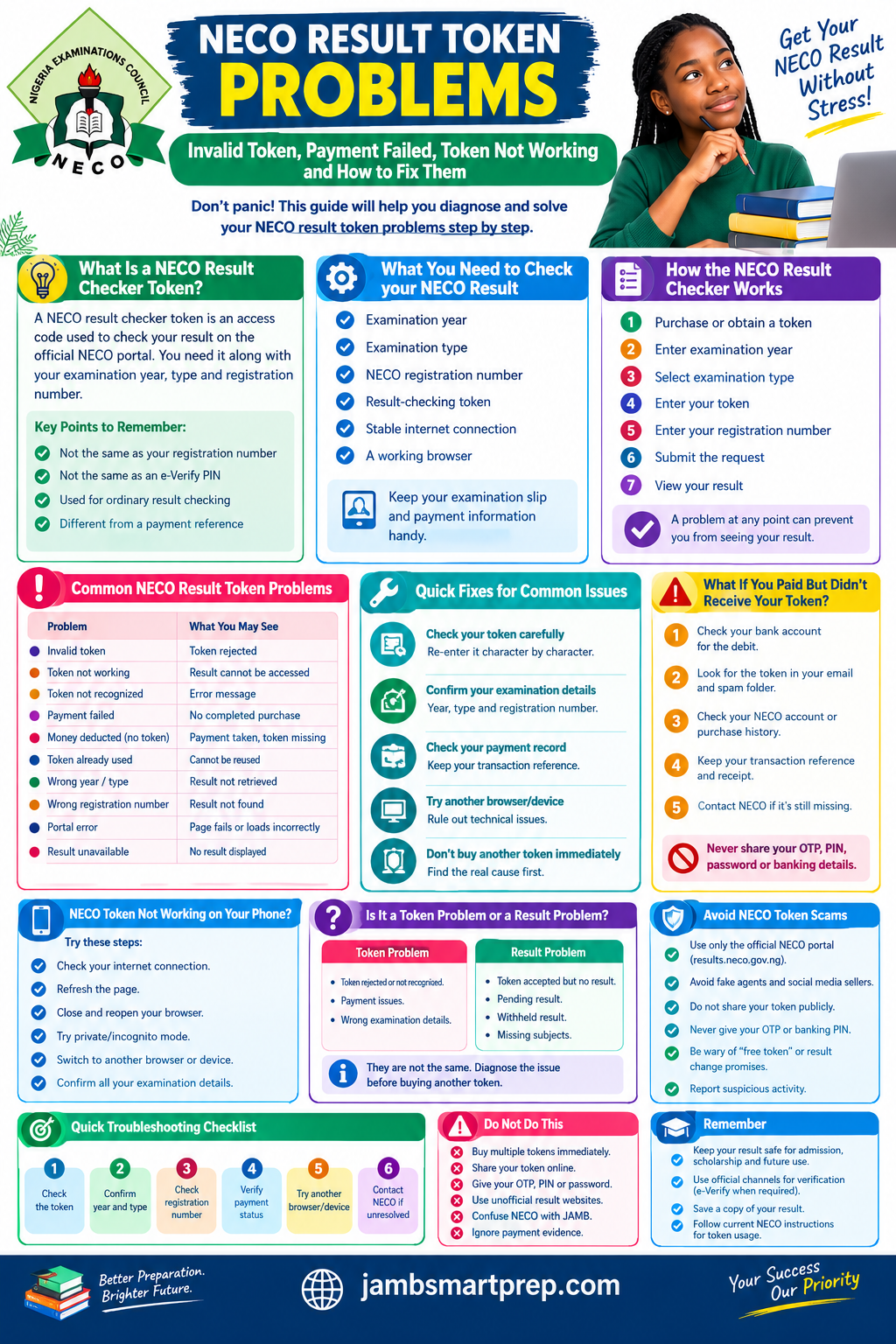
SAFETY REMINDER
Never share your OTP, bank PIN, password or sensitive banking information with anyone claiming to help you check your result.
Conclusion
NECO result token problems can be frustrating, especially when you are waiting for an examination result that you need for admission, screening, scholarship applications or other educational purposes.
The most important thing is not to panic and immediately purchase another token.
Start by identifying exactly where the problem occurs.
- Check your token.
- Check your examination year.
- Check your examination type.
- Check your registration number.
- Check your payment record.
Then check whether the problem is actually with the token or with the result portal or result itself.
A rejected token does not automatically mean that your money is lost. Likewise, a result that does not appear does not automatically mean that the token is defective.
The safest approach is to work through the problem step by step and use official NECO channels when the issue requires intervention.
For Nigerian students preparing for JAMB admission, university screening, polytechnic admission, scholarship applications or other academic processes, keeping your examination information and result documents safe can also save you unnecessary stress later.
Most importantly, use the official NECO platform for sensitive result-checking activities, protect your payment information and avoid unofficial agents who promise shortcuts.
When dealing with an examination result, verify first, troubleshoot carefully and pay again only when you understand why another payment is actually necessary.
