
How to correct wrong NECO registration number is among the queries candidates are searching for an answer to online.
Yes, it has come to our notice that overtime, several NECO candidates always faces issues of wrong registration number which normally occured during the NECO registration process.
In view of this, we have put together this post which aim to tackling virtually everything you need to know about how to correct wrong NECO registration number.
Yes, during the course of this online guide, you will learn how to correct a wrong NECO registration number, where to request correction, documents needed, possible fees and what to do if your result is affected. All you need to do to get what you want is to keenly follow all the instructions outlined in this post.
As we all know, discovering that your NECO registration number is wrong can be worrying, especially if you are about to check your result, submit your O’Level result for admission, or verify your result through NECO e-Verify. A single incorrect digit can prevent a candidate from finding the expected examination record.
The first thing to understand is that a wrong NECO registration number should not be treated in the same way as a wrong name, date of birth or gender. The appropriate solution depends on when the error was discovered, the type of NECO examination involved, and whether the registration data has already been uploaded and processed.
If you have noticed an error, do not pay an agent who claims to have a private way of changing your NECO record. Start by checking your original registration documents, confirming exactly where the error occurred, and then using the appropriate school or official NECO channel.
In this guide, you will learn how to correct a wrong NECO registration number, what to do before and after the examination, how to handle a registration number that is preventing you from checking your result, and what to do when the number fails during NECO result verification.
Can a Wrong NECO Registration Number Be Corrected?
A wrong NECO registration number should be reported and investigated through the appropriate registration or NECO support process. The exact correction procedure depends on the examination and the stage at which the error is discovered.
For school-based NECO registration, it is particularly important to identify errors early. NECO’s registration guidance states that registration errors committed by schools are expected to be corrected during the validation process before registration data is uploaded.
This means that a candidate who notices an error before the registration data is finalised should report it immediately rather than waiting until the examination or result-checking stage.
If you discover the problem after the examination, do not assume that the registration number can simply be edited from the result portal. The official NECO result portal is designed to retrieve results using the examination year, examination type, token and registration number. It does not present itself as a registration-data correction platform.
The important point
Do not try to create a new registration number yourself.
Your registration number is part of your examination record. If there is a discrepancy, the goal is to establish which information belongs to your official NECO record and then follow the appropriate correction or support procedure.
What Is a NECO Registration Number?
A NECO registration number is the identification number associated with a candidate’s examination registration.
It is one of the details used when accessing a NECO result. The official NECO Results Portal currently asks candidates to select their examination year and examination type, enter a result-checking token and provide their registration number before clicking Check my result.
This is why a registration-number error can become a serious problem after results are released.
For example, imagine that a candidate’s correct registration number is:
1234567890
but the number written on a document is:
1234567898
The difference is only one digit, but entering the incorrect number may prevent the candidate from accessing the expected result.
That does not automatically mean that the result has been cancelled, withheld or lost.
It may simply mean that the candidate is using incorrect examination information.
Where Can I Find My NECO Registration Number?
Before requesting any correction, first check the documents and records available to you.
Depending on your examination and registration process, look at:
- Your NECO registration slip
- Examination photocard, where applicable
- Registration documents supplied by your school or registration centre
- Previous NECO examination records
- Your result information, if the result has already been released
- Official correspondence relating to your registration
For school-based SSCE Internal candidates, the registration process is handled through the school’s NECO registration system. The current SSCE Internal portal allows schools to log in and view uploaded candidates and transaction information.
If the number on your personal document differs from the number recorded by your school, do not immediately assume that the number on your document is the official one.
Ask the school’s examination or registration officer to check the record.
NECO Registration Number vs Result Token
One of the most common mistakes candidates make is confusing their NECO registration number with their result-checking token.
They serve different purposes.
| Item | What it is used for |
|---|---|
| NECO Registration Number | Identifies your examination registration |
| NECO Result Token | Used to access the result-checking service |
| Examination Year | Identifies the year in which you took the examination |
| Examination Type | Identifies the relevant NECO examination |
| Verification Reference/Token | May be used as part of the separate e-Verify process |
The official NECO Results Portal requires both a token and a registration number when checking a result.
Therefore, buying another result token will not normally solve a problem caused by entering the wrong registration number.
Example
Suppose you have purchased a valid NECO result token, but the registration number you entered is incorrect.
You may still be unable to retrieve the correct result.
In that situation, purchasing another token without first checking the registration number could simply result in unnecessary expense.
Why Is My NECO Registration Number Wrong?
There are several ways a registration-number problem can arise.
1. A Digit Was Entered Incorrectly
A simple typing error can cause one or more digits to differ from the correct registration record.
This is particularly possible when information is copied manually from one document to another.
2. The School Made a Registration Error
For SSCE Internal candidates, schools are involved in the registration process.
NECO’s published registration guidance specifically requires schools to validate candidate information and correct errors before uploading the registration data.
This is why candidates should examine their registration information carefully when the school provides it for checking.
3. The Candidate Is Looking at the Wrong Document
Sometimes the registration number is not actually wrong.
The candidate may be looking at:
- An old examination document
- Another examination year
- Another examination type
- Another candidate’s document
- A photocopy with unclear digits
Always compare the number against more than one reliable record before requesting a correction.
4. The Number Was Copied Incorrectly
A candidate may have copied the number into a phone note, admission form or result-checking page and accidentally changed one digit.
In that case, the official NECO record may be completely correct.
5. There Is a Difference Between Your Registration Record and Result Information
If your registration document and result information appear to contain different numbers, do not attempt to modify either document yourself.
This is the point at which you should establish which record is held by NECO.
How to Confirm That Your NECO Registration Number Is Actually Wrong
Before contacting NECO, take a few minutes to investigate the problem.
Step 1: Check Your Original Registration Document
Look carefully at every digit.
Do not rely on memory.
If possible, compare the number with another official document connected to the same examination.
Step 2: Check Your Examination Photocard
If you were issued a photocard, compare the registration details against your other documents.
For school-based examinations, NECO’s registration guidance has placed particular importance on candidates checking their registration information during the validation process.
Step 3: Contact Your School
If you registered for SSCE Internal through a school, ask the school’s examination officer or NECO registration administrator to check your record.
This is especially important when the error was discovered before or around the registration-validation stage.
Step 4: Check the Official Result Portal
If your result has already been released, use the official NECO Results Portal rather than a third-party result-checking website.
The portal requires the examination year, examination type, token and registration number.
Step 5: Do Not Guess the Number
If you are missing one digit or cannot clearly read the registration number, do not try different combinations repeatedly.
A guessed number can create further confusion.
Find the correct information from your registration records or the appropriate official source.
Can I Correct My NECO Registration Number Online?
This is one of the most important questions in this article.
Do not assume that the ordinary NECO result-checking portal allows you to change your registration number.
The official result portal currently provides fields for selecting the examination year and type, entering a token and entering the registration number to check a result.
It is therefore a mistake to treat the result checker as a general-purpose NECO registration correction portal.
For school-based registration, NECO’s published guidance places responsibility on the registration process to identify and correct errors during validation before the registration data is uploaded.
The official NECO website also provides a separate Registration Validation Application, which has its own login system and support contact.
NECO Registration Validation Application via https://validation.neco.gov.ng/
What this means for candidates
If you are still within the registration or validation stage, report the problem immediately through the appropriate registration channel.
If the examination has already been written or the registration record has already been processed, do not assume that you can simply log into a portal and replace the number yourself.
Instead, gather your evidence and contact the appropriate NECO support channel for guidance.
What to Do If You Discover the Error Before the Examination
Finding a wrong registration number before the examination gives you an important opportunity to address the problem early.
If you are a school-based candidate, report it to the person responsible for NECO registration at your school.
Follow these steps:
- Show the registration document to the school.
- Point out the exact digit or information you believe is wrong.
- Compare it with the school’s registration record.
- Ask the registration officer to confirm the information.
- Follow the applicable validation and correction procedure.
- Check the updated document before signing or approving it.
- Keep a copy of the corrected record.
NECO’s registration guidance specifically describes a validation process in which candidate information is checked and corrections are made before registration data is uploaded.
That is why candidates should never ignore a registration error simply because the examination date is still some weeks away.
What If the Wrong NECO Registration Number Is Discovered After Registration?
This situation requires more care.
Once registration information has moved beyond the correction stage, the candidate should not assume that the same editing procedure is still available.
Start by determining:
- Whether the registration was for SSCE Internal or SSCE External
- Whether the examination has taken place
- Whether the number is wrong on your document or in the official record
- Whether the problem is preventing result checking
- Whether the problem is preventing result verification
For SSCE External, NECO operates a separate registration system. The current official portal provides registration information and directs candidates to the applicable 2026 guidelines.
This distinction matters because NECO registration procedures are not necessarily identical across every examination type.
What we have covered so far
If your NECO registration number is wrong, do not immediately assume that your result is missing or that your examination record has been cancelled.
First:
Check the original registration documents → confirm the correct number → ask the school or registration centre to verify the record where applicable → use the appropriate official NECO support or correction process.
The earlier an error is discovered, the better. NECO’s registration guidance makes clear that registration errors should be identified and corrected during the applicable validation process before registration data is uploaded.
What to Do After Registration, After the Exam, and When Your Result Is Affected
If you have confirmed that the NECO registration number on your document is different from the number you should be using, the next step depends heavily on when you discovered the problem.
A candidate who notices an error during registration has a different situation from someone who has already written the examination and is now unable to check a result. The same is true for a candidate whose result is available but whose registration details are causing problems during NECO e-Verify.
The safest approach is to establish the exact nature of the error before making any payment or submitting a correction request.
What to Do If Your NECO Registration Number Is Wrong After Registration
If you discover the error after registration has been completed, do not immediately assume that you can edit the number yourself.
For the 2026 SSCE Internal examination, NECO states that registration errors committed by schools should be corrected during the validation process before registration data is uploaded online. The Council also states that it is not liable for registration errors committed by schools.
This makes the validation stage particularly important.
If you are still within the registration process
Contact the school or registration administrator immediately and explain the problem.
Ask the person handling the registration to:
- Check your candidate record.
- Compare it with your registration documents.
- Confirm whether the number is actually incorrect.
- Make any permitted correction through the appropriate registration process.
- Allow you to check the corrected information again.
Do not wait until the examination day to report an error that you have already noticed.
What If My NECO Registration Number Is Wrong After the Exam?
This is more complicated because the examination has already taken place.
At this stage, you should not attempt to create another registration number or register for the examination again simply because you believe the number is wrong.
Instead, gather the documents connected to the examination and establish exactly where the discrepancy exists.
Prepare the following information
- Full name used during registration
- Examination year
- Examination type
- Registration number shown on your document
- School or examination centre
- Examination subjects
- Registration slip or photocard
- Result details, if available
- Any payment or registration evidence
- A clear explanation of the problem
For a school-based candidate, speak to the school’s NECO examination officer first. The school may be able to determine whether the problem is on the candidate’s copy of the registration information or in the registration record itself.
If the issue cannot be resolved through the school or applicable registration process, contact NECO directly.
How to Contact NECO About a Wrong Registration Number
When contacting NECO, make your complaint specific.
Instead of writing:
“My NECO number is not working.”
Explain exactly what has happened.
Example of a useful complaint
Subject: Request for Assistance With Incorrect NECO Registration Number
Dear NECO Support,
I am requesting assistance concerning a discrepancy with my NECO registration number.
Examination: SSCE Internal
Examination Year: [Year]
Candidate Name: [Full Name]
School/Centre: [School/Centre]
Registration Number on My Document: [Number]The registration number on my document appears to be different from the number I am expected to use. I have attached the relevant registration evidence for your review.
Kindly advise me on the appropriate procedure for resolving the issue.
Thank you.
Do not include your bank PIN, ATM PIN, password or one-time password in an email or complaint.
What If Your NECO Registration Number Does Not Work When Checking Your Result?
This is one of the most important situations to address because many candidates search for “wrong NECO registration number” after attempting to check their results.
The official NECO result portal requires four key pieces of information:
- Examination year
- Examination type
- Result token
- Registration number
You then select Check my result.
Therefore, a failed result search does not automatically prove that your registration number is wrong.
There are several things you should check first.
Check the Examination Year
Make sure you selected the year in which you actually sat for the examination.
Using the wrong year can produce an unsuccessful result search even when your registration number is correct.
Check the Examination Type
Make sure you selected the correct NECO examination.
Do not assume that every NECO result uses the same examination category.
Check the Registration Number
Compare every digit with your official registration document.
A single incorrect digit can make the search unsuccessful.
Check the Result Token
Make sure the token is valid and entered correctly.
The official result portal separates the token field from the registration number field.
NECO Result Not Showing Because of a Wrong Registration Number
If your result does not appear, avoid jumping to conclusions.
A result that is not showing can have several possible explanations.
For example:
- Wrong examination year
- Wrong examination type
- Incorrect registration number
- Incorrect token
- Temporary portal problem
- Result processing issue
- Missing or incomplete result
- Withheld result
- Another problem with the examination record
This is why the article should link to a dedicated guide on NECO result missing or incomplete rather than telling every reader that a failed result search is caused by a wrong registration number.
A useful troubleshooting sequence
Check your year → check examination type → check registration number → check token → retry on the official portal → investigate further if the problem remains.
What If the Registration Number on My Slip Is Different From the One in My School Record?
Do not decide on your own which number is correct.
This is an important situation because the document you have may contain a printing or data-entry error.
Ask your school’s NECO registration administrator to compare the information against the school’s official candidate record.
If the school confirms a discrepancy, ask what official correction or support procedure applies.
For SSCE Internal registration, the current NECO system is designed for schools to manage uploaded candidates and registration transactions.
The current Registration Validation Application also provides a dedicated platform for the validation process .
Can NECO Registration Number Be Changed After the Examination?
Do not publish a blanket statement that every registration number can be changed after an examination.
The official 2026 SSCE Internal guidelines specifically discuss correcting registration errors during validation before uploading the registration data.
Once the examination has already been written, the situation is different.
If you discover a genuine discrepancy after the examination:
- Confirm the error.
- Preserve your original documents.
- Contact your school or registration centre where applicable.
- Contact NECO through an official channel if necessary.
- Follow the instructions NECO provides for your specific record.
The important thing is to avoid making an unsupported change yourself.
What Documents Should You Prepare for a NECO Registration Number Problem?
Having the right evidence can make it easier to explain the problem.
1. NECO Registration Slip
This should be one of the first documents you check.
2. Examination Photocard
If you were issued a photocard, keep it available.
3. School Registration Information
For SSCE Internal candidates, ask the school to check the candidate record.
4. Result Printout
If your result is already available, include it when it is relevant to the discrepancy.
5. Valid Identification
Keep an acceptable identity document available if NECO requests one.
6. Payment Evidence
If you have already paid for an official service connected with the issue, keep the receipt or transaction reference.
Important
Do not send every personal document to an unknown person who claims to be a NECO agent.
Only provide information through an appropriate official channel when it is actually required.
Is There a NECO Registration Number Correction Fee?
There is no reason to quote one fixed correction fee in a general article unless the official NECO service currently specifies that amount.
NECO’s payment platform shows that different NECO services can have separate payment items. The platform currently lists services such as Correction of Name among its payment categories and instructs users to obtain the applicable payment item code from the NECO website. It also advises users to verify the payment before paying.
This is important because candidates should not assume that a fee for correcting one type of NECO information is automatically the fee for correcting a registration number.
Before making any payment
Check:
- The name of the service
- Payment item
- Current fee
- Payment reference
- Official NECO payment platform
- Whether the payment is refundable
NECO’s payment portal currently warns that refunds are not applicable once payment has been completed.
How to Pay for an Official NECO Correction Service
If NECO directs you to make a payment for the specific correction service, use the official payment system.
The NECO payment portal currently explains the process as follows:
- Select the appropriate payment item.
- Obtain the required payment item code from the NECO website.
- Complete the payment form.
- Select the available payment method.
- Confirm the transaction.
- Keep evidence of payment.
- Present payment evidence to the appropriate NECO office when required.
Do not pay into a personal account simply because someone says the payment is for NECO.
What If Your NECO Registration Number Is Wrong During NERVS Verification?
This is another situation where candidates can become confused.
NERVS, or the NECO Result Verification System, is used for result verification and confirmation. The official e-Verify platform states that individual candidates can use the service to verify results or generate verification reports for institutional purposes.
The e-Verify process requires candidates to enter and validate their examination number before submitting the verification application.
If you enter an incorrect registration number, the verification process may not return the record you expect.
What should you do?
First check:
- Examination number
- Examination year
- Examination type
- Candidate information
If the information on your original NECO documents does not agree, stop and investigate the discrepancy before repeatedly submitting requests.
How to Correct a Wrong NECO Registration Number During e-Verify
If the number you entered in e-Verify is wrong, do not attempt to alter a generated verification report manually.
The official e-Verify platform explains that the individual verification process involves registration, payment, token validation, submission of the application, entry and validation of the examination number, and generation of a PDF report.
Follow this approach
Step 1: Stop the verification request if the examination details are incorrect.
Step 2: Check your original NECO registration documents.
Step 3: Confirm the correct examination number.
Step 4: If you have already made payment, keep the payment reference.
Step 5: Check your e-Verify dashboard for the status of the request.
Step 6: If the problem cannot be resolved through your account, contact the e-Verify support team.
The current NERVS platform lists ev************@******ov.ng for support and provides official telephone numbers.
What If You Already Generated a NECO Verification Report With the Wrong Number?
Do not edit the report.
A PDF modification changes the appearance of a document, not the underlying NECO record.
If you generated a verification report using incorrect examination information, contact the appropriate NECO e-Verify support channel and explain what happened.
The official e-Verify system states that a report is generated after an application is submitted and can be viewed from the dashboard.
Keep the original report and any transaction information until the issue has been resolved.
What If My NECO Verification Payment Has Already Been Made?
If payment has been completed, do not immediately pay again.
First check whether the payment has been validated on your e-Verify account.
The current e-Verify process specifically instructs users to validate token payment before proceeding with the application.
Keep:
- RRR
- Payment receipt
- Date of payment
- Amount paid
- Email used
- Screenshots
- Application information
If you need support, these details can help explain the transaction.
Can I Use the NECO Result Checker to Correct My Registration Number?
No. The result checker should not be treated as a registration correction portal.
The official NECO Results Portal currently provides fields for:
- Examination year
- Examination type
- Token
- Registration number
Its function is to retrieve the result after those details are supplied.
If your registration number is genuinely incorrect, investigate the registration record rather than repeatedly trying different numbers on the result checker.
What If NECO Says My Registration Number Is Invalid?
An invalid registration number message does not automatically mean your NECO result has been cancelled.
First check whether you entered:
- The correct examination year
- The correct examination type
- The correct registration number
- The correct token
- The correct candidate information
If everything is correct and the system still rejects the number, the problem may require official assistance.
Do not pay someone who claims that an invalid-number message gives them special access to your record.
How to Report a NECO Registration Number Error
When making a complaint, provide enough information for NECO to understand the problem without exposing unnecessary sensitive information.
Include:
- Full name
- Examination type
- Examination year
- Registration number
- School or centre, where applicable
- Description of the error
- Relevant supporting document
- Contact information
Do not include:
- ATM PIN
- Bank password
- Internet banking password
- OTP
- Card PIN
- Email password
The official NECO website provides its contact details, while the 2026 SSCE Internal guidelines specifically direct enquiries to NECO support emails and helplines.
How Long Does NECO Registration Number Correction Take?
There is no single processing period that should be promised for every registration-number problem.
The time can depend on:
- When the error was discovered
- Whether registration is still open
- Whether the school has already uploaded the data
- Whether the examination has been written
- Whether the record requires NECO review
- Whether supporting documents are needed
- The type of examination involved
For that reason, avoid articles or agents promising that your registration number will definitely be changed within a particular number of hours or days.
The correct approach is to submit the problem through the appropriate official channel and retain the reference or evidence of your request.
A Simple Decision Guide for a Wrong NECO Registration Number
| When you discovered the problem | What you should do |
|---|---|
| During registration | Report it immediately to the registration administrator |
| During validation | Correct it through the applicable validation process |
| Before the registration data is uploaded | Ensure the correction is entered before upload |
| After registration | Confirm the official record and seek guidance |
| After the examination | Do not create another number. Contact the appropriate authority |
| While checking your result | Check year, examination type, token and registration number |
| During NERVS/e-Verify | Confirm examination details before submitting verification |
| After generating a wrong report | Do not edit the PDF. Contact e-Verify support |
Important Warning About NECO Registration Number Agents
A search for “how to correct wrong NECO registration number” can expose candidates to online scams.
Someone may claim that they can:
- Change your NECO registration number
- Change your examination record
- Make a missing result appear
- Remove a withheld result
- Change examination grades
- Bypass NECO verification
- “Access the NECO database”
- Fix the problem instantly for a fee
Treat such claims with caution.
NECO has official registration, validation, payment, result-checking and e-Verify systems. Use the service appropriate to your problem rather than giving control of your examination information to an unknown individual.
What we have covered so far
If your NECO registration number is wrong after registration or after the examination, there is no safe shortcut that allows you to simply invent a replacement number.
Start with the evidence.
Check your registration document → compare the record with your school or registration centre → confirm the examination year and type → check the official result portal if applicable → contact NECO or e-Verify support when the discrepancy cannot be resolved.
For the 2026 SSCE Internal examination, NECO specifically says registration errors should be corrected during validation before the registration data is uploaded.
If the problem concerns an already-issued result or an e-Verify report, do not edit the document yourself. Ask the appropriate NECO support team to clarify the official record.
Result Problems, NERVS Verification and Common Mistakes
A wrong NECO registration number becomes particularly confusing when the examination is already over and the candidate is trying to use the number to check or verify a result.
At that point, candidates often see messages such as “invalid registration number,” “result not found,” or “candidate not found.” These messages can be alarming, but they do not all mean the same thing.
Before concluding that NECO has lost your result, first establish whether the problem is actually the registration number.
What If My NECO Result Is Showing With the Wrong Registration Number?
If you have successfully accessed a result but the examination number displayed does not correspond with the number you expected, do not alter the result document yourself.
First compare the information with your original registration records.
Check:
- Candidate’s full name
- Examination year
- Examination type
- Examination number
- Subjects and grades
- School or examination centre
If other details clearly identify you as the candidate, preserve the result and registration documents and seek clarification through the appropriate NECO channel.
A result document should not be edited manually to make the examination number appear different.
NECO Registration Number Wrong But Result Is Showing
This situation is different from a result that is completely missing.
If you can access a result but believe the registration number is incorrect, the first question is:
Is the number actually wrong in NECO’s record, or is the number on your personal document wrong?
That distinction matters.
For example, a candidate might have copied one digit incorrectly onto a personal note while the official NECO record remains correct.
Before requesting a correction, compare the number with the original registration information held by the school or registration centre.
Do not immediately request a new result token
A new token is unlikely to solve a problem caused by an incorrect examination number.
The official NECO result portal uses the examination year, examination type, token and registration number as separate pieces of information.
What If NECO Says “Invalid Registration Number”?
An invalid NECO registration number message can have several causes.
Check these first:
- You selected the wrong examination year.
- You selected the wrong examination type.
- You entered one or more digits incorrectly.
- You entered a registration number belonging to another examination.
- You entered the wrong token.
- The result or examination record requires further investigation.
The official result checker should be the first place to verify the information.
If the information is correct and the system continues to reject it, keep a screenshot of the error and contact the appropriate NECO support channel.
NECO Result Not Showing After Entering the Correct Registration Number
A NECO result not showing problem should not automatically be labelled a registration-number problem.
The distinction is important because NECO results can have different statuses and technical issues.
A candidate may encounter:
- Result not showing
- Result missing
- Incomplete result
- Pending result
- Withheld result
- Cancelled result
- Invalid registration number
- Incorrect token
- Portal error
Each situation may require a different response.
Example
If your registration number is accepted but one or more subjects are missing, repeatedly entering the registration number will not necessarily solve the problem.
That is better treated as a missing or incomplete NECO result issue.
If the registration number itself is rejected, however, you should investigate the examination details first.
Wrong NECO Registration Number and Missing Result
There is a major difference between these two situations.
| Problem | What it may indicate |
|---|---|
| Registration number rejected | Incorrect examination details or record issue |
| Registration number accepted but result missing | Result availability or processing issue |
| Some subjects missing | Incomplete result issue |
| Result says pending | Result is still being processed or requires further action |
| Result says withheld | NECO has placed the result under a withholding status |
| Result says cancelled | Examination result has been cancelled according to the applicable decision |
| Result works but personal details are wrong | Candidate-information correction issue |
This distinction should be explained clearly because many candidates search for “NECO result missing” when the actual problem is an incorrect registration number.
Can a Wrong NECO Registration Number Cause a Result Not to Show?
Yes, entering the wrong registration number can prevent the result checker from retrieving the candidate’s record.
However, that does not mean every missing result is caused by a wrong registration number.
The official NECO result checker requires the candidate to supply the correct examination year, examination type, token and registration number. (results.neco.gov.ng)
If one of these details is wrong, the search may fail.
The best approach is therefore to verify each field independently rather than assuming the result has disappeared.
How to Check Your NECO Registration Number Before Contacting NECO
Before sending a complaint, use this simple checklist.
Registration Number Checklist
1. Compare the number with your registration slip.
Make sure every digit is identical.
2. Check your examination year.
Do not accidentally select another examination year.
3. Check the examination type.
Make sure the selected examination corresponds with the examination you actually took.
4. Check the token.
A registration number cannot compensate for an invalid or incorrectly entered result token.
5. Try the official result portal again.
Use the official NECO Results Portal rather than an unofficial website.
6. Keep evidence of the problem.
Take a screenshot if the portal displays an error.
7. Ask your school to confirm the record.
This is particularly useful for SSCE Internal candidates.
How To Correct Wrong NECO Registration Number for SSCE Internal Candidates
SSCE Internal candidates generally register through their schools.
That makes the school an important point of contact when there is a registration-data discrepancy.
If your school gave you a registration document containing an incorrect number, report it to the school’s examination officer.
Ask the school to check the registration record and establish whether the number was entered incorrectly.
NECO’s 2026 SSCE Internal guidelines emphasise the validation of registration information and state that schools should correct registration errors during validation before the data is uploaded.
If the examination has already taken place
Tell the school exactly what has happened and provide copies of your registration evidence.
The school should then advise you on the applicable procedure or contact NECO where necessary.
Do not attempt to solve the matter by registering again.
How To Handle a Wrong NECO Registration Number for SSCE External
SSCE External registration operates separately from the school-based SSCE Internal registration process.
NECO’s official SSCE External portal provides information for candidates using the external registration system via https://ssceexternal.neco.gov.ng/
If an external candidate discovers a registration-number problem, the candidate should use the appropriate official registration or support channel associated with that examination.
The correction process should not be assumed to be identical to the procedure used by school-based candidates.
Before contacting support
Have these details ready:
- Full registered name
- Examination year
- Examination type
- Registration number
- Registration evidence
- Examination centre
- Description of the discrepancy
Wrong NECO Registration Number During NERVS Verification
The NECO e-Verify system is another place where an incorrect examination number can cause problems.
The official platform allows candidates to verify their NECO results and generate verification reports for purposes such as institutional verification.
If you enter an incorrect examination number during verification, the system may not identify the expected record.
Before submitting the verification request
Check:
- Examination number
- Examination year
- Examination type
- Candidate details
If the number is genuinely different from your original registration information, investigate the discrepancy before proceeding.
What If My NECO Result Is Correct but NERVS Cannot Verify It?
Do not immediately assume that your result has been cancelled.
The verification system and the ordinary result-checking process serve different purposes.
If you can access your result through the official result checker but encounter a problem while attempting verification, document the problem.
Keep:
- Result printout
- Registration slip
- Examination number
- Verification application details
- Payment evidence, if applicable
- Screenshots of the error
Then contact the appropriate e-Verify support channel.
What If I Entered the Wrong Registration Number on My NECO Verification Application?
If the application has not been completed, correct the information before submitting it where the system permits.
If the application has already been submitted, do not modify an official verification report manually.
Instead, check your dashboard and follow the applicable support procedure.
The e-Verify platform describes a process involving registration, payment, token validation, application submission, examination-number validation and report generation. (everify.neco.gov.ng)
This means that the safest approach is to correct the information at the appropriate stage rather than attempting to alter a generated document.
Common Mistakes Candidates Make When Trying to Correct NECO Registration Numbers
1. Creating a New Registration Number
Do not invent another number because the original one appears incorrect.
Your examination record is tied to the information submitted during registration.
2. Registering for the Examination Again
If you have already written the examination, registering again will not automatically correct an existing examination record.
3. Buying Multiple Result Tokens
A new token does not necessarily solve an incorrect registration-number problem.
First establish whether the token or registration number is actually responsible.
4. Editing the Result PDF
Do not alter an official NECO result document.
A modified PDF is not the same thing as an amended NECO record.
5. Paying an Unofficial Agent
Someone asking for money to “enter the NECO database” or “change the number immediately” should be treated with caution.
6. Sending Your OTP or Password
NECO support should not require your banking password, card PIN or OTP for an ordinary registration-number enquiry.
7. Assuming a Missing Result Means Cancellation
A missing result and a cancelled result are not the same thing.
Check the actual status before drawing conclusions.
How to Avoid NECO Registration Number Errors
Prevention is much easier than trying to resolve a discrepancy after the examination.
Check Your Registration Details Early
When your school or registration centre gives you the registration information for checking, read every digit carefully.
Do not sign or approve information without checking it.
Keep Your Documents Safe
Store both a physical and digital copy of your registration information.
You can take a clear photograph or scan the document and keep it somewhere secure.
Do Not Rely on Memory
Registration numbers contain multiple digits and can easily be mistyped.
Always copy directly from the official document.
Report Errors Immediately
If you notice an error during the registration or validation period, report it immediately.
NECO’s published registration guidance makes the validation stage an important opportunity for identifying and correcting registration errors before data upload.
NECO Registration Number Problem: What Should You Do?
CHECK YOUR NUMBER
⬇️
Compare it with your NECO registration slip
⬇️
Confirm examination year and examination type
⬇️
Ask your school or registration centre to verify the record
⬇️
IF THE ERROR IS FOUND DURING REGISTRATION
Correct it through the applicable validation process
⬇️
IF THE EXAMINATION HAS ALREADY BEEN WRITTEN
Do not create a new registration number
⬇️
Keep your registration documents
⬇️
Contact the appropriate NECO support channel
⬇️
IF YOUR RESULT IS NOT SHOWING
Check registration number + examination year + examination type + token
⬇️
IF NERVS/e-VERIFY IS THE PROBLEM
Check the examination number before submitting the verification request
⬇️
Use official NECO e-Verify support if the problem remains
Avoid These Mistakes
❌ Do not pay unknown agents
❌ Do not edit your NECO result
❌ Do not share your OTP or PIN
❌ Do not guess registration numbers
❌ Do not buy unnecessary tokens
What we have covered so far
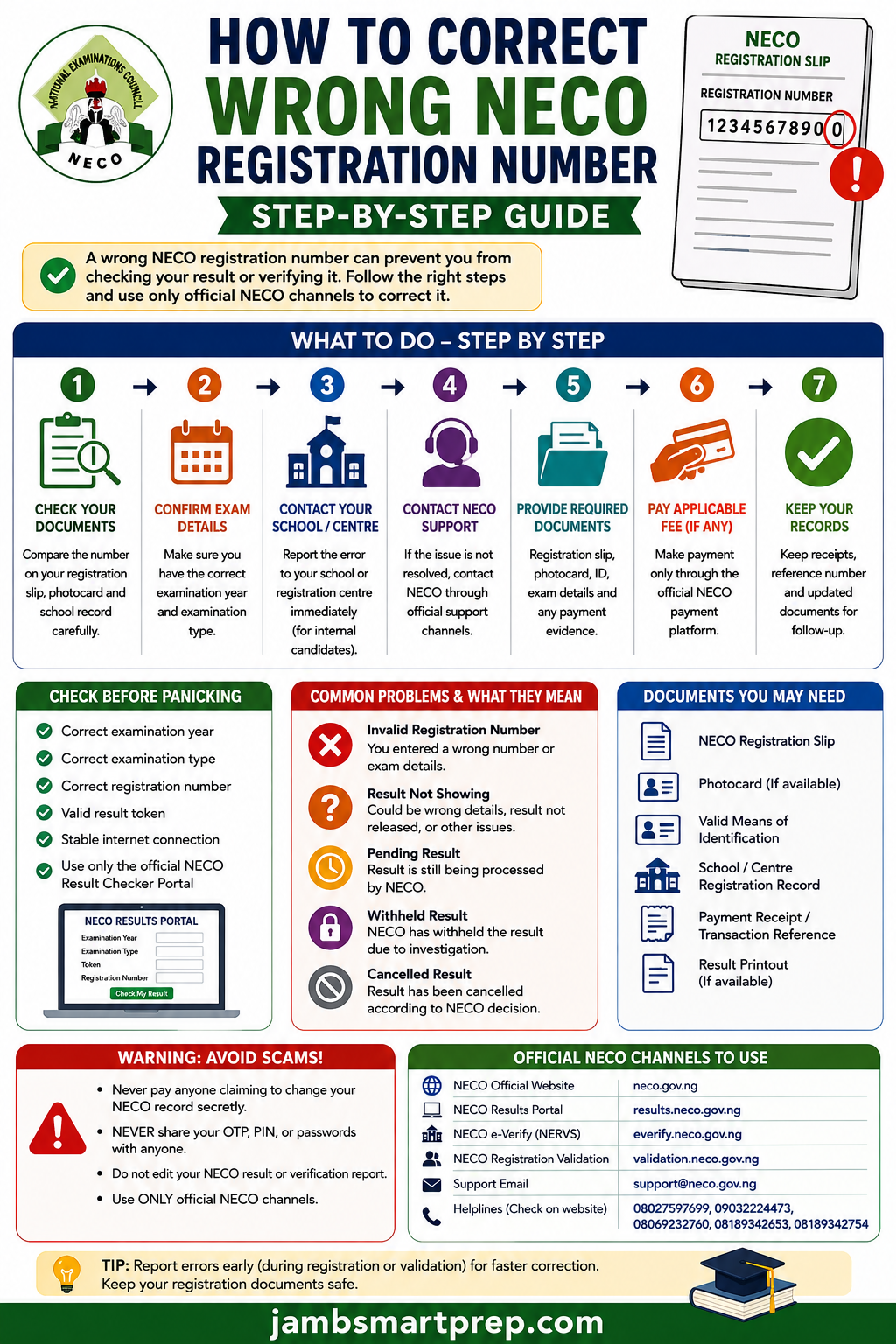
A wrong NECO registration number, an invalid registration number, a missing result, a pending result and a cancelled result are different problems.
If your number is wrong, start by confirming the original registration information. If the examination has already taken place, preserve your documents and use the appropriate NECO support route rather than trying to create or modify an examination number yourself.
For NERVS or e-Verify problems, check the examination number carefully before submitting the verification request and use the official support channel when the record cannot be verified.
Frequently Asked Questions About Wrong NECO Registration Number
Can I change my NECO registration number myself?
You should not assume that you can manually change an assigned NECO registration number.
The official NECO result portal asks candidates to enter their examination year, examination type, token and registration number to retrieve a result. It does not present the result checker as a registration-number editing facility.
If the number is genuinely incorrect, establish the source of the error and use the appropriate NECO or school registration channel.
Can I correct a wrong NECO registration number after the exam?
You should contact the appropriate NECO support channel rather than attempting to create another number yourself.
The published 2026 SSCE Internal guidelines specifically address correction of school registration errors during validation before registration data is uploaded. They do not state that candidates can freely replace their examination number after the examination.
For a post-examination problem, preserve your registration documents and ask NECO or the relevant registration administrator what procedure applies to your particular record.
What if I entered the wrong NECO registration number while checking my result?
Simply return to the official NECO Results Portal and enter the correct information.
The portal requires:
- Examination year
- Examination type
- Result token
- Registration number
If you entered the wrong registration number, correct it before submitting the result search.
There is no reason to assume that your result has been cancelled simply because you entered one incorrect digit.
What if my NECO result is not showing?
First check your:
- Examination year
- Examination type
- Registration number
- Result token
If all four are correct and the result still does not appear, investigate the issue further rather than repeatedly guessing registration numbers.
A result that is not showing can have causes other than an incorrect registration number.
Why does NECO say my registration number is invalid?
An invalid registration number may be caused by an incorrect digit, wrong examination year, wrong examination type or another problem with the examination record.
Start by comparing the number you entered with your original registration document.
If the information is correct but the official result portal continues to reject it, contact NECO support.
Can I use another person’s NECO registration number?
No.
Every candidate should use the registration number belonging to their own examination record.
Do not borrow another candidate’s number simply because yours is not working. It can lead to a completely different candidate record and make the situation more confusing.
Can a result token fix a wrong NECO registration number?
No. A result token and registration number perform different functions.
The official NECO result checker has separate fields for the token and registration number.
If your registration number is wrong, buying additional tokens without investigating the number may simply cost you more money.
Can I buy another NECO token if my registration number is not working?
You can purchase a token through the official NECO result service when you need one, but buying another token should not be your first response to an incorrect registration number.
First determine whether the problem is:
- The token
- Registration number
- Examination year
- Examination type
- Result availability
- Another examination-record issue
Can my school correct a wrong NECO registration number?
For school-based SSCE Internal candidates, the school plays an important role in the registration process.
NECO’s 2026 guidelines state that schools are responsible for correcting registration errors during the validation process before the registration data is uploaded.
Therefore, if you discover the problem during registration or validation, report it to the school’s NECO registration officer immediately.
What if my school refuses to correct the error?
Ask the school to explain what information was submitted and whether the registration record has already been uploaded.
If the issue cannot be resolved at school level, use the official NECO support contacts provided for the examination.
The 2026 SSCE Internal guidelines list in**@******ov.ng and su*****@******ov.ng, together with NECO helpline numbers, for further enquiries.
What If My Registration Number Is Correct but NECO Result Is Still Missing?
Do not keep trying to change the registration number.
If you have verified that the number is correct, move to the next stage of troubleshooting.
Check whether:
- You selected the correct examination year.
- You selected the correct examination type.
- Your result has been released.
- Your token is valid.
- Other candidates from the same examination are experiencing a similar issue.
- Your result displays a particular status.
This distinction is important for SEO and, more importantly, for candidates. “NECO registration number not working” and “NECO result missing” are related searches, but they are not identical problems.
What If Only Some NECO Subjects Are Missing?
If your registration number works and your result appears but one or more subjects are absent, do not automatically request a registration-number correction.
That situation may be an incomplete or missing result issue.
Record the subjects that are missing and compare the displayed result with the subjects you actually registered and sat for.
You may then need to follow the appropriate NECO result enquiry process.
This is one reason a good troubleshooting guide should distinguish between:
wrong registration number → result not showing → incomplete result → pending result → withheld result → cancelled result.
What If My NECO Result Is Pending?
A pending result is not the same as an incorrect registration number.
If the portal identifies your candidate record but displays a pending status, changing the registration number is unlikely to be the appropriate solution.
Check the official NECO announcements and follow the applicable instructions for pending results.
Do not pay an agent who promises to remove a pending status through a private system.
What If My NECO Result Is Withheld?
A withheld result should also not be confused with a registration-number problem.
If the official result system identifies your record but indicates that the result is withheld, the candidate should investigate the applicable NECO process for withheld results.
Do not assume that changing the registration number will make the result appear.
What If My NECO Result Has Been Cancelled?
A cancelled result is different from a missing result.
If the official NECO system indicates cancellation, changing your registration number will not legitimately reverse that status.
Candidates should seek information through NECO’s official channels rather than paying someone who claims to have access to a hidden database.
How Do I Correct a Wrong NECO Registration Number for Admission?
If a university, polytechnic, college or other institution asks for your NECO examination number and you discover that the number on your document is incorrect, do not simply submit a number you have guessed.
Use your official registration records to establish the correct information.
If the institution needs result verification, NECO’s official e-Verify system is designed for result verification and confirmation. NECO describes the service as supporting individual and institutional verification.
This is particularly important when your NECO result is being used for:
- University admission
- Polytechnic admission
- College of education admission
- Employment
- Scholarship applications
- International education applications
- Institutional screening
How NECO e-Verify Handles Examination Numbers
The official NECO e-Verify platform instructs users to submit and validate their examination number as part of the verification process. After successful submission, a verification report can be generated and viewed from the user’s dashboard.
This means you should check the examination number carefully before submitting an e-Verify request.
The e-Verify platform also notes that results are available from 2000 for SSCE Internal and from 2002 for SSCE External. It further states that the absence of a passport on a report does not invalidate the report.
What If I Paid for NECO e-Verify With the Wrong Registration Number?
Do not immediately make another payment.
First check the status of the existing request and determine whether the wrong number was actually submitted.
Keep your:
- Payment reference
- Application details
- Registration number
- Examination year
- Email address used
- Screenshots
The official e-Verify platform provides support through e-******@******ov.ng and lists a telephone contact for enquiries.
What If My NECO Verification Report Contains the Wrong Examination Number?
Do not edit the PDF yourself.
A verification report is an official document generated from information submitted through the verification system. The appropriate solution is to contact NECO e-Verify support and explain the discrepancy.
The current e-Verify platform describes the process as submitting and validating the examination number before generating the report.
NECO Registration Number Troubleshooting Checklist
Use this checklist before contacting NECO.
Registration details
- I have checked my original registration slip.
- I have checked my photocard, where applicable.
- I have confirmed my full name.
- I have confirmed the examination year.
- I have confirmed the examination type.
- I have compared every digit of my registration number.
- I have contacted my school if I am an SSCE Internal candidate.
Result checking
- I am using the official NECO result portal.
- I selected the correct examination year.
- I selected the correct examination type.
- I entered the correct token.
- I entered the correct registration number.
- I saved a screenshot if an error appeared.
Verification
- I checked the examination number before submitting e-Verify.
- I kept my payment evidence.
- I did not alter an official verification report.
- I know the official e-Verify support channel.
NECO Registration Number Correction: What You Should Never Do
There are several shortcuts that can make the situation worse.
Never create a fake registration number
A guessed number is not a correction.
Never alter your NECO result
Changing a PDF or printed result does not change the NECO database.
Never give an agent your OTP
Your OTP should remain private.
Never give an agent your banking PIN
A genuine examination correction should not require you to surrender your banking credentials.
Never pay an unofficial “database access fee”
Claims that someone can secretly access or alter NECO’s database should be treated as a serious warning sign.
Never register for the examination again simply because you made a mistake
First determine what happened to the original record.
How to Protect Your NECO Registration Information
Your registration number may not be a password, but it is still examination information that should be handled carefully.
Keep your registration slip in a safe place.
A good practice is to maintain:
One physical copy + one clear digital copy + one backup.
You should also avoid posting your complete registration details publicly on social media.
If you need help from a school or official support channel, provide only the information needed to identify and resolve the problem.
Official NECO Platforms You Should Use
When dealing with a registration-number problem, always check that you are using a genuine NECO platform.
NECO official website
National Examinations Council official website via https://neco.gov.ng/
The official website provides examination information, registration guidelines, announcements and contact details.
NECO Results Portal
NECO Results Portal via https://results.neco.gov.ng
This is the official portal for checking NECO results using the required examination details, token and registration number.
NECO SSCE Internal Portal
NECO SSCE Internal Portal via https://ssceinternal.neco.gov.ng/
The portal provides school administrators with functions including viewing uploaded candidates and transaction history.
NECO SSCE External Portal
NECO SSCE External Portal via https://ssceexternal.neco.gov.ng
This is the official portal for SSCE External registration.
NECO e-Verify
NECO e-Verify Portal via https://everify.neco.gov.ng/
NECO describes e-Verify as its online result verification and confirmation system for individuals and institutions.
NECO Support Contacts for Registration Problems
For SSCE Internal enquiries, NECO’s 2026 guidelines list:
- in**@******ov.ng
- su*****@******ov.ng
- 08027597699
- 09032224473
- 08069232760
- 08189342653
- 08189342754
The general NECO website also lists official contact information.
For e-Verify enquiries, the current platform lists e-******@******ov.ng and 08035036317 on its registration page, while its main platform lists additional support numbers and ev************@******ov.ng.
Because contact information can change, check the official NECO website or the relevant portal before relying on a phone number or email address found on an unofficial website.
Final Advice for Candidates With a Wrong NECO Registration Number
A wrong registration number can be frustrating, especially when it prevents you from checking your result or completing an admission verification process.
However, the problem is usually easier to handle when you approach it systematically.
Do not guess the number.
Do not create a replacement number.
Do not buy unnecessary tokens.
Do not edit your result.
Do not pay an unknown agent to “access the NECO database.”
Instead, identify where the discrepancy occurred, preserve your registration documents and use the appropriate official NECO channel.
For school-based SSCE Internal candidates, report registration errors as early as possible. NECO’s 2026 guidelines specifically place the correction of school registration errors within the validation process before registration data is uploaded.
If the problem occurs while checking a released result, carefully verify the examination year, examination type, token and registration number on the official result portal.
If the problem occurs during result verification, use the official e-Verify system and contact its support team when necessary.
Frequently Asked Questions: Quick Answers
How do I correct a wrong NECO registration number?
First confirm the error using your original registration documents. If you are an SSCE Internal candidate, contact your school’s NECO registration officer. If the examination has already been processed, seek guidance from the appropriate NECO support channel.
Can I change my NECO registration number online?
Do not assume that you can edit an assigned examination number through the result-checking portal. The official result portal is for retrieving results using the examination details and token.
What if my NECO registration number is not working?
Check the examination year, examination type, token and every digit of the registration number. If everything is correct and the problem continues, contact NECO support.
What if my NECO result is not showing?
A wrong registration number is one possibility, but it is not the only one. Check all examination details before investigating other possible result problems.
Can I use my NECO token to correct my registration number?
No. The token is used for result checking. It is separate from the registration number.
What if I entered the wrong examination number on e-Verify?
Check the application status and contact NECO e-Verify support if the request has already been submitted. Do not alter a generated verification report.
Can a NECO agent change my registration number for me?
Be very cautious about anyone making this claim. Use official NECO channels and do not give strangers your passwords, OTPs or banking credentials.
Related Articles
- NECO Result Checker Portal Login
- How to Check NECO Result Online
- NECO Result Not Showing
- NECO Result Missing or Incomplete
- What to Do If Your NECO Result Is Still Pending
- How to Handle Withheld NECO Results
- NECO Result Cancellation: What It Means
- How to Correct Wrong Name on NECO Result
- How to Correct Wrong Date of Birth on NECO Certificate
- How to Correct Wrong Gender on NECO Registration
- How to Verify a NECO Result Using NERVS
- NECO Result Verification Guide
- How to Buy a Genuine NECO Result Checker Token
- NECO Result Checker Token Not Working
- NECO Result Problems and Solutions
This creates a useful internal-link structure where the present article acts as the central guide for NECO registration number errors, while individual articles handle specific result and verification problems.
Conclusion
A wrong NECO registration number can interfere with result checking and verification, but it does not automatically mean that your result has been cancelled, withheld or lost.
The correct response is to verify the number, identify where the discrepancy occurred and use the appropriate official channel to resolve it.
For candidates still within the registration process, early reporting is particularly important because NECO’s 2026 SSCE Internal guidelines state that school registration errors should be corrected during validation before the registration data is uploaded.
For candidates who have already written the examination, avoid creating a new number or paying an unofficial agent. If the result checker rejects the number, carefully check the examination year, examination type, token and registration number.
And if you are dealing with NECO NERVS/e-Verify, make sure the correct examination number is submitted before completing the verification process.
The safest rule is simple: when your NECO registration number appears wrong, verify first and correct through an official channel. Never guess, edit or pay an unverified agent.

Joel
Aug 27, 2026 -
Hello jambamartprep team, please I need help with my exam