Is your NECO result missing or incomplete? Welcome to Jambsmartprep.com, your no. 1 guide for Jamb, WAEC, NECO and admissions. In today’s post, we will be covering virtually everything you need to know about What to Do When Your NECO result is missing or incomplete.
Yes, during the course of this online guide, you will learn what a missing or incomplete NECO result mean and how a missing NECO result can appear, why is your NECO result missing or incomplete and the complete ways to go about it. All you need to do to get what you want is to keenly follow all the instructions outlined in this post.
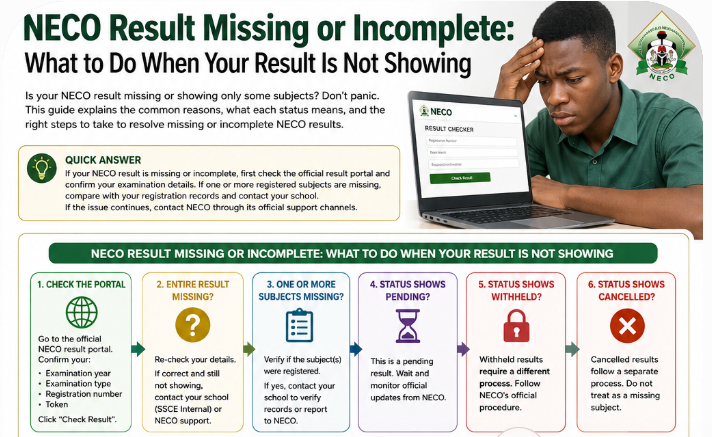
If your NECO result is missing or incomplete, first check the official result portal and confirm your examination year, examination type, registration number and token. If one or more registered subjects are missing, compare the result with your registration records and contact your school if you took SSCE Internal. If the problem remains unresolved, contact NECO through its official support channels.
As we all know, checking your NECO result should be a straightforward process. You enter your examination year, examination type, token and registration number, then view your grades. But sometimes, a candidate checks the result and notices that one or more subjects are missing.
In other cases, the NECO result is incomplete, some grades are not displayed, the entire result is unavailable, or the portal shows a status such as pending. This can be worrying, especially when the result is needed for JAMB admission, university screening, scholarship applications or another important academic process.
The first thing to understand is that a NECO result missing or incomplete does not automatically mean the result has been cancelled.
There are several possible explanations for a missing subject or incomplete result. The problem may relate to examination processing, candidate information, school records, the result portal or a status that requires further attention.
This guide explains what the different situations can mean and what you should do before assuming the worst.
What Does a Missing or Incomplete NECO Result Mean?
A missing or incomplete NECO result means that the result displayed to a candidate does not contain all the subjects, grades or information the candidate expected to see.
For example, a candidate may check the result and find English Language, Mathematics, Biology and Chemistry, but Physics is not displayed. Another candidate may see all the registered subjects but find that one grade is absent.
There is also a more serious situation where the candidate cannot retrieve the result at all.
The official NECO result portal requires candidates to select the examination year and examination type, enter their token and registration number, and then select “Check Result.” The portal also provides an official support email for result-checking problems.
This means you should first establish exactly what kind of problem you are facing.
A missing subject is different from a completely unavailable result. A pending result is also different from a withheld or cancelled result.
A Missing Result Is Not Automatically a Cancelled Result
It is easy to become alarmed when a subject disappears from your result. However, you should not conclude that NECO has cancelled the subject simply because it is not displayed.
Consider these examples:
| Result problem | What it may indicate |
|---|---|
| One subject is missing | Information relating to that subject may need to be checked |
| Several subjects are missing | A wider record or processing issue may need investigation |
| The entire result is missing | The result may be unavailable, or the submitted details may need checking |
| Result shows pending | Relevant processing has not been completed |
| Result shows withheld | The result has a status requiring further attention |
| Result shows cancelled | NECO has formally cancelled the relevant result |
| Portal is not displaying the result | There may be a portal, account or information problem |
The important point is simple: check the exact status before deciding what has happened to your result.
How a NECO Result Can Be Missing or Incomplete
The phrase “NECO result missing” can describe several different situations.
Understanding the exact problem will make it easier to decide what to do next.
Only One Subject Is Missing
This is one of the most common situations candidates worry about.
You may see most of your subjects but discover that one subject is absent from the result.
For example, a candidate might see:
- English Language
- Mathematics
- Biology
- Chemistry
but Physics does not appear.
This does not by itself establish that Physics has been cancelled. The candidate should first confirm that the subject was actually registered and then ask the school or relevant examination authority to check the candidate’s records.
The same applies if the missing subject is Mathematics, English Language, Biology, Economics, Government or another subject.
Several Subjects Are Missing
If two, three or more subjects are absent, the situation deserves closer attention.
Start by comparing the displayed result with the subjects on your examination records. If several candidates from the same school are experiencing a similar problem, it may also be useful for the school to investigate whether there is a wider issue.
That observation alone does not prove the cause, but it can help the school identify whether the problem affects one candidate or several candidates.
All Subjects Are Missing
A completely unavailable result is different from a result with one missing subject.
If none of your subjects is displayed, check your examination year, examination type, registration number and token carefully before assuming that your result has disappeared.
The official result portal specifically asks candidates to select the correct examination year and examination type before entering their token and registration number.
Subjects Are Listed but a Grade Is Missing
Another possibility is that the subject appears on the result but the expected grade or score is not displayed.
Do not immediately treat this as a cancellation. Record what you see on the screen and compare it with your examination records.
A screenshot can also be useful if you later need to explain the problem to your school or NECO support.
The NECO Result Shows “Pending”
A pending result should not automatically be treated as a missing result.
The word “pending” suggests that the relevant result information has not been completed or released in the form expected by the candidate. The correct next step depends on the particular circumstances.
If your result is specifically marked as pending, it is better to follow guidance for NECO pending results rather than treating it as an ordinary portal error.
The NECO Result Shows “Withheld”
A withheld result is another situation that should be handled separately.
A candidate should not describe a withheld result simply as a missing result. If NECO displays a specific status, take note of the wording and follow the appropriate procedure.
This distinction matters because the solution to a portal problem is not necessarily the same as the process for a withheld result.
The Result Cannot Be Found on the Portal
Some candidates search for their result and receive a message that suggests the result cannot be found or displayed.
Before contacting anyone, check:
- Examination year
- Examination type
- Registration number
- Token
- Examination number where applicable
- Candidate details
Also make sure you are using the official NECO result portal rather than a third-party website.
Why Is My NECO Result Missing or Incomplete?
There is no single explanation that applies to every candidate.
A NECO result problem can have different causes, which is why candidates should avoid relying on claims from unofficial websites, agents or social media pages.
Here are some possibilities worth checking.
1. The Result Is Still Being Processed
One possibility is that the relevant result information has not completed the necessary processing.
This can be particularly important when candidates begin checking their results around the period of result release and some information is available while other information is not.
Do not assume that every incomplete result will have the same explanation.
2. School Records May Need to Be Checked
For school-based candidates, the school can be an important part of the investigation.
NECO’s 2026 SSCE Internal guidelines show that schools are responsible for entering candidate information and uploading registration records online. The guidelines state that a candidate is only registered after the relevant offline entries have been uploaded online and a registration number obtained.
This is one reason a candidate with a NECO result missing subject should speak to the school’s examination officer or principal.
The school can check the records available to it and determine whether the subject was correctly entered and whether there are any related issues that need to be brought to NECO’s attention.
3. Continuous Assessment Information May Need Attention
Candidates sometimes assume that a missing result must have been caused by the examination itself.
However, examination records can involve more than the final written paper. Where Continuous Assessment or other required information is relevant to the candidate’s records, the school may need to confirm that the appropriate information was handled correctly.
Do not assume that a missing subject is always caused by CA. The exact cause must be established from the candidate’s records and, where necessary, NECO.
4. Registration Information May Not Match
Another area worth checking is the candidate’s registration information.
This can include:
- Registration number
- Examination number
- Examination year
- Examination type
- Candidate details
- Registered subjects
NECO’s 2026 registration guidelines place emphasis on accurate candidate information during registration.
This is why candidates should keep their registration documents and compare them with the result they are trying to retrieve.
5. Examination or Practical Records May Need Further Processing
Some candidates may be concerned because a practical subject does not appear as expected.
It is important not to assume that every missing practical subject has the same cause. The appropriate response is to check the registered subject and then seek clarification from the school or NECO where necessary.
6. School-Related Registration Problems
A problem with the candidate’s school records can sometimes require the school to take the first step.
This is particularly relevant to SSCE Internal candidates because the examination is conducted for candidates at the end of their secondary school education, with schools playing a central role in registration. NECO describes SSCE Internal as the examination for candidates completing their secondary school education, while SSCE External is for candidates who have attempted the examination and have deficiencies to make up.
If you are a school candidate and your NECO result is incomplete, do not skip the school when looking for an explanation.
7. A Portal or Technical Problem
Sometimes the problem may be related to how the result is being displayed.
If your token is accepted but the result does not appear as expected, record the exact message displayed on the screen.
Try checking again later using the official portal, but do not repeatedly purchase tokens simply because the result is not displaying correctly.
8. The Result May Be Under Review
A result can also require further attention before the candidate receives the information expected.
If the portal displays a specific status, use that status as the starting point for determining your next step.
9. The Wrong Examination Type Was Selected
This is a simple mistake that can prevent a candidate from retrieving the expected result.
NECO operates different examination categories, including SSCE Internal and SSCE External. The official NECO website explains the distinction between these examinations.
Therefore, if you sat for SSCE Internal but select the wrong examination type while checking, you should not conclude that your result is missing.
What to Do If Your NECO Result Is Missing
Once you discover that your result is incomplete, resist the temptation to panic or pay someone who claims to have a special way of retrieving it.
Work through the problem in order.
Step 1: Check the Result Again on the Official NECO Portal
Start with the official result checker.
The current portal asks you to:
- Select the examination year.
- Select the examination type.
- Enter your NECO token.
- Enter your registration number.
- Click Check Result.
- Review the result carefully.
These are the fields currently provided by NECO’s official result portal.
When checking again, avoid rushing through the form.
Confirm that the examination year is correct. Confirm the examination type. Check the registration number character by character, especially if you copied it from another document.
Important: Do Not Buy Another Token Immediately
A missing subject does not necessarily mean that your token has failed.
If the token has already worked and the result is displayed but incomplete, purchasing another token is unlikely to solve a missing-subject problem.
First identify whether you have a NECO result checker problem or an actual result-record problem.
Step 2: Confirm Your Examination Details
Before contacting NECO, gather the basic information connected to your examination.
Check:
- Examination year
- Examination type
- Registration number
- Examination number
- Candidate name
- School
- Subjects registered
This information will make it easier to explain the problem accurately.
Step 3: Compare the Result With Your Registration Information
Look at the subjects you registered for and compare them with the subjects displayed on the result.
If Mathematics is missing, confirm that Mathematics was among your registered subjects.
If English Language is missing, check the same thing.
If a practical subject is missing, verify the subject entry and then speak with the school if necessary.
This simple comparison can prevent a candidate from reporting a subject as missing when it was not actually part of the examination entry.
Step 4: Ask Your School to Check Your Record
If you are an SSCE Internal candidate, contact your school examination officer, principal or another official responsible for examination matters.
Ask the school to check:
- Your candidate registration
- Your registered subjects
- Continuous Assessment records where relevant
- Examination records
- Any communication received from NECO concerning your result
Do not rely solely on a classmate’s explanation of what happened. Your own candidate record is what matters.
Step 5: Ask Whether Other Candidates Have the Same Problem
If several students from your school are reporting that the same subject is missing, tell the school.
For example, if several candidates discover that one particular subject is absent from their results, the school may be able to investigate the matter more effectively than an individual candidate acting alone.
Again, this does not prove the cause. It is simply useful information when investigating a result problem.
Step 6: Contact NECO Through Its Official Support Channels
If checking the details and speaking with your school does not resolve the problem, use NECO’s official support system.
The support portal currently allows users to search for answers and submit a ticket when they cannot find a solution.
When making a complaint, explain the problem clearly instead of writing only, “My NECO result is missing.”
Include relevant information such as:
- Full name
- Examination number
- Registration number
- Examination year
- Examination type
- School
- Missing subject
- Exact message displayed
- Screenshot of the result, where appropriate
- Description of what happened
- Contact information
Keep copies of your complaint and any response you receive.
Do not post your examination number, token or other private examination details publicly in the comments section of a website or on social media.
What to Do If One Subject Is Missing From Your NECO Result
A NECO result missing subject problem should be handled carefully.
Suppose your result shows nine subjects but one subject you expected is absent.
Start with these questions:
- Was the subject actually registered?
- Does the subject appear on your registration documents?
- Are other candidates experiencing the same issue?
- Has the school checked your candidate record?
- What exact status or message appears on the NECO portal?
If the subject was registered and is genuinely absent, contact the school for SSCE Internal examinations and ask them to investigate the record.
If the school cannot resolve the matter, contact NECO through its official support channels.
Most importantly, do not assume that a missing subject has been cancelled simply because it is not displayed.
The exact status needs to be established first.
What If NECO Result Is Missing Mathematics?
If NECO result missing Mathematics is your particular problem, treat it seriously, especially if Mathematics is required for your intended course or admission process.
First confirm that Mathematics was included among your registered subjects. Then ask the school to verify your record and seek clarification from NECO if necessary.
The same approach applies if NECO result missing English or another subject that you need for admission.
A candidate should not wait until the final stage of an admission process before investigating a missing subject.
What If a Practical Subject Is Missing?
If a practical subject does not appear, check the registered subject and ask your school to verify the relevant examination records.
Avoid relying on assumptions about why the subject is absent. The school or NECO should clarify the actual status.
What to Do If Several Subjects Are Missing From Your NECO Result
Finding one missing subject can be worrying. Finding several missing subjects can be even more confusing, particularly when you need the result for admission or another important purpose.
If several subjects are missing, do not immediately assume that your entire NECO result has been cancelled.
Start by checking whether the missing subjects were included in your registration details. Compare the result displayed online with your examination slip, registration information or any other official record you have.
If the subjects were registered but are not appearing on the result, contact your school if you took the SSCE Internal examination. Ask the examination officer to check your candidate record and the subjects submitted for the examination.
If the school cannot explain the problem, contact NECO through its official support channels.
NECO’s official support portal allows users who cannot find an answer to submit a support ticket.
What You Should Check When Several Subjects Are Missing
Go through the following information carefully:
- Confirm the examination year.
- Confirm whether you selected SSCE Internal or SSCE External.
- Confirm your registration number.
- Check your examination records.
- Compare the subjects displayed with the subjects you registered.
- Ask your school to check your candidate record.
- Record the exact message displayed by the result portal.
- Contact NECO if the problem remains unresolved.
If several students from the same school are experiencing the same issue, inform the school. This may help the examination officer investigate whether the problem affects multiple candidates.
However, do not assume that a common problem among students automatically proves its cause. The school or NECO will need to establish what happened.
NECO Result Not Showing All Subjects
The search query “NECO result not showing all subjects” usually comes from candidates who can see part of their result but cannot find one or more expected subjects.
This situation is different from a candidate who cannot access the result at all.
For example, imagine that your NECO result displays:
- English Language
- Mathematics
- Biology
- Chemistry
- Economics
but Physics is missing.
The first question should be whether Physics was actually registered.
If Physics appears on your registration record but is absent from the result, ask your school to investigate the candidate record if you sat for SSCE Internal. If you took SSCE External, follow the appropriate NECO support route for your examination.
Missing Subject vs Missing Grade
These two situations should not be confused.
A missing subject means the subject itself is not appearing among the listed subjects.
A missing grade means the subject appears, but the expected grade or result information is not displayed.
When contacting support, explain precisely which of these situations applies to you.
Instead of writing:
“My NECO result is incomplete.”
A more useful complaint would be:
“My NECO result is displaying eight subjects, but Physics, which I registered for, is not listed.”
The second explanation gives the person handling the complaint more information to work with.
Keep a Screenshot of the Result
If the result is displayed but incomplete, take a screenshot showing what appears on the screen.
If there is an error message, capture that too.
Also write down the date and approximate time you checked the result. This information may be useful if the problem changes later.
NECO Result Missing After Checking Successfully
Another situation occurs when a candidate successfully checks a result and later cannot retrieve it in the same way.
For example, you may have checked the result earlier and seen your grades. When you return later, the result may fail to display or the portal may show a different message.
This can lead to the search “NECO result missing after checking.”
Before concluding that the result has disappeared from NECO’s system, repeat the checking process carefully.
The official NECO results portal currently requires the candidate to select the examination year and examination type, enter a token and registration number, and then select the option to check the result.
Check These Details Again
Make sure you have selected:
- The correct examination year
- The correct examination type
- The correct registration number
- The correct token
Also make sure that you are using the official NECO result portal.
If the portal accepts your details but the result is still not displaying correctly, take a screenshot of the message or result page.
What If the Token Worked Before?
A token working previously does not necessarily mean that every subsequent portal problem is a token problem.
If you have already successfully accessed your result, avoid buying another token simply because the result is temporarily unavailable.
First establish whether the problem concerns the token or the result itself.
If necessary, contact NECO through the official support channel rather than paying an unofficial agent who claims to have access to the result database.
NECO Result Missing vs Pending vs Withheld vs Cancelled
These terms can look similar to a worried candidate, but they should not be treated as interchangeable.
Understanding the difference can help you avoid taking the wrong step.
| Status | What it generally tells you |
|---|---|
| Missing | Expected result information is not appearing |
| Incomplete | Some expected subjects, grades or information are absent |
| Pending | Relevant processing or release has not been completed |
| Withheld | The result has been placed under a specific status requiring attention |
| Cancelled | The relevant result has been formally cancelled |
| Not Found | The system cannot retrieve or match the requested result information |
The most important rule is this:
Do not describe a result as cancelled simply because it is missing.
Cancellation is a specific status. A result that is incomplete, pending or unavailable may require a completely different course of action.
What Does a Pending NECO Result Mean?
A pending result is one that has not reached the point where all expected information is available to the candidate.
If your result specifically shows a pending status, follow the guidance for pending results rather than repeatedly entering the same information or purchasing additional tokens.
You should also monitor official NECO announcements and use official support channels when the problem requires clarification.
What Does a Withheld NECO Result Mean?
A withheld result should be treated separately from an ordinary portal problem.
If the portal gives you a withheld status, record the exact wording and seek information about the appropriate process.
Do not edit the result screenshot to remove the status, and do not pay someone who claims they can secretly “clear” the result.
What Does a Cancelled NECO Result Mean?
Cancellation is more serious because it means the result has been formally cancelled.
A candidate should look for the official explanation and follow the applicable NECO procedure.
A missing subject, however, should not automatically be described as a cancelled result.
Can a Missing NECO Result Be Corrected?
In some circumstances, a missing or incomplete result may be resolved, but there is no single correction process that applies to every candidate.
The correct procedure depends on why the result information is missing.
For example, the appropriate next step may involve:
- Checking the candidate’s registration details.
- Confirming the registered subjects.
- Asking the school to investigate its records.
- Submitting a complaint to NECO.
- Providing supporting information requested by NECO.
- Checking the result again after the issue has been addressed.
- Using NECO’s verification service where verification is required.
NECO’s published 2026 registration guidelines place responsibility on schools to validate registration information before uploading it online and state that registration errors committed by schools should be corrected during the validation process. The guidelines also provide official NECO support emails and telephone contacts for enquiries.
This is one reason candidates should keep their registration documents rather than relying entirely on memory.
Can NECO Result Be Updated After Release?
A candidate should not assume that every result can simply be edited after release.
If you discover missing information after the result has been released, report the specific problem through the appropriate channel and allow NECO or the relevant school to determine what action is possible.
Avoid websites or individuals promising guaranteed result changes.
There is an important difference between reporting an error and altering a result.
Candidates should only pursue correction through legitimate NECO procedures.
How Long Does NECO Result Correction Take?
One of the most common questions candidates ask is:
“How long does NECO result correction take?”
There is no single number of days that should be presented as a guaranteed correction period for every missing or incomplete result.
The time can depend on the nature of the problem and the information required to investigate it.
For example, the situation may involve:
- A candidate registration record
- A school record
- A missing subject entry
- Continuous Assessment information
- Examination records
- Supporting documents
- A technical problem
- Further investigation by NECO
NECO’s published annual report describes processes involving examination administration, result checking and confirmation, while its official support system provides a channel for users to raise unresolved issues.
For that reason, be cautious when you see websites claiming that every NECO result correction takes exactly seven, fourteen or thirty days.
Unless NECO gives a specific timeframe for your particular case, there is no reason to treat an unofficial number as a guarantee.
What Should You Do While Waiting?
If you have already submitted a complaint:
- Keep your complaint reference or ticket details.
- Save copies of relevant documents.
- Keep screenshots of the original problem.
- Check your email for responses.
- Follow up through the official channel when necessary.
- Inform your school if it is an SSCE Internal issue.
- Tell your intended institution if the missing result is affecting an urgent admission process.
Do not submit multiple conflicting complaints simply because you have not received an immediate response.
Documents and Information You May Need for a NECO Result Complaint
Before contacting NECO, gather as much relevant information as possible.
This can make your complaint clearer and reduce unnecessary back-and-forth.
Keep These Records
- Full name used for the examination
- NECO registration number
- Examination number
- Examination year
- Examination type
- School name
- Examination centre information where applicable
- Registered subjects
- Examination slip or photocard
- Screenshot of the incomplete result
- Screenshot of any error message
- Token transaction information where relevant
- Previous correspondence with your school
- Previous correspondence with NECO
- Any supporting documents requested by the Council
Not every complaint will require every item on this list.
The exact information required can depend on the nature of the problem.
Why Screenshots Matter
Suppose you contact support today and the portal displays one message, but a different message appears tomorrow.
A screenshot gives you a record of what the system showed when you first reported the problem.
Make sure the screenshot is clear enough to show the relevant information.
At the same time, avoid posting sensitive information publicly.
How to Contact NECO About a Missing Result
If you have checked the official result portal, confirmed your details and spoken with your school where appropriate, the next step may be to contact NECO.
The official NECO support portal provides a way for users to search for help and submit a ticket when they cannot find an answer.
The official result portal also lists su*****@******ov.ng as its support email.
NECO’s published 2026 guidelines also list official support emails and telephone numbers for enquiries.
For the latest contact information, use NECO’s official website and support platform rather than relying on old contact details copied across blogs.
NECO Official Website via https://neco.gov.ng/
NECO Result Portal via https://results.neco.gov.ng/
NECO Support Portal via https://support.neco.gov.ng
What Should You Write in a NECO Result Complaint?
Keep your explanation short and specific.
Subject: Complaint About Missing NECO Result
You can explain:
I checked my NECO result using the official result portal, but one or more registered subjects are not appearing. My examination year is [year], my examination type is [type], and the missing subject is [subject]. I have checked my registration details and would like assistance in confirming the status of the missing result.
Then provide the relevant identifying information requested through the official support channel.
Do not send your NECO token, password or other confidential information to people who contact you privately and claim to be able to fix the result.
Can I Use an Incomplete NECO Result for Admission?
This question is particularly important for candidates preparing for university, polytechnic or college admission.
Whether an incomplete result can be used depends on the requirements of the institution and the particular course.
For example, a candidate applying for a course that requires Mathematics may face a different situation if Mathematics is the missing subject than someone whose missing subject is unrelated to the institution’s stated requirements.
You should therefore check the admission requirements of the institution you are applying to.
Do not assume that because one school accepts an incomplete result, every other institution will do the same.
What If Admission Screening Is Already Open?
If your admission screening deadline is approaching and your NECO result is incomplete, do not simply wait.
Contact the institution’s admissions office or follow the instructions published by the institution.
At the same time, continue working on the NECO result issue.
Keep evidence showing that you are actively resolving the problem, such as your support ticket or correspondence with your school.
NECO is responsible for its examination and result processes, while individual tertiary institutions determine their own admission requirements.
What If NECO Result Is Missing English Language?
English Language is an important subject for many Nigerian admission processes, so a missing English result should be investigated promptly.
Start by confirming that English Language was among your registered subjects.
Then:
- Check the result again.
- Confirm the examination year and type.
- Compare the result with your registration records.
- Contact your school if you took SSCE Internal.
- Contact NECO if the issue remains unresolved.
- Check the admission requirements of your intended institution.
Do not assume that the missing English result means you failed English or that the result was cancelled.
The result record needs to be checked before drawing that conclusion.
What If NECO Result Is Missing Mathematics?
The same principle applies when NECO result missing Mathematics is the problem.
Confirm the subject entry first.
If Mathematics was registered but is not displayed, ask your school to check your record and contact NECO where appropriate.
This is particularly important if Mathematics is one of the O’level requirements for your intended course.
Do not wait until the admission deadline is almost over before addressing the problem.
What If a Required Subject Is Missing?
Some courses have specific O’level subject requirements.
If the missing subject is one of those requirements, treat the issue as urgent.
For example, a candidate pursuing a science-related course may need particular science subjects, while another course may have different requirements.
The correct response is to check the institution’s published admission requirements and determine whether the missing subject affects eligibility.
At the same time, continue the process of resolving the incomplete NECO result.
What If My NECO Result Is Missing Because of a School Problem?
If you believe the problem may be connected to your school, speak to the examination officer or principal.
Remain factual.
Instead of saying:
“My school has destroyed my result.”
explain what you have observed:
“My NECO result is showing eight subjects, but Physics, which appears on my registration record, is missing.”
This gives the school something specific to investigate.
The school’s examination officer may be able to check registration records and communicate with the relevant NECO officials where necessary.
NECO’s 2026 guidelines state that schools are expected to validate candidate registration information before uploading registration data online.
This makes your school’s records important when investigating an SSCE Internal result issue.
What If NECO Says My Result Is Not Available?
“Result not available” does not always provide enough information by itself to determine what has happened.
You need to look at the exact message and circumstances.
Your situation may fall into one of several categories:
- The result has not yet been released.
- The result is pending.
- The system cannot find the submitted details.
- Some result information is missing.
- The result has been withheld.
- There is a technical problem.
- The wrong examination type was selected.
- The candidate entered incorrect information.
This is why screenshots and accurate examination details are useful when making a complaint.
Do not tell support only that “NECO result is not showing.”
Tell them exactly what happens after you enter your details.
For example:
“After I select the examination year and SSCE Internal, enter my token and registration number, the portal accepts the information but my result displays only seven of my registered subjects.”
That is much more useful than a general complaint.
NECO Result Missing or Incomplete: What to Do When Your Result Is Not Showing
NECO RESULT MISSING OR INCOMPLETE?
1. Check the Official Portal
↓
Confirm examination year
Confirm examination type
Enter correct token
Enter registration number
↓
2. What Is Missing?
Entire result
→ Recheck examination details
One subject
→ Confirm registered subject
Several subjects
→ Ask school to check candidate records
Pending
→ Follow pending-result guidance
Withheld
→ Follow the appropriate NECO process
↓
3. If the Problem Remains
Contact your school if you are an SSCE Internal candidate.
↓
4. Still Not Resolved?
Use the official NECO support channel.
↓
Keep Your Evidence
Registration details
Examination records
Screenshots
Support ticket
School correspondence
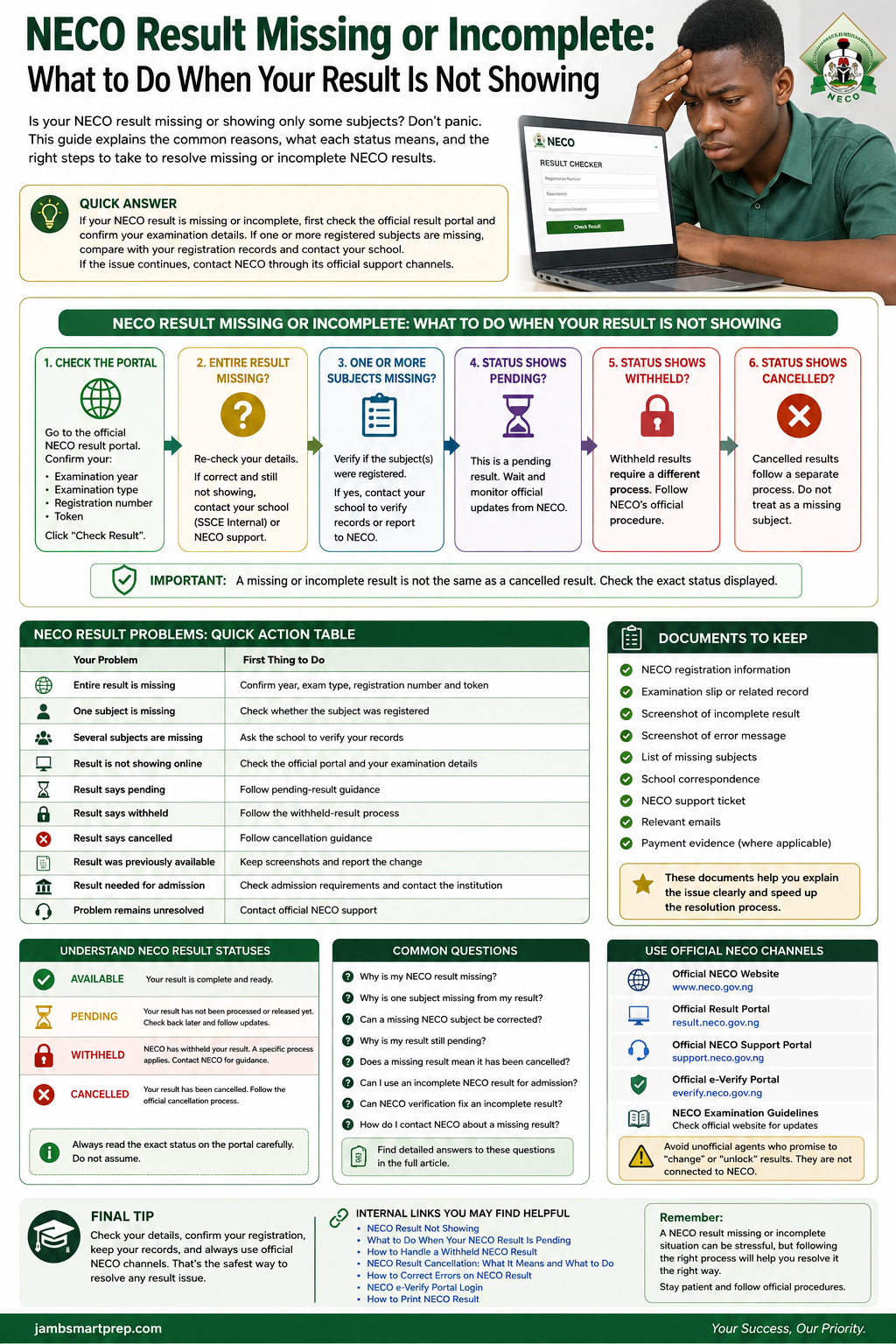
Important: Do not pay unofficial agents who promise to “unlock” or secretly change a NECO result.
How NECO Result Verification Can Help
NECO also operates an official result verification and confirmation system known as e-Verify.
The system is designed for individuals and institutions that need to verify or confirm NECO results. NECO’s e-Verify platform states that individuals can use it to verify a result or generate a verification report for institutional purposes.
This makes e-Verify useful when a university, employer or another institution needs formal confirmation of a candidate’s result.
However, there is an important distinction.
NECO result verification is not the same thing as correcting a missing result.
If one of your subjects is missing from the result checker, using a verification service should not be presented as a guaranteed way to add that subject.
First resolve the underlying result issue through the appropriate NECO process.
The e-Verify platform explains that individual users can register, purchase a verification token, submit an application and generate a report after the application is processed.
This can be useful for verification, but it should not be confused with result correction.
What Happens If Your School Cannot Resolve the Missing NECO Result?
If you have reported the problem to your school and the school cannot explain why your NECO result is missing or incomplete, the next step is to use NECO’s official support channels.
This is especially important for candidates who sat for SSCE Internal because the school may have access to registration and examination records that individual candidates cannot access.
Ask the school to confirm exactly what it has checked. For example, you can ask whether your registered subjects, candidate information and relevant examination records were correctly submitted.
If the school confirms that the information was submitted correctly but your result is still incomplete, keep a record of the school’s response and contact NECO.
The official NECO support portal allows users to search for answers and submit a support ticket when they cannot find a solution.
Do Not Keep Repeating the Same Complaint Without New Information
If you have already opened a support request, keep your ticket details and use the same case when following up where possible.
Sending several unrelated complaints can make it harder to keep track of the issue.
Instead, provide additional information if the school has discovered something new or if the message displayed on the result portal has changed.
What Information Should You Give NECO About a Missing Result?
A complaint that simply says “My NECO result is missing” may not provide enough information to identify the problem.
Give a clear description of what you checked and what you found.
Include information such as:
- Your full name
- Examination year
- Examination type
- Registration number
- Examination number, where applicable
- School name, where applicable
- Missing subject or subjects
- The exact message displayed on the portal
- Date you checked the result
- Screenshot of the result or error message
- Relevant registration or examination documents
The official NECO result portal currently identifies su*****@******ov.ng as its support email.
For the latest contact information, use NECO’s official website or support portal rather than relying on contact details copied from old articles.
How to Write a Complaint About a Missing NECO Subject
A useful complaint should be short and specific.
For example:
Subject: Missing Subject on NECO Result
I checked my NECO result using the official result portal, but Physics, which I registered for, is not displayed. My examination year is [year] and my examination type is [type]. I have checked my registration details and contacted my school. I would like assistance in confirming the status of the missing subject.
The candidate should then provide the information requested through the official NECO channel.
Do not include sensitive information in public comments or send your examination details to an unknown person who claims to work for NECO.
Can a Missing NECO Result Be Corrected?
A missing or incomplete NECO result may require investigation before any correction or update can be considered.
The correct process depends on the reason for the problem.
For example, if the issue relates to candidate registration information, the relevant records may need to be checked. If the problem concerns a subject that was registered but does not appear on the result, the school or NECO may need to establish what happened.
It is therefore better to describe the process as reporting and resolving a result problem rather than promising that every missing result can simply be edited.
NECO’s current payment portal includes official payment categories for services such as correction of name and instructs users to obtain the relevant payment item code from NECO’s website. It also states that evidence of payment should be presented to the nearest NECO office.
That does not mean a candidate should pay for a correction simply because a subject is missing. First establish what the problem is and whether a correction service actually applies.
Result Correction Is Different From Result Manipulation
This distinction is important.
A legitimate correction involves reporting an error through the appropriate NECO procedure.
Result manipulation means attempting to alter examination information without authorization.
Candidates should never pay an individual who claims they can secretly add a subject, change a grade or “unlock” a result.
What If the Missing Subject Was Not Registered?
Before reporting a subject as missing, confirm that it was actually included in your examination entry.
This is an easy mistake to overlook.
For example, a candidate may remember preparing for Economics but discover that Economics was not among the subjects formally entered for the examination.
Check your registration records rather than relying on memory.
If the subject does not appear in your registration record, the situation is different from a case where the subject was registered but is missing from the released result.
For SSCE Internal candidates, the school should be able to help confirm the registered subjects.
NECO’s registration guidelines place emphasis on validating candidate information and subjects before registration data is uploaded.
What If the Subject Was Registered but Is Missing?
This is the situation that deserves closer investigation.
Suppose your registration record shows:
- English Language
- Mathematics
- Physics
- Chemistry
- Biology
but your released result shows every subject except Physics.
In this situation, keep the registration evidence and screenshot of the result.
Then:
- Confirm the examination year.
- Confirm the examination type.
- Check that you are using the correct registration number.
- Confirm the missing subject on your registration record.
- Ask the school to check its records if you are an SSCE Internal candidate.
- Contact NECO if the issue remains unresolved.
Do not assume that the missing Physics result means you failed Physics or that NECO cancelled it.
The status needs to be established first.
What If Your NECO Result Is Incomplete Because of a Registration Error?
Registration errors can become important when investigating a missing or incorrect result.
NECO’s published 2026 guidelines state that schools are responsible for validating registration information and that a candidate is registered after the offline entries have been uploaded online to obtain a registration number. The guidelines also emphasize the importance of proper validation before online upload.
This is why candidates should review their registration information carefully whenever they have access to the relevant documents.
If an error is discovered, do not assume that a correction can be made at any time or through any website.
Ask the school or NECO what procedure applies to the particular error.
Can NECO Add a Missing Subject to My Result?
There is no basis for telling every candidate that NECO will automatically add a missing subject.
First, NECO needs to establish what happened.
There is a major difference between:
- A subject that was never registered
- A subject that was registered but is not displayed
- A subject whose result is pending
- A subject under a different status
- A portal problem
- An examination record that requires investigation
If the subject was genuinely registered and there is a problem with the result record, report it through the proper channel.
Do not pay someone who promises to add the subject privately. What If the Missing Result Is Needed for JAMB or University Admission?
A missing NECO result can become particularly stressful when a candidate is applying for admission.
The first thing to establish is whether the missing subject affects the institution’s O’level requirements.
Different institutions and courses can have different requirements.
For example, a candidate whose missing subject is not part of the required subjects for a particular course may face a different situation from a candidate whose missing subject is one of the compulsory requirements.
Check the Admission Requirements
Look at the official admission requirements for:
- The institution
- The faculty
- The department
- The course
Do not rely solely on what another candidate tells you.
Contact the Admissions Office if the Deadline Is Near
If you have an incomplete NECO result and an admission deadline is approaching, contact the institution as soon as possible.
Explain that the result is incomplete and that you are working to resolve the problem.
Ask the institution whether it will accept the available result temporarily or whether it requires the complete result before screening or admission can proceed.
The decision belongs to the institution.
Can I Use an Incomplete NECO Result for Admission?
There is no universal answer.
Some institutions may have procedures for candidates whose results are unavailable or incomplete, while others may require candidates to present complete O’level results.
The answer can also depend on the missing subject.
For this reason, avoid articles or social media posts that claim:
“Every Nigerian university accepts incomplete NECO results.”
That is too broad.
Instead, check the specific institution’s current admission instructions.
If the missing subject is one of the compulsory requirements for your course, resolving the NECO issue should be treated as a priority.
What If My NECO Result Is Missing English or Mathematics?
English Language and Mathematics can be particularly important because many Nigerian tertiary institutions and courses have specific O’level requirements involving these subjects.
If either subject is missing from your result:
1. Confirm the subject was registered
Check your registration record.
2. Check the official result portal again
Make sure you selected the correct examination year and examination type.
3. Contact your school
This is especially important for SSCE Internal candidates.
4. Report the problem to NECO if necessary
Give NECO the exact details of the missing subject.
5. Check your admission requirements
Find out whether the subject is required for your intended course.
Do not assume that a missing subject means a failed subject.
What If Your NECO Result Shows Only Some Subjects?
This is one of the clearest examples of an incomplete NECO result.
Suppose you registered for nine subjects and only seven appear.
Start by writing down the two missing subjects.
Then compare them with your registration record.
A simple checklist can help:
| Question | What to check |
|---|---|
| Was the subject registered? | Registration record |
| Is the subject displayed? | NECO result |
| Is another grade missing? | Result details |
| Are other candidates affected? | Ask school |
| Did the portal show a status? | Screenshot |
| Can the school explain it? | School examination officer |
| Is the problem unresolved? | NECO support |
This approach is more useful than repeatedly refreshing the result page without investigating the underlying problem.
What If the NECO Result Portal Is Not Showing the Result at All?
If the entire result is unavailable, start with the basics.
The official NECO result portal currently asks candidates to select their examination year and examination type before entering their token and registration number.
Check each field carefully.
Check the Examination Year
Make sure you have selected the year in which you actually sat for the examination.
Check the Examination Type
Make sure you selected the correct examination category.
Check the Registration Number
Enter the registration number exactly as provided.
Check the Token
Make sure the token belongs to the relevant result-checking process.
Try Again Later if There Is a Technical Error
If the portal itself appears to be experiencing a problem, avoid assuming that your result has been lost.
Take a screenshot of the error and try again later.
If the problem continues, use the official support channel.
What If Your NECO Result Was Showing Before but Is Now Incomplete?
This situation can be particularly confusing.
If you previously saw the complete result and later discovered that one or more subjects were no longer displayed, preserve evidence of the earlier result if you have it.
A screenshot or printed copy can help establish what you previously saw.
Then check the result again through the official portal.
If the result remains incomplete, contact NECO support and explain that the result was previously accessible in a different form.
Do not alter the old screenshot or edit the result.
Keep the original file exactly as it was.
How to Follow Up on a NECO Missing Result Complaint
Submitting a complaint is only the first part of the process.
If the problem remains unresolved, follow up carefully.
Keep Your Complaint Reference
If NECO’s support system provides a ticket or reference number, save it.
Keep Your Emails
Do not delete messages relating to the complaint.
Keep Your School Correspondence
If your school has contacted NECO on your behalf, keep copies of relevant communication.
Follow Up With the Same Details
When following up, repeat the important information consistently.
Avoid changing your examination number or other details accidentally.
Do Not Send Money to a Personal Account
If someone contacts you privately claiming to be able to resolve the missing result, verify the person’s identity and the official procedure before making any payment.
Use NECO’s official payment channels for services that genuinely require payment.
NECO’s payment portal states that users should verify the payment item before paying and notes that payment evidence may need to be presented at a NECO office.
Common Mistakes to Avoid When Your NECO Result Is Missing
A missing result can make candidates vulnerable to bad advice.
Avoid these mistakes.
1. Buying Multiple Result Tokens
If the result is already displaying but a subject is missing, buying another token is unlikely to solve the missing-subject problem.
2. Using Unofficial Result Websites
Use the official NECO result portal when checking your result.
3. Assuming a Missing Subject Has Been Cancelled
A missing subject and a cancelled result are not automatically the same thing.
4. Ignoring Your School
For SSCE Internal candidates, the school can be an important source of registration and examination information.
5. Waiting Until an Admission Deadline Is Over
If the result is needed for admission, begin investigating the problem early.
6. Paying an Unofficial Agent
Be suspicious of anyone who promises to “restore,” “unlock” or secretly change a NECO result.
7. Posting Your Examination Details Publicly
Do not post your registration number, token or other sensitive information in public comments.
8. Editing Your Result Screenshot
A screenshot is evidence of what the portal displayed. Editing it can create confusion and undermine your complaint.
9. Assuming Every Problem Has the Same Cause
A missing Mathematics result and a portal login problem are different situations.
10. Relying on Old Information
NECO’s portals, contact information and procedures can change.
For current instructions, use official NECO sources.
Is NECO e-Verify Useful If My Result Is Missing?
NECO’s e-Verify platform is designed for result verification and confirmation.
The official platform says individuals can use it to verify their result or generate a verification report for institutional purposes. It also supports institutional verification of candidates’ results.
This can be useful when a university, employer or another institution needs formal confirmation of a result.
However, e-Verify should not be presented as a tool that automatically repairs an incomplete result.
What e-Verify Can Do
It can help with:
- Result verification
- Result confirmation
- Generating verification reports
- Institutional result checks
What e-Verify Should Not Be Treated As
It should not be presented as a guaranteed method for:
- Adding a missing subject
- Changing a grade
- Removing a withheld status
- Reversing a cancellation
- Correcting an examination record without the appropriate process
The official e-Verify platform provides a process through which candidates create an account, purchase and validate a verification token, submit an application and obtain a report.
If your problem is a missing subject, deal with the underlying result issue first.
NECO Result Missing or Incomplete: A Simple Troubleshooting Checklist
Before contacting anyone, work through this checklist.
Result Checking
- Correct examination year selected
- Correct examination type selected
- Correct registration number entered
- Correct token used
- Official NECO result portal used
Result Review
- Missing subjects identified
- Registered subjects checked
- Exact portal message recorded
- Screenshot saved
School Follow-Up
- School contacted
- Candidate registration checked
- Subject entry confirmed
- Relevant school records checked
NECO Follow-Up
- Official support channel used
- Complaint clearly explained
- Supporting information provided
- Ticket or correspondence saved
Admission
- Course requirements checked
- Institution contacted if necessary
- Admission deadline noted
This checklist can help prevent candidates from jumping between unrelated solutions.
When Should You Contact NECO Immediately?
You should consider contacting NECO when:
- A registered subject is missing after you have checked your details
- Several registered subjects are missing
- The entire result remains unavailable after confirming your information
- The portal displays an unexplained result status
- Your school has checked its records but cannot resolve the problem
- You previously accessed the result and the problem later appeared
- The issue is affecting an urgent admission or verification process
The official NECO support portal is available for unresolved questions and support tickets.
For result checking itself, the official portal lists su*****@******ov.ng as its support email.
When You Should Not Panic
Seeing an incomplete result can be frightening, especially when friends are already printing their results or completing admission forms.
But a missing subject is not enough information to determine the final outcome.
First identify what is missing.
Then confirm whether the subject was registered.
Next, check your school records if applicable.
Finally, use NECO’s official support channels if the problem remains.
That sequence is more reliable than guessing.
NECO Result Missing or Incomplete Troubleshooting Guide
By now, you should have a clearer idea of what to check when your NECO result is missing or incomplete. The safest approach is to identify the exact problem before taking any further action.
Use this troubleshooting flow whenever your NECO result is not showing correctly.
Step 1: Check the Official NECO Result Portal
Start by checking your result through the official NECO result portal.
Confirm:
- Examination year
- Examination type
- Registration number
- NECO token
If the portal displays your result, look carefully at all the subjects and grades.
Do not assume that the result is missing simply because one subject is not visible.
Step 2: Is the Entire Result Missing?
If the entire result is unavailable, first confirm your examination details.
Check the year, examination type, registration number and token again.
If the information is correct, try the official portal again.
If the problem continues, contact your school if you sat for SSCE Internal.
If your school cannot resolve the issue, contact NECO through its official support channel.
Step 3: Are One or More Subjects Missing?
If the result appears but one or more subjects are missing, check your registration records.
Ask:
Was the missing subject actually registered?
If it was registered, ask your school to verify the relevant records if you are an SSCE Internal candidate.
If the school cannot explain the problem, contact NECO.
Step 4: Does the Portal Say Pending?
If the result specifically shows a pending status, treat it as a pending NECO result rather than simply calling it a missing result.
Follow the appropriate pending-result guidance and monitor official information.
Step 5: Does the Portal Say Withheld?
A withheld result requires a different approach.
Do not treat a withheld result as an ordinary technical problem.
Record the exact status and follow the appropriate NECO process.
Step 6: Does the Portal Say Cancelled?
If the result is specifically marked as cancelled, follow the guidance relating to result cancellation.
A missing subject should not automatically be described as a cancelled result.
The distinction matters because each status can require a different response.
The source outline recommends using this decision-based structure as a central visual asset for the article.
NECO Result Missing or Incomplete: Quick Action Table
| Your problem | First thing to do |
|---|---|
| Entire result is missing | Confirm year, examination type, registration number and token |
| One subject is missing | Check whether the subject was registered |
| Several subjects are missing | Ask the school to verify your records |
| Result is not showing online | Check the official portal and your examination details |
| Result says pending | Follow pending-result guidance |
| Result says withheld | Follow the appropriate withheld-result process |
| Result says cancelled | Follow cancellation guidance |
| Result was previously available | Keep screenshots and report the change |
| Result is needed for admission | Check course requirements and contact the institution if necessary |
| Problem remains unresolved | Contact official NECO support |
This simple table can also serve as a featured snippet-style section because it directly matches several common searches around NECO result problems.
What If Your NECO Result Is Still Not Complete After Following These Steps?
If you have checked the portal, confirmed your registration information and contacted your school, but the problem remains, do not start trying random solutions.
Keep all relevant records together.
Your folder should contain:
- NECO registration information
- Examination slip or related record
- Screenshot of the incomplete result
- Screenshot of any error message
- List of missing subjects
- School correspondence
- NECO support ticket
- Relevant emails
- Payment evidence where a legitimate NECO service has been used
Having these records makes it easier to explain the problem consistently.
It also protects you from forgetting important details when following up.
What If NECO Has Not Responded to Your Complaint?
If you have submitted a complaint and have not yet received a response, check the support channel you used for any ticket or reference information.
Keep your complaint details available.
If you follow up, explain that you previously submitted a complaint and provide the relevant reference information.
Avoid changing the facts each time you make contact.
For example, if you originally reported that Physics was missing, do not later describe the problem as Chemistry being missing unless you have discovered a separate issue.
Clear and consistent information makes the complaint easier to understand.
Should You Visit a NECO Office?
If the official support process indicates that you need to visit a NECO office or submit documents physically, follow the instructions given by NECO.
Do not assume that visiting an office is necessary for every missing-result complaint.
Likewise, do not assume that an unofficial agent can resolve a problem faster simply because the person claims to have contacts within NECO.
Use the official process first.
If NECO specifically requests supporting documents or a physical appearance, follow those instructions carefully.
Can a NECO State Office Help With a Missing Result?
A NECO state office may be relevant when the official process directs a candidate or school to make an enquiry or submit documents through an office.
However, candidates should confirm the appropriate office and procedure through NECO’s official channels.
Do not rely on an old telephone number, social media post or address copied from another website.
Official contact information can change.
What If Your Missing NECO Result Is Affecting Admission?
This is where timing becomes important.
If you need the result for university, polytechnic, college of education or another admission process, check the institution’s requirements immediately.
Find out:
- Whether NECO is accepted
- Whether an incomplete result is acceptable
- Whether the missing subject is compulsory
- Whether an awaiting-result option is available
- When the screening deadline closes
- Whether you can update the result later
Do not assume that all institutions handle incomplete O’level results in the same way.
If the missing subject is a requirement for your course, tell the institution’s admissions office about the problem and ask what procedure applies.
At the same time, continue pursuing the NECO issue.
Can I Submit an Incomplete NECO Result While Waiting?
This depends on the requirements of the institution or organisation requesting the result.
If the institution allows candidates to proceed with incomplete or pending results, follow its instructions.
If it requires a complete result, you will need to resolve the NECO problem before meeting that requirement.
The important thing is to ask the institution directly rather than relying on assumptions.
What If I Need the NECO Result for Scholarship or Employment?
The same principle applies.
Check the requirements of the organisation requesting your result.
Some organisations may require a complete certificate or result statement. Others may have a verification process.
If verification is required, NECO’s official e-Verify system may be relevant. However, NECO e-Verify is a verification service, not a guaranteed repair system for incomplete results. The source outline specifically recommends making this distinction clear.
NECO Result Missing or Incomplete: Common Questions
The following questions address common search queries around missing, incomplete and unavailable NECO results.
Why Is My NECO Result Missing?
A missing NECO result can have different causes. The problem may involve examination details, registration records, result processing, the result portal or a specific result status.
First confirm your examination year, examination type, registration number and token.
If the information is correct and the result is still unavailable, contact your school if applicable and use NECO’s official support channels.
Why Is My NECO Result Incomplete?
Your result may be considered incomplete when one or more registered subjects or expected grades are not displayed.
Check your registration records first.
If the missing subject was registered, ask your school to verify the relevant records if you are an SSCE Internal candidate. If the issue remains unresolved, contact NECO.
Why Is One Subject Missing From My NECO Result?
First confirm that the subject was actually registered.
If it appears in your registration information but is absent from the released result, record the problem and ask your school to investigate.
If the school cannot resolve it, contact NECO through an official channel.
A missing subject does not automatically mean that the subject has been cancelled.
Why Are Some Subjects Missing From My NECO Result?
If several subjects are missing, compare the result with your registration information.
If the subjects were registered, ask the school to check your records if you are an SSCE Internal candidate.
If several candidates from the same school have the same problem, inform the school because this may help with its investigation.
What Should I Do If My NECO Result Is Not Showing?
Start with the official NECO result portal.
Confirm:
- Examination year
- Examination type
- Registration number
- Token
If the information is correct and the result still does not appear, save a screenshot of the message and contact the appropriate school or NECO support channel.
Can a Missing NECO Subject Be Corrected?
A missing subject should first be investigated to determine why it is absent.
If the subject was registered but does not appear on the result, report the issue through the proper channel.
Do not assume that every missing subject can automatically be added after release.
How Do I Recover a Missing NECO Result?
There is no single recovery procedure for every missing result.
First establish whether the problem is caused by incorrect checking information, an unavailable result, a pending status, a missing subject or another result issue.
Then follow the appropriate NECO procedure.
Why Is My NECO Result Still Pending?
A pending status means that the result information has not reached the stage expected by the candidate.
If your portal specifically displays “Pending,” follow the appropriate guidance for pending results instead of treating it as a simple missing-result problem.
Does a Missing NECO Result Mean It Has Been Cancelled?
No.
A missing or incomplete result should not automatically be described as cancelled.
Cancellation is a specific status. A result may instead be incomplete, pending, unavailable or affected by another issue.
Always check the exact status displayed.
Can I Use an Incomplete NECO Result for Admission?
It depends on the institution, course and missing subject.
Check the admission requirements of the specific institution.
If the missing subject is required for your course, resolve the NECO problem as quickly as possible and contact the institution if the admission deadline is close.
How Do I Contact NECO About a Missing Result?
Use NECO’s official support channels.
Explain exactly what is missing, provide your examination details through the secure official channel and include any relevant evidence requested.
Avoid giving examination information to unofficial agents.
How Long Does It Take NECO to Correct a Missing Result?
There is no single correction period that should be guaranteed for every case.
The time can depend on the nature of the problem, the records involved and any investigation that may be required.
Do not rely on websites claiming that every missing NECO result will be corrected within a fixed number of days.
Can NECO Result Verification Fix an Incomplete Result?
No. Verification and correction are different processes.
NECO e-Verify is intended for result verification and confirmation. It should not be presented as a guaranteed method of adding a missing subject or correcting an incomplete examination record.
What Should I Do If My NECO Result Shows Only Some Subjects?
Compare the subjects displayed with your registration records.
If a registered subject is missing, ask your school to check the candidate’s records if you are an SSCE Internal candidate.
If the problem remains unresolved, contact NECO.
Why Is My NECO Result Not Showing All Subjects?
The first thing to check is whether all the subjects were actually registered.
If they were registered and are absent from the released result, investigate the issue with your school and NECO.
Do not assume that the missing subjects have been cancelled.
Related NECO guides
- NECO Result Checker Portal Login
- NECO Result Not Showing
- What to Do When Your NECO Result Is Pending
- How to Handle a Withheld NECO Result
- NECO Result Cancellation: What It Means and What to Do
- NECO Result Checker Token Not Working
- How to Print NECO Result
- How to Correct Errors on NECO Result
- NECO Result Verification Guide
- NECO e-Verify Portal Login
- NERVS Portal Guide
- How to Recover a Lost NECO Examination Number
- How to Correct Wrong Name on NECO Result
- How to Correct Wrong Date of Birth on NECO Result
- How to Correct Wrong Gender on NECO Result
NOW OVER TO YOU
Ask yourself the following question before leaving this guide:
Have I checked the official NECO portal?
If not, do that first.
Did I select the correct examination year?
Confirm it.
Did I select the correct examination type?
Check whether you are dealing with SSCE Internal or SSCE External.
Did I enter the correct registration number and token?
Check them carefully.
Is the entire result missing or are only some subjects missing?
Identify the exact problem.
Was the missing subject actually registered?
Compare the result with your registration records.
Have I contacted my school?
If you are an SSCE Internal candidate, the school may have useful records.
Have I saved a screenshot?
Keep evidence of what the portal displayed.
Have I used an official NECO support channel?
If the school cannot resolve the issue, use the appropriate NECO channel.
Is the missing result affecting admission?
Check your institution’s requirements immediately if there is an upcoming deadline.
Am I dealing with a genuine NECO process?
Avoid unofficial agents who promise to change, unlock or restore examination results.
Conclusion
A NECO result missing or incomplete can cause serious concern, especially when the result is needed for admission, scholarship applications, employment or another important purpose.
However, the right response is to investigate the problem systematically.
First, identify exactly what is missing. Check whether the entire result is unavailable or whether only one or more subjects are missing. Confirm your examination year, examination type, registration number and token.
If a subject is missing, compare the result with your registration records. For SSCE Internal candidates, speak with the school examination officer and ask the school to verify the relevant records.
If the problem remains unresolved, use NECO’s official support channels.
Most importantly, do not assume that an incomplete result has been cancelled. A missing subject, pending result, withheld result and cancelled result are different situations and should be handled according to the actual status displayed.
Also avoid unofficial agents who promise to “unlock” or secretly change a NECO result. Keep your examination records, screenshots and complaint information safe, and use official channels whenever you need assistance.
If your NECO result is missing, incomplete or showing only some subjects, start by checking the exact status on the official portal and comparing it with your registration details. If the problem remains, contact your school and use NECO’s official support channels for further assistance. This is the recommended closing approach in the supplied article plan.
